
- NewspapertagDiv AMP Plugin Tutorial
- NewspaperTrack Subscription Sources with Locker URL in Opt-In Builder
- NewspaperWP Rocket and Newspaper Theme: Optimization Guide
- NewspaperCredit System
- NewspaperIntroduction to CPT and ACF with Newspaper Theme
- NewspaperHow to edit modules for Flex Block X
- NewspaperHow to use the Posts List shortcode
- NewspaperUser review system
- NewspaperCustom Fields Support
- NewspaperHow to generate Facebook App ID
- NewspaperHow to insert a block inside the content of a post
- NewspaperModal Popup
- NewspaperPayPal Setup
- NewspaperLink Tracker
- NewspaperLockers
- NewspaperGeneral Options that May Interfere with the Newspaper Theme
- NewspaperAdd Cryptocurrency Price Ticker Widget
- NewspaperPosts Loop Element
- NewspaperThe Newspaper Mobile Theme: Introduction
- NewspaperAutoptimize Plugin – install and configuration
 Taurinense
 hi, thanks for the reply. The wallpaper is set to full size. But it shrinks with the window.
I attach the videos
My site –> error background
https://www.screencast.com/t/Ssh1qDmty
LaStampa —> Ok background
https://www.screencast.com/t/yXKZLf32
 media24 bv
Hello,
I use the mobile theme, I selected the option to use it for ‘mobile + amp’.
Now I constantly get a mix: the mobile version is shown on desktop sometimes, some articles on mobile are shown with the mobile version, others are shown with the responsive version of the normal lay-out.
How do I solve this? My site is nieuws7.be
 Vlad S
 Hello !
Ads can be added in Theme panel – Mobile Theme – AMP Ads as you can see here: https://www.screencast.com/t/faFzw27nkTa
Thank you !
 Anamaria
 Hello,
If you have installed a Standard Prebuilt Website you cand change the color from Newspaper -> Theme Panel -> Theme Colors => https://www.screencast.com/t/70UA7TisQy and for fonts Newspaper -> Theme Panel -> Theme Fonts => https://www.screencast.com/t/CbgtS9lr or if you have a Pro Prebuilt Website then you can edit with tagDiv Composer => https://www.screencast.com/t/jNDptsgvhgOW and select which element you want to edit, for example, select the Header main menu => https://www.screencast.com/t/oo6zPCDWd6 -> https://www.screencast.com/t/1EGstlbu.
Also, the fonts and size you can set with tagDiv Composer => https://www.screencast.com/t/ep18JvpT
Hope this helps you!
Thank you!
 headline
The Newspaper theme you guys have built is excellent in so many ways. But one real shortcoming is the difficulty in making custom page types. For example, with the current proliferation of fake news, most news aggregators, (Facebook included), expect news orgs to have at least 10 additional pages that cover ethics, ownerships, masthead, public policy, corrections, etc.
But Newspaper theme in its current state, provides no template for creating custom page types. So I have to create a cloud template, write the info into a column text box, optimize by screen size, copy the entire code to a new page, then copy the column text into the mobile editor and optimize everything for AMP. None of this can be done in Gutenberg and just saved as a custom page type.
With the critical nature of these additional pages in today’s media ecosystem, future newspaper updates should include a “policies” custom and page type/taxonomy.
 ChildhoodBiz
 Hi Bettina,
one last question: any idea hot to make sure that drop-caps are only applied to the regular wordpress post, but not to all custom post types? Or how to allow one specific custom post type but nor others?
One of my CPTs is “cb_marken”. Maybe you have an example of that?
Kind regards, Martin
 Kiko0132
Hi
I dont need a multi-language solution, but want to change “Popular posts”, “My Favourites”, etc. to german. Can I do it w/o using a plugin?
Thnx & sorry for the newbie question
Michael
 Abiquiu News
 All my post pages read “Sample Page Title”. My website is http://www.abiquiunews.net . I am new to WordPress.
 Topfgartenwelt
I’m using the mobile theme and I want to show some AMP Ads. But the AMP Ads should only show in the AMP Version and not in the normal mobile page. When I use the slot for Mobile Ads I see the ad in the amp version (sometimes) but also in the mobile version. Is there a way to split it up? Or is it possible to don’t show the -advertisement- on the mobile theme when only an AMP Ad is inserted for the AMP version of the layout?
Greetings Kathrin
 Bettina
 Hello @shubhamsharma7979!
Unfortunately, for AMP version you can add how many ads spots you can see if you access Newspaper -> Theme panel -> Mobile Theme -> Mobile ads.
Thank you for your understanding!
Bettina Hello!
You can write the code like this for example:
https://pastebin.pl/view/80a81f65
Hope that helps you!
Thank you!
 shamszy
 Here’s the link
theinsidernews.com.ng
On all articles, you see by Ramp….
I need to disable that so it won’t show the author
 shubhamsharma7979shubhamsharma7979
 AMP Section Only have 2 ads section on pehragraph i want add more ads in amp pages …. Hoe can i do this
Vlad S Hi,
In Newspaper v10.3.3 was add a better support for WPML plugin -> https://i.imgur.com/vAjt3aG.png now you can set the header, footer, category and single template on each language in them panel, for this you need to use the translate for cloud templates -> https://i.imgur.com/Y99kgbB.png in this way on each language you’ll have only the templates made for that language, for example https://i.imgur.com/UJbzFFp.png -> https://i.imgur.com/TWZLxQZ.png -> https://i.imgur.com/CjsSkAC.png
You can duplicate a cloud template like this -> https://i.imgur.com/BLYyLc4.png after that you can edit it with tagDiv Composer.
The second method is the classic one using the strings translate, this is more harder -> you need to use the this option -> https://i.imgur.com/59kl17v.png in order to use the string translate, for example for the header -> https://prnt.sc/rumozl and in WPML String -> https://prnt.sc/rumqn5 then you need to set the id of the header you want to be set for that language -> https://i.imgur.com/ghCu54I.png -> https://i.imgur.com/UAgVTC6.png -> https://prnt.sc/rumrbd
Hope this will help you!
Thank you!
Vlad S Hello !
I’m not sure I fully understand what you are looking to achieve.
Can you provide an example ?
Thank you !
Anamaria Hello,
I think you have a Pro Prebuild Website, and you need to edit with tagDiv Composer => https://www.screencast.com/t/9F4Rr1AfDku, and you can remove the Single Post Author Box and Single Post Share selecting with tagDiv Composer with a right click you can delete => https://www.screencast.com/t/qXVCHLn8agF , or selecting the element and with drag & drop place into the deleting red zone from the bottom right of the page => https://www.screencast.com/t/HvYLtBLm
Hope this helps you!
Thank you!
 huynhlekien
 Hello Bettina,
Here is my website: https://www.pnj.com.vn/blog/
Example for AMP verion: https://www.pnj.com.vn/blog/don-may-man-chieu-hoi-thinh-vuong-cung-bo-suu-tap-than-tai-tan-suu/?amp
Thanks.
 PKP01
PKP01Hi,
Within category template breadcrumbs I have site homepage and category title. Since category title is anyway the biggest text right below breadcrumbs this is creating awkward layout and not very nice from SEO perspective. How to remove category name from category breadcrumb?
Example: https://bajki-zasypianki.pl/wiersze-dla-dzieci/
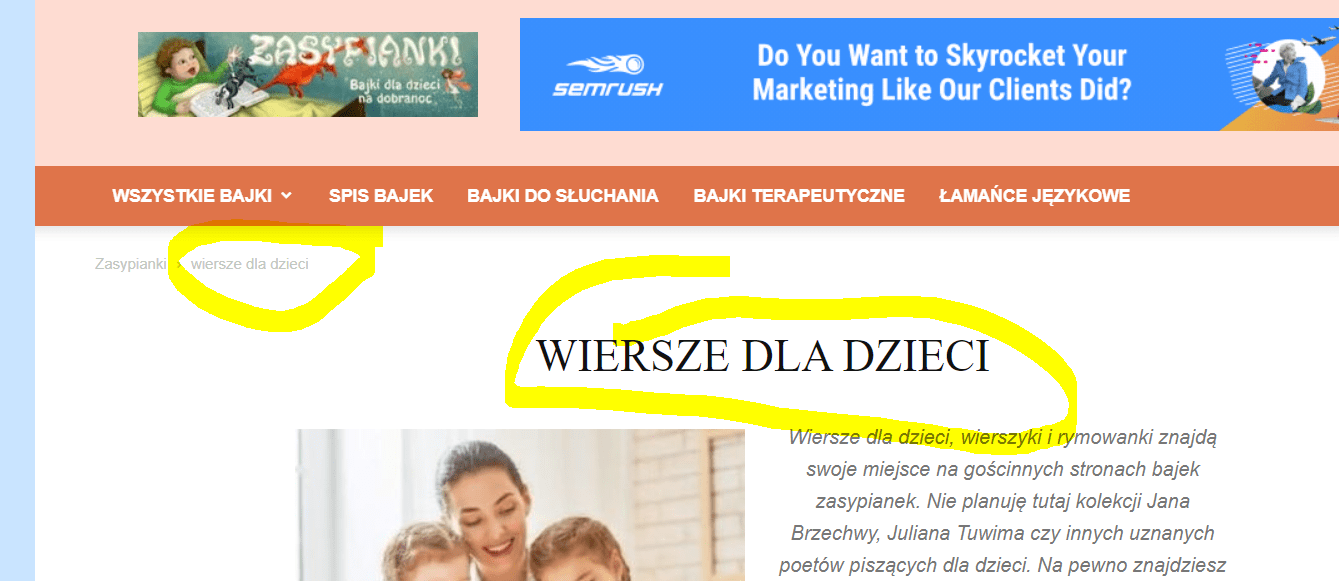
Thanks for help!
Pawel
 kumel69
Hi, I’m trying to paste my taboola code into my AMP version. From the theme options, it works but it shows up in the header. Is there any way that they can be seen at the end of the article?
 jackholden
I’ve just installed Newspaper X and installed the default theme with all the content. The front page looks good, but when I click on a post, all the formatting seems quite messed up! Below is a perfect example of this:
https://www.stoplosstrades.com/2021/01/21/entrepreneurial-advertising-the-future-of-marketing/
I’ve made no changes whatsoever yet, and just wanted to look around. I seem to be getting about 3 or 4 posts on a page, the advert box which pops up as I scroll down. It’s really confusing me!
Any ideas? Is this a common issue?
 getat
getatHi,
I have the problem that the Ad at the 2nd column is shown below the single post content at the public site. Within the tagDiv editor it’s correct. Example https://n1tv.rmg.co.at/2021/01/12/ortseindruecke-von-achau/
This also happens if I re-import the single post page
Thanks for help.
Raimund
 Toni S.
Hi, I couldn’t get the coronavirus medicine pro -template working.
I get when I try to use divTag composer: “Errors at columns elements: 3(models) : 4(dom). The model does not match the content Current state has involved an issue.”
I tried everything as told in https://forum.tagdiv.com/tagdiv-composer-not-working/
The error exists right from the start before I’ve done anything besides installing the theme, sample content and plugins that should be compatible.
Only the front page allows me to adjust things. Is there a fix for this?
 Calin
Calin Hi,
I think that you are using the mobile theme plugin, you’ll gain a better speed then responsive version of theme, but in order to achieve that speed you’ll need to create a new content for pages because in the most of cases those were made with builders or shortcodes ( tagDiv Composer, WPBakery ) and you need to use only the mobile editor ( you need to set the content for pages in mobile editor and this content will be display on mobile theme, also the mobile theme will not display any sidebar)
-> https://i.imgur.com/9d0UWLT.png
Also you can show the responsive version on mobile theme (to get the same layout as on desktop on mobile) -> https://i.imgur.com/m0bVB5T.png you can check more details about mobile theme in our documentation -> https://tagdiv.com/mobile-theme-get-mobile-ready-with-newsmag-theme/ or if you want to have the responsive version only, you can use the amp option from mobile theme -> https://i.imgur.com/oofST3D.png (to use the mobile theme template on amp) or you can disable the plugin.
These options are like this:
Mobile -> the mobile theme will apply only on mobile version.
Mobile + amp -> it will apply on both and it will have the same layout.
Amp -> the mobile theme plugin layout will be use only for amp version.
Hope this will help you!
Thank you!
Bettina Hello!
The back to top arrow can be change only using css code. For example if you want to remove that arrow you can use this css code:
.td-scroll-up {

display:none;

}
Set this code in Newspaper -> Theme panel -> Custom code -> Custom css.
That box which appear there it could be from a plugin because we don’t have this thing in our theme. Please look about other plugin settings.
Thank you!



