
- NewspapertagDiv AMP Plugin Tutorial
- NewspaperTrack Subscription Sources with Locker URL in Opt-In Builder
- NewspaperWP Rocket and Newspaper Theme: Optimization Guide
- NewspaperCredit System
- NewspaperIntroduction to CPT and ACF with Newspaper Theme
- NewspaperHow to edit modules for Flex Block X
- NewspaperHow to use the Posts List shortcode
- NewspaperUser review system
- NewspaperCustom Fields Support
- NewspaperHow to generate Facebook App ID
- NewspaperHow to insert a block inside the content of a post
- NewspaperModal Popup
- NewspaperPayPal Setup
- NewspaperLink Tracker
- NewspaperLockers
- NewspaperGeneral Options that May Interfere with the Newspaper Theme
- NewspaperAdd Cryptocurrency Price Ticker Widget
- NewspaperPosts Loop Element
- NewspaperThe Newspaper Mobile Theme: Introduction
- NewspaperAutoptimize Plugin – install and configuration
 Bettina
 Hello @kevinstolz!
You can create a new page and edit it with the tagdiv Composer. You can customize the pages as you want. You need to edit the logo when you edit the homepage for example with the tagdiv Composer. We have 3 options available for mobile versions that you can use:
1. Responsive version: A responsive version of your website looks similar to the desktop version. TagDiv Composer is used to edit the page. Click on the mobile viewport: https://www.screencast.com/t/XDQJedlggSB. There, you can see your mobile version and edit or adjust the elements to look better.
2. Mobile pages: https://tagdiv.com/newspaper-10-3-7-update-brings-customizable-and-fast-mobile-pages
3. Mobile theme plugin: The Mobile Theme is a performance-optimized theme included in the main Newspaper theme that only loads on mobile devices. It comes with its own templates and designs for pages, posts, categories, etc., so your current templates from the desktop theme will get converted to the mobile theme layout. Please see https://forum.tagdiv.com/the-mobile-theme/ and https://forum.tagdiv.com/mobile-theme-introduction/ for more information.
A full explanation is here: https://www.youtube.com/watch?v=SpGkOnJeNZY
If you need to use mobile version 1 or 2, then you need to uninstall the Mobile Theme plugin and AMP.
Thank you!
 simchris
 I would not bother with AMP as Google abandoned that in 2023 and now “deprecated.” No longer needed for Google authentication or SERPS. Better to have single main canonical page than multiple versions. AMP will stop working entirely at some point, so not good idea to start now.
(I don’t work here.)
 Rasinski1986
 marijn390
 Hi Anamaria,
I discovered that I do not have the option to add Additional text for ‘Single Post Date’. I do have this for the ‘Single Post Modified Date’.
Can you also add this for the Single Post Date? For example, I can place ‘Added:’ by the date.
 ioannisch
 I have this error in fb debugger. Provided og:image URL, https://i0.wp.com/e-agrotis.gr/wp-content/uploads/2024/06/πιρινελαιο.jpg?fit=1200%2C630&ssl=1 could not be processed as an image. It may be corrupted or may have an invalid format. Any issues?
 Anamaria
 Hi,
Please disable the mobile theme plugin, clear the cache and check after.
Using our theme, you can choose from 3 mobile versions
-> mobile responsive => https://www.screencast.com/t/oJ2ShOp47
-> mobile theme plugin => https://forum.tagdiv.com/the-mobile-theme/
-> mobile page => https://tagdiv.com/newspaper-10-3-7-update-brings-customizable-and-fast-mobile-pages/ The option that you need to use.
Suppose you created the mobile pages with tagDiv Composer. In that case, when you install the Mobile Theme plugin, your pages will be overwritten by the plugin (the mobile theme comes with its templates for page, post, category, etc, so your current templates from the desktop theme will get converted to the mobile theme layout, the page content is made without builders in mobile editor => https://www.screencast.com/t/xbgZG8kH also, the options that are provided to edit the mobile theme version are limited (this keeps the things simple)).
This is a video about Responsive Newspaper Theme, AMP & Mobile Theme, Mobile Pages & Templates -> https://www.youtube.com/watch?v=SpGkOnJeNZY.
So, the mobile responsive is what you see when that you select the viewport on phone => https://www.screencast.com/t/matV17hH, so some settings may apply for each viewport(where is the border blue), and others are not(where the border is black).
The mobile page has the mobile templates from Cloud Library => https://www.screencast.com/t/YCcZ8rL8
The Mobile responsive version of the theme and the mobile page editor can be edit with tagDiv Composer, the mobile theme plugin cannot.
For example, you can have the mobile theme plugin activated and use the mobile page/mobile responsive version for the homepage/pages, but for the categories pages/404 page, you can’t use the mobile page/mobile responsive version if you have the mobile theme plugin activated.
So, if you want to design the pages with tagDiv Composer, you can use the mobile page or mobile responsive version.
Thank you!
 diegocoru
 Hi Anamaria
The issue now is that I load the author template I want, but it’s not taking the articles that the author published. It says Sample post 0, Sample post 1, etc.
Same with the author’s name. It says published by John Doe who’s not one of our authors…
Anamaria  Calin
Calin Hello,
Here are some more recommendations:
Install a plugin for malware and please update the theme to the last version if this is already at the last version, please delete it and replace it with a fresh copy from themeforest account. DO the same for the theme plugins.
If you notice again the site redirects to other sites, it may be because of injected malware. We recommend you follow the steps below:
– Change admin passwords and delete admin accounts you are not familiar with;
– Delete any weird/unknown plugins folders and files;
– Delete the weird/unknown themes;
– Clean unfamiliar Theme Panel injected code (example – https://i.imgur.com/4q70kCv.png);
– Clean WordPress files (example – https://i.imgur.com/stJCqiK.png)
Thank you!
 charlesroos
 Looks like some translations work and some not. The main menu item “Home” stayes always in English for example, it doesn’t get translated. I think i should translate inside menu builder somewhere and in other places the other phrases.
charlesroosHi,
I tried to change translations as described in the steps below but those changes didn’t take any effect and the web site stil lshows phrases in english and not in the new translated language.
Can you suggest how to proceed to translate successfully.
1. Theme Panel
2. Translations
3. Load available translation
4. Choose language, Estonian
5. Load translation, Yes
6. Translations section translation pairs in 2 columns, for example: Home=Avaleht, EXCLUSIVE=EKSKLUSIIVNE, etc.
7. Go to your WordPress Newspaper web site and see that there is still phrases Home and EXCLUSIVE instead of the translation words “Avaleht” and “EKSKLUSIIVNE”.
 zhifi
zhifiHi,
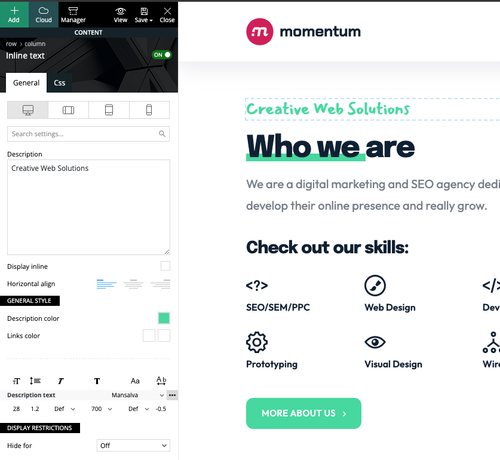
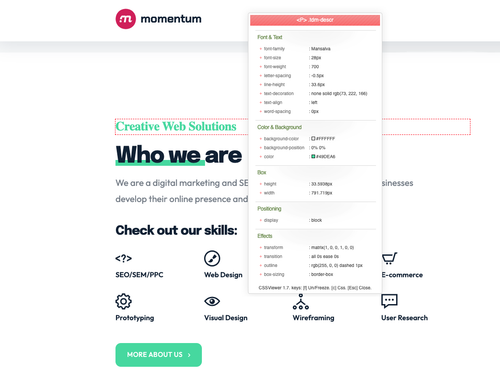
There seems to be an issue with Google Fonts. They load properly in the backend, but the frontend is not changing the font. Example: Mansalva font with Momentum Demo. I cleared my cache and used a computer that has never visited the site.
Backend:
Frontend:
simchris Be sure to resave your permalinks from the WP settings.
Also, consider doing 301 redirects for old /amp and /?amp=1 stuff to the main canonical pages. I posted how to do this recently, as we finally retired them on all our news pages also.
(I don;t work here)
 AnaPicado
After several months thinking about if we conserve AMP pages, we decided to deactivate the plugin. We have created mobile pages for the main page, and the principal categories (they were pages with no amp version and when we had amp pages they looked great), and now when we deactivate and delete the amp plugin we can´t see the mobile pages we have.
Must we do something to solve this problem?
The blog is https://mifamiliaviajera.com
It looks to solve when we deactivate the mobile them plugin… Is it correct?
Regards
Ana
 roccomaglio
 I am adding a script to a raw html element. I cannot add the script here because you seem to reject script in messages.
The issue is when I view it on the page a type=”text/javascript” has been added to the script tag. This can be viewed on any of our post template pages, for example https://www.hernandosun.com/2024/06/20/embark-on-an-adult-summer-reading-adventure-at-east-hernando-library/.
The reason this is an issue is it is causing the script to not run in Chrome based browsers.
 m
mI am using Newspaper Version 12.6.4.
However, I’m receiving warnings from my security software that my tagDiv Composer plugin is not updated, for example:
WordPress tagDiv Composer plugin <= 4.8 – Authenticated Stored Cross-Site Scripting via Attachment Meta vulnerability
Hoe can I check which version I’m using and upgrade it?
 allerenitalie
Hi, I have newspaper theme, on https://www.allerenitalie.com
if I change the cloud template header, the same I choose in theme panel for header, for example i make the row with 2 columns it’s break all my site like if I have 2 colummns in header all site have 2 columns, but when I see on editor it’s appare to be ok.
In the meantime I see on mobile the header not open the menu but in the desktop it’s ok (search and menu) why?
 kodro
kodro The problem it was the incompatibility of my Ads provider with AMP.
Anamaria Hi,
We don’t recommend to using amp, because it is deprecated -> https://developer.bigcommerce.com/docs/storefront/wordpress/platform-integration/enabling-amp -> https://forum.tagdiv.com/topic/amp-end-of-line/
Thank you!
 NyttenET
Hi Team,
I am managing eurasaintimes.com and I am getting an issue where the amp URL of one of the category is showing as blank i.e https://www.eurasiantimes.com/category/indo-pak-news/?amp Please check and let me know incase of any further details required!
Error Log : https://drive.google.com/file/d/171AMNY2y6F4xquIMNnnfrV1Gl4hXMD1b/view?usp=sharing
kodro I disconnected tagDiv Mobil Theme and AMP, and reconnected and not it works!
 av
avIf for example you click on the featured news item (top left corner, largest image on home page) — the Flex Block 1 — go to Style, and then attempt to change Block Fonts > Block header and try to change “Default font” to “Global font #1”, the system attempts to ‘draw’ a tooltip/modal, but fails and redirects to an ‘Aw, Snap’ white screen — Error code: STATUS_BREAKPOINT.
 Ericky
As in the example you see below, I want to place a “custom” ad at the top, just above the text, in a length that will completely cover the top of the text. This will be a banner design and should be compatible with all screen sizes.
Which element would you recommend me to use for this? Do you have a good solution in your cloud template archive etc. I am open to your suggestions.
 JJ0000
For example, we have an outbound link in menu. We need to mark it as “no follow” etc
Thanks
 Michael Smart
Please what is the custom shortcut (e.g. td_source_title_with_url) for displaying Page Title when I type it inside “custom field”? I know that there is a provided element called “Page Title” that automatically displays a Page Title, but I just need to know how to display it by typing it manually. Example {cf_page_title} or td_source_title_with_url. Thanks



