
- NewspaperFlex Block Builder and Flex Loop Builder
- NewspaperHow to use the Flex Blocks cache option
- NewspaperHow to edit modules for Flex Block X
- NewspaperHow to insert a block inside the content of a post
- NewspaperFlex Block Settings Guide
- NewspaperMeta Info on Modules and Blocks
- NewspaperTheme modules and blocks
- NewspaperThumbnails – Fix strange looking images on blocks
- NewspaperBlock settings tutorial
- NewspaperCategory Tag on Modules/blocks
- NewspaperWP Rocket and Newspaper Theme: Optimization Guide
- NewspaperSearch setup for custom post type
- NewspapertagDiv Opt-In Builder – Emails
- NewspaperBookmark – Save For Later
- NewspaperModules Builder in Newspaper Theme
- NewspaperFilters and sorting for taxonomies
- NewspaperUser review system
- NewspaperWooCommerce: Happy “Add to Favorites!”
- NewspaperLockers
- NewspaperLeads
 infocj
slider revolution has any license code to register? as can’t update it automatically and latest version isn’t available in theme pack, wordfence says the plugin has a security vulnerability, same with the WPBakery Page Builder.
if i deactivate all the thumb on modules/blocks and regenerate the thumbnails what images will be displayed in modules/blocks? the default thumbs from wordpress? as are generated thousands of images because of those modules/block sizes.
also is there any support for the theme outside the forum? creating topics on and on and waiting sometimes over 1h for response isn’t always good.
 Anamaria
 Hi,
You can do it as I said; you need to make the changes on the block on the image, gap, and whatever you want https://i.imgur.com/Ic3cMAD.png
Thank you!
 JapanGeeck
 Hi,
There is no value on these fields.
All fields are blanck.
This block is diplay:none but there is a value for a href = “tagdivofficial”
It’s the same here :
https://demo.tagdiv.com/newspaper_urban_observer_pro/2023/09/13/td-post-the-ethical-dilemmas-of-reality-tv-production/
You can inspect code an find tagdivofficial
But I don’t where I can remove this value.
I try to add a value # on theme panel settings, but there is an error message.
Anamaria Hello,
Yes, you can set the limit of the posts on the first block, and filter for the latest, and for the next block, set the offset limit to 6 -> https://forum.tagdiv.com/offset-feature/
Thank you!
 seamie1990
Is it possible to assign specific posts to Flex blocks? I want to assign latest posts (1 to 6) to one flex block and latest posts (7 to 14) to a different Flex block.
JapanGeeck Hi,
Sorry, I made a mistake. It’s this block I want to modify.
<div class="tdm-social-wrapper tds-social1 tdi_22"><div class="tdm-social-item-wrap"><i class="td-icon-font td-icon-instagram"></i><span style="display: none">Instagram</span></div><div class="tdm-social-item-wrap"><i class="td-icon-font td-icon-linkedin"></i><span style="display: none">Linkedin</span></div><div class="tdm-social-item-wrap"><i class="td-icon-font td-icon-twitter"></i><span style="display: none">Twitter</span></div></div>
I can’t modify href=”tagdiv” of href=”tagdivofficial” from theme panel settings: https://forum.tagdiv.com/social-sharing/
Thank you for your help.
JapanGeeckHi,
I have a question.
I need to remove this block :
<div class=”tdm-social-wrapper tds-social1 tdi_22″><div class=”tdm-social-item-wrap”><i class=”td-icon-font td-icon-instagram”></i><span style=”display: none”>Instagram</span></div><div class=”tdm-social-item-wrap”><i class=”td-icon-font td-icon-linkedin”></i><span style=”display: none”>Linkedin</span></div><div class=”tdm-social-item-wrap”><i class=”td-icon-font td-icon-twitter”></i><span style=”display: none”>Twitter</span></div></div>
on this prebuilt theme : https://demo.tagdiv.com/newspaper_urban_observer_pro/2023/09/13/td-post-the-ethical-dilemmas-of-reality-tv-production/
This block is hidden and I can’t reach with Tagdiv Composer. I can’t find on the webpage.
Could you help me to remove this block ?
Thank you.
Anamaria Hello,
We recommend using PHP version 8.0 or 8.1; with version 8.3, certain issues may arise.
1. You need to download the latest version from Themeforest and perform the update manually. We recommend conducting the update on a staging website because there have been many changes from version 9.1 to 12.6.5. Additionally, the auto-update option was only added later in version 10.3.x.x.
2.No, you don’t need to purchase a new license, as updates are for a lifetime if the license is valid.
3. The license remains the same; only the theme version differs, so you can use the same license on the website where you currently have that older version.
4. Over time, vulnerabilities have been discovered and resolved through updates. You can find the changelog for each version here -> https://tagdiv.com/newspaper/
Unfortunately, the tagdiv Composer may be disabled due to malware, so certain plugin files may be targeted. However, this can only be seen in the error log file. I recommend that after updating the theme, WordPress, and PHP, you use Wordfence to scan the website and block access to /wp-json/tdw/save_css
If an attacker wants to target this URL /wp-json/tdw/save_css they can do so. Even if the website uses a different theme, the attacker can still try that URL. We could add an option to enable/disable the Live CSS, and it will be considered. But for now in order to remove it this can only be done with a modification to the composer plugin. I think that all that removing it requires is to comment this line of code – https://prnt.sc/RtwvL5Nc4ikR -> https://prnt.sc/ymZmhdUfp57U But as I mentioned, the attacker can still try to access the URL.
Thank you!
 haipo
haipoHi TAGDIV team,
Recently we moved our news site to TAGDIV.
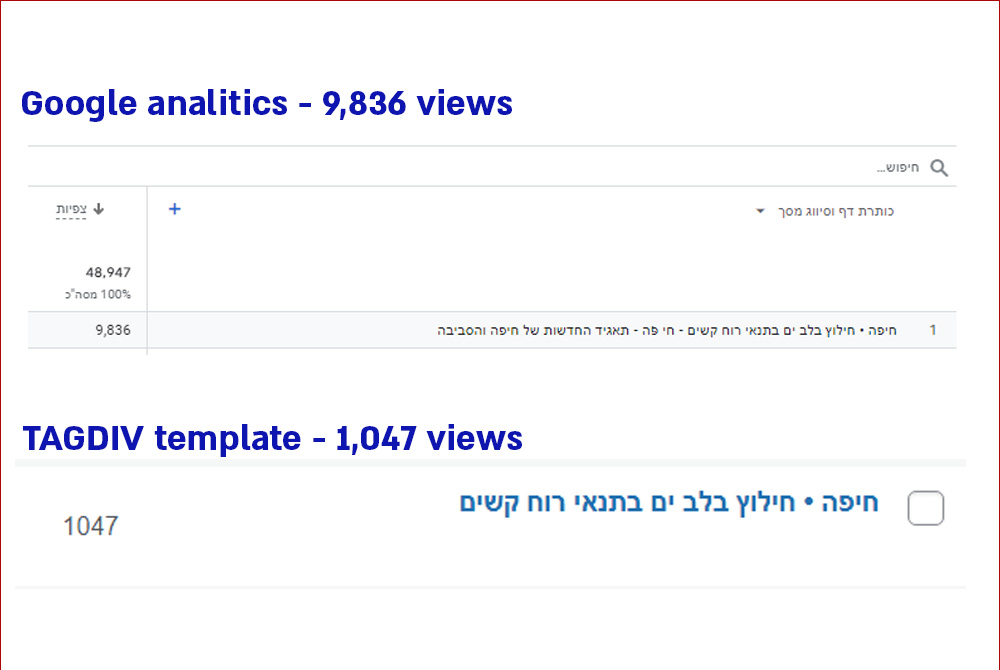
There is a problem witth the counting of post views.
–
To identify the problem, I compared the same post between Google analytics and WordPress-TAGDIV:
Post URL:
https://haipo.co.il/item/513336
–
The issue has impact on several processes:
For examples:
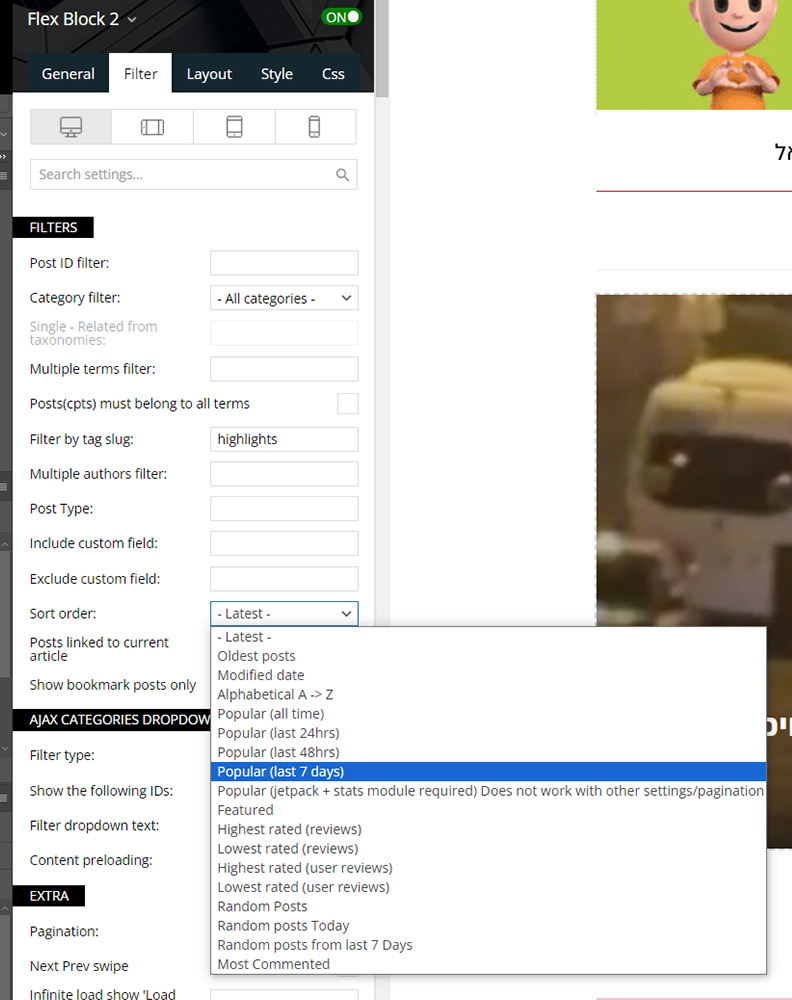
1. Tagdiv flex block is using the post count to filter and sort posts.
2. Autors are monitoring their activity and measuring post success according to post view count.
3. Customers pay according to views.
–
Example of flex block filter according to post views:
–
Can you advise if I missed something in my setup or there is a bug in the template?
–
Thanks,
Yaron Carmi
Anamaria Hello,
I recommend using the element title instead of title on the block, then you can set it as you want -> https://i.imgur.com/luPTvzb.png
Thank you!
 Ashot
Ashot Hello.
I also faced a similar problem. But the Newspaper version 9.1 has not been updated yet. Commenting in the code helped. Although after some time, the tagDiv composer plugin began to deactivate by itself. I was trying to figure out what the reason was and installed several monitor plugins. Including the REST API call monitor. And I found a huge mass of /wp-json/tdw/save_css requests. There were others, but there were very few of them in relation to the number of save_css requests. We don’t use plugins on our site that require a REST API, so through the firewall plugin I just blocked all REST API requests for non-logged in users. And in the REST API request monitor plugin, I see that a 401 response is now sent to such requests, instead of 200. At the same time, the opportunity to leave feedback via the Contact form 7 plugin has disappeared, since it is. But this is a temporary measure, and the REST API request block can be included in the code by compiling your own list of requests that should be blocked. And in the near future, we still plan to update the version of the theme. But the REST API block did not help with the problem of incomprehensible self-deactivation of the plugin. We will deal with this in another discussion thread.
 curistorian
Hi – I have spent over an hour trying to get the real estate module in the hamburger drop down menu to widen/take up the remainder of space in the column (screenshot: https://ibb.co/bzdGj2D) I am using Flex Block X and have it set to max 1 item, 1 module per row. Why is it staying left aligned and not centering/taking up the remainder of space in the inner column?
 dlrms
dlrmsWould like to remove hyperlinks on thumbnails. Why? Well, having hyperlinks on thumbnails creates duplicate links on the page, since a post title with a hyperlink is also shown for posts displayed in flex blocks etc. Basically want cleaner, shorter code for better SEO. Is this possible via functions.php or something?
Please advise.
Thank you.
Anamaria Hello,
So, did you manage to block the access?
Thank you!
Anamaria Hello,
Because it is used as a page builder, it is normal to look with a shortcode there. You can set the title seo for the blocks using tagdiv Composer.
Thank you!
Anamaria Hello,
The page templates can’t be global on each page, and it is not working as a single template, for example.
Create a new page in Dashboard -> Pages, press the publish button, and view. Edit it with the TagDiv Composer: https://prnt.sc/gGw1zq0zdf3r and start customizing it as you like to add text, image using the elements from tagdiv Composer. You can import from the Cloud Library sections, blocks, etc. already designed.
You can create a sidebar like in this guide https://forum.tagdiv.com/sidebars-tutorial/
Thank you!
Anamaria Hello,
For the category template, please use a posts loop; if you have set a posts loop, it will display all posts in this category. Alternatively, you can use Flex Block/Big Grid Flex and set the filter to “Category -Current category” => https://i.imgur.com/7P99qx0.png. This is why the block will display posts for each category.
Thank you!
 juniordiscart
Hi
I just discovered that you can create your own Flex Module blocks. However, I ran into the situation where I wanted to add a color/gradient overlay. This is currently not possible with the Featured Image block. It is allowed for the video popup, if any, but I’d like to do it as well for just the image.
Thank you!
Kind regards,
Jan.
 rusakovs2005
 It appears on the main page I’m trying to make. With each new block on the page, an error keeps popping up. I’ve checked the forum, and this error occurs for many with your theme. If you can’t help me, I’ll have to request a refund.
All the steps you described have been completed and notghing heppen.
 Miroslav Glavić
 So blocking the save_css by putting their permissions to 000?
Then on the screenshot comment out that line with
<!-- and -->
Correct?
Anamaria Hi,
You can add the flex block where you want.
Thank you!
Anamaria Hello,
Please replace the block 17 with a flex block.
Also, what PHP version do you have? We recommend using flex blocks instead of the standard blocks 1-25 and a big grid full. The flex blocks and modules builder have more options.
Thank you!
 dirkxi
This started showing up on my website: https://www.truestblog.com
“Deprecated: Optional parameter $td_column_number declared before required parameter $limit is implicitly treated as a required parameter in /home2/twothum5/public_html/wp-content/plugins/td-standard-pack/Newspaper/includes/shortcodes/td_block_17.php on line 125”
I have tried everything within my purview to fix it, but to no avail. Please assist.
 Alex
Alex Hi @Calin,
Thank you for checking. The results you have are correct.
But, try with the following conditions:
1) Single post template doesn’t exist – don’t create Single post template (in cases when there is no need for simple single posts);
2) CPT Single post template uses CPT Featured Image block with the Image Preload function enabled.
Result: Preload on CPT Single post template is not working.
– The system does not register the Image preload function on CPT single post template if there is no Single post template with the enabled Image preload function.
Thank you.
 freeesmaster
 Hello Support,
I can’t figure out how to change the underline colors in the ‘column titles’ I looked for CSS and HTML codes on home page, but I didn’t find any that relates to ‘td-momentum-load’ I only found the below CSS code under theme panel >> custom CSS
am I missing any HTML code? how do I adjust the colors of those underlines? please guide me. Thanks!
.td_block_separator.td-momentum-load {
transition: all 0.4s ease-in;
transition-delay: 0.5s;
}
.td_block_separator.td-momentum-load.td-momentum-in-viewport.td-load-hero {
width: 260px !important;
}
.td_block_separator.td-momentum-load.td-momentum-in-viewport.td-load-center {
width: 200px !important;
}
.td_block_separator.td-momentum-load.td-momentum-in-viewport.td-load-left {
width: 220px !important;
}
.td_block_separator.td-momentum-load.td-load-delay {
transition-delay: 1s;
}
.td_block_separator.td-momentum-load.td-load-delay-1 {
transition-delay: 4s;
}
.td_block_separator.td-momentum-load.td-load-delay-hero {
transition-delay: 3s;
}



