
- NewspaperFlex Block Builder and Flex Loop Builder
- NewspaperHow to use the Flex Blocks cache option
- NewspaperHow to edit modules for Flex Block X
- NewspaperHow to insert a block inside the content of a post
- NewspaperFlex Block Settings Guide
- NewspaperMeta Info on Modules and Blocks
- NewspaperTheme modules and blocks
- NewspaperThumbnails – Fix strange looking images on blocks
- NewspaperBlock settings tutorial
- NewspaperCategory Tag on Modules/blocks
- NewspaperWP Rocket and Newspaper Theme: Optimization Guide
- NewspaperSearch setup for custom post type
- NewspapertagDiv Opt-In Builder – Emails
- NewspaperBookmark – Save For Later
- NewspaperModules Builder in Newspaper Theme
- NewspaperFilters and sorting for taxonomies
- NewspaperUser review system
- NewspaperWooCommerce: Happy “Add to Favorites!”
- NewspaperLockers
- NewspaperLeads
 simchris
 Hey!
I’ll post updated version once I finish the tweak of doom! Have been messing with the new TD Composer beta, so got sidetracked, as I wanted to leave VC behind entirely from “now” onward.
I will actually update and add the #comments on what couple of the things actually do. And I’ll include my AMP footer injection code, too!
Actually the trick with the stupid render blocking thing is three step
a) generate ‘critical CSS’ for your post page; insert this into the header.php right before </head>
b) in functions.php – “de-enqueue” the main style.css from being generated and placed in the head.
c) put link to the main style.css file in the footer.php file.
d) if you don’t want to use functions.php to move the other .js stuff; use the “Scripts to Footer” WP plugin.
THAT is the super secret way we do it for my SEO service here (not a sales pitch). What this does is load the important CSS “above the fold” inline, then page loads on mobile (and I have 98 MPS score to prove it; the last gotcha is the CSS for stupid ‘tap targets’ — ugh) without waiting for anything, then main CSS loaded at end.
This simply works. If you have weirdo plugins injecting css and js in the head, you’ll have to de-enqueue them and move to footer.php manually. But the speed rating improvement is insane as there is literally *no* “render blocking” of any kind for Google on mobile or desktop. Period.
I was writing an ebook on all of this but personal life intruded so that didn’t happen.
-
This reply was modified 10 years by
simchris.
 Catalin
 Hello Kley,
I have checked your website and I saw that you have a problem with your mobile theme in that your featured images are not displayed. Please try to re-download the latest version of the theme which is still 7., but the fix was implemented after 7.3 was released. Please download the theme again, delete your current theme and install the freshly downloaded one. The version is the same but the fix will be present.
As an alternative here is the fix needed:
Add this code in the mobile theme’s function.php:
td_global::$td_options = get_option(TD_THEME_OPTIONS_NAME); //read the theme settings once
It should look like so: http://screencast.com/t/ke18K42lG
If you want to change the Big Grid from your front page in mobile theme, please notice that you will have to alter the code from the td_block_big_grid_mob_1.php core file and change the post limit, like this -> http://screencast.com/t/tm8M9M6nBrhG
Hope this helps!
Thanks.
 Beldar
I changed the Big Grid Slide style from 2 to Big Grid 11 (td_block_big_grid_style), but now, as the 11 is lower, a large white space is shown (image). If I change it in Column Settings / Design Options, the white space is removed but the links do not work in that space.
Any solution?
Thanks
 Alin [tagDiv]
 Hi,
The theme doesn’t have an option for this, only if you use two blocks 2 and limit the first one to display 2 posts – http://screencast.com/t/jPavtUxi
If you want to change it in the code, you can try this modification – http://screencast.com/t/FOs33Ltflceb – http://screencast.com/t/LDE8T4xA
Block 2 is designed using module 6 and module 2 and you can change the font for module 6(small) from Theme Panel > Theme Fonts – http://screencast.com/t/rgw5yFud
Thanks!
-
This reply was modified 10 years by Alin [tagDiv].
Catalin Hello sjlabar,
Please notice that you will have to use the following code for better results in theme. The quote should have to be “'” and not “"”
[vc_row][vc_column][td_block_ad_box spot_id='custom_ad_1' spot_title='- Advertisement -'][/vc_column][/vc_row]
Hope this helps!
Thanks.
BeldarI would like to put four large entries instead of two at the top, as seen in this image. How could we do that?
Moreover, how I can change the font size of small entries in Block 2?
Thanks
 sjlabar
 Hello,
I am using this http://prntscr.com/ccu51r
[vc_row][vc_column][td_block_ad_box spot_id="custom_ad_1" spot_title="- Advertisement -"][/vc_column][/vc_row]
And in the mobile theme it is displaying the shortcode, it is working fine on desktop version.
 Bogdan B.
 Hello,
The answer uis yes for your first 2 questions. Speedbooster only has that list of compatible plugins and in the system status it will show the first incompatible plugin it detects as it only takes 1 to deactivate the plugin. it will detect the first one ad not detect the others as it deactivates itself.
We have not tested ‘white listing’ any plugins from the code. if you add plugins to the list you might as well remove the detect function and be done with it. You must simply remove the highlighted part and the function will not be there anymore. However speedbooster was only tested with the compatible plugins. We cannot guarantee it will work with any other plugins. It will be a trial and error situation if you plan on using it with all your plugins. For some it may work an move the css and js but for other it could not. Some pl;ugins actually require the css and js to stay at the top and not moved to footer. There are quite a bunch of situations you can face. that is why we added the compatibility in the first place.
this is the cause of your issues with the YTSubscribe and Facebook Login JS/CSS. Speedbooster probably cannot manage to find their id;s or to move them to footer. If speedbooster cannot do this you can try another such tool as our plugin is not the only one that can move js and css to footer.
You can try some of these alternatives as well:
I hope this helps.
Catalin Hello eizaz,
1)Unfortunately, I do not exactly understand what you mean but I guess that you want to change the Big Grid style to be as Slider, right? Please notice that Big Grid SDlider is only one and you cannot change the style of it. This feature is available if you are using the Visual Composer and you can change it from this -> http://screencast.com/t/A1eZTgFD9ib All the settings about this Block could be accessed from here -> https://forum.tagdiv.com/block-settings-tutorial/
2)Please notice that word cold be changed from your back end when you edit the Block. You will have to change the title of the Block, like this -> http://screencast.com/t/aIgma5RpO
Thanks for your understanding!
Catalin Hello fox,
If you want to have that design, please notice that you will have to use the Block 9 or 10 as you can see here -> http://demo.tagdiv.com/newspaper/block-9/ and also, you must use a bit of CSS code to hide the margin and padding bottom and the author name and date.
The code is ->
.td_module_8 .td-module-meta-info{

display:none;

}

.td_module_8{

padding-bottom:0;

margin-bottom: 0;

}
The result you should see here -> http://screencast.com/t/tbeaUISJCg
Thanks.
Bogdan B. Hi Dirk,
Sorry but our theme has no implementation for featured images to show on pages. You can assign a featured image on pages so it will show up on blocks if you choose to show pages, but there are no options to show the image on the actual page.
Thank you!
 Andrei L.
 Hi @rida
You can use blocks to sort posts from each page. For example in page 1 you add block 1 and choose in filters category1; http://screencast.com/t/BzaQQ74DhD9e For page 2 you can do the same, just change the category: http://screencast.com/t/8PwvC4KCIz2 You can also use page-builder+latest as a page template and choose the category from post loop settings: http://screencast.com/t/F2b8jkN9LXy
For more details about how to use visual Composer and how to built pages please check these links: https://forum.tagdiv.com/newsmag-how-to-use-visual-composer/ – https://forum.tagdiv.com/newsmag-block-settings-tutorial/ – https://forum.tagdiv.com/newsmag-homepage-how-to-build-and-set-it/ – https://forum.tagdiv.com/newsmag-page-templates/
Hope this helps.
Thanks!
Andrei L. Hi
1. I assume that you’re referring at trending now block. If so it can be added on the page using Visual Composer page-builder: http://screencast.com/t/UGEUCjF0CkR For more details about how to use Visual Composer please check or documentation: https://forum.tagdiv.com/newsmag-how-to-use-visual-composer/ – https://forum.tagdiv.com/newsmag-homepage-how-to-build-and-set-it/
2. Please provide your site url so I can have a closer look and get back to you with a more accurate answer.
Thanks!
 muppins
Ad code:
<script type="text/javascript">

  ( function() {

    if (window.CHITIKA === undefined) { window.CHITIKA = { 'units' : [] }; };

    var unit = {"calltype":"async[2]","publisher":"chaoticways","width":300,"height":250,"sid":"Chitika Default"};

    var placement_id = window.CHITIKA.units.length;

    window.CHITIKA.units.push(unit);

    document.write('<div id="chitikaAdBlock-' + placement_id + '"></div>');

}());

</script>

<script type="text/javascript" src="//cdn.chitika.net/getads.js" async></script>
Size: 300×250
put in template 11 post type.
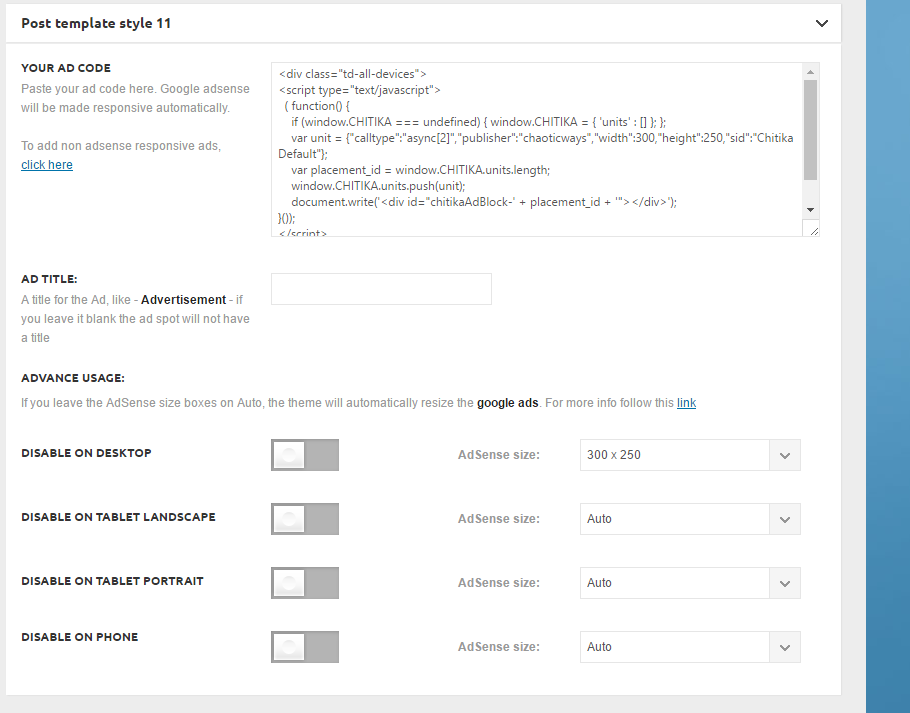
It’s not showing up on the top right next to the video:
http://ghesports.com/runescape-chaotic-ways-pk-video/
Nor is it showing on the homepage.
 Nano
Nano Thank you for the response and clear instructions .
Few things-
As of now I have 25+ plugins installed under the wordpress while as I can see in the screenshot http://screencast.com/t/RZLIOPUNdqh , there are almost 10 plugins whitelisted under TDbooster.
Does it mean that having any other plugins other than these 10 plugins will automatically disable the TDbooster even if it is activated under the plugin dashboard. Right?
But then on my “system status “dashboard ( see here : https://i.imgur.com/rpcyRvM.jpg ) why it’s showing only one incompatible plugins even though there are 15+ plugins which are activated but not whitelisted under the tdbooster plugin? Or is it because under the “system status” it can only show one name, no matter even if other plugins are also causing compatibility ?
Now about the workaround solution:
1. Can I whitelist the incompatible plugins ( in this case the one plugin name “adminise” shown under system status ) If yes then what code should I write there under the TDbooster .php file.
2. The second method you said is to remove ( or commenting out) the code which causes the restrictions on incompatible plugins and hence I should remove the codes shown here http://screencast.com/t/RZLIOPUNdqh .
Right?
And you somehow missed to respond on the point no-5 in my previous comment where I tried to detect the JS/CSS files but couldn’t achieve the desired result. I am copying the same question here again:
5. I tried to move the JS, CSS files under footer based on the instructions given here: https://forum.tagdiv.com/how-to-make-the-site-faster/ . I extracted and copied the list of registered JS and CSS files in a text file ( Look here: http://pastebin.com/D5CAive8 )
but then I compared it with my blocking JS/CSS listed under Pagespeed ( look here: http://pastebin.com/EH2uS3Pz )
But the problem is, almost none of the JS/CSS files listed under Pagespeed is matching with the one I extracted from my sites using functions.php code. For example- As per Pagespeed, I can see that YTSubscribe and Facebook Login JS/CSS files are causing issues, but I can’t find it under the extracted list.
Please take your time and help me to achieve greater speed and performance of my site. I am worried because just few days back under my old themes, I used to have 97 Pagespeed score and 90 Yslow scores but currently it’s too bad 🙁 ( Have a look at my speed scores on 20th august 2016 snapshots: https://i.imgur.com/JbnKtAO.png )
Thank you.
NanoAs the documentation here : https://forum.tagdiv.com/primary-category/ suggests that on breadcrumbs and on the page modules we can display only one category tag.
To set a ‘Primary Category’ to posts we need to select the option from post settings. If we don’t select “primary categories” under post settings , it will automatically take one category based on alphabetical sorting.
But my question is that doesn’t your theme honor the “primary settings” chosen under “Category selection” by WordPress dashboard. To better understand what I am saying, have a look at this screenshot: https://imgur.com/a/lQOfR
You can see that we can select primary categories from here too and this is where I usually select “Primary Category” . Will this selection be displayed at the places wherever Primary categories are needed ? ( Like brood combs , module, blocks etc.)
Also , you must have noticed that even if we don’t select any primary categories here: https://imgur.com/a/lQOfR WordPress automatically mark one of the category as Primary category. Does this happen on alphabetical category sortings ?
Thank you.
 Sasser
 Thanks. Now 2 i solved.
1. But lets look at this image. The meta info on blocks/modules is gone!
http://media.newsvoice.se/2016/08/blocksettings.png
3,4: newsvoice.se
5. How to get under scored links back?
http://media.newsvoice.se/2016/08/No-underscore.png
6. Here is the white text invisible. How to change text color for the heading in the RSS Widget? See the blueish marking. I had to add another text box on top to create a heading.
http://media.newsvoice.se/2016/08/text-should-not-be-white.png
 Tiger33
 ok found the solution
the date for modules is covered in a separate option –
Block Settings > Meta info on Modules / Blocks
Regards
Bogdan B. Hello,
You can have autoplay in our sliders as well: http://screencast.com/t/OC4z3pppySaT
But there is no options such as the slider on gameranx. All of the links inside our blocks lead to posts, not change the main post in the slider.
Thank you!
Andrei L. Hi
On posts are fewer dynamic elements, basically there only in sidebar can be displayed blocks. On pages where blocks are usually displayed the html structure is different. You need new width/height values for rows, columns, modules.
We can’t recommend any particular developer as we don’t work with people which offer freelance services. However you can look for a developer on sites like https://studio.envato.com/ which is one of the best site on the market.
Thanks!
Catalin Hello foxxx.sale,
Do you want to add blocks in your post content? Also, please notice that our theme has been designed to use the Visual Composer only for pages but if you want you can use this plugin and on posts pages but it is not fully tested with it and probably you will need additional customizations through code. If you want to active the Visual Composer for posts, please turn it on from this -> http://screencast.com/t/tTWQTWU4
If is not what you mean, please provide more details.
Thanks.
Bogdan B. Hi,
If you use wordfence, it’s the firewall of the plugin blocking the theme settings. The firewall must be set to learning mode and you can use wordfence again.
Thank you!
Bogdan B. Hello,
If you want to filter the content on pages you need to play around in visual composer a bit and get a feel for it and what it can do. This guide should provide a quick insight: https://www.youtube.com/watch?v=guxT8HgCBFo&list=PL6CsDkMaejhqHDywTTazZ-qpBzB8kFSfT&index=2 and https://www.youtube.com/watch?v=LC7iz-v-zIY&list=PL6CsDkMaejhqHDywTTazZ-qpBzB8kFSfT&index=6
https://forum.tagdiv.com/how-to-use-visual-composer/
The filtering of the posts that will show on the theme blocks and grids is done through the block settings.
Here is a tutorial on how to use the block settings to filter the content: https://forum.tagdiv.com/block-settings-guide/
I hope this helps.
Thank you!
Andrei L. Hi
The theme has been developed to be fast but it may still need configurations on this matters so test your site using google’s page speed insights testing tool(or gtmetrix) and make sure you follow the guide instructions and methods then test your site again.
I’ve tested your site using google page speed and noticed that your server response time is very slow. According to google report it takes more then 5 seconds until the server deliver the requested data: http://screencast.com/t/taHVTK3OB Make sure that the server meets theme’s requirements: https://forum.tagdiv.com/newsmag-requirements-for-newsmag/ and also check if the parameters from system status have the values indicated here: https://forum.tagdiv.com/system-status-parameters-guide/
Also try deactivate all plugins except Visual Composer, clear all caches then test your site page-speed again. In terms of speed we have made a page speed guide and covered the most important aspects that google notifies you of (image optimization, js/css render blocking and more..) and based on which it classifies and grades your site regarding speed. You can find it here: https://forum.tagdiv.com/how-to-make-the-site-faster/
If you decide to use the speed booster keep in mind that is an optional plugin and it was designed to work only with tested plugins – http://screencast.com/t/FXXDNtqfz in case you use other plugins it will be automatically disabled, so please check System Status – http://screencast.com/t/9SmVSXqe To make it work with other plugins you will have to alter the code and remove/comment this – http://screencast.com/t/RZLIOPUNdqh Also you may find some useful information here: https://forum.tagdiv.com/topic/website-memory-problem/ – https://forum.tagdiv.com/topic/speed-booster-and-akismet/
Thanks!
Andrei L. HI
Theme layout relay on a fixed width by 1021px. All blocks, modules, rows and post templates are designed starting from this value. To increase container’s width on pages are required many customizations and tests. You will need to change the layout of all block’s and modules. Basically all theme’s layout must be re-designed.
We can’t offer customization services at the moment so if you really need this or you’re not aware of the steps you need to take in this regard please consider hiring a developer or a freelancer to do this for you.
Thanks for your understanding.



