- NewspaperFlex Block Builder and Flex Loop Builder
- NewspaperHow to use the Flex Blocks cache option
- NewspaperHow to edit modules for Flex Block X
- NewspaperHow to insert a block inside the content of a post
- NewspaperFlex Block Settings Guide
- NewspaperMeta Info on Modules and Blocks
- NewspaperTheme modules and blocks
- NewspaperThumbnails – Fix strange looking images on blocks
- NewspaperBlock settings tutorial
- NewspaperCategory Tag on Modules/blocks
- NewspaperWP Rocket and Newspaper Theme: Optimization Guide
- NewspaperSearch setup for custom post type
- NewspapertagDiv Opt-In Builder – Emails
- NewspaperBookmark – Save For Later
- NewspaperModules Builder in Newspaper Theme
- NewspaperFilters and sorting for taxonomies
- NewspaperUser review system
- NewspaperWooCommerce: Happy “Add to Favorites!”
- NewspaperLockers
- NewspaperLeads
 Calin
Calin Hello,
Those requests are generated by the theme and are usually related to pagination. If your website uses AJAX pagination, infinite scroll, or a “Load More” button, each time new posts are loaded a request like the one mentioned above is sent to the database.
To reduce the number of requests to /wp-admin/admin-ajax.php?td_theme_name=Newspaper?v=12.7.5, you can lower the number of pagination-triggered requests from your blocks—especially on the homepage. The homepage is typically the most accessed page and often contains the highest number of blocks with pagination enabled.
Thank you.
Calin Hi,
Unfortunately, the Block elements will not adjust to the website width if it is wider than the default. For this, you’ll need to use the Flex Block elements, which are adjustable based on the width and per viewport using tagDiv Composer.
Alternatively, you can create your own module using the Module Builder and display the block using the Flex Block Builder.
Thank you!
 MarryCaribbean
Hello tagDiv Support,
I need help with a serious issue that started after updating Newspaper. I have spent hours troubleshooting this and I want to give you a clear, detailed summary so you can understand exactly what is happening.
My site:
MarryCaribbean.com
Theme:
Newspaper
Problem summary:
After the update, my single post pages began crashing and showing the WordPress critical error message. At the same time, several layout behaviors changed unexpectedly, including my post hero styling and category/archive display.
Here is what I observed and tested.
1. Single posts started failing after the Newspaper update
Before the update, my single posts were working normally.
After the update:
* Single post pages began showing “There has been a critical error on this website.”
* This was happening under Newspaper, while the site worked under a default WordPress theme.
* Category pages and other parts of the site were not failing in the same way at first, which made this look specific to the Newspaper single post rendering path.
2. Debugging pointed to td-composer
I enabled WordPress debug logging and found fatal errors pointing to td-composer, specifically memory exhaustion in this path:
/wp-content/plugins/td-composer/legacy/common/wp_booster/td_util.php
I also saw repeated notices for translation loading from other plugins, but those did not appear to be the main cause of the front-end post failure.
The key fatal I saw was memory exhaustion inside td-composer.
3. Default WordPress theme worked
To isolate the issue, I temporarily switched to a default WordPress theme.
Result:
* The single posts loaded
* The content itself was fine
* This suggested the problem was not with WordPress core or the post content itself, but with Newspaper/tagDiv rendering
4. Backup restore did not solve the issue
I restored a backup using UpdraftPlus, including:
Database
Plugins
Themes
However, this did not restore the previous Newspaper behavior on its own. The single post issue remained. What actually made individual posts load again was manually opening them and explicitly selecting a post template such as FROM PANEL or DEFAULT and then updating the post.
5. tagDiv Composer / Cloud Library behavior was inconsistent
After the restore:
* tagDiv Composer and tagDiv Cloud Library had to be reactivated
* Header/footer/custom appearance behavior changed depending on whether these plugins were active
* At one stage, single posts worked with Composer off, but the custom header/footer/design was degraded
* With Composer on, other design pieces came back, but single post behavior was still unstable or altered
6. The biggest discovery: post template behavior changed
This appears to be the most important clue.
I found that many posts would work again only after I manually opened the post and explicitly selected a post template, for example:
* FROM PANEL
or
* DEFAULT
If I manually selected one of those and updated the post, the post would usually load again.
This strongly suggests the update changed or broke how post template settings were being inherited or interpreted.
What is especially concerning is that this appears to affect many posts, not just one or two.
7. “From Panel” is not consistently broken, but behavior changed
I originally thought FROM PANEL itself was broken, but after more testing I found:
* Some posts work on FROM PANEL
* Some posts work on DEFAULT
* Some posts needed to be manually touched and saved before they would work at all
So the issue does not seem to be as simple as “FROM PANEL is broken.”
It feels more like the update disrupted how template/layout assignments are being inherited or loaded on a per-post basis.
8. My hero/header layout on single posts changed
Even after I got the posts loading again, the visual layout is not what it was before.
Before:
* My post hero had a stronger designed look
* The title, author, tags, and hero image styling appeared more integrated/overlaid
* There was more of a styled hero presentation
Now:
* The posts may load, but the hero/header presentation is simplified or degraded
* The featured image sits more plainly
* The old styled hero treatment appears to be missing
So even when the post works, the layout is not the same as before the update.
9. Article Display View options appear to be missing
In the Theme Panel, under areas where I remember having many layout/style choices, the “Article Display View” area appears blank or missing its usual options.
I specifically remember having many appearance/layout choices there before. Now those options do not appear to load properly.
This makes me think some template/module UI in Newspaper is no longer loading correctly after the update.
10. Category/archive behavior also changed
After the update:
* My category/archive sections changed layout
* I had 3 items per row before, but now it is showing 2
* I also started seeing little comment count boxes with “0”, which I never wanted and did not have before
I checked Block Settings and global module meta settings. Show Comment Count appears to be off globally, but the archive/category output is still not matching what I had before.
This makes it seem like the archive/module style or template behavior changed during the update as well.
11. Cloud Templates screen appears empty
In Cloud Templates, I currently do not see cloud templates assigned in the way I expected. For example, the Single Templates area appears empty.
That is confusing because I know my site had a more customized appearance before, and the current theme behavior no longer matches it.
12. Main concern
My biggest concern is that this update appears to have:
* broken or altered post template inheritance
* changed single post rendering behavior
* removed or failed to load layout options I previously had
* changed archive/category display unexpectedly
On a larger site, this kind of behavior is extremely disruptive because it can force manual repair of many posts.
What I need from you:
1. Help identifying exactly what changed in Newspaper that caused single post template behavior to break or stop inheriting correctly
2. Help restoring the original post hero/layout behavior I had before the update
3. Help restoring the archive/category display so it matches the previous layout
4. Help understanding why the Article Display View choices appear missing/blank
5. Guidance on whether this is a known issue in the current version and whether there is a patch or recommended fix
I would appreciate a serious look at this, because this has taken a lot of time to troubleshoot and it clearly appears connected to the Newspaper/tagDiv update path rather than WordPress itself.
Thank you,
MarryCaribbean.com
 Boardtalk
Hello,
I’m using Block 4 from the “Add Element” section to display my blog posts.
My webpage layout is wider, but I can’t find any setting within the Block 4 options to adjust the block width so that it matches the earlier part of my page.
The earlier section of the page is built using Pre-designed Templates from the tagDiv Cloud Library, where there are options available to control the section width. However, I cannot see a similar width option for Block 4.
Could you advise if there is a way to adjust the width of Block 4 so it aligns with the rest of the page?
Thank you.
Calin Hi,
If it is an image that is slected it can be because the image is not selected in full size, and it is used as a thumb https://prnt.sc/zdg-XBLi53E3
Now if is a block, then you can edit teh page with tagDiv Composer, select the block and in the layout tab look for Image size. From there, select teh image size/thumb you want to be used – https://prnt.sc/g8z1ti5KjtCG
Calin Hi,
Could you please let me know the link you want to add in the image information block and which field you tried to set it in? I remember you also reported a similar situation with a different image. When I logged in and set the link, it was saved and worked without any problems. So it might be related to the link you’re trying to set, the place where you’re trying to add it, or even the browser extensions you have enabled.
 danizar
 I’ve come up to a solution using the default FLex Module Block. Thank You.
Calin Hi,
Yes, it can be used, but I will suggest using the ACF plugin instead, because the Real Estate Plugin is hardcoded for that demo and you need to manually change the code in the plugin and adjust it according to your needs. By using ACF, you can create CPT’s, taxonomies and custom fields that can be used with the theme, you can create a cloud template and even modules and blocks for those
Calin Hi,
I understand, if you want to give it another try, we can take a closer look. For this, you can contact us via email at contact@tagdiv.com and provide temporary WP-admin access https://www.wpbeginner.com/plugins/how-to-create-temporary-login-for-wordpress-no-passwords/, include the link of this topic to identify you, and also provide some screenshots with teh block that is not rotating the articles when the random sort is set.
Thank you!
Calin Hi Danizar, if you want to create a module for your website, you can use the module builder (those modules can be used on Flex Block Builder and Flex Loop Builder). This is easier than creating a classic module in code and you’ll avoid problems like the one you are facing now. If you want to create a simple module, you can use the example from here – https://forum.tagdiv.com/practical-example-how-to-add-a-new-block-and-module/
danizarHello,
i have created two custom blocks. I want to use them inside a “Module cloud template” to render items in a “Flex Loop Builder”
I used de td-api-plugin. I can drag and Drop de block inside de tag div editor but something is not working. I can save de “module template” the first time but when i edit again it returns an ERROR “Errors at columns elements: 1(models) : 0(dom). The model does not match the content Current state has involved an issue. You could try an UNDO operation (CTRL+Z / CTRL+SHIFT+Z)”
What i am doing wrong?
This is how i add the api block (it has no parameters, all is coded into de file that renders the module -> td_video_empresa.php):
td_api_block::add('td_video_empresa',

                array(

                    'map_in_visual_composer' => false,

                    'map_in_td_composer' => true,

                    "name" => 'Mòdul Video Empresa',

                    "base" => "td_video_empresa",

                    'tdc_category' => 'Modules elements',

                    'file' => $this->plugin_path . '/modules/td_video_empresa.php',

                    "params" =>

                        array_merge(

                            td_config::get_map_block_general_array()

                        )

                )

            );
This is the file that renders the block -> td_video_empresa.php
class td_video_empresa extends tdb_module_template_part {
function render( $atts, $content = null ) {
/* -- Call the parent render method -- */
parent::render($atts);
/* -- Retrieve the module post data -- */
$post_obj = self::$post_obj;
$post_type = null;
$postID=$post_obj->ID;
$url_video=get_field("url_video_empresa",$postID);
$video_extern=get_field("link_finestra_nova",$postID);
$logo=get_post_thumbnail_id($postID);
$linkEmpresa=get_permalink($postID);
$tituloEmpresa=$post_obj->post_title;
$string="";
$string.=renderVideo($url_video,220,$tituloEmpresa,$postID);
$string.='<div class="modul-caixa" >';
$string.='<h3 style="margin:0px;">'.$post_obj->post_title.'</h3>';
$string.='</div>';
return $string;
}
}
Calin Hi,
1. What can be done is to set a featured image that will be displayed on blocks and a different one in the article, so when the article is opened, the featured image will be displayed and the other one (for this, the featured image from teh article will be removed).
2. Currently, if there is no featured image, it will need to display an image as a placeholder; otherwise, the blocks will not look good – https://prnt.sc/o7UYYPEgqVIF
Calin Hi,
This can be done globally using the theme panel > block settings > meta info on modules/blocks – https://prnt.sc/Gqkq89C2K4QB or specific only on that element with css, but it is recomanded the first option.
Thank you!
Calin Hi,
What you could check is the theme panel settings for the block headers; those options are on the path Newspaper > Theme panel > Theme colors > General theme color https://prnt.sc/x9vjTpLTPxiw
Thank you!
 ctucker
I have a block filtered by a category with two articles. When set to random under the filter tab the same post shows everytime.
Calin Hi,
Yes, that’s how it works: when you import a block or a section from the code, it is placed at the end of the page in a row. To position elements on a page or a template, the row element is used, which can contain one or more columns.
Here’s an important detail: you cannot place a row inside another row directly. You can only move the elements from one row into another row. If you do need a row within a row, you can use the inner row element, which functions just like a regular row but is used inside columns.
Now, regarding elements imported from the cloud that come with their own row: these can be moved along with the row. This means you can drag and drop the entire row before or after another row.
If you want to move the imported elements into an already existing row, it’s best to first check whether the imported row includes an inner row. If it does, you can move this inner row into any column of the target row. You can do this using drag-and-drop or by copying and pasting it before or after a specific element.
I hope this helps!
Calin Hi,
That element is a posts loop (https://prnt.sc/JkGvT-YJ4lwx), and it’s a special element different from the rest of the blocks. This one has an automatic filter—there are no manual filters like on the other elements. So, if you want a filter that you can set yourself, you’ll need to use a Flex Block 1, which can be configured for the exact layout you want.
I’ve just set up the Flex Block 1 for you. You can check it and set the filters as you need.
 opinandosinanestesia opinandosinanestesia opinandosinanestesia
 Thank you!
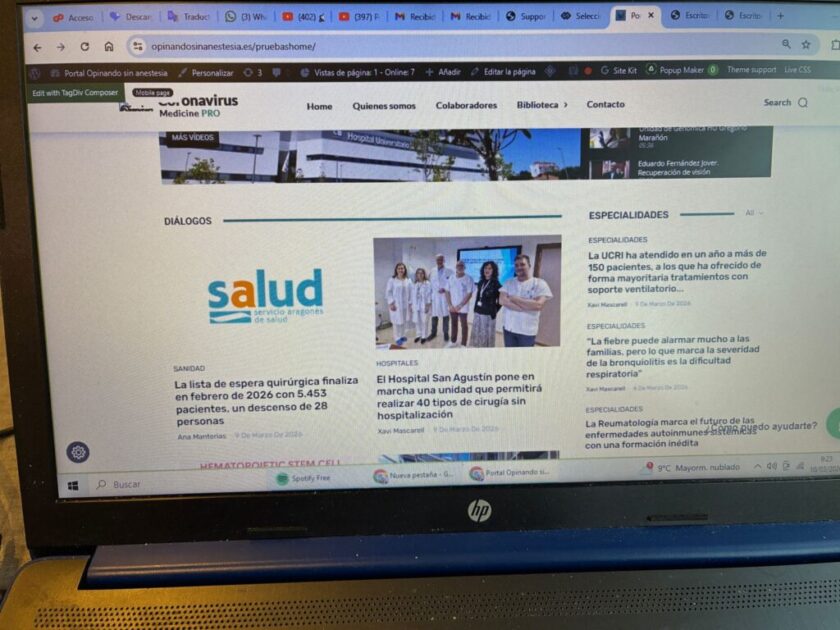
The problem I’m having is that when I try to implement a new block, it’s automatically placed at the end of the website, making it extremely difficult to move, and often impossible to move at all. This situation is causing a lot of problems. Is there a way to have new blocks implemented directly in the area of the website where we want them to appear?
opinandosinanestesia Thank you!
This is the page: https://opinandosinanestesia.es/pruebashome/ and the block I want to modify is this one: ” rel=”noopener” target=”_blank”>https://opinandosinanestesia.es/wp-content/uploads/2026/03/57f627cf-0e25-4596-8c74-3b7423d5ea70-scaled.jpg
. It’s under the “dialogues” category. I want to modify it so that I can change the categories and only see entries with a specific tag. I’ll send you the access link via email.
Calin Hi,
Could you please confirm whether the filter is applied on the homepage?
Also, please let me know which blocks you would like the filter to affect and what the expected results should be for each block. This will help me better understand the intended behavior.
If possible, could you also re-provide temporary access to the website so I can review the setup? I will check the configuration and get back to you with an update on the situation.
Thank you.
Calin Hi,
Yes, you can create any kind of call to action. This is essentially just a section that you can build according to your needs. Simply drag a Row or Inner Row to the place where you want to create the call to action, set up the number of columns you need, and then add the elements you want—such as images, text, buttons, or blocks https://prnt.sc/aHKv5v-GIk4j
Calin Hi,
Maybe I didn’t understand your request correctly, but you cannot insert an image gallery directly inside a block. Instead, you can create a section with an image gallery, which means adding a row that will contain the gallery.
To do this, edit the page using tagDiv Composer. From the left sidebar, select Cloud, then search for Gallery. After that, import the gallery layout you want. It will be added at the bottom of your page, and you can simply drag and place it wherever you want on the page.
Alternatively, you can use a dedicated gallery plugin that provides shortcodes. In that case, create the gallery using the plugin, copy the shortcode, and then add it to your page using the Shortcode element in tagDiv Composer where you want the gallery to appear.
Thank you!
Calin Hi,
Unfortunately, we have not tested the WP Obituary plugin with our theme, so we cannot confirm how it works or how it should behave when used together with our theme. Because of this, we’re not able to provide support for issues related specifically to that plugin. We recommend contacting the plugin’s author for further assistance.
Our theme includes its own frontend builder called tagDiv Composer, which can be used to edit pages and Cloud Templates. With it, you can customize rows, blocks, and other elements used across pages and templates.
Thank you!