- NewspaperFlex Block Builder and Flex Loop Builder
- NewspaperHow to use the Flex Blocks cache option
- NewspaperHow to edit modules for Flex Block X
- NewspaperHow to insert a block inside the content of a post
- NewspaperFlex Block Settings Guide
- NewspaperMeta Info on Modules and Blocks
- NewspaperTheme modules and blocks
- NewspaperThumbnails – Fix strange looking images on blocks
- NewspaperBlock settings tutorial
- NewspaperCategory Tag on Modules/blocks
- NewspaperWP Rocket and Newspaper Theme: Optimization Guide
- NewspaperSearch setup for custom post type
- NewspapertagDiv Opt-In Builder – Emails
- NewspaperBookmark – Save For Later
- NewspaperModules Builder in Newspaper Theme
- NewspaperFilters and sorting for taxonomies
- NewspaperUser review system
- NewspaperWooCommerce: Happy “Add to Favorites!”
- NewspaperLockers
- NewspaperLeads
 Anamaria
 Hello,
This is how the block looks on the responsive version; you can’t edit it. There is a scroll bar -> https://i.imgur.com/lp34HMl.png
Thank you!
 Calin
Calin Hello,
The “wp-json/tdw/save_css” I think it can be related to the bots that want to inject malwares in the theme live css, what I recommend is to install the Wordfence plugin and restrict that link and block the ip-s that attempt to inject those links.
I hope this will help you!
Thank you!
 chrystelle
Good morning,
I’m using tagdiv to create a login/registration block on my side page.
My problem is when I enter a nickname, email and password, no email arrives. Worse still is that the nickname is logged without validation.
Am I missing something?
THANKS
 Bettina
 Hello @otaku!
Check this guide: https://www.billerickson.net/block-styles-in-gutenberg/
In every update, we try to update different designs in our new demos: https://demo.tagdiv.com/select_demo/newspaper-prebuilt-websites/
You can choose it from the available designs.
Thank you!
Calin Hi,
“How come that the site does not display thumbs but it displays original images, keeping their aspect ratio? Is that a bug?” – normally this can be done if the images are not uploaded using the WordPress media and this is working like this because there are users that prefer to use the original image and not a thumb.
By default if the module block thumb is enabled in the theme panel – https://i.imgur.com/lZgC97S.png and the image is uploaded using media or is regenerated using a plugin a thumb for that module will be made.
Now if there is also a problem with media images, then indeed it is possible to be something interfering, most of the time it is a plugin or some custom code in a child theme.
If you can provide temporary wp-admin access to the website we’ll take a look and try to resolve the problem, for this please backup your website and please contact us via email at contact@tagdiv.com.
Thank you!
Bettina Hello @RahulDasOp !
If you import a section or block, then this will be added in the content zone and not in the footer. You can also move it to the place you want with drag and drop. Copy the row or element and paste it after a row or element. Please note that you need to have a customizable cloud header or footer in order to add the cloud section or blocks in those zones.
Thank you!
 rahuldas
What seems to be the issue here is that, despite selecting a specific category and post ID, some posts do not appear in certain blocks. How can I resolve this?
Calin Hello,
This can be done using the offset option from the block – https://forum.tagdiv.com/newsmag-block-settings-tutorial/ – https://i.imgur.com/iQ3TeHb.png
Thank you!
Anamaria Hi,
You can’t set a limit for big grid flex only if you use more blocks with offset option.
Thank you!
Anamaria Hi,
Please edit the cloud template with tagDiv Composer -> https://i.imgur.com/j8YvKks.png click on the block and remove the offset -> https://i.imgur.com/dJ0iFQu.png let that field empty.
Thank you!
 csturk3466
Hello,
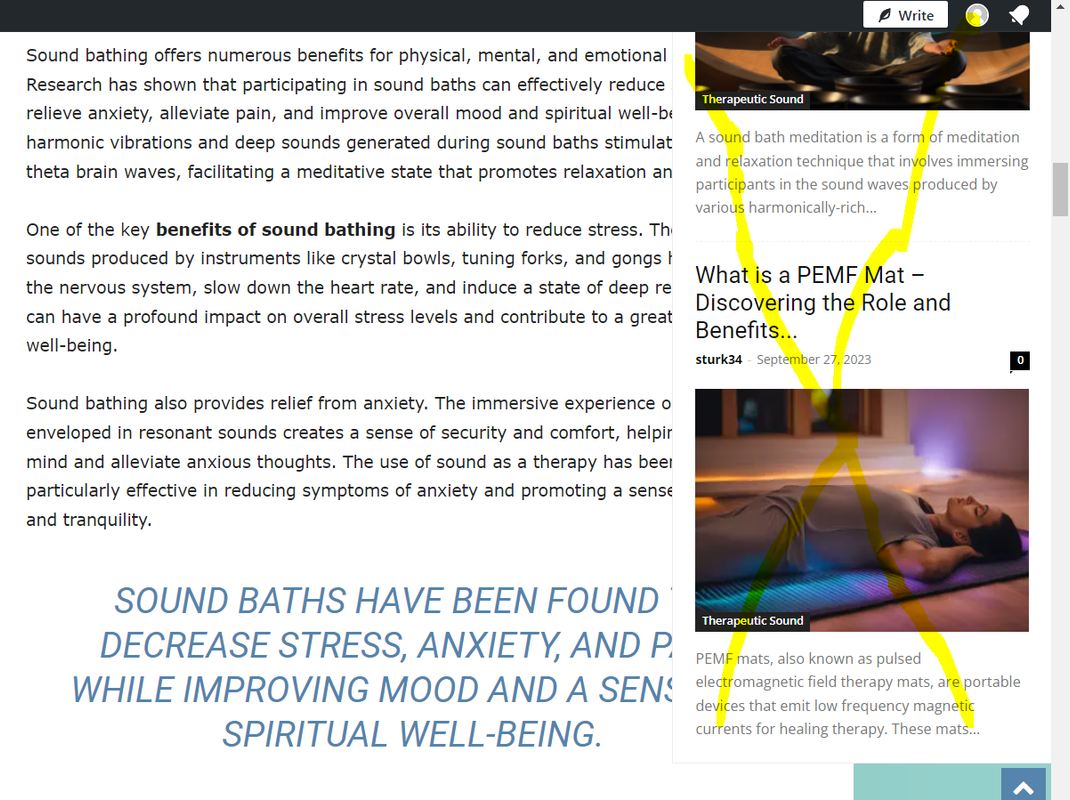
This might be a very basic question, but recently I noticed a menu in the right nav of my site. It’s on blog articles and appears once I scroll down the page. The menu includes some related articles or possibly recently published articles. I don’t want this menu to be there, especially because it blocks written content. I don’t know how the menu appeared, and it has not always been like this. Any idea how I can get rid of it? The following link has an image that details the issue. I put a yellow X on the specific menu.
https://i.postimg.cc/x8HGwv8s/blogs-in-nav.png
Here is also a link to the page directly, in case that’s helpful: https://soundtherapynearme.com/sound-therapy/what-is-resonance/
Thank you for the assistance.
 Bezukhof
I’m experiencing near constant downtime on mymydiy.com and other sites. SiteGround is telling me that the requests on mymydiy are principally caused by: wp-json/tdw/save_css
They told me:
“If you know which plugin, script or setting is causing the numerous requests for “wp-json/tdw/save_css” to be made, I would recommend disabling it or consulting its creators on how to reduce the amount of requests.”
Top 10 requested URLs:
188046 /wp-json/tdw/save_css
68831
5074 /wp-json
1733 /feed
1455 /robots.txt
1051 /wp-includes/js/jquery/jquery.min.js?ver=3.7.1
952 /wp-includes/js/jquery/jquery-migrate.min.js?ver=3.4.1
926 /wp-includes/css/dist/block-library/style.min.css?ver=6.4.1
897 /wp-includes/js/comment-reply.min.js?ver=6.4.1
771 /wp-content/plugins/instagram-feed/css/sbi-styles.min.css?ver=6.2.5
These issues also seem to coincide with the WordPress 6.4.1 update that rolled out. Trying to figure out what to do- any insights since the excessive requests seem to be coming from Newspaper and its associated plugins.
rahuldasWhat seems to be the issue here is that, despite selecting a specific category and post ID, some posts are not appearing in certain blocks. How can I resolve this?
 HeatherKitching
One other question for today: If you have two blocks that filter the same category, how do you keep them from showing the same articles? I want my slider to show the four most recent articles, and then I want the next block to show the NEXT most recent articles. How do I do that? Thanks!
 info@simonebarbone.net
 I mean I want to display even 40 posts, is there any setting I have to choose even in flex blocks, or the only way is to use OFFSET POSTS?
 Nuspapr14
Hi! I’m trying to modify the front page header/top block of the page so that it pulls from a category instead of the most recent post. However, I don’t see anywhere in the theme panel to modify those settings. I can’t access that blocks setting when editing the page and don’t see settings to modify it in the header.
 llaporte
 Good morning,
With the new version 12.6.2 have you corrected the problem with the td_block_homepage_full_1 short code?
As I mentioned to you a month ago, it works well in version 12.5.1 but not since version 12.6.
You told me then that the Dev team was looking at this for a future corrected version.
Before updating to 12.6.2 I would like to know if these issues are corrected.
Thanks in advance,
Luc Laporte
Calin Hello,
Please provide a link to the website where you want to adjust the blockquotes and please let me know how you’ll like to be. I will make a css for you.
Thank you!
 mdz
mdz And I couldn’t figure out why this address shows a blank page, even though I’ve seen this link many times in the official documentation and there is a lot of scource code in this page:
https://forum.tagdiv.com/article-ads/
It turns out that if “Ad-Block” is turned on, then it shows a blank page 😀
-
This reply was modified 2 years by
mdz.
Calin Hello,
If this is a flex block then you can set the category id-s that you want to be displayed in that drop down – https://i.imgur.com/EVhXEcC.png
Thank you!
llaporte Bonjour,
Avec la nouvelle version 12.6.2 avez vous corrigé le problème du short code td_block_homepage_full_1 ?
Comme je vous l’avais mentionné voici un mois, il fonctionne bien dans la version 12.5.1 mais plus depuis la version 12.6.
Vous m’aviez dit alors que l’équipe de Dev était pour regarder cela pour une prochaine version corrigé.
Avant de faire la mise a jour vers 12.6.2 j’aimerais savoir si cet enjeux est corrigé.
Merci a l’avance,
Luc Laporte
Anamaria Hi,
You can use the widgets for the sidebar – https://i.imgur.com/2vbC0nh.png – https://i.imgur.com/ub4k0vl.png and for pages, you can indeed create sidebars using tagDiv Composer, select the row and choose a layout with 2, 3 columns – https://i.imgur.com/Y6tCJrr.jpg then just drag the elements from tagDiv Composer in columns where you want to be displayed. – https://i.imgur.com/YVWhdgF.jpg -> https://forum.tagdiv.com/sidebars-tutorial/
You can’t assign a single post template for pages. A workaround can be to save an element or row: https://www.screencast.com/t/kVxpDT9SV in the tagdiv composer, so you can add it on every other page. The saved elements can be seen at the end of the other blocks when you add an element in the tagDiv Composer.
Thank you!
Anamaria Hello,
There you have two choices: Flex block and Posts Loop: https://forum.tagdiv.com/posts-loop/
The posts loop will display the posts related to the author.
For flex block, you should choose the current author “: Author – Current author”special filter: https://forum.tagdiv.com/flex-block-settings-guide/
Thank you!
HeatherKitching I’m not sure I follow. Are you saying I have to code it? I can’t just set one block to be three column and one to be two?
 thegreekherald
How do I get posts that relate to authors on the author page?
Are there specific blocks, modules, or filters there?