
- NewspaperFlex Block Builder and Flex Loop Builder
- NewspaperHow to use the Flex Blocks cache option
- NewspaperHow to edit modules for Flex Block X
- NewspaperHow to insert a block inside the content of a post
- NewspaperFlex Block Settings Guide
- NewspaperMeta Info on Modules and Blocks
- NewspaperTheme modules and blocks
- NewspaperThumbnails – Fix strange looking images on blocks
- NewspaperBlock settings tutorial
- NewspaperCategory Tag on Modules/blocks
- NewspaperWP Rocket and Newspaper Theme: Optimization Guide
- NewspaperSearch setup for custom post type
- NewspapertagDiv Opt-In Builder – Emails
- NewspaperBookmark – Save For Later
- NewspaperModules Builder in Newspaper Theme
- NewspaperFilters and sorting for taxonomies
- NewspaperUser review system
- NewspaperWooCommerce: Happy “Add to Favorites!”
- NewspaperLockers
- NewspaperLeads
 Carvibz
Hello and Happy New Year!
We’ve been using the Newspaper theme for over 1 year and it’s proven a highly valuable resource. Nevertheless, while we’ve read your documentation on the topic, but it’s not totally clear to us how the theme works regarding images.
Context:
We are a news website and we usually upload photos from Instagram or screenshots from YouTube in FHD. We’re running your lightbox and the gallery is set this way. Link to: Media File. Image Size: medium.
Our Goal with the Newspaper theme for this action:
We’re trying to delete some of the thumbnails generated by the Newspaper theme because these take up serious space (we’re close to filling up our server capacity regarding sheer size and file count, and we’re not using the majority of them in the first place—more on this below).
Details:
Until recently, all the ticks were On in Theme panel>Block Settings>Thumbs on Modules/Blocks. But our website only really uses 696×0, so we’ve just switched all of them Off and left only that On.
The problem is with all the news stories written until the said recent change. Many unnecessary crops (for our implementation) were created for these and we’re trying to establish which ones to delete from the server and which to keep for properly displaying the stories.
Here’s Example One.
The issue is that the thumbnails generated are come in more sizes than required: (300×0, 696×0, 0x420). At least for us on Firefox (on Chrome they seem to work fine, display a single size, namely 696×0). One of these isn’t even meant for galleries.
And, on top of this, the editor and the thumbnails are like this (it’s a default wordpress size):
https://www.carvibz.com/wp-content/uploads/2022/12/320890937_1225580058312273_926418632237447405_n-240×300.jpg
Here’s Example Two, for the first image in the gallery (porsche-panamera-rear2.jpg)
If we look in the server, there are over 20 crops generated for the original image, as follows:
-100×70
-1024×576
-1068×580
-1068×601
-150×150
-150×84
-1536×864
-218×150
-265×198
-300×169
-324×160
-324×235
-324×400
-356×220
-356×364
-485×360
-533×261
-534×462
-696×385
-696×392
-741×486
-747×420
-768×432
-80×60
-original uploaded to wordpress media gallery (in this case it was 1600×900, but it can obviously vary)
This behavior is replicated with all other images (the number of crops per original image—as found on the server—usually varies between 22 and 24 and not 100% of the specific sizes are the same for the various images, even though many are common).
Conclusion (we need your assistance):
-What crops should we delete?
-Can you please explain how the NewsPaper theme works in terms of generating these crops and serving them to the users? This should help us establish the crops we can delete and the ones to keep.
Thank you,
Mihnea Radu
Carvibz co-founder
 seoviking
 Just to specify I am using the latest WordPress and Theme versions, as well as all plugins are updated.
I am using the “Blockchain Pro” cloud template.
Here are all my plugins – https://imgur.com/a/OHxMDfy
Here is how the sidebar looks in post edit mode – https://imgur.com/a/U2GoHdD
Here are post preferences – https://imgur.com/a/D93r8h7
This is how my Blog category looks (notice no featured images even though it is meant to have them) – https://imgur.com/a/3Te3ts2
And here is how it should look from demo – https://imgur.com/a/IOVqtyA
Hope it helps
 sathishtalk360
Hi, [tagDiv] Blocks not displaying in widgets Section limited widgets only available for me, please see my image.

Thanks,
Jagan
 mediagod
 Hello Everyone,
I was experiencing the same issue and found a solution after monitoring the browser’s console and making changes to my webserver’s configuration.
The following error appeared whenever I went to edit a page with the tagDiv Composer:
Error at zones: 6(models) : 0(dom). The model does not match the content Current state has involved an issue. You could try an UNDO operation (CTRL+Z / CTRL+SHIFT+Z)
I decided to look at the browser’s console while the tagDiv composer page was loaded to see if I could find out what was causing the problem. I saw the following error in the console:
The loading of “https://www.mywebsite.com/tdb_templates/404-template-week-pro/?td_action=tdc_edit&post_id=89&tdbTemplateType=404” in a frame is denied by “X-Frame-Options“ directive set to “DENY“.
Apparently the tagdiv editor uses an xframe and my webserver (Nginx) was configured to deny all xframes. After visiting https://developer.mozilla.org/en-US/docs/Web/HTTP/Headers/X-Frame-Options and following the instructions I was able to get the editor working.
The specific configuration line in NGINX’s server configuration that was causing the problem was:
add_header X-Frame-Options “DENY”;
I deleted this line and replaced it with:
add_header X-Frame-Options SAMEORIGIN always;
After doing this I restarted NGINX and the tagdiv editor proceeded to work as normal.
-
This reply was modified 3 years by
mediagod.
 drvarun5179
Hi, I released my Page speed guide for the Newspaper theme back in 2017. This is the 2023 version for the same.
My Website: https://medicforyou.in
Current Stats:
1. Pagespeed Mobile
2. Pagespeed Desktop
3. GTMetrix
4. Pingdom
Resources used:
Plugins
1. Ad Inserter
2. Akismet
3. Contact Form 7
4. Converter for Media
5. Formidable Forms
6. Formidable Forms Pro (Paid)
7. Inline Related Posts
8. Jetpack
9. LuckyWP Table of Contents
10. RankMath (free version)
11. Regenerate Thumbnails
12. tagDIV Cloud Library
13. tagDIV Composer
14. tagDIV Mobile Theme
15. tagDIV Social Counter
16. Wordfence Security
17. WP Rocket
18. wpDiscuz
CDN– Only Cloudfare Free with tweaks and rules
Hosting– GoDaddy (sucks but will switch later)
Plugin Based Tweaks Worth Mentioning
1. Ad Inserter
Newspaper mobile does not provide extended in-article ads. This is why I switched to Ad-inserter to apply rules to mobile and desktop versions. Works like a charm.
4. Converter for Media
Free webP conversion recommended by Google. Lightweight and also converts your previously uploaded files to webP as well.
6. Formidable Forms Pro- Paid
I bought this to have a quiz and calculator. To be honest, I spent more than 30 hours but still could not learn the conditional tags and essential formatting. Regardless, this is broken on the mobile theme plugin and has a drastic speed impact on the page. Definitely not recommended.
8. Jetpack
I am still to figure out what is the role of Jetpack in SEO and speed. Anyways, I have kept it to not destroy my existing SEO.
11. Regenerate thumbnails
I would recommend regenerating all thumbnails at a time when your visitors are not active on the website. It has some memory usage and should be done in a free environment.
MOST IMPORTANT
I browsed through forums to find that TD Standard Pack is not an essential plugin if you know how to develop your theme properly using TD Composer.
I was already using pre-installed templates. So, I simply deactivated the plugin to check if any pages were broken. Since there were none, I deleted the plugin.
It has huge speed impact and I definitely recommend creating your own templates rather than relying on the easy way out. Additionally, I would recommend you start with a pre-built website, and start editing the following Cloud Templates:
14. tagDIV Mobile Theme
If you have to choose performance over quality, I’d recommend quickly installing this plugin. It is tempting to give your users a wonderful experience, but at what cost? Reduced speed only drops your visitors from search engines. Most of us are bloggers, meaning we rely on Google and Bing for our visitors (in long term). I’d recommend using it without caring for those beautiful blocks or glittering images.
16. Wordfence Security
If you are on a shared hosting like me and using Wordfence, I would suggest you enable performance tweaks.
17. WP Rocket
I used AutoOptimize and various other plugins to speedily my website. I did achieve results, but the “remove unused CSS” is beyond my scope. It requires hours of finding the CSS and deleting them. Even if you understand what I am saying, you are still bound to make mistakes.
I switched to WP Rocket a few months back. It cost me 59 USD for a year. What did I get? Here are tweaks that I was not able to achieve previously (the rest all can be achieved with free plugins):
18. WpDiscuz
The CSS files are annoying and I believe minifying CSS and loading
wpDiscuz> Settings> General Settings> Enable Use WordPress native AJAX functions and Minify JS and CSS Files to Optimize Page Loading Speed.
If you have not installed it yet, I highly recommend you don’t get lured by it. Stick to traditional Comments from WordPress itself. They won’t cost you any speed damage.
Cloudfare Optimizations
I would not go much into detail about this. But I will summarize what I have done:
1. Optimization Tab- Tick marked all options except AMP URL and Rocket Loader (only if you are using WP Rocket because it will break your search button and menu on mobile with a Newspaper theme).
2. Caching- Tickmarked all except Always Online and Development mode.
3. Rules- I have set two rules which make Cloudfare cache all contents on my website except my admin panel. You can set them using the following image, make sure you replace your website name with www or without www (and no HTTP or HTTPS) and in THE ORDER THEY ARE (ByPass at 1st, Cache everything at 2nd).
Image:
4. Scrape Shield- Tick marked all of the available features (3 in total).
Currently, my concerns revolve around the following:
I hope this guide helps you all. Please leave any feedback or queries. Best of luck fellas.
 Andy White
Domain and ‘problem’ urls:
https://doogle.com/index.php/2022/10/03/test-gsap/
https://doogle.com/index.php/2022/10/04/test2-gsap/
I’ve got a simple animation. When it’s on a browser it’s fine but inside tagDiv it seems to escape the DOM/boarders. Is there something I can do? I’ve tried adding it to a container, table, iFrame etc. but they all have their other problems.
Thanks
 ezioboy
I’m making a page that introduces lectures and accepts applications.
It was difficult to deal with it myself, so I brought a template with a news paper theme.
Can you make a design template or block that I can apply for the introduction of the lecture in the next update? Newspager Div The composer’s work is so difficult that manipulation is impossible.
I tried to post, but it seems a little difficult to give trust and impact to users, and it is very frustrating.
 Calin
Calin Hi,
The DOM number is given by the elements that are used on the page/post, if there are more of them, the DOM number will be higher.
What I can recommend is to set more useful elements, blocks, and modules.
Thank you!
 darknorth
 Thanks for post limits 🙂 This solves one problem. This happened today too. I am testing it now by removing post limiter on these 2 blocks
 slavamatador
 we use plugin tagDiv Mobile Theme – https://prnt.sc/W3IfDFxg2pZ4
1. how to remove the display of the author and date on the post preview in need help with ?
2. increase the height of the selected blocks (make the block height 250 px) and make the distance between them 2 px
highlighted the blocks in red
we use plugin tagDiv Mobile Theme – https://prnt.sc/W3IfDFxg2pZ4
 Anamaria
 Hello,
For the category template, if you have set a posts loop then will display all posts in this category or you can use Flex Block/Big Grid Flex and set the filter to “Category -Current category” => https://i.imgur.com/7P99qx0.png
Thank you!
Anamaria Hello,
I recommend you to use a Single Post Template from tagdiv Cloud Library, and you can design it with tagdiv Composer.
To display the related articles or more from author, you can use Flex Block and filter it https://www.screencast.com/t/SEmxo13Fo2X -> https://i.imgur.com/YIg3nPP.png
if you want to keep those templates the only way to remove the “more from author” tab is to use a custom CSS like this one:
.single .td-related-right{

 display: none;

 }
Set the code in Theme Panel ->Custom code -> Custom CSS
I hope this helps you!
Thank you!
Anamaria Hello,
1. If you using the Flex Block or Big Grid Flex in the layout are the options “Show author”, “Show date” and you can choose to hide => https://www.screencast.com/t/6UPXQbiTO2
For mobile theme version to remove the author name on the blocks, please go in Theme Panel -> Block Settings -> Meta Info on modules/blocks and disable the author => https://www.screencast.com/t/5w5CxkcU
2. You can’t change the layout and customize the mobile theme version. There are some settings in the Theme panel -> Mobile Theme and Dashboard -> AMP only.
Thank you!
Anamaria Hello,
You can try to add Woo Product Block and Filter it.
Thank you!
 phase3av
Hello,
I see an option for upsells as a product block, but is there an option for to display cross sells in the cart?
 phubner
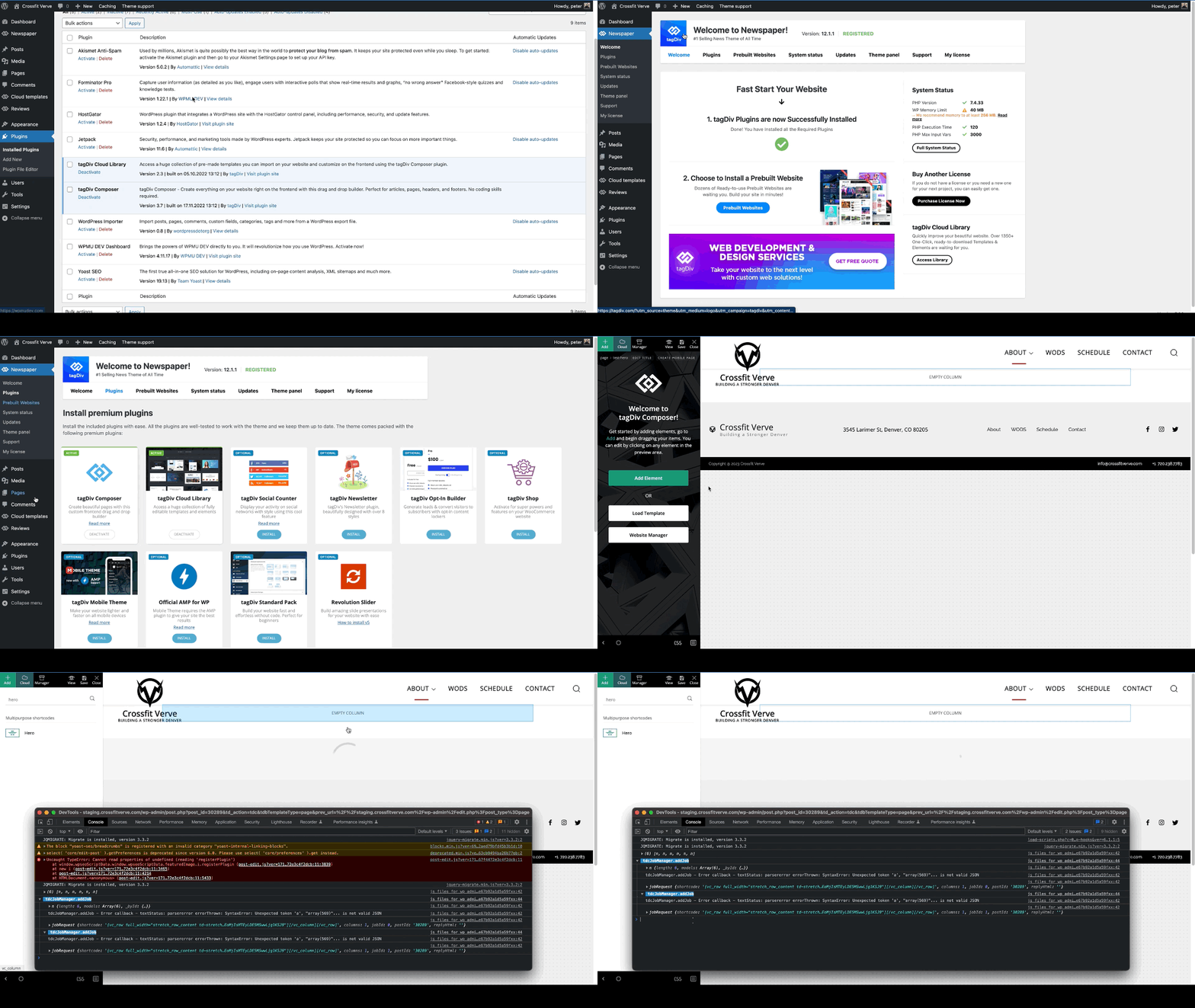
When trying to add a hero modules to pages I am getting the following error. This is happening on multiple sites of mine.
I created a simple test page that was blank and just tried to add the hero module. The page just has the spinner and never completes adding the hero module. In the console this is logged
tdcJobManager.addJob - Error callback - textStatus: parsererror errorThrown: SyntaxError: Unexpected token 'a', "array(569)"... is not valid JSON
jobRequest ...
shortcode
:
"[vc_row full_width=\"stretch_row_content td-stretch-content\"][vc_column][tdm_block_hero title_text=\"SGVybw==\" title_tag=\"h3\" title_size=\"tdm-title-bg\" description=\"V2VsY29tZSB0byB0aGUgZnV0dXJlIG9mIGJ1aWxkaW5nIHdpdGggV29yZFByZXNzLiBUaGUgZWxlZ2FudCBkZXNjcmlwdGlvbiBjb3VsZCBiZSB0aGUgc3VwcG9ydCBmb3IgeW91ciBjYWxsIHRvIGFjdGlvbiBvciBqdXN0IGFuIGF0dGVudGlvbi1jYXRjaGluZyBhbmNob3IuIFdoYXRldmVyIHlvdXIgcGxhbiBpcywgb3VyIHRoZW1lIG1ha2VzIGl0IHNpbXBsZSB0byBjb21iaW5lLCByZWFycmFuZ2UgYW5kIGN1c3RvbWl6ZSBlbGVtZW50cyBhcyB5b3UgZGVzaXJlLg
I did verify that I could add other modules, Author box, Flex grid, Client list, Image info box … etc.
site : staging.crossfitverve.com
Newspaper Version : 12.1.1
plugins : tagDiv Composer, tagDiv Cloud Library, YOAST SEO, Forminator Pro, Jetpack, WPMU DEV Dashboard
slavamatadorHello
https://recipes-for-you.com/
1. how to remove the display of the author and date on the post preview in need help with ?
2. increase the height of the selected blocks (make the block height 250 px) and make the distance between them 2 px
highlighted the blocks in red
 u2them
 Can you set a slider block to link on click of image and not just title?
Anamaria Hello,
You can reduce the space only using a custom code css
.td_flex_block_4.td_block_template_14 .td-block-title

{

margin-bottom: 4px;

}
Set the code in Theme Panel -> Custom Code -> Custom CSS.
Thank you!
Anamaria Hello,
I recommend you to use a Single Post Template from tagdiv Cloud Library, and you can design it with tagdiv Composer.
To display the related articles or more from author, you can use Flex Block and filter it https://www.screencast.com/t/SEmxo13Fo2X -> https://i.imgur.com/YIg3nPP.png
You can set the ads in Single Post Template from tagDiv Cloud Library and you can set top ad, 3 inline ads set after x paragraphs and bottom ad, please check this article -> https://forum.tagdiv.com/article-ads/ and video https://www.youtube.com/watch?v=biTpVVlr8j8
Thank you!
Anamaria Hello,
Blocks 1 to 25 or Big Grid are from the standard pack plugin, which is deprecated, But you can obtain the same design using Flex Blocks and Big Grid Flex. Those types of blocks are more flexible.
You need to have the show category -> https://i.imgur.com/YW7rEzq.png
Thank you!
 sco
scoHi,
When I add an element flex block 1 and if I use the following configuration, no featured post is displayed. Same post is always displayed (last post) and it is not a featured one.
Configuration of the flex block 1 :
– limit post number : 1
– filters tab:
* everything is left blank except sort order and category filter
* category filter : — all categories —
* sort order : Featured
Is there a bug here, or what am I doing wrong. I know how to define a featured post and the way I do it matches your online documentation.
Looking forward to your reply,
Thanks for your help.
 VeriArtem
Hello
Flex block 4 > Header template: Block Header 17
How to decrease massive empty space between header 17 and the block?
Regards
Alex
 renatot10
where are my blocks? the tutorial shows many more than I have!
My blocks:
https://ibb.co/zVXMQnf
Toutorial blocks:
https://ibb.co/j3y73kV
also, how do i show the categories in part to the block title? thank you
https://ibb.co/2YmM8kR
Anamaria Hello,
I think that I know what the problem is, please edit the cloud template with tagDiv Composer -> https://i.imgur.com/j8YvKks.png click on the block and remove the offset -> https://i.imgur.com/dJ0iFQu.png let that field empty.
Thank you!



