
- NewsmagBlock settings tutorial
- NewsmagCategory tag on modules/blocks
- NewsmagtagDiv Composer Tutorial
- NewsmagWeather Widget
- NewsmagExchange widget
- NewsmagInstagram widget
- NewsmagHow to use the Visual Composer plugin
- NewsmagIntroduction
- NewsmagFooter templates
- NewsmagCustom ad spots
- NewsmagLoading image effects
- NewsmagSmart sidebar
- NewsmagFeatured images
- NewsmagGeneral settings
- Newsmag7 days post sorting
- NewsmagTheme thumbs
- NewsmagExcerpts introduction
- NewsmagTheme colors introduction
- NewsmagtagDiv slider gallery
- NewsmagVideo playlist
 Sam Trautman
I have updated the newspaper theme and now blocks do not work? What is the problem? Thanks
 jitendrachrysolite
Hello,
Im using “flex block 4” and added hover effect but the hover effect is not smooth please let me know how I can add “transition-duration” CSS class to make it smooth or is there any other way to do that?
 Bettina
 Hello!
If you use a filter category like: Single – More from author, Single – Related by category, Single – Related from tags, please make sure you place that block in a post template to have effect.
If this is not what you mean, then please provide more information about your issue.
A solution for sending a screenshot/video is this:
Download, capture, send: https://www.techsmith.com/jing-tool.html
After making the screenshot, you will have a link, paste it here.
Thank you!
 Anamaria
 Hello,
if I understood correctly, for that you want you can use the block Flex Block, filter it on “Category – Current Category” and you can exclude the category that you want using the sign “-id category” that you want to remove it => https://i.imgur.com/Mejd8gl.png
Hope this helps you!
Thank you!
 great1212
 We are also facing the same annoying problem
TagDiv team this is a theme related issue. Plz sort out this issue at your earliest
 reded
rededSite url: https://aodww2.com
We’re using Block 17 bit it happens with others we’ve tried. Using a Category filter that relates to Post Category. Shows in TD Composer, but will only show 2 and then shows empty when 3rd is added to row. This feature was working but has stopped working.
 c386
c386Hi,
Having trouble with Instagram integration in the Newspaper theme.
Within the Theme Panel my Instagram Business account shows as connected, yet the widget in my sidebar does not update to reflect the latest posts or number of followers.
The widget is configured using the [tagDiv] Instagram block, with our business page selected in the Instagram Account Source drop-down menu. If I instead choose ‘Instagram ID’ as the account source, the widget no longer displays images and shows only text.
Similarly, if I enable Instagram in the Footer settings, an outdated feed appears at the bottom of the page showing only text; the actual images are missing. Unlike the widget, there is no option to select the business page in footer settings, the instagram ID has to be entered manually.
Others appear to be experiencing similar issues and any help or guidance would be most appreciated.
 Calin
Calin Hi,
I think that you are referring on posts that are display in blocks, if is so, then you can do that using tagDiv Composer, edit the page and sort the blocks after the latest -> https://i.imgur.com/mlFM8om.png -> https://i.imgur.com/HgChiW9.png
I hope this will help you!
 charamis
I have the 11.2 Version. After I update to 11.3.2 the whole site is broken.
TagDiv plugins like “TagDiv composer”, “tagDiv Standard Pack”, were not enabled. After I enabled them only some blocks was working. Header was reset to default demo and the main body of the home page was just displayed the pseudocode of TagDiv composer.
I restore now the site in previous backup.
How can I be sure that the site will not broke again? I want to update it.
Can you give me a solution?
Calin Hi nikoss123,
With Newsmag theme you can disable the author name from posts using the option from here -> https://i.imgur.com/PT4ltGL.png and from the blocks you can disable the author from here -> https://i.imgur.com/rIj01GR.png
If those are not apply pleas make sure that you do not have a plugin conflict or an object cache that is providing the cache version of backend.
I hope this will help you!
Calin Hi,
I think that I understand what you mean, when you are using our theme your website has more elements, thumbs with images, blocks … so those need to be optimized to get a better speed, for this you need first to make sure that all theme requirements are set https://forum.tagdiv.com/newsmag-requirements-for-newsmag/ after that you need to use some extra steps to optimize the website and make it faster, for this please check our guides from here:
-> How to Make the Site Faster
-> Cache plugin – install and configure
-> Cloudflare (CDN)
-> Autoptimize Plugin – install and configuration
I hope this will help you!
 Daniel Iceman
 @crodexter
I really needed the PHP blocks (my site has a lot of custom code areas like review scores, etc), so I’m using a patch for this: first, I register a custom widget area where I need PHP using the Theme Panel > Blog and posts templates > Custom sidebar. Then, using the “PHP Code Widget” plugin for WordPress, I simply put the code there.
I’m sure it’s not the cleanest method, but it works.
 kapitel7
 Those tagdiv guys still hasn’t said any sorry although the damage thay caused is tremendous. What a shithead company!!!
Let’s be fair, they have released a statement on the blog and one cannot expect them to work on weekends. However it is disappointing, that they have not answered this thread today.
Anamaria Hello,
Please make sure you have activated the thumbs from Theme Panel -> Thumbs on Modules/Blocks => https://i.imgur.com/AtRRjN4.png
Thank you!
Anamaria Hello,
Depends, if you have block 1-24 in your website, or if you use style header/footer/post from the theme panel, then if you deactivate the tagDiv Standard Pack you will only have shortcodes, but you can disable it, you make the changes for the mobile theme, after which you can activate it again.
Thank you!
Anamaria Hello,
Please remove the above code CSS and use this => https://i.imgur.com/8bMX7nG.png
.td-business.home .td-header-desktop-wrap .tdm_block_socials,

.td-business.home .td-header-desktop-wrap .tdb_header_menu, .td-business.home .td-header-desktop-wrap .tdb_header_search

{

margin-bottom: 0;

}
Thank you!
Calin Hi,
I’m very sorry you went through such an unpleasant experience.
The Newsmag theme verifies your license key with the Envato API. If you already have a license activated on your website yet the website displays the notice LICENSE KEY IS NOT REGISTERED please reset the license key and set it again.
The number of requests sent by the automated system quickly hit the Request Rate Limit of the Envato API. In the absence of a positive validation response, the system blocked the website. We know that no technical explanations can ease the frustration, as we feel the same way. We understand that you’ve worked hard for your project just like we have for ours, and this should not have happened.
Thank you for understanding.
 crodexter
 Hello,
Just to add that PHP block would be great functionality.
Is there a way to add PHP functions to cloud templates?
 msostar
After the debacle with the “Ilegal license” I bought another license and updated it to the latest version.
However, after the update, my Home page got mangled and all I could see were Td_block entries with some strings of letters and numbers.
I need someone from the DEV team to take care of this with utmost urgency.
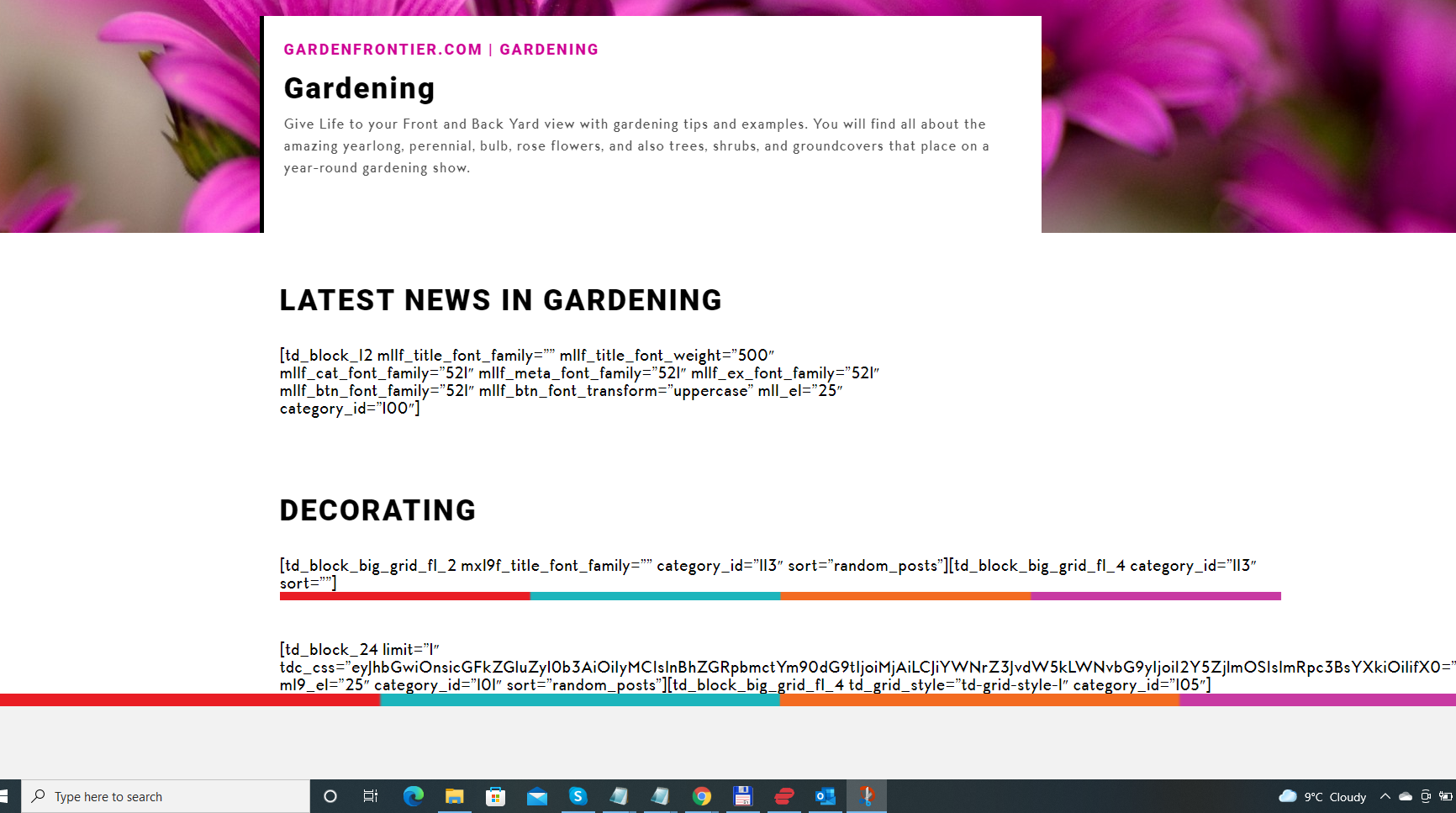
 draldo
 reset of the key and entring it once again helped,
but blocking the site with not registered message is terrible.
 pablo ™
 Hi, Anamaria
No, I didn’t solve the problem! If you look closely, above the Google Ads blocks, all margins have been excluded. Ads are touching content.
Also, the website is flashing while loading. The header opens deformed and then after awhile it reloads correctly. This is really bad for the user experience – and it wasn’t like that before.
 patrixx73
 Hi, I sent you an email with all the login details. Is it possible you fix the error by today? As I specified in the mail, no modification of the code has been applied, nor HTML. Everything has happened inside the editor. I just selected a category from the filter block and the columns have messed up. This project is urgent and it would be nice if you can fix it by today.
Kindest Regards
Patrick
 gm07
gm07 My problem is that these cowboys hid a function in their code that has the ability to take over my site whenever they want and display whatever they want. That is unacceptable
I don’t like it either
 complexs1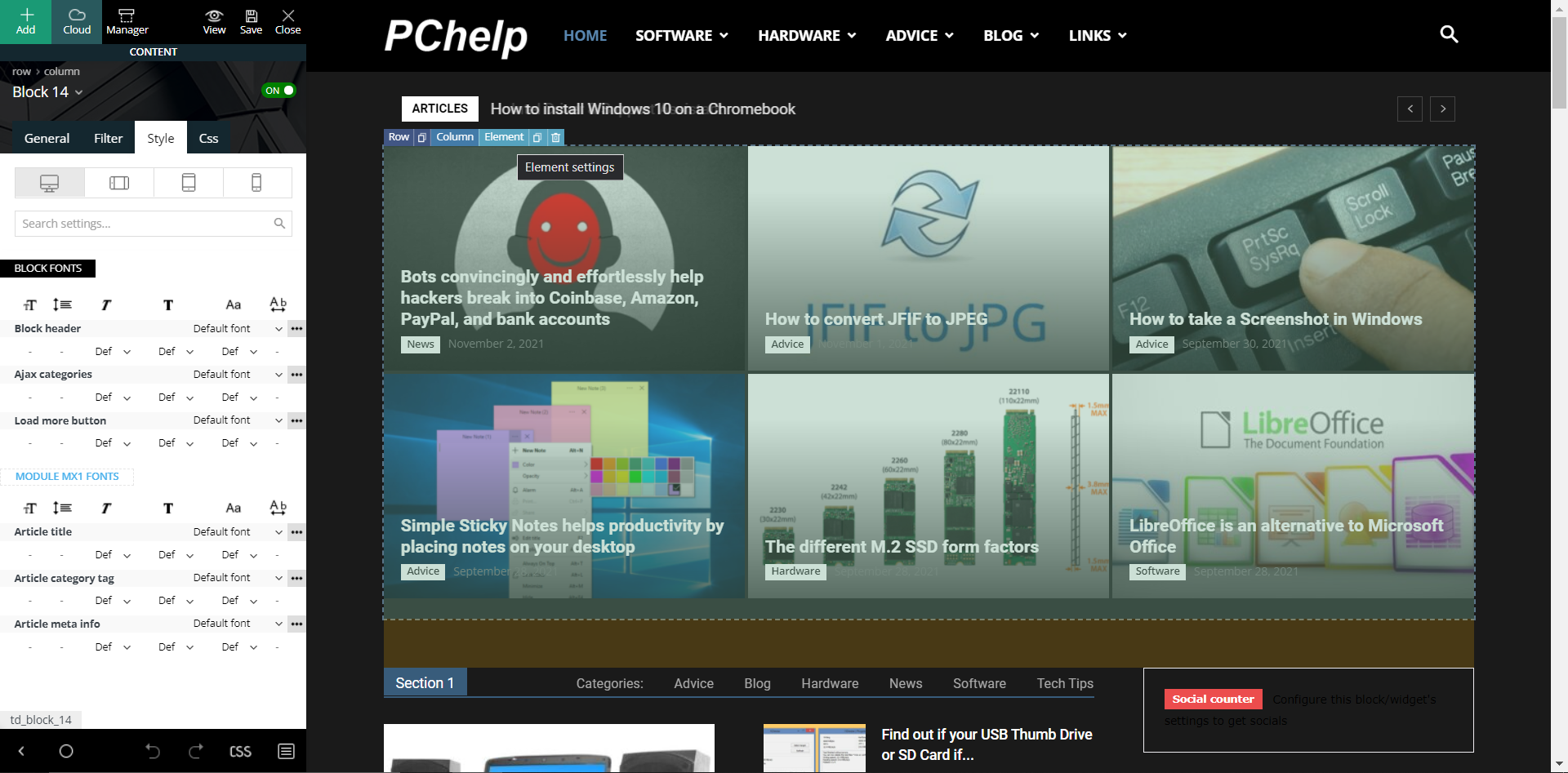
When I click on the “Element setting” for the “Block 14” I see this but no options to change the gradient effect. The prebuilt website is called “Black Version”. I appreciate the reply back but cannot find this setting to remove the gradient effect. The above picture shows exactly what I see when I select “Style” in the “Block 14” “Element setting”. I see nothing nowhere that says “flex blocks”.
-
This reply was modified 4 years by
complexs1.
 playradius
Good Afternoon –
I have uploaded Sofia-Pro as a Custom Font into my theme font area, and changed to that font on every single item in the list. However it is still showing Roboto in ‘Text with Title’ / WordPress block editor elements. I’ve disabled ‘Load Default Fonts’, however cannot seem to fix this issue.
Any thoughts or options I may have missed? –
http://www.2021.playradius.co.uk
Thanks!



