- NewspaperHow to use the Flex Blocks cache option
- NewspaperCache plugin – install and configure
- NewspaperWP Rocket and Newspaper Theme: Optimization Guide
- NewspaperFlex Block Settings Guide
- NewspaperGeneral Options that May Interfere with the Newspaper Theme
- NewspaperThe Newspaper Mobile Theme: Introduction
- NewspaperAutoptimize Plugin – install and configuration
- NewspaperHow to update a plugin
- NewspaperCloudflare (CDN)
- NewspaperFacebook Share
- NewsmagRequirements for Newsmag
- NewsmagHow to update the theme
- NewsmagtagDiv Social Counter tutorial
- NewsmagTop bar templates
- NewsmagAjax view count
- TutorialsWhat is Ajax preloading?
- NewspaperVideo Playlist
- Newspaper7 Days Post Sorting
- NewspaperAjax View Count
- NewspaperTop bar templates
 Bettina
 Hello!
Deactivate ALL plugins except tagDiv ones, also if you are using a cache plugin, deactivate it, clear all cache and try again.
Let us know the results!
Thank you!
Bettina Hello @platamun47 !
Do you have the Standard Pack plugin installed and active?
Make a test and deactivate ALL plugins except tagDiv ones, also if you are using a cache plugin, deactivate it, clear all cache and try again.
If the problem is still there, then please contact us via email at contact@tagdiv.com and provide the following:
– admin url and credentials
– cpanel url and credentials
– a link to this topic in order to identify you
We will take a look and try to help you asap.
Thank you!
 Southview92
mobile version not showing correctly. I have turned off all my cache plugins to see if this will work but it has not. the only cache plugin i have is cloudflare switch on.
what is happening is, my home page http://www.in2town.co.uk has a mobile version which i designed and looks amazaing on a mobile. however, sometimes it shows on a mobile and other times on the mobile it only shows the desk top version of the home page. which looks bad on a mobile but looks good on a desktop.
i would like to know if anyone has come across this problem so i can fix it. i want my mobile version always to show on mobile devices.
 Anamaria
 Hello,
For malware, please check this topic https://forum.tagdiv.com/topic/security-vulnerability-reported-in-composer-again/
For thumbs please go to the theme panel -> block settings -> inline css and disable the option to minify the css and clear the cache.
Thank you!
 byothe
 no it’s LS Cache but I think it also minifies CSS… you are right 😉
thank you for your efficient help
 rahuldas
 I use the hostinger’s own plugin LiteSpeed Cache. Is that okay? Or I will download WP Super Cache?
Bettina Hello @aedney !
Make a test and deactivate ALL plugins except tagDiv ones, also if you are using a cache plugin, deactivate it, clear all cache and try again.
If the problem is still there, then please contact us via email at contact@tagdiv.com and provide the following:
– admin url and credentials
– a link to this topic in order to identify you
We will take a look and try to help you asap.
Thank you!
Bettina Hello @payoneer !
Sometimes, the issue can be from a plugin conflict or a cache issue. That’s why we recommend first deactivating ALL plugins except tagDiv ones; if you are using a cache plugin, deactivate it, clear all cache (also from your browser), and see the results.
Thank you!
Bettina Hello!
They are not from our theme. Make a test and deactivate ALL plugins except tagDiv ones, also if you are using a cache plugin, deactivate it, clear all cache and try again.
Thank you!
Anamaria Hello,
Usually, this happens with cache plugins. If the cache plugin does not have mobile support then the mobile theme version can be delivered instead.
The solution would be to use the recommended WP Super Cache plugin instead and activate these settings (especially the mobile device support): https://forum.tagdiv.com/cache-plugin-install-and-configure/
Also, please let me know what plugin for the cache you use now.
I hope this helps.
Thank you!
 aedney
Hi
I host my website with WordPress directly using one of their business offerings.
Everything has been working great for a long time, but yesterday I decided to activate their Global Edge Cache option (I dont have any other caching going on).
As soon as I did that none of my images in a gallery will now display when clicked on. They show fine in the post, but when I click on them they show a black box.
If you hover over the image, the link to the image says:
data:image/gif;base64,R0lGODlhAQABAAAAACH5BAEKAAEALAAAAAABAAEAAAICTAEAOw==
instead of an actual link to the image.
I have tried turning off the edge cache but the images havent gone back to how they were.
Wordpress themselves have looked into this and said its an issue with the theme and I should contact the developer.
This is what they said:
It seems the gallery part is a Newspaper theme’s feature or a plugin that is integrated with the theme and it might be conflicting with the image optimization features from WordPress.
Can you please contact the theme support and let them know about this issue? They should know where and what to check in order to fix this problem.
My site is https://moviesgamesandtech.com
thank you.
Anamaria Hi,
Please go to the theme panel -> block settings -> inline css and disable the option to minify the css and clear the cache.
Thank you!
 Archerix
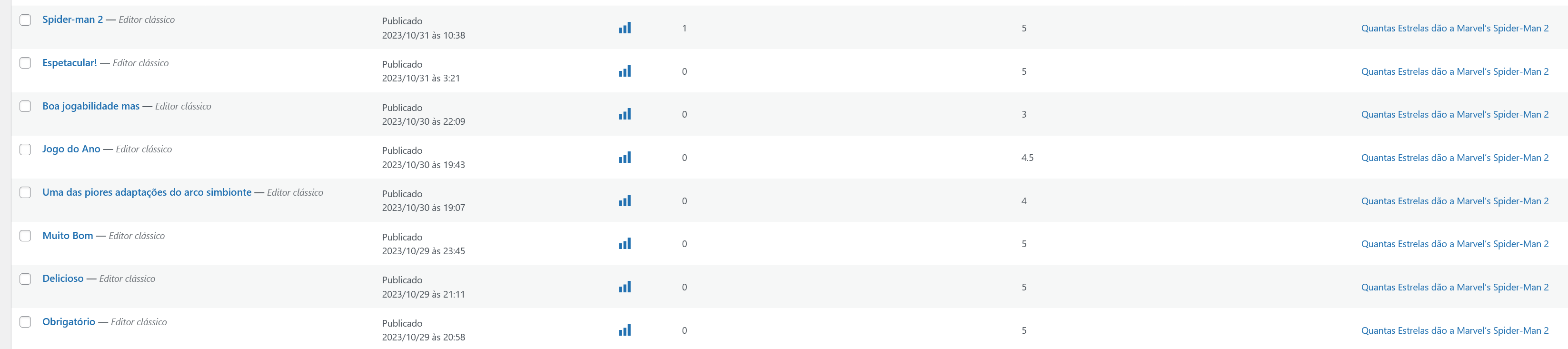
Hi, I can’t find the solution for this. I have a post with 8 reviews, but the theme only shows the 5 most recent reviews. How can I show all reviews? Post–> https://bit.ly/45VihUe
The reviews are all published, but only shows a total of 5 Screenshot
I cleared the cache, but the problem persists
Bettina Hello @jandevit1!
Can you find them in the properties?
Make a test and deactivate ALL plugins except tagDiv ones, also if you are using a cache plugin, deactivate it, clear all cache and try again.
Thank you!
Bettina Hello @Santy!
I can see that you have an ad like a modal, which makes the content gray.
Deactivate it and check if the problem is still there.
Make a test and deactivate ALL plugins except tagDiv ones, also if you are using a cache plugin, deactivate it, clear all cache and try again.
Thank you!
Anamaria Hi,
You need to translate the English (original language) header for each language in part – https://i.imgur.com/CDmeHCf.png you should have them imported for each language the cloud template – https://i.imgur.com/4agmUtg.png
A much simpler and faster alternative is to duplicate the cloud template you want to use in another language, edit it and select the desired language – https://i.imgur.com/z1CqgBo.png (edit the name) – https://i.imgur.com/dPX8ROs.png – https://i.imgur.com/Lc81IgP.png This method needs to be used to translate all cloud templates.
The pages are created with tagDiv Composer which is a page builder, when WPML is used it cannot translate everything that was built with the page builder and must be edited for each language separately. Please open the page in the editor and click on translate – https://i.imgur.com/TXH6y1c.png
When you make the corrections, make sure you are on the page with the language you are editing, and if you use the cache, or object cache, please clear it.
Thank you!
Anamaria Hi,
Have you checked for a plugin conflict? Please deactivate ALL plugins except tagDiv ones; also, if you are using a child theme or cache plugin, deactivate them, clear all cache, and try again.
Thank you!
Bettina Hello @dlicoppe !
Strange! If you delete a post, then the search won’t show it anymore.
Make a test and deactivate ALL plugins except tagDiv ones, also if you are using a cache plugin, deactivate it, clear all cache and try again.
Thank you!
Bettina Hello @designrepublik !
Unfortunately, we do not fix the page speed issues on our demos.
Our developers are aware of this issue and try to synthesize the composer, which is big, and fix the major problems of the theme and speed.
A cache plugin doesn’t help much with page speed.
To increase the page speed you can check these similar topics for more solutions:
– https://www.infophilic.com/get-almost-100-pagespeed-newspaper-theme/
– https://forum.tagdiv.com/topic/score-100100-pagespeed-with-newspaper-wordpress-theme/
– https://developers.google.com/speed/docs/insights/v5/about
– https://www.youtube.com/watch?v=tnkVapqhIHc
– https://www.xtechkr.com/optimize-newspaper-theme/
– Check those guides : https://web.dev/lcp/ – > https://www.sqlpac.com/en/documents/google-pagespeeds-lighthouse-6-new-features-lcp-cls.html -> > https://wp-rocket.me/google-core-web-vitals-wordpress/improve-cumulative-layout-shift
– https://forum.tagdiv.com/topic/to-high-cumulative-layout-shift-in-mobile-theme/
Please check the tutorials from those platforms gt metrix and Google Pagespeed Insights and I’m sure you can increase the page speed.
Please note that page speed or optimization is not covered by the support team: https://forum.tagdiv.com/newspaper-theme-support/
Thank you for understanding!
Bettina Hello!
Do you have the Standard Pack plugin installed and active?
Make a test and deactivate ALL plugins except tagDiv ones, also if you are using a cache plugin, deactivate it, clear all cache and try again.
If the problem is still there, then please contact us via email at contact@tagdiv.com and provide the following:
– admin url and credentials
– cpanel url and credentials
– a link to this topic in order to identify you
We will take a look and try to help you asap.
Thank you!
Bettina Hello @bobwei !
Make a test and deactivate ALL plugins except tagDiv ones, also if you are using a cache plugin, deactivate it, clear all cache and try again.
Check if you have some extra code added somewhere.
Let me know the results!
Thank you!
Bettina Hello Jonathan!
This seems to be a caching issue. Please try to uninstall the cache plugin and check if the problem is solved. Make sure you do not use an object cache or any caching tool in your Cpanel.
Let me know the results!
Thank you!
Bettina Hello @fgates !
Please check the console (ctrl + right-click -> Inspect ) to see which errors you encountered there. Examine some other potential interfering factors: https://forum.tagdiv.com/general-options-may-interfere-newspaper-theme/
Make a test and deactivate ALL plugins except tagDiv ones, also if you are using a cache plugin, deactivate it, clear all cache and try again.
Thank you!
Bettina Hello @rakhesh !
Please check this topic: https://forum.tagdiv.com/topic/theme-panel-settings-are-not-saving-2/
Make a test and deactivate ALL plugins except tagDiv ones, also if you are using a cache plugin, deactivate it, clear all cache and try again.
Contact us via email at contact@tagdiv.com and provide the following:
– admin url and credentials
– the license certificate and purchase code
– a link to this topic in order to identify you
– specify the current domain you need to assign the license key
Thank you!
 valikhanb
 No, there is no any specific words on search. Its just happens on clients side, using different wi-fi’s the same issue.
Cleared cache didn’t help.