- NewspaperHow to use the Flex Blocks cache option
- NewspaperCache plugin – install and configure
- NewspaperWP Rocket and Newspaper Theme: Optimization Guide
- NewspaperFlex Block Settings Guide
- NewspaperGeneral Options that May Interfere with the Newspaper Theme
- NewspaperThe Newspaper Mobile Theme: Introduction
- NewspaperAutoptimize Plugin – install and configuration
- NewspaperHow to update a plugin
- NewspaperCloudflare (CDN)
- NewspaperFacebook Share
- NewsmagRequirements for Newsmag
- NewsmagHow to update the theme
- NewsmagtagDiv Social Counter tutorial
- NewsmagTop bar templates
- NewsmagAjax view count
- TutorialsWhat is Ajax preloading?
- NewspaperVideo Playlist
- Newspaper7 Days Post Sorting
- NewspaperAjax View Count
- NewspaperTop bar templates
 Anamaria
 Hello,
I think that here it depends on everyone, if you think that you are fine with the cache plugin given by the host you can use it. It is not really recommended to have more than one cache plugin, as it can interfere with their settings.
Thank you!
Anamaria Hi,
It could be a cache issue or a plugin conflict there. So, please make a test and uninstall all the non-tested plugins and the cache plugins that you use and see the results.
Thank you!
 canopi_life
 Hi Anamaria,
Siteground has dynamic cache (full-page caching for non-static resources) and memcached (object caching). Memcached has been turned off.
The host plugin (SG optimizer) is not installed, so I don’t think there’s interference.
Best,
Yen
 Archerix
 Hi, we have no problem with a 55.000 posts website and 500k visitors month
We are showing 3 popular posts in every single page, Sort order “Jetpack + stats module required”, “No Preloading” + WP Supercache
-
This reply was modified 4 years by
Archerix.
 Hispanic L.A.
 I have already deactivated, erased and reinstalled Composer and erased the cache, with no results.
But I also got an automatic email from WordPress pointing at the plugin RankMath, with a long code in the message.
I forwarded it to RankMath and sent them username and pass as administrators as they requested. I am waiting for an answer and will update you if it does not work in the next few hours and send you administrator credentials as requested.
I also sent you an email.
Thank you,
Gabriel
 dmkeene
 Same for us. When traffic spikes on our site – usually we get spikes of a couple of hundred visitors per second – it kills the site with 503 errors – all because the most popular filter setting is generating piles of db requests.
This feature should have some settings to it that reduce the load on the db server – notably it should cache the result and refresh it every minute – which would mean a single db INNER JOIN per minutes, instead of hundreds. That seems like it would be the best solution…
Processing even one of these queries per second will kill mySQL and burn up CPU – this is lazy work here.
 Umut
Umut thedonatshop
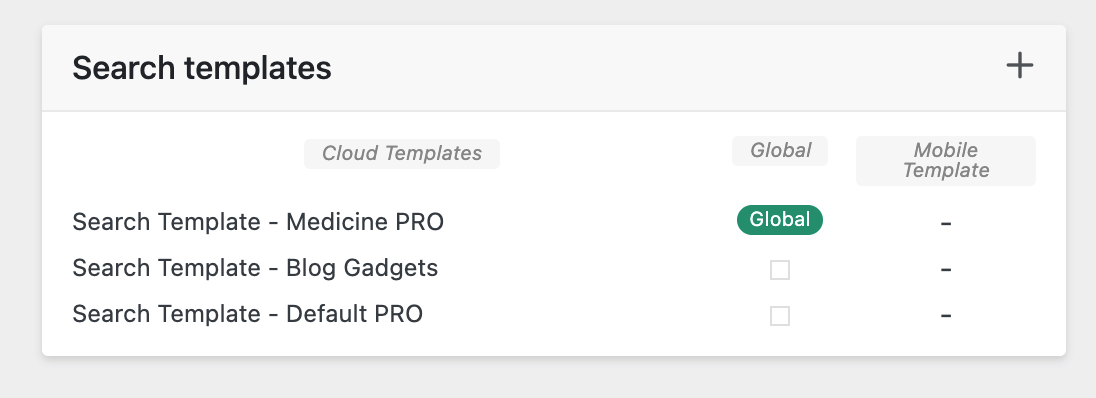
 I have added yet another. The results are still sample posts.
https://i.gyazo.com/9f5f1ab7b22e40fc22de03263ff1cab0.png
when I click “view” directly from the search template it brings me to the medicine pro search page. it shows with “sample posts”
but then when I do a search on that page it reloads to the “blog gadgets” search template again. but maybe it’s cached. I don’t know.
 Bettina
 Hello @popseo !
It could be a cache issue or a plugin conflict there. So, please make a test and uninstall all the non-tested plugins and the cache plugins that you use and see the results.
Thank you!
Anamaria Hi Yen,
Please let me what cache you have on the server, it might interface with the options in wp super cache.
Also, maybe that plugin on the server has options to optimize the css and it can interfere with the theme.
For the cache plugin, no additional adjustments are required.
Thank you!
Anamaria Hello,
As my colleague told you, if you have the mobile theme plugin activated, it will detect the mobile version, but considering that you are using a cache plugin that does not have an option to detect the mobile version, problems will occur.
Thank you!
Anamaria Hi,
There are many optimization guides provided by our users here in the forum, some made by us, you could check some of them
– https://forum.tagdiv.com/cache-plugin-install-and-configure/
– https://forum.tagdiv.com/how-to-make-the-site-faster/
– https://forum.tagdiv.com/topic/high-number-of-ajax-request/
– https://www.infophilic.com/get-almost-100-pagespeed-newspaper-theme/
– https://forum.tagdiv.com/topic/score-100100-pagespeed-with-newspaper-wordpress-theme/
– https://forum.tagdiv.com/topic/newspaper-theme-speedify-your-website/
– https://forum.tagdiv.com/topic/tutorial-chriss-custom-optimizations-for-functions-php-etc/
– https://forum.tagdiv.com/cloudflare-cdn/
– https://forum.tagdiv.com/topic/theme-causing-high-cpu-usage-2/
– https://forum.tagdiv.com/topic/sql-querys-high-cpu/
– https://forum.tagdiv.com/topic/newspaper-theme-slow-to-respond/
– https://premium.wpmudev.org/blog/optimizing-your-wordpress-database-a-complete-guide/
– https://underconstructionpage.com/optimize-wordpress-database/
– https://crunchify.com/better-optimize-wordpress-database-all-in-one-guide/
Maybe your hosting provider can provide some advice as well.
Thank you!
canopi_life Hello tagDiv team,
I’d like to report our observation from this problem.
After several days of testing, we found out that the css was quite unstable whether new changes (changes on template or new post upload) were made on the website or not. When false layout displayed, the only effective solution was to flush the cache from our host.
By suggestion, we uninstalled the plugin “wp super cache”, and the css remains stable until now.
Since this plugin was installed and set up following your documentation, I’d like to ask what extra setup we can make to not mess up the css? And if you have other recommendation for a cache plugin?
Thank you.
Best,
Yen
 Micha
Micha Unfortunately, not quite so simple, there is a tutorial (https://forum.tagdiv.com/how-to-make-the-site-faster/), but really much, you get out unfortunately not. You can do a lot with Cloudflare, but only with the Pro version and of course if you optimize WpRocket a little bit (https://www.andraware.com/wp-rocket-for-newspaper-theme/)
If it’s your own server, you can get a lot out of it with Nginx and Redis in conjunction with W3C Cache. And of course in which one throws for example some from the head (rds etc.)
 tenacemente
 Problema risolto, se qualcuno dovesse riscontrare il mio stesso problema basta svuotare la cache del Browser. Grazie
Anamaria Hello,
I’m sorry but maybe you didn’t understand how our theme works, but we’ll try to help you.
1. Usually, the ads are set in the element AD BOX, and you can remove it, edit with tagDiv Composer, select the Ad box element and with right-click you can delete it => https://www.screencast.com/t/2GfCVx9BCAw7 or with drag & drop place it into the deleting red zone from the bottom right of the page.
You can add a sidebar like in this guide https://forum.tagdiv.com/sidebars-tutorial/
We have some settings for the rows and different stretch sizes: https://www.screencast.com/t/bsbB5P97A
2. I checked and seems you have the mobile theme plugin activated, but the cache plugin doesn’t recognise the mobile version and desktop version.
This problem is caused by the cache plugin. If the cache plugin does not have mobile support then the mobile theme version can be delivered instead.
The solution would be to use the recommended WP Super Cache plugin instead and activate these settings (especially the mobile device support): https://forum.tagdiv.com/cache-plugin-install-and-configure/
Also, please make sure you have enabled the mobile cache if the plugin has this option
3. Please check this topic where I explained each mobile version -> https://forum.tagdiv.com/topic/mobile-version-not-working-properly-2/ and choose what mobile version you want.
The AMP works better only with the Mobile Theme plugin. From my point of view, if you don’t use the Mobile Theme plugin, then there is no reason or benefit to AMP. Please read all about AMP here: https://forum.tagdiv.com/tagdiv-amp-plugin-tutorial/
4. Please follow the steps from point 1 to delete the ads.
Thank you!
Anamaria Hello,
If your settings are not saved, please check this topic -> https://forum.tagdiv.com/topic/newspaper-theme-panel-settings-are-not-being-saved/ and try the suggestions. Also, please check the cache, clear/purge all cache
Thank you!
 Calin
Calin Hi,
1. I do not think it is a good idea to delete the file, this can provide problems. But in case that you are 100% sure that you do not use the code from that file, you can try it. In case that there are some problems, just delete the tagDiv Composer plugin and reinstall it from Newspaper > plugins
2. If I’m right the WP Rocket has some options to preload classes.
-> https://docs.wp-rocket.me/article/8-preload-cache
-> https://wp-rocket.me/google-core-web-vitals-wordpress/preload-key-requests-wordpress/
Thank you!
Calin Hi,
I believe that you tried the settings like in this guide https://rankmath.com/kb/homepage-meta-title-and-description/ when you are logged in the site name is still at the end of the homepage? If not, then it can be a cache problem.
Thank you!
Anamaria Hi,
There are many optimization guides provided by our users here in the forum, some made by us, you could check some of them
– https://forum.tagdiv.com/cache-plugin-install-and-configure/
– https://forum.tagdiv.com/how-to-make-the-site-faster/
– https://forum.tagdiv.com/topic/high-number-of-ajax-request/
– https://www.infophilic.com/get-almost-100-pagespeed-newspaper-theme/
– https://forum.tagdiv.com/topic/score-100100-pagespeed-with-newspaper-wordpress-theme/
– https://forum.tagdiv.com/topic/newspaper-theme-speedify-your-website/
– https://forum.tagdiv.com/topic/tutorial-chriss-custom-optimizations-for-functions-php-etc/
– https://forum.tagdiv.com/cloudflare-cdn/
– https://forum.tagdiv.com/topic/theme-causing-high-cpu-usage-2/
– https://forum.tagdiv.com/topic/sql-querys-high-cpu/
– https://forum.tagdiv.com/topic/newspaper-theme-slow-to-respond/
– https://premium.wpmudev.org/blog/optimizing-your-wordpress-database-a-complete-guide/
– https://underconstructionpage.com/optimize-wordpress-database/
– https://crunchify.com/better-optimize-wordpress-database-all-in-one-guide/
Maybe your hosting provider can provide some advice as well.
Thank you!
 ian909
 Hi,
There are no caches on the site as it’s my staging copy.
I can give you the url but I need to create a login for you. How can i send you the login in private?
Many thanks
Ian
Anamaria Hi,
Please purge the cache a few times, also check if you don’t have an object cache -> https://forum.tagdiv.com/general-options-may-interfere-newspaper-theme/ -> https://kinsta.com/blog/w3-total-cache/#object-cache.
Also, please provide the link to your website.
Thank you!
Anamaria Hi,
Please purge the cache a few times, also check if you don’t have an object cache -> https://forum.tagdiv.com/general-options-may-interfere-newspaper-theme/ -> https://kinsta.com/blog/w3-total-cache/#object-cache.
Thank you!
Calin Hi,
What I can recommend is to do a new mobile page template after the homepage of the website and see if the problem persist or not.
Also, please be sure that the cache plugin that you have is supporting mobile cache.
In case that the problem continue, and you agree, then we can connect to the website to take a look at it.
Thank you!
Anamaria Hi,
Have you tried to see that this issue is not caused by a plugin conflict?
Usually, this issue is caused by a plugin conflict, please do a test using the theme plugins, clear all cache and see if the problem persists.
Thank you!