- NewsmagRequirements for Newsmag
- NewsmagHow to update the theme
- NewsmagtagDiv Social Counter tutorial
- NewsmagTop bar templates
- NewsmagAjax view count
 Vlad S
 Hello !
Please send us a screenshot of your System Status Tab and make sure that all the requirements are met as you can see here: https://forum.tagdiv.com/requirements-for-newspaper/ ; You will have to first start looking for a plugin conflict. please deactivate ALL plugins except tagDiv ones, also if you are using child theme or cache plugin, deactivate them, clear all cache and try again.
Also you can try and remove and re-install the tagDiv Composer plugin.
Let us know the results.
Thank you !
Vlad S Hello !
You will have to first start looking for a plugin conflict. please deactivate ALL plugins except tagDiv ones, also if you are using child theme or cache plugin, deactivate them, clear all cache and try again.
Also you can try and remove and re-install the tagDiv Composer plugin.
Let us know the results.
Thank you !
Vlad S Hello !
This happens due to cache. Please follow our guide and make sure that WP Super Cache has been installed properly: https://forum.tagdiv.com/cache-plugin-install-and-configure/
Let us know the result.
Thank you !
 a_l
a_lI purchased the Newsletter theme on Monday hoping that it would speed up my website, https://www.immunofrontiers.com, relative to my other, more outdated theme. However, my pages are now loading more slowly, and this is having an impact on my Google rankings. I would appreciate any insight regarding how I could speed up my website with the Newsletter theme.
Google Page Speed Insights shows “reduce initial server response time” to be slowing the website considerably. I have tried to correct this using a number of methods but am still showing the problem. Thank you for your time and insight.
Current methods used:
-CDN (cloudflare)
-Autoptimize (JS aggregated, CSS aggregated, image lazy load)
-Async JavaScript (async javascript active)
-WP Super Cache (set up according to TagDiv specifications)
-Hummingbird (asset optimization)
-GZIP compression
-expires headers
-images compressed before uploading to between 10 and 80 kB each
The TagDiv mobile theme is currently active on my site. I am not able to use AMP for external reasons.
 ozgunminare
Hello Dears!
I update mobile page with composer but always have to make clean cache for go on live.
Any suggestion to solve this problem?
Thanks!
 Alin [tagDiv]
 Hi,
We investigate this issue and we will provide a fix as soon as possible.
Until then, please install and activate Enable jQuery Migrate Helper plugin and try this option – https://www.screencast.com/t/WYlKJVLi Clear all the caches (also the browser cache).
Thanks!
Vlad S Hello !
You will have to first start looking for a plugin conflict. please deactivate ALL plugins except tagDiv ones, also if you are using child theme or cache plugin, deactivate them, clear all cache and try again.
Also you can try and remove and re-install the tagDiv Composer plugin.
Let us know the results.
Thank you !
 Frydenborg
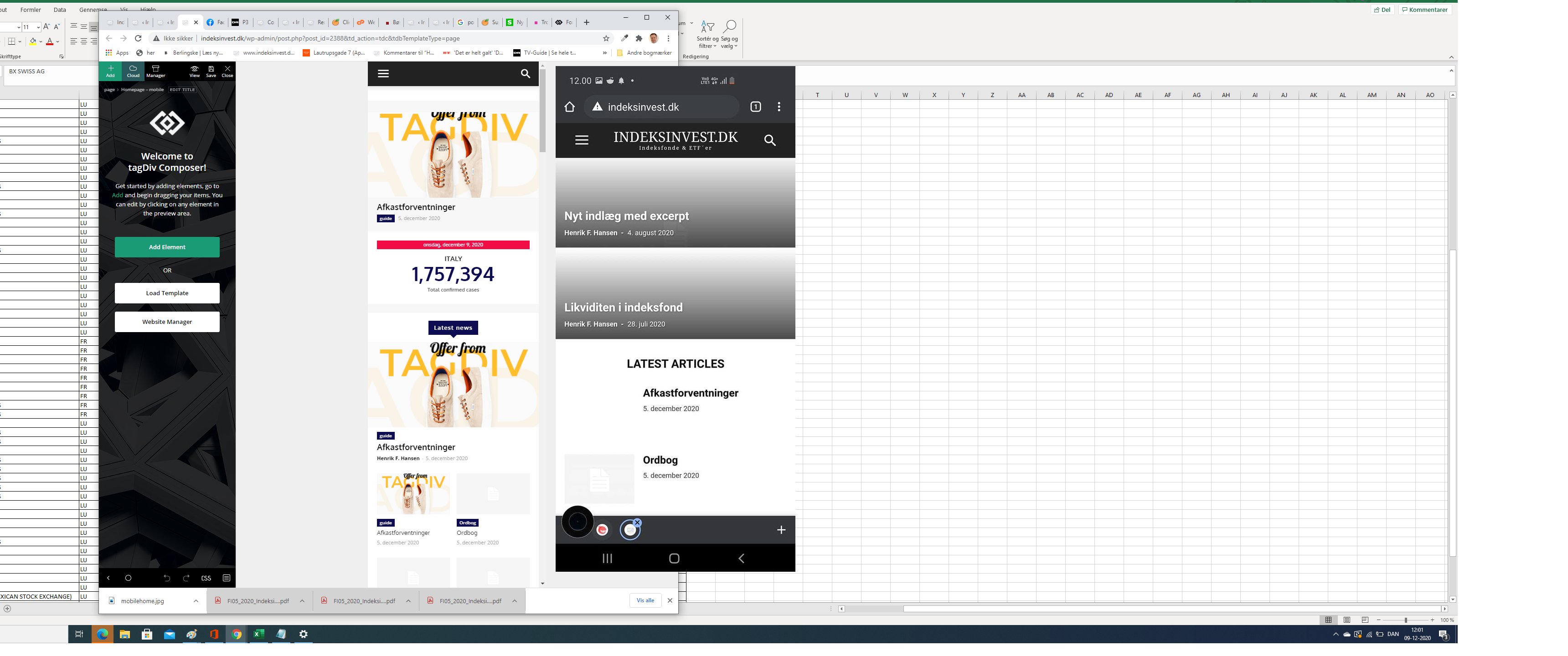
Apparently, my site on my mobile (indeksinvest.dk) looks quite different from I see in tagdiv Composer when I edit mobilpage home (see screenshot), I have tried to delele cache.
1. How can I make the site looks the same at mobiles as the mobile home page template in tagdiv Composer?
2. How can I change text logo font at mobile pages?
Vlad S Hello !
You will have to first start looking for a plugin conflict. please deactivate ALL plugins except tagDiv ones, also if you are using child theme or cache plugin, deactivate them, clear all cache and try again.
Also you can try and remove and re-install the tagDiv Composer plugin.
Let us know the results.
Thank you !
Vlad S Hello !
We do not have any built in caching option. Cache is used externally using a plugin which the user can choose.
Please provide a link to your website in order to inspect.
Vlad S Hello !
Yes, please turn that option on, clear your cache and try again.
Thank you !
 Patrick93
 Hello Amit,
thank you for your great work!
I read through your article (https://www.infophilic.com/get-almost-100-pagespeed-newspaper-theme/) and did a few things.
But I also have a few questions.
But first a question, why I came across this topic at all:
In the first miliseconds of the loading process of my website a different font flashes. This is extremely annoying. Do you know how to prevent this?
Look here: modusx.de (Screenshot: https://nimb.ws/TBdEAD)
1.) Have you ever tested WP fastest Cache? What is your experience with it? Especially compared to WP Super Cache.
2.) You say that Cloudflare can be used.
Is the free version useful here too?
3.) What is your experience with Gzip? Is it possible that Newspaper-Theme does not work with GZIP?
4.) By activating plugins my database has grown a lot. In my database there is a lot of data about plugins which I don’t use anymore. Does a large database damage the loading speed?
5.) A question about the part “Removing Font Awesome”. With the code snippet only the essential icons are loaded. But which icons are essential? All the ones I select in the theme?
6.) You write that there is also a funcion.php for the mobile theme.
Is it possible to overwrite it with a child theme or do you have to add new entries after every update?
For example: Removing Emojis, Removing Font Awesome or Preload Newspaper fonts.
7.) There are several ways to add custom CSS.
Where do you think it makes the most sense? In the Theme Panel under Custom Code? Or rather under WordPress Design > Customizer?
I look forward to an answer from you.
Best regards
Patrick
 kibiribi
A new empty page.
When I opened and tried to import new selected template – it didn’t import.
No errors in console, no messages.
Watch video – https://drive.google.com/file/d/1-H9gjh4HSfGy1ejrFjochojWCut6OWIC/view?usp=sharing
I guess it’s not new version problem
Before new Template ver.10.3.9 I tried to do the same with ver. 10.3.8 – result the same.
Template update didn’t help me.
I tried to clear all time cache – didn’t help.
PC, browser was rebooted.
It’s very strange, there are no errors after button click.
Credentials were sent to support email.
Vlad S Hello !
You will have to first start looking for a plugin conflict. please deactivate ALL plugins except tagDiv ones, also if you are using child theme or cache plugin, deactivate them, clear all cache and try again.
Also you can try and remove and re-install the tagDiv Composer plugin.
Let us know the results.
Thank you !
 norbiQue
 hi,
did you clear your cache?
 tttechnology
I have selected to use my sidebar in the theme panel but it still shows the default template side bar, i have cleared cache etc. but no luck.
Can anyone advise?
Link: https://www.tttechnology.co.uk/google-pixel-5-pro-with-in-display-camera/
 Bettina
 Hello!
As I know the 500 errors are internal server errors, you’ll need to make some investigations, below are some links that hope it will help you:
– https://www.wpbeginner.com/wp-tutorials/how-to-fix-the-internal-server-error-in-wordpress/
– https://wordpress.stackexchange.com/questions/312292/how-to-stop-a-500-error-on-the-wordpress-theme-folder
– https://wordpress.org/support/topic/google-search-console-reporting-a-500-error-on-my-theme-folder/
-> https://forum.tagdiv.com/topic/wp-supercache-causes-500-internal-error-and-cannot-deactivate/
Also make sure that all theme settings are as in our guide ->
– https://forum.tagdiv.com/requirements-for-newspaper/
and please increase all requirements that are lower, and follow all steps.
Let me know the results!
Thank you!
 ChandlerBing1985
 Hi Calin,
thank you for the reply. I tried to activate WP Super Cache. I would pre-load wp-content/themes/Newspaper/images/icons/newspaper.woff (also for mobile) and I found a simply guide to do it (https://www.infophilic.com/get-almost-100-pagespeed-newspaper-theme/#setup-cloudflare). It recommends to use Wp-Rocket for this option but when i tried to activate creates a crash with WP Super Cache. Is there another solution to pre-load that font or any other solution for increase the score on Page Speed Insight?
Thank u so much!
 Redlemon
Header:
Although I have opened Website Manager and set Mobile Menu Sticky as enabled, and saved, when I open the website on an actual mobile device and scroll down, the sticky header does not appear. Inside the TDC environment, when previewing the website on a mobile device, the sticky header is there and functions as set and expected.
Footer:
I open TDC and select the footer row. Then, right between the settings tabs and the search box, I click on the mobile icon to edit those settings. The styles and settings which are displayed in the TDC preview window do not represent the ones applied in reality. Yes, I’ve saved the changes, cleared the cache, minified JS and CSS versions, and even browsed the page from a new and single incognito session from an actual mobile device, and in chrome’s and firefox’s dev tools. For once, the background color is different (light blue in TDC vs Black in reality), and then the structure of the footer is different also.
In website manager, under the footer section, I only see two options; Global Template and/or No Footer. Currently applied I have the Footer Template – Default PRO.
Then in cloud templates I open the Footer Template – Default PRO to edit it, but “Edit with Tag Div Composer” button is not available. In the textarea I can only see gibberish, which I know is not gibberish really, but a nightmare to work with at the least.
Lastly, in the admin pages, under Newspaper > Theme panel > Footer, I see no other option other than the CLOUD LIBRARY TEMPLATE section, but the Footer Settings or any other section besides the CLOUD LIBRARY TEMPLATE, as described here ( https://forum.tagdiv.com/footer-templates/ ), are nowhere to be seen.
The theme version is 10.3.7
Please advise as you see appropriate.
Vlad S Hello !
You will have to first start looking for a plugin conflict. please deactivate ALL plugins except tagDiv ones, also if you are using child theme or cache plugin, deactivate them, clear all cache and try again.
Also you can try and remove and re-install the tagDiv Composer plugin.
Let us know the results.
Thank you !
 gc2522734
Hello sir, after the new update we assume you are using theme cache for fast speed website. But it worst for a news publishers. Now Post taking more time to come in news sitemap. Also post views in dashboard not working, always showing zero views (see reference- https://prntscr.com/vy1xts). Please tell me how to disable the cache and not effect our site performance. Because its destroying our website. Google select only trending topic for google discover. So if post comes late in sitemap then google deny the artcle to show in discover. Please roll out new update to solve the issue and tell me now how to disable the cache.
Bettina Hello !
You will have to first start looking for a plugin conflict.
Please deactivate ALL plugins except tagDiv ones, also if you are using child theme or cache plugin, deactivate them, clear all cache and try again.
If this problem is not solved after that, then we need to take a look and see what happened there.
Please contact us via email at contact@tagdiv.com and provide the following:
– admin url and credentials
– a link to this topic in order to identify you
Our team will take a look !
Thank you !
Vlad S Hello !
You will have to first start looking for a plugin conflict. please deactivate ALL plugins except tagDiv ones, also if you are using child theme or cache plugin, deactivate them, clear all cache and try again.
Also you can try and remove and re-install the tagDiv Composer plugin.
Let us know the results.
Thank you !
Bettina Hello!
You will have to first start looking for a plugin conflict.
Please deactivate ALL plugins except tagDiv ones, also if you are using child theme or cache plugin, deactivate them, clear all cache and try again.
If this problem is not solved after that, then we need to take a look and see what happened there.
Please contact us via email at contact@tagdiv.com and provide the following:
– admin url and credentials
– a link to this topic in order to identify you
Our team will take a look !
Thank you !
Vlad S Hello !
You will have to first start looking for a plugin conflict. please deactivate ALL plugins except tagDiv ones, also if you are using child theme or cache plugin, deactivate them, clear all cache and try again.
Also you can try and remove and re-install the tagDiv Composer plugin.
Let us know the results.
Thank you !