
- NewspaperCloudflare (CDN)
- NewspaperWP Rocket and Newspaper Theme: Optimization Guide
- NewspaperUsing the Theme Translations with WPML
- NewspaperRequirements for Newspaper
- NewspaperHow to Make the Site Faster
 Bettina
 Hello @chriswp!
The tagdiv Composer plugin is a bigger one with a lot of functions and settings. Our developers tried to improve it more and more and optimize it as much as they could in every update.
There are a lot of factors which can make your site slow. Make sure you use only some templates and fewer functionalities and options.
Some factors which you need to take into account are:
External factors: server speed, if you are using CDN or not, the external resources loaded by your website like ads, fonts, tracking scripts like Facebook Pixel, Google Analytics, Twitter analytics, Hotjar and so on.
Internal factors: the number of elements on the page, image size, image formats, if you are using mobile optimized layouts, console errors, if you are using the Standard Pack plugin or not, if you are using the PRO demo or a standard one.
Some starting points to improve your website page speed are here:
– https://forum.tagdiv.com/topic/optimize-script-to-improve-site-speed/
– https://forum.tagdiv.com/topic/a-few-tips-for-newspaper-x-speed-high-cpu-usage-issues/
– https://www.xtechkr.com/optimize-newspaper-theme/
– https://forum.tagdiv.com/how-to-make-the-site-faster/
– https://forum.tagdiv.com/topic/score-100100-pagespeed-with-newspaper-wordpress-theme/
– https://www.infophilic.com/get-almost-100-pagespeed-newspaper-theme/
– https://developers.google.com/speed/docs/insights/v5/about
– https://www.youtube.com/watch?v=tnkVapqhIHc
Please check the tutorials from those platforms, GT metrix and Google Pagespeed Insights, and I’m sure you can increase the page speed.
Please note that page speed is not covered by the support team: https://forum.tagdiv.com/newspaper-theme-support/
Thank you for understanding!
 chriswp
Hi there
I have been using your theme for many years on several projects. I am worried that the speed issues are never addressed. My site 7.dk is slower than ever on mobile. It is hosted on Kinsta – supposedly one of the best hosts out there. It uses CDN, and I have optimized the site using Imagify for the images, WP Rocket for the caching and in general I don’t have many plugins installed.
What to do? Any suggestions?
 Anamaria
 Hi,
For Cloudflare we have only this guide https://forum.tagdiv.com/cloudflare-cdn/
There are many optimization guides provided by our users here in the forum, some made by us; you could check some of them
– https://forum.tagdiv.com/cache-plugin-install-and-configure/
– https://forum.tagdiv.com/how-to-make-the-site-faster/
– https://forum.tagdiv.com/topic/high-number-of-ajax-request/
– https://www.infophilic.com/get-almost-100-pagespeed-newspaper-theme/
– https://forum.tagdiv.com/topic/score-100100-pagespeed-with-newspaper-wordpress-theme/
– https://www.andraware.com/wp-rocket-for-newspaper-theme/
– https://spraythemes.com/newspaper-theme/how-to-speed-up-the-newspaper-wordpress-theme-using-wp-rocket/
– https://forum.tagdiv.com/topic/page-speed-guide-for-2023-beginners-and-advanced/
– https://forum.tagdiv.com/topic/newspaper-theme-speedify-your-website/
– https://forum.tagdiv.com/topic/tutorial-chriss-custom-optimizations-for-functions-php-etc/
– https://forum.tagdiv.com/cloudflare-cdn/
– https://forum.tagdiv.com/topic/theme-causing-high-cpu-usage-2/
– https://forum.tagdiv.com/topic/sql-querys-high-cpu/
– https://forum.tagdiv.com/topic/newspaper-theme-slow-to-respond/
– https://premium.wpmudev.org/blog/optimizing-your-wordpress-database-a-complete-guide/
– https://underconstructionpage.com/optimize-wordpress-database/
– https://crunchify.com/better-optimize-wordpress-database-all-in-one-guide/
Also, pagespeed is not covered by support -> https://forum.tagdiv.com/newspaper-theme-support/
Thank you!
 editorepgn
Hi. When sharing a post from our site to Twitter using the Share Buttons, the image (or card) does not display on the share. The share will display the post title, links and our @, but no image. We have the Yoast plugin and have the Twitter setting enabled and ‘Add Open Graph meta data’ on Facebook enabled. Facebook shares work properly with the image. All our meta tags, both twitter and og: appear to be correct.
We also have the plugins: WP to Buffer Pro, WP Fastest Cache, Really Simple SSL. We have tried deactivating one at a time, but did not solve the problem. We tried disabling our CDN, and checked our SSL via Qualys SSL Labs. When using the Twitter Validator, we receive the message: ERROR: Fetching the page failed because other errors.
We tried to disable the share buttons from the Theme Panel/Social/Social Share, but the buttons still appear on the post pages. We were going to install another share plugin just to test, but cannot get the Share buttons off the posts.
Any suggestions for other things to check.
website: https://epgn.com
Thank you.
Anamaria Hi,
For Cloudflare we have only this guide https://forum.tagdiv.com/cloudflare-cdn/
There are many optimization guides provided by our users here in the forum, some made by us; you could check some of them
– https://forum.tagdiv.com/cache-plugin-install-and-configure/
– https://forum.tagdiv.com/how-to-make-the-site-faster/
– https://forum.tagdiv.com/topic/high-number-of-ajax-request/
– https://www.infophilic.com/get-almost-100-pagespeed-newspaper-theme/
– https://forum.tagdiv.com/topic/score-100100-pagespeed-with-newspaper-wordpress-theme/
– https://www.andraware.com/wp-rocket-for-newspaper-theme/
– https://spraythemes.com/newspaper-theme/how-to-speed-up-the-newspaper-wordpress-theme-using-wp-rocket/
– https://forum.tagdiv.com/topic/page-speed-guide-for-2023-beginners-and-advanced/
– https://forum.tagdiv.com/topic/newspaper-theme-speedify-your-website/
– https://forum.tagdiv.com/topic/tutorial-chriss-custom-optimizations-for-functions-php-etc/
– https://forum.tagdiv.com/cloudflare-cdn/
– https://forum.tagdiv.com/topic/theme-causing-high-cpu-usage-2/
– https://forum.tagdiv.com/topic/sql-querys-high-cpu/
– https://forum.tagdiv.com/topic/newspaper-theme-slow-to-respond/
– https://premium.wpmudev.org/blog/optimizing-your-wordpress-database-a-complete-guide/
– https://underconstructionpage.com/optimize-wordpress-database/
– https://crunchify.com/better-optimize-wordpress-database-all-in-one-guide/
Also, pagespeed is not covered by support -> https://forum.tagdiv.com/newspaper-theme-support/
Thank you!
Anamaria Hi,
There are many optimization guides provided by our users here in the forum, some made by us; you could check some of them
– https://forum.tagdiv.com/cache-plugin-install-and-configure/
– https://forum.tagdiv.com/how-to-make-the-site-faster/
– https://forum.tagdiv.com/topic/high-number-of-ajax-request/
– https://www.infophilic.com/get-almost-100-pagespeed-newspaper-theme/
– https://forum.tagdiv.com/topic/score-100100-pagespeed-with-newspaper-wordpress-theme/
– https://www.andraware.com/wp-rocket-for-newspaper-theme/
– https://spraythemes.com/newspaper-theme/how-to-speed-up-the-newspaper-wordpress-theme-using-wp-rocket/
– https://forum.tagdiv.com/topic/page-speed-guide-for-2023-beginners-and-advanced/
– https://forum.tagdiv.com/topic/newspaper-theme-speedify-your-website/
– https://forum.tagdiv.com/topic/tutorial-chriss-custom-optimizations-for-functions-php-etc/
– https://forum.tagdiv.com/cloudflare-cdn/
– https://forum.tagdiv.com/topic/theme-causing-high-cpu-usage-2/
– https://forum.tagdiv.com/topic/sql-querys-high-cpu/
– https://forum.tagdiv.com/topic/newspaper-theme-slow-to-respond/
– https://premium.wpmudev.org/blog/optimizing-your-wordpress-database-a-complete-guide/
– https://underconstructionpage.com/optimize-wordpress-database/
– https://crunchify.com/better-optimize-wordpress-database-all-in-one-guide/
Also, pagespeed is not covered by support -> https://forum.tagdiv.com/newspaper-theme-support/
Thank you!
 drvarun5179
 Mobile theme or mobile theme plugin?
For mobile theme, you have to make your own customisations.
For mobile theme plugin, this is possible with knowledge of coding.
In my opinion, it is better the mobile theme plugin is left as it is. The plugin has huge speed bonus if combined with a cache plugin and cdn (clodufare for me).
And yes, they did add new feature to mobile theme plugin. The hamburger menu now has dropdown menus finally. ?
 ribhusingh
 Purging the CDN did the job. Thank you.
 Calin
Calin Hi,
Does this problem appear only when you are not log in? If so then it can be from a cache plugin.
Also, I checked your website now and this is displaying only shortcodes on the desktop – https://i.imgur.com/xugcMtw.png – https://prnt.sc/xDcp0jNzl4lZ if you are using CDN please purge it.
Thank you!
Calin Hi juanjobasc you can use the Micha suggestion, it should work fine.
Other settings that can be done are to set the option only on amp in the mobile theme – https://i.imgur.com/VrJ4iPw.png and ask google to reindex your website (also clear all ache, object cache, purge CDN), after your website is reindexed you can also disable the amp plugin.
Thank you!
Calin Hi,
For the cache plugins, when you use the mobile theme plugin you need to enable in cache plugin the cache for mobile devices – https://i.imgur.com/YkuXcG8.png – https://i.imgur.com/7WTiZN7.png
Now about the CDN, the mobile theme is not working with the CDN, because this by default recognizes only the responsive version. There is an extension that should be working, but this is not free – https://developers.cloudflare.com/automatic-platform-optimization/reference/cache-device-type/ – https://prnt.sc/IGADrkzKOvay this normally should work with the mobile theme too.
Thank you!
 Kami74
Hello,
I bought the template yesterday and it’s my first time using wordpress !
I would like to know how can i delete these type of elements :

I can delete the differents elements inside of it, but i can’t delete the element itself (the whole blue one)
Thank you for your future answers!
 Lalit
LalitHello, I am trying to fix an issue related to newspaper’s mobile theme plugin and Cloudflare for 10-15 days but I am failed to fix. Finally, I have to create this ticket.
I have installed Wp super cache and setup as per your guide available on https://forum.tagdiv.com/cache-plugin-install-and-configure/ And, added my site over Cloudflare by following your guide – https://forum.tagdiv.com/cloudflare-cdn/ but having some issues with the mobile theme plugin.
My site sometimes loads the desktop version on mobile devices and vice versa sometimes loads the mobile version on desktop PC.
But, When I pause Cloudflare cache or put it on development mode, it works without any problem. On mobile, the mobile theme plugin works, and the full-site works on desktop PC.
I have tried to change many settings in Cloudflare to fix the problem but nothing helped.
I thought, it may cause due to wp super cache so I installed wp-rocket cache plugin but the same problem still facing while using the cloudflare.
Please see the following video and help me to know why newspaper mobile theme is not working with cloudflare cache.
The following video will show you wp-rocket plugin and cloudflare setting and describe the problem
https://drive.google.com/file/d/1ON9lUJh4NxHlbjsV4pkO0bZ9CFDdA0bl/view?usp=sharing
My website URL is same as showing in the above video
Mobile screenshot: https://drive.google.com/file/d/1gz6mHIOU8JtNU9MeCiTfoQWU57QOEPOn/view?usp=sharing
Some info about my site
Activated plugins are:
Akismet Anti-Spam
AMP
OneSignal Push Notifications
Super Progressive Web Apps
tagDiv Cloud Library
tagDiv Composer
tagDiv Mobile Theme
tagDiv Newsletter
WP Mail SMTP
WP Rocket
Yoast SEO
Some info about my hosting server
1) File are hosted on Digital ocean server
2) Server – Ubuntu 22.2, Nginx, Mysql, PHP 8.2
3) Website – https://geeksramp.com
4) All plugins and newspaper theme are updated
I have explored many topics on the tagdiv forum but none helped. moreover, I have made no custom code to change the layout of mobile theme plugin.
Thanking you!
Calin Hi,
Please understand that the support is not 24/7 but only from Monday to Friday during the time interval 8:00 AM – 17:00 PM (GMT+2).
Also, please understand that we try our best to help you with everything we can, even if your soup ended on 2018-12-26.
The fact that your site has a different version than the one on the desktop can only mean that you used the mobile theme plugin and/or amp (one of the two or both).
If you use amp or have used am, you must reload your site on google (obviously after the amp is disabled, you have deleted any cache, object cache, purged CDN….).
And after the site is re-indexed it should be ok. If only mobile theme is used, just disable it and delete all the cache, and object cache…
Thank you for your understanding!
Anamaria Hi Armand,
Happy new year, too.
For the problem with the author links, maybe the author archives are disabled in the Yoast plugin; if they are, author links will be redirected to the homepage. Check if that is the case: http://prntscr.com/mbwwuk -> https://forum.tagdiv.com/general-options-may-interfere-newspaper-theme/ after that clear all cache, purge CDN(if you are using) and check the results.
For downloading the CSV, the screenshot doesn’t work; also, ensure that you don’t have a plugin conflict.
Thank you!
drvarun5179Hi, I released my Page speed guide for the Newspaper theme back in 2017. This is the 2023 version for the same.
My Website: https://medicforyou.in
Current Stats:
1. Pagespeed Mobile
2. Pagespeed Desktop
3. GTMetrix
4. Pingdom
Resources used:
Plugins
1. Ad Inserter
2. Akismet
3. Contact Form 7
4. Converter for Media
5. Formidable Forms
6. Formidable Forms Pro (Paid)
7. Inline Related Posts
8. Jetpack
9. LuckyWP Table of Contents
10. RankMath (free version)
11. Regenerate Thumbnails
12. tagDIV Cloud Library
13. tagDIV Composer
14. tagDIV Mobile Theme
15. tagDIV Social Counter
16. Wordfence Security
17. WP Rocket
18. wpDiscuz
CDN– Only Cloudfare Free with tweaks and rules
Hosting– GoDaddy (sucks but will switch later)
Plugin Based Tweaks Worth Mentioning
1. Ad Inserter
Newspaper mobile does not provide extended in-article ads. This is why I switched to Ad-inserter to apply rules to mobile and desktop versions. Works like a charm.
4. Converter for Media
Free webP conversion recommended by Google. Lightweight and also converts your previously uploaded files to webP as well.
6. Formidable Forms Pro- Paid
I bought this to have a quiz and calculator. To be honest, I spent more than 30 hours but still could not learn the conditional tags and essential formatting. Regardless, this is broken on the mobile theme plugin and has a drastic speed impact on the page. Definitely not recommended.
8. Jetpack
I am still to figure out what is the role of Jetpack in SEO and speed. Anyways, I have kept it to not destroy my existing SEO.
11. Regenerate thumbnails
I would recommend regenerating all thumbnails at a time when your visitors are not active on the website. It has some memory usage and should be done in a free environment.
MOST IMPORTANT
I browsed through forums to find that TD Standard Pack is not an essential plugin if you know how to develop your theme properly using TD Composer.
I was already using pre-installed templates. So, I simply deactivated the plugin to check if any pages were broken. Since there were none, I deleted the plugin.
It has huge speed impact and I definitely recommend creating your own templates rather than relying on the easy way out. Additionally, I would recommend you start with a pre-built website, and start editing the following Cloud Templates:
14. tagDIV Mobile Theme
If you have to choose performance over quality, I’d recommend quickly installing this plugin. It is tempting to give your users a wonderful experience, but at what cost? Reduced speed only drops your visitors from search engines. Most of us are bloggers, meaning we rely on Google and Bing for our visitors (in long term). I’d recommend using it without caring for those beautiful blocks or glittering images.
16. Wordfence Security
If you are on a shared hosting like me and using Wordfence, I would suggest you enable performance tweaks.
17. WP Rocket
I used AutoOptimize and various other plugins to speedily my website. I did achieve results, but the “remove unused CSS” is beyond my scope. It requires hours of finding the CSS and deleting them. Even if you understand what I am saying, you are still bound to make mistakes.
I switched to WP Rocket a few months back. It cost me 59 USD for a year. What did I get? Here are tweaks that I was not able to achieve previously (the rest all can be achieved with free plugins):
18. WpDiscuz
The CSS files are annoying and I believe minifying CSS and loading
wpDiscuz> Settings> General Settings> Enable Use WordPress native AJAX functions and Minify JS and CSS Files to Optimize Page Loading Speed.
If you have not installed it yet, I highly recommend you don’t get lured by it. Stick to traditional Comments from WordPress itself. They won’t cost you any speed damage.
Cloudfare Optimizations
I would not go much into detail about this. But I will summarize what I have done:
1. Optimization Tab- Tick marked all options except AMP URL and Rocket Loader (only if you are using WP Rocket because it will break your search button and menu on mobile with a Newspaper theme).
2. Caching- Tickmarked all except Always Online and Development mode.
3. Rules- I have set two rules which make Cloudfare cache all contents on my website except my admin panel. You can set them using the following image, make sure you replace your website name with www or without www (and no HTTP or HTTPS) and in THE ORDER THEY ARE (ByPass at 1st, Cache everything at 2nd).
Image:
4. Scrape Shield- Tick marked all of the available features (3 in total).
Currently, my concerns revolve around the following:
I hope this guide helps you all. Please leave any feedback or queries. Best of luck fellas.
Anamaria Hi,
There are many optimization guides provided by our users here in the forum, some made by us; you could check some of them
– https://forum.tagdiv.com/cache-plugin-install-and-configure/
– https://forum.tagdiv.com/how-to-make-the-site-faster/
– https://forum.tagdiv.com/topic/high-number-of-ajax-request/
– https://www.infophilic.com/get-almost-100-pagespeed-newspaper-theme/
– https://forum.tagdiv.com/topic/score-100100-pagespeed-with-newspaper-wordpress-theme/
– https://www.andraware.com/wp-rocket-for-newspaper-theme/
– https://spraythemes.com/newspaper-theme/how-to-speed-up-the-newspaper-wordpress-theme-using-wp-rocket/
– https://forum.tagdiv.com/topic/newspaper-theme-speedify-your-website/
– https://forum.tagdiv.com/topic/tutorial-chriss-custom-optimizations-for-functions-php-etc/
– https://forum.tagdiv.com/cloudflare-cdn/
– https://forum.tagdiv.com/topic/theme-causing-high-cpu-usage-2/
– https://forum.tagdiv.com/topic/sql-querys-high-cpu/
– https://forum.tagdiv.com/topic/newspaper-theme-slow-to-respond/
– https://premium.wpmudev.org/blog/optimizing-your-wordpress-database-a-complete-guide/
– https://underconstructionpage.com/optimize-wordpress-database/
– https://crunchify.com/better-optimize-wordpress-database-all-in-one-guide/
Also, pagespeed is not covered by support -> https://forum.tagdiv.com/newspaper-theme-support/
Thank you!
Anamaria Hi,
Please check if you made the settings like in our guide -> https://forum.tagdiv.com/autoptimize-install-configuration/
There are many optimization guides provided by our users here in the forum, some made by us; you could check some of them
– https://forum.tagdiv.com/cache-plugin-install-and-configure/
– https://forum.tagdiv.com/how-to-make-the-site-faster/
– https://forum.tagdiv.com/topic/high-number-of-ajax-request/
– https://www.infophilic.com/get-almost-100-pagespeed-newspaper-theme/
– https://forum.tagdiv.com/topic/score-100100-pagespeed-with-newspaper-wordpress-theme/
– https://www.andraware.com/wp-rocket-for-newspaper-theme/
– https://spraythemes.com/newspaper-theme/how-to-speed-up-the-newspaper-wordpress-theme-using-wp-rocket/
– https://forum.tagdiv.com/topic/newspaper-theme-speedify-your-website/
– https://forum.tagdiv.com/topic/tutorial-chriss-custom-optimizations-for-functions-php-etc/
– https://forum.tagdiv.com/cloudflare-cdn/
– https://forum.tagdiv.com/topic/theme-causing-high-cpu-usage-2/
– https://forum.tagdiv.com/topic/sql-querys-high-cpu/
– https://forum.tagdiv.com/topic/newspaper-theme-slow-to-respond/
– https://premium.wpmudev.org/blog/optimizing-your-wordpress-database-a-complete-guide/
– https://underconstructionpage.com/optimize-wordpress-database/
– https://crunchify.com/better-optimize-wordpress-database-all-in-one-guide/
Maybe your hosting provider can provide some advice as well.
Thank you!
Bettina Hello!
If you use CDN, then check this topic: https://forum.tagdiv.com/cloudflare-cdn/
Please disable the Rocket Loader.
I hope that helps you!
Thank you!
 jpegjoe
I’ve switched to a different theme and don’t have this issue, but when I add any image to a post, I cannot use an ‘ or a – in the caption. When I do, it renders a funny number instead of the character.
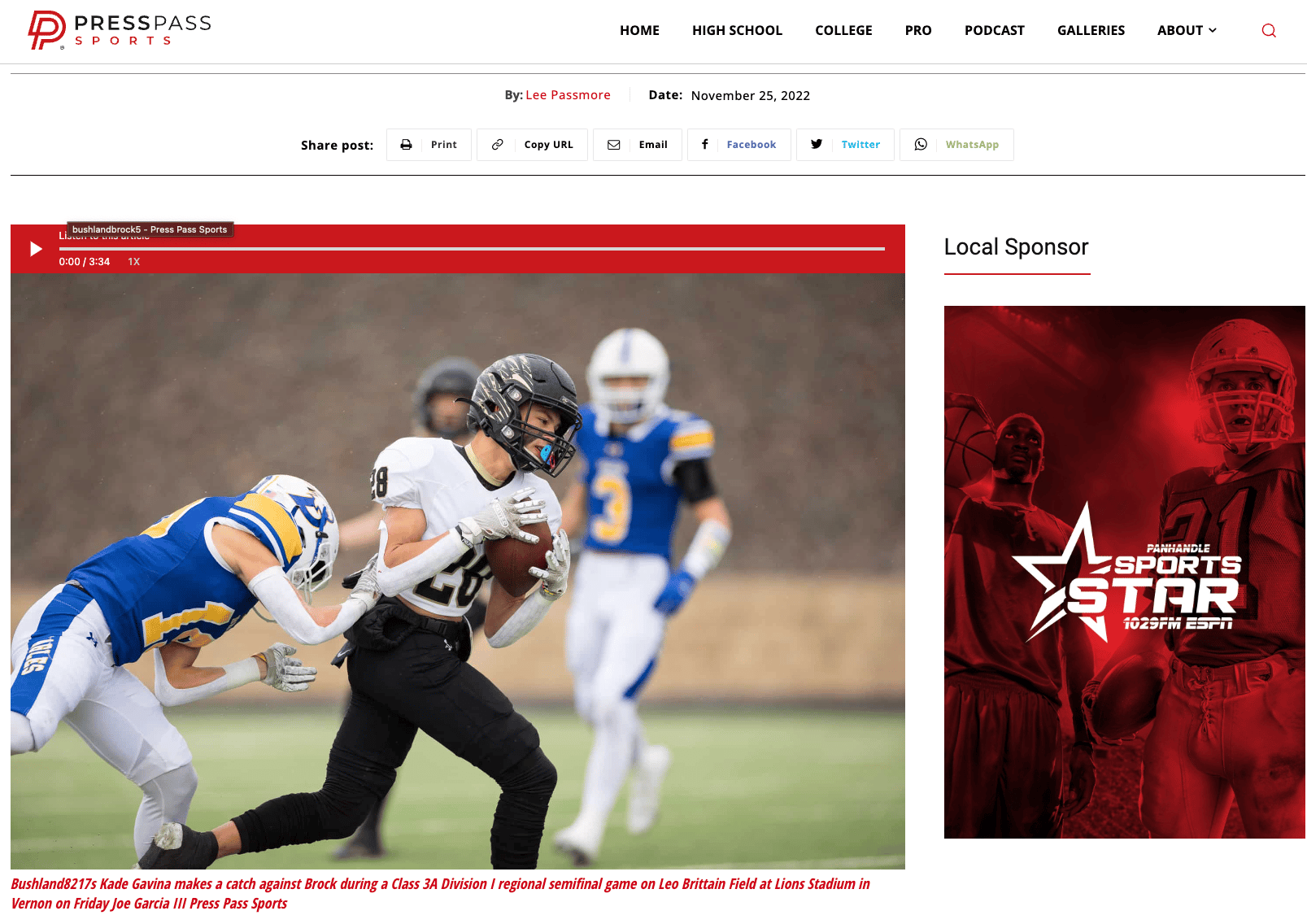
https://www.presspasssports.com/bushland-overwhelmed-in-second-half-rally-by-brock/
The caption on the story link above should render “Bushland’s Kade Gavina…”
The caption displays on the back-end editor correctly, but not on the public url when logged out.
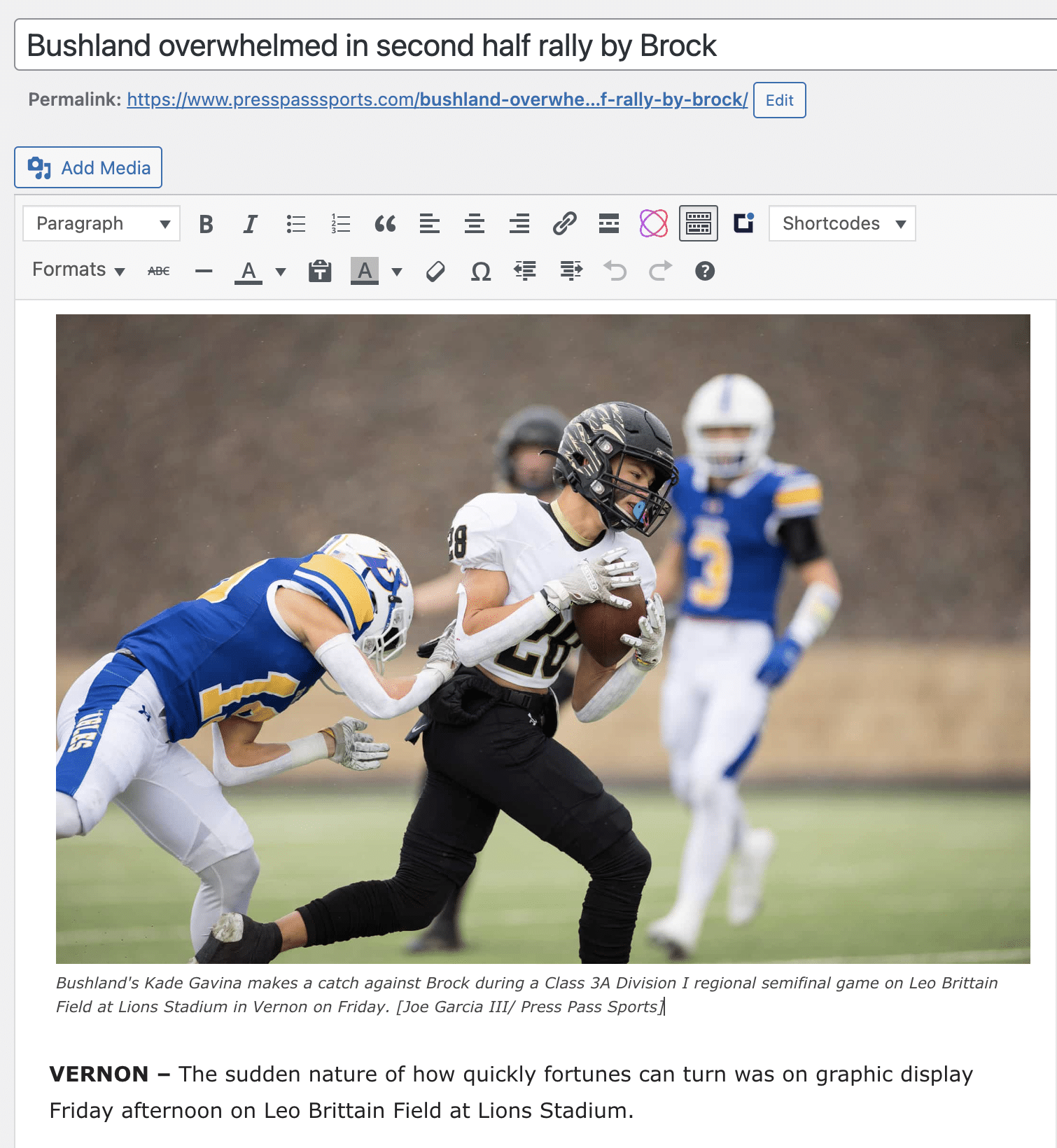
Anamaria Hi,
There are many optimization guides provided by our users here in the forum, some made by us; you could check some of them
– https://forum.tagdiv.com/cache-plugin-install-and-configure/
– https://forum.tagdiv.com/how-to-make-the-site-faster/
– https://forum.tagdiv.com/topic/high-number-of-ajax-request/
– https://www.infophilic.com/get-almost-100-pagespeed-newspaper-theme/
– https://forum.tagdiv.com/topic/score-100100-pagespeed-with-newspaper-wordpress-theme/
– https://www.andraware.com/wp-rocket-for-newspaper-theme/
– https://spraythemes.com/newspaper-theme/how-to-speed-up-the-newspaper-wordpress-theme-using-wp-rocket/
– https://forum.tagdiv.com/topic/newspaper-theme-speedify-your-website/
– https://forum.tagdiv.com/topic/tutorial-chriss-custom-optimizations-for-functions-php-etc/
– https://forum.tagdiv.com/cloudflare-cdn/
– https://forum.tagdiv.com/topic/theme-causing-high-cpu-usage-2/
– https://forum.tagdiv.com/topic/sql-querys-high-cpu/
– https://forum.tagdiv.com/topic/newspaper-theme-slow-to-respond/
– https://premium.wpmudev.org/blog/optimizing-your-wordpress-database-a-complete-guide/
– https://underconstructionpage.com/optimize-wordpress-database/
– https://crunchify.com/better-optimize-wordpress-database-all-in-one-guide/
Maybe your hosting provider can provide some advice as well.
Thank you!
Bettina Hello @swankyfella !
Check this guide: https://byteofdev.com/posts/speed-up-font-loading/
Theme requirements: https://forum.tagdiv.com/requirements-for-newspaper/
There are a lot of factors which can make your site slow. Make sure you use only some templates and fewer functionalities and options.
Some factors which you need to take into account are:
External factors: server speed, if you are using CDN or not, the external resources loaded by your website like ads, fonts, tracking scripts like Facebook Pixel, Google Analytics, Twitter analytics, Hotjar and so on.
Internal factors: the number of elements on the page, image size, image formats, if you are using mobile optimized layouts, console errors, if you are using the Standard Pack plugin or not, if you are using the PRO demo or a standard one.
Some starting points to improve your website page speed are here:
– https://forum.tagdiv.com/topic/optimize-script-to-improve-site-speed/
– https://forum.tagdiv.com/topic/a-few-tips-for-newspaper-x-speed-high-cpu-usage-issues/
– https://www.xtechkr.com/optimize-newspaper-theme/
– https://forum.tagdiv.com/how-to-make-the-site-faster/
Please note that page speed is not covered by the support team: https://forum.tagdiv.com/newspaper-theme-support/
Thank you for understanding!
 leoizzo82
Hello everyone,
I just installed DISQUS on my website a long time ago but give up because of a issue that the plugin was causing on it. Today I tried again and everything works fine at POST PAGE but DISQUS is messing with the HOMEPAGE. As you can see on attached images, when It’s active it changes the homepage to something completely different. Any ideas how to fix that?
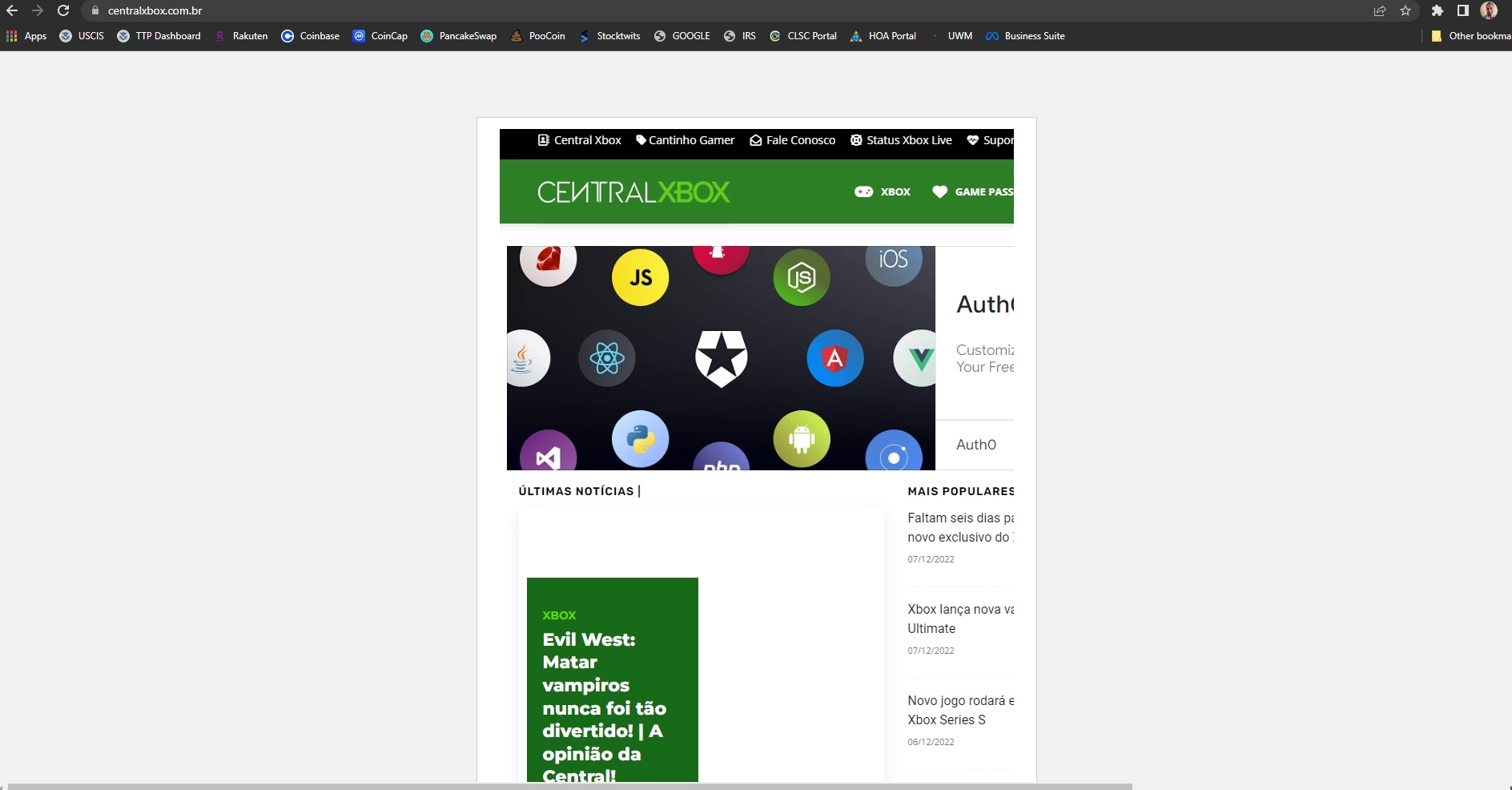
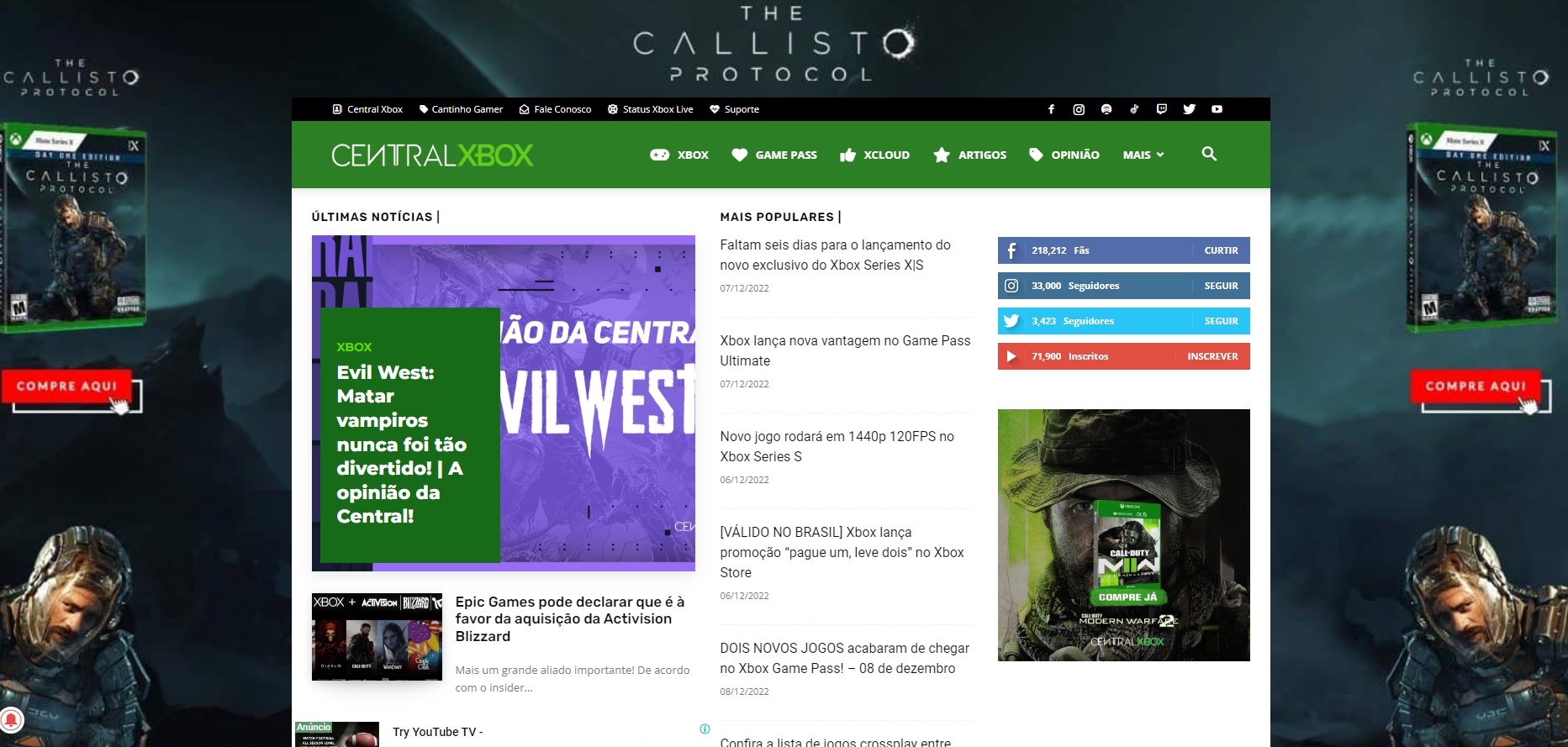
Wodpress 6.1.1 version
Newspaper 12.1.1
Bettina Hello Carlos!
You can have a faster website with any version how I said above.
There are a lot of factors which can make your site slow. Make sure you use only some templates and fewer functionalities and options.
Some factors which you need to take into account are:
External factors: server speed, if you are using CDN or not, the external resources loaded by your website like ads, fonts, tracking scripts like Facebook Pixel, Google Analytics, Twitter analytics, Hotjar and so on.
Internal factors: the number of elements on the page, image size, image formats, if you are using mobile optimized layouts, console errors, if you are using the Standard Pack plugin or not, if you are using the PRO demo or a standard one.
Unfortunately, no. Because the Mobile theme plugin overwrites the cloud templates.
Thank you!
Anamaria Hi,
Please make sure you have the latest version of the theme, 12.1.1
Please check if this code is missing from your .htaccess: https://www.screencast.com/t/iN0R93dD3p from our requirements https://forum.tagdiv.com/requirements-for-newspaper/ this requirement is not displayed in System Status.
Usually, after you set the code in .htaccess the WP editor works well.
Also, please check this guide about deny code https://forum.tagdiv.com/general-options-may-interfere-newspaper-theme/ ->
Please do a test using only tagDiv plugins and try to open the WP Editor.
Please check the console https://imgur.com/bRYwbvE if you have any errors when you try to open the wp editor, maybe is possible to be from the firewall or security module which blocks the admin-ajax.php request, which usually displays a 403 or 404 error.
If you don’t use a security plugin, please ask your host about this, maybe you have a security module that blocks this.
If you use a plugin like Wordfence please set it in learning mode.
Also, if you are using Cloudflare, please make sure that is set as in our guide https://forum.tagdiv.com/cloudflare-cdn/, you need to disable the Rocket Loader.
Thank you!



