
- NewspaperCloudflare (CDN)
- NewspaperWP Rocket and Newspaper Theme: Optimization Guide
- NewsmagUsing the theme translations together with WPML
- NewspaperUsing the Theme Translations with WPML
- NewsmagCustom Post Type Support
- NewsmagRequirements for Newsmag
- TutorialsWhat is Ajax preloading?
- NewspaperRequirements for Newspaper
- NewspaperHow to Make the Site Faster
 Lucian
 Hi 3gca,
I have checked your site and found it working properly except of this wp booster error present on category pages: http://screencast.com/t/1UhaO8Abn – this happens because the setting you currently use has been changed in the latest update. It’s enough to go to theme panel > categories and set the category template: http://screencast.com/t/JmI2zZx8xoV make sure you clear the cache, purge cdn file if you’re using and test again.
Please provide more details about other issues you experience after latest theme update and also make sure you empty all chase, purge cdn files if your using any and make sure your also test this without plugins, just theme’s plugins.
Please also provide more details about the ‘Malware’ warning from your website after theme update so we can look into it.
Please let us know!
Thanks for the message!
 PatWire
 I also ran previous sites through MaxCDN and Cloudflare – both paid for about $29 per month – I use neither now no cache plugin even and have lost 1 second. For my audience this is fine. So it’s even paid for itself 10 times over.
I hate to say this as many disagree but GoDaddy Managed WordPress as a host has been awesome and also contributed to good speeds, cache at host and backups and staging sites. But will probably have to move to private soon if traffic keeps rising ?
 Bogdan B.
 Hello,
I have checked your site and you seem to have a redirect on your links:
http://screencast.com/t/2fcWJJ6IsP , https://en.wikipedia.org/wiki/HTTP_301
Please try to disable all plugins except visual composer, clear your cache and purge your files if you use CDN.
Thank you.
Bogdan B. Hello Marek,
Our theme was tested with all versions of IE from 8 to 11. You can check our demo: http://demo.tagdiv.com/newspaper/ . There you will see the default state of the theme and you can inspect it yourself on IE 8 9 and 10.
I have checked your site and it seems to have some sort of interference.
Please disable all your plugins except of Visual Composer to make sure that it is not a plugin conflict, also clear cache and purge your files if you use CDN. Let me know if you still have this issue afterwards.
Thank you.
Bogdan B. Hello ferkof,
We recommend using WP Super Cache with its default settings, as this is the setting in witch the plugin was tested. Try reverting your settings to their default, then disable all other plugins except visual composer, clear your cache and purge your files if using CDN.
If the problem persists send us a link to your site so we can better identify the problem
Thank you
 Alin [tagDiv]
 Hi nasosrogas,
I cannot access your site – http://screencast.com/t/0mOvxD8rNY it seems to be in the maintenance mode.
Please also disable all your plugins except of Visual Composer to make sure that it is not a plugin conflict, also clear cache and purge your files if you use CDN. Let me know if you still have this issue and when I can access your site to take a look.
Thanks!
 gfran5
 I noticed in the speedbooster file, it is using version 1.11.1 from google instead of the local ones… in this article (http://encosia.com/3-reasons-why-you-should-let-google-host-jquery-for-you/) it mentions you should set the google cdn to fallback to the local files if the CDN doesn’t load or isn’t allowed in that country..
this is the code i am using:
function wel_adding_scripts() {
wp_deregister_script(‘jquery’);
wp_register_script(‘jquery’, ‘https://ajax.googleapis.com/ajax/libs/jquery/1.11.3/jquery.min.js’, ”, ‘1.11.3’, true);
wp_enqueue_script(‘jquery’);
}
add_action( ‘wp_enqueue_scripts’, ‘wel_adding_scripts’ );
Do you know how i could setup a fallback method?
 simchris
 You have to add a CORS instruction at your CDN for “cross domain” loading of fonts.
so you need to add this to your htaccess setting at your CDN:
# Apache config
<FilesMatch ".(eot|ttf|otf|woff)">
    Header set Access-Control-Allow-Origin "*"
</FilesMatch>
nginx
location ~* \.(eot|otf|ttf|woff)$ {
    add_header Access-Control-Allow-Origin *;
}
See the support for your CDN on how to do this.
Alternately, you can load the fonts locally for the icons.
Hope that helped. See FAQs for your CDN as they should have help on this.
-
This reply was modified 11 years by
simchris.
 pmerlihan
[Sat Sep 12 09:53:53.204235 2015] [:error] [pid 11570] [client 66.249.65.187:62362] PHP Fatal error: Call to undefined function get_header() in /nas/wp/www/cluster-40900/xtra/wp-content/themes/Newspaper/index.php on line 6
I just put my site live yesterday at observerxtra.com
Site worked great except for a few hiccups when I launched the CDN through wpengine.com. This morning the fonts for the icons and social media have either boxes or asian characters. The error posted above came up in the logs. I’m hoping someone has a solution for me. I’m not super technically savvy. I read about solutions regarding adding code to htaccess — this apparently is a known issue. Could someone be more specific as to what and where to put new code.
Thanks in advance
Pat
Alin [tagDiv] Hi,
Please disable all your plugins except of Visual Composer, clear cache and purege your files if you use CDN, then check if you still have this issue. Also it could be a host issue, it may block the access to the admin-ajax.php file, please check the browser console for errors while the “save settings” process it running. If this is the case you have to contact the host administrator and inform him about this.
Thanks!
 Andrei L.
 Hi
There is no ideal size for the feature images but in order to fit the thumb container it should have at least the sizes of thumb’s container, because WordPress doesn’t enlarges images. If you already use bigger images and still have issues with them, try to clear all caches purge cdn files also deactivate the plugins, leave just Visual Composer active, and make sure you regenerated the thumbs after theme’s update, then test again.
Let me know how it goes and if the problem persist please send an email at contact@tagdiv.com with your sites login details and we will inspect this issue, also include a link to this topic.
Thanks!
Alin [tagDiv] Hi,
I have checked your site and you have some errors in the console – http://screencast.com/t/HNR4L7tm
From what version did you updated? Version 4 of the theme? Please make sure that you update the theme properly using this guide – https://forum.tagdiv.com/how-to-update-the-theme-2/ Always make a full backup of your site. Also update the plugins that come with the theme files form the /plugins folder.
If the issue persist please disable all your plugins except of Visual Composer, clear cache and purge your files if you use CDN. After this disable CDN and all css/js minifications.
Thanks!
 Afterglow
Hello,
Where can I find the “new big grids” display option for the homepage in version 2.2, which I loaded to my pavlikeni.com site? I am talking about the 2 large images on top of 3 smaller ones, which you show on the image below.
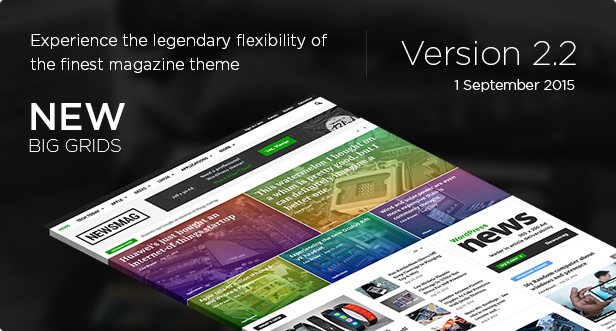
Thanks,
Peter
Alin [tagDiv] Hi,
Please check this also without any plugins active except of Visual Composer, clear cache and purge you files if you use CDN. Then disable any js/css minification(it may cause some issues) and also the CDN.
Create a test page, add a block with this kind of sort order and see how it goes.
I have checked this again on my side and did not found any issues.
Thanks!
Andrei L. Hi
Please make sure you clearer all caches, purge the cdn files, also deactivate all plugins and test again. Also try to save the permalinks: http://screencast.com/t/OxdrL6aat You can test this with a default WP theme.
Let me know how it goes and if you still have this issue send an email at contact@tagdiv.com and provide wp-access and we will check this issue.
Thanks!
 doucare1971
 I think I am going to take off Cloudflare for my website since it still has not a massive amount of visitors still. So it won’t hurt it too much without Cloudflare. Just use the cache plugin until I start getting a lot more visitors and sluggish website then go back to Cloudflare or if I have good income then move to better CDN.
Andrei L. Hi
The current theme’s version it’s tested with Visual Composer plugin and works fine. Also I’ve checked your site and noticed that you’re using a very old version of the theme, so my recommendation it’s to update it at the current version which is V 2.2 available on themeforest. Before start the update please do a full backup to your database: https://codex.wordpress.org/Backing_Up_Your_Database Also make sure you clear all caches purge cdn files if you’re using and update the plugins from the package.
Notice that if you made any customization in theme’s files will be lost, also it’s possible that some widgets must be recreated.
If you still need assistance on this please send an email at contact@tagdiv.com and provide wp-access, and we will get back with an answer as soon as possible.
Thanks!
 femaleintel
Hello,
I love the theme update! It looks phenomenal.
I was wondering how I can customize the default video player which is used on the Newspaper theme. Rather than having it use the Vimeo player, I have a Vimeo Pro account which gives me the file URL location and allows me to embed videos into my own player.
For that reason, I have JW Player Ads Edition, which allows me to monetize. Right now the only way to get videos to show up in their specific position is if it’s strictly a Vimeo URL. Since I’d like to use the pre-roll VAST tags I have, I was wondering what I need to edit (where to begin, what file it’s found under, etc) so that I can have JW Player V6 Ads Edition be my video player rather than the one Vimeo provides.
Vimeo Pro allows users to not only embed videos, but to directly embed the files which change to a mobile format or downgrade quality based on connection speed for you (acting as a $200 a year CDN, saving me $6,000 a month at least).
Where do I go about editing how a video is pulled? Ideally, if I could paste in the url to my video on Vimeo / YouTube area, and run the system through there, where would I edit this file and would it be best to use a child theme to direct this through?
Thanks & Fantastic theme!
 Daniel
Hi!
I just upgraded to the last version of the theme, and suddenly it seems that my pictures takes forever to load?
Example:
http://www.vitamail.no/dreamwell/sover-du-darlig-da-kan-du-ha-mangel-pa-magnesium/
When I enter the page, the site loads fast (Wpengine, CDN enabled) – but the pictures wait 3-4 seconds and then suddenly all the pictures appear at once.
Anyone have any suggestions?
 Circus Bazaar
 Hi Andrei,
See link to staging site.
http://circus.staging.wpengine.com
Clearing the cache and cdn etc is an impossibility in staging.
I have deactivated all plugins except for.
Envato Toolkit
TagDiv Social counter
WPBakery Visual Composer
You will see the issue there.
Shane
Andrei L. Hi
I’ve checked your site and works fine on mobile devices now: http://screencast.com/t/OYlr23xQku also the theme’s version that you’re using it’s 2.0 not 2.2: http://screencast.com/t/VlmWd9PS Regarding the update process, please make sure you clear all caches, purge the cdn files if you’re using, also deactivate all plugins, except Visual Composer and test again. Make sure you follow this update guide: https://forum.tagdiv.com/how-to-update-theme/
Let me know how it goes and if you still need assistance on this provide more details!
Thanks!
Andrei L. Hi
I’ve tested the current theme’s version (V 2.2) and works fine after update. Try to clear the cache, purge cdn file if you’re using and test again. If the problem persist so please provide more details or a screen that point the issue so I can inspect it. You can also try this without any plugins, leave just Visual Composer active.
Thanks!
-
This reply was modified 11 years by Andrei L..
Alin [tagDiv] Hi @luxelifeatl,
Please check our documentation to see how you can add a background image for your site – https://forum.tagdiv.com/background-introduction/ Also you can add a background image/color for each category – http://screencast.com/t/WS6ffcdNIdNl The articles from that specific category inherit that background.
Please provide more details if this is not what you mean. Also you can install the theme’ demos to make an idea about this and please read documentation.
Thanks!
 Steven
 You keep using these so called plugins that messing up the theme,that “wp-optimize-by-xtraffic” is no good..
Here is a plugin that works great with the theme and do a good job i’m also using it…
Merge + Minify + Refresh plugin it’s the best right now since Cf RocketLoader don’t work well with the theme..I still use Cf for the CDN but nothing to optimize my site from there…
Find it here >>> https://wordpress.org/plugins/merge-minify-refresh/
Here is 2 other plugins that will help you with the optimize…
Scripts To Footer >>>> https://wordpress.org/plugins/scripts-to-footerphp/
Async Javascript >>>> https://wordpress.org/plugins/async-javascript/ DON’T USE THE ASYNC OPITION IT WILL BREAK THE THEME ONLY USE THE DEFER OPITION
REMOVE THAT “wp-optimize-by-xtraffic AND WP Optimize Speed By xTraffic THEY BOTH IS RUBBISH AND THE PLUGINS WAS NOT MADE GOOD IT’S JUST GOING MAKE UR SITE FEATURES BREAK…
TEST FROM MY SITE WITH A VIDEO USING THESE PLUGINS I TELL YOU ABOUT ..
 Lucian
 Hi,
Please do send us your admin details via email so we can have closer look at this and also make sure if you use any js/css/html compression you tun it off, also empty all caches and purge cdn files if using an cdn host then test again without any plugins active, besides theme’s plugins.
Address us at contact@tagdiv.com via email and also include a link tot this tread. We will get back back to your with an answer as soon as possible.
Thanks for the message!
