
- TutorialstagDiv Social Counter Tutorial
 Calin
Calin Hi,
If the problem is only for some cloud templates, then it can be from some settings made on them, so, you can use the revision -> https://i.imgur.com/PI3wZFC.png in this way you’ll get the version before setting the shotcodes.
And in case that the problem is still persisting, please contact us via email at contact@tagdiv.com provide wp-admin access and include the link of this topic.
Thank you!
 Anamaria
 Hello,
Unfortunately, on Mobile Theme and AMP, you can’t use the Cloud Templates.
Also, please check this topic where I explained each mobile version -> https://forum.tagdiv.com/topic/mobile-version-not-working-properly-2/ and choose what mobile version you want.
The mobile theme and AMP comes with their own templates, and for example, to create the about us page, you need to set the content in mobile editor => https://i.imgur.com/UzF2C81.png or you can disable the mobile theme plugin on that page => https://i.imgur.com/TdKalp1.png
Thank you!
Calin Hi Allen Clein,
Is this problem happen only for one page or for all of them? If is only for a page, then it can be from the last settings that were made on it, what you can do in this situation is to use an revision .
If is on all pages and you have cloud header and footer, then it can be from some settings set on those.
In case that this is not solving the problem, please make a full backup and contact us at contact@tagdiv.com and provide wp-admin and cPanel access. We’ll take a look as soon as possible. Also include the link of this topic to can identify you.
Thank you!
Anamaria Hello,
So I understand when you try to make changes with tagDiv Composer, this error appears.
Usually, this problem can be from the firewall or security module which blocks the admin-ajax.php request.
If you don’t use a security plugin, please ask your host about this, maybe you have a security module that blocks this.
If you use a plugin like Wordfence please set it in learning mode.
Also, if you are using Cloudflare, please make sure that is set as in our guide https://forum.tagdiv.com/cloudflare-cdn/, you need to disable the Rocket Loader.
Please make sure that you do not have a plugin conflict, please deactivate ALL plugins except tagDiv ones, also if you are using a child theme or cache plugin, deactivate them, clear all cache and try again.
Let me know the results!
Thank you!
Anamaria Hello,
I just checked your website and looks fine blocks.
Also, if referring to those you don’t have the blocks set => https://i.imgur.com/8VrZtnO.png, is just a row.
Also, Please make sure that all theme plugins are installed (tagDiv Composer, tagDiv Cloud Library and tagDiv Standard Pack if you are using standard elements). Most of the time one of the theme plugins is not activated.
Thank you!
 crodexter
 On the other hand I use Ad Inserter Pro shortcode on homepage and cloud page is working for homepage template
crodexter Hello,
I tried all suggestion. Header and footer disabled and chache plugin disabled.
I tried all steps for uninstall and install of TagDiv composer.
I disabled Ad Inserter Pro which is only new plugin I installed in last few months.
I did add some Ad Inserter Pro shortcode in template in HTML block but when I disable Ad Inserter Pro and disable chache same error happens. I would say it could be that shortcode.
Is there a way to see cloud template content in some way? In database or in some file so that I delete that shortcode?
-
This reply was modified 4 years by
crodexter.
 Lalit
LalitHi,
I am using amp+mobile plugin and created a About us page with cloud template and edited with composer.
Now the problem is that it is working well on desktop but when i check the page on mobile, it shows nothing except header and footer.
However,i have also created a page for mobile using composer like shown here https://tagdiv.com/newspaper-10-3-7-update-brings-customizable-and-fast-mobile-pages/
I want to know how to show the about us template on mobile when using amp+mobile plugin?
 verona2020
Instalo el tema Newspaper en worpress y se instala correctamente pero no me deja instalar los plugins.
Fast Start Your Website
1. Install or Update the required Newspaper plugins
Easily Install and Activate the following tagDiv plugins
tagDiv Composer
Not installed
tagDiv Cloud Library
Not installed
tagDiv Social Counter
Not installed
System Status
PHP Version
7.4.26
WP Memory Limit
256 MB
PHP Execution Time
300
PHP Max Input Vars
10000
Buy Another License
If you do not have a license or you need a new one for your next project, you can easily get one.
Purchase License Now
No puedo enviar url porque el tema no se deja instalar
He copiado los textos…se podrá adjuntar una imagen? Cómo?
 Bettina
 Hello!
The Standard Pack plugin is an old plugin for the default templates and is no longer required because the new demos are using cloud templates which we recommend it in order to have the possibility to edit them with the TagDiv Composer which contains a lot of functions and features, please check our tutorial here: https://forum.tagdiv.com/tagdiv-composer-tutorial/
Documentation here:
– https://forum.tagdiv.com/cloud-library-templates/
– https://forum.tagdiv.com/design-post-pages-using-cloud-library-templates/
– https://forum.tagdiv.com/cloud-library-category-templates/
Check also our video tutorials here: https://www.youtube.com/c/tagdivThemes/videos
Thank you!
Calin Hi rm81680, if the problem was related to the infinite loading, then it may was also from the settings from CDN , please make sure that the Cloudflare is set like in our guide. Also there can be other extra plugins that can interfere. Is the problem happen when you are logged as admin or only when you are not logged in?
Thank you!
Calin Hi,
This situation appear because the tagDiv Cloud library is conditioned to be used only on Newspaper theme (it is one measure to prevent pirating our work), so if you change the theme name, you can simply say that it is a different theme, but it will not work entirely, it will not work because you’ll not have access to cloud templates, because this will allow only the Newspaper theme to access it.
Thank you for your understanding!
Calin Hi FKnews, sorry, but I do not see any difference.
In tagDiv Composer you have a template that display how the blocks with posts will look, and this is not assigned (https://i.imgur.com/PByW7gp.png), when you check it on the frontend and the cloud template it is assigned it looks like this -> https://i.imgur.com/ouzihm3.png is the same structure, but are display the posts with different featured images and posts titles, and excerpts.
If you want you can edit the cloud templates with assigned content -> https://i.imgur.com/unuJxNd.png
If this is nowt what you mean, please let me know!
 MarijaZT
 Actually not ok with category templates either. I have chosen the category template from the cloud library but when try to apply it on my page it doesn`t appear…
https://www.screencast.com/t/0ae0qXzH I have set for the template to be global…
https://www.screencast.com/t/ciDFBPZHW1O
What do these errors mean? And how to fix this? https://www.screencast.com/t/clqSy5paEu
Anamaria Hello,
1. The footer template does not have the button to be edited with the tagDiv Composer in the backend. Please check this guide:https://forum.tagdiv.com/footer-templates/
You can edit with tagDiv Composer the footer template can be edited only from the frontend if it is assigned, edit a page/post template with tagDiv Composer and go down to the footer => https://www.screencast.com/t/rpfNhfyrF
2. There is no scroll bar, if you have a mouse with the scroll you can use it to scroll in tagDiv Composer.
Thank you!
Anamaria Hello,
Please try to go in Cloud Templates, select the template, edit it => https://i.imgur.com/DpvZKj5.png and try to revert a revision => https://i.imgur.com/jbmCnzm.png
Thank you!
 nwnuyhs
 Hi Calin,
I have reset the php option,but the problem is always exist in Cloud Templates,but otheer pages are ok,how to explain the problem?
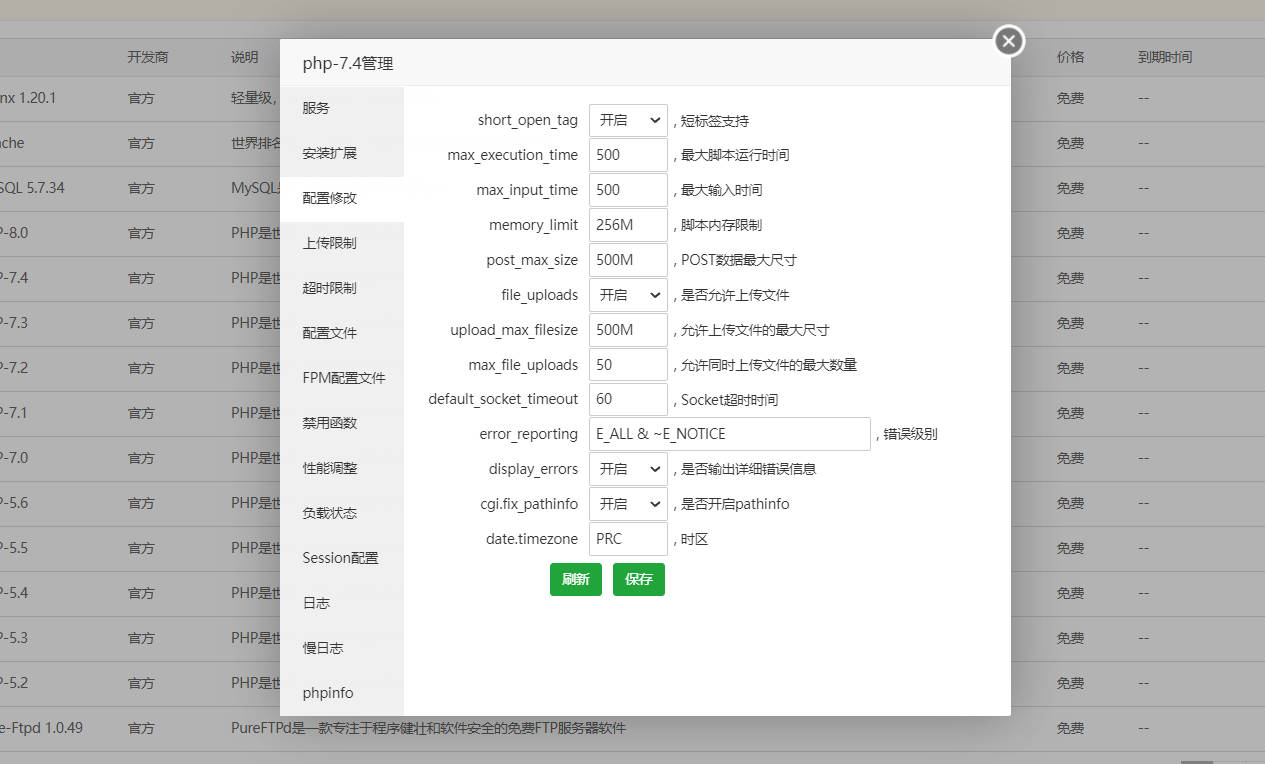
Calin Hi,
Yes, you are right, maybe is not 100% but 90% are, to remove the standard pack you’ll need to use cloud templates and for pages you’ll need to replace the simple blocks and grids with flex blocks and flex grids. But before this you’ll need to have a full backup and is no need to set on a different theme during the theme update. When you update the theme via FTP/cPanel, you’ll need to copy and replace only the Newspaper theme (delete the old Newspaper theme and unzip the new one), after the theme is set, you need to go in WordPress > Newspaper > welcome section and update the theme from there. Also because you have an older version, you need to install the tagDiv Standard pack from Newspaper > plugins.
Thank you!
Calin Hi Mark Gilbert, I just checked your website and I see that the AdSense code need a long time to load, over 1s -> https://i.imgur.com/1sYVgxN.png
The pagespeed depends on a lot of elements, like page elements, external resources…
As I see on your website, there are no theme problems, but maybe you can optimize better the pagespeed for your website:
https://forum.tagdiv.com/how-to-make-the-site-faster/
https://forum.tagdiv.com/cache-plugin-install-and-configure/
https://forum.tagdiv.com/cloudflare-cdn/
https://forum.tagdiv.com/autoptimize-install-configuration/
I hope this will help you!
Calin Hi,
Please check our guides for pagespeed:
https://forum.tagdiv.com/how-to-make-the-site-faster/
https://forum.tagdiv.com/cache-plugin-install-and-configure/
https://forum.tagdiv.com/cloudflare-cdn/
https://forum.tagdiv.com/autoptimize-install-configuration/
I hope this will help you!
Calin Hi jitendrachrysolite,
This will not be easy, it will take a lot of work and even more calm. Also, the design is possible to look a little different.
What need to be done first is to learn how to use the Newspaper theme and try to recreate a small part from the website, for example a cloud template for posts or for categories (this can be apply for all posts and need to be edited only once), the problem will be on pages, where if you want to use tagDiv Composer, then you need to recreated all of them.
Let us know step by step where you are with your work and what you need to do and we’ll try to help you as much as we can.
Thank you!
Calin Hi nwnuyhs,
The problem you reported has nothing to do with our server, believe me, the server is very powerful.
Usually the “Invalid reply from server endpoint error” is caused by insufficient WP_Memory_limit, if you’ll set it to 256M, and is still not working, please double it and check the rest of settings from our guide -> https://forum.tagdiv.com/requirements-for-newspaper/ also make sure that you are using ssl and you have a good band width, the one from our server is 1GB/s and the one that I use at home is 500MB/s, if you have a low band width, then you can access parts of cloud, this can be done from frontent, for example if you are on a post -> https://i.imgur.com/4G74M7F.jpg or from tagDiv Composer -> https://i.imgur.com/2F6MhfI.png
I the problem is still persisting and you have a good band width, then we can take a look and see if there is not something different that interferes.
Thank you!
Calin Hi,
The problem has addressed but it was only for cloud templates, I think that you are still using standard templates. In this case the best solution will be to use a child theme and set the logo-text.php file in header (to not have problems with files path, you can set all the files from that folder in child theme), in this way will no longer need to set the code after each update.
Thank you for your understanding!
Calin Hi segnali,
You need to check on the posts/pages where you have a different menu or this is not apply, if you are not using a different cloud header, an individual one, this will overwrite the global one. If you have, then just set it for the one that it is set as global.
In case that you can not manage it, please provide a link where I can check the website menu.
Thank you!
LalitHi,
I want to report two bugs I found while using the Tech news demo.
1. There is no visible “Edit with TagDiv Composer” for the Footer Cloud Template – Tech News Pro. Even in the normal visual edior.
2. There is no scroll bar in the TagDiv Composer. Each time I need to click the Tab button to move to different options in the General setting.
To demonstrate the issue, I have recorded a video.
Please watch this video and understand the issue: https://drive.google.com/file/d/19W-F0Lz3Xsh0CVy8UhXU_rOTueV2MnTq/view?usp=sharing
Kindly fix this issue as soon as possible.
Regards,



