- NewspapertagDiv Composer – Website Manager
- NewspaperWhen tagDiv Composer is Not Working
- NewsmagtagDiv Composer Tutorial
- TutorialsFrom WPBakery to tagDiv Composer
- NewspapertagDiv Composer Tutorial
- NewsmagHow to use the Visual Composer plugin
- NewspaperScroll Animation
- NewspaperSingle External Shortcode and External Shortcode
- NewspaperCredit System
- NewspaperBookmark – Save For Later
- NewspaperFlex Block Builder and Flex Loop Builder
- NewspaperModules Builder in Newspaper Theme
- NewspaperIntroduction to CPT and ACF with Newspaper Theme
- NewspaperCreate a frontend submission form
- NewspaperHow to Use the Tabbed Content shortcode
- NewspaperCreate a form contact page
- NewspaperFilters and sorting for taxonomies
- NewspaperUser review system
- NewspaperCustom Fields Support
- NewspaperWooCommerce: Happy “Add to Favorites!”
 robinspaul
 Hi,
When I try Edit with TagDiv Composer on a page, it shows this error – Error 404 – not found. Could someone please help me?
These are my settings:
Server software Apache
PHP Version 8.3.28
max_execution_time 300
max_input_vars 5000
SUHOSIN installed false
mbstring available
GD library available
WP Memory Limit 256 MB/request
WP_DEBUG False
Caching plugin WP super cache
Thanks
 llaporte
 Re-bonjour,
Même en retirant tous les plugins il m’est impossible de faire quelque modification avec TagDiv Composer, j’ai toujours la même erreur même en tentant de créer un page.
TagDiv Composer est devenue inutilisable,
Je n’utilise que le le modèle Footer – Downtown PRO avec TagDiv Composer.
Je commence a trouver cela difficile de ne pouvoir faire de modification avec TagDiv Composer et pense même refaire cette section du site sans devoir l’utilliser.
SVP veuiller m’aider,
Bien a vous,
Luc Laporte
-
This reply was modified 9 months by
llaporte.
 Maddest
 I gave the fix a second try and now it works on my side as well! Very cool!
Thanks a lot!
However, will this fix be integrated into the next version of td composer?
 Calin
Calin Hi,
Edit the homepage using tagDiv Composer https://i.imgur.com/LqZci0B.png, select the mobile viewport – https://i.imgur.com/irzI2i7.png ,then the menu and change the title – https://i.imgur.com/EQOebz7.png
Thank you!
 daveslc
 Update: the TD-Composer-Fix plugin did work. Thanks!
Maddest Hi Calin,
thanks a lot for your quick support. Are you planning to integrate this fix in the next version of tagDiv Composer?
Calin Hi,
That’s correct. This is code that will be rendered by tagDiv Composer and the Cloud Library, so it won’t appear in the WordPress editor as it does on the frontend and theme builder when you edit it.
Calin Hi, Yes, this can be done for each viewport in part using the tagDiv Composer
– https://tagdiv.com/tagdiv-composer-page-builder-basics/ – https://i.imgur.com/uhPYeAZ.png – https://i.imgur.com/dpbDfIK.png
Calin Hi,
Yes, a page made with tagDiv Composer allows you to copy elements from one page to another. To do this, in Composer, right-click on the element and select Copy. On the new page, select an element that will be above or below where you want to paste it, then right-click and choose where to paste the copied element.
You can also save the element in tagDiv Composer and then drag it as a new element on any page.
https://tagdiv.com/right-click-menu-tagdiv-composer/
https://tagdiv.com/how-to-use-the-new-copy-paste-tools-for-elements/
https://tagdiv.com/copy-paste-style-feature/
Calin Hi EDMSU,
Edit the homepage using tagDig Composer, then go down to the section with the review: https://i.imgur.com/D2zQkFF.png
– You will see a Raw HTML element—select it: https://i.imgur.com/Ekft2Zf.png
– Expand the editor and comment out that code.
After that, the images in the first view will appear one above the other. Then select the crown image element and delete it. After that, go back to the review section and uncomment the code.
Calin Hi,
If you have the latest version and you face a critical error when using the search, it will be need to replace the current theme plugin tagDiv Composer with the one from here – https://cdn.tagdiv.com/wp-content/uploads/2025/11/td-composerfix.zip
Thank you!
Calin Hi,
1. I believe there has been a misunderstanding regarding the cloud templates.
In the General tab, you will find the standard cloud templates for a blog. These include templates for the header, footer, single post, category, tag, author, date, 404, attachment, and search pages.
The template that can be used for a single doctor is available under the Single Article cloud templates (see: https://i.imgur.com/xNZUSoK.png). However, the template you are trying to use is a Custom Post Type (CPT) template. CPT templates cannot be applied to regular single posts; they can only be used for their respective CPTs. Additionally, this CPT template is not part of the cloud templates—it was provided in my previous reply—and, as mentioned, it works only for CPTs, not for standard posts or articles.
If you want your regular posts to have a layout similar to the CPT layout, you will need to recreate it manually using the Theme Builder in tagDiv Composer. If custom fields are required, you can use the ACF plugin to achieve this.
To copy and paste the CPT template I provided, please edit a single under the Custom post type – https://i.imgur.com/ZvgMAhV.png hover over the 3 dots and click on “edit” https://imgur.com/NlMnH9L. After that, replace the code with the one from here https://cdn.tagdiv.com/wp-content/uploads/2026/01/Custom-Post-Type-CPT-Doctors-PRO.txt
2. As mentioned above, there is a misunderstanding. I believe this comes from trying to combine multiple prebuilt templates without fully understanding how the theme works. It seems there may be some confusion about core concepts such as what a post is, what a CPT (Custom Post Type) is, and the difference between categories and taxonomies, including how they are configured and how they are meant to function.
The section you are referring to (https://i.imgur.com/UrNPZOE.png) is displaying the Doctors CPT, and its layout is provided by the Doctors PRO Plugin. This plugin can be installed from Newspaper > Plugins > Dedicated Plugins for Prebuilt Websites (https://i.imgur.com/6eVC20P.png). Once the plugin is installed, you can use Flex Block X to select and display that module (https://i.imgur.com/nZpalQh.png). However, since the plugin creates the module using predefined code, we recommend creating your own custom module using the Module Builder, and then displaying it via the Flex Block Builder.
By doing this, you gain full control over the module’s layout and settings. For example, if you want to add an “Age” field, you can create a custom field using a plugin such as ACF, and then display it in your custom module using the Custom Field element.
Thank you!
 nupe8
nupe8 Hello, I’m not able to pull up any templates for screenshots. If I hover over a template in the cloud templates section and click edit with td composer, I get the spinning circle. No templates actually load. For whatever reason, I can see the header on the mobile version.
 duliom
 I create a new page from scratch, and then I try to incorporate it using tagdiv composer, and I get this error.
MaddestHello tagDiv Support Team,
I am experiencing a critical error on my website (running the Newspaper theme) specifically when performing a search. The rest of the site functions normally, but submitting a search query results in a “Critical Error” message.
Error Log Details:
I have enabled WP_DEBUG and identified the following fatal error:
Fatal error: Uncaught TypeError: Cannot access offset of type array on array in …/wp-content/plugins/td-composer/legacy/common/wp_booster/td_util.php:1196
Stack Trace Summary:
#0 td_util::get_template_id(Object(WP_Post)) called at td_util.php(340)
#1 td_util::check_header() called at td_wp_booster_functions.php(513)
The error seems to originate during the wp_enqueue_scripts and wp_head actions when the theme tries to determine the template ID for the search results page.
Environment Information:
Theme: Newspaper (using a child theme)
Plugin: tagDiv Composer
PHP Version: 8.4.13 (The error appeared after upgrading PHP versions)
WordPress Version: 3.9
The error only occurs on the search results page.
Is this a known compatibility issue with PHP 8.x and the current version of the tagDiv Composer? Could you please advise if there is a specific patch for td_util.php or if a plugin update is required to handle the array type-checking more gracefully in PHP 8?
Thank you for your assistance.
Website URL: madtrash.com
 thedoc
 Hi, thanks.
I do always changes on tagdiv composer and clear the browser cache, don’t have other ways.
How can i clean the object cache ?
even clearing the cache i still see the module on the browser, and if i inspect it, i see the lines with the command
Calin Hi,
When you remove elements from tagDiv Composer but they are not reflected on the frontend, it may be due to the cache or object cache. Make sure that after you make the changes in tagDiv Composer, you also clear all the cache.
I hope this will help you!
Calin Hi,
This situation is related to an ad blocker. Please try using a different browser and make sure that no ad-blocking extensions are enabled. Normally, the frontend and the Composer view should look the same.
Also, after making all changes, please ensure that the cache is cleared.
If you’d like, I can remove the ad banners for you. To proceed, please contact us via email at contact@tagdiv.com and provide temporary wp-admin access.
Calin Hi,
You can edit the theme files, the problem is that you need to do this after each theme update because the code from that file can not be set in a child theme.
The file that should be edited is wp-content/plugins/td-composer/legacy/common/wp_booster/td_data_source.php and the code is around lines 519-525 – https://i.imgur.com/dOIfAbv.png is starts with case ‘random_7_day’:
Thank you!
Calin Hi,
In most cases, this issue is caused by a shortcode that is not compatible with our theme or by a plugin conflict. As a result, after configuring the page or Cloud Template with tagDiv Composer and saving it, you may encounter this error the next time you attempt to edit it.
If the issue occurs only on a specific page or Cloud Template (including the header or footer), it is likely related to certain settings or shortcodes used there. You can test this by temporarily changing the header or footer to see if the problem persists. In many cases, the issue can be resolved by restoring a previous version using page revisions: https://wordpress.com/support/page-post-revisions/
Thank you!
Calin Hi,
Most of the time, the problem is from a shortcode that is not compatible with our theme or a plugin conflict; therefore, after you set it with tagDiv Composer and save the page/cloud template, the next time you try to edit it, you’ll get that error.
If is only for one page or a cloud template (it can be on the header or footer, you can change them for tests and see if the problem persists), this is from some settings/shortcodes set on it and it can be fixed using the page revision https://wordpress.com/support/page-post-revisions/
Thank you!
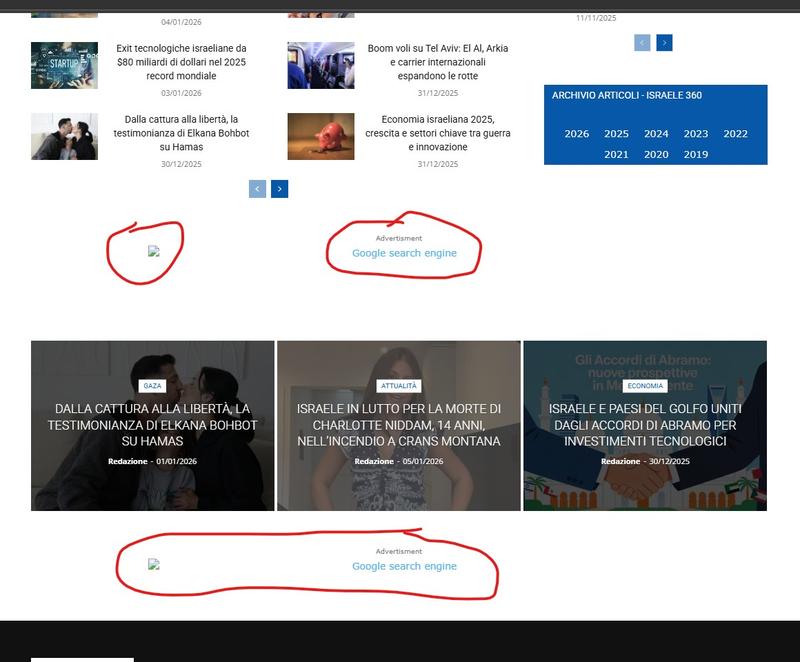
thedocHi, i was testing the module RAW HTML and positioned on the bottom of the sidebar but then decided to delete them, deleting the module through tagdiv composer and i still see them there at the same place https://i.postimg.cc/cCH3pnfx/tag5.jpg. In the tagdiv composer there is no way to delete them again, but they are still visible, even checked with different browsers
how can i get rid of them ?
thedoc Hi, i don’t have anymore the ad module, i’ve already deleted but the problem is that i still see the google search ad out of the composer. See https://i.postimg.cc/YSsJtyR6/tag1.jpg and https://i.postimg.cc/FHnPSkL6/tag2.jpg there is no ad module visible, still you see the ad https://i.postimg.cc/8kMhGKmp/tag3.jpg and also visible on mobile https://i.postimg.cc/gjgcdbSY/tag4.jpg
Calin Please provide some screenshots from tagDiv Composer, it should be something like this – https://i.imgur.com/uqbhTKH.png https://i.imgur.com/HKEPdek.png or just select the block and delete it (use the right click on it and select the delete option from the right menu). You can add the ad box element later, where you want on your website.
Calin Hi,
In most cases, this issue is caused by a shortcode that is not compatible with our theme or by a plugin conflict. As a result, after setting the page or Cloud Template with tagDiv Composer and saving it, you may encounter this error the next time you try to edit it.
If the problem occurs only on a specific page or Cloud Template (including the header or footer), it is likely related to settings or shortcodes used there. You can test this by temporarily changing the header or footer to see if the issue persists. In many cases, it can be resolved by restoring a previous version using page revisions: https://wordpress.com/support/page-post-revisions/
Thank you!