
- NewspapertagDiv Composer – Website Manager
- NewspaperWhen tagDiv Composer is Not Working
- NewsmagtagDiv Composer Tutorial
- TutorialsFrom WPBakery to tagDiv Composer
- NewspapertagDiv Composer Tutorial
- NewsmagHow to use the Visual Composer plugin
- NewspaperScroll Animation
- NewspaperSingle External Shortcode and External Shortcode
- NewspaperCredit System
- NewspaperBookmark – Save For Later
- NewspaperFlex Block Builder and Flex Loop Builder
- NewspaperModules Builder in Newspaper Theme
- NewspaperIntroduction to CPT and ACF with Newspaper Theme
- NewspaperCreate a frontend submission form
- NewspaperHow to Use the Tabbed Content shortcode
- NewspaperCreate a form contact page
- NewspaperFilters and sorting for taxonomies
- NewspaperUser review system
- NewspaperCustom Fields Support
- NewspaperWooCommerce: Happy “Add to Favorites!”
 Digital Nomads
Hi there,
I´m missing Undo and Redo arrows in Composer (Cmd+Z isnt working either). Tried few different cache clean browsers but i cant get them back.
The appear on loading but dissapear right away.
Hope you can help me out.
Website: nomada360.com (coming soon mode)
Video screenshot of the issue: https://drive.google.com/file/d/1lOjUblb016IvJfnBSKv1ClFqsYCaqq0s/view?usp=sharing
Thanks
 sruhtbackend
Hi
While customising my site on the composer, the footer has somehow become corrupted and does not show on my site anymore. I am using the standard newspaper cloud template for the footer.
how would I make the footer appear again?
thanks
 truthmedia
 Hi vawn,
I faced a similar issue as well. I was trying to upgrade our website from Newspaper 9.7.2 to 11.4.3, and WPBakery Page Builder from 5.5.2 to (latest version used in Newspaper 11.4.3).
The following steps worked for me (using latest version of WordPress 5.9.3):
- Activate WordPress default theme (Twenty Twenty Two)
- Deactivate then delete Newspaper 9.7.2
- Deactivate then delete WP Bakery Page Builder 5.5.2
- Install then activate WP Bakery Page Builder in Newspaper 11.4.3 (from Newspaper folder > code > other_plugins > js_composer.zip)
- Install then activate Newspaper 11.4.3 (using Newspaper.zip)
- Install/Update theme plugins, especially Standard Pack plugin
Hope this helps!
Cheers 🙂
 Keshi
KeshiHello, whenever I try to edit a page using TagDiv Composer, I get the following error:
“Errors at elements: 4(models) : 3(dom). The model does not match the content Current state has involved an issue. You could try an UNDO operation (CTRL+Z / CTRL+SHIFT+Z)”
How do I fix this?
 earanda
Hello
I need to enable a “shortcode” on the main page in a column with agenda publication. I am using the Simple Event Planner plugin.
I use the “Column text” element on the main page, I click on the “edit content” button, I paste the shortcode and I click on the (X) of the WP Editor, then I save from the Composer. But it does not save the changes made.
I did the test run of the shortcode on a post and it works fine.
Could you help me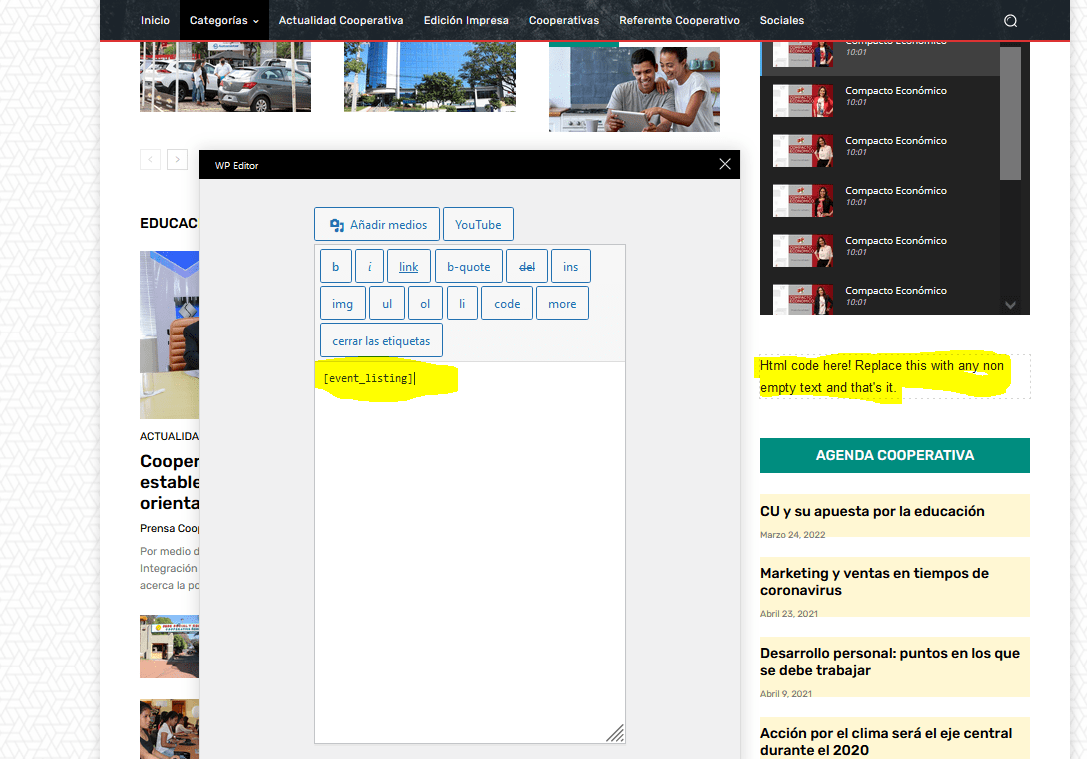
 roberto.srelz
Hi, we’re getting since some weeks recurrent and frequent error as below (we redacted our site name). Seems to be related to some coding issue? This error causes excess of resources utilization in some moments of the day and the site goes in Error 503. On all error lines, the block element is the same and the referred line is the same 433. Could you advise us on what to do / what to check and how to fix?
[29-Apr-2022 16:04:07] WARNING: [pool -] child 66876 said into stderr: “PHP message: PHP Warning: A non-numeric value encountered in /var/www/vhosts/-/httpdocs/wp-content/plugins/td-composer/legacy/Newspaper/includes/shortcodes/td_flex_block_1.php on line 433”
 themidfielder
Hi, I have a problem with desktop drop down menu on my website – https://www.themidfielder.com. Everything was working fine till this Monday, but when I checked accidentally my website yesterday, I noticed that drop down menu doesn’t work on desktop(it works only when I’m in edit mode with the composer).
 VeriArtem
 Hello
For editing I’m using only tagdiv Composer.
veriartem.com and screenshots are on https://veriartem.com/2022/04/29/screenshot/
First one is about excerpt block settings
Second one is how I would like to be displayed.
Regards,
Alex
 Bettina
 Hello!
Please edit this page with the TagDiv Composer and you can customize the way it looks like. Also, the footer while you scroll down the page and reach it.
You can add the sidebar in the tagdiv Composer. Steps:
1. Add 1 row (or existing one)
2. Split into 2 columns( 2/3 + 1/3 )
3. You can add whatever element you want into the second column and consider it a sidebar.
Thank you!
Bettina Hello!
We do not encourage you to use Wp Bakery at all. Please note that the WP Bakery has a conflict with the tagDiv Composer. Please use only one builder and not both.
This plugin can be find in the Newspaper-tf\code\other_plugins.
Thank you!
 ialv
ialv When I try to create a page menu as you indicated earlier in the conversation, it doesn’t work to do what I show you in the example.
Here are the steps I followed:
I want to create a grouped menu with the icon (image 1) so that when the user clicks on it, another menu page like the one attached (image 2) comes up.
1. I create the page with the composer (image 3). [example design].
2. I create a link in the menu with that page (image 4).
3. The link it shows me in the menu is not as I want, as it shows me a ‘mega menu’ with that page itself, not a page like the one I detail in image 2.
How can I make it look like in https://demo.tagdiv.com/newspaper_nft_pro/? Since in the steps we indicated it does not do it.
Thank you.
Images:
1. https://ibb.co/J25bGsQ
2. https://ibb.co/Wv1b762
3. https://ibb.co/1KmRmnt
4. https://ibb.co/Z6t7Fqj
5. https://ibb.co/VvRmycm
 Calin
Calin Hello,
Did you tried with tagDiv Composer -> https://i.imgur.com/4sYRc8k.png
Can you please provide a link to your website and some screenshots where you’ll like to be display the excerpt. I will check the elements from that section and I will let you know how to display it.
Thank you!
Bettina Hello!
Did you check the settings from the TagDiv Composer as suggested above? Please let me know.
A solution for sending a screenshot/video is this:
Download, capture, send: https://www.techsmith.com/jing-tool.html
After making the screenshot, you will have a link, paste it here.
Thank you!
Calin Hi,
That footer does exist in cloud, but need to be a little edited https://i.imgur.com/AKvFlTF.png -> https://i.imgur.com/QZ0xMBD.png use tagDiv Composer to remove the elements that you do not need and to adjust the layout.
Thank you!
Bettina Hello!
Add a new page, edit it with the TagDiv Composer from the blue button, and choose no Header and no Footer from here: https://prnt.sc/7vdBHgDvSc6G
Thank you!
Bettina Hello!
Before uploading the image in the TagDiv Composer, make sure you select the thumbnail size https://prnt.sc/lm0cspEEW8MF or any other size which can be perfect for your logo. Or you can do it before uploading the image in the Media Library.
Thank you!
Bettina Hello!
There are some settings only in the theme panel. Here you can remove/set a picture for mobile menu background: https://www.screencast.com/t/x3Xrln2b88x
And the background color here: https://www.screencast.com/t/PbU3hQpDqHh
In this modal you can not add any element. You should choose the menu from the tagdiv Composer.
A workaround there could be to use a modal popup: https://forum.tagdiv.com/modal-popup/
Thank you!
 myvirtualplanet
URL https://www.cimbusinessevents.com.au/
tagDiv Composer plugin is causing issues with AIOSEO in latest update 11.4.3. I had to revert back to previous Newspaper Theme to resolve issue. There is a conflict with Vue. Can this be fixed so I can install latest Newspaper Theme?
Bettina Hello!
No. In our theme we have a setting when you edit the post template with TagDiv Composer. You can disable/enable that setting like this: https://www.screencast.com/t/JaSHpq10Y
Check this guide: https://forum.tagdiv.com/create-custom-code-using-the-browsers-inspector/
Please access the search page results, edit it with the TagDiv Composer, and check if you have the sort order: Latest and without no limit or offset: https://www.screencast.com/t/8aQXkhkNatrA
Thank you!
 nbauorg
Hi, I use a mobile menu template. But I fail to customize it. Although I selected the right menu in the composer it does not show. Also the search modal does not look very useful. What can I do?
Bettina Hello!
Try to edit the file from td-composer\legacy\Newspaper\loop-single.php
Hope that helps you!
Thank you!
Bettina Hello!
You can insert an image at the beginning of your page when you will edit it with the TagDiv Composer. Add the element called Single background image and upload the image there.
Thank you!
 gs271
gs271Hi there,
would appreciate to be contacted by someone who is experienced in doing attractive best practice web design with Tag Div Composer. Would like to add a few things to my web site (2 new pages + changing main page).
Looking forward to hear from you
Please contact:
Gregor Sampson
gregor.sampson@lavis.at
https://www.lavis.at
Bettina Hello!
You should add the ads when you edit the post with TagDiv Composer in the element called ” Single Post Content ” in the tab ADS. Documentation here: https://forum.tagdiv.com/article-ads/
Or you can use the element called “Ad box” from TagDiv Composer and there you need to add the ads: https://forum.tagdiv.com/ads-adsense-overview/
Thank you!
Calin Hi,
Can you please make a test, please disable tagDiv Composer and tagDiv Cloud Library, delete them and reinstall the plugins from Newspaper >plugins
In case that the problem is still persisting, then please make a full backup for your website and please provide access via email (contact@tagdiv.com) to see what can be that situation.
Thank you!



