
- NewspaperCreate Custom Code with the browser’s Inspector or the Live CSS Box
- NewspaperScroll Animation
- NewspaperWP Rocket and Newspaper Theme: Optimization Guide
- NewspaperHow to setup Twitch for Social Counter
- NewspaperModal Popup
- NewspaperFlex Block Settings Guide
- NewspaperAutoptimize Plugin – install and configuration
- NewspaperAdding Multiple Authors to Your Articles
- NewspaperDesign your Post Pages using the Cloud Library Templates
- NewspaperBig Grid Flex Settings
- NewsmagtagDiv Composer Tutorial
- TutorialsFrom WPBakery to tagDiv Composer
- NewspapertagDiv Composer Tutorial
- NewspaperTheme modules and blocks
- TutorialsDefault Block Settings Guide
- NewspaperThe Mobile Theme
- NewspaperCompare theme files – Winmerge tutorial
- NewsmagBlock settings tutorial
- NewsmagLogo & Favicon
- NewsmagFooter templates
 Calin
Calin Hi,
Please replace the css with this one https://i.imgur.com/jOqaSmb.png
body .td-header-top-menu {

display: block;

text-align: center;

}
Hope this will help you!
 team118
CSS is broken on the staging site when I tried updating the theme to the newest version
https://mvtimes179.d.wpstage.net/
Gate login info
Username: blogvault
Pass: beedfc8b
 TAPA-GLOBAL
 Hi Anamaria,
That was sooooo helpful! I will try it out.
Also, is there a css to display 2 elements in a single row in mobile? Eg. The team member element and the icon box element always display one per row in mobile. And I would like to display 2 in a single row instead.
Thank you,
Jasmine
 chucky20
SLOW… i did everything but i couldnt change gtmetrix points to up. i use your theme and mobil theme plugin. i use wp-rocket loader for css vs minifying.. and imagify for image optimization. i didnt understand what im doing wrong. GTMETRIX : 35 point for performance and saying largest paintiful paint 5-6 secs ! i delete featured image which size 1200×675. and added 696X392 (size of td-composer said on homepage big grid flex) nothing change…
note: when i activated amp plugin scores are more slower …. :(( could you help me please for this ?
 Anamaria
 Hi,
1. If you saw a cloud template as you like how it is structured, you can import that template. This is the easiest way to do it.
Not all elements have an option where you can check to be inline, but it can be set to be inline from the CSS tab (this is one all elements) => https://www.screencast.com/t/tNRCDXbG Also, the CSS tab settings can be adjusted per viewport => https://www.screencast.com/t/oFuTsvJMt3cM
2. I hope this video will help you => http://www.filedropper.com/8ea8bc9c-9df2-43cb-93c6-31d8a0790581
Thank you!
 Bettina
 Hello!
Unfortunately, there is no setting for this at the moment.
One solution for that could be to write and extra class for the element like this: https://www.screencast.com/t/buzPbH76 ; and then write a css code : https://www.screencast.com/t/K0QkTDdA
After applying this custom css code there, the only element which has that class will have underline.
Thank you!
Anamaria Hello,
I checked your website and seems you have set the color => https://www.screencast.com/t/rneynm3nuib with custom CSS. For widgets links, there isn’t any option to set the color from the Theme Panel. This can be done with custom CSS.
Thank you for understanding!
Calin Hi,
Top bar on mobile can be set only if you use the responsive e version and you use a custom css
.td-top-menu-full {

    display: block;

}
This code need to be set in theme panel> custom code> advance css> phone.
Thank you!
 Jose
Jose Hello Vlad S,
Thanks for reply.
To avoid problems with my main page, let’s use my test page (it’s this one: https://cutt.ly/Nkq08Q5 )
I have deactivated all plugins, cleared the cache. I have also removed all custom CSS from the theme.
Right now only the theme and theme plugins are working. I use the same logo for the theme control panel and for the mobile plugin control panel.
In the first image you can see the responsive version of the homepage on a mobile. In the second image you can see an article loaded with tagdiv mobile plugin.
Can you see the difference? The logo is bigger, the menu is out of place, the top menu bar has no shadow…. All these are theme errors. Rather, they are tagdiv mobile plugin errors. Maybe you should check this problem a bit, because it is not very aesthetic.
Cheers, Jose

-
This reply was modified 5 years by
Jose.
 Vlad S
 Hello !
It looks like the CSS is overwritten by something external. Are there any new plugins that you are using that could have created this ?
Thank you !
 pavel@earnware.com
 Well, check this out: 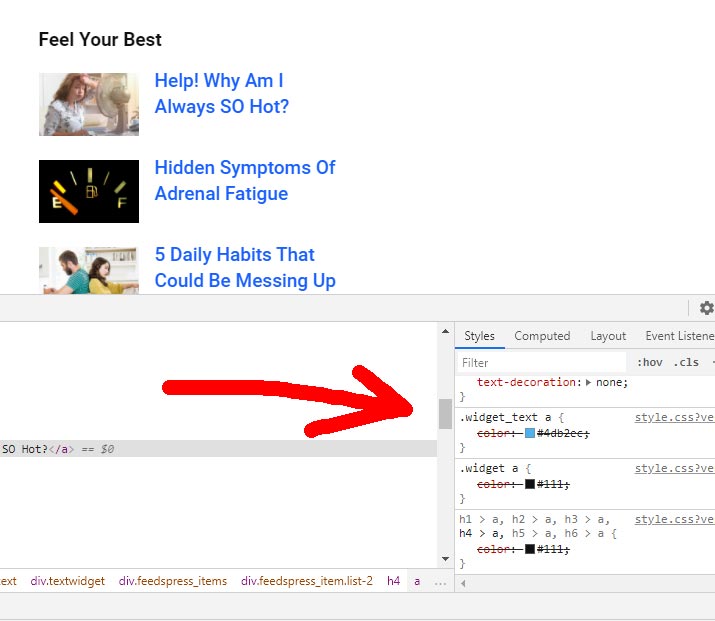
It’s overwritten with custom css, but.. there is still “.widget_text a” style that cannot be overwritten from the Theme Panel. Here’s the live website, you can see the problem in the sidebar “Look Your Best” widget https://reliablenews.org/trumps-impeachment-unlikely-as-gop-backs-him/
Theme Accent color doesn’t work for it. On this specific website, the theme accent color is #1960ff.
-
This reply was modified 5 years by
pavel@earnware.com.
-
This reply was modified 5 years by
Bettina Hello @Topfgartenwelt!
If you use Mobile Theme, there is no setting to adjust the sizes.
The only one solution is to create a custom css code for this.
Thank you!
Vlad S Hello !
That CSS comes because you are using a tagDiv composer template. In order to change your appearance you will have to do it via tagDiv Composer as you can see here: https://www.screencast.com/t/v3eACqRUnOsW
Thank you !
Anamaria Hi,
Usually, this problem can appear when you are using the WPBakery if you have this plugin enables then please disable it and try again. There may be a conflict between WPBakery and tagDiv cloud library.
Unfortunately, there is no solution (maybe sometimes can be used custom CSS) for the conflict between WpBakery and tagDiv Cloud library for the moment. You can only have one of them active, but not both at the same time.
Thank you!
 zenzino
I can’t change the size of the body font using the Theme Panel. I’ve changed it in the General settings and the Post setting.
I used inspect element and found the following:
.tdi_85_ff9, .tdi_85_ff9 > p, .tdi_85_ff9 .tdb-block-inner > p {

font-size: 14px !important;

line-height: 1.8 !important;

}
This seems to be overriding the setting from the Theme Panel. I never created that CSS and it doesn’t appear in my Custom CSS panel. Where could that code be coming from?
https://greenlivingmag.com/marci-zaroffs-latest-eco-venture/
Thanks,
zenzino
Vlad S Hello !
Only for the twitter button we could try a css code. Can you send us as link to where we can find this twitter logo so we can inspect and see what can we do to fix this issue too ?
Thank you !
 haxigi
 These tabs (Style, CSS) are missing https://imgur.com/AcRinJ0
Check out how it looks like. I have only General tab: https://prnt.sc/xny0tc
Calin Hi,
Yes, with tagdiv Composer you can adjust the column width -> https://i.imgur.com/AKwmRxp.jpg I think that you are referring to this kind of lines -> https://i.imgur.com/nOOPjsY.jpg normal that border is set with custom css and it can be remove only with custom css, for this I will need a link to your website.
Thank you!
Vlad S Hello !
Please use this css code: body .td-page-title {
display:none;
}
.td-crumb-container{
display:none;
}
The code must be inserted here: https://www.screencast.com/t/J1Nxw5s5
Let us know the result !
Thank you !
 Topfgartenwelt
 Dear Vlad, I know that it works perfectly if I directly insert the ads in Newspaper. But the legal requirements have changed. In the EU no ad is allowed to be shown without consent and Google AdSense makes problems if there are too many impressions for visitors from Social Media. Unfortunately Newspaper offers no possibilty to stop referrers for Facebook and so on.
If a block or a CSS-Wrapper is inserted in the layout always a Layout Shift occurs like here: https://www.topfgartenwelt.com/svg-logo
This also happens if I write a CSS-Wrapper and put it directly into the Ad-Section of the Newspaper Composer. Why is that happen?
Greetings Kathrin
Bettina Hello @twoodman!
The code need to be set in Newspaper -> Theme panel -> Custom code -> Custom css.
Thank you!
Anamaria Hello,
That can be achieved with custom CSS or same more setting made with tagDiv Composer.
The faster one is with custom CSS, please try this code:
.menu-item-354 .menu-item-0 .col-xs-12 {

    padding-left: 20px!important;

}

 .tdb-menu .menu-item-354.tdb-mega-menu .sub-menu {

width: 720px !important;

left: 70%;

transform: translateX(0%);

 -webkit-transform: translateX(-30%);

}
Look like this => https://www.screencast.com/t/XmYvvTgAyyL
Let me know the results!
Thank you!
Anamaria Hello,
You can set the hover on the icon, title and button => https://www.screencast.com/t/SybQm8BUF , but for making the whole icon box to black on hover, you need to use a custom CSS => https://www.screencast.com/t/Uuld1Zr1y
The code you can insert in Theme Panel -> Custom Code -> Custom CSS => https://www.screencast.com/t/lryYSSg6gk
The code is:
.tdm_block_icon_box:hover, .tdm_block_icon_box:hover .tdm-title

{

background-color: black;

color: #fff;

}
Hope this helps you!
Thank you!
 twoodman
 Hi Bettina,
Sorry for the late response as I have been away. Please could you tell me where to place the custom css. Thanks.
Vlad S Hello !
Please try this css code: .td-main-content-wrap {
margin-top:10px!important;
}
The code must be inserted here: https://www.screencast.com/t/J1Nxw5s5
Let us know the result !
Thank you !



