
- NewspaperCreate Custom Code with the browser’s Inspector or the Live CSS Box
- NewspaperScroll Animation
- NewspaperWP Rocket and Newspaper Theme: Optimization Guide
- NewspaperHow to setup Twitch for Social Counter
- NewspaperModal Popup
- NewspaperFlex Block Settings Guide
- NewspaperAutoptimize Plugin – install and configuration
- NewspaperAdding Multiple Authors to Your Articles
- NewspaperDesign your Post Pages using the Cloud Library Templates
- NewspaperBig Grid Flex Settings
- NewspapertagDiv Composer Tutorial
- NewspaperTheme modules and blocks
- NewspaperThe Mobile Theme
- NewspaperCompare theme files – Winmerge tutorial
- NewspaperUsing Other Ads
- NewspaperBlock settings tutorial
- Using custom fonts
- Using typekit fonts
- NewspaperChild Theme Support
- NewspaperHow to Make the Site Faster
 junaiddar
 Thank you Simion C, that was helpful.
Can you please elaborate on these points in the child theme support?
12. The wordpress templates which are not loaded by theme API, like archives.php, header.php, etc, have child theme standard support.
The theme API in the child theme:
Important!
We strongly DO NOT RECOMMEND using the theme API from the child theme.
If I have to make changes in the child theme then I have to use the theme API in style.css?
 polys_a
Hello
I just change socialista.com.cy template to Newspaper latest version.
The site is using Next Scripts: Social Networks Auto Poster to auto share to several facebook groups an twitter. This plugin was working on the old template but now with Newspaper I get an error on Images. It seems it uses a hotlink protection on images.
This is the additions to .htaccess file after enabling the Newspaper Template:
# BEGIN Expire headers

<ifModule mod_expires.c>

ExpiresActive On

ExpiresDefault "access plus 5 seconds"

ExpiresByType image/x-icon "access plus 604800 seconds"

ExpiresByType image/jpeg "access plus 604800 seconds"

ExpiresByType image/png "access plus 604800 seconds"

ExpiresByType image/gif "access plus 604800 seconds"

ExpiresByType application/x-shockwave-flash "access plus 604800 seconds"

ExpiresByType text/css "access plus 604800 seconds"

ExpiresByType text/javascript "access plus 604800 seconds"

ExpiresByType application/javascript "access plus 604800 seconds"

ExpiresByType application/x-javascript "access plus 604800 seconds"

ExpiresByType font/truetype "access plus 604800 seconds"

ExpiresByType font/opentype "access plus 604800 seconds"

ExpiresByType application/x-font-woff "access plus 604800 seconds"

ExpiresByType image/svg+xml "access plus 604800 seconds"

ExpiresByType application/vnd.ms-fontobject "access plus 604800 seconds"

ExpiresByType text/html "access plus 600 seconds"

ExpiresByType application/xhtml+xml "access plus 600 seconds"

</ifModule>

# END Expire headers
<IfModule mod_deflate.c>
<filesMatch "\.(js|css|woff|html|php)$">
SetOutputFilter DEFLATE
</filesMatch>
</IfModule>
Can someone help to solve this issue?
 imambudianto5
Dear Team,
How to setting up css backgrooud like bizzfeed > https://www.screencast.com/t/BkaUgUufcXu8
Please help
Thanks
 llucson
I have several websites with newspaper8 and I upgraded to 8.1 with no problems, but in one particular, I get this error at home after updating and the web does not load. What’s wrong?
array(7) { [“el_class”]=> string(0) “” [“el_id”]=> string(0) “” [“class”]=> string(28) “td_uid_16_598669dc7222f_rand” [“css”]=> string(0) “” [“tdc_css”]=> string(112) “eyJhbGwiOnsibWFyZ2luLXRvcCI6Ii0yNSIsImJvcmRlci1jb2xvciI6IiMwMDAwMDAiLCJiYWNrZ3JvdW5kLWNvbG9yIjoiIzAwMDAwMCJ9fQ==” [“tdc_css_class”]=> string(28) “td_uid_16_598669dc7222f_rand” [“full_width”]=> string(38) “stretch_row_content td-stretch-content” }
wp booster error:
TD Composer Internal error: The system tried to use an att that does not exists! class_name: vc_row Att name: “tdc_css_class_style” The list with available atts is in tdc_composer_block::render
/var/www/vhosts/revistaestrategia.com/httpdocs/wp-content/plugins/td-composer/includes/tdc_composer_block.php > get_att
 Golaylaura
Hi!
I have a quick question. I’d like the spacing between my images to be smaller, how can I do that?
All of these pictures are in blog posts, and that’s where I’d like the spacing to be smaller between each images.
Here is how it looks like right now: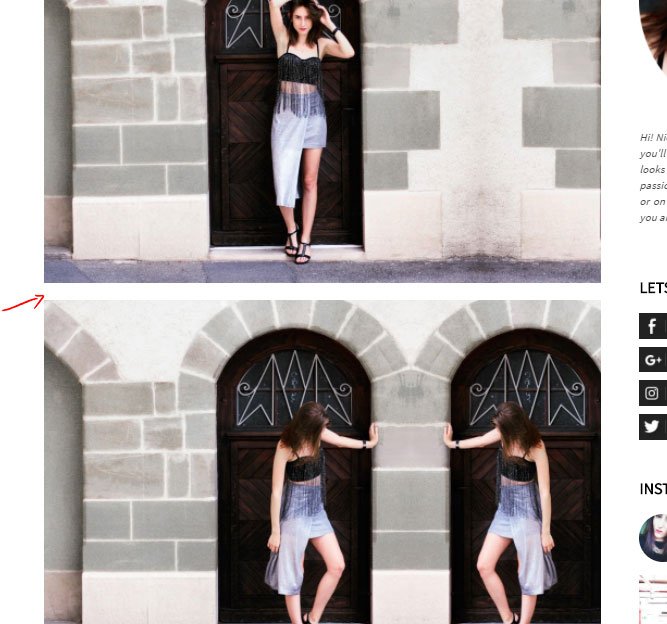
I already took a look in the forum and tried a few things in the CSS, but nothing worked… 🙁
Thanks! 😉
 Excalibur777
Hello,
I’m using the latest theme (8.1) and WordPress (4.8.1), but after these updates I cannot make changes to the CSS anymore. Live CSS and Custom Code > Custom CSS are not working.
In Live CSS: I’ve added some CSS-codes and hit the Save button but it these changes are not saved.
In Custom Code > Custom CSS: the text block is non-responsive. I cannot add any css-codes.
When, as a last resort, I put the css-code in the css file of the child-theme, it’s also not updated.
I didn’t make any changes to some plugins.
Could you please check what’s going on?
Thank You!
 cyberfyber
Failed to load content css: …./wp-content/themes/Newspaper-child/editor-style.css
??????????????????????????????????
 steve83
 I installed tagdiv composer and the pages now resolve.
However, many of the elements I previously created with Visual Composer are either corrupt or don’t show at all, some images are now a completely different size too and throw the layout out. If I disable Visual Composer more elements just show lines of code instead of the intended design element. e.g.
[vc_tta_tabs style=”modern” color=”peacoc” alignment=”center” active_section=”1″ css_animation=”fadeIn”][vc_tta_section title=”Overview” tab_id=”1491972503254-34a1c000-3dcd8379-50bf”]
How are we supposed to proceed when the site was originally made with Visual Composer and it is suggested we now switch to Tagdiv Composer?
-
This reply was modified 9 years by
steve83.
 zdrave
 Hi Chris S.
I know there are many plugins for this issue but I can not open admin panel in wp so, I wonder if there is a save custom CSS in the base and which the table if exists
Thanks
 northbridge
 Hello there,
after update newspaper from 8 to 8.1 the website is broken!!!!
Homepage error:
array(7) { [“el_class”]=> string(17) “td-video-playlist” [“el_id”]=> string(0) “” [“class”]=> string(28) “td_uid_83_59849a62c84e4_rand” [“css”]=> string(0) “” [“tdc_css”]=> string(52) “eyJhbGwiOnsiYmFja2dyb3VuZC1jb2xvciI6IiMyMjIyMjIifX0=” [“tdc_css_class”]=> string(28) “td_uid_83_59849a62c84e4_rand” [“full_width”]=> string(11) “stretch_row” }
wp booster error:
TD Composer Internal error: The system tried to use an att that does not exists! class_name: vc_row Att name: “tdc_css_class_style” The list with available atts is in tdc_composer_block::render
/var/www/soccerplus.gr/wp-content/plugins/td-composer/includes/tdc_composer_block.php > get_att
please help to resolve the issue!
 sternstrategy
Hello! I don’t want to include a sidebar on my post single, but without the sidebar, the content is way too wide since the optimal length for reading is about 50 characters per line. I’d like to make the max-width of just the post content about 850px. I included the following CSS:
.td-ss-main-content { max-width: 850px; }
This works, however, the content is then left aligned. How would I center the entire column?
Thanks!
 Simion C.
 Hi,
You could set a custom color just for the Big grid bottom box, with some custom CSS code. Try a code like this for example
– https://www.screencast.com/t/1DwseymaBn
The default color is in rgba format
– https://www.screencast.com/t/hDiX6hRpzq
This is the code if you decide to use it, change the background color as you like and enter it in Theme panel->Custom CSS section
.td-grid-style-4 .entry-title {

background-color: yellow;

}
Thanks
Simion C. Hi,
It could be possible with some custom CSS code. If you could provide a link to your website, I will try to give you a more accurate solution. A code like this one might be what you want, you can try it in the meantime
.sf-menu > .current-menu-item a,

.td-header-wrap .td-header-menu-wrap .sf-menu > li > a:hover {

color: white!important;

}
Enter the code in Theme panel->Custom CSS section and see if it does what you wanted.
Thanks
 wpmu
wpmu Hey Chris,
I check the console view again and found https://192.168.0.120/wp_011_gadgets/wp-content/uploads/2017/03/52.jpg and https://www.softwarefindr.com/wp-content/plugins/td-composer/css-live/assets/external/ace/ace.js?ver=__td_aurora_deploy_version__
Is responsible for slowing the site down. Thanks, the site is still slow but not 60seconds slow.
Catalin, when you import the gadget demo, it also imports broken images my guess is that all users using that demo template as the same issue.
 adrian_van_hal
Hi,
Newpaper theme, no settings imported from demo’s. Page template = page builder + title.
Where do I have to put the ccs code to let no-show the counter of comments (black icon, white number)?
– for this specific block please (16)
Is a list available with .td elements? so i know where to refer to in case I like to add some css?
Many thanks,
Ad
 soundstrat
 Ok, so I have found the solution…
The functions.php file in the new Newspaper 6.3 is different than the one that was in 6.0
To resolve this issue, go to themes – editor in your dashboard, then replace the following code – making sure NOT to remove any other code. If you remove other code, you may lose custom functionalities that you’ve set in this functions file. Here’s the code:
<?php

/*  ----------------------------------------------------------------------------

    Newspaper 6 Child theme - Please do not use this child theme with older versions of Newspaper Theme
What can be overwritten via the child theme:
- everything from /parts folder
- all the loops (loop.php loop-single-1.php) etc
- the rest of the theme has to be modified via the theme api:
https://forum.tagdiv.com/the-theme-api/
*/
/* ----------------------------------------------------------------------------
add the parent style + style.css from this folder
*/
add_action( 'wp_enqueue_scripts', 'theme_enqueue_styles', 1000);
function theme_enqueue_styles() {
wp_enqueue_style('td-theme', get_template_directory_uri() . '/style.css', '', '6.1c', 'all' );
wp_enqueue_style('td-theme-child', get_stylesheet_directory_uri() . '/style.css', array('td-theme'), '6.1c', 'all' );
}
With this:
<?php

/*  ----------------------------------------------------------------------------

    Newspaper V6.3+ Child theme - Please do not use this child theme with older versions of Newspaper Theme
What can be overwritten via the child theme:
- everything from /parts folder
- all the loops (loop.php loop-single-1.php) etc
- please read the child theme documentation: https://forum.tagdiv.com/the-child-theme-support-tutorial/
- the rest of the theme has to be modified via the theme api:
https://forum.tagdiv.com/the-theme-api/
*/
/* ----------------------------------------------------------------------------
add the parent style + style.css from this folder
*/
add_action( 'wp_enqueue_scripts', 'theme_enqueue_styles', 1001);
function theme_enqueue_styles() {
wp_enqueue_style('td-theme', get_template_directory_uri() . '/style.css', '', TD_THEME_VERSION, 'all' );
wp_enqueue_style('td-theme-child', get_stylesheet_directory_uri() . '/style.css', array('td-theme'), TD_THEME_VERSION . 'c', 'all' );
}
This worked for me. Please update and let us know if it works for you.
 opeedo
Hello please I am using sticky menu on my site and the logo seems too small, please can you give me the CSS code to make the logo size 100% with menu bar height?
Simion C. Hi,
It could be a possibility, but I can’t say for sure when it will happen. It will be announced when the theme will officially support different ad implementations.
Sorry, I did not test te code on mobile as well. You can enter the code I provided in the Theme panel->Advanced CSS, in the desktop section so it only applies on desktop.
Then on mobile it will look like this
– http://prntscr.com/g3vzrj
Thanks
 Catalin
 Hello Hamza Khan,
Please keep in mind that our theme has no RTL support because it has been designed to be used in this layout, sorry!
Unfortunately, we have no plan on implementing it in the near future. Implementing RTL support in our theme will require 2 style.css files and it will add significant “weight” to the theme. Using the RTL mode means that lots of elements have to be adjusted and this thing involves custom work and we cannot provide this at the moment!
Please try to do a simple search of our forum and you will see that our team offers support only for theme related problems and which not require additional customizations. Please check again our support policy here -> https://forum.tagdiv.com/support-policy-2/
Thanks for your understanding!
 ecastillo23
 Hello, thanks for answered me.
Speedbooster is active and working, but in my homepage only.
I have only allowed plugins installed
I have only 2 css blocking the test:
https://www.tuvisaamericana.com/wp-content/themes/Newspaper/style.css?ver=8.1
https://fonts.googleapis.com/css?family=Work+Sans:400,600|Open+Sans:300italic,400,400italic,600,600italic,700|Roboto:300,400,400italic,500,500italic,700,900,600&ver=8.1
When I follow this guide: https://forum.tagdiv.com/how-to-make-the-site-faster/, the page don’t show me those CSSs.
Catalin Hello allenwei812,
Sorry for this but please notice that our theme does not have any automatically option that allows you to do this, sorry! You should use a bit of CSS code to do this, CSS which have to be created by you because this is not a simple task and it which involve such custom work and we cannot provide this type of services at the moment, sorry!
Thanks for your understanding!
Catalin Hello harmario,
If you want to hide only the menu items from the top of your website, you should use the code below and place it in Theme panel -> Custom CSS area.
The code is ->
.menu-item{

display:none;

}
Also, if you want to remove the menu only from mobile devices, you should use only the following code ->
.td-icon-mobile{

display:none!important;

}
Or also, if you want to hide from the entire website, use both of codes.
Thanks for your understanding!
 Hamza Khan
 after update the theme will it change my CSS style sheet i edit CSS some to rtl ???
 Thakksy
 Thanks, I will implement the shortcode by editing the template. Will Newspaper test the matched content in the future as it is very important?
Also, the css code provided above to make the header ad center doesn’t work on mobile, how to fix this?
.td-header-style-5 .td-header-sp-recs {
width: 728px;
margin-left: auto;
margin-right: auto;
float: none;
}
Catalin Hello technouk,
You should try using the code below and place it in Theme panel -> Custom CSS area.
The code is ->
.td-logo-text-container .td-logo-text{

font-family:Arial!important;

}

.td-tagline-text{

font-family:Arial!important;

}
NOTE: The font should have to be loaded in your theme before using it to your custom CSS code.
Hope this helps!
Thanks for the message!

