- NewspaperModules Builder in Newspaper Theme
- NewspaperIntroduction to CPT and ACF with Newspaper Theme
- NewspaperHow to edit modules for Flex Block X
- NewspaperStripe Setup
- NewspaperPayPal Setup
- NewspaperAdd Cryptocurrency Price Ticker Widget
- NewspapertagDiv Shop
- NewspaperDesign your post pages using the Default Templates
- NewspaperTheme modules and blocks
- NewspaperUsing the Theme Translations with WPML
- NewspaperHow to Set the Image Avatar
- NewspaperNewspaper theme documentation
- NewsmagInstalling pre-built websites
- NewsmagIntroduction
- NewsmagSmart Lists
- NewsmagTheme thumbs
- NewspaperSmart Sidebar
- NewspaperBreadcrumbs
- NewspaperFooter Builder
- NewspaperMain Menu
 beppepicaro
 Thank you for your reply.
1 – The style I am looking for is the one in the demo page https://demo.tagdiv.com/newspaper_tech/shop/. Now the styling is correct but only IF I don’t declare the page as a shopping page in woocomerce -> settings…
Now I just realised that when a page is set as a shop page the PAGE ATTRIBUTES box in the wordpress backend does not display the TEMPLATE options, usually it is set to -> DEFAULT TEMPLATE (other options, just to avoid confusion, are “pagebuilder + empty page”, “+ overlay menu” and so on…)
2 – Now I got how the sidebar works in this theme, it’s ok now.
3 – Ok!
4 – Thank you! Is it possible to put that code into the child theme? I put a copy of the file td_block_text_with_title.php, duly modified, on the child theme folder but it won’t work. Do I need to recreate the same folder tree in the child theme?
I have seen that block elements (like Block 3) have the styling I am looking for but the woocomerce categories are not visible in the “category filter” pull-down menu of the block settings of the WPBackery Page Builder. Maybe if we could select the category from the filter it would be easier and more flexible. I tried using shortcodes and IDs and slugs but it seems they are invisible.
Thank you.
-
This reply was modified 8 years by
beppepicaro.
 Bogdan B.
 Hello,
1. Please provide examples of what style you are referring to. Please paste a link to your page and mention what is wrong sith the styling.
2. A sidebar on a page is assigned through the taghdiv composer on a split row. Either add elements directly or use a widget sidebar element.
3. The featured image is never visible on pages. On our demo it is a single image element, not a featured images set in wordpress.
4. You could remove that text if needed. That is displayed when there is no content in that element. It would require a modification to the text with title element, like this
– https://www.screencast.com/t/wRcj94sjbmN
– https://www.screencast.com/t/F8oNaAY8o
– https://www.screencast.com/t/HEnp2eWxx
Thanks
 Simion C.
 Hi,
It seems that particular demo psd files are not included in the theme package, most are. I will make inquiries about this, and see why it is not included. I will give you an answer as soon as possible.
Thanks
Simion C. Hi,
Please check the theme system status
– https://forum.tagdiv.com/system-status-parameters-guide/
Ask your hosting provider to increase the allocated resources if needed. This could mean the demo has not installed properly. Try to uninstall the demo and install it again. Once installed the demo layout should look as the live demo, only the demo content will be different (posts, images used etc).
Thanks
Simion C. Hi,
@beppepicaro That code will enable features for the product pages, such as zoom, image slider and modal. It can be entered in theme or child theme functions file, if you want to benefit from those features.
No need to change anything in the code, enter it and it should work.
The woocommerce shop page will show nothing in the mega-menu, when opened it will show content according to your settings
– https://www.screencast.com/t/23jih8QB
This default shop page can be skipped, you can display products in other ways as well. Such as Bogdan mentioned above shortcodes can be used, that is how the demo page was built.
Thanks
 David Langer
 3) I just find out that after the load of the new demo my previous article lost some settings as pictures in the article.
If now, I click on the picture, it just opens the picture as new URL link, so far it worked so, you just opened the picture as a “gallery” so every click off the picture simply closed it and you were still in the article.
You can try this article – https://neverskipriding.com/mtb/getting-to-know-fred-austruy/
 Buzzifeeds
 can you please reply to my emails , now when i ad the header ads , work fine in other pages but the home page no , when i change the header look or the logo or anything didn’t change on the homepag , but other pages all is fine , i reloaded all my website from the host , i deleted all my data and install all from zero , but still the same problem , i change the demo , i choose another one , the theme change on other pages but the home page still with the theme that i choose the first time
-
This reply was modified 8 years by
Buzzifeeds.
 ankitg1689
Hi. I recently setup a website with newspaper theme. I used the black version demo. The site is complete, but at the end of the every page, I see the shortcode [ssbp]
I cannot find a way to remove it. I searched and even added the simple social share button on the website, but it still shows.
The website link is vocalstarblog.ca
Any help will be appreciated.
beppepicaro Thank you for your reply.
I managed to get closer to what I need but I have a few issues:
1 – When I set “my page” (Woocommerce -> Settings -> Products -> Display) as “Shop page”, then “my page” won’t honour the styling that I created with tagDiv composer, but if I don’t set the page as “Shop page” I get the styling.
2 – Even though I selected a sidebar, and I created a new one just to make sure, there is no sidebar in the frontend in either pages, in the one set as “Shop page” and in the “standard” one.
3 – The Featured Image is not visible either in the default “Shop page” and in “my page”.
4 – To get the styling as per your demo page shown here https://demo.tagdiv.com/newspaper_tech/shop/
I used the “Text With Title” element, it seems the only one which could generete a text label with a line, but in the front end page I get this message:
“Html code here! Replace this with any non empty text and that’s it.”
Is there a workaround to avoid such message because I don’t need any text here but I like the style.
Please see below the code generated by the tagDiv composer:
[vc_row][vc_column][td_block_text_with_title custom_title="Mugs" header_color="#0a0a0a" header_text_color="#ffffff" separator="" tdc_css=""][/td_block_text_with_title][product_category per_page="12" columns="4" orderby="" order="DESC" category="mugs"][/vc_column][/vc_row][vc_row][vc_column][td_block_text_with_title custom_title="T-Shirts" header_color="#0a0a0a" header_text_color="#ffffff" separator="" tdc_css=""][/td_block_text_with_title][product_category per_page="12" columns="4" orderby="" order="DESC" category="t-shirt"][/vc_column][/vc_row]
 Mike_Spoleto
Hi all,
i have just installed NewsMag on my http://www.veryimportantweb.com, the sport demo version. Now i have to customize the content. Actually i dont know how to manage or change the menu pages on the top of the home page (actually News, Sport Today, Tennis, WRC, Horse racint etc.).
 johnfelipe
 bro, that is not helpful i need this
1. https://goo.gl/Mau6Vo
2. https://goo.gl/opBBjC
3. https://goo.gl/kJdbxw
4. https://goo.gl/wFPH2P
5. https://goo.gl/EFAUyG
6. https://goo.gl/32kLXF
Means all with 3 dots at final, here is my demo link: https://demoautomatico.conexionmas.com/
 etasoft
 hello, excellent theme, thanks
I had a similar problem with the menu, I was preparing a website based on the demo construction, (newspaper 8.6 version) I am using header style 4, without top bar, and always sticky menu. When the page opens the first time, the menu is displayed correctly, but when scrolling and the menu stays sticky, the spaces between the elements of the menu are lost and all the elements are stuck
according to the solution by Simion C., the problem was corrected, thanks very much
 chazlight1
Greetings,
I just installed the Newspaper theme and choose to upload the default demo content. However, the layout is off. The block grid at the top is showing 5 instead of 4 articles. Also, it’s like there is a sidebar missing as the first two news section are full width and the missing sidebar widgets show up lower down on the page. It seems this is only happening on the homepage.
Thank you!
 Catalin
 Hello Nestor1986,
Please notice that the speed of your website depends on how well your site is optimized. Notice that is not a simple task and if you do not have any experience in this regard you will do not bring good results for the theme. Also, notice that we have a speed optimization tutorial but this is addressed only to advanced users. So, if you follow the steps which are presented in this tutorial here -> https://forum.tagdiv.com/how-to-make-the-site-faster/ you can increase the page speed loading and if you are not aware of the steps in this regard, please consider hiring a freelancer/developer to help you because the speed optimization services are not covered by our support policy, as you can read here -> https://forum.tagdiv.com/support-policy-2/ Check our documentation here -> https://forum.tagdiv.com/requirements-for-newspaper/ regarding on dedicated server to fit our requirements.
Unfortunately, our theme does not have such an option to minify the style.css file and we cannot recommend any plugins with this functionality because is not tested with our theme. For minifying this file, we are using CloudFlare for our demo and works fine. If you want to read other views from our users, please check this topic -> https://forum.tagdiv.com/topic/tip-how-to-easily-minify-your-css-without-breaking-your-site/
One of our top members here on the forum wrote his own optimization tutorial here:
https://forum.tagdiv.com/topic/tutorial-chriss-custom-optimizations-for-functions-php-etc/ and here -> https://www.infophilic.com/get-almost-100-pagespeed-newspaper-theme/
Basically, these are the theme requirements
– https://forum.tagdiv.com/requirements-for-newspaper/
Thanks for your understanding!
beppepicaro Thank you for your reply.
I like the demo page here https://demo.tagdiv.com/newspaper_tech/shop/
and I will be happy to replicate it for now.
If I understand correctly I need to:
– Add woocommerce plugin – done.
– Paste the code you provided in the text window – done.
But:
1. Shall I add this text in a New Page or in the Shop page generated by woocomerce?
I did both:
– in the default shop page it won’w work, for example I don’t see the welcome text;
– in the new page the welcome text is not stylised and I don’t have those nice black line dividers with the boxed text nor I have the sidebar as well as the featured image (in the demo page the lady smiling with the gloves).
What am I doing wrong? Please help.
PS: I have installed the animal demo theme and I don’t want to install another demo, if possible.
Thank you.
Simion C. Hi,
Woocommerce will import a default shop page initially, this will show products on the page like this
– https://www.screencast.com/t/8AfWgJnt
– https://docs.woocommerce.com/document/woocommerce-pages/
The number of products per page can be controlled like this
– https://docs.woocommerce.com/document/change-number-of-products-displayed-per-page/
That code in the child theme or main theme functions.php file will allow you to change the number of products on a default shop page.
Or you can display products on pages using the shortcodes provided by woocommerce
– https://docs.woocommerce.com/document/woocommerce-shortcodes/
These shortcodes can be entered on pages using a text element, with the tagDiv composer
– https://www.screencast.com/t/6YDbXpsd
– https://www.screencast.com/t/3t4Vz2t8
This way you could display for example products and other elements on the same page. This is how the theme woocommerce demo is made, with shortcodes
– https://demo.tagdiv.com/newspaper_tech/shop/
This the actual page content of the demo page, maybe you can look it over
– https://pastebin.com/2RCe4N7C
Thanks
Simion C. 1. To make that a rectangle, changing the width should do the job, like this
– https://www.screencast.com/t/ZpWiBNjzYfyt
You could make the modification in the code provided previously to style the blocks as the gadgets demo
– https://www.screencast.com/t/9Zx7MwUb
By default it is 5px by 5px, a square.
2. Regarding the icons, additionally to changing the height another modifications must be made, like this
– https://www.screencast.com/t/habOGJwNdz
– https://www.screencast.com/t/HtFWFCDHKvfw
.td-social-network{

height: 33px;

}

.td-social-but-icon {

line-height: 33px;

}
Catalin Hello lukehodge,
You sohuld try using a bit of CSS code if you want to change the size of your logo.
The code is ->
@media (max-width: 1140px){

.td-main-menu-logo img {

max-width: 250px;

}

}

@media (max-width: 1140px){

.td-main-menu-logo img{

max-height: 60px!important;

}

}
Notice that we do not recommend to increase the size of that section because the logo can be easily broken. I suggest to load another logo size for the mobile version from Theme panel, clear all the caches and check the results. If you will check our demo, you will see good results in this case.
Thanks for your understanding!
Catalin Hello betomenali,
1)Make sure that you are using the latest version of the theme installed via FTP way because this is the surest method, in this case, remove all of the untested plugins if you are using something like this, check the system status parameters to be increased according to our documentation from here -> https://forum.tagdiv.com/system-status-parameters-guide/
2)I have inspected your website and the menu items are working fine and it seems to be right aligned as you can see in our demo -> https://www.screencast.com/t/oaNgfvYWng2 It’s the same behavior.
Thanks for your understanding!
beppepicaroHello,
I have read somewhere about a shop page or plugin like woocommerce for the newspaper theme. What I am looking for is a page to display simple products like t-shirts and mugs. Any piece of advice on how to procede? I think I have seen something in the forum or in the demo that I perused a while back.
 mjcxmjc
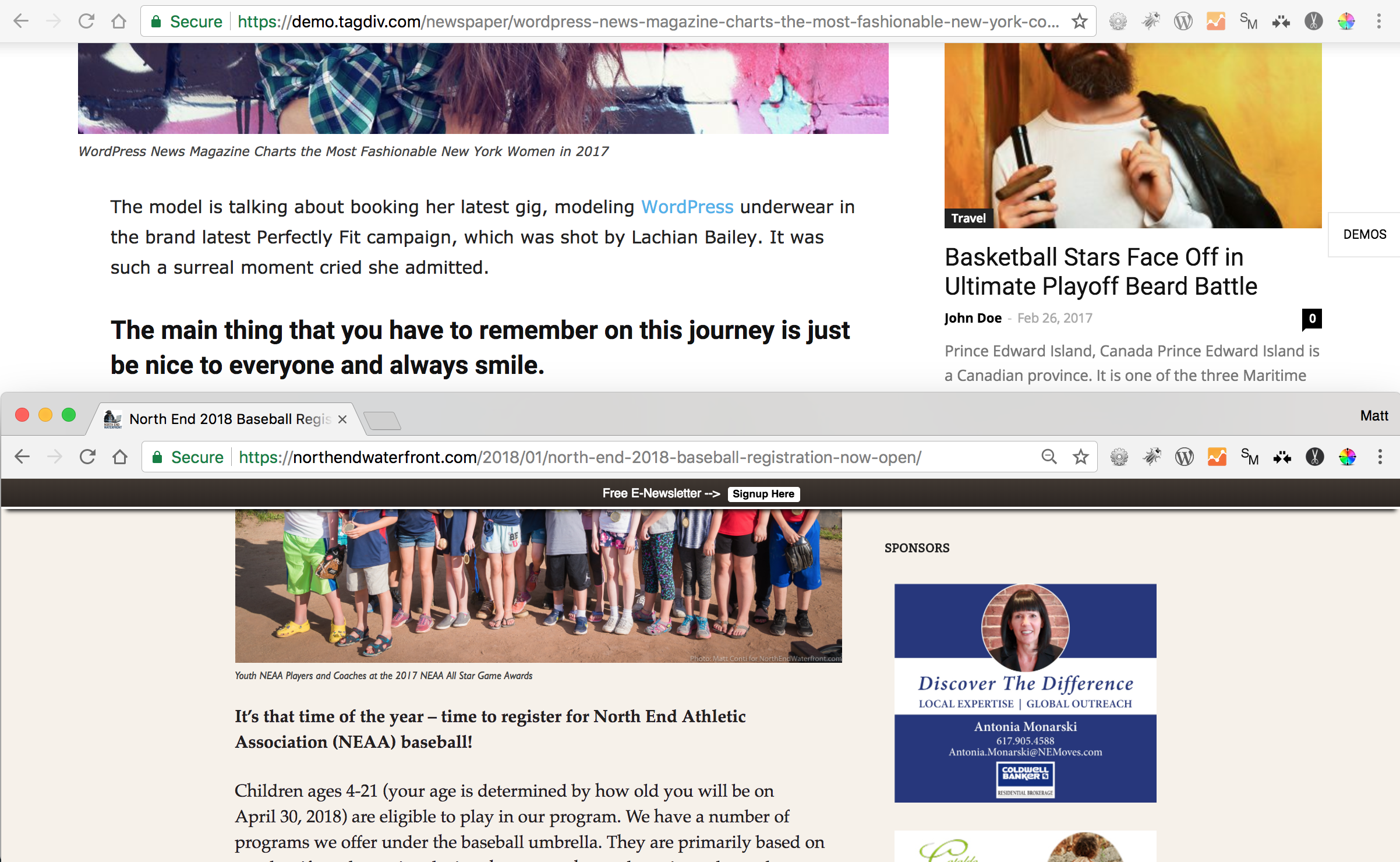
 I am trying to achieve the same look as on the demo. In the screenshot, this is using exactly the same browser scale settings showing the Newspaper theme demo (upper) and my site (lower).
https://northendwaterfront.com/wp-content/uploads/2018/01/Screen-Shot-2018-01-22-at-10.47.23-AM.png
Why is the demo so wider with larger images, etc. in the same sized window?
Simion C. Hi,
1. That would be the color set in the demo, each demo contains custom design. The color is set in the demo stylesheet
– https://www.screencast.com/t/yFwSE0mRZwQ
Removing it from there will allow the theme accent color to display on the modules. Or change it in the code directly, that will work as well.
2. The demo also has some design for the Instagram element, in the same stylesheet here
– https://www.screencast.com/t/rXfMOmNtk5jd
Removing it will display the default state.
Most of the demos have such custom design, where there were no theme panel settings at the moment of creation, custom CSS was used. This stylesheet is imported when the demo is installed and will override theme code.
Thanks
Simion C. Hi,
1. You can for example use a different page as shop, more about it here
– https://forum.tagdiv.com/topic/how-to-make-woocommerce-shop-home-look-like-the-demo/
Use shortcodes to display woocommerce content, that is how the demo is built also.
2. The number of columns can be controlled within the shortcode, for example
– https://www.screencast.com/t/6YDbXpsd
– https://www.screencast.com/t/3t4Vz2t8
3. You can add blocks to the page if you wish
– https://www.screencast.com/t/ZdjVveBH7q
– https://www.screencast.com/t/6s3BXvWr45
Thanks
 designr
Hello,
I am using the news ticker element to show quotes. This is how I have implemented it–> https://ibb.co/h8e7bw
This looks okay on desktop, but on mobile, some part of the quote is cut off… like this–> https://ibb.co/fTDQww
1. What changes do I have to make so that the full quote shows on mobile?
2. Is there a better way of achieving this using current theme capabilities?
NB: I did not start building the site from a demo.
designrHello,
I started customizing the theme from zero-did not use a demo.
But I would like my footer to appear like the default demo. I can see that footer style 5 was used on the demo, but this has 3 columns above the about us section… I would like to have 4 or 5 columns above this section.
How can I achieve this?
Thanks!