
- NewspaperModules Builder in Newspaper Theme
- NewspaperIntroduction to CPT and ACF with Newspaper Theme
- NewspaperHow to edit modules for Flex Block X
- NewspaperStripe Setup
- NewspaperPayPal Setup
- NewspaperAdd Cryptocurrency Price Ticker Widget
- NewspapertagDiv Shop
- NewspaperDesign your post pages using the Default Templates
- NewspaperTheme modules and blocks
- NewspaperUsing the Theme Translations with WPML
- NewspaperHow to Set the Image Avatar
- NewspaperNewspaper theme documentation
- NewspaperSmart Sidebar
- NewspaperBreadcrumbs
- NewspaperFooter Builder
- NewspaperMain Menu
- NewspaperInstalling Pre-built Websites
- NewspaperPre-built Websites: Introduction
- NewspaperWhat’s Included in the Newspaper Theme Package
 adam_page
I just installed the Newspaper 7 theme and the News Magazine demo. When I go to the page editor, Visual Composer is not appearing — just the stock WordPress composer box filled with the Visual Composer codes. Looks like this: https://snag.gy/e8C5w9.jpg I have disabled all plug-ins, except the plugins that come with the theme (Slider Revolution, Mobile Theme, Social Counter, Visual Composer). I have enabled WP_Debug, and it logged the following errors:
[03-Jun-2016 14:53:09 UTC] PHP Notice: Undefined index: description in /home/meteam5/public_html/wp-content/themes/Newspaper/includes/wp_booster/td_block_widget.php on line 135
[03-Jun-2016 14:57:46 UTC] PHP Notice: Undefined index: source in /home/meteam5/public_html/wp-content/themes/Newspaper/includes/wp_booster/wp-admin/panel/td_view_theme_plugins.php on line 159
[03-Jun-2016 14:58:04 UTC] PHP Notice: Undefined index: source in /home/meteam5/public_html/wp-content/themes/Newspaper/includes/wp_booster/wp-admin/panel/td_view_theme_plugins.php on line 159
How can I get Visual Composer to display correctly?
 Bogdan B.
 Hi,
If you install the ‘Say what’ demo, that is the style of the standard big grid 4: http://screencast.com/t/qGdHUthcrEaS
Thank you!
 Catalin
 Hello davidcolq,
I have checked your smart list and I saw that it is working fine but when I link to the image, I will get error -> http://screencast.com/t/JPcdJbbr8f Please ensure that you have right set your smart list according to our documentation here -> https://forum.tagdiv.com/smart-lists/ Also, please try to disable all the active plugins, leave just Visual Composer to active, clear all your caches, purge CDN files if you are using the CDN system and install only the plugins that come bundled with our theme and rule out the conflicting plugins. I have tested on my side the smart list feature and everything seems to work as properly, as you can see in our demo preview, here -> http://demo.tagdiv.com/newspaper/smart-list-style-2/
Hope this helps and let us know how it goes!
Thaks for your understanding!
Catalin Hello Sayeed,
I have tested on my side with smart list 6 and everything seems to work as properly, as you can see in our demo preview here -> http://demo.tagdiv.com/newspaper/whitewater-rafting-day-trip-new-york-east/ Please try to disable all the active plugins, leave just Visual Composer to active, clear all your caches, purge CDEN file is your are using CDN system and install only the plugins that come bundled with our theme and rule out the conflicting plugins.
Thanks for your understanding!
 Sayeed
 Hi,
I tried installing the demo for WhatSay but the I was not able to get the homepage results as showed in the demo.
I am talking about the block with two big thumbnail on top.
Thanks!
Catalin Hello mhendiz,
Do you have used before this type of demo? What steps do you have followed to get rid of it? I suppose that you have used Tech demo and then you have removed it and this request still remains there without any effect (0 B). Please provide more details about this case so I will be able to identify the root of this request.
Thanks for your understanding!
Catalin Hello icsiaid,
If you want to decrease your header for politics demo, you will have to use a bit of CSS code to do that. Please try the code below and place it in Theme panel->Custom CSS area.
The code is ->
.td-politics .td-header-style-11 .td-logo-wrap-full {

min-height: 0;

line-height: 0;

}
The result -> http://screencast.com/t/Zn56QDncXXZq
Thanks.
 mhendiz
 hi
thanks for your response.
i have question.
this codes in view-source.
<link rel=’stylesheet’ id=’td-theme-demo-style-css’ href=’http://www.muhendisbeyinler.net/wp-content/themes/Newspaper/includes/demos/tech/demo_style.css’ type=’text/css’ media=’all’ />
i dont using demos. how can i delete this codes.
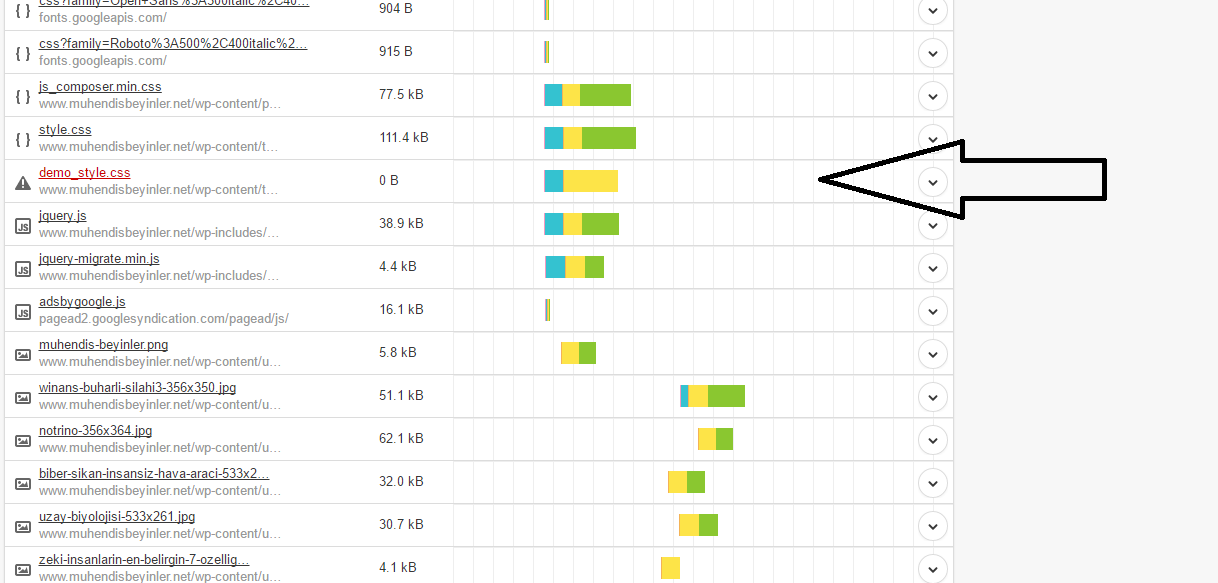
showing me 404.
i just deleted demos folder.
 infrastructureaustralia.com
 Hi Bogdan,
Thanks for replying. Im looking to have the big grid across the top of my home page with categories underneath and have the smartbar scroll beside them, this is the code I have:
[vc_row][vc_column][td_block_big_grid_3][td_block_ad_box spot_id="header" spot_title="Advertisment"][/vc_column][/vc_row][vc_row][vc_column width="1/3"][td_block_1 custom_title="Ports" custom_url="http://www.infrastructureaustralia.com/ports" header_color="#eded00" category_id="10" limit="1"][/vc_column][vc_column width="1/3"][td_block_1 custom_title="Construction" custom_url="http://www.infrastructureaustralia.com/construction" header_color="#81d742" category_id="13" limit="1"][/vc_column][vc_column width="1/3" el_class="td-ss-row"][/vc_column][/vc_row][vc_row][vc_column width="1/3"][td_block_1 custom_title="Infrastructure" custom_url="http://www.infrastructureaustralia.com/infrastructure" header_color="#1e73be" category_id="11" limit="1"][/vc_column][vc_column width="1/3"][td_block_1 custom_title="Telecommuncations" custom_url="http://www.infrastructureaustralia.com/telecommuncations" header_color="#dd9933" category_id="6" limit="1"][/vc_column][/vc_row][vc_row el_class="td-ss-row"][vc_column width="1/3"][td_block_1 custom_title="Airports" custom_url="http://www.infrastructureaustralia.com/airports" header_color="#7b7c18" category_id="9" limit="1"][/vc_column][vc_column width="1/3"][td_block_1 custom_title="Rail" custom_url="http://www.infrastructureaustralia.com/rail" header_color="#a5008c" category_id="8" limit="1"][/vc_column][/vc_row][vc_row][vc_column width="1/3"][td_block_1 custom_title="Road" custom_url="http://www.infrastructureaustralia.com/road" header_color="#dd3333" category_id="7" limit="1"][/vc_column][vc_column width="1/3"][td_block_1 custom_title="Utilities" custom_url="http://www.infrastructureaustralia.com/utilities" header_color="#00eaea" category_id="12" limit="1"][/vc_column][/vc_row]
But I would like it to look more like the newspaper demo.
Many thanks!
Bogdan B. Hello Robert.
The design for each demo is added custom in the style.css file. There is no setting to chose one style or the other. If you want that design, you will have to install the demo as there is no way to add it from the theme panel.
Thank you!
 RobertSchubert
I want to have the block categories (I’m not sure I’m using the correct term, they appear in pink on the demo) display in the same manner as they do in the “Say What Demo” (http://demo.tagdiv.com/newspaper_what/).
I cannot find where to adjust this in Newspaper>Theme Panel.
Any ideas on how to access this design option?
Thank you,
Robert
Catalin Hello Glitched,
I have checked your website and I saw that your toggle mobile menu it is not had any reaction. I suspect this issue come from your untested plugins which you are using on your side, though. -> http://screencast.com/t/Uj4ZCsEkWOb Please try again to remove ALL your untested plugins, leave just Visual Composer to active, clear all your caches, purge CDN file if you are using the CDN system and install only the plugins that come bundled with our theme and rule out the conflicting plugins. Please notice that the theme is fully tested and works as properly. You can do a test with our demo preview and check the results n mobile mode, like this -> http://demo.tagdiv.com/newspaper/
Hope this helps and let us know how it goes!
Thanks for oyur understanding!
 thies
thies Hi Catalin,
I have make a clean install and installed the latest version of the theme.. Also installed the travel demo. But i have a question about the travel demo.
How can i change the background size? I want change the height size of the “td-travel-header”. Where can I find this?
Kind Regards,
TB
Catalin Hello solidoes,
The surest way in this regard is to install the Black Version demo from scratch. Also, please notice that every demo has an own custom design and it is not simple to achieve this from the Theme panel. As a hint, you will have to check the style.css for this type of demo, like so -> http://screencast.com/t/WxpENXAteJdH and there you will find all of the code which has used to achieve this design. Please notice that the best way to have the black version of our theme is to install that demo.
For more information about installing demo, please consult here -> https://forum.tagdiv.com/search/installing+demo/
Thaks for your understanding!
 Andrei L.
 Hi
We use a custom structure for our page. There is not a template which automatically generate that layout so we made it with a custom html structure. The layout which can be achieved without modifying the code can be seen on our demos: http://demo.tagdiv.com/newsmag/ To replicate the same layout as on our blog you’ll need to customize the theme. We can’t offer customization services at the moment so if you’re not aware of the steps you need to take in this regard please consider hiring a developer or a freelancer to do this for you.
Thanks!
Catalin Hello revistatrazos,
I have checked your website and I saw that your Video Playlist is working fine. Also, please notice that if you want to have a playlist, you will have to add more than one video to create a list -> http://screencast.com/t/PiXA77aB
Here -> http://demo.tagdiv.com/newspaper_sport/ you can see how it could have to appears a playlist.
If is not what you mean, please provide more details about your problem, so I will be able to provide a more accurate response.
Thanks for your understanding!
Catalin Hello GuideMoba.Com,
First of all, please ensure that you have updated your Social Counter to the latest version of it (Social Counter 4.0) and also, for Visual Composer to have 4.11.2 version. For more information about this plugin, please consult our documentation here -> https://forum.tagdiv.com/tagdiv-social-counter-tutorial-2/ and please notice that you will have to follow this instruction in order to achieve best results. If you want to change the widgets from the Newspaper default, you will have to simply add the certain widget in this, like so -> http://screencast.com/t/CANjcFWEyUMa If you cannot do this step and you cannot save your widgets, please ensure that your parameters are increased to be higher, according to our documentation here -> https://forum.tagdiv.com/system-status-parameters-guide/
Please check this topic here -> https://forum.tagdiv.com/topic/cant-save-theme-settings/ because there was discussed this problem about Wordfence plugin. If you have the Wordfence plugin, please disable it or set it according to workaround that was explained in that topic by Bryson T.
Hope this helps and let us know how it goes!
If you refer to something else, please provide more details so I will be able to provide a more accurate response.
Thank you for your understanding!
Catalin Hello Jose,
Unfortunately, the footer size for the mobile theme cannot be changed very easy because it is displayed in 2 different spans and could not be moved. As you can see, the same layout it displayed and for our demo version, like so -> http://screencast.com/t/lT0UVmaqTGfM If you want to change this, please notice that this is not a simple task and require to make some additional customizations through code that involves custom work and we cannot provide this type of services at the moment, sorry!
Thanks for your understanding!
 solidoes
 Ok, my client is still interested in changing the skin to the black version, my question is could make that change by making changes from the Theme Panel or must install the demo? Thank you
 GuideMoba.Com
 crazydiver
 Thanks Bogdan!
I still have problems identifying the modules to make changes.
I’m trying to find the element the controls Sports News and Recipes (in the demo NewsMag) by trial and error. In the block settings, which module would that be?
Thank you.
 cheekyrome
Hi,
I installed the “Tech News” demo.
There is a “star rating” to see under some posts. I installed the plugin “WP Review”, because I thought, it would be the one used on “Newspaper”.
But it doesn’t work. There is the star rating under my posts now, but in the blocks i created with visual composer, there are no stars to see.
How did you make it?
Thanks for your support.
Best regards,
Rome
Catalin Hello
I suppose that you want to achieve this layout for your homepage, right? -> http://demo.tagdiv.com/newspaper/homepage-one-top-post/ So, please notice that you can do that using the Visual Composer, Homepage post element, like this -> http://screencast.com/t/GQ3N7KMX7in
Hope this helps!
Thanks for your understanding!
Bogdan B. Hello,
The style of the black version of the theme changes elements as well. every demo has it’s own styling. If you want to remove the style of the new tabs you will have to search in the demo’s style.css and remove the black version styling: http://screencast.com/t/T6fCMTl6
Thank you!
Bogdan B. Hello,
if you edited the demo content and did not create your own after you installed the demo, then this will hapen as the demo content will be removed. the best way is to create a back-up of your page by copying the page layout from text mode and pasting it in a new page. Basically create a duplicate of the content that will get removed. This is a common problem people have as it;s easier to edit the demo than create content from scratch but the downside is in this type of situations when people change demos after they already have their site set-up.
Please create duplicates of the content that gets removed so you no longer have edited demo content on your site.
(there is no way of installing a demo without the content being removed)
Than you!
