- NewspaperFlex Block Builder and Flex Loop Builder
- NewspaperHow to use the Flex Blocks cache option
- NewspaperHow to edit modules for Flex Block X
- NewspaperFlex Block Settings Guide
- NewspaperBig Grid Flex Settings
- NewspaperSingle Post Excerpt
- NewspaperWP Rocket and Newspaper Theme: Optimization Guide
- NewspaperSearch setup for custom post type
- NewspaperBookmark – Save For Later
- NewspaperModules Builder in Newspaper Theme
- NewspaperFilters and sorting for taxonomies
- NewspaperHow to insert a block inside the content of a post
- NewspaperCustom Post Type Support
- NewspaperMeta Info on Modules and Blocks
- TutorialsFrom WPBakery to tagDiv Composer
- NewspapertagDiv Composer Tutorial
- NewsmagSocial counter styles on Newsmag
- NewspaperSocial Counter Styles on Newspaper
- TutorialsOffset Feature
- NewspaperCloudflare (CDN)
 regio-online
Hi there at tagdiv,
I am running into some issues of witch I can’t optain if it is theme related or not, but maybe you can help or give a hint.
My newssite is running for over 8 years now with Newspaper and all postst are kept. My wp-postmetatable is very large (about 2,6GB) witch seems to give a lot of issues with stability of the database.
I recently moved from an unmaneged VPS (16 vCpu cores and 60GB RAM) to a shared hosting option with 24vCpu cores and 16GB RAM. I took over the site end 2024 and the previous owner helped with support on the VPS. Because of less time available and not being able to update Plesk to latest version, he stopped with suporting me on the VPS.
For years we used WP Rocket as caching plug-in witch almost never gave issues. Before the move a continues amount of databaseconnection errors was arising. The VPS had to be rebooted every few days because the mariadb service was killed.
Using a cache plugin (any cache plugin) gives Fatal database conetion errors or ‘Post can not be updated’. Tried Varnish cache without any other caching but that did not renew/cleared when I posted a new post. Also tried Redis Object Cache, witch worked at first, but then posting an post kept hanging and Redis didn’t clear anymore.
Because everytime I had to remove caching plugins via FTP to restore my site, I took a closer look at my database.
As far as I know I am only using cloud templates and flex blocks. But the fact that my postmetatable is 2.6GB big concerns me. Maybe you can help me out explaining if td-composer creates a lot of extra row in that table. At current time there are 1071550 totall rows in the postmeta table. I see a lot of the following rows
_vc_post_setting
_edit_lock
_edit_last
slide_template
post_views_count
and this repeats itself many times, but there are also references to other plugins like RankMath, WP Media Folder and FS Poster. It is tricky to get a clear picture of what is eating space unnessessary.
A hint of help would be much appriciated!
 JhonnySan
Hello tagDiv Team,
I’m using the Newspaper theme version 12.7.1 and am currently designing my site’s homepage with tagDiv Composer. In one of the main blocks on the homepage, I’m using Flex Block 1 to display recent catalogs in a grid format.
In the block settings, I have selected the option:
“Show additional text before the date.”
However, no field is displayed for entering custom text (for example, “Updated:”), and currently the date appears alone.
My intention is for the word “Updated:” to appear before the date in all Flex Block 1 modules automatically, without having to manually edit each post.
Is there a way to enable this text from the translation or global theme settings, without using a child theme?
Or should I modify a specific file to make this option work properly?
I would greatly appreciate your guidance. I’ve attached screenshots with the exact block configuration.
Thanks in advance for your help.
Regards,
Jhonny
Enviar comentarios
Paneles laterales
Historial
Guardado

 Calin
Calin Hello,
To reduce the queries you can check the fallow.
Check if you are using ajax pagination, mega menu many blocks (the theme is making a query for each block in part and if you are using mega menu each element as mega menu makes queries, also ajax pagination make quires to database), also make sure that you use lazyload for images.
Other type of settings that can reduce the numbers of queries: use a good cache plugin, use object cache (redis), and use flex block cache – https://forum.tagdiv.com/use-flex-blocks-cache-option/
In addition, it’s a good idea to identify what’s consuming your server resources. Tools like Query Monitor and Code Profiler can help you pinpoint high CPU or resource usage caused by plugins, themes, or database queries.
Thank you!
 RoffyDesignandArtInnovation
How can I set the filter settings so that only posts from 2024 and 2025 are displayed? I use Flex Block 2, the largest window on the website. In this time frame, the ads should be displayed in mode: Random. Is that possible? See also attachment. KI gives me an individual php code for this: But I don’t know where I could insert it? I don’t know if it works?
function beitraege_2024_2025_random() {
$query = new WP_Query([
‘post_type’ => ‘post’,
‘orderby’ => ‘rand’,
‘posts_per_page’ => 5,
‘date_query’ => [
[
‘after’ => ‘2023-12-31’,
‘before’ => ‘2026-01-01’,
‘inclusive’ => true,
]
]
]);
ob_start();
if ($query->have_posts()) {
echo ‘
- ‘;
- ‘ . get_the_title() . ‘
while ($query->have_posts()) {
$query->the_post();
echo ‘
‘;
}
echo ‘
‘;
wp_reset_postdata();
}
return ob_get_clean();
}
add_shortcode(‘artikel_2024_2025’, ‘beitraege_2024_2025_random’);
Thank you very much for your help.
See also this link:
This is the Website: https://e-m-l.ch
Raphael Gasser
Calin Hi,
The Big Grid Flex 3 will slide only on mobile, on desktop will not slide, but a similar layout has the Big Grid Slide that can slide on both desktop and mobile – https://i.imgur.com/4mf9Ok6.png
Thank you!
 Supuseyer18
Is it possible to make slide in Big Grid Flex 3 ?
Newspaper Version: 12.7.1
Calin Hi,
Only the flex blocks have the option to add/remove elements, the normal blocks use only the theme panel settings that will apply globally – https://i.imgur.com/kr3oLLV.png also you can import from cloud a flex block that was configurated to looks similar with block 11 – and you can edit it – https://i.imgur.com/ptKrbuO.png – https://i.imgur.com/cSPbpwJ.png
Thank you!
Calin Hi,
This situation can be related to the fact that the flex block do not has the correct filter set, it should be set on related by category, tag or taxonomy like this – https://i.imgur.com/SNBQxBB.png (using the filter with single in front). Please check the settings you have on the element.
Thank you!
 plotwit-team
Hi I am tying to show Latest post in one of the section but its not showing up when using Flex box1 module.
https://plotwit.com/beyond-the-blockbusters-jake-gyllenhaals-10-must-see-performances/ this is the latest post added under “Star Spotlight” category. but its showing different post.
https://ibb.co/MxLY4pHM
Please Help!
 jorronchi
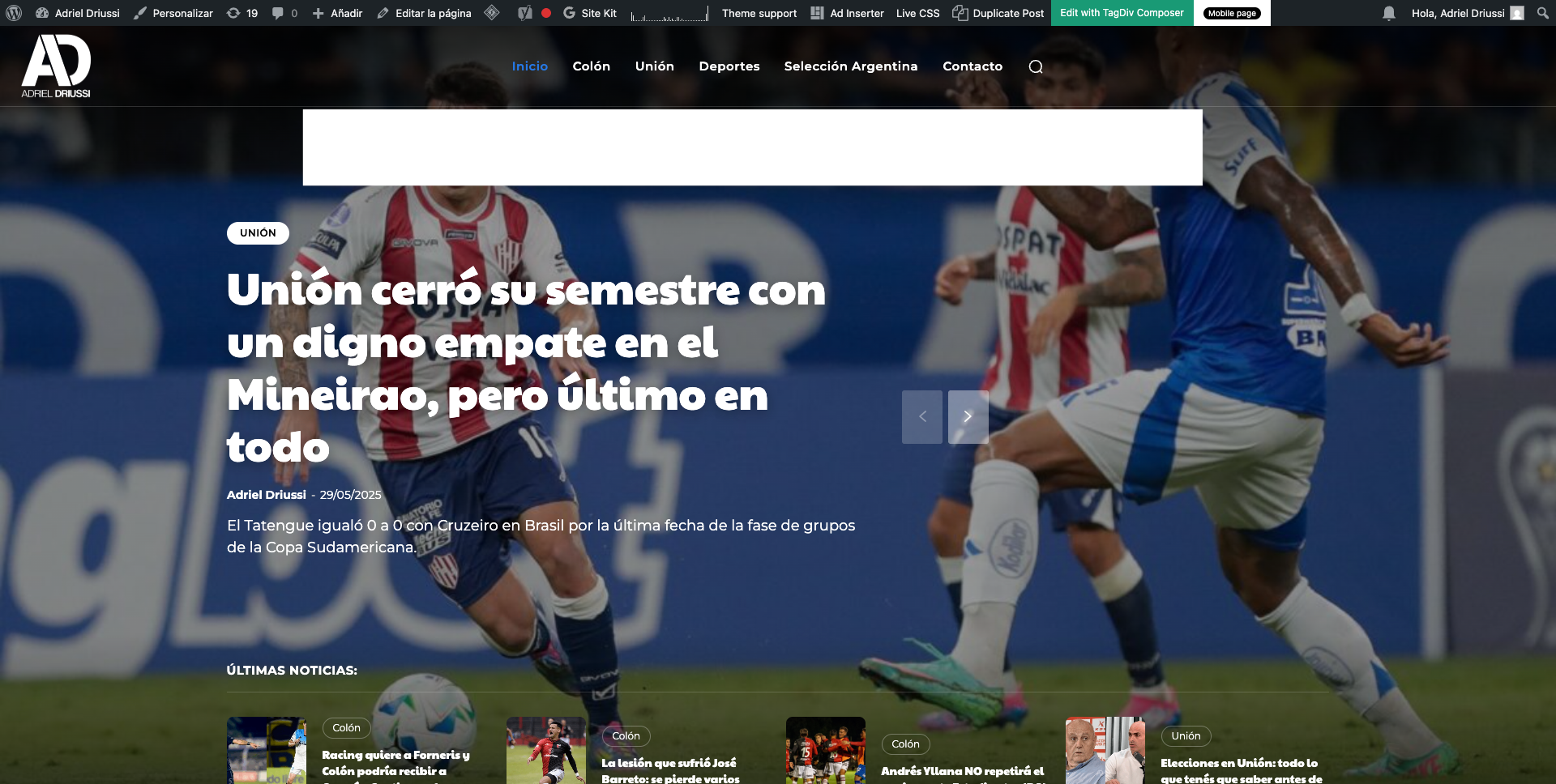
Hello, we would like to insert a banner that appears immediately after the header on https://adrieldriussi.com.ar/. Ideally, the banner should be placed above the featured image, both on desktop and mobile. I’m attaching images showing where we’d like to place the banner.
http://imgfz.com/i/4hW0nIe.png
http://imgfz.com/i/6c4byZN.png
We tried doing this through the Ad Inserter plugin but couldn’t find a way to insert the banner in the correct spot (I tested with different divs). Could you help me with this?
Thanks!
 percezioni
 Hi,
i have disabled the modal pop up element that is inside of demo (is for subscribe and follow to social) but i continue to view and have many 404 error.
With ahrefs i see many 404 error for this link:
<a href=”switching-plans-wizard/” title=”See pricing”
and also for
<div class=”tdm-social-item-wrap”><a href=”tagdivofficial” rel=”nofollow”
For me is impossible to find where i can disable. Please explain with much more details
I paste here the source code that you can view from source page:
<style>.tdm_block.tdm_block_button{margin-bottom:0}.tdm_block.tdm_block_button .tds-button{line-height:0}.tdm_block.tdm_block_button.tdm-block-button-inline{display:inline-block}.tdm_block.tdm_block_button.tdm-block-button-full,.tdm_block.tdm_block_button.tdm-block-button-full .tdm-btn{display:block}.tdc-row .tdi_30 .tdm-btn{height:auto;padding:15px 25px}@media (min-width:768px) and (max-width:1018px){.tdc-row .tdi_30 .tdm-btn{height:auto;padding:12px 20px}}</style>
<style>.tdc-row .tdi_31{padding:15px 25px;height:auto;line-height:1;font-family:var(–tt-extra)!important;font-size:16px!important;line-height:1.2!important;font-weight:600!important;text-transform:uppercase!important;letter-spacing:0.5px!important;height:auto}.tdc-row .tdi_31 i{font-size:16px}body .tdc-row .tdi_31 .tdm-btn-icon:last-child{margin-left:10px}body .tdc-row .tdi_31{background-color:var(–tt-accent-color)}body .tdc-row .tdi_31:after{background-color:var(–tt-hover)}body .tdc-row .tdi_31 .tdm-btn-text,body .tdc-row .tdi_31 i{color:#ffffff}.tdc-row .tdi_31 svg{fill:#ffffff;fill:#ffffff}.tdc-row .tdi_31 svg *{fill:inherit;fill:inherit}body .tdc-row .tdi_31:hover .tdm-btn-text,body .tdc-row .tdi_31:hover i{color:#ffffff;-webkit-text-fill-color:unset;background:transparent;transition:none}body .tdc-row .tdi_31:hover svg{fill:#ffffff;fill:#ffffff}body .tdc-row .tdi_31:hover svg *{fill:inherit;fill:inherit}body .tdc-row .tdi_31 i{color:#ffffff;-webkit-text-fill-color:unset;background:transparent}body .tdc-row .tdi_31:hover i{color:#ffffff;-webkit-text-fill-color:unset;background:transparent;transition:none}.tdc-row .tdi_31:before{border-width:0px;border-style:solid}@media (min-width:768px) and (max-width:1018px){.tdc-row .tdi_31{padding:12px 20px;height:auto;line-height:1;font-size:14px!important}}</style><div class=”tds-button td-fix-index”><span class=”tdm-btn-text”>See pricing</span><i class=”tdm-btn-icon td-icon-arrow-right-rounded”></i></div></div></div></div><div class=”vc_column tdi_33 wpb_column vc_column_container tdc-column td-pb-span4″>
<style scoped>.tdi_33{vertical-align:baseline}.tdi_33>.wpb_wrapper,.tdi_33>.wpb_wrapper>.tdc-elements{display:block}.tdi_33>.wpb_wrapper>.tdc-elements{width:100%}.tdi_33>.wpb_wrapper>.vc_row_inner{width:auto}.tdi_33>.wpb_wrapper{width:auto;height:auto}.tdi_33{justify-content:center!important;text-align:center!important}@media (min-width:768px) and (max-width:1018px){.tdi_33{padding-top:30px!important;width:36%!important}}</style><div class=”wpb_wrapper” ><div class=”tdm_block td_block_wrap tdm_block_socials tdi_34 tdm-content-horiz-left td-pb-border-top td_block_template_1″ data-td-block-uid=”tdi_34″ >
<style>.tdm_block.tdm_block_socials{margin-bottom:0}.tdm-social-wrapper{*zoom:1}.tdm-social-wrapper:before,.tdm-social-wrapper:after{display:table;content:”;line-height:0}.tdm-social-wrapper:after{clear:both}.tdm-social-item-wrap{display:inline-block}.tdm-social-item{position:relative;display:inline-flex;align-items:center;justify-content:center;vertical-align:middle;-webkit-transition:all 0.2s;transition:all 0.2s;text-align:center;-webkit-transform:translateZ(0);transform:translateZ(0)}.tdm-social-item i{font-size:14px;color:var(–td_theme_color,#4db2ec);-webkit-transition:all 0.2s;transition:all 0.2s}.tdm-social-text{display:none;margin-top:-1px;vertical-align:middle;font-size:13px;color:var(–td_theme_color,#4db2ec);-webkit-transition:all 0.2s;transition:all 0.2s}.tdm-social-item-wrap:hover i,.tdm-social-item-wrap:hover .tdm-social-text{color:#000}.tdm-social-item-wrap:last-child .tdm-social-text{margin-right:0!important}</style>
<style>.tdi_35 .tdm-social-item i{font-size:14px;vertical-align:middle;line-height:28px}.tdi_35 .tdm-social-item i.td-icon-linkedin,.tdi_35 .tdm-social-item i.td-icon-pinterest,.tdi_35 .tdm-social-item i.td-icon-blogger,.tdi_35 .tdm-social-item i.td-icon-vimeo{font-size:11.2px}.tdi_35 .tdm-social-item{width:28px;height:28px;margin:5px 10px 5px 0}.tdi_35 .tdm-social-item-wrap:last-child .tdm-social-item{margin-right:0!important}.tdi_35 .tdm-social-item i,.tds-team-member2 .tdi_35.tds-social1 .tdm-social-item i{color:var(–tt-accent-color)}.tdi_35 .tdm-social-item-wrap:hover i,.tds-team-member2 .tdi_35.tds-social1 .tdm-social-item:hover i{color:var(–tt-hover)}.tdi_35 .tdm-social-text{display:none;margin-left:2px;margin-right:18px}@media (min-width:768px) and (max-width:1018px){.tdi_35 .tdm-social-item i{font-size:12px;vertical-align:middle;line-height:24px}.tdi_35 .tdm-social-item i.td-icon-linkedin,.tdi_35 .tdm-social-item i.td-icon-pinterest,.tdi_35 .tdm-social-item i.td-icon-blogger,.tdi_35 .tdm-social-item i.td-icon-vimeo{font-size:9.6px}.tdi_35 .tdm-social-item{width:24px;height:24px}}</style><div class=”tdm-social-wrapper tds-social1 tdi_35″><div class=”tdm-social-item-wrap”><i class=”td-icon-font td-icon-instagram”></i><span style=”display: none”>Instagram</span></div><div class=”tdm-social-item-wrap”><i class=”td-icon-font td-icon-linkedin”></i><span style=”display: none”>Linkedin</span></div><div class=”tdm-social-item-wrap”><i class=”td-icon-font td-icon-twitter”></i><span style=”display: none”>Twitter</span></div></div></div><div class=”td_block_wrap td_block_raw_css tdi_36 td-pb-border-top td_block_template_1″ data-td-block-uid=”tdi_36″ ><div id=tdi_36 class=”td_block_inner td-fix-index”><style>.td-coaching-mm .td-sd-menu-icon.tdm_block_icon_box {
cursor: pointer;
}
Calin Hi,
Take a look here in this video for example where are build 6 columns: https://www.screencast.com/t/mZ2c5XamTFN You can play the layout options -> https://tagdiv.com/flexibility-rows-columns-newspaper-theme/ -> https://tagdiv.com/how-to-add-delete-and-duplicate-row-newspaper-theme/
You need to set each column width to 20% for five columns. Also, did you have set the align options on the row or on each column?
Thank you!
Calin Hi,
Unfortunately the cache option is only on flex blocks.
If you want to make a few tests I will suggest to remove on homepage the youtube videos and for menu to replace all menus that are made using page or category with custom links – https://i.imgur.com/3TU1ttE.png this will reduce the number of queries and the website should become faster.
Thank you!
Calin Hi Niklas, I will recommend to use the layout options from row and columns – https://tagdiv.com/flexibility-rows-columns-newspaper-theme/
Thank you!
Calin Hi,
This situation can be caused by more situations.
– it is possible to have an offset on the block were it should be display the article (it can be checked using tagDiv Composer)
– it can be related to a cache that is apply on blocks, it can be a cache from a plugin or the cache from the blocks – https://forum.tagdiv.com/use-flex-blocks-cache-option/
If you already checked those and the problem persist, please contact us via email at contact@tagdiv.com, provide a temporary wp-admin access and we’ll check it out.
Thank you!
 virajbpd
 Hi Calin,
We are using object / redis cache on our websites.
As you have mentioned about flex block, but on the Homepage we are not using flex block, we are using only Blocks and there is not option of cache in that.
So, how can we set cache on block things?
Thanks & regards,
Prathimesh
 mottoyou
Hi there,
I’ve set the Flex Loop Builder to sort the standard WP posts using Flex Loop Filters.
The two taxonomies I’m using as filters are the standard WP “category” and “post_tag”: https://prnt.sc/X8Ge5XrQphcG
However, on the front end I’ve noticed that selecting a term from “post_tag” along with a specific “category” term (with “Multi-Selection” enabled for both), doesn’t give the expected results, even though some posts belong to both the selected tag and the chosen category.
For instance, selecting a specific tag, the posts are filtered accordingly; furthermore, keeping the selected tag and adding a category-specific term, the posts are no longer filtered, but remain the same, just according to the selected tag.
I saw on one of your demo sites – “Doctors PRO” – that by having different taxonomies as filters and selecting different terms, doctors are filtered properly, based on multiple selection from different taxonomies. I know those are custom taxonomies, and doctors are a custom post type.
I’m wondering how I could get standard WP posts to filter properly when selecting both a tag-specific term and a category term.
Your support in this regard would be much appreciated!
Thank you!
Calin Hi,
What can be done is to replace all standard template and standard blocks with cloud template and flex blocks and after that to disable the tagDiv Standard Pack plugin, after that a good part of css will be removed.
Also, check if you are using css in live css – https://i.imgur.com/RyLF3vQ.png
Also, please check if the plugin has any option to remove unused css
Thank you!
Calin Hi,
1. For this you need to select each block from your website and use the filter tab to set the category articles you want there – https://forum.tagdiv.com/flex-block-settings-guide/ – https://i.imgur.com/vVTJoha.png
2. This is similar to point 1 you need to use the settings from the block. You can set the number of articles, to filter the articles, to short them .. all this can be done using tagDiv Composer and selecting the blocks – https://forum.tagdiv.com/flex-block-settings-guide/
Thank you!
Calin Hi,
Ok, the good news are that this is only a css problem and is only on web-stories page. You can use this custom css in the theme panel > custom code > custom css to resolve the problems from the image:
.post-type-archive-web-story .td_block_list_menu ul,

.post-type-archive-web-story .tdm_block_socials .tdm-social-wrapper  {

display: flex;

}

.post-type-archive-web-story .tdm_block_socials .tdm-social-wrapper a{

  display: flex;

  align-items: center;

  justify-content: center;

}
To display the web stories on frontpage please check if there are any shortcodes provided by the plugin. Also, if the web stories is a cpt, then you can use a flex block and set the post type of cpt in this place – https://i.imgur.com/m7s7qEa.png
Thank you!
 jasm90
 Asunto: Problemas persistentes con carga AJAX – Caché en bloques no fue efectivo
Estimado equipo de soporte de tagDiv,
Gracias por su respuesta anterior. Después de probar la solución recomendada de activar el caché para los bloques Flex, lamento informar que no produjo mejoras significativas en el rendimiento del servidor.
Actualmente operamos un sitio de noticias de alto tráfico con más de 10.000 publicaciones, y nuestra infraestructura incluye:
VPS optimo
Nginx, PHP 8.1 (FPM), Redis como caché de objetos
WP Rocket (totalmente optimizado), Cloudflare activo, y la última versión del theme Newspaper
No usamos WooCommerce ni funciones de suscripción – es un sitio exclusivamente de publicaciones
A pesar de tener todas las capas de caché activas y optimizadas, seguimos observando un alto consumo de CPU incluso en momentos sin visitas. Tras una revisión más profunda, la causa principal parece ser el uso de AJAX, especialmente:
admin-ajax.php?action=as_async_request_queue_runner
tareas en segundo plano generadas por el theme/plugins (probablemente vía Action Scheduler)
llamadas generales a admin-ajax generadas por el theme y el constructor
En este contexto, no es viable desactivar funcionalidades críticas o plugins simplemente para reducir la carga del servidor, especialmente considerando que muchas llamadas AJAX provienen de la estructura misma del theme (incluyendo tagDiv Composer y bloques dinámicos).
Necesitamos una solución técnica concreta y viable para reducir la sobrecarga de AJAX sin sacrificar funciones esenciales.
Agradeceríamos su orientación sobre lo siguiente:
¿Existe algún mecanismo interno o actualización en desarrollo para minimizar las consultas AJAX en segundo plano?
¿Es posible configurar tagDiv Composer o componentes del theme para reducir su dependencia de admin-ajax en entornos productivos?
¿Tienen prácticas recomendadas o configuraciones avanzadas específicamente para sitios con gran volumen de contenido que utilicen Newspaper?
Esperamos su orientación experta, ya que esta situación está afectando el rendimiento y la escalabilidad de nuestro sitio en producción.
Calin Hello,
In addition to using caching, Cloudflare, and Redis, I’d also recommend enabling caching for the Flex Block. This feature can make a noticeable difference by significantly reducing the number of server requests, especially on content-heavy pages.
It’s also good to keep in mind that, like any visual page builder, tagDiv Composer requires more resources while editing. This is perfectly normal. Real-time builders perform many background processes—adding, removing, and modifying elements, all of which generate multiple live requests. On websites with large databases (for example, those with a high volume of articles), using filters on blocks can slow things down a bit, as each block applies its own query to retrieve specific content.
This behavior is common across most live builders, not just tagDiv Composer. The system is working hard to provide instant feedback, which naturally increases resource usage.
What you can do:
A good next step would be to monitor resource usage and identify which pages or specific elements are using the most server resources. Often, features like AJAX filters or “most popular articles” widgets can be more demanding, since they constantly query the database for up-to-date information.
Identifying and optimizing these high-impact areas can help keep your site fast and responsive both for your visitors and during editing sessions.
Thanks again
Calin Hi Prathimesh,
What I can recommend in this situation is to use an object cache / Redis and you can also use the cache from flex blocks elements – https://forum.tagdiv.com/use-flex-blocks-cache-option/
Thank you!
Calin Hi,
Please check if the wp rocket plugin is set as in our guide also using Redis will help a lot. Another cache that can be used the the cache from flex blocks elements – https://forum.tagdiv.com/use-flex-blocks-cache-option/ this should reduce the CPU, also you can use a plugin to monitories the elements and plugins that are consuming and when are consuming the resources.
Thank you!
Calin Hi,
1. I checked the homepage and the next prev seems to be working on all blocks except the first one were all the time is bringing the same article. What I can suggest is to try with a filter applied this should resolved the situation.
2. Please check in the theme panel if you have any social share enabled to be display. If there are only a few socials, you can use this quite to add the rest of them – https://forum.tagdiv.com/topic/missing-social-share-options/
3. Where are “td-gadgets-loop” and “td-gadgets-flex” defined? – those classes are coming with the demo install, the css is implemented directly in the demo so you’ll need to overwrite it by adding an extra css that will apply on those classes.
4. This needs to be done per each block where you want to adjust the text, use tagDiv Composer, edit the page/template, select the block and in Layout tab look for button text – https://i.imgur.com/1bvkgVK.png
5. This can be done by editing the single post template with tagDiv Composer and enabling the infinite loading option. You can use this guide – https://forum.tagdiv.com/infinite-loading-single-posts/
Thank you!