
- NewspaperHeader Builder
- NewspaperHeader ads
- NewspaperHeader styles
- NewspaperSearch setup for custom post type
- NewspapertagDiv Composer – Website Manager
- NewspaperBookmark – Save For Later
- NewspaperWooCommerce: Happy “Add to Favorites!”
- NewspaperModal Popup
- NewspaperFlex Block Settings Guide
- NewspaperPosts Loop Element
- NewspaperHow to Add a Logo in Newspaper
- NewspaperDefault Category Settings
- NewspaperWhen tagDiv Composer is Not Working
- NewspapertagDiv Cloud Library Plugin
- NewspapertagDiv Composer Tutorial
- NewspaperUsing the Theme Translations with WPML
- NewspaperInstagram in Newspaper WordPress Theme
- NewspaperWeather Shortcode
- NewspaperThe Mobile Theme
- NewspaperLogin – How to Enable User Registration
 mita
mitaHi, I’ve just download and installed the latest version of the theme. Demo “COV-19 Italy Report PRO” (importing content) was installed.
My question is: When customizing the theme, many of the changes I’m performing are not being displayed. Like for example: Banners I’m adding, or if I change the the block header template. So something must be wrong. All necessary plugins are installed, as well as wp super cache.
I appreciate feedback and support. Thanks
 IslandJim
Hi I would like to have the mobile search available inside the menu and not visible in the header until someone opens the menu. Is that possible? Not using the mobile them.
thanks
 Topfgartenwelt
I have used the code from infophilic to fasten the newspaper theme to fasten the blog. But now I can find in the debug-section the following message:
2020/04/13 17:42:47 [error] 23958#23958: *1084 FastCGI sent in stderr: “PHP message: PHP Warning: php_uname() has been disabled for security reasons in /home/wp/disk/wordpress/wp-content/plugins/seo-by-rank-math/vendor/rollbar/rollbar/src/Defaults.php on line 66PHP message: PHP Warning: Use of undefined constant ‘wp_enqueue_scripts’ – assumed ‘‘wp_enqueue_scripts’’ (this will throw an Error in a future version of PHP) in /home/wp/disk/wordpress/wp-content/plugins/td-composer/mobile/functions.php on line 27PHP message: PHP Warning: Use of undefined constant ‘infophilic_remove_multi_purpose’ – assumed ‘‘infophilic_remove_multi_purpose’’ (this will throw an Error in a future version of PHP) in /home/wp/disk/wordpress/wp-content/plugins/td-composer/mobile/functions.php on line 27PHP message: PHP Warning: Use of undefined constant ‘wp_enqueue_scripts’ – assumed ‘‘wp_enqueue_scripts’’ (this will throw an Error in a future version of PHP) in /home/wp/disk/wordpress/wp-content/plugins/td-composer/mobile/functions.php on line 34PHP message: PHP Warning: Use of undefined constant ‘infophilic_remove_newsletter’ – assumed ‘‘infophilic_remove_newsletter’’ (this will throw an Error in a future version of PHP) in /home/wp/disk/wordpress/wp-content/plugins/td-composer/mobile/functions.php on line 34” while reading response header from upstream, client: 66.249.79.226, server: http://www.topfgartenwelt.com, request: “GET /2019/07/automatische-bewaesserung-im-garten-planen-gardena-micro-drip-system-erfahrung.html?amp HTTP/1.1”, upstream: “fastcgi://unix:/var/run/wordpress.php-fpm.sock:”, host: “www.topfgartenwelt.com”
What does that mean?
Greetings Kathrin
 BuddhaNET777
 i was able to resolve this issue, the problem was that i only edited the header view in desktop mode and not mobile within tagdiv. cheers
 olankun
how to change if i use tema on mobile : amp + mobile. tq
 Calin
Calin Hi,
The most easiest way it will be to change the header style -> https://i.imgur.com/pZIto7r.png or to import a cloud header from tagDiv Cloud Library and set it in theme panel -=> https://i.imgur.com/ICmtaTr.png these can be edited with tagDiv Composer and you can achieve the header you want.
Thank you!
 Vlad S
 Hello !
Yes, you can add the code in ads – header ad. Or you can manually insert it in here: https://www.screencast.com/t/mN7A8UowNmXS
Thank you !
Vlad S Hello !
By using tagDiv Composer on each page you can create your own header and footer: https://www.screencast.com/t/owDHabxdLXZn
Thank you !
 notionmotion
I bought this theme because is was rated a bets seller with a great page builder. I’m using the Italy Report Pro template. It is ridiculously hard to customize and standardize areas in this template that should be easy to do.
I can’t set a default font sitewide for my headers or the default font. It’s very hard to make customizations using CSS because every element is handled independently.
It’s should’ve take me a few hours to setup a news site. Instead, I’ve been at it for 6-8 hours and I’m not even close o being finished.
The documentation is virtually useless and the support forums help very little. I’m close to asking for my money back.
I could’ve used Avada and been up and running in no time.
Vlad S Hello !
All you have to do is open the svg file using notepad and copy that code into header logo tab.
Thank you !
Vlad S Hello !
You edit and customize your header by following our tutorial here: https://www.youtube.com/watch?v=HXQQygkCCJo&t=4s
Thank you !
BuddhaNET777i have added the signin/register element to my header. i want to change the background image of the popup. how do i do this?
i want it to look like my login link
https://buddhanet.world/bn-login
this is what it currently looks like

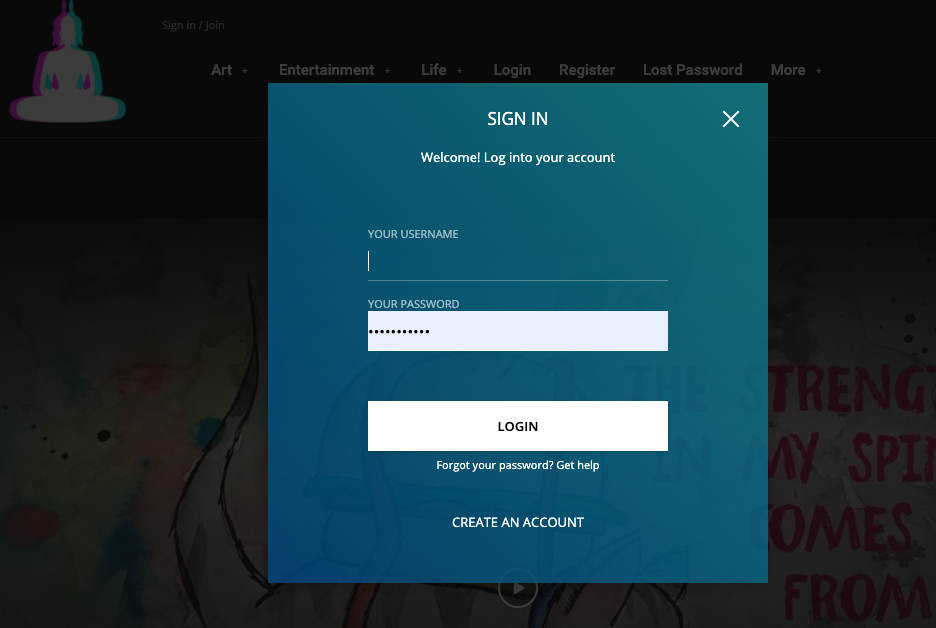
 forevermogulmag
It looks like the Travel Blog header is not available in the Cloud Templates. https://demo.tagdiv.com/newspaper_blog_travel/ Can you tell me how I can get this header/menu to add to my page.
Thanks.
 bluetonic
I add custom ad code
I see desktop , laptop , tablet it’s ok
but I don’t see in mobile (header)
thanks for support
 chip303
 What I noticed:
As soon as I have called up an article, the search is superimposed on top, the menu and the mobile header (inside still no function) are displayed in a reduced size.
By the way, both in Chrome, Firefox, Safari (each mobile on the phone)
 Edged
EdgedHello,
I just bought this theme because I wanted to use the video news demo to make my site. However, when I try to change the header layout style, I get an error where the header seems to go over the content below. I have included an image on dropbox:
https://www.dropbox.com/s/npypv6ikegbanwj/Capture.PNG?dl=0
How can this problem be fixed?
 investmentguide
On my website, I am using newspaper, business theme with header style 2.
[img]https://i.ibb.co/Z2wgnFD/logo.jpg[/img]
I would like some code (without creating a child theme ideally) that will move the logo to the far left of the header space so that it is in line with the home logo rather than over to the right.
Can someone help me with this please.
Thanks,
Matt
 bo
boHello,
on my blog tospitakimou.gr in most cases the mobile logo is aligned left.
http://imgur.com/a/twjycbU
I am not using a cloud template for header and I cannot find how to align it in center.
Thanks a lot in advance for your support.
With kind regards,
Chris
 pankajbisht
Dear Sir/Mam,
I have use the newspaper themes for my website. I have try to linking my web site with Google Analytics with google site kit plugin. but during this process I have seeing the error “Error: We’ve detected there’s already an existing Analytics tag on your site (ID UA-16201XXXX-1), but your account doesn’t seem to have access to this Analytics property. You can either remove the existing tag and connect to a different account, or request access to this property from your team.” thin I have remove Google Analytics script from my header.php and try to link again but problem is as it is.
I have try to find the wrong code in all theme editor but code is not find any file. Thin I find my website view source file and I have found a wrong code in home page website source file. I have try to find that code in my website source file but they are not present any where.
I cannot add new code without deleting old code. Please help me for deleting the existing old Analytics tag code/ script from my website. Tell me how can I found and delete from my website.
Thanks
Pankaj
 PINA-ABJAOU
 Hello!
I created a new website and I applied to google adsense. They gave me a verification code to add it into the header of my website like this one :
<script data-ad-client=”ca-pub-xxxxxxxxxxxx” async src=”https://pagead2.googlesyndication.com/pagead/js/adsbygoogle.js” type=”text/javascript”>
But I don’t know where to acaxtly add it. Can I add it in the header section ads of the theme panel ? Because as I know this section of Ads it is used to just display the ads barre !
Sincerely,
-
This reply was modified 6 years by
PINA-ABJAOU.
 Furkansolhan
 Arnaud
Hi!
We are developing a new version of our main website. This new version is at first designed for 2 different “areas”: Belgium (French) and Luxembourg (French). Another “language” will be added in the coming months and will cover Belgium (Dutch).
To do so, we use WPML in addition to Newspaper theme. We have therefore two languages configured and that are translated using string translations. The menus and the taxonomy are also translated.
Our problem: the Mega menu in the header works fine on the default language, but does not load in the other language. For the header, we use a Cloud template that we redesigned afterwards. Still, I don’t why the Mega menu does not load when I hover it?
Note: we do not use any child theme, and we tried disabling the other plugins. Does not help. + all the lights are green in the panel!
Thank you for your time!
 be2name
Hello,
my AMP-pages looked just fine, but I think with the newest version of the AMP-plugin all my colour-settings of the header, footer, links etc. are gone and set to ugly default. The rules applied in the mobile-theme-settings have no effect. I also use Yoast SEO, which has also AMP-colour settings, but these setting also have no effect. Where can I change the colour of my MAP pages, where can I add additional CSS to my AMP pages to get the latest layout back?
 vivekchavhan
How to different header and footer for each page
 huynhhieutravel
Helllo,
I couldn’t figure out where to change my email and tel line on Background Video and Header Menu. I was looking at Edit with TD Composer and Widget or Theme Panel. I’m in crazy with a little bit infomation for publish my website.
It’s on td-header-sp-top-widget.
My website is: https://sayhappy.vn/
Email: huynhhieutravel@gmail.com
Thank you,



