
- NewsmagHomepage – How to build and set it
- NewspaperHomepage – How to build and set it
- NewspaperHow to edit modules for Flex Block X
- NewspaperGeneral Options that May Interfere with the Newspaper Theme
- NewspaperThe Newspaper Mobile Theme: Introduction
- NewspaperHow to Add a Logo in Newspaper
- NewspapertagDiv Shop
- NewspaperHow to Use tagDiv Cloud Library
- NewspaperDesign your Post Pages using the Cloud Library Templates
- NewspaperHeader Builder
- NewspapertagDiv Cloud Library Plugin
- NewsmagtagDiv Composer Tutorial
- TutorialsFrom WPBakery to tagDiv Composer
- NewspapertagDiv Composer Tutorial
- NewspaperNewspaper theme documentation
- NewspaperThe Mobile Theme
- NewsmagNewsmag documentation
- NewsmagMain menu
- NewsmagLogo & Favicon
- NewsmagPage templates
 deviajeconmigo
Hello,
I have designed a custom mobile page with TagDiv. When I set it up to be the mobile version it stays on for several seconds. But like a minute after the homepage gets back to the normal mobile version of the theme (travel memories is the theme installed). Is there any way to keep the mobile version I created on forever? This is driving me crazy.
Thanks in advance.
Alvaro.
 Anamaria
 Hi,
You can check the home page with tagDiv Composer and in Manager (Website Manager) and see what header is set.
The Global Template is the one set in Theme Panel and has the menu which is set also, from Theme Panel => https://www.screencast.com/t/wrk2Q3z9 to change the menu on the homepage select a header which you want and set your menu on cloud header => https://www.screencast.com/t/4rIvzc4Km
Hope this helps you!
Thank you!
 Bettina
 Hello!
I checked your website and I can see your footer is there.
To modify your footer page, you need to access Newspaper -> Theme panel -> Footer -> Footer settings -> Footer page, then here you can see the button called “Edit footer page”.
Please note that if you will set in theme panel your homepage as your footer page, then the footer will not appear on homepage.
Thank you!
 Vlad S
 Hello !
The slide element which comes from tagDiv Composer it looks like this and it only pulls posts and it works like a block but it offers you a slide effect: https://www.screencast.com/t/LrFJAPusQh This is an element from tagDiv Composer, You will have to open tagdiv composer on your homepage or on your templates and add it.
The other solution would be to use Revolution Slider. Unfortunately we have not tested any more plugins in this matter, you can however test and see other plugins that fit your taste and work with the theme.
I hope this was more helpful !
Thank you !
 RickBouwmeister
 Hi Anamaria, It looks like the (downtime) problem is fixed.
But I still don’t know how to fix the menu-problem.
My homepage shows a ‘standard’ menu;
My pages show a menu I made myself in the tagdiv composer.
I need that menu I made myself on my homepage. But how?
 AdminWill
Good afternoon,
I installed a League Gothic Regular font on my theme panel to use on my homepage: wwww.chemindecosse.com
I use Tagdiv composer and no problem until a week or so a go.
The League Gothic font doesn’t display anymore on the website.
What might be the problem ?
 Defense92
Hey,
On my HomePage (http://dev2021.defense-92.fr/dev21/), the load more button is repeating the posts that are already showed…
The filter for the Blok 14 is Category : All Categories and Sort Order: lastest.
Any clue?
thanks!
Bettina Hello!
Once a demo is loaded the entire demo-style.css file corresponding to that demo will be loaded. If you remove the loading of this file, the demo will no longer receive the specific style. If you do not need to load css, you can simply use the cloud library and import the demo homepage and not use a demo at all on your install.
If you still want to remove the loading of the demo file, you can not do it from the child theme. You have to modify the main theme file:
td-composer/legacy/common/wp_booster/td_wp_booster_functions.php [line 414]
Hope that helps you somehow!
Thank you!
 Anonymous
 Oh, believe me: it’s very normal for you guys to leave costumers websites with issues… I have two open topics that I asked for a fix and did not receive it (the “fix” proposed to me was to wait for the developers to fix it..)
For that reason I am not willing to fix the slide element bug for now, as I’ll wait for an upcoming update to try this element again… I am not in the mood to engage in a conversation trying to solve an issue, to, one week later, receive an answer like that: “I have passed this topic to our developers and they will take a look at improving the theme in the next updates.” or “I have checked and this seems to be on our developers to do list.“, as seen here: https://forum.tagdiv.com/topic/avoid-non-composited-animations/
And, trying to receive an answer for the question I asked, I’ll reformulate it:
I am willing to put a slider in my homepage, but I don’t know where to begin… What are my options to achieve that, either via TD Composer blocks, TD Cloud elements, or external plugins?
Thank you!
 Nagarig
I wanted to disable header ads for mobile view. so from Tagdiv homepage builder, i put header ads > css “hidden”. but now, when i want to “Show” it, ads not appearing. please help.
Anonymous Hello, Vlad!
Thank you for the copy and paste response. It seems that you did not even saw my question…
I’ll put the question I asked again here, hoping that, this time, it’ll be read:
Besides using external plugins (Revolution Slider is too bloated, all the others don’t seem to be seamlessly compatible with the theme), there is another option to put a slider in the homepage?
 boroguide
Hi, started noticing a slight issue with my homepage: https://www.boroguide.co.uk/
The title text (parallax header?) on the full screen header isn’t always visible on load. But any adjustment of the screen size seems to jolt it into life and it then does appear.
The issue with it not appearing straight off is that it just leaves the header image with no explanation or down arrow.
What could be causing this?
RickBouwmeisterHi there,
The mobile version of my website shows 2 different mobile menu’s. The one on the homepage is not the one it should be. The other pages do have the menu as it should be.
How can I change this homepage mobile menu just like the other ones?
Kind regards, Rick
website: http://www.costablanca.nl
 PKP01
PKP01Hi,
Within category template breadcrumbs I have site homepage and category title. Since category title is anyway the biggest text right below breadcrumbs this is creating awkward layout and not very nice from SEO perspective. How to remove category name from category breadcrumb?
Example: https://bajki-zasypianki.pl/wiersze-dla-dzieci/
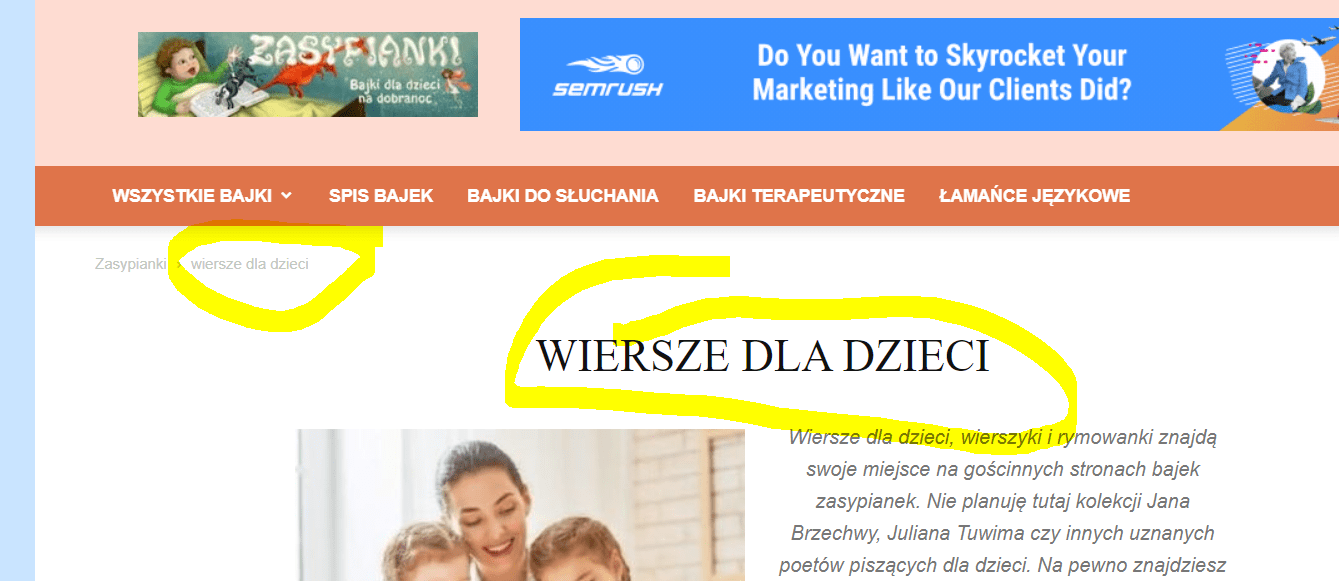
Thanks for help!
Pawel
 Snowwhite7
Hello,
I have an ad agency that gave me a plug in to install for them to add a widget to put sidebar ads on my site. Unfortunately, this is not working on my theme. Is there a way to do this?
Also, if I want to add sidebar ads myself with only a link and photo ( no agency ad), I can’t seem to find how to do this for the homepage and blog posts. I tried to bring up a box, but I can’t add it.Do you have a tutorial?
Thanks!
AnonymousHello!
I need to put a slider in my homepage, but I am not being able to do so.
Every time I try to put the “slide element” via TD Composer, my site brakes.I really don’t know why this occur, but it doesn’t show any error in console or in the wp error log.
Besides using external plugins (Revolution Slider is too bloated, all the others don’t seem to be seamlessly compatible with the theme), there is another option to put a slider in the homepage?
Thanks!
 isai
isaiAfter updating to the latest version 10.3.2 the homepage slideshow has disappeared.
What to do to fix this error?
I had to restore the backup, to see the slideshow back.
Could someone from the support do the update for me, please?
Regards.
 stepanmika
Hello, I have problems with resposive version of my homepage (www.suvmag.cz). When I make some change in the TagDiv editor, the change is not applied to the responsive version and so they both look absolutely different. For example, now I have Revolution slider in desktop version (I am using Car Blog theme), but in the responsive version, there is no Revolution slider at all. I tried even creating a mobile home page, but the changes I make on mobile homepage are not seen anywhere… Thank you for your help in advance!
 Rhonda
The images on at least two of my sites using Newspaper theme are not loading. Sometimes the Homepage loads, but when they click on the article, the Featured Image does not load. I just spent almost an hour troubleshooting with a Godaddy technical support rep and he is convinced it is a theme issue. I have disabled the plugins and the problem persists.
Nagarig Hi, It’s not working. My Instagram widget is added in Footer 1 through Custom HTML. It is not working when I choose to Hide it.
Instagram widget is from a social plugin, not a newspaper Insta widget. So I am using shortcode like [instafeed] in custom HTML > added in widgets. Then I added the widget in footer from Homepage TagDiv editor. Then I tried Hidden in Mobile view, but it is not working. please help.
Vlad S Hello !
That can be done using tagDiv Composer. Open tagDiv Composer on your homepage and edit the colors as you can see here: https://www.screencast.com/t/mQmgv2S4
Let us know the result !
Thank you !
 pikirandotco
hello i want to make each color fit the existing category, You can see that the image above does not match the color it should be
I want to change the category color according to the color below
RED : NASIONAL
GREEN : LIFE STYLE
YELLOW : REGIONAL
PURPLE : INTERNASIONAL
Bettina Hello!
Unfortunately, you can not disable sticky option only on a page the same header. You can do this if you will do another header for homepage and set up non-sticky.
Thank you!
Bettina Hello!
Unfortunately, for the moment there is no option to can include “Latest articles” on a post page only on homepage.
Thank you for your understanding!
 Romi
RomiHi Tagdiv Admin
I would like to have “Pagination” in Extra for the Big Grid Flex 1. As this Big Grid Flex 1 block doesn’t have that feature.
So the question is how to have pagination on the block so the category I display on the homepage have the pagination (arrow for next post or such).
Thanks in advance.
