
- NewspaperHomepage – How to build and set it
- NewspaperHow to edit modules for Flex Block X
- NewspaperGeneral Options that May Interfere with the Newspaper Theme
- NewspaperThe Newspaper Mobile Theme: Introduction
- NewspaperHow to Add a Logo in Newspaper
- NewspapertagDiv Shop
- NewspaperHow to Use tagDiv Cloud Library
- NewspaperDesign your Post Pages using the Cloud Library Templates
- NewspaperHeader Builder
- NewspapertagDiv Cloud Library Plugin
- NewspapertagDiv Composer Tutorial
- NewspaperNewspaper theme documentation
- NewspaperThe Mobile Theme
- NewspaperPage templates
- NewspaperTheme Colors Introduction
- NewspaperFooter Builder
- NewspaperMain Menu
- NewspaperPre-built Websites: Introduction
 yingfuli
 Hi,
I use AdRotate to make groups but only use their shortcode in NewsPaper Theme Panel or on the homepage with the ad element in VC. AdSense however injects at least two ads randomly on each page. Could it be caused by having inserted the AdSense code in the header?
 DaveS
DaveSHi guys,
I have an issue with an empty sidebar on a specific page type.
When I activate the sidebar under Template settings > Woocommerce template > Shop Homepage + Archives – the respective sidebar created for those pages is displayed properly (note: the sidebar is hidden for the Shop Homepage with custom css). If I understand correct, the same sidebar should appear on the woocommerce search result page. When I do a search, products are displayed as results properly, and the space for the sidebar is reserved, but the sidebar itself doesn’t load. You can have a look here bit.ly/2vVaRz7 . How can I fix it?
Thanks
 lukehodge
Hi, I’ve recently activated the Newspaper theme and am unable to see the elements I’ve added/saved on my homepage with Tagdiv composer.
I think it’s due to mydomain.com not matching up with mydomain.com/home but I don’t know how to fix it.
If I go to mydomain.com.au/home I can see the stuff I’ve added in Tagdiv Composer, but if I just go to mydomain.com it’s not there.
I can see that the permalink for the ‘home’ page is mydomain.com.au/home and if I try to delete the ‘home’ part it just defaults back to it when I save.
I’ve tried deactivating all plugins except for Tagdiv composer but the result is the same.
I know very little about website building so help would be greatly appreciated.
 albertok
Hi,
I tried to edit homepage of a loaded demo and I had this error:
Errors happened during tdcIframeData.init() -> bindViewsModelsWrappers()!
What is that?
 momenvy
Hello,
I don’t mean to sound incredibly dumb here – but I can’t seem to figure out how to modify the home page of my baby blog. I installed it a while ago but now with the new tagDiv options, I would love to add a few changes to my home page. Is there a way to use the tagDiv system with the homepage? Or is it only for additional pages we create? I have watched the tutorials and they don’t answer my question. Thanks!
 Scumbag
My site http://scumbagged.com has an issue. I cannot update the footer content. That goes where footer 1, 2 & 3 is on the widget. The widget is excessible and I can add and drop things into footer 1, 2, & 3 but the changes don’t show. Everything stays the same with the “even more news” and “popular categories”. What’s going on? I’ve searched everywhere on my site to change this content and cannot find any of it.
Again another mystery is on the mainpage of my site where it says “Recent Articles” towards the bottom, I cannot find where to even edit this at… It’s not on the homepage where I go to edit it and that’s where I thought I would find it.
Thanks in advance!
 JimmyARobert
Hi, I just removed the “News Ticker” Element that I had on my homepage, and now there is a space between the menu bar and the start of the grid. I noticed on your demo version of “Sound Radar” the same as what I’m using there is no space under the menu. I checked to make sure the column and row was deleted. Could you please help with this?
 laxallstars
Our homepage: https://laxallstars.com
The blue section on our homepage should be a 1/3 column on the left side. The black article section should be 2/3 on the right.
Our shop: https://laxallstars.com/shop/
The top sections are woocommerce elements and misaligned.
Please advise. Thanks in advance!!
 Goa
Goa Hello,
I tried what you sent me but I still do not have the numbering of the pages with all the articles (on the other pages) at the bottom of my homepage.
Regards,
 ringstonmedia
Hi,
I need to increase the words, or characters displayed in the blocks on our homepage. https://metroairportnews.com
Any thoughts, or hints to where this setting is would be appreciated.
 samuel
Hello TagDiv Team,
I was able to integrate the rev-slider successfully (thanks to the detailed documentation). I went ahead and created a demo slider and added it to the homepage as well. The slider is showing up but there seems to be a space between the menu bar and slider. (you can check the test link: http://www.ssent.net.in). I tried to reduce the top-padding but if we reduce it to 0 the mobile responsiveness is affected.
Following are quick pointers on the settings.
1. Slider is set at Full-Screen.
2. I am using the demo ‘Say What’ with no changes made to the layout or code. (esp. for HomePage)
Request you to share your thoughts on how I can get rid of the white space and not loose the mobile responsiveness and slider functionality.
Regards,
Samuel
 truongtungminh
 And something you maybe need to know, thumbnail work perfectly on category page, but not on homepage
 erick485
Hi,
I have a client who wants to break a long post title into 2 lines. If I use the tag <br> inside the post title, I can achieve the result in the article page but not on the blocks on the homepage.
Can you assist me on how to solve this?
 wonderwallbya
Hi.
I understand how to create a new homepage for tagDiv Composer. But what is the best way to do the same for regular pages who already exist ? Must I have to create a new page, delete the old one, change the title of the new one so it can use the same URL ? Or is there a best way ? Thanks.
 Simion C.
 Hi,
You could set a negative margin on the row containing the slider, like this
– https://www.screencast.com/t/6Mzl1fxVm
Or try a code like this for example (will apply only to homepage)
– https://www.screencast.com/t/PzvrqFitIH
.home .td-main-page-wrap {

padding-top: 0;

}
Thanks
 valibrad
Hello,
Have a problem with the search form. It shows results for first page, then on pagination (page nr2) it goes to home page. Can anybody help to fix this issue? Thank you
 antasitepu
How can i custom my mobile homepage with tagdiv composer ?
 Edward
 To customize your new Main Menu:
1. Start to add menu items from the left panels (Homepages, Pages, Links, Categories (in your case!))
2. You can manage your menus by using the drag and drop functionality and rearrange the menu items in the desired order.
3. After setting up your menu, scroll down to the bottom of the page and assign the menu to one of the 3 Theme Locations at the bottom. Select Header Main for Main Menu.
4. Click the Save Menu button
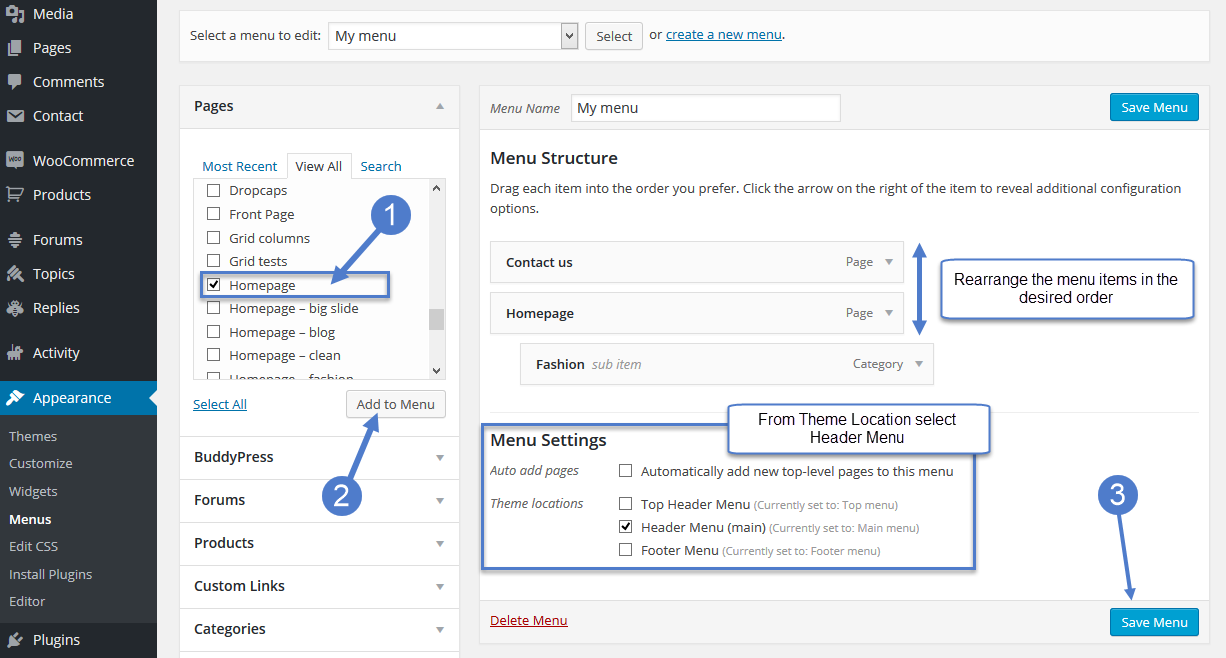
https://forum.tagdiv.com/main-menu/
-
This reply was modified 9 years by
Edward.
 Croatia Explorers
Hi Guys
I’m new to code so please bare with me.. I’m trying to add meta tag to confirm ownership of webpage for an affiliate program. I can only verify the ownership of my domain by adding a META tag into the section of your HTML code on your homepage.
I can’t see where i do this? Is it in theme panel, via c panel bluehost or somewhere else??
I currently use yoast for seo and google metas so I’m wondering whether it’s suppose to be with them, but no where to add.
Thanks in advance for any advice
 chloecollette83
Hello and thank you for your theme. I’ve a couple problems.
1. Although I’ve activated my theme WordPress is mandating that I re-activate it. The problem is that I have already done so, and do not wish to create entirely new log on credentials.
2. I’ve published a post but, even though the photo, title, and subtitle appear on my homepage, the link appears to be broken.
3. My custom CSS appears to load after the theme CSS. Is the only way to correct this by manually editing the style.css sheet which came with my original theme?
In advance, thank you for your assistance.
 paulieweb
Hello,
Great theme. Wondering if you know a way to auto-populate the YouTube block on the homepage from my account/channel? I tried working at it manually but can’t really get it working as intended. We have a new video every day and don’t want to keep having to update the playlist manually. Thanks!
 PatWire
Just a note – the very popular AMPforWP plugin has released what it calls an ‘AMP Newspaper theme’ – it is in fact what appears to be TagDiv’s Newspaper theme edited for AMP; all very good, except it’s selling for $49 PER YEAR
They have often recommended Newspaper as a good theme, but I wanted to let you know about the use of your theme name and the fact that it is being sold
The sales details: ‘AMP Newspaper theme was created specially for the users who are using the Newspaper 8 theme by tagdiv and wants the same look and similar looking functionality on the AMP.
This theme was created with Drag & Drop AMP Page builder which allows you to create a dynamic homepage on AMP with News ticker, several types of category block designs with options like category selection, post counts, colour pickers & many other options.’
1. Is this authorised by TagDiv?
2. Why can’t we have one anyway as part of NP8 if it’s possible 🙂
Best wishes
Pat
Simion C. Hi,
Please try a code like this one, it will change all the article titles on the homepage to the color you want
– https://www.screencast.com/t/3L6lfMQk
– https://www.screencast.com/t/xExyxozl70
Enter the code in Theme panel->Custom CSS
.home h3 > a {

color: #1903ba;

}
Thanks
 dwarkapuria
Hello
wWe want to remove header ads from homepage and pages, please see the url we want to remove the big adsense ad from homepage .
Thanks
 willkar
Is there a way to have a popular trending tags on header like this ? (Attachment)
It would be cool to replace or add this funcion on the “News ticker” widget.
Link image: http://imgur.com/jkoONC9
