
- NewsmagInstall via WordPress
- NewsmagInstall via FTP
- NewsmagInstalling pre-built websites
- NewsmagUsing the theme translations together with WPML
- NewsmagHow to update a plugin
- NewsmagNewsmag theme support
- NewsmagCustom Post Type Support
- NewsmagImport / Export theme settings
- NewsmagHow to add icons in the menu
- NewsmagRequirements for Newsmag
- NewsmagNewsmag documentation
- NewsmagHow to update the theme
- NewsmagBlock settings tutorial
- NewsmagHow to update the WPBakery plugin
- NewsmagIntroduction
- NewsmagMain menu
- NewsmagFeatured image or video
- NewsmagAuthor card
 Bettina
 Hello @ElkGroveNews !
Make sure you have all the tagdiv plugins installed, active and up to date: https://forum.tagdiv.com/newspaper-how-to-update-a-plugin/
Thank you!
 Anamaria
 Hello,
Seems you have the mobile theme and AMP are still activated on the website. Please deactivate those plugins and purge the cache a few times.
Usually, this problem is caused by the cache plugin, which doesn’t have the option for the mobile version -> https://forum.tagdiv.com/cache-plugin-install-and-configure/
Please disable the redirect from the mobile version to amp -> https://i.imgur.com/7Z7V82x.png using that option your visitors will never see the responsive version, only the amp version.
The AMP works better only with the Mobile Theme plugin. From my point of view, if you don’t use the Mobile Theme plugin, then there is no reason or benefit to AMP. Please read all about AMP here: https://forum.tagdiv.com/tagdiv-amp-plugin-tutorial/
It comes with its own templates/design for page, post, category, etc so your current templates from the desktop theme will get converted to the mobile theme layout. Documentation here:
– https://forum.tagdiv.com/the-mobile-theme/
– https://forum.tagdiv.com/mobile-theme-introduction/
Please read all about AMP here: https://forum.tagdiv.com/tagdiv-amp-plugin-tutorial/
Note that you can not customize AMP so much, because it comes with its own design.
There are some settings in the Theme panel -> Mobile Theme and Dashboard -> AMP only.
You can not add a shortcode as in the TagDiv Composer. Please note that you can’t customize the AMP pages with the TagDiv Composer.
Make sure the redirect mobile visitors to amp option is disabled.
Please check this topic where I explained each mobile version -> https://forum.tagdiv.com/topic/mobile-version-not-working-properly-2/
Thank you!
Anamaria Hello,
Please delete the tagdiv Composer, reinstall it, and activate it again.
Did you use another page builder?
Thank you!
 soynadie
The system indicates that an update is available, I installed the update online through the wordpress desktop
All perfect
5 days later I have the site misconfigured and Newspaper tells me to install from scratch and buy the license….
What happened?
 mm-design
Hello,
today one of my client’s website is totally blank:
https://www.wingateschool.com/
I do not know what could be the problem because I did not install new plugins or made edits.
I noticed that on the Theme dashboard, under the Updates tab, it is displayed the following error message “An issue has been encountered while trying to validate your license key. Please reset the key from the System status tab and try to activate it again, or contact our customer support team at contact@tagdiv.com.”
I have tried to reset the key but the problem is still here.
I need to solve this issue asap because tomorrow my client has an important meeting with stakeholders and the website is blank atm.
Can you please help me with this?
Thanks a lot.
M.
 ElkGroveNews
Recently my website was attacked via my host, Host Gator. After the attack, the top flex box on the default
I was using the default Pro Newspaper theme for my website elkgrovedailynews.com
I had to reinstall the default template and this message appeared twice at the top of the page:
Notice: Undefined offset: 1861 in /home1/elkgrews/public_html/wp-includes/nav-menu-template.php on line 210
I tried a few different templates and that same message appeared.
I am currently using the News Life Pro template because the error message above does not appear.
However, I prefer using the Default Pro template.
What is making the error message appear, and how can I remove the error so I can use Default Pro template?
Also when I reinstalled the default template, the Big Flex at the top of the pages did not properly display.
The top of page flex block
 Snowwhite7
 I had my host do a back up and I will try to re-install the new version this week.
 tenacemente
 Installo sempre la demo senza contenuti ma ogni volta devo ugualmente ricreare la pagina Home.
 RKdium
Dear TagDiv-team,
Could you please tell me if this is normal?
https://sitecheck.sucuri.net/results/https/www.rommalanders.com
If TagDiv Composer plugin is activated, the sucuri sitecheck recognizes the plugin as a malware. I’ve tried to reinstall the plugin, no changes.
Is there any kind of problem with the plugin in this case? Or false positive?
Best regards and thank you for your help!
Roman
 Kentaro Darkdox
Hi
When I tried to edit a Page with TagDiv Composer, I get an error with the Plugin.
https://prnt.sc/Km83giUIIGxw
I checked it, but they are all installed. The Composer version is 3.5
This only happens to me with some pages. Even so, the affected ones look good for the user.
Why it happens?
One of the affected pages: https://www.alertageekchile.cl/nuestro-equipo/
Bettina Hello @Kelvin!
We recommend using only one cache plugin, the WP Super Cache plugin with this configuration: https://forum.tagdiv.com/cache-plugin-install-and-configure
Do not use multiple cache plugins!
Thank you!
 Kelvin
I got a message on WordPress dashboard that the page cache is not detected. I installed WP Super Cache but got the error below. I have changed and updated my website permalink but nothing has changed. I have also changed the menu titles but it has also stayed the same. Kindly assist me.
Error: Configuration file /home/admin/domains/college2university.com/public_html/wp-content/wp-cache-config.php is missing. Please reload the page.
Warning! Could not update /home/admin/domains/college2university.com/public_html/wp-config.php! WPCACHEHOME must be set in config file.
Warning! /home/admin/domains/college2university.com/public_html/wp-content/advanced-cache.php cannot be updated.
Make /home/admin/domains/college2university.com/public_html/wp-content writable using the chmod command through your ftp or server software. (chmod 777 /home/admin/domains/college2university.com/public_html/wp-content) and refresh this page. This is only a temporary measure and you’ll have to make it read only afterwards again. (Change 777 to 755 in the previous command)
Refresh this page to update /home/admin/domains/college2university.com/public_html/wp-content/advanced-cache.php
If that doesn’t work, make sure the file /home/admin/domains/college2university.com/public_html/wp-content/advanced-cache.php doesn’t exist:
Bettina Hello @tenacemente!
The design is changing, and if you install the demo with content, then all the content will be overwritten. Install a demo without content, and you’ll never lose your previous content.
Thank you!
 steveroberts
 Thanks for your help.
As far as I know, I don’t have Google Analytics on the site. I cannot find any plug in that would indicate such.
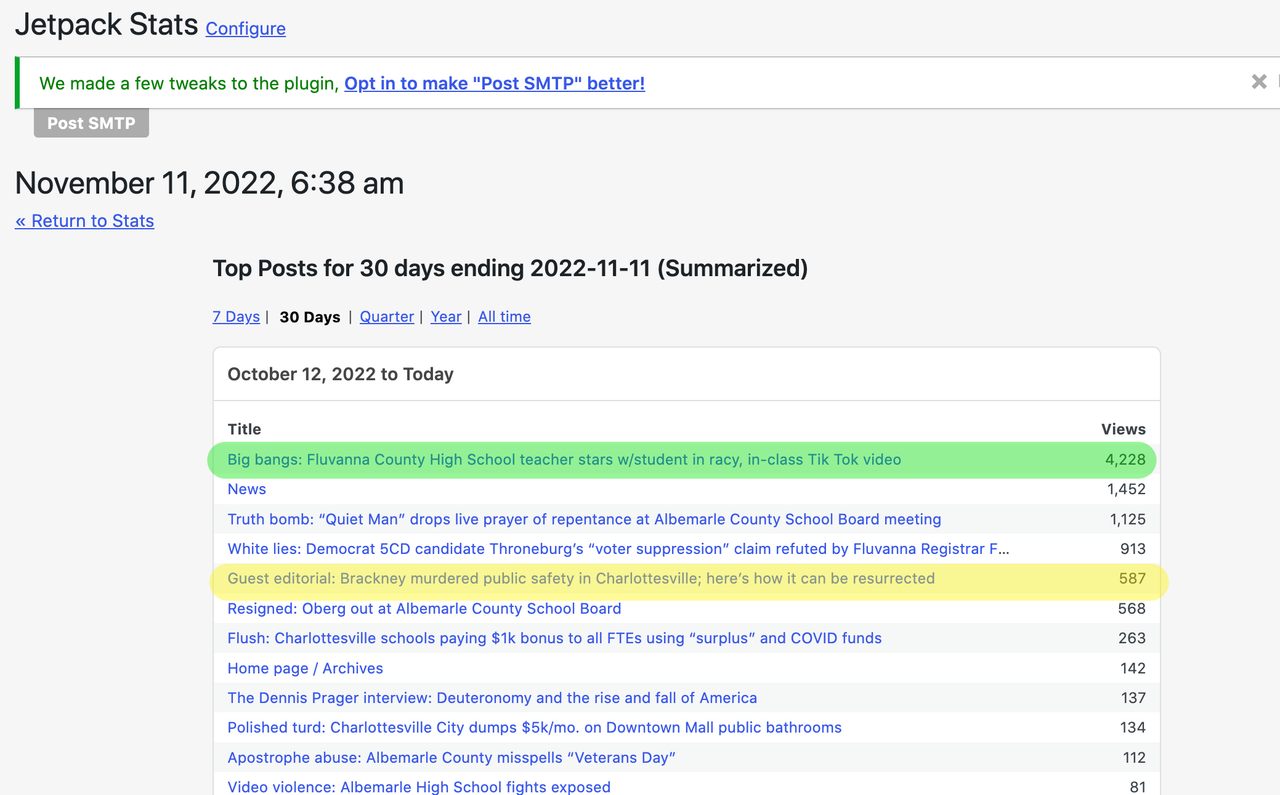
Jetpack Stats, which is installed, has shown about 900 site visits in the past two days. 587 of those are showing as viewing the post below. Yet, as of this morning, the post itself is showing only 193 views.
Another post is showing 4,228 views in Jetpack Stats, but the on-post display indicates only 1,114 views.
Something is not working correctly, and this is new. Previously, the post counts were reflecting accurately.
Anamaria Hello,
This problem was solved in Newsapepr v12.1 -> https://wpscan.com/vulnerability/993a95d2-6fce-48de-ae17-06ce2db829ef, but as certain security plugins detect plugin version < 3.5, the problem was in 3.4. To solve the problem with <3.5 we changed the version to 3.6, all you have to do is delete tagDiv Composer and reinstall it from Newspaper > Plugins.
Thank you!
 GerPic
 Greetings,
I restored my site (www.matinella.it), I reinstalled the theme and the plugins but once again the TD-COMPOSER plugin and it makes me block the site creating serious economic problems.
Here is the error message: An E_COMPILE_ERROR error was caused in line 47 of the file /web/htdocs/www.matinella.it/home/wp-content/plugins/td-composer/legacy/common/wp_booster/td_wp_booster_functions.php . Error message: require_once (): Failed opening required ‘td_block.php’ (include_path = ‘.: / Php7.4 / lib / php’).
the problem must be solved!
Anamaria Hello,
This problem was solved in Newsapepr v12.1 -> https://wpscan.com/vulnerability/993a95d2-6fce-48de-ae17-06ce2db829ef, but as certain security plugins detect plugin version < 3.5, the problem was in 3.4. To solve the problem with <3.5 we changed the version to 3.6, all you have to do is delete tagDiv Composer and reinstall it from Newspaper > Plugins.
Thank you!
 MartinLWilliamson
 I tried it again, and got a different error this time:
Downloading installation package from https://cloud.tagdiv.com/td_plugins/td-composer/e815948e5c9ec5801de67b92a1d5a59fx/td-composer.zip…
Unpacking the package…
Could not copy file. td-composer/legacy/Newspaper/includes/demos/week_pro/td_media_1.php
Any help you can offer would be great, thanks.
MartinLWilliamsonHi there, I’m having a problem installing the Composer plugin when trying to install Newspaper v12.1 on my site VeloVeritas.co.uk
I get the following error: (but the file class-wp-filesystem-direct.php DOES exist….)
Any advice or help much appreciated, thanks.
Downloading installation package from https://cloud.tagdiv.com/td_plugins/td-composer/e815948e5c9ec5801de67b92a1d5a59fx/td-composer.zip…
Unpacking the package…
Warning: dir(/homepages/30/d35404754/htdocs/[mysite]/wp-content/upgrade/td-composer-Pe9ceC/td-composer/mobile/includes/smart_lists/): failed to open dir: No such file or directory in /homepages/30/d35404754/htdocs/[mysite]/wp-admin/includes/class-wp-filesystem-direct.php on line 613
Warning: dir(/homepages/30/d35404754/htdocs/[mysite]/wp-content/upgrade/td-composer-Pe9ceC/td-composer/td-multi-purpose/styles/tds_title_over_image/): failed to open dir: No such file or directory in /homepages/30/d35404754/htdocs/[mysite]/wp-admin/includes/class-wp-filesystem-direct.php on line 613
Could not copy file. td-composer/legacy/Newspaper/includes/demos/wine/td_media_7.php
 Dryden
 Ah, that’s an idea. I’ve already downgraded my WP installation, perhaps I give it a try with WP 6.1 in the weekend (or just wait to an updated NP). 🙂
 jtoney
Where do I find the materials to see how to set up the directory and listings system? I’ve looked around and I don’t see it nor do I see any premade templates and etc. I upgraded to version 12 of the theme today and have it installed.
Bettina Hello @vijay!
To be sure that your website is no longer infected, I suggest you make a full backup and try a fresh install of WordPress.
Thank you!
Bettina Anamaria Hello,
Usually, when this is happening, it is from an object cache that can be from a plugin that you have installed or from your host. Please check this and if you can not find it, just make a test using only theme plugins and see if the problem persists.
In case you checked all those and the problem persists, please contact us via email contact@tagdiv.com . Make a full backup for your website and provide wp-admin and cPanel access via email and provide as many details as you can about the problem.
Thank you!
 fleeksoft
 Hi, tagDiv Mobile Theme is already installed and active.

