
- NewsmagInstall via WordPress
- NewsmagInstall via FTP
- NewsmagInstalling pre-built websites
- NewsmagUsing the theme translations together with WPML
- NewsmagHow to update a plugin
- NewsmagNewsmag theme support
- NewsmagCustom Post Type Support
- NewsmagImport / Export theme settings
- NewsmagHow to add icons in the menu
- NewsmagRequirements for Newsmag
- NewsmagNewsmag documentation
- NewsmagHow to update the theme
- NewsmagBlock settings tutorial
- NewsmagHow to update the WPBakery plugin
- NewsmagIntroduction
- NewsmagMain menu
- NewsmagFeatured image or video
- NewsmagAuthor card
 billyapps
Hello,
I tried to update my theme to the latest version but when installing plugins TD composer install failed. I tried to do that manually i get this message while uploading .zip file: “The link you followed has expired.”
In checking system status, i found that some PHP values need to be increased. My host support team did that but i still get a ‘PHP Memory Limit need to be increased to 128 mb) even if it is already done.
I’ve deactivated plugins excepts tagdiv plugins, deleted the cache using a cache plugin but nothing has changing.
Your help will be appreciated
Regards
 chucky20
hi..I installed the necessary plugins for amp. Both mobile plugin and amp plugin from theme plugins. I want the mobile version of my site to be fast. As a result, I want all mobile pages to output as amp. I choose the standard one from the amp plugin and it constantly chooses the transitional even though I delete the cache plugin and the browser’s cache. and the option “redirect mobile users to amp page” appears and I say redirect. But when this happens, when I enter the normal address of my site from my phone; the normal mobile site is opening then suddenly redirected to the amp site! and all my pages’extension of my page it looks like ?amp=1 . The speed drops very badly when directed! My mobile site with amp is 30-40 while pagespeed is exiting desktop 88?!?!?! Please help or I’ll commit suicide 🙁 hown can i change ?amp=1 to ?amp
and how can i choose standart mode in amp plugin.
 Achimzwo
 Hi,
Problem is solved.
I´ve found in one of my other WordPress installations an p-tag.
 p {
    text-transform: none;
    padding-bottom: 1em;
}
That snippet paste in the Theme Panel custom code and it runns.
Newspaper is Great but it take a Time to use it exessfull. 😉
Greetings
Achimzwo
-
This reply was modified 5 years by
Achimzwo.
 Avantage75
I can’t install prebuilt website (with or without content). I always get alert my server is not properly configured.
I also can’t install any tagDiv plugins (except manually) and can’t connect to Cloud Library.
I have checked System status and everything is green. I have edited PHP configuration on host server and every single value is even much higher than recommended.
Wordpress ver. 5.6
Newspaper ver. 10.3.9.1
 Bettina
 Hello !
You will have to first start looking for a plugin conflict. please deactivate ALL plugins except tagDiv ones, also if you are using child theme or cache plugin, deactivate them, clear all cache and try again.
Also you can try and remove and re-install the tagDiv Composer plugin.
Let us know the results.
Thank you !
 DavisvsGoliath
 Thank you Bettina for the prompt response,
Mine is not functioning like that, perhaps a plugin issue!
Should i reinstall?
Bettina Hello!
I checked your website and it seems you have installed Mobile theme plugin. If you created the mobile pages with TagDiv Composer, then when you install Mobile Theme plugin, your pages will be overwritten by the plugin.
The Mobile Theme is a performance optimized theme included in the Newspaper main theme and it loads only for mobile devices. It comes with it’s own templates for page, post, category, etc so your current templates from the desktop theme will get converted to the mobile theme layout. For more details, please take a look here: https://forum.tagdiv.com/the-mobile-theme/
Better deactivate the plugin and see the results.
Thank you!
 shawshawshaw
I click on a block from the library and I press “import selection” from the description box – and the box asking me “TEMPLATE IMPORT: are you sure you want to import the selection?” stays BEHIND of the box with the description of the block, preventing me to press “ok”. As soon as I press “X” on the description, the “import selection” box – it disappears along with the “template import” box. I turned off all of my plugins and I still can’t figure out the problem. Any ideas?
This is what I mean by the description box:

I can’t get to the “TEMPLATE IMPORT: are you sure you want to import the selection?” box because the description box is covering it.
-Thanks in advance!
 steveroberts
Hello,
Here: http://www.SchillingShow.com
Social counter widget is showing code:
[td_block_social_counter facebook=”schillingshow” twitter=”schillingshow” youtube=”theschillingshow” custom_title=”STAY CONNECTED” border_top=”no_border_top” block_template_id=”” manual_count_youtube=”538″ manual_count_facebook=”4430″]
Editing with TagDiv says “install plugin”
Not sure how to fix this. Can you please assist?
 SnakeEater
 To give more clarity on my situation, I go in the theme panel, I make one whatever change to the header. I press Save Settings, I get the V notification. I press F5 (or Ctrl-F5 for that matter), the settings reverted to the default ones.
For what it’s worth these are the things that I have done so far:
– Reinstalled theme and plugins
– Checked all file permissions on my server
– Deactivated all plugins that are not TagDiv (I also tried deactivating all of them too)
– Removed all cache files from the server
– Checked that I can execute admin-ajax.php (returns 0)
Fairly sure there is also a whole load of other stuff I tried to do, still no luck. If it’s of any help, this is happening as I am testing migration from Newspaper 8 to Newspaper X (doing this on a separate domain than the registered one)
-
This reply was modified 5 years by
SnakeEater.
AchimzwoHello,
since I use the Composer and have install the Posttemplate (Pulses Pro) Line Breakes
<p> </p>
are hidden in all Posts.
How can I repair that?
Thank You
 Anamaria
 Hello,
You are probably uploading the whole theme package. You have to upload only the theme zip file, not the whole package which contains other items
– https://help.market.envato.com/hc/en-us/articles/202821510-Theme-is-missing-the-style-css-stylesheet-error
Install via WordPress -> https://forum.tagdiv.com/install-via-wordpress/
Install via FTP -> https://forum.tagdiv.com/install-via-ftp/
Let me know the results!
Thank you!
Bettina Hello!
The desktop version is working like in mobile too, which is strange.
We tested with our theme the WP Super Cache and with the settings from our guide this is working correctly: https://forum.tagdiv.com/cache-plugin-install-and-configure/
Please install and configure the WP Super Cache Plugin.
Hope that helps you!
Thank you!
 Leema1303
Unpacking the package…
Installing the theme…
The package could not be installed. The theme is missing the style.css stylesheet.
Theme installation failed.
 Vlad S
 Hello !
Please send us a screenshot of your System Status Tab and make sure that all the requirements are met as you can see here: https://forum.tagdiv.com/requirements-for-newspaper/ ; You will have to first start looking for a plugin conflict. please deactivate ALL plugins except tagDiv ones, also if you are using child theme or cache plugin, deactivate them, clear all cache and try again.
Also you can try and remove and re-install the tagDiv Composer plugin and please send us a link to your website in order to take a look.
Let us know the results.
Thank you !
Bettina Hello!
This can be achieved by using SEO Yoast plugin -> Social. Please install and configure it and you will see the featured image in your next post on Facebook.
If the issue persist after configuration, then please delete your cache from your browser and try again.
Thank you!
 Lukas Fila
 Hello Vlad,
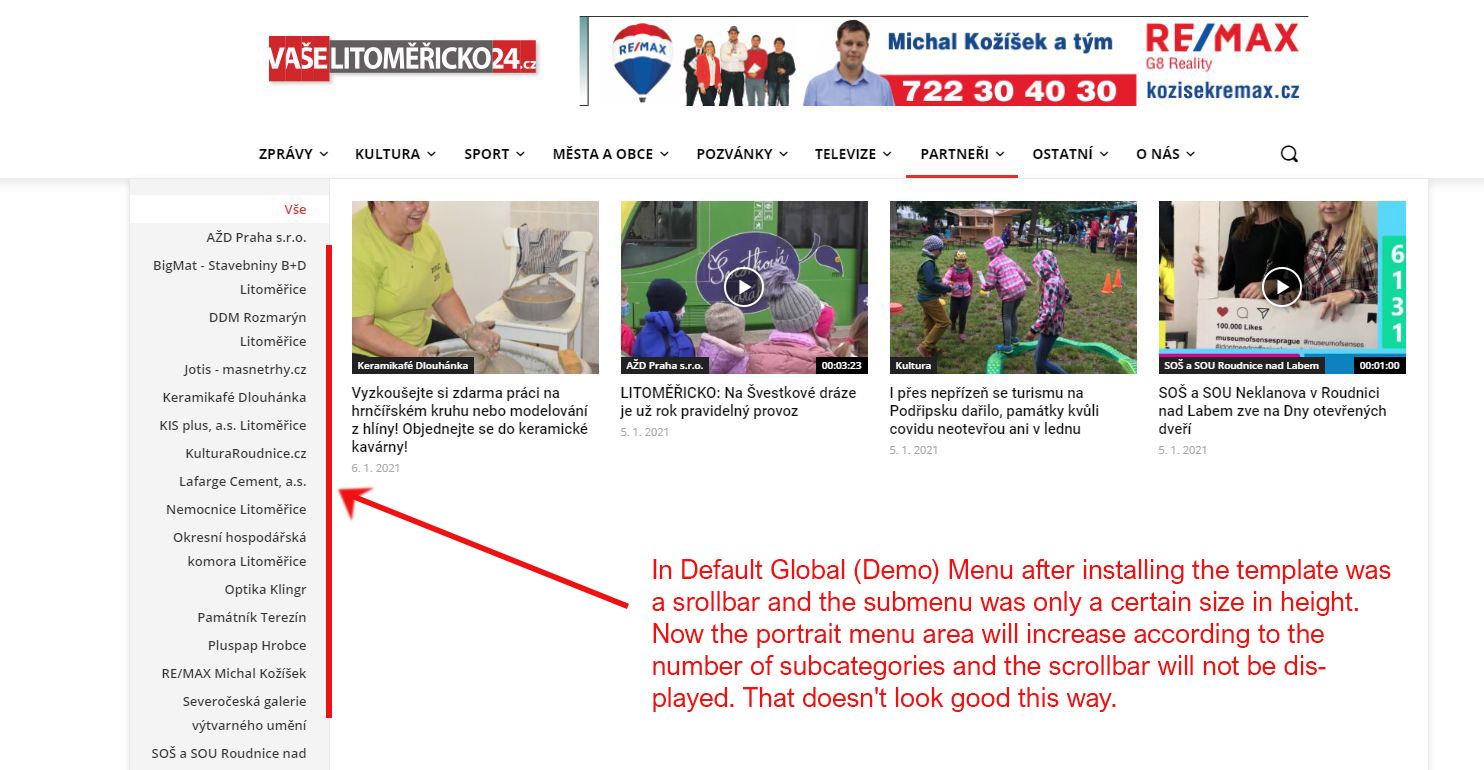
I’m sorry to react so late, but only now is my problem really current. The point is that after setting my own form of the header from the cloud, the scrollbar disappeared from the Mega menu.
In Default Global (Demo) Menu after installing the template was a srollbar and the submenu was only a certain size in height. Now the portrait menu area will increase according to the number of subcategories and the scrollbar will not be displayed. That doesn’t look good this way. My web: https://litomericko24.cz/
 mteliambavi
Hi
I cant install a single template – Medicine Pro.
It says that one image can’t be loaded.
Bettina Hello!
Please try to re-install the Standard Pack.
If this problem is not solved after that, then we need to take a look and see what happened there.
Please contact us via email at contact@tagdiv.com and provide the following:
– admin url and credentials
– a link to this topic in order to identify you
Our team will take a look!
Thank you!
 jihoon park
 For reference, I haven’t checked anything. After installation, the default status, css reduction, and Java reduction are all unchecked.
 gcamara
I have been working with this theme and tagdiv themes since 2016 and bought a lot of licenses for professional and personal projects. Never seen something like this until now.
Last week, trying to remove mode-less.js and text.js, 3 main categories have vanished making me waste more than 5 hours moving and assign content to right category again. I couldn’t believe it and load a test db backup to check all happened when new theme was installed.
Now, a video image has been generated and al maxresdefault* images have been reassigned to date where the new video post image was created…
Everything is happening with child theme and a template.
I cant go back and restore my previous theme after a week working with this, but… seriously what else should I found next days?
jihoon parkAfter installing the WP Rocket plugin, release the mobile theme. Help
Vlad S Hello !
Please send us a screenshot of your System Status Tab and make sure that all the requirements are met as you can see here: https://forum.tagdiv.com/requirements-for-newspaper/ ; You will have to first start looking for a plugin conflict. please deactivate ALL plugins except tagDiv ones, also if you are using child theme or cache plugin, deactivate them, clear all cache and try again.
Also you can try and remove and re-install the tagDiv Composer plugin and please send us a link to your website in order to take a look.
Let us know the results.
Thank you !
Anamaria Hello,
Please check if you use the last WordPress 5.6 version with a last theme version Newspaper 10.3.9.1 and check to see if the problem persists.
If you have the last version a the theme and WordPress, you will have to first start looking for a plugin conflict. Please deactivate ALL plugins except tagDiv ones, also if you are using child theme or cache plugin, deactivate them, clear all cache and try again.
Also, you can try and remove and re-install the tagDiv Composer plugin.
If it is an old theme version, before to update, make a full backup to all files and the database, in case something goes wrong. => https://forum.tagdiv.com/how-to-update-the-theme-2/
What I suggest is to try this on staging or sub-domain to not affect the live website and after the update is stabilized you can change it on the live website.
Let me know about your results!
Thank you!
 keverix
I have asked for a refund for my purchases twice to no avail. So I am trying a third time to install before asking again for a refund. When I install the Newspaper theme even after I remove the Newsmag theme, I get a “critical error debug” on the site and can’t complete the install.

