
- NewsmagInstall via WordPress
- NewsmagInstall via FTP
- NewsmagInstalling pre-built websites
- NewsmagUsing the theme translations together with WPML
- NewsmagHow to update a plugin
- NewsmagNewsmag theme support
- NewsmagCustom Post Type Support
- NewsmagImport / Export theme settings
- NewsmagHow to add icons in the menu
- NewsmagRequirements for Newsmag
- NewsmagNewsmag documentation
- NewsmagHow to update the theme
- NewsmagBlock settings tutorial
- NewsmagHow to update the WPBakery plugin
- NewsmagIntroduction
- NewsmagMain menu
- NewsmagFeatured image or video
- NewsmagAuthor card
 doraemonwu
I use Newspaper 9 recently, but I tested my website through Google Pagespeed, Its get 8 scores on mobile phone and 32 scores in computer. Could you give me some suggestion to improve the score of Google Pagespeed? Thank you!
this is my website
https://www.boyangu.com/
Should I provide what plugin I installed in the past time?
 mdpmice
Hi! I am using the Newspaper Theme. I do not manage very well with tagDiv Composer as I want to customize my website.
Is it possible to install and work with Visual Composer plugin?
Thank you
 Vlad S
 Hello !
Unfortunately that is a bug. This demo requires for you to have the Newsletter plugin installed: https://www.screencast.com/t/OzEro4uNIAbE
We are sorry for the inconvenience !
Thank you !
 Calin
Calin Hello,
Please make sure that you have the mobile theme plugin and amp plugin install and activate, after that make sure that you are using one of those two option -> http://prntscr.com/p3nwun and set in AMP only the posts like this -> http://prntscr.com/p3nx8m
Thank you!
Calin Hi,
Please notice that the speed of your website depends on how well your site is optimized.
Notice that is not a simple task and if you do not have any experience in this regard you will do not bring good results for the theme. Also, notice that we have a speed optimization tutorial but this is addressed only to advanced users. So, if you follow the steps which are presented in this tutorial here -> https://tagdiv.com/how-to-increase-page-loading-speed/
There are many optimization guides provided by our users here in the forum, some made by us, you could check some of them
– https://forum.tagdiv.com/cache-plugin-install-and-configure/
– https://forum.tagdiv.com/how-to-make-the-site-faster/
– https://www.infophilic.com/get-almost-100-pagespeed-newspaper-theme/
– https://forum.tagdiv.com/topic/score-100100-pagespeed-with-newspaper-wordpress-theme/
– https://forum.tagdiv.com/topic/newspaper-theme-speedify-your-website/
– https://forum.tagdiv.com/topic/tutorial-chriss-custom-optimizations-for-functions-php-etc/
– https://forum.tagdiv.com/cloudflare-cdn/
– https://forum.tagdiv.com/topic/theme-causing-high-cpu-usage-2/
– https://forum.tagdiv.com/topic/sql-querys-high-cpu/
– https://forum.tagdiv.com/topic/newspaper-theme-slow-to-respond/
– https://premium.wpmudev.org/blog/optimizing-your-wordpress-database-a-complete-guide/
– https://underconstructionpage.com/optimize-wordpress-database/
– https://crunchify.com/better-optimize-wordpress-database-all-in-one-guide/
Thank you!
 wanderwind
Hi guys,
I just installed the “Travel Memories” demo theme. Can anyone tell me why I see this coding at the home page? It was there from the start. How do I remove it?
See the screenshot here: https://ibb.co/M7Lgvm4
Thanks!
 juanca1612
Hello,
As the title indicates, I have installed the mobile theme and AMP, selected the Mobile + AMP option but when viewing the pages on mobile I see it as if it were the mobile theme without more, that is, I do not see at the end of the url /amp … instead if I add it manually it works and it shows an AMP version very similar to the mobile theme but in which it deactivates several functions as usual, how can I always show AMP? Or how is it more advisable?
 mimpio
I just want to change image behind main menu. I installed demo content and there are different images on every page. But I can’t find how to change those images.
My page is https://www.oulunhermoratahieronta.fi/ and on that website I mean that forest image. I would like to change that.
 cjr
cjrHi,
For some reason, after installing the mobile theme I cant access the mobile version of my site. Here is the URL: https://serpositivo.com tx
 dennisjpitocco
1. Installed Author Template 16 from Cloud Library successfully.
2. Changed my Individual Author Template selection to Author Template 16 via Theme Panel/Template Settings/Author Template.
3. When I click on my byline, my Name now appears on new Template, but image & bio is still demo info. Shouldnt my image and bio be populated from my User Profile as with the default Theme Author Template?
 Tread Topic
 I used 16 GB ram with 8 core CPU dedicated hosting..but still, my site speed is 2.1 second from Canada server I want to increase my site speed fewer than 1sec what I need to do? it will show that to many HTTP requests make it fewer in GT matrix how to do that?
like this error is shown—->This page has 8 external Javascript scripts. Try combining them into one. This page has 4 external stylesheets. Try combining them into one.
I already used Cloudflare CDN and uninstall all untrusted plugin and i also used wp rocket premium plugin still site speed is more than 2 sec..why?
how to make my site speed fewer than 1sec? please give me suggestion to speed up my site..
 brandoni
 I have 2000 post… must I change the color for everyone ?
When I installed the black versione of the theme it changed the color of the text in the post, but not in all text.
 cyrus
cyrusHello,
The Favicon updates in the theme, but not online. This was a cloned Newspaper Theme I had from another website with Newspaper license. That old cloned Favicon is still appears here. I tried deleting the old fivicon, it is no longer in the theme panel. But displays on Chrome and Firefox search engines, even after clearing cache and using private window. I re-deleted the new favicon, and left empty, still shows old favicon. Than I reinstalled a new favicon, with logo, etc. Same issue. Called hosting, they stated it is the newspaper theme, some kind of glitch.
Please provide remedy
Thank you
 cedehgen
 Hello Vlad,
I have just: Tagdiv Cloud Library, Tagdiv Composer and Tagdiv Social Counter active. I’m not using any other plugin.
I’m not using any plugin for cache and child theme.
I just installed the Demo Theme Crypto fully.
Thanks,
Calin Hello,
You can use the tagDiv Composer also maybe you can find a demo that can be closer for what you need.
Thank you!
Vlad S Hello !
Please delete the tagDiv plugins and reinstall them from the welcome screen of the Newspaper Theme: 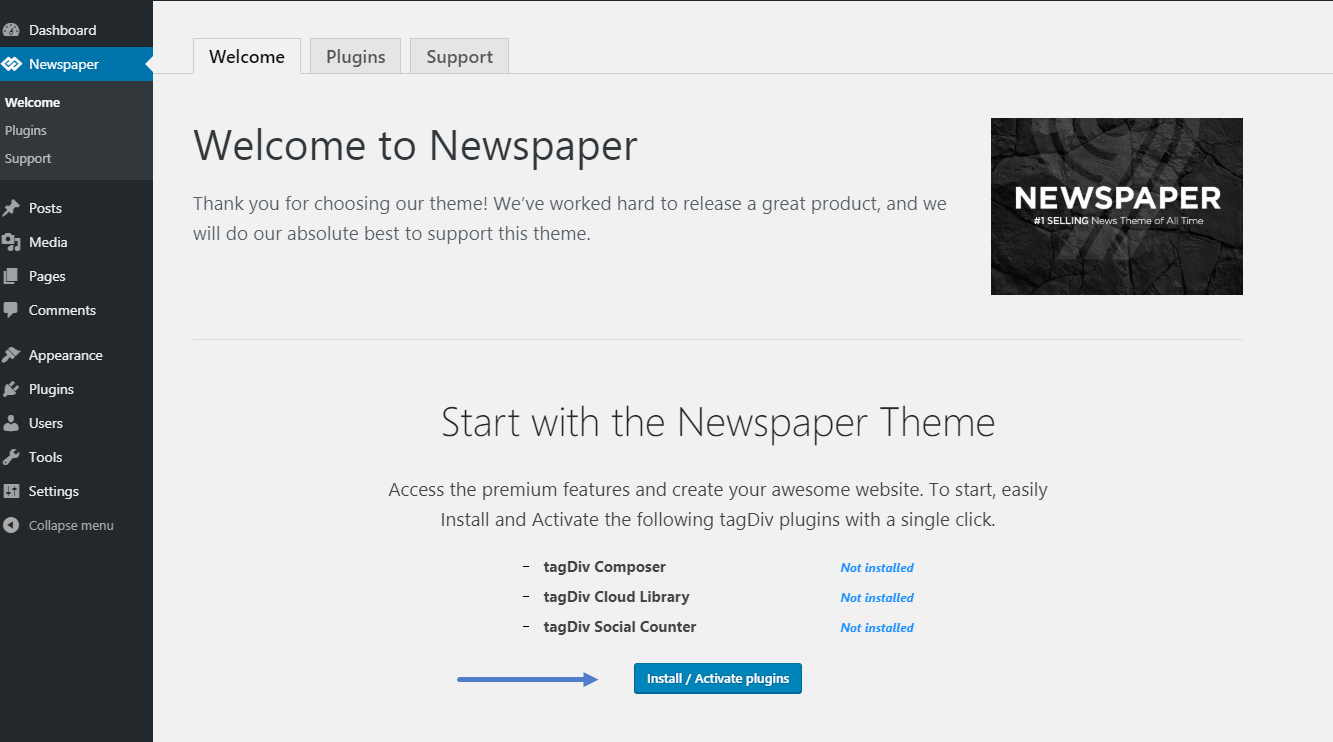
Let me know if this worked out !
Thank you !
 con
con Hey Vlad I’ve paid for & downloaded News 9 but ca not install it on WordPress. I wonder if you can help? It tells me: The link you followed has expired. Please try again.
 kieuvuanhtu
My website loading very slowly after installing newspaper theme. How to fix this?
 Cryptodex
 Calin,
How can I make this page look the same as typing it into a mobile browser? This page looks awful in comparison. I have installed the mobile theme and set it up correctly and I am using AMP. Is there a customer support number I can call into and get better assistance with this issue? It seems you might not be understanding how to help me here.
 Gul Klud
Hi guys
The frontpage of our newspaper theme site has an incredibly long load time.
https://gulklud.dk/
We are talking 5 to 6 seconds.
We have not installed very many plugins and definitely not any that can increase the load time by that much.
Articles (posts) also have a long load time. 2-3 seconds
Please have a look and let is know if you think anything is slowing the site.
Thanks
cyrus Hello Vlad,
IF you can solve this quick, you are a genius. I deactivated all plugins, reactivated them, and issued a new license. Still, Tag Div Composer makes changes to all 20 pages on desktop version. Doesn’t matter what page or category I use Tag Div Composer to install element or write something, all side wide and all pages and categories get affected. I have no plugins that conflict, and deactivated all cache. Mobile Theme does not have this issue.
You have a genius idea to solve NOW?
 2076nb2019
 Hi,
Yes I added that ‘Scroll to Top’ myself, as the default scroll that comes in your theme don’t seem to be working for RWD. Just check your demo installation in a mobile device, you will know what I mean! Here: https://demo.tagdiv.com/newspaper/
Seems like your theme designer added the ‘Scroll to Top’ button in your mobile theme, but not in the RWD!
-
This reply was modified 7 years by
2076nb2019.
 UkulCool
 Thanks, It worked fine-free
How can I install the tagDiv Builder Template?
 jacobkoshy333
 Here is a screenshot of how the post permalinks are displayed in google search results after installing newspaper: https://imgur.com/LBy5ua4
Gul KludI have installed the active campaign plugin.
I would like to activate an email form slide in from the left handside.
Where do I se that up?
