
- NewsmagUsing other ads
- NewspaperUsing Other Ads
- NewsmagSidebar ads
- NewspaperSidebar ads
- NewspaperIntroduction to CPT and ACF with Newspaper Theme
- NewspaperHow to edit modules for Flex Block X
- NewspaperHow to use the Posts List shortcode
- NewspaperCreate a frontend submission form
- NewspaperHow to Use the Tabbed Content shortcode
- NewspaperWooCommerce: Happy “Add to Favorites!”
- NewspaperHow to generate Facebook App ID
- NewspaperLink Tracker
- NewspaperFlex Block Settings Guide
- NewspaperGeneral Options that May Interfere with the Newspaper Theme
- NewspaperSocial Icons
- NewspaperPosts Loop Element
- NewspaperSet a Background for Category Page
- NewspaperThe Newspaper Mobile Theme: Introduction
- NewspaperHow to Add a Logo in Newspaper
- NewspapertagDiv Shop
 romina@realpower.it
Hi,
Is it possible to create a block of posts with the style of the YouTube playlist?
what I would like to do is try to use the vertical slider: clicking on the thumbnail of the post on the right loads the preview of the post on the left.
Maybe there’s already a block that does this? or in what other ways can I achieve this result?
Thank you
 Alex
Alex Hello @Anamaria,
Now you have shared a screenshot with a good INP score for desktop. Nobody reported that there was an issue with a poor INP score. So this is irrelevant.
As previously stated twice: The issue is with INP on mobile. The issue is with Newspaper theme. Your main demo that is “optimized” does not meet the required criteria for origin.
You can deny it as much as you want, try to confuse by involving prebuilt websites that no one mentioned, blame it on ads etc.
Either way, it doesn’t change the fact that the issue is with the theme.
Another very important aspect is that we offer free support to you by testing and outlining the bugs and issues in your theme so you can improve it.
 Anamaria
 Hello @Alex,
If you use ads, it’s your own choice, which is unrelated to the theme. Yes, we have several demos with good scores, and they are optimized, but it’s still recommended to make configurations and necessary optimizations regardless of which prebuilt website you use.
INP is related to mouse clicks, taps, and key presses. Now, if you have pop-ups with ads, it’s your choice. As I’ve mentioned before, you need to make the necessary optimizations regardless of which prebuilt website or theme you use https://i.imgur.com/z9rLkxK.png
Another very important aspect is that we offer support, even if you haven’t extended the support, and we try to help, and even page speed is not covered by the support team.
Thank you!
Alex Hi @Anamaria,
These are two different things: URL and Origin.
The one you are showing is “This URL”, means it passes only for this URL.
To be noted, “this URL” you are presenting does not have any external java (adsesne etc), which is why it passes, as java is one of the major factors to slowdown the pagr. The majority of publishers have ads enabled, which is a standard practise. And with ads enabled, the majority unfortunately would have CWV failed with Newspaper.
Also this post you made confuses the topic of this thread, as you are now talking about an an overall CWV score for the particular URL, other than dealing with the INP issue that is poor throughout Newspaper.
 mateusnds
 Hi Bettina, thanks for getting back.
The option I’m using is from the theme panel (https://forum.tagdiv.com/using-other-ads-non-adsense-ads/ (this one), the only one that works for me.
According to the print I sent (here:https://prnt.sc/WvoUtvlDGJ-K), the code is correct, however, nothing is displayed on the website, at the same time, I cannot see the code when I check the page code (CTRL +U).
How can I resolve it?
 Bettina
 Hello @mateusnds!
You can also add the ad code in the theme panel and choose from where you like to display the ad in the shortcode Ad box from tagdiv composer using a cloud template.
If you use default templates, then the ad should be displayed if the code is correct.
Check out the documentation here:
– https://forum.tagdiv.com/ads-adsense-overview/
– https://forum.tagdiv.com/article-ads/
– https://forum.tagdiv.com/background-ads/
– https://forum.tagdiv.com/using-other-ads-non-adsense-ads/
Thank you!
Bettina Hello Ameet!
The error appears only if you are logged in as an admin. So, you should edit this page with the TagDiv Composer and add an image to every element in order for it to be displayed on your frontend.
We have 3 options for mobile versions that you can use:
1. Responsive version: A responsive version of your website looks similar to the desktop version. TagDiv Composer is used to edit the page.Click on the mobile viewport: https://www.screencast.com/t/XDQJedlggSB. There, you can see your mobile version and edit or adjust the elements to look better.
2. Mobile pages: https://tagdiv.com/newspaper-10-3-7-update-brings-customizable-and-fast-mobile-pages
3. Mobile theme plugin: The Mobile Theme is a performance-optimized theme included in the main Newspaper theme that only loads on mobile devices. It comes with its own templates and designs for pages, posts, categories, etc., so your current templates from the desktop theme will get converted to the mobile theme layout. Please see https://forum.tagdiv.com/the-mobile-theme/ and https://forum.tagdiv.com/mobile-theme-introduction/ for more information.
A full explanation is here: https://www.youtube.com/watch?v=SpGkOnJeNZY
If you need to use mobile version 1 or 2, then you need to uninstall the Mobile Theme plugin and AMP.
Any other plugins that are not official were not tested with our theme, and we do not recommend them.
Thank you for understanding!
 newspatron
 Hello i thought it easier for you to visit the contact us page on the site
https://newspatron.com
This page
https://newspatron.com/contact-us/
However here is a screenshot of the error
One more major issue that needs to be supported by tag div.
I am testing another site for mobile version readiness.
There at the site[https://staging-9728-newspatron.wpcomstaging.com/amp/], i have activated the tag div plugin for mobile theme. Alongwith the tag div mobile plugin, I have activated an amp plugin but not the official one. Instead i have activated the plugin called [Accelerated Mobile Pages Description AMP for WP – Accelerated Mobile Pages for WordPress].
This plugin has loads of customizations and features.
Its not just a plugins but its an ecosystem, with loads of other addons and features. feel free to check the same.
Not only customizations, but several youtubers have validated the same.
After installing it on a test site, however in the theme panel, I could not choose[mobile + amp] feature, since the official plugin is not installed.
Can this at all be fixed?
Everything else otherwise looks fine and also the scores have improved.
Let me know if its possible to use the other plugin?
[to use this feature, first you need to install and activate the Official AMP plugin for WordPress]
The temporary site for testing url is at
https://staging-9728-newspatron.wpcomstaging.com/
Anamaria Hello,
Please try setting the code in the custom code box in the ad box and checking if the ad is displayed.
The ad box has 3 sections for ads: using theme panel ads -> https://i.imgur.com/KFa9ibl.png, using images/banners -> https://i.imgur.com/MfAPTaE.png and custom code -> https://i.imgur.com/2rh8SuD.png save it and will appear on the post (you can set a shortcode like a shortcode from adrotate plugin or other plugins).
Thank you!
 aephraim
Hello,
I just want to establish Forum under newspaper theme, where the topics are organized in threads and other members can contribute to the topic. Is this possible under newspaper theme? if possible, how to implement this?
 eman
emanHello, I have a problem with the mobile version and it’s driving me crazy, I need help.
Here’s the setting in the options: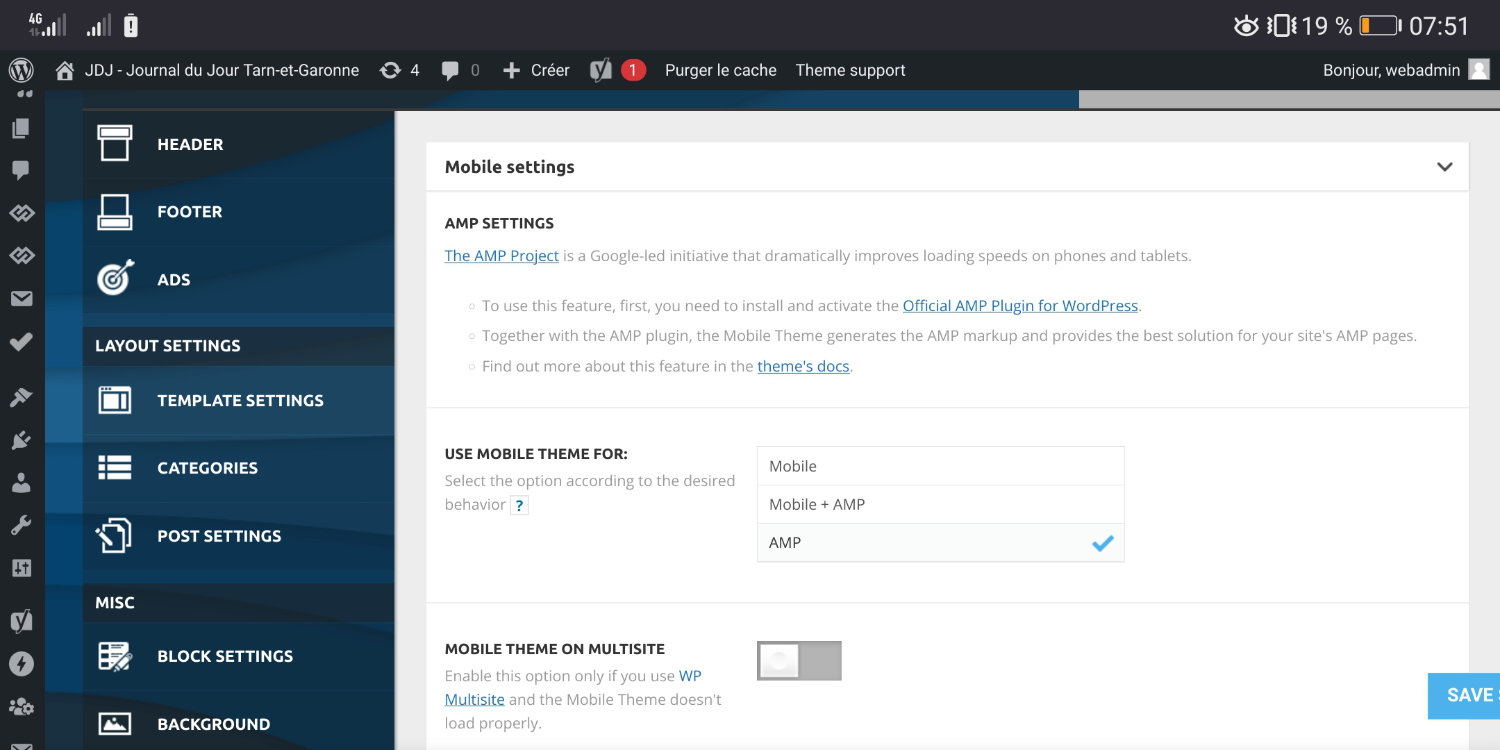
and here’s the rendering that appears and that I want to have : 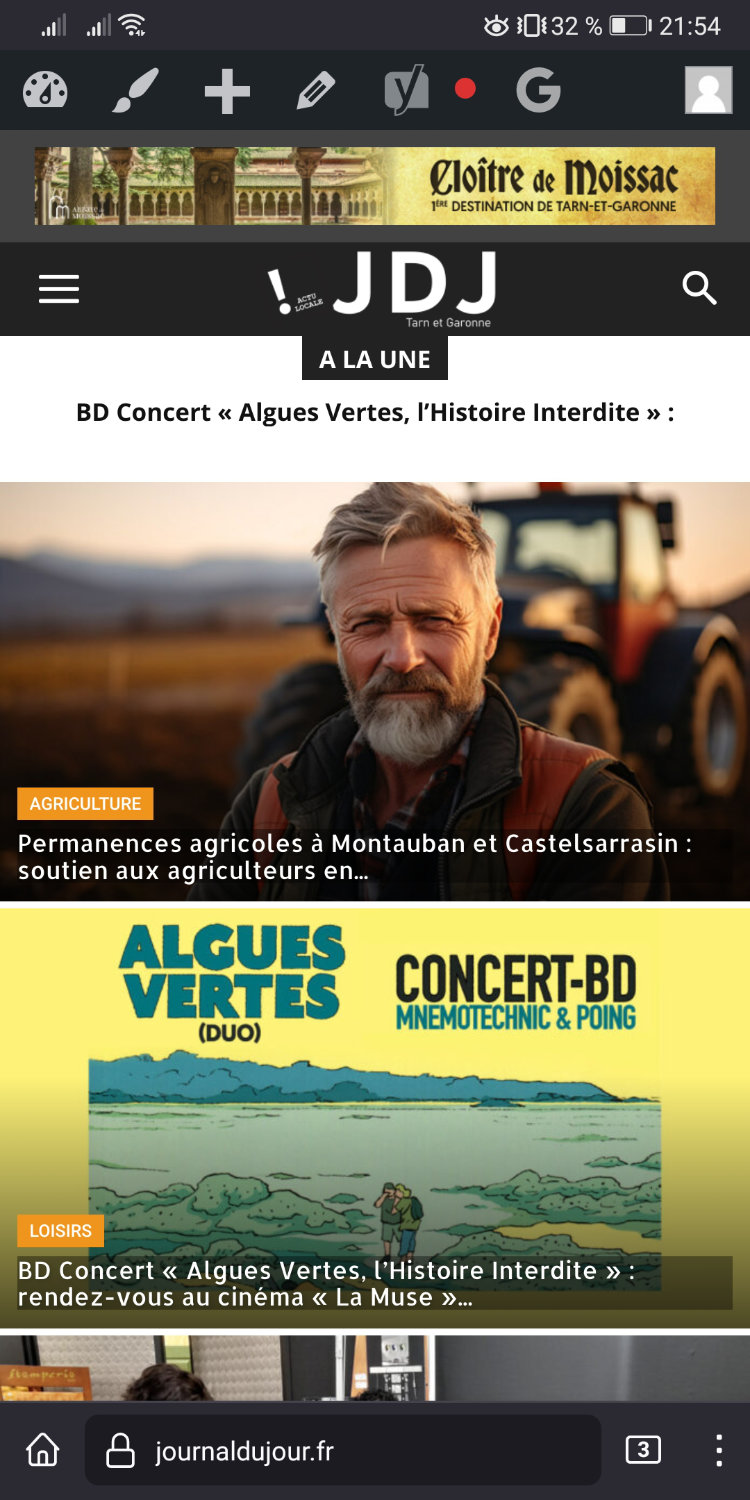
BUT! this rendering doesn’t stay, it displays another visual by itself!! and then looks like this :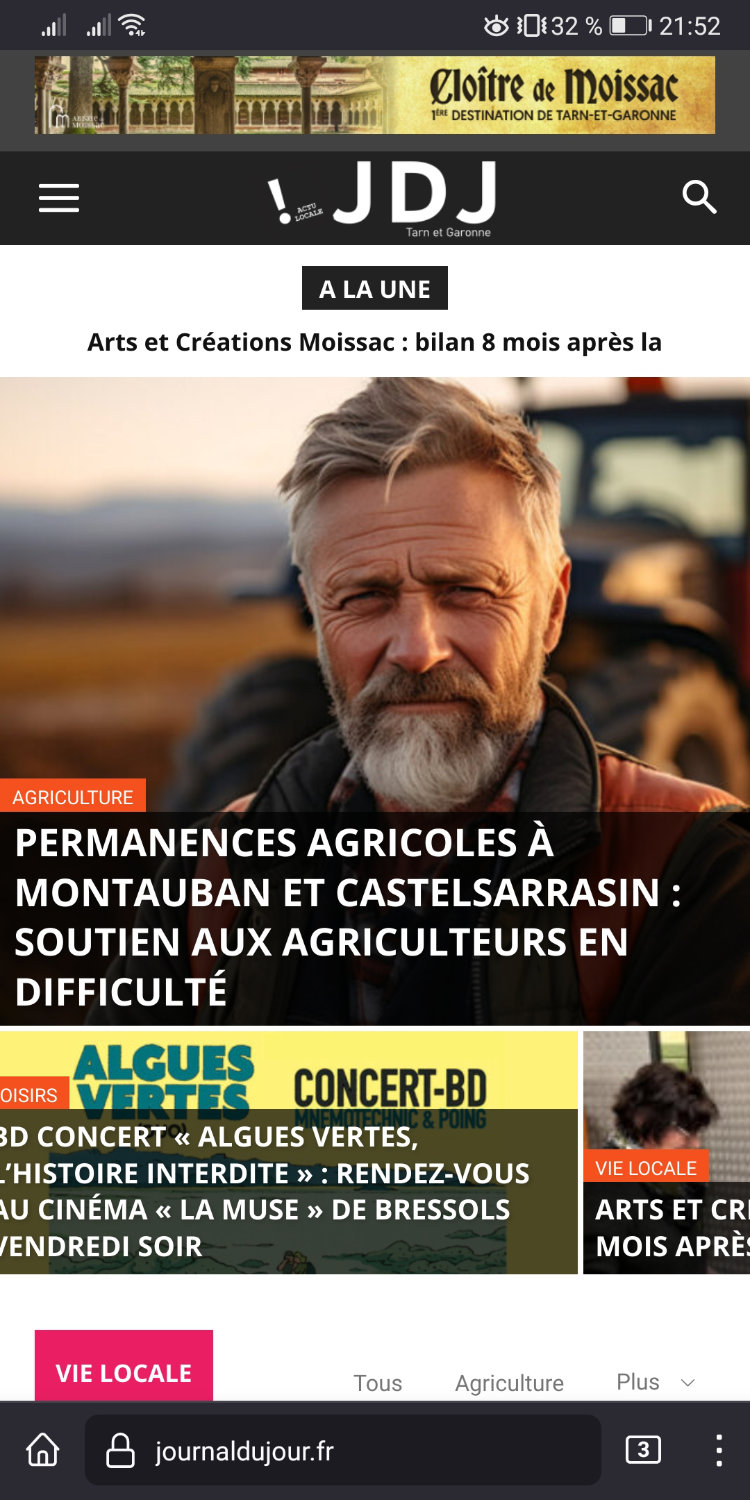
I have the cash WP plugin SUPER CHACHE, and I’m constantly forced to connect to the site admin and clear the cache to get the right version! but it never stays in place!
PLease help
Thank you
Anamaria Hi,
You can use AD BOX element. The ad box has 3 sections for ads: using theme panel ads -> https://i.imgur.com/KFa9ibl.png, using images/banners -> https://i.imgur.com/MfAPTaE.png and custom code -> https://i.imgur.com/2rh8SuD.png save it and will appear on the post (you can set a shortcode like a shortcode from adrotate plugin or other plugins).
Thank you!
 haipo
haipoHi Team
In my DEV system, I customized a new post layout from template.
But when the post loads, it also loads other posts in a row 5 times.
It also loads the menu 5 times
I didn’t find a way to stop it
Can you look at this example please?
https://dev2.haipo.co.il/item/485841
–
Thanks,
Yaron
 Calin
Calin Hi,
On Nwesmag theme you can set the ads in the theme panel – https://forum.tagdiv.com/newsmag-using-other-ads/ to set banners you can use this structure – https://i.imgur.com/4ALkrKg.png replace the # with the link and set an alt for the image.
Thank you!
 disegnoweb
Hi there!
I have created the AMP version for the website smarknews.com, but ?’ve got some problems. I tried to take a look to the issues of other people in this forum, but it was unsuccessful.
First of All, I’ve created the home mobile version as you wrote in your documentation:
https://tagdiv.com/newspaper-10-3-7-update-brings-customizable-and-fast-mobile-pages/
I’ve used one of the mobile templates (newspaper mobile).
But if I try to load the page from mobile, it doesn’t work, even id I try to clear the site cache with the suggested plugin wp super cache.
The page is available here
https://www.smarknews.it/home-mobile/
But the stranger thing is that if I try to load the homepage from my desktop device without reloading the browser’s cache, it loads as mobile default version (with all the stream of the news without categories division)…
I’m not understanding where I’m doing wrong…
Thank you for your attention!
Andrea
 mode8.jp
Hi Team,
Simply, would you please let me know how I can manage to change the print setting.
I did not notice that pages which are created via TD composer will NOT display anything when we tried to print pages (= Browser > setting > Print, or right-click > Print).
It seems Posts are okay… I hope…
I am sure it DID display a whole page before and can manage to control by css. (I think I hace done that on 12.1 on my clients’ site…)
I have checked some of other users’ pages below and it seems most of websites are same.
<Users… Sorry for adding your websites for examples.>
https://happypeoplepickleball.com/
https://www.anaverona.it/
https://horrortape.com/
https://swankyretreats.dreamhosters.com/swankyretreats/
https://mipylist.com.br/
Some of parts like a top menu bar, sidebar, youtube, pop ads and footer are well displayed on the printing previews.
I have deactivated all plugins except for Newspaper.
Also, changed to WP default theme and WORKED fine (=displayed all on a Printing preview).
I deactivate tagDiv standard pack, the result is same = almost blank printing page.
Would you please tell me IN DETAIL,
1 – is there any way to control or manage this printing issue by css?
2 – We do not want to display everything. We need to manage which we should be displayed on printing. SO! Which CSS file or some other files can be modified?
It seems it is really wasting time to find and check it all, so please let me (or us) know how it can be done quickly. I hope this setting is easy to adjust.
All the best,
 avrpatsfan
 Keep running into issues left and right and it’s very frustrating!
I just noticed that when I load the desktop version of my site with my account logged out (in a different browser) the header is all messed up, the homepage looks nothing like what it’s supposed to, and it’s displaying the mobile footer for some reason. Yet when I load it with my admin account logged in it loads perfectly.
When I load it logged out in another browser it looks like this:


But for whatever reason the Opinion page loads perfectly, even when logged out on another browser.

And as I mentioned, I have no issues when logged in, as you can see below.

I even tried uninstalling WP rocket and using FlyingPress with the same result. Please help!
newspatronHello, I created a menu that leads to another a Contact us page with various menus.
Please see the screenshot. The page is correctly displayed at the webversion.
however the mobile page display looks untidy.
Is there a way out to display the same in a presentable manner on the About Us PAge, Contact US and such other pages.
Please check the below About us and contact us webpage at the staging site below
https://staging-5416-newspatron.wpcomstaging.com/about-us/
https://drive.google.com/file/d/11YAeJlohbDpleVSYugAulACuq3SB9tdi/view?usp=sharing
Let me know how the same could be included on mobile pages too, instead of the usual page.
A screenshot below
https://drive.google.com/file/d/1cfNDaOutdF9H-U4RkOYsOAgqwmuBvjeT/view?usp=sharing
 panais
Hi , congratulations for the very beautiful and versatile theme.
I have followed this guide https://forum.tagdiv.com/social-sharing/
but in the first picture I only have six options available to activate and not popular social media like facebook instagram or twitter. Checked with another browser still not showing other social media available to select. Running the latest version of the theme. Thank you in advance.
Alex Hi @Calin,
1. Thank you for spotting that file. I will check, maybe I’ll figure something as well. Otherwise I will wait for your/developer’s solution.
2. From now on, every new issue with the theme that I find, I will be staring in a new thread “Only for Calin”. So they shouldn’t respond.
Otherwise, it is a waste of my time, repeating the same thing to those who don’t seem to care and just try to get rid of “another annoying customer”. It is a very common thing in many businesses these days, unfortunately.
I obviously don’t get paid by tagDiv despite evidently helping this company testing and getting its product better.
– Or, we can communicate by email.
3. Additionally, I think there is another issue with lazy video on mobile. Any YouTube video url has the same alt, which reads “Video The Dark Knight Rises: What Went Wrong? – Wisecrack Edition”. Here is a screenshot of html. It is hardcoded in this file: td-composer/legacy/common/wp_booster/td_video_support.php
Thank you.
-
This reply was modified 2 years by
Alex.
 waleed9
Hello support
1- Note text Delete all data Not understood Where is this section?
see here https://prnt.sc/gQenQLVgObUH
The plugin does not appear on the left side and I cannot access it
Please explain more
Do we use the two plugins together or one because I did not understand exactly? There is talk about deleting another plugin that has been dispensed with. There is confusion.
2- There are a lot of instructions for Ad
In short, where are these ads or pictures placed and what is the code?
see here https://prnt.sc/nhdChToDB0i9 aand here https://prnt.sc/pkT4s3A3K5r2
If it is just a picture that I designed, is that different?
Thanks alot
 tony51
I’ve put two shortcodes from the Advanced Ads plugin in the custom ad code field in the Ad Box element, one for desktop and the other for mobile. (The plugin is set up to show the corresponding ad for each device.)
This is how they appear:
[the_ad_placement id=”leaderboard”]
[the_ad_placement id=”leaderboard-mobile”]
It looks a bit sketchy to me but it appears to be working. Any feedback would be appreciated.
 DocDigit
 I activated Cache and did remove some images due to the removal of some old postings.
The issue I asked is that I don’t use images from the /images folder, but only from the media folder and its other resolution formats @ /wp-content/uploads/YYYY/*
 Alex
AlexHi Calin,
Environment:
1. “Lazy Video on Mobile” in theme panel is enabled, as required for speed.
2. “Also aggregate inline CSS?” in Autoptimize settings is enabled, as required for speed, per your guide.
Result/Issue: The video thumbnail is not properly loaded. It is loaded in a full image width – much wide than the view port. Screenshot
When “Also aggregate inline CSS” is disabled, it loads fine. However, disabling this option causes other speed issues, including large dom size.
– How to use “Lazy Video on Mobile” and “Also aggregate inline CSS?” both enabled, so it works for speed as advertised?
Thanks.
 Thomas
Hello
We just realize that the cool homepage we design is in fact only show for us as connect! 🙁

In fact for the other they see the Blog page:

We think there is a problem with the customize page beacause the 2 pages are different but in fact the connect see the first, homepage, and the non connected the second, here my account in this example but on the site, Blog :




