- NewsmagUsing other ads
- NewspaperUsing Other Ads
- NewsmagSidebar ads
- NewspaperSidebar ads
- NewspaperIntroduction to CPT and ACF with Newspaper Theme
- NewspaperHow to edit modules for Flex Block X
- NewspaperHow to use the Posts List shortcode
- NewspaperCreate a frontend submission form
- NewspaperHow to Use the Tabbed Content shortcode
- NewspaperWooCommerce: Happy “Add to Favorites!”
- NewspaperHow to generate Facebook App ID
- NewspaperLink Tracker
- NewspaperFlex Block Settings Guide
- NewspaperGeneral Options that May Interfere with the Newspaper Theme
- NewspaperSocial Icons
- NewspaperPosts Loop Element
- NewspaperSet a Background for Category Page
- NewspaperThe Newspaper Mobile Theme: Introduction
- NewspaperHow to Add a Logo in Newspaper
- NewspapertagDiv Shop
 wellspc23
I cannot not get a new install of Newspaper working on GoDaddy Business Hosting plan.
The staging site is: http://www.rightnerdmedia.com/gemgeeksDEVELOPMENT/
tagDiv Composer loads, but will not make any changes to the site.
I get an error message when trying to open any of the demo posts that URL is not found, even though the front page is showing the featured image and content.
Here is the htaccess file:
# BEGIN WordPress
# The directives (lines) between “BEGIN WordPress” and “END WordPress” are
# dynamically generated, and should only be modified via WordPress filters.
# Any changes to the directives between these markers will be overwritten.
php_value max_input_vars 5000
php_value max_execution_time 300
php_value post_max_size 50M
php_value upload_max_filesize 50M
<IfModule mod_substitute.c>
SubstituteMaxLineLength 10M
</IfModule>
<IfModule mod_headers.c>
Header always append X-Frame-Options SAMEORIGIN
</IfModule>
<IfModule mod_rewrite.c>
RewriteEngine On
RewriteRule .* – [E=HTTP_AUTHORIZATION:%{HTTP:Authorization}]
RewriteBase /
RewriteRule ^index\.php$ – [L]
RewriteCond %{REQUEST_FILENAME} !-f
RewriteCond %{REQUEST_FILENAME} !-d
RewriteRule . /index.php [L]
</IfModule>
# END WordPress
I have another site running the Newspaper theme on this exact same server…the only difference is that is is running version 10.4 of the theme.
 WalnutHillDesign
 I’ve experienced this issue many times as well. It’s hit or miss. Sometimes the content loads and other times it’s just an empty text input box. It even has deleted the text that was previously entered.
It seems that it’s not fully loading or something.
TagDiv composer seems to have slowed down too. Running on a dedicated with tons of RAM & cpu.
 amitfahad
Hello, I am facing issues with plugins activation. Everything was fine. I wanted to solve my core web vitals issue reducing LCP error. Then I found (https://wordpress.org/support/topic/removing-excluding-jquery-min-js/) this article and placed the code
function my_jquery_enqueue() {
wp_deregister_script( ‘jquery’ );
}
add_action( ‘wp_enqueue_scripts’, ‘my_jquery_enqueue’ );
in the theme’s function.php. After that, all images were broken from my site. I cannot remove EWWW Image Optimizer. If I deactivate it, it still showing deactivate.
https://imgur.com/a/8eCTWgn
WP Rocket is not working properly, clearing cache takes me to another page.
https://imgur.com/a/n1Qt53l
Also “Floating ads bottom” plugin and “UpdraftPlus – Backup/Restore” plugin is not working. When I click activate shows “The link you followed has expired.
Please try again.”
Can you please help me solve the issue? Is there any way to reset the theme to solve the issue? Thank you.
 faysalyaqoob
 Hi,
I have removed the external CSS and checked my website, ads only show on the homepage, on the landing pages there are no ads. My money is being wasted. I am paying the SEO team and the Content Creators but it’s all charging my pocket. This problem has taken a lot of time but you could not help me solve this issue. I think I will not recommend any new friends to buy this theme and use tagDiv if things remain the same. I need a solution to this problem. I can provide my username, password, and any other detail that you may need to fix this, but please help me. I am so tired of this situation.
And by the way, the code that you’ve asked me to remove is the feature that I need on my website. How come a CSS stop Google Ads? I don’t understand.
 bookman53
 I can’t say with 100% certainty that the issue did not occur while the site was still in staging, but I know that I was never reminded of another theme update until after I moved the site from staging to live.
I use MainWP to help me manage my websites. I found about the Newspaper theme update discrepancy when MainWP indicated that an update was available for the theme soon after I updated to version 11.
I do not use a child theme.
The theme update was done from the Dashboard > Updates page. The Newspaper plugins were updated from Dashboard > Newspaper > Updates > Plugins.
Dashboard > Newspaper > Updates indicates that my theme is up to date.
As the following screenshot shows, the Dashboard > Appearance > Themes pages also says there is an update available for Newspaper.

Thanks.
 pmdcloud
A separate issue to my previous post. When browsing my site with ?amp suffix, it loads AMP theme correctly. When using /amp/ it does not load AMP page, but instead a broken version of the page that doesn’t process shortcodes or other such things.
Seems like a theme bug. Can you confirm? AMP plugin is set to allow Legacy reader: /amp/ & ?amp so I would expect both to work.
 Carlos Colina
when I put the <!–sse–> <!–/sse–> tags in the ad box of the newspaper themes I give it to save, but in the html code the code disappears <!–sse–> <!–/sse–> I can’t find a way to place it without the themes hiding it in the source code.
I must put the ad code within those tags, when viewing the page the ad appears fine, but when I see the source code the SSE tags are not there, and I need them for cloudflare to apply a security configuration.
I have tested those tags with the ad on another page of another themes and it works fine, it is shown in the source code. But with NewsPaper, no.
 CountryCaller
I cannot seem to change two ad sections on the website.
One is the Above footer and the other is the below article.
Here is the link where you can find both the cases: https://countrycaller.com.au/2021/05/05/public-invited-to-surat-basin-info-sessions-as-senex-operations-expand/
I am trying to use Ad rotate plugin to add shortcode to the ad space. But it is just showing the static image ad I had added before and I cannot seem to save new data in the theme option.
Ad space screenshot: https://prnt.sc/17tg1w9
And a video of the ad code not updating: http://somup.com/criVQ6YcXG
Please help.
 StormShadow
Good Night,
I’m having some issues with the TagDiv Composer. Everytime I click on “Edit with TagDiv Composer” it sends me to the 404’s theme page. I’ve searched on other threads and it looks it hasn’t happened before, sorry if this question has already been answered.
Thanks in advance
EDIT
Btw, my site is: https://adrnetworks.mx/
 Ekta_19
I face some issues in my theme panel that’s why or maybe some other issue but My Instagram feed is also not working I read the documentation and followed the steps but still, that is not working.
The client is asking for the wordfence security and needs to install caching plugin suggest me the best and lightweight plugin to reach that functionality

Nothing beyond this It just doesn’t work
 Vlad S
 Hello!
Do you mean the infinite loading option from the bottom of the posts that loads another one ? That option is possible when using Cloud Library post templates: https://www.youtube.com/watch?v=I1R3j1QYod0 And you can activate or deactivate the infintie scroll from here: https://tagdiv.com/infinite-loading-for-single-posts/
Thank you!
 Abder Fath
Hello, I would like to change the text and the css of “You must be logged in to post a comment”.
Also, I would like to redirect it to another link which is the newspaper sign in popup https://forum.tagdiv.com/wp-content/uploads/2017/05/sign_in_3.png
Thank you in advance!
 insumedical
hi~!
I ask again.
Here is the design issue description url.
https://verywellinfor.com/wp-content/uploads/2021/06/06-18-01.jpg
tell me how to solve..
in this post..
Please do not reply to anyone other than the person in charge.
please ^^
 lyon
lyonHello, We are using Newspaper Theme version 10.4 on our multisite network, with WordPress 5.7.2. Ever since updating to 10.4, we’ve had an issue that affects just two of our sites on the network, one of which is the main site. All the other sites have no issue.
What happens is when we build a page with a sidebar in TD Composer, and leave the page template set to default, we are seeing a strange overlapping sidebar:
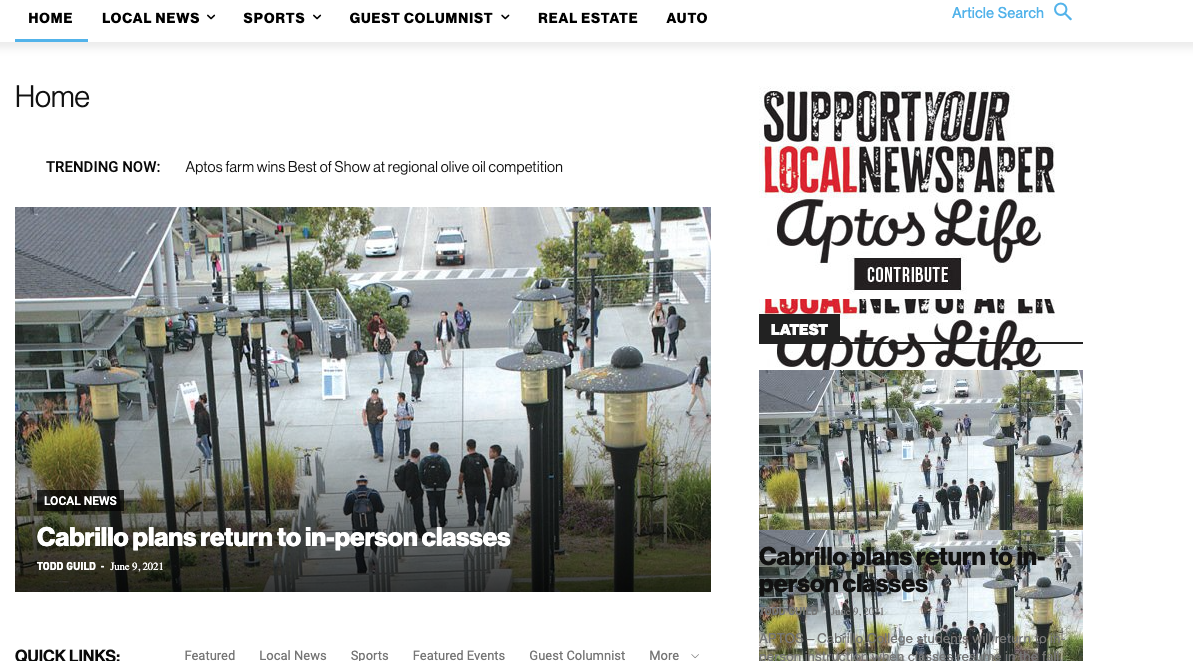
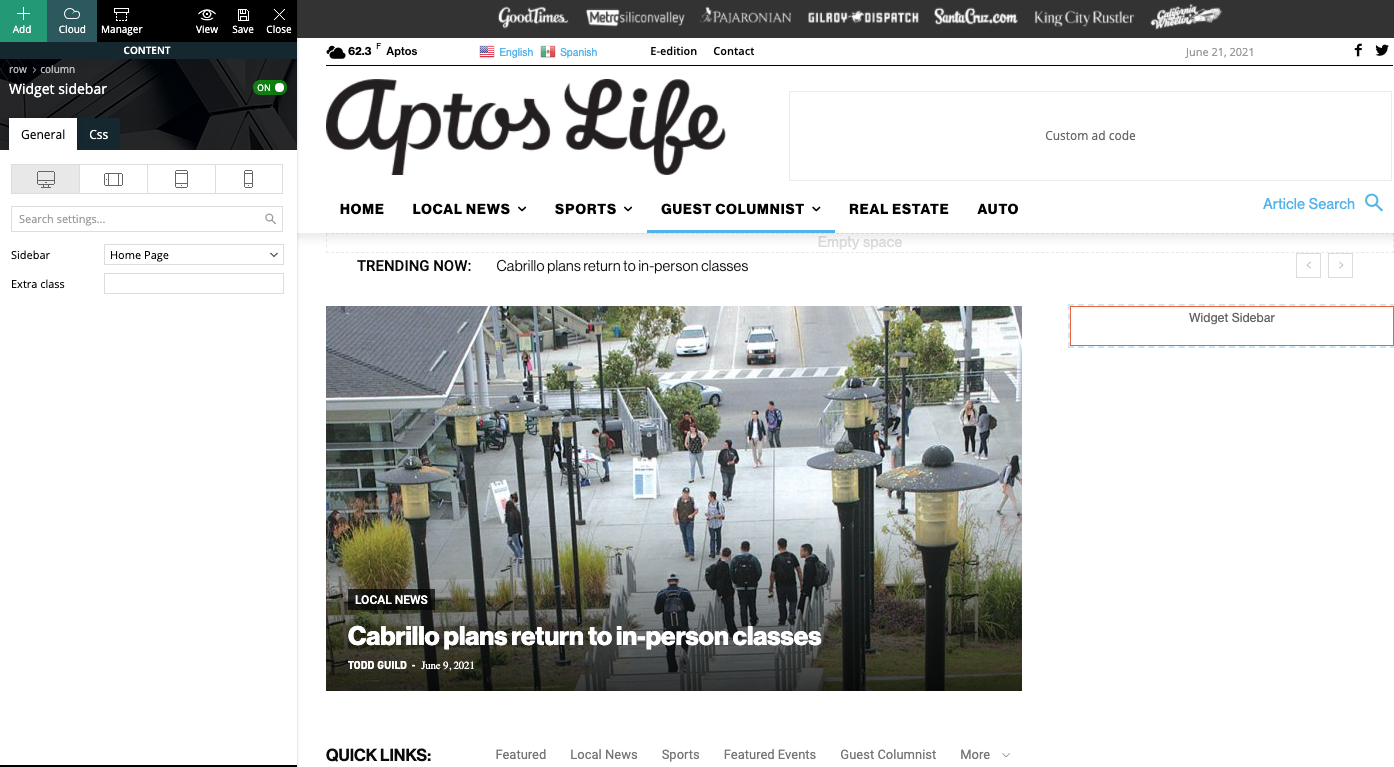
This is how we have the sidebar set in TD Composer:
As a temporary workaround we can set the page template to Pagebuilder + latest articles + pagination, but this opens up a whole new set of problems. For example, if we try to change or hide the sidebar in the “Homepage latest articles” settings, no changes occur. Even something such as changing the title on the post loop won’t take affect.
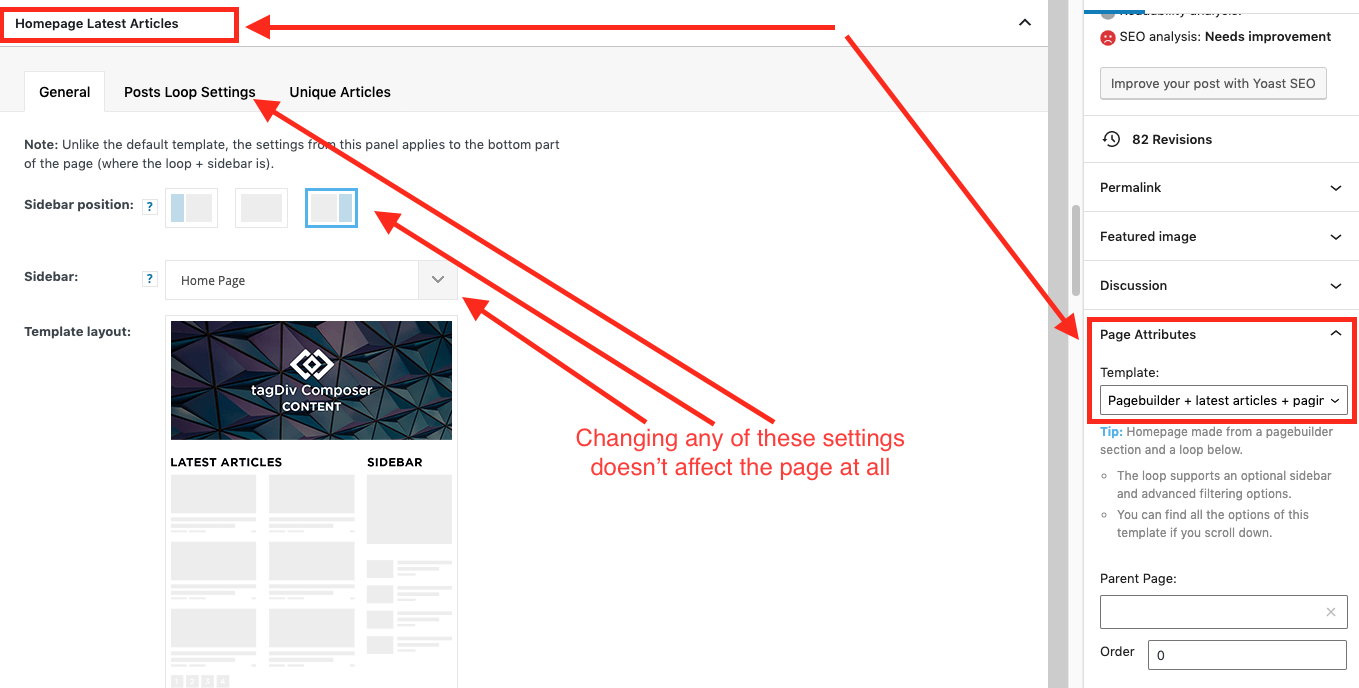
As a result, instead of two overlapping sidebars, we now have two duplicate sidebars stacked on top of each other:
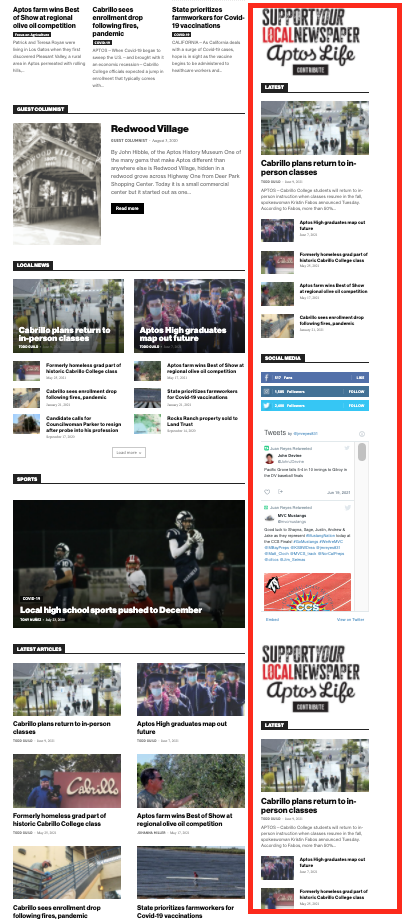
Is there any way to fix these issues? Ideally we would like to leave the page template set to default, with the overlapping sidebars eliminated.
We’ve already tried disabling all our plugins to check for conflicts. Here is some more info from the System Status panel:
Theme name Newspaper
Theme version 10.4
Theme database version 10.4
HTTP channel test wordpress
Installed demo Default – demo ID: default | install type: full
Theme Mobile Newspaper mobile version
php.ini configuration
Server software Apache/2.4.38 (Debian)
PHP Version 7.3.19-1~deb10u1
post_max_size 32M – You cannot upload images, themes and plugins that have a size bigger than this value. To see how you can change this please check our guide here.
max_execution_time 120
max_input_vars 3000
SUHOSIN installed false
PHP extensions
mbstring available
GD library available
WordPress and plugins
WP Home URL https://aptoslife.com
WP Site URL https://aptoslife.com
WP version 5.7.2
WP multisite enabled Yes
WP Language en_US
WP Memory Limit 1 GB/request
WP_DEBUG False
Caching plugin No caching plugin detected – for best performance we recommend using WP Super Cache
 njwalter2004
You guys have made it so simple to create a website, I really appreciate all the work gone into this program. My normal web repair person said the coding is way too complex to be able to help me so I need to go to you guys.So I’m hoping you can help me with a few problems I have come up upon while creating my new website.
Website Address: https://mamaofmanyblessings.com/
1. The Maga menu. The alignment on the menu is wonky. I have tried messing around with it and even searched the topics on here, but no matter what I do the previews of the images on the submenu go off of the page.
2. Single post – when I click onto any post it will have the full post and if you scroll down to the bottom the next post loads and the next indefinitely. You can use this link as an example https://mamaofmanyblessings.com/strawberry-shortcake-bars.html. I only want the post clicked on to load not any other posts after it.
3. I have a static page set up and have created a “blog homepage” so that anyone can click on it to easily see the most recent blog posts. Well I create a page using TAGDIV and once I save it, it loads another page and deletes all of the changes I have made and gives me an error I have included a screenshot below of the error I get when I reload the created page.

thank you in advance for your assistance.
 Christopher
 I have everything that’s needed in system status, it’s all green. I deactivated WP-Super Cache and all other plugins except tagdiv plugins, because you said so. Here’s the screenshot you asked for.

Site still says the same thing.
I don’t know what else to do?
-
This reply was modified 5 years by
Christopher.
 egm_ar
 Hi, I’ve used this: https://adspro.scripteo.info/ Ads Pro by Scripteo. It’s a paid plugin.
Although it didn’t have any issues with Newspaper, I’ve found it a little difficult to learn to use it and eventually deactivated it.
I’m open to other suggestions.
 stefanegirard
Hello,
1-I created a page with “text with title blocks”.
2-I added an image in each blocks with an hyperlink landed to a category or an other page:

When I click on the image it works fine.
3- Then I activated Yoast SEO
4- When I click on the image, I have a 404 page.
Please help
Stefane
3-
 Photoboy
I look after http://www.thesteepletimes.com
I currently have some adsence ads running but despite 50k real visitors monthly, we barely make $20-35 a month from these ads.
I have a couple of questions:
To Make more revenue we are looking to sell some directory listings to local businesses and take Banner advertising from them too.
I am looking for the best plugins or other ways of creating directory pages and listings with several categories with interesting and varied content (several images in listing, videos and reviews etc).
I can currently place Adsense ads using the theme ad-block, but I would like to sell banner ads to local clients So I need a good way to place these banner Ads in the theme, so as to be responsive and work on AMP and mobile theme and rotate (change) every minute or so, as well as have statistics. I can create images but the options are limited and they do not respond well,
Can You guys or anyone reading this suggest a solution that works and does not add code that causes problems, or slows site down or conflict with SEO or subscription popups etc.
PS currently I am using thrive themes for the pop ups, is there something better as Thrive seems to slow the site and mess up the page-speed and core web vitals?
 Edged
Edged Hello,
I have tried everything and I don’t know why auto in articles ads don’t work in the Gourmet Pro post template.
There is no way google Adsense is choosing not to put in articles ads in every single one of my well over 100 posts on my site but does so at the bottom of each one and other non-could templates.
further more 3 manual in article ad spots for articles 2000 words or far greater is a ridiculous solution, especially for a newspaper theme.
I have tried to be respectful, but I now believe that you guys have been wasting my time with these answers.
I will ask one more time, do Adsense auto in articles ads not work in the Gourmet Pro post template?
Please answer truthful and stop wasting my time so I can find a better solution.
 cdpragazzi
Hello, i have insert ads code (ADSENSE) in a Theme Setting but not it works in a desktop mode.
Code insert in this section:
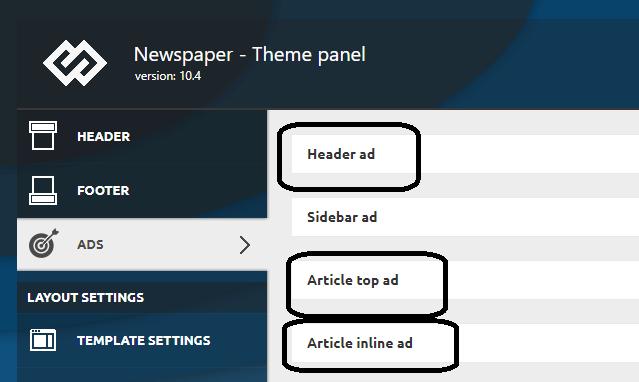
In a mobile i use a Theme Mobile (and has other settings) and it works.
 Calin
Calin Hi,
If this is a code for auto ads for amp, then this code is already added in our theme, if is other kind of AdSense ads, the the code can be set in this place -> https://i.imgur.com/44Bpjv1.png
If this is not what you mean, please let me now and provide some more details.
Thank you!
 TREVOR
Greetings team!
First, I would like to congratulate you on the beautiful website templates you created, I really fell in love with your templates, so I decided to buy them.
I’ve been a WordPress user for 10 years and I have other websites, however, with templates from other companies.
I’m a little (actually quite) sad because I’ve been trying to solve the problem below for 2 months without success.
As I’ve never had this problem, I just decided to ask for your help.
On my other sites, I usually use the WPBakery Page Builder plugin for editing, this is the first site I’m using the “TAG DIV”, and I don’t like it…
PROBLEM DESCRIPTION (IRRITANT):
As below, here is a screenshot of my website home https://foodcookhealthy.com/ https://foodcookhealthy.com/ , as you can see, the installed template is ok. The model is the “LIFE STYLE PRO” :

LOOK AT THE SITE’S CATEGORYS PAGES, THEY ARE UNCOFIGURED! AND THIS ALSO HAPPENS IN THE HOME, WITHOUT ANY REASON OR ACTION OF MY, SUDDENLY, I WAKE UP IN THE MORNING AND THE PAGE LOOKS LIKE THIS:
https://foodcookhealthy.com/category/food/ https://foodcookhealthy.com/category/food/


THE MOST SHAMEFUL IS THAT THE PAGE WAS READY AT THE END OF APRIL, TOTALLY READY AND IN MAY/2021 I RECEIVED ADVERTISERS – THESE ADVERTISERS ARE SEEING THE PAGE ENTIRELY UNCONFIGURED, BECAUSE EVEN AFTER THE SITE IS READY, THESE ARE THESE SOME PAGES! THIS IS HURTING ME WITH ADVERTISERS AND VISITORS. I SPENT MONEY WITH DISSEMINATION ON SOICIA NETWORKS, I DIDN’T EXPECT THIS PROBLEM TO ARRIVE!
 rudhihadhi92
Hello,
I am using the newsmag theme from tagdiv for my website. I’ve also installed the AMP plugin and Mobile Theme, but I have a question about “how to install ad code in AMP”.
When I tried to create a new ad unit specifically for AMP in my Adsense account, there I found 2 codes, namely 1 code that was told to paste between <head>code</head>, and the other in the <body></body> body tag.
For the ad code I already know where I should paste it, namely in the “Ad Auto AMP” bar in the Mobile Theme settings panel. Meanwhile, if the other code, which is asked to paste in the <head></head> section, where should I paste it?
Because I see the section in the AMP plugin settings or Mobile Theme there is no column or bar for code (meta tags)?
—
Here’s an example of my website post page that has successfully become an AMP page: https://dutaserviceac.com/freezer-tidak-dingin/?amp
Because I enable AMP pages only specifically for post pages.
Please help from the Tagdiv team? thank you
Regards
Rudi Hadi
Jakarta, Indonesia
 wgtimes
I am using the PULSES PRO theme.
After posting a homepage is changed.
This is normal page. We can see the main menu and others normally.

This is wrong page. We can’t see the main menu and see wrong structure.

When I see wrong page, I have to save the homepage in tagDiv Composer again.

What is reason for the problem.