
- NewspaperDesign your Post Pages using the Cloud Library Templates
- NewspaperDesign your post pages using the Default Templates
- NewspaperPage templates
- NewspaperCreate a form contact page
- NewspaperCloud Library Templates
- NewspaperCloud Library – Category Templates
- NewspaperHomepage – How to build and set it
- NewspaperPost templates
- NewspaperDefault post templates
- NewspaperCategory templates
- NewspaperPost template ads
- NewspaperSingle External Shortcode and External Shortcode
- NewspaperWP Rocket and Newspaper Theme: Optimization Guide
- NewspaperSearch setup for custom post type
- NewspapertagDiv Composer – Website Manager
- NewspaperBookmark – Save For Later
- NewspaperFlex Block Builder and Flex Loop Builder
- NewspaperModules Builder in Newspaper Theme
- NewspaperIntroduction to CPT and ACF with Newspaper Theme
- NewspaperCreate a frontend submission form
 Carel
Carel Sory but i dont understand.
How can i assign a cloud template for mobile page to the whole website without going global ????
 Bettina
 Hello!
The mobile page is assigned on a cloud template and not on a default one. If some pages are using default templates, then you need to assign manually the cloud template with the mobile page assigned.
You should edit the posts with the WordPress Editor and be sure you choose a cloud template.
I’ve checked both links from your last reply and I can see the same mobile header.
Thank you!
 dirkdirkdirk
 Hi Bettina,
thanks for getting back. A few follow up questions and answers:
– “I can see that you use also default templates.”
-> Yes, for the category pages at least, so far. Is that a problem?
– “I recommend you to use only cloud templates, also for your category page.”
-> How would that change things? The default category template is perfectly able to list standard post types.
What I am trying to communicate is that shortcodes/elements seem to fail to list/show our custom post type with the way that things are configured.
 thedonatshop
 sorry for the double image. I tried to delete one but I saw no delete option.
part 2 of this is a slight variation. but principally the same issue or very similar.
I’d want to be able to link these “learn more ” buttons to link to a custom link added to the post with the aid of a custom field. they would actually go to the author template.
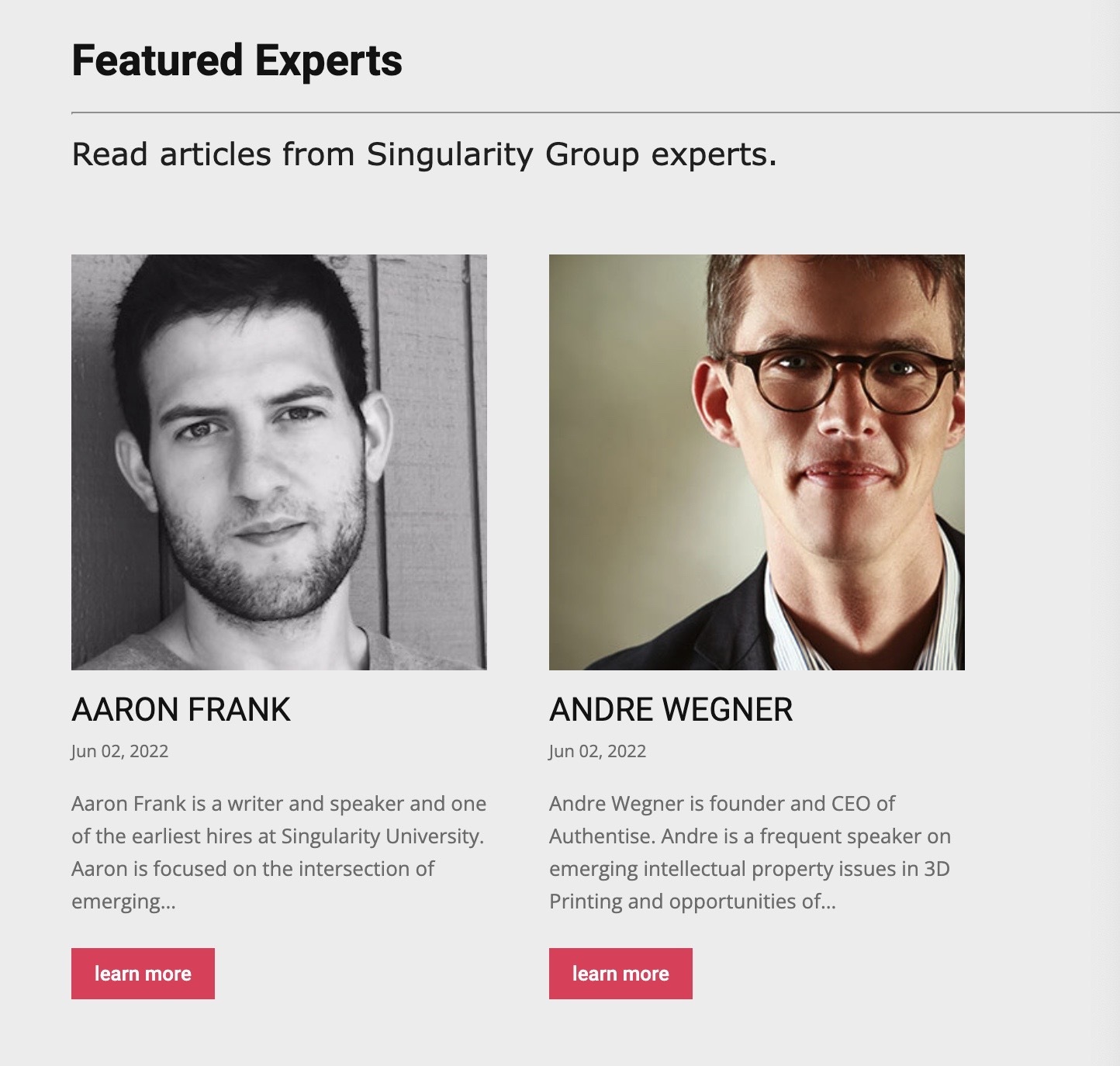
I arrived here as I saw no way to loop contributors
thus I saw even less on how to loop in “featured” contributors as I saw no way to indicate any contributor as a featured one.
so I resorted to making custom posts for each of the featured contributors . so I can loop them in a block but now I need them to link to their respective author page.
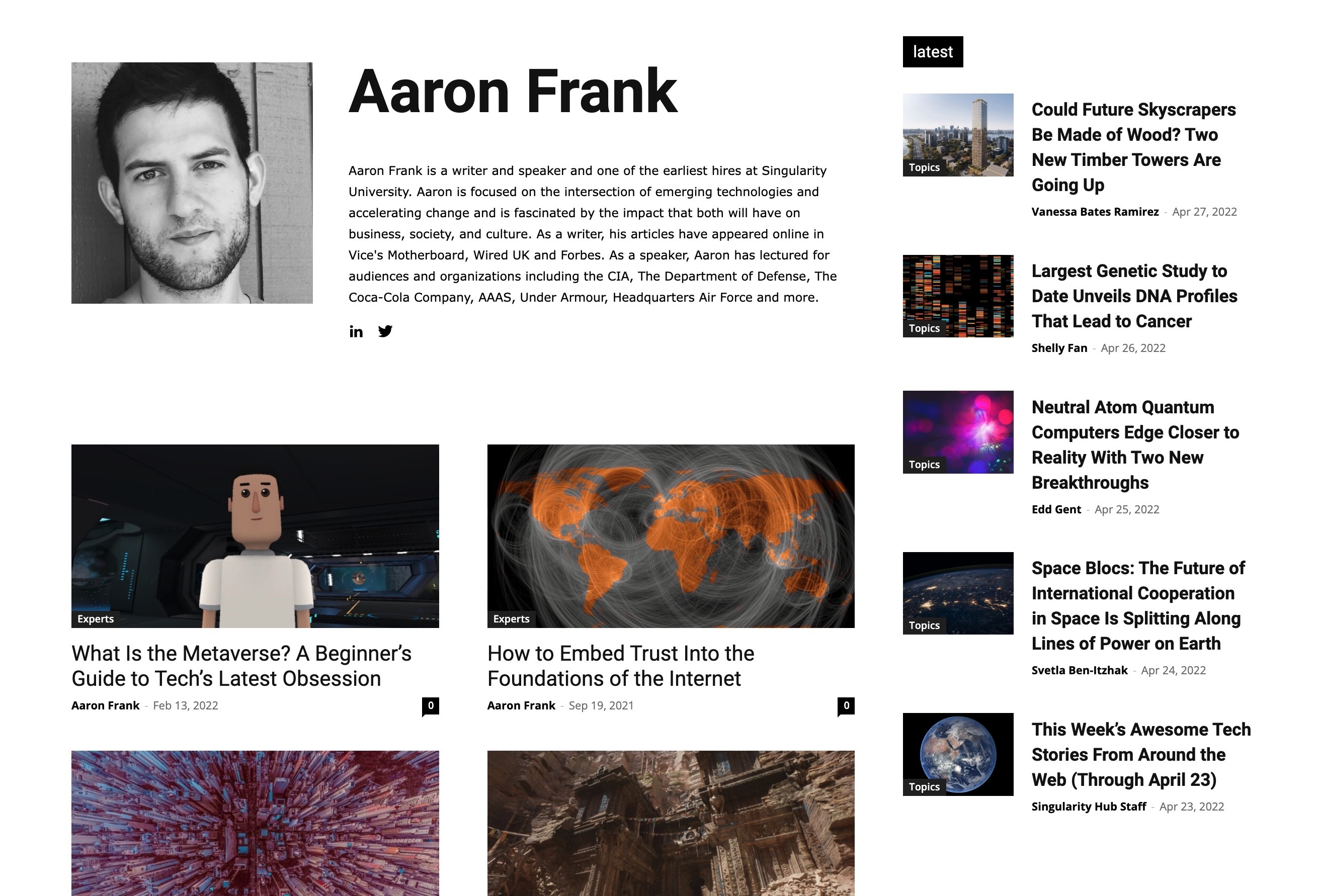
I’m not asking you to help me with these other plugins. only to find out once I have custom plugins will I be able to place them in your theme and get some of the custom fields to be populated.
Or if you see another way to achieve what I need within your theme.
thank you.
 joannatruncali
 Both of these articles are running the same template (Single Template) that I have gone in and edited. I have created mobile pages, erased demo content, and uploaded my own information. However, they have different headers on mobile. So how is the same template generating different headers?
Correct mobile header: https://409family.com/409-family-southeast-texas-splash-pads-pools/
Incorrect mobile header: https://409family.com/409-outline-june-events-around-southeast-texas
Sorry for the multiple replies. As I dug into your proposed solution, I found it lacking.
joannatruncali So setting a Header as Global will not override other settings? That seems like it defeats the purpose of having a Global header setting option.
The events page is generated automatically, and I don’t have a Page in my dashboard to edit or assign a template. How can I remove the demo content from that page?
 Tikonenko
 Berfore i wrote in this forum, i read all post about this problem and tryed all solutions, but didn´t work.
The error is in every single post template imported from clud library. Not in single page and others pages o templates imported, like category, author, home, etc templates.
Now i discoverd that if i open the template with the editor and from there open with tag div composer, instead of open it directly in tag div composer, i can edit.
So, i can fix my problem for now, but something is not working.
 Anamaria
 Hello,
Yes, the next update will include support for using custom fields on single post templates, pages, categories, tags, authors, and attachment templates.
Also, the shortcode will be called the custom field and will also have the option of additional text and icons.
Best regards,
Anamaria
Bettina Hello!
From what I can see, you use default templates for some posts. So, it’s normal that mobile page won’t be applied for those articles.
Make sure all your articles have assigned that post template for which you’ve created the mobile page.
Documentation here:
– https://forum.tagdiv.com/design-post-pages-using-cloud-library-templates/
– https://tagdiv.com/newspaper-10-3-7-update-brings-customizable-and-fast-mobile-pages/
Thank you!
Anamaria Hello,
For this, you should use cloud templates. You can have different ads in every post/article/header/footer if you use a different template for each. If you want the same design, you can duplicate the templates.
Check this topic: https://forum.tagdiv.com/topic/different-logo-in-categorypage/;
We recommend using cloud/PRO templates in order to have the possibility to edit them with the tagDiv Composer which contains a lot of functions and features, please check our tutorial here: https://forum.tagdiv.com/tagdiv-composer-tutorial/
Check also our video tutorials here: https://www.youtube.com/c/tagdivThemes/videos and more theme documentation on the left side: https://forum.tagdiv.com/newspaper-theme-documentation/
Thank you
 Redlemon
 Hi Calin,
I have been digging on my old tickets, and I found this. I would like to share my feedback. I have replaced all tagDiv Standard Pack modules with Cloud Templates, and have also disabled TDSP, but I am still having 8 slow queries in the front page of my site. I have opened a different ticket for that case, but I would like to share the knowledge with fellow TDC users.
Bettina Hello!
If you mean the CPT template, save and view, then you won’t see the changes. You need to access your CPT page in your frontend(not the CPT template in the link with tdb_template).
Thank you!
Bettina Hello!
From what I can see, you have a global template which hasn’t any mobile pages, but for the category you specified is working the selected template(the other categories are different). I do not know how is looking the mobile version you created.
If you are sure that the settings and the design of the mobile version you’ve created are not applying, then please check for a plugin conflict or a cache issue.
Deactivate ALL plugins except tagDiv ones, also if you are using a cache plugin, deactivate it, clear all cache and try again.
If the problem persists, then we can investigate this issue further via email. Please contact us via email at contact@tagdiv.com and provide the following:
– admin url and credentials
– cpanel url and credentials
Our team will take a look!
Thank you!
Anamaria Hello,
For this page, you can’t upload a page template, because we don’t have an option to edit the blog page.
Thank you!
Bettina Hello!
I can see that you use also default templates. I recommend you to use only cloud templates, also for your category page, so you can edit it with the TagDiv Composer and use the shortcodes/elements in order to display what you need.
Thank you!
Anamaria Hello,
Our theme does not have the option to take the first image from the post and set it as a featured image -> https://forum.tagdiv.com/featured-image-or-video/
Also, the settings from Theme Panel are used for the Standard Prebuilt website, so if you have a Pro Prebuilt, you need to edit with tagdiv Composer.
You can delete the element Single Featured image with right-click from the Single post template so that in this mode you won’t have a featured image -> https://i.imgur.com/re1XWKO.jpg or selecting the element and with drag & drop place into the deleting red zone from the bottom right of the page => https://i.imgur.com/vkQVCjn.jpg the same steps for author and date.
Thank you!
Anamaria Hi,
If you’re seeing only three options please make this adjustment in the tagDiv Composer plugin -> wp-content/plugins/td-composer/legacy/common/wp_booster/td_first_install.php
=> https://www.screencast.com/t/yO3iU8E5JhH
Then hit a save in the theme panel and then revert the code back to the original, this will make the social icons appear properly again -> https://forum.tagdiv.com/design-post-pages-using-default-templates/.
If you don’t have success you can send us an email at contact@tagdiv.com and provide
– wp-admin URL and credentials
– cPanel URL and credentials
We will fix the problem. Include a link to this topic in the email.
Let me know the results!
Thank you!
Anamaria Hi,
Is this problem only for some pages/templates or all of them?
Also, for error please check this topic https://forum.tagdiv.com/topic/error-at-zones-6models-1dom-the-model-does-not-match-the-content-currene/
Thank you!
joannatruncaliI created a Mobile Header Cloud Template and set it as Global, but the default header from the “All about Parenting” demo is still loading on several posts and pages. The correct header loads on one blog post, and the demo head will load on another blog post so I’m not sure why it’s switching between two posts that are both using the same Cloud Template. I have checked all my settings in the Theme Panel and erased all of the “All About Parenting” demo content. I have also deactivated the Mobile Theme plugin in order to show the mobile pages I’ve created. The Global Mobile Header I have set is what shows in TD Composer, but is not what appears when loading the page on an actual mobile device. What might still be generating the text for the demo header? How can I ensure the Global Mobile Header I’ve created is actually Global across the mobile site?
Global Mobile Header that I have set: https://drive.google.com/file/d/1wjtaEilAm8_Gz34AHX6b3xZUmlGXzwDw/view?usp=sharing
example (this is the correct header on my mobile device): https://bit.ly/3tbpAX9
Mobile Header that appears on several posts and pages (some blog posts, all event pages, etc): https://drive.google.com/file/d/1zoxwyZczM9jZZjAQrY-8Mz4Ph4rAft5e/view?usp=sharing
example (post loads incorrect header on my mobile device): https://bit.ly/3tchrSl
 PIF21
PIF21 I re-added the code in this area, but I’d done that before.
I’m currently using a header template for my homepage, so the header is not the Newspaper Theme header. Do I need to add the code to header within the header template on the homepage?
Do I have to treat templates different than a regular Newspaper theme site? Do Adsense Auto Ads work with templates?
The tutorial said Google usually needs to see 6 months of content before it adds Adsense. Is that correct? Will we have to wait 6 months?
-
This reply was modified 4 years by
PIF21.
 PuckWuck
 Unfortunately, that’s not the case at all.
As mentioned, it’s just so strange that I see the edit CPT template button at top and I see the changes I made to that template. But they’re just not reflected in the actual page. 🙁
Frustrating since it’s such an important feature for me to have and yet I can’t get it done.
 pavlen032
Hi,
I created a mobile page with the steps given in your documentation, but i dont get that page when i load the page on my mobile device. I can only see that template when i am in tagDiv editor. Also where can i edit social icons in the mobile menu.
Best regards.
 PetrSycha
 I don’t think you understand me. I don’t need a template for the main page or for the posts. But only for articles.
for comparison:
Main page (done): https://www.rozumimepenezum.cz/
Post (done): https://www.rozumimepenezum.cz/jak-poslat-penize-bez-znalosti-cisla-uctu/
Page: https://www.rozumimepenezum.cz/o-projektu/cil-programu/
 Lamb
Lamb I have restaured an recent version but even though I still have code lines in the middle of the page that I can’t remove. I have also seen this morning pluggins theme to install which I did and then all my website was broken … I’m in a recovery mode … is it because of an issue from the new version of the template ?
Anamaria Hello,
For the homepage template you have these options, using Cloud, or from the clod templates homepage -> https://www.screencast.com/t/64jydT2F
Thank you!


