
- NewspaperWP Rocket and Newspaper Theme: Optimization Guide
- TutorialsDefault Block Settings Guide
- TutorialsOffset Feature
 propagare
Editing the mobile version of a page, I clicked Website Manager to select the mobile header for the page. As it didn’t exist, I used the conversion tool.
A new header was created and I could choose and mark it as global (https://i.imgur.com/u2f6CKg.png), but two things happened:
– Even selected and saved, it is not being displayed when I access the page from mobile
– It does not appear for editing in tagDiv Cloud Templates (https://i.imgur.com/LJboWp7.png)
How to solve this?
 cristianviar
Hello,
I recently acquired a website with this theme and after the migration from server I see these issues:
td_api_base::mark_used_on_page : a component with the ID: single_template_7 is not set.
/var/www/vhosts/noticiasvideojuegos.com/httpdocs/wp-content/plugins/td-composer/legacy/common/wp_booster/td_api.php
Display backtrace
wp_booster error:
td_api_base::get_key : a component with the ID: single_template_7 Key: file is not set.
/var/www/vhosts/noticiasvideojuegos.com/httpdocs/wp-content/plugins/td-composer/legacy/common/wp_booster/td_api.php
Display backtrace
wp_booster error:
The path of the single_template_7 template not found. Did you disable a tagDiv plugin?
/var/www/vhosts/noticiasvideojuegos.com/httpdocs/wp-content/plugins/td-composer/legacy/common/wp_booster/td_api.php
Display backtrace
wp_booster error:
td_api_base::get_key : a component with the ID: single_template_7 Key: bg_use_featured_image_as_background is not set.
/var/www/vhosts/noticiasvideojuegos.com/httpdocs/wp-content/plugins/td-composer/legacy/common/wp_booster/td_api.php
Display backtrace
wp_booster error:
td_api_base::get_key : a component with the ID: single_template_7 Key: bg_disable_background is not set.
/var/www/vhosts/noticiasvideojuegos.com/httpdocs/wp-content/plugins/td-composer/legacy/common/wp_booster/td_api.php
Display backtrace
wp_booster error:
td_api_base::get_key : a component with the ID: single_template_7 Key: bg_box_layout_config is not set.
/var/www/vhosts/noticiasvideojuegos.com/httpdocs/wp-content/plugins/td-composer/legacy/common/wp_booster/td_api.php
Any ideas how could I sort it out? Currently I hided through css but I want to fix it…
Thanks in advance,
 Calin
Calin Hi,
If I’m right, that it is a category page. In order to display only posts from that category, you need to use a specific filter, the current category filter, edit the cloud category template with tagDiv Composer -> https://i.imgur.com/q3Ke1bp.png -> https://i.imgur.com/dYQ4iDu.png also it can be use the posts loop element.
Thank you!
 Bettina
 Hello!
It seems that this page was missed. I just addressed this issue to my colleague and we hope in short time this page will be available in the Cloud Templates.
We are sorry for the inconvenience!
Thank you for understanding!
Bettina Hello!
The Mobile Theme is a performance optimized theme included in the Newspaper main theme and it loads only for mobile devices. It comes with its own templates/design for page, post, category, etc so your current templates from the desktop theme will get converted to the mobile theme layout.
Documentation here:
– https://forum.tagdiv.com/the-mobile-theme/
– https://forum.tagdiv.com/mobile-theme-introduction/
Also, you can not customize AMP so much, because it comes with its own design: https://forum.tagdiv.com/tagdiv-amp-plugin-tutorial/
There are some settings in the Theme panel -> Mobile Theme and Dashboard -> AMP.
Thank you!
Calin Hi,
It depends on what you mean by a fully compatible cache plugin. If you are referring to the settings that need to be used to work correctly with the theme, then both of the above plugins can be used, for WP Super cache we have a guide, and for WP Rocket we can give you a guide that works.
Now the problem is that depending on how each website is created, what elements it contains and what resources it still has, some webmasters need help to get a better speed for the mobile version. So our theme besides the responsive version offers me 2 more options.
Mobile page templates, these are mobile templates that can be made for pages and cloud templates with tagDiv Composer -> https://i.imgur.com/Uz85flw.png -> https://i.imgur.com/LR03SYa.png
Mobile theme plugin, is a plugin that uses a simple layout and elements without builders, as a consequence the pages must be rebuilt using mobile editor or you can use the responsive version.
Here is a video for how to use those 2 mobile versions -> https://www.youtube.com/watch?v=SpGkOnJeNZY
Thank you!
Bettina Hello!
The page templates is a new feature. Unfortunately, in this demo, there isn’t a page template built for the contact page.
You can import one existing template for this page from the Cloud Templates -> Page Templates by clicking on “+”, or create a new one from scratch.
Thank you for your feedback!
Calin Hi,
Yes, you can set in any page an cloud template the Newsletter with tagDiv Composer, also you can set any other elements if you have the embed code or the shortcode, you just need to set them in a column text or text with title element.
Thank you!
 jtoney
Is there still no way to make each post have custom content? For example if I have a post and its using a certain template, if I attempt to add custom content it will use that content on every single post that shares that template.
So I’d like to be able to have a table listing or be able to pull up the titles of certain articles but doing that right now adds it to every page using the template.
 nedeljko1
 Hi,
Not a problem with optimization. When we set any theme, the site loads in two seconds. We have a problem with the tagDiv Composer plugin. He has a problem, he slows down the site a lot. Also, when we set PHP version 8.0 or 8.1, the post template is completely white and the menu is frozen (Attached image). We installed Single Post Template – Magazine PRO.
When we set the PHP version to 7.4, then it loads the post normally.
When we turn off the tagDiv Composer plugin all pages are loaded in one second.

-
This reply was modified 4 years by
nedeljko1.
 vivreausmic
Hello,
I want to import a tds-switching-plans-wizard by the newspaper center pro demo (https://demo.tagdiv.com/newspaper_center_pro/tds-switching-plans-wizard/)
Tag div Cloud Templates and Opt In Builder are available on my website.
But i don’t find this page on the cloud library. Import all the demo isn’t an option, i need only this page.
Thanks 🙂
 themepark
Hello. You did an amazing job with the Rimont theme. However, I was looking for a Page template that goes with the theme and there apparently isn’t one. Is this correct? If so, what is your recommendation for pages like About Us, etc. in that theme?
Thank you for your time and assistance.
 Nickolas Combatente
 i dont know what you mean by that: “The mobile page template can be also used on cloud templates”. Im a begginer in doing sites and with newspaper theme.
right, dont have a way to me use only one plugin than can make all the necessary stuff, like show mobile page only on mobile devices and the others cache things. What wanna say is dont have a complete cache plugin compatible with newspaper theme?
 PeteMason
https://www.socialistparty.org.uk
I did a backup before updating to 11.4.3
However, on upgrade to 11.4.3 the following code displayed on the home page where the second block, block 17, (“News”) was normally positioned:
[td_block_17 custom_title=”News” block_template_id=”td_block_template_8″ border_color=”#dd3333″ category_id=”98″ ajax_pagination=”” td_ajax_filter_type=”” td_filter_default_txt=”More” m4_tl=”50″]
Possibly this next piece showed too, but I’m not sure now:
[vc_row_inner gap="12" tdc_css="eyJwaG9uZSI6eyJtYXJnaW4tcmlnaHQiOiItMjAiLCJtYXJnaW4tbGVmdCI6Ii0yMCIsIndpZHRoIjoiY2FsYygxMDAlICsgMTAwcHgpIiwiZGlzcGxheSI6IiJ9LCJwaG9uZV9tYXhfd2lkdGgiOjc2N30="]
Below which the home page displayed normally (see screenshot). As expected, there was no access to this code in the tagdiv editor.
Rather than attempt a fix (an edit in wordpress to remove the displayed code would probably have worked fine, then restore block in tagdiv), I used the newspaper theme updates panel to reverse the upgrade – I went back a few to 11.4, and this was successful at restoring the block immediately. (Which is very good, btw.)
Screenshot:
https://www.socialistparty.org.uk/Images/Upgrade_to_11-4-3_causes_block_17_to_crash_out_22-4-22.jpg
This screen shot is a mock up – an approximation to the display (since I immediately reversed the upgrade, I didn’t pause to document it.)
I’d like to upgrade to the latest version, but hoping you could check this out first.
 David
David Hi Calin,
Actually, the page was created when WPBakery was a built-in part of Newspaper and the only way to design pages. It’s a pity that this is no longer supported, as it means extra work. But yes, if I disable WPBakery and rebuild the pages with TagDiv Composer, it seems to solve the problem.
I add the post ID filter in exactly the same way. However, it doesn’t seem to work for the Single Post template, no matter which Post ID I try. Any idea what this could be due to?
Thanks!
Calin The mobile page template can be also used on cloud templates.
Yes you can use the WP Rocket with the WP Super cache, but, you need to clear both caches.
 Archerix
Need some help, there is something that I’m probably missing, I’m trying to move from the standard header to the cloud Header template default pro (trying to control the showing of ads on mobile since the bug), but I can´t get the same look as you can see in the screenshots, I can’t stretch the menu bar to the width of the page, showing tow black spots
How can I edit de Default pro to get the same look?
Live website
https://www.otakupt.com/wp-content/uploads/2022/04/Untitled-8.jpg
Edited Cloud
https://www.otakupt.com/wp-content/uploads/2022/04/Untitled-10.jpg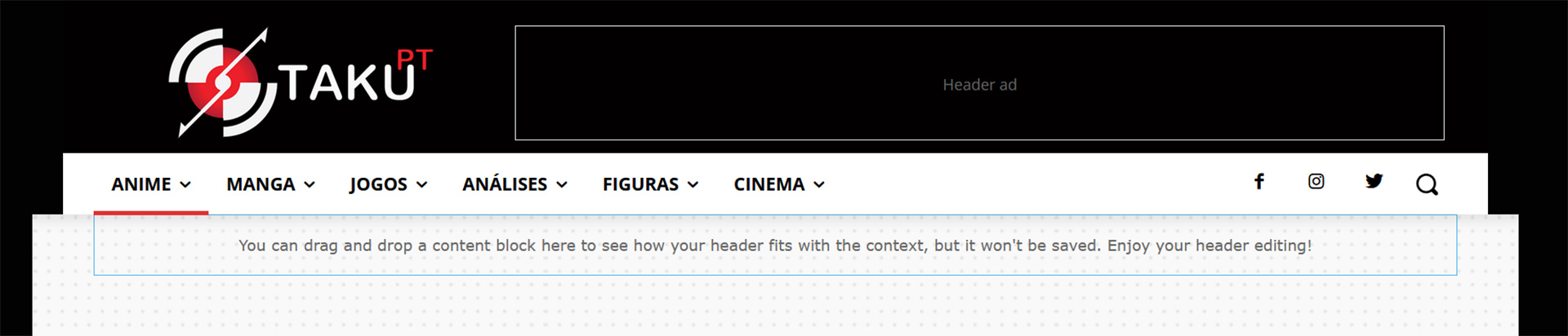
 cardinapoints
 I was able to create and import and edit the “base store” template from the cloud samples, but I was done with editing the template is not displaying on my default store page as defined in the template. Please, how can I set the template created to the store page?
This is the link to my template
https://cardinapointsolutions.com.ng/tdb_templates/woo-shop-base-template-shop-audio-4/
This is the link to my store page
https://cardinapointsolutions.com.ng/shop/
Thanks
cardinapointsI was able to create and import and edit the “base store” template from the cloud samples, but I was done with editing the template is not displaying on my default store page as defined in the template. Please, how can I set the template created to the store page?
This is the link to my template
https://cardinapointsolutions.com.ng/tdb_templates/woo-shop-base-template-shop-audio-4/
This is the link to my store page
https://cardinapointsolutions.com.ng/shop/
Thanks
Bettina Hello!
You need to access an article/post in the frontend, click on the green button Edit with the TagDiv Composer and from there you can add the elements.
Documentation here:
– https://forum.tagdiv.com/cloud-library-templates/
– https://forum.tagdiv.com/design-post-pages-using-cloud-library-templates/
– https://forum.tagdiv.com/cloud-library-category-templates/
Check also our video tutorials here: https://www.youtube.com/c/tagdivThemes/videos
Thank you!
 gbmagazine
Single post template should be full-width, I have imported this template and set it to global – https://staging5.greenbeltmagazine.com/tdb_templates/single-post-template-58-influencer/ this template looks perfect but the real blog posts are broken – looks weird in fixed width.
https://staging5.greenbeltmagazine.com/dwell-it/responsible-growth-and-development/
you can see all the posts are broken, can be accessed from home page and click on any any random post – https://staging5.greenbeltmagazine.com/
also when I try edit with tagdiv composer – the edit window looks fine.
I have deactivated all the plugins to check the conflicts but its not a plugin conflict. Please provide a permanant solution to this issue, as we are delayed in the website launch due to these issues.
screenshot: https://www.awesomescreenshot.com/image/25982439?key=972d47436ce4df089fc2f5c82662bcd3
Bettina Hello!
For more customization, I recommend you to edit the page with the TagDiv Composer and add a flex block instead the default block that you use: https://forum.tagdiv.com/flex-block-settings-guide/ With a flex block 1 for example, you have the possibility to make the featured images like a square for example from their settings.
Also, you can add a row divided in as many columns you need( https://prnt.sc/-SAV6yHpckUp), but only if you use the TagDiv Composer on a cloud template. Take a look here in this video for example where I build 6 columns: https://www.screencast.com/t/mZ2c5XamTFN
Thank you!
 amber nazir
Dear Support team,
I have set the header and footer for the mobile templates for all, single post, category post, archive post, it looks fine on the desktop when I am setting up the mobile pages, but when I load on my mobile it shows the header and footer from theme options not the one I set using cloud library
Website: https://quews.co.uk/
Please have a look header and footer for pages are fine but not okay for the category and single post. Please advice the solution thanks.
Bettina Hello!
I recommend you to make a full backup, update the theme and plugins to the latest version 11.4.3.
If you use default templates, then you can install the Standard Pack plugin.
We recommend to use cloud/PRO templates in order to have the possibility to edit them with the TagDiv Composer which contains a lot of functions and features, please check our tutorial here: https://forum.tagdiv.com/tagdiv-composer-tutorial/
Documentation here:
– https://forum.tagdiv.com/cloud-library-templates/
– https://forum.tagdiv.com/design-post-pages-using-cloud-library-templates/
– https://forum.tagdiv.com/cloud-library-category-templates/
Check also our video tutorials here: https://www.youtube.com/c/tagdivThemes/videos
Thank you!
Calin Hi,
This is because you are using a demo that is being edited from the font and does not take into account the settings in the standard pack (please disable the tagDiv Standard Pack plugin and if everything works fine, leave it disabled). To edit a page or a cloud template you need to use tagDiv Composer. Here is a video showing you how to use this editor -> https://www.youtube.com/watch?v=SoGQ0d5kIBg
Thank you!



