- NewspaperWP Rocket and Newspaper Theme: Optimization Guide
- TutorialsDefault Block Settings Guide
- TutorialsOffset Feature
 Rigsbyx
Hi Folks,
Is there a way to assign different sub-categories into different elements on the category homepage? I know I can use Current Category from Filter, but it’s going to be the same across all elements in the template; they’re just the latest posts across the entire category, and thus they will all look the same.
For example, If I have 10 categories for Sport, I would like them to all show up in their own mini-feed. Again, I know I can’t assign football specifically because I am using one template for all categories, but is there a way to show sub-categories in different elements on the category homepage? Can they be separated?
Obviously, I think the only way around this would be to create 50+ templates, but I am asking before I start with the hope that you may have some suggestions.
Thanks : )
 ViewCars001
 I can’t add a picture.
site “blog.viewcars.com”
When I switch to the blog page, all the blogs appear one after the other, I don’t want this, I want them to be side by side or different templates. (like home page layout)
There is such a setting in the editing tools, but it is not active for me.
 Bettina
 Hello!
When you install Mobile Theme plugin or AMP, your pages will be overwritten by the plugin.
The Mobile Theme is a performance optimized theme included in the Newspaper main theme and it loads only for mobile devices. It comes with its own templates for page, post, category, etc so your current templates from the desktop theme will get converted to the mobile theme layout. For more details, please take a look here: https://forum.tagdiv.com/the-mobile-theme/
Please note that if a page is made by Composer, than the content won’t be displayed on Mobile theme version or AMP.
If you deactivate the plugins, then the pages will automatically load how you’ve set up.
Thank you!
 Anamaria
 Hello,
So I understand you use the mobile theme plugin?
In your situation, I would recommend using a mobile responsive version.
This is a video about Responsive Newspaper Theme, AMP & Mobile Theme, Mobile Pages & Templates -> https://www.youtube.com/watch?v=SpGkOnJeNZY (
Thank you!
Anamaria Hello,
Please edit the footer template delete the code and add this code https://pastebin.com/efnE47Cu after save it and assign it on the page.
Thank you!
 Calin
Calin Hi muktipolice, from your above reply, I understand that you want to set the H1 only on blocks and that can be done using tagDiv Composer, https://i.imgur.com/GWZHE1T.png but, the think is that our theme is setting the H1 automatically on logo when you use page template default or with page builder or it set it on page title when you use the page title and this H1 can be remove only manually.
I hope that this time I was able to explain better.
Thank you!
 antiquark
 Thanks for your answer, I’ve tried and it works.
But your Art Blog Pro footer template seems to be broken : from the Website manager, when I import the Art Blog Pro template, it adds at the bottom of the page something which seems to be the Art Blog Pro homepage instead of the footer template.

Could you please correct the template and let me know?
Thanks
 Mark Gilbert
 Now it’s started again – Dashboard / Cloud Templates / Add New – hangs on blank, black page for a minute then gives “Invalid reply from server endpoint.”
I have changed nothing from last week when it loaded after 50 seconds or so.
You have my installation settings above.
Are you sure nothing is wrong your end? Many other comments suggest something is flaky here.
Regards
MG
Bettina Hello!
Please check this video: https://www.screencast.com/t/fGV2uwNO2I
You can assign and import from Website Manager which footer template you need.
If you have a cloud/PRO template, but you can’t edit the footer, then edit your homepage with TagDiv Composer, scroll till footer, click on footer zone and you can edit/delete the elements there.(see the video)
Hope that helps you!
Thank you!
antiquarkHi,
I’m building a new website with the Newspaper Theme (I have been using it on another website for a few years now).
With this new website, I have a problem with the footer :
– In the Theme Panel, there are no settings in the footer section

– When I import a footer template, there is no “Edit with Tagdiv Composer” link in the templates section for the footer (no problem with other templates like headers, singles, pages…)

– Moreover, when I try to import the “Art blog pro” footer template, it seems it imports a full page without any footer

Is there anything I’m doing wrong?
The website url is http://www.antiquark.me (currently set with no footer)
Thanks for your help
Bettina Hello!
When you install Mobile Theme plugin or AMP, your pages will be overwritten by the plugin.
The Mobile Theme is a performance optimized theme included in the Newspaper main theme and it loads only for mobile devices. It comes with its own templates for page, post, category, etc so your current templates from the desktop theme will get converted to the mobile theme layout. For more details, please take a look here: https://forum.tagdiv.com/the-mobile-theme/
Please note that if a page is made by Composer, than the content won’t be displayed on Mobile theme version or AMP.
If you deactivate the plugins, then the pages will automatically load how you’ve set up.
Thank you!
Bettina Hello Paul!
Edit the page normally and change the settings from Template: default, see the screenshot below: https://www.screencast.com/t/0I4zBQMBC
If this is not what you mean, then please provide more information about your issue, screenshots and your website link in order to help you efficiently.
A solution for sending a screenshot is this:
Download, capture, send: https://www.techsmith.com/jing-tool.html
After making the screenshot, you will have a link, paste it here.
Thank you!
 PauloCot
 Hi Anamaria,
This applies when I make new pages also, there is nowhere to change the layout.
It appears something is stopping the “page template settings” screen element from displaying.
All screen elements within the screen options tab are ticked but neither the “Page Template Settings” and “Homepage Latest Articles” display.
There’s no option to add a screenshot here but if that doesn’t make sense please let me know and I’ll externally link.
Thanks, Paul
Bettina Hello!
Edit the page normally and change the settings from Template: default, see the screenshot below: https://www.screencast.com/t/0I4zBQMBC
Thank you!
 maaikewind
 Or is there a way to make the homepage to look good on mobile? While using the same template as the desktop one?
Bettina Hello!
1. To add a new post, go to your WordPress admin dashboard area > Posts > Add New. Write your post’s title and text and when you are ready, click on Publish.
2. You can change the roles and capabilities of your users: https://wordpress.org/support/article/roles-and-capabilities/
3. Where you upload the image in Media, there is a setting with the size of the image and please select full size.
4. AMP is faster and works better only with the Mobile Theme plugin. The design is looking pretty similar as our plugin. Install AMP and Mobile Theme, then just navigate the website on your mobile phone because the design will apply automatically. For more information, you can check our documentation:
– https://forum.tagdiv.com/the-mobile-theme/
– https://forum.tagdiv.com/tagdiv-amp-plugin-tutorial/
5.You need to enable this option: Mobile+Amp – Displays content using the Mobile Theme on both mobiles and AMP by accessing Newspaper -> Theme panel -> Mobile theme.
6. In our theme we have a setting when you edit the post template with TagDiv Composer. You need to disable that setting like this: https://www.screencast.com/t/JaSHpq10Y
7. Unfortunately, this plugin is not a tested one with our theme, so I’m not sure it is responsive or not.
8. Edit the homepage with TagDiv Composer, and you can edit them. For more information about TagDiv Composer, please check our documentation here: https://forum.tagdiv.com/tagdiv-composer-tutorial/
9. I recommend you to use “column text” or “text with title” elements from TagDiv Composer and insert some texts there in the WP Editor. These elements have a button called “edit content” and if you click on that button, the WP Editor will open and you can add some texts. Write the text in WP Editor, close from X, save and you can see the changes in your homepage.
Hope that helps you!
Thank you!
 arvind9725
i have run site audit on semrush and it gives me below error.
Error : 1 page has more than one H1 tag
URL : https://www.greengujarati.com/
Theme : Newspaper Version: 11.2
i have seen the source code and found there are four <h1> tag into my home page. so i want to remove unused 3 <h1> from my home page. please help me. thanks in advance.
below are the 4 <h1> tag from my home page source code.
1)
<div class=”tdb-block-inner td-fix-index”><h1><span class=”tdb-logo-text-wrap”><span class=”tdb-logo-text-title”>Green Gujrati</span><span class=”tdb-logo-text-tagline”>ગુજરાતી બ્લોગ</span></span></h1></div></div> <!– ./block –></div></div><div class=”vc_column tdi_12 wpb_column vc_column_container tdc-column td-pb-span4″>
2)
<div class=”tdb-block-inner td-fix-index”><h1><span class=”tdb-logo-text-wrap”><span class=”tdb-logo-text-title”>Green Gujarati</span><span class=”tdb-logo-text-tagline”>ગુજરાતી બ્લોગ</span></span></h1></div></div> <!– ./block –></div></div><div class=”vc_column tdi_25 wpb_column vc_column_container tdc-column td-pb-span4″>
3)
<div class=”tdb-block-inner td-fix-index”><h1><span class=”tdb-logo-text-wrap”><span class=”tdb-logo-text-title”>Green Gujarati</span><span class=”tdb-logo-text-tagline”>ગુજરાતી બ્લોગ</span></span></h1></div></div> <!– ./block –></div></div></div><div class=”vc_column_inner tdi_45 wpb_column vc_column_container tdc-inner-column td-pb-span8″>
4)
<div class=”tdb-block-inner td-fix-index”><h1><span class=”tdb-logo-text-wrap”><span class=”tdb-logo-text-title”>Green Gujarati</span><span class=”tdb-logo-text-tagline”>ગુજરાતી બ્લોગ</span></span></h1></div></div> <!– ./block –><div class=”td_block_wrap tdb_header_menu tdi_62 tds_menu_active3 tds_menu_sub_active1 tdb-head-menu-inline tdb-mm-align-screen td-pb-border-top td_block_template_1 tdb-header-align” data-td-block-uid=”tdi_62″ style=” z-index: 999;”>
NOTE : i have seen source code of other website who have used News Paper 11 latest version but their code is fine.
Anamaria Hello,
Please use Single Post Template from Cloud Library, you have more control to design the layout.
Also, go in Settings -> Reading and set a static page=> https://i.imgur.com/ToVk6fy.png to can design it with tagDiv Composer.
On our channel https://www.youtube.com/channel/UCOT1RiNysIPCTPSnVZskwtQ, you can find more videos that can help you.
Also, I saw you don’t have a sidebar on post => https://i.imgur.com/SKblucS.png
Thank you!
Bettina Hello!
Edit your page the Single Cloud Template – Animals PRO(1st screenshot) with the inner row, Layout tab, and choose the third option: https://www.screencast.com/t/0Ic5oD4PDk
Single Cloud Template – Animals PRO(2nd screenshot) is appearing like that because you edit the template from Cloud Templates.
If the problem is still there, then make a full backup, contact us via email at contact@tagdiv.com and provide the following:
– admin url and credentials
– a link to this topic in order to identify you
Our team will take a look!
Thank you!
 lwatson1439
 Let me try this again with screenshots you can see.
There are two instances:
1) I am modifying the category-template and want to have the Author name be white. But it stays black. Perhaps I need to modify it somewhere else? See screen shot.
https://www.screencast.com/t/S99W838P
2) I am modifying the element on the home page (flex block 1) to make the Title white and the Author white. But it stays black. So same basic question, where do I correctly modify this? See screen shot.
 dmillersg77
 So I tried visiting theme panel categories and selecting the no template option. I then looked at one of the categories to see if the sidebar option would appear but no field appeared. I then went back to the post editor for the post and selected the correct sidebar to see if toggling off the template option via the theme panel would allow the sidebar field in the post to work and still nothing. Same sidebar.
I am using the revenant theme. I visited the tagdivcomposer button and it takes me to the front end. I tried readding the sidebar widget and selecting the correct widget and clicked saved. I visited the page in another window and can see the sidebar working. But this doesn’t quite solve it for me.
I need a different sidebar for each post. If I add the widget sidebar via the tagdiv composer, it adds the sidebar to every post.
I need a separate sidebar for each post.
Please advise.
-
This reply was modified 5 years by
dmillersg77.
 SAMYTHEBIGJUICYPauloCot
Hi,
I am unable to change the sidebar position on new and existing pages – basically choosing whether I want a standard template (sidebar on right) or no sidebar at all.
Within the screen options at the top of the page I have tried enabling (ticking) both “Page Template Settings” and “Homepage Latest Articles” but this doesn’t do anything and I have no additional options to choose from further down the page.
Can anyone help, please, truly stuck on this one. I am running the latest version of WordPress and Newspaper.
Thanks, Paul
Bettina Hello!
When you install Mobile Theme plugin, your pages will be overwritten by the plugin.
The Mobile Theme is a performance optimized theme included in the Newspaper main theme and it loads only for mobile devices. It comes with its own templates for page, post, category, etc so your current templates from the desktop theme will get converted to the mobile theme layout. For more details, please take a look here: https://forum.tagdiv.com/the-mobile-theme/
Please note that if a page is made by Composer, than the content won’t be displayed on Mobile theme version.
Thank you!
 Matija
Hi
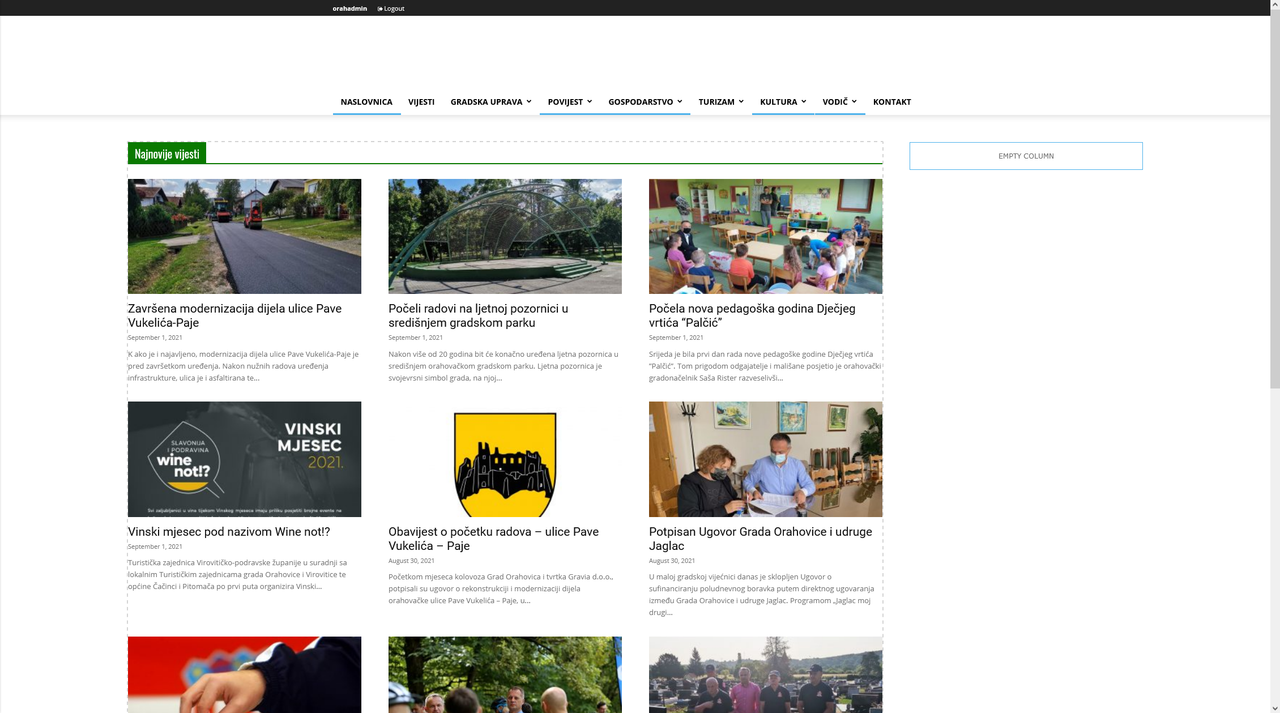
I save my template like this: https://i.postimg.cc/vHgy9GjK/Screenshot-2021-09-06-at-12-27-54-Slu-bene-stranice-Grada-Orahovice-Word-Press.png
And on live page it shows different… https://www.novo.orahovica.hr
WHY?