
- NewspaperDesign your Post Pages using the Cloud Library Templates
- NewspaperDesign your post pages using the Default Templates
- NewspaperPage templates
- NewspaperCreate a form contact page
- NewspaperCloud Library Templates
- NewspaperCloud Library – Category Templates
- NewspaperHomepage – How to build and set it
- NewspaperPost templates
- NewspaperDefault post templates
- NewspaperCategory templates
- NewspaperPost template ads
- NewspaperSingle External Shortcode and External Shortcode
- NewspaperWP Rocket and Newspaper Theme: Optimization Guide
- NewspaperSearch setup for custom post type
- NewspapertagDiv Composer – Website Manager
- NewspaperBookmark – Save For Later
- NewspaperFlex Block Builder and Flex Loop Builder
- NewspaperModules Builder in Newspaper Theme
- NewspaperIntroduction to CPT and ACF with Newspaper Theme
- NewspaperCreate a frontend submission form
 Fenix
Fenix I’m sorry but i think this isn’t a customization. This is a correction. The template vote is incoherent with the vote showed on the search engine results. If i put a vote of 7 out of 10 in the Review Page Settings then on Google you’ll see 3,5/5 and not the original vote like in every other site of my same category.
So why should i pay to fix a “bug”?

 mmmmarchese
Hello,
is it possible to change the template of pages, categories and tags like the homepage?
I looked in the panel settings, but I did not find anything
 Nikolaas49
 Hi,
Unfortunately, this also did not help.
See: https://www.screencast.com/t/svqMtsIZqH
I deleted the provided code, and I tried the following code (I added !important):
.td-craft-ideas .td_block_template_6 .td-block-title {
background-image: none !important;
}
This is the result: https://www.screencast.com/t/FQBi8yrXPy
Now we’ve managed to delete the image, but no also the Header-image in the Widget area is deleted..
Previously Bogdan B. said the image should not even be there. Maybe that’s the problem? We try to delete an image that should not even be there?
As mentioned before, I changed the header image manually (this is the topic: https://forum.tagdiv.com/topic/excerpt-not-shown-on-blog-page-change-background-of-headers/). Maybe something went wrong there?
I hope you can help me fix this!
Kind regards, Nick
 Margherita
Hi,
I recently installed the Ajax Load More plugin and purchased the Previous Post Add-on.
I would like to know if you have encountered any problems with this plugin, and what you suggest to install this shortcode inside the single template .php file (or if it should also be installed in the single loop or elsewhere).
Thank you
——- example ——-
<? php get_header (); ?>
<main id = “page-content”>
<div class = “post-container”>
<? Php
// The loop
if (have_posts ()):
while (have_posts ()): the_post ();
// replaced with Ajax Load More shortcode
echo do_shortcode (‘[ajax_load_more post_type = “post” repeater = “default” previous_post = “true” previous_post_id = “‘. get_the_ID (). ‘” posts_per_page = “1” button_label = “Previous Post”]’);
endwhile;
endif;
?>
</ Div>
</ Main>
<? php get_footer (); ?>
 gsdmagency
I upgraded my site from Newspaper 7.2 >> 8.7 and all is working perfectly except for the sidebars. It is only showing the default WordPress sidebar and also no styling for headings etc. I have deletedmy old sidebar in widgets and created new ones in Themepanel >> Template settings and loaded new text field and still not showing. I have gone and set the sidebar as default for all sections and even selected it on my page settings for individual pages.
my site is here: http://www.mbuyekezoboxing.co.za
Any idea why the custom sidebars wont show?
 regio-online
Hi there,
We use the Newspaper Theme v 8.7.2. On our (static) Homepage and several other pages I want to place a sidebar where I can put a a page overview. I read almost all your tutorials about sidebars, tried everything I can think of, but can not get a sidebar in my template. I use tag_Div Composer for my pages. I tried standard Custumiser but that says there are 4 more widget area’s that can not been shown. Tried creating a new sidebar trough Template setting – Page Template – create new sidebar. Then I read I need a widgetised Sidebar block, but there is no widget to be found called Sidebar. I did try to place the widget Pages in Newpaper template, but that doesn’t do anything.
The pages have a big grid on top of the page. They need a single row. The template for pages is 3 rows wide, but has plenty of (white) space on the left and the right. I would like to be able to place a sidebar on the right side, to make navigation al lot easier for my visitors. Is there any way this is possible? How or where do I find a widgetised sidebar that I can customise myself? How to I even make room for a sidebar in this template, wich clearly doesn’t work trough template settings?
Any help is much appreciated!
 Sebastian Escobar
 Yes. I like, is better the General Responsive Mode but my only problem is with BigGrid. I have a strong argument for to to defend the use of the normal template in the cell phone view, if the pages can not be adapted. I have some pages that need to be seen in good shape and if Mobile theme can not do it, then the alternative is to stay with the normal site.
But what do I do with BigGrid 1?
Maybe I have to create a BigGrid 5 only for mobil? (I tested in https://demo.tagdiv.com/newspaper/big-grid-5/ and I think this work)
 intelweb
 Hello again,
I would appreciate if u make that change in the future(1/2 months??) because it would help us very much.If i would like put a shortcode ad into a template but for example only for Tech category is it possible? or if i want to show different shortcode ads to all categories?
Can u please tell me what is the max width for ads in the sidebars?because i want to add in one row two banner ads…
One more thing…in the video for “How category settings work” at the begining , it shows that u can edit the page with the tagdiv composer…is that possible? i mean , can i create a page for the category or not?
thanks again!!
 noticiasdeloccidente
Is it possible to place a shortcode in the body of a category, as if it were a post or a page? In the previous template that I used to use, I could do it without problem. In this you can see the code in plain text instead of applying the shortcode. How can i fix it?
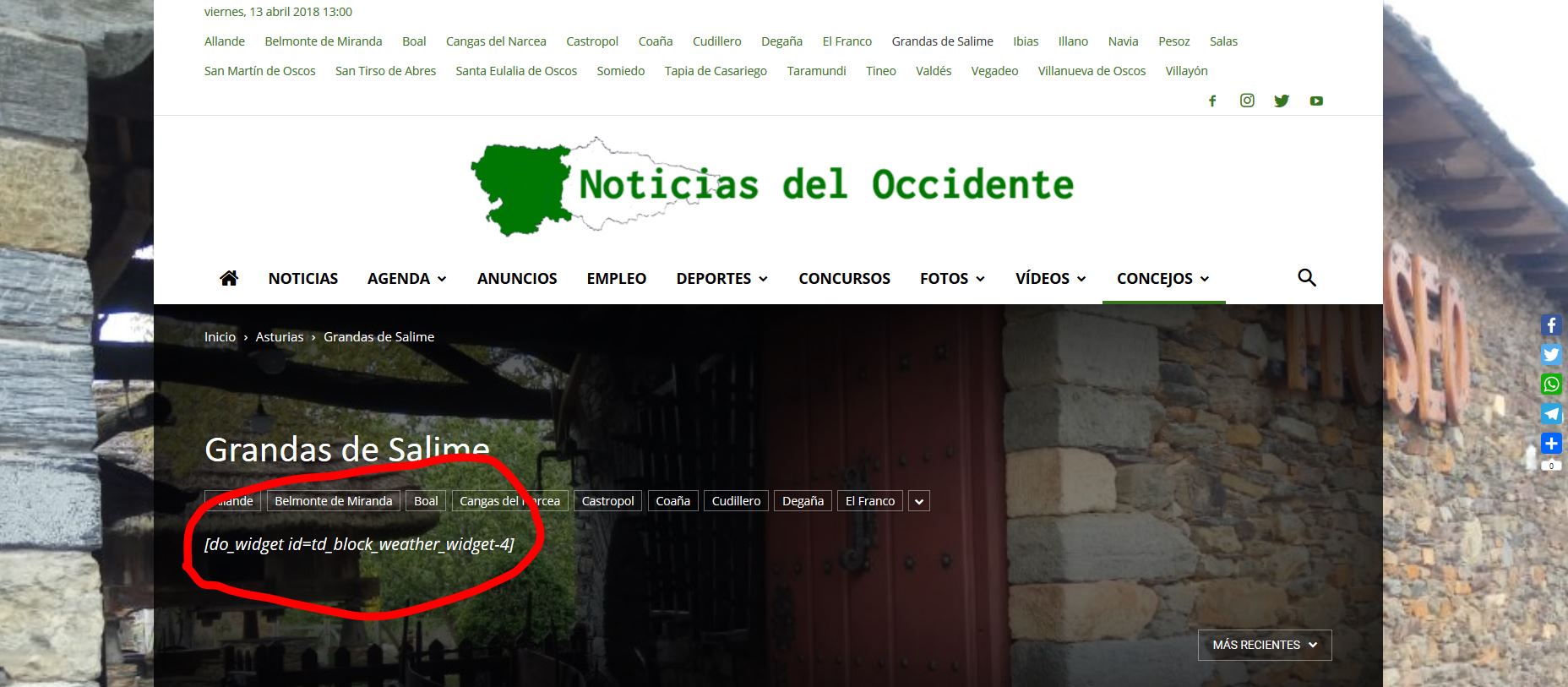
 Bogdan B.
 Hello,
The latest articles section is controlled by the page template. Please read this guide: https://forum.tagdiv.com/page-templates-2/
In order to hide a sidebar ad, remove it from the widgets area https://www.screencast.com/t/bPGaCRU0Vu
You can place it again after you are done. You can use this guide to properly use the ad system in our theme: https://forum.tagdiv.com/ads-adsense-overview/
Thank you!
 dumagroup
 Hi there,
it seems like i too am having an issue with this.
I will email you the wp-admin details.
Similarly, when I am on a page and try to change the template. when I update it just reverts back to what the template was originally
Andrew
 Simion C.
 Hi,
The theme contains basic markup for posts and for some other elements, bit not as you mention. If you should consider that those will be a necessity you will have to implement them either by a plugin maybe or by modifications in the code.
The header menu is here, and also the logo
– https://www.screencast.com/t/GFGdUfFS
The sidebar section would be here in the page templates (each of them)
– https://www.screencast.com/t/foAacCCA
Thanks
 notsirhc
 this is whole thing in my custom CSS:
.td-header-header {

  border-bottom: 1px solid #353535;

}
.td-black .td-video-template-bg {
background-color: rgba(0,0,0,0.4);
}
.td-black .td-video-template-bg-small{
background-color: rgba(0,0,0,0.7);
}
.td_module_9 .td_quote_on_blocks {
font-size: 16px;
line-height: 20px;
font-weight: 300;
font-style: italic;
text-align: center;
text-transform: none;
margin-top: 10px;
}
.td-black .td_quote_box .single_template_11 {
background-color: rgba(33,33,33,0.5);
}
cite {
font-size: 12px;
color: #bbb;
}
.td-black .td-smart-list-dropdown-wrap .td-smart-next,
.td-black .td-smart-list-dropdown-wrap .td-smart-back {
color:#fff;
}
.td-black .td-smart-disable:hover {
background-color: transparent !important;
}
.td-post-sub-title {
text-align: center;
}
.td-black .post {

background-color: rgba(0,0,0,0.6);

}
.td-black .td-main-content-wrap,
.td-black .td-category-grid,
.td-black .td-category-header,
.td-black .td-big-grid-post .td-module-thumb,
.td-black .td_module_14 .td-module-meta-holder,
.td-black .td-post-template-4 .td-post-title,
.td-black .td-post-template-6 .td-post-header-holder,
.td-black .td-post-template-8-box,
.td-black .td-smart-list-dropdown-wrap .td-smart-list-dropdown,
.td-black .td_module_mx3 .td-module-meta-info {
background-color: rgba(0,0,0,0.6);
}
.td-black .td-page-content,
.td-black .td-post-content,
.td-black .wpb_text_column,
.td-black .td_block_text_with_title,
.td-black .woocommerce #tab-description {
color: #bbb;
}
-
This reply was modified 8 years by
notsirhc.
notsirhc Dear Simion,
I’ve remove what you said, and use below code
.td-black .post {
background-color: rgba(0,0,0,0.6);
}
and it works to video template, but it makes another page looks bad
https://www.screencast.com/t/l79pg3Hxd7Rz
need help.
-
This reply was modified 8 years by
Bogdan B. Hello,
We added the h1 on logos where there is no h1 on the page. SEO requires a h1 tag.
If you want to remove it, you will have to either use the page builder + page title template where the h1 is shown in the page content, and the logo does not get a h1 tag anymore, or by editing the theme files and removing the h1 tag from the theme code: https://www.screencast.com/t/9uXujjSj
Thank you!
 Caronte
Hello,
I bought your outstanding template for a big newspaper online.
This site is very huge, ported from Joomla and we have to work on for few weeks.
In order to not stop the work of the authors, we have to put it online very soon.
We are able to show the author on the posts page but to disable the href, just for some days.
Which file we have to modify?
Thanks,
Caronte.
 bajwa
bajwaHi,
I selected pagebuilder+latest articles+pagination template.
And it is showing pagination. How to show infinite scroll using template ?
notsirhc Hi Simion,
Please take a look:
homepage: https://www.liqlo.com/
naked page: https://www.liqlo.com/renungan/archives/9272 or every page that use video template
Thank you.
Simion C. Hi,
From what I can see at the moment, the mobile front page is displayed on desktop at the moment
– https://www.screencast.com/t/upeqZO14vJR
That could be caused and it is in general, by caching implementations. The mobile theme is sensitive when it comes to caching. It is only tested and works best with the WP super cache plugin. You could either disable the mobile plugin or try using different caching if possible the recommended plugin for best results.
I will try to help you further with your questions after the mobile issue is solved, so the homepage can be seen.
1/2. The header supports 2 menus, a main header menu and a top bar menu
– https://forum.tagdiv.com/main-menu/
– https://forum.tagdiv.com/top-bar-templates/
Another menu is not supported by the theme, maybe use a plugin if you need a 3rd menu in the website.
3. The justify text option was removed from WordPress in version 4.7. You could re-add the option if this is required for you
– http://www.wpbeginner.com/plugins/how-to-add-underline-and-justify-text-buttons-in-wordpress/
4. I will take a look once the homepage will be visible.
5. Not all the blocks/modules display excerpts. You can see how all the blocks look here
– https://demo.tagdiv.com/newspaper/block-1/
Note that even if a module displays an excerpt in certain layouts, this may be not visible when placed on a single column. Example
– https://www.screencast.com/t/QJkTwULi
Thanks
Simion C. Hi,
The menu overlay template will only be displayed on pages, it is a page template not a general website template. On posts the default header style selected by you will be displayed normally. Maybe that would be possible through modifications, but I cannot say exactly if that is the case.
Thanks
 Catalin
 Hello eparibar,
I saw that you are using the Latest Articles page template and notice that element cannot be changed with TD Composer. Using this template, you should add at the top of the ‘Latest articles’ some page builder element to check the page builder functionality. For more information about using our page builder, please check here -> https://forum.tagdiv.com/tagdiv-composer-tutorial-2/
Thanks for your understanding!
 NickDeBaerdemaeker
For the lp/cd reviews on our site we are looking for a category page which displays the thumbnails as squares at a fixed size of 200px X 200px (the artwork for either a cd or lp is always a square shape).
We would like to use the ARTICLE DISPLAY VIEW M1 as a basis, and add this option to the list.
We noticed that this is possible given the api modules instruction, though we were hoping someone could help us out a bit.
We have already added this bit of code to the includes/td-config.php, which hopefully is sufficient ?
thank in advance.
              td_api_module::add('td_module_20',

            array(

                'file' => td_global::$get_template_directory . '/includes/modules/td_module_20.php',

                'text' => 'Module 20',

                'img' => td_global::$get_template_directory_uri . '/images/panel/modules/td_module_20.png',

                'used_on_blocks' => array('td_block_25'),

                'excerpt_title' => 30,

                'excerpt_content' => 50,

                'enabled_on_more_articles_box' => false,

                'enabled_on_loops' => true,

                'uses_columns' => false,                      // if the module uses columns on the page template + loop

                'category_label' => true,

                'class' => 'td_module_wrap td-animation-stack',

                'group' => '' // '' - main theme, 'mob' - mobile theme, 'woo' - woo theme

            )

        );
 ML
MLHey Newspaper community!
For SEO purposes, I’m looking to remove the category page by an other “normal” page or post.
For example, if I have the following posts :
test.com/fruits/apple
test.com/fruits/banana
test.com/fruits/orange
I don’t want to have an automatic archive category page fruits. Instead, I want to have test.com/fruits as a post itself and not a category template page.
Any idea how to do this easily ?
Thanks for your help,
notsirhchello,
I’ve used custom CSS for transparent page with black demo into my website.
http://www.screencast.com/t/TzpjlSfXyjy
.td-header-header {

  border-bottom: 1px solid #353535;

}

.td-black .td-video-template-bg {

	background-color: rgba(0,0,0,0.4);

}

.td-black .td-video-template-bg-small{

	background-color: rgba(0,0,0,0.7);

}

.td-black .td-smart-list-dropdown-wrap .td-smart-next,

.td-black .td-smart-list-dropdown-wrap .td-smart-back {

  color:#fff;

}

.td-black .post {

	background-color: transparent;

}

.td-black .td-video-template-bg

.td-black .td-video-template-bg-small

{

  background-color: rgba(0,0,0,0.8);

}

.td-black .td-main-content-wrap,

.td-black .td-category-grid,

.td-black .td-category-header,

.td-black .td-big-grid-post .td-module-thumb,

.td-black .td_module_14 .td-module-meta-holder,

.td-black .td-post-template-4 .td-post-title,

.td-black .td-post-template-6 .td-post-header-holder,

.td-black .td-post-template-8-box,

.td-black .td-smart-list-dropdown-wrap .td-smart-list-dropdown,

.td-black .td_module_mx3 .td-module-meta-info {

  background-color: rgba(0,0,0,0.6);

}
.td-black .td-page-content,
.td-black .td-post-content,
.td-black .wpb_text_column,
.td-black .td_block_text_with_title,
.td-black .woocommerce #tab-description {
color: #bbb;
}
But the problem/awkward thing shows in video template.
The body seems so naked.
http://www.screencast.com/t/R04M1yxIMgI
Kindly need your help to make it looks like another post page.
Thank you.
 eduonix
 Hi Catalin,
Thanks for your reply!
I have a related query regarding the same question. Such as renaming the ‘Latest Articles’ Title in the bottom half of my theme layout which doesn’t give me the option to change the name in (Homepage latest articles). https://forum.tagdiv.com/page-templates-2/

