
- NewspaperDesign your Post Pages using the Cloud Library Templates
- NewspaperDesign your post pages using the Default Templates
- NewspaperPage templates
- NewspaperCreate a form contact page
- NewspaperCloud Library Templates
- NewspaperCloud Library – Category Templates
- NewspaperHomepage – How to build and set it
- NewspaperPost templates
- NewspaperDefault post templates
- NewspaperCategory templates
- NewspaperPost template ads
- NewspaperSingle External Shortcode and External Shortcode
- NewspaperWP Rocket and Newspaper Theme: Optimization Guide
- NewspaperSearch setup for custom post type
- NewspapertagDiv Composer – Website Manager
- NewspaperBookmark – Save For Later
- NewspaperFlex Block Builder and Flex Loop Builder
- NewspaperModules Builder in Newspaper Theme
- NewspaperIntroduction to CPT and ACF with Newspaper Theme
- NewspaperCreate a frontend submission form
 agracjan
Hi
I have a question. I just want to add block – OUR LATEST POST (from 404.php) at the bottom of the single post. How to add or modify this code and paste to single.php?
<h4 class="block-title"><span><?php echo __td('OUR LATEST POSTS', TD_THEME_NAME) ?></span></h4>

                <?php

                $args = array(
                    'post_type'=> 'post',
                    'showposts' => 6
                );
                query_posts($args);

                $td_loop_block_module = td_util::get_option('tds_404_page_layout');
                //$td_loop_block_module

                locate_template('loop.php', true);
                //get_template_part('category', 'slider');
                wp_reset_query();

                ?>
of course after content and before widget (mobile)
 oguerin
Hello, I think I might be missing something but I can’t find the page template “mobile theme”, it doesn’t appear in my pages list. I have a static page selected as said in the mobile theme tutorial.
In addition, how can I get the categories to show in the menu of the mobile theme ? all I have is the logo.
http://genres.centrelgbtparis.org
Thanks, Olivier
 biglipper
 Thank you, Simion. That was helpful. Follow-up questions…
How can I mirror the functionality of regular post category pages (Category Template, Category Top Posts Style, Article Display View) on my custom content type categories?
I have read this page
Custom Post Type Support and understand about copying taxonomy.php to taxonomy-custom-type-name.php but that doesn’t seem to replicate all the functionality of the main category pages.
Thanks for your help. This is a great product, and I have read all the docs. Sometimes I need help connecting the dots between what I’ve read.
-
This reply was modified 8 years by
biglipper. Reason: typo!
 SheikhOvais
Hey guys,
I was wondering if blank page template like that was available? Just like a landing page, no header no footer, there’s already a version without sidebars, but not any one without header and footer. Can you please let me know how can I add one?
Thank you!
 Simion C.
 Hi,
If you are using the mobile theme, this has predefined templates for the homepage, post page, category page, etc. The homepage will always display a top grid containing posts you enter in the Featured category
– https://forum.tagdiv.com/featured-posts-2/
In the bottom of the page, there will be a Latest articles section containing your latest posts. Content for mobile pages has to be entered through the Mobile editor, located in the page edit screen at the bottom.
More about the mobile theme plugin here
– https://forum.tagdiv.com/the-mobile-theme/
Please note that the mobile theme plugin is an optional plugin, not required. If it is not active, the same content from desktop will be displayed. The main theme has a fully responsive design and will adapt the website for mobile devices.
Thanks
Simion C. Hi,
At the moment the category pages can only be customized through the theme panel options
– https://forum.tagdiv.com/how-category-settings-work/
You could insert that block shortcode in the category template, by editing the category template file in the theme. These are some similar topics
– https://forum.tagdiv.com/topic/category-top-posts-style-featured-posts/
– https://forum.tagdiv.com/topic/advertising-block-in-category-page/
– https://forum.tagdiv.com/topic/trending-now-on-category/
Thanks
 nicolaslavado
Hi.
First, sorry for my english 🙁
I’m triying to set a custom ad on my homepage (see 48horasbadajoz.com). The ad size is 970×90 px, but the ad looks smaller.
The code that I have used is:

You can see a screnshoot here: http://48horasbadajoz.com/wp-content/uploads/2017/10/Captura-de-pantalla-2017-10-23-a-las-10.30.14.png
I have used the same code in “post template style 12, 13 ad” and the size is ok. You can see here http://48horasbadajoz.com/tina-rodriguez-alcaldesa-de-fregenal-de-la-sierra-en-fitur-2017/
How can I set the correct size?
Thanks
 Kelvin
 Hello,
But as you can see from the screenshot i gave to you, its possible to have that kind of layout.
I will recommend you make our layouts flexible for users using your template so use the desired layout of their choice.
Great theme anyway.
When im done designing my webpage, i will display it for you to see.
Regards,
Kasnet
Simion C. Hi,
Thank you for your appreciation. You can create a page using any of the available elements with the tagDiv composer, and set it as homepage
– https://forum.tagdiv.com/homepage-how-to-build-and-set-it/
– https://forum.tagdiv.com/tagdiv-composer-tutorial/
There are Big grids, Full Big grids and blocks that can be used to display your posts
– https://demo.tagdiv.com/newspaper/big-grid-1/
– https://demo.tagdiv.com/newspaper/full-big-grid-1/
– https://demo.tagdiv.com/newspaper/block-1/
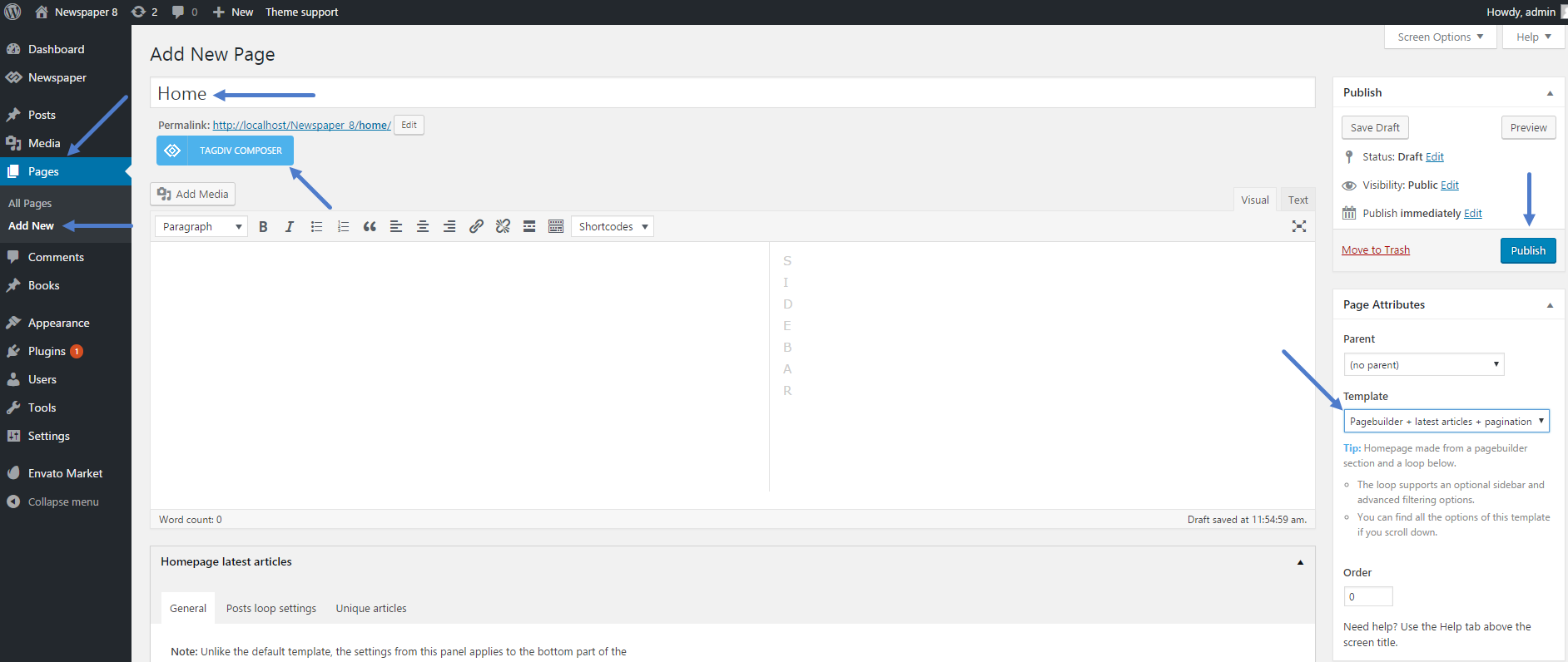
I see you are not using a static page as homepage at the moment. For example create a page and select the Latest articles page template
– https://www.screencast.com/t/DV99YC1k
Place the grid of you choosing at top (like Big grid 1 that is present on your category page)
– https://www.screencast.com/t/4ghxi5Bz
The module that displays posts in the Latest articles section can be changed as well, in addition a custom name can be set for this section
– https://www.screencast.com/t/FuEMewgoeaN
The result will be a page with a grid on top, and a latest articles section below. Just like you wanted. Using the composer you can create pages in any way you like, it is not hard to use.
Please let us know if you have further questions, or you need help.
Thanks
 mdz
mdzHello!
Is it possible to use in category template the same what is used in front page:
[td_block_21 limit=”10″ category_id=”1″ ajax_pagination=”infinite” custom_title=”asd”]
???
 LilyUK
Hi – I would like my front home page to look like the design of my category pages i.e. with a grid at the top of the page with large images followed by other articles listed below.
I have looked at the template settings > blog and post template but cannot see an option there. Is this possible please?
PS, aside from this question, I like this theme very much, thank you!
Simion C. Hi,
The page in the screenshot does not have the latest articles page template selected
– https://www.screencast.com/t/U1eseoAKnT
If that page template is not selected, the latest articles section will not be displayed at all. Edit the page where the template is used, the options will be visible. If they are still not present, check the screen options
– https://www.screencast.com/t/vgPzKdFezsW
Thanks
Simion C. Hi,
On pages you can use any of the available grids, blocks and other elements to display your posts. Check them all out and pick the ones most suited to display the content
– https://demo.tagdiv.com/newspaper/block-1/
– https://demo.tagdiv.com/newspaper/big-grid-1/
– https://demo.tagdiv.com/newspaper/full-big-grid-1/
There is a video playlist element as well
– https://demo.tagdiv.com/newspaper/video-playlist/
Or you can simply paste the video link in a text element on pages
– https://www.screencast.com/t/q00KC4Ol
– https://www.screencast.com/t/1CxMJZOZuL
We will add more elements for the tagDiv page builder in future updates.
There are post templates that you can use for featured videos
– https://forum.tagdiv.com/featured-image-or-video/
These are some video post examples
– https://demo.tagdiv.com/newspaper/td-post-how-to-make-a-perfect-caffe-macchiato-video/
– https://demo.tagdiv.com/newspaper/louge-music-reasons-why-in-form-leicester-city-will-finish/
– https://demo.tagdiv.com/newspaper/td-post-major-deep-feelings-january-2015-deep-house-mix/
Thanks
 Edward
 > on my site http://www.kreditwuerdigkeit.de/ you see everywhere postingdates.
> How I can delete them?
For Block – Check this point: Theme panel – Block Settings – Meta info on Modules/Blocks
> Below on my site you see the column “Neueste Beträge”. How I can remove this?
For homepage do not use this template:
-
This reply was modified 9 years by
Edward.
Simion C. Hi,
Please provide some more details about how exactly you want the menus to display, for a more accurate solution. I will try to provide a code to make it the way you want.
The Latest articles section will be displayed on the bottom of the page, when the required page template is selected
– https://www.screencast.com/t/XhczH9pX7
It can be customized as you like, or disabled by selecting a different page template.
Thanks
Simion C. Hi,
The Latest articles section will be displayed on the bottom of the page, when the required page template is selected
– https://www.screencast.com/t/bK8CCpSLBNDg
You can set a custom title to it, or hide the title if you wish.
Thanks
 brookz
Hi
I noticed my wordpress site is reloading the old template theme I had before I uploaded the newspaper theme? Why does it load the old theme on some pages? in particular on the mobile verision.
thanks
Simion C. Hi,
That is the Latest articles section, it can be customized like this
– https://www.screencast.com/t/U6LUqFn4Pu
Or disabled by selecting the default page template
– https://www.screencast.com/t/lL6ukEIFC25
You can set a sidebar for the Latest articles section, containing anything you want. If you want to place ad boxes in it, simply add them in the sidebar you want
– https://www.screencast.com/t/G7wyCGCvY
More about custom ads and also using non-Adsense ads here
– https://forum.tagdiv.com/custom-ad-spots/
– https://forum.tagdiv.com/using-other-ads-non-adsense-ads/
Thanks
Simion C. Hi,
That can be done by modifying the post template files only. There is no theme option to move the sharing below the featured image. I have provided a solution in this topic
– https://forum.tagdiv.com/topic/share-butons-at-post-page/
The result in that example is that the sharing is below the image, in post template 2. The modifications will have to be made for each post template you want.
Thanks
 hunmar
Hi guys,
I have created a custom post type and enabled the “Categories (WP Core)” taxonomy.
I can create posts and they will display in block widgets if I add my post type (under the correct categories). They don’t, however, show up on the category pages.
Do you know how I can get this working?
It might be better to setup the archive page for the custom post type. E.g. mydomain.com/POSTYPE
Is there a way to modify this archive page to use a category template?
Thanks
Simion C. Hi,
With the Yoast SEO plugin you can set the title for each page or post. More information here
– https://yoast.com/wordpress/plugins/seo/titles-and-meta-descriptions/
– https://kb.yoast.com/kb/yoast-wordpress-seo-titles-metas-template-variables/
– https://www.screencast.com/t/xfjSx6kqW2GQ
– https://www.screencast.com/t/15mxOFYcD0
If this is not what you mean, please correct me.
Thanks
 Alin [tagDiv]
 Hi,
Please provide a link to your site.
Where you get this issue? On a static page or on the category template?
Thanks!
Simion C. Hi,
A background image can be set for each category, in the Per category settings
– https://forum.tagdiv.com/newsmag-how-category-settings-work/
But for setting a header image on the category page there is no option at the moment. That could only be done by maybe modifying the category templates and inserting the images there. Or maybe place them with some CSS.
On blocks and modules the categories will be represented by a category tag, not image
– https://forum.tagdiv.com/newsmag-category-tag-on-modulesblocks/
Thanks
Simion C. Hi,
Please note that when both Visual composer and tagDiv composer are active, there could be issues. I believe that is the case here. The single images for example have a different implementation in each composer, both will apply which leads to the images not displaying properly. Go to the plugins section and deactivate the tagDiv composer, then check the results on these pages.
Regarding the logo, you could use either of header styles 7 or 8 for a full width logo. Header style 7 will require a small modification, there is a small issue with it. Edit the header template 7 file which looks like this at the moment
– https://www.screencast.com/t/q6iXae9Q
Modify it like this – https://www.screencast.com/t/6JJOmbwoT
The result – https://www.screencast.com/t/HCnQ1okKajW
Sorry for any inconvenience, we will fix the issue in the future update. Header style 8 will not require modifications, it can be used normally.
Please let us know if you need further help.
Thanks
 lehrhauseditors
We have four categories that we use for our blog posts – we have designed an image for each one. I would like to add a header image for each category on their individual template and on the home page when using the blocks. is this possible?

