- NewspaperDesign your post pages using the Default Templates
- NewspaperPost template ads
- NewspaperWP Rocket and Newspaper Theme: Optimization Guide
- NewspaperHow to use the Flex Blocks cache option
- NewspaperFlex Block Settings Guide
- NewspaperThe Newspaper Mobile Theme: Introduction
- NewspaperDefault Category Settings
- NewspaperCloud Library – Category Templates
- NewspaperBig Grid Flex Settings
- NewspaperHeader Builder
- NewspaperMeta Info on Modules and Blocks
- NewspaperTheme modules and blocks
- NewspaperImport / Export Theme Settings
- TutorialsDefault Block Settings Guide
- NewsmagImport / Export theme settings
- TutorialsOffset Feature
- NewspaperUnique Articles
- TutorialsSystem status parameters guide
- NewsmagRequirements for Newsmag
- NewsmagBlock settings tutorial
 Simion C.
 Hi,
If you have created and published posts, then these posts are still available. They are saved in the database. Please do not edit the dummy posts that are provided when the demo is installed
– https://forum.tagdiv.com/installing-demos/
If you edit these dummy posts and then uninstall the demo, they will be removed. They are demo content, you have to create your own posts and publish them.
Pages can be edited and the blocks and grids can be filtered and sorted to display posts from your own categories, replacing the demo content
– https://forum.tagdiv.com/block-settings-guide/
Unless you have a backup, there is no way or restoring edited dummy posts.
Thanks
Simion C. Hi,
If I understand correctly the image was displayed vertically in the post page. I have not heard about this issue before, could not say what is causing it. I believe the image is originally like that, from what I can see this is the original image used
– https://i1.wp.com/jazko.com/wp-content/uploads/2017/10/DSC_0322.jpg
WordPress has an option to rotate the images after uploading them in the media library
– https://www.screencast.com/t/WbasznpouK5
Or you can process the images before you upload them, in a photo editing program for example.
Images should not change orientation once uploaded the intended way. I have not heard of this issue before, but every day is something new.
As I understand there are multiple options to implement that verification code. The easiest way would be to add the code as mentioned, in the theme header file. That will be sufficient. The file is located in the main theme folder, on the server you are using. They can be accessed by FTP
– https://premium.wpmudev.org/blog/wordpress-theme-files/
– http://www.wpbeginner.com/beginners-guide/beginners-guide-to-wordpress-file-and-directory-structure/
Or you could simply use the default WordPress editor, like this
– https://www.screencast.com/t/ET50xtubPbKo
Regarding the page issue, from what I can see it is not displaying correctly at the moment. Edit the page with the tagDiv composer and make sure all the elements are placed corrector. You could simply remove the block with issues and add it again.
The easiest way to implement additional sharing would be to use sharing plugins. The alternative is by code modification only and manual implementation. I could not say if or when more sharing options will be added in the theme by default.
Thanks
Simion C. Hi,
I believe that demo you have installed has conditions to remove the author name. It will not be displayed
– https://demo.tagdiv.com/newspaper_blog_beauty/
Each demo has custom design, this is one of the design choices for this demo. Along with module comments, post views in the post page and comment count in the post page. If you want to display the author name, you will have to remove this code in the demo stylesheet
– https://www.screencast.com/t/sZ19cY5uol
Remove just the author name from the code if that is the only meta you want to display.
Or use a code like this to make it visible, the result is like this
– https://www.screencast.com/t/Zn5MmWwb
It will not have any styling similar to the demo, since it was not meant to be displayed. You could make it aligned with the date
– https://www.screencast.com/t/9hYneSVq47xI
.td-blog-beauty .td-post-author-name {

display: inline-block;

top: 3px;

}
Then further customize the font properties – https://www.screencast.com/t/pCnp6jUtF1i
Thanks
 Abarac
Hello … Having problem with does various borders all accros rows and columns. I wan’t do build a standard page with visual composer that has several rows and columns. This is a page with service information ( no need for blog posts blocks or tagDiv etc.)
Is there a css snippet to remove the borders for that specific page?
I need to turn off the MAIN CONTAINER BORDERS for the page and the borders that SURROUND COLUMNS and ROWS when working with Visual Composer.
I see there are alot css rules for those borders ( the ::before’s and ::after’s and so on … ). I tried to turn them off or set them to white … but no luck there …
Thanks in advance.
Simion C. Hi,
The sidebar reserved space was considered to be helpful, so it can be seen exactly how the post will look, depending on sidebar used or not. At the moment it could only be removed by editing the CSS used. Check this topic for a solution
– https://forum.tagdiv.com/topic/sidebar-space-in-edit-mode-in-post/
Sorry for any inconvenience created.
Thanks
 simchris
 This may help while waiting for reply from TagDiv on specific file to remove — however theme may not work with some edits:
https://forum.tagdiv.com/topic/tutorial-good-basic-security-practices/
One option if not ready to upgrade, after cleaning boxes and dbase
a) rename theme folder to something else (newspooper)
b) add function in the functions.php to remove versions/XMLRPC in the post data.
remove_action('wp_head', 'rsd_link');

remove_action('wp_head', 'wlwmanifest_link');

remove_action('wp_head', 'wp_generator');

add_filter('xmlrpc_enabled', '__return_false');
disable xml-rpc in your htaccess file (if using Apache hosting)
# Block WordPress xmlrpc.php requests

<Files xmlrpc.php>

order deny,allow

deny from all

allow from 123.123.123.123

</Files>
 Edward
 > on my site http://www.kreditwuerdigkeit.de/ you see everywhere postingdates.
> How I can delete them?
For Block – Check this point: Theme panel – Block Settings – Meta info on Modules/Blocks
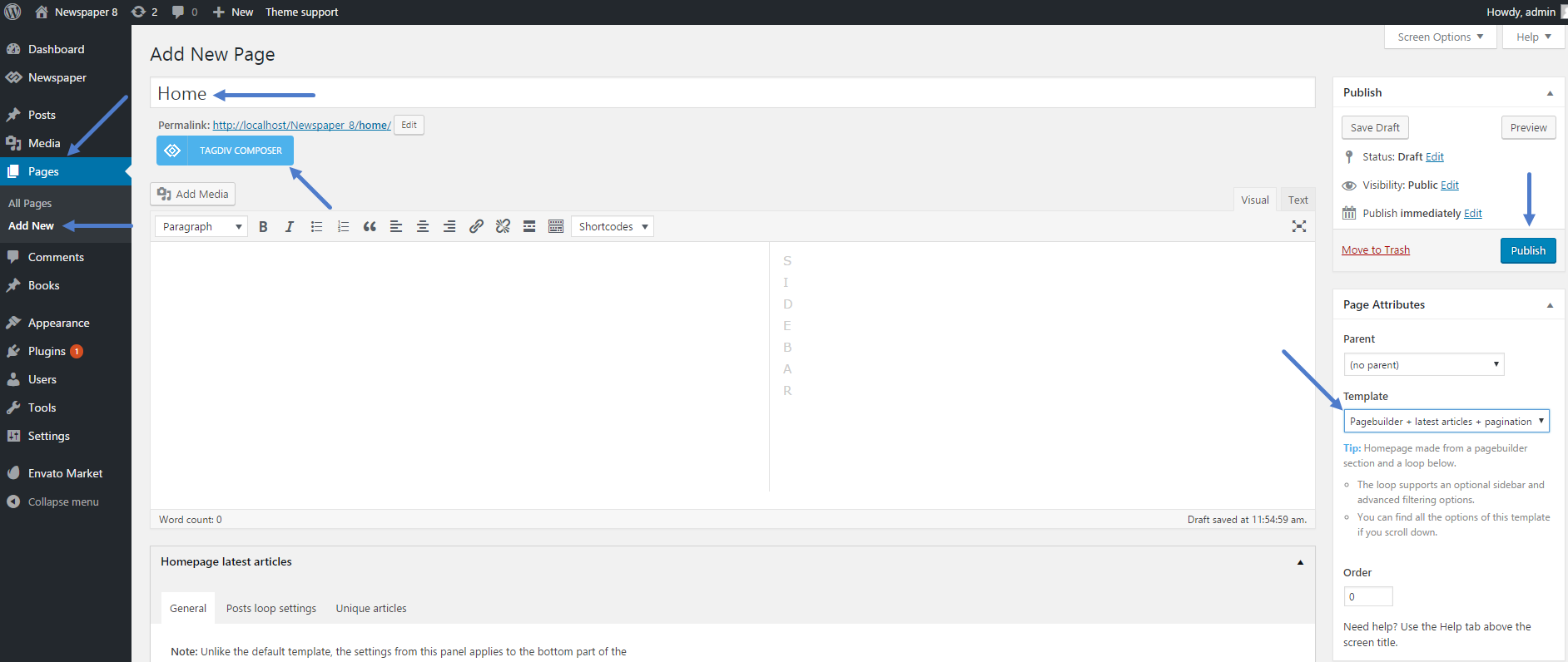
> Below on my site you see the column “Neueste Beträge”. How I can remove this?
For homepage do not use this template:
-
This reply was modified 8 years by
Edward.
simchris Correct! Generally you would *not* allow this if you had public folk signing up and having ability to edit their accounts/bios ….
but in a magazine setup, you might want to have ‘long bios’ — we do that here; and I think we used one of the common functions like this
//disable WordPress sanitization to allow more than just $allowedtags from /wp-includes/kses.php

remove_filter('pre_user_description', 'wp_filter_kses');

//add sanitization for WordPress posts

add_filter( 'pre_user_description', 'wp_filter_post_kses');
Simion C. Hi,
You can include posts in the Featured category
– https://forum.tagdiv.com/featured-posts-2/
Then choose the Featured category in the slide filter settings, and sort by Latest
– https://www.screencast.com/t/cjaN2O4V
In this situation the slide will display the latest posts added to the Featured category. A limit of posts can be set as well as an autoplay interval
– https://www.screencast.com/t/XouPGmR1
So now the slide will display for example 5 latest posts from the chosen category, changing every 5 seconds.
The excerpt in this case should be set to letters, maybe choose the same value for all modules. The post titles will not be the same for all posts, experiment with different values for the blocks you use, until you find a perfect solution.
Regarding the cache configuration there is a guide
– https://forum.tagdiv.com/cache-plugin-install-and-configure/
Some settings might have changed, but most are the same
– https://www.screencast.com/t/viT3UUna
We will update the tutorial as soon as possible, taking in account the changes in the cache plugins panels.
The front page will be used to display the posts, you will not be needing that option to use a different page. The “Blog pages show at most” setting controls the number of posts in the Latest articles section (if there is no value set manually – https://www.screencast.com/t/3Io9tIeZhU2), and on category pages loop
– https://www.screencast.com/t/VN0sogW6LNS
– https://www.screencast.com/t/W8vNqqmA1RFs
A sidebar can be set or removed for each category, in the Per category settings. The actual sidebar content can be customized in Appearance->Widgets
– https://www.screencast.com/t/DatBdFk8j
There could be such plugins, but we cannot make any recommendations. You can search for and try out a few plugins that have options like this. The post can be shared but manually, not automatically
– https://forum.tagdiv.com/sharing/
Please let us know if you have further questions, we will try to help you as soon as possible.
Thanks
 Intraprendere
Hi,
is there a way to change the background color of a piece (and only a piace) of a single post content?
I founded the “
" tag, that apply a grey background but also remove al formats.
Is there a way to obtain the same effect on the background?

Thank you very much
 Rhys
RhysHi All…
I have been trying to find an effective yet simple way to use youtube and vimeo embed code on all my posts as the site is going to be predominantly aggregated video posts.
I have looked at some other threads about this but there does not appear to be a very easy solution. The problem I have is that I am using a chromebook so cannot use ftp access to be able to make changes as detailed in other comments from Tagdiv support members.
I really want to use embed code option instead of links so I can remove video title and suggested videos at the end.
So how can I do this..???
Also.. are there any plans for future updated with tagdiv to allow embed code instead of links when creating new video posts? Not having this feature weakens the theme slightly. Apart from this the Newspaper theme is A1… would be so much better being able to have the option to use video embed code.
Thanks – Rhys
Simion C. Hi,
The Latest articles section will be added to the bottom of the page, when the required page template is selected
– https://forum.tagdiv.com/page-templates-2/
It can be customized in terms of module used to display the posts, and the content it displays
– https://www.screencast.com/t/k7EkZdPk0En
This section can also have a custom sidebar set
– https://www.screencast.com/t/VJ6GBbk9N
Or it can be removed by selecting a different page template.
Thanks
 Bogdan B.
 Hello,
1) Yes the easiest way would be to add a custom link to the menu and link it to a page instead of the video category
2) Please use this guide: https://forum.tagdiv.com/video-playlist-2/ On pages, please use the video playlist from the page builder, not the shortcode from posts.
3) Unfortuantly there is no other way of updating a playlist. you can only add or remove youtube ID’s
4) Technically yes, but if too many are used in the same playlist, it can become a bit slow on the loading times. Once you see slowdowns because of the many videos, you should consider replacing very old ones in the playlist.
Thank you!
Simion C. Hi,
1. There is no need for code to be used for removing the author name and date, either on the post pages, or pages. There are options in the theme panel, this is for the post page
– https://www.screencast.com/t/pqjEK1x1n21
And this option is for modules and blocks
– https://www.screencast.com/t/q5QR68ozCf
2. The category tag can be removed in the theme panel, for each module
– https://forum.tagdiv.com/category-tag-on-modulesblocks/
Thanks
 majorfuss
1. On the author page, how can I remove the box at the top showing the image, posts, comments? http://majorfuss.com/author/catherine-levine/
2. On a tag page, how can I remove the word “Tag” in the title? https://snag.gy/zcP09l.jpg And how can I hide the breadcrumbs on tag pages only? https://snag.gy/pg7LnA.jpg
3. On a search page, how can I increase the font size of “If you’re unhappy…”? https://snag.gy/6FhxKr.jpg
4. On a 404 page, how can I change all of the font styles? https://snag.gy/t4Tfwo.jpg And how can I change the block title to a different style? https://snag.gy/XN6wEZ.jpg
5. On mobile, how can I remove the top menu showing my social icons? https://snag.gy/JzluHL.jpg
Simion C. Hi,
The sidebar can be removed for each post, in the post edit screen
– https://www.screencast.com/t/KadhJsPv
The post will occupy the full width available, when there is no sidebar set.
Pages can be built the way you want, with the tagDiv composer
– https://forum.tagdiv.com/tagdiv-composer-tutorial/
Please let us know if you need further help, or have more questions.
Thanks
Simion C. Hi,
Installing the demo with content will not remove or overwrite your existing content. It will import some dummy posts, categories, menus etc. These are meant to provide a structure for the demo to be displayed. They can then gradually be replaced with your own.
Installing the demo with no content, will import the demo custom design and theme panel settings.
You could install it like this, but in order to have a homepage like the mentioned demo, the same elements and layout have to be used in the homepage (same Full big grid, blocks etc) The custom design will apply only to the same elements like in the demo. For example the design on the Grid displayed on top differs from the default grid, it has custom design specific to that demo
– https://demo.tagdiv.com/newspaper/full-big-grid-8/
– https://demo.tagdiv.com/newspaper_gadgets/
Thanks
 joshuabaer23
 View of this scenario is within the demo. My version is on a not-public server.
https://demo.tagdiv.com/newspaper_architecture/ellie-gouldings-living-room-is-all-about-texture/
I am not asking to remove the gap. Im wondering if the gap is supposed to be that way, or if there is a setting to adjust it. I also wanted to point out that adding a review to the post seems to mess up the css in that block.
-
This reply was modified 9 years by
joshuabaer23.
Simion C. Hi,
At the moment there are no options to remove or add more sharing options for the post page. The easiest way of removing the Google and Pinterest sharing would be to hide them with CSS like this
– https://www.screencast.com/t/LZYoApRiM4
– https://www.screencast.com/t/UtMh6TaAvk
.td-default-sharing .td-social-google,

.td-default-sharing .td-social-pinterest {

display: none;

}
The code must be entered in Theme panel->Custom CSS section.
This could also be done by modifying the theme file where the post sharing is defined, here are some similar topics
– https://forum.tagdiv.com/topic/add-email-sharing-button-2/
Something as simple as a link with a Font awesome mail icon can be sufficient
– https://www.screencast.com/t/kN5YBf56WY6P
The with some CSS to style it, the result is like this
– https://www.screencast.com/t/x9IXuNL1VV9
Or maybe you can try sharing plugins that have more options. The theme might also add this possibility in a future update, but I cannot say for sure when this will happen.
Thanks
Simion C. Hi,
The demo categories can be removed just like any normal WordPress categories
– https://www.screencast.com/t/SKOphrK0VP
The blocks and other elements can then be configured to display posts from your own created categories
– https://forum.tagdiv.com/block-settings-tutorial/
Thanks
Simion C. Hi,
If you mean the post sharing in the post page, that can be disabled in the theme panel
– https://forum.tagdiv.com/sharing/
The socials displayed in the header and footer can be disabled like this
– https://forum.tagdiv.com/top-bar-templates/
– https://www.screencast.com/t/goLzT0zL2
Or the accounts can be removed from the Social networks settings
– https://www.screencast.com/t/sMnYDm3kYEm7
Thanks
Bogdan B. Hello,
In order to move over from VC to the tagdiv composer you should follow this guide https://forum.tagdiv.com/visual-composer-tagdiv-composer-transition/
As for the ad on the bottom of the post, please check the ads section of the theme panel and remove any unwanted ads. That is the ‘article bottom ad’
Thanks
Bogdan B. hello,
That seems to be a category.
A category will show posts using a grid and modules beneath. If you only have 3 posts, it will only fill the grid and not the module. You can however change this behavior and remove the grid entirely from the theme category settings: https://forum.tagdiv.com/how-category-settings-work/
Thank you!
Bogdan B. Hello,
If you want to change the posts shown on the homepage, you will have to learn how to use the page builder to add, remove content and to change it based on your preference. Please use this guide: https://forum.tagdiv.com/how-to-use-visual-composer/
For the block settings please use this guide: https://forum.tagdiv.com/newsmag-block-settings-tutorial/
Thank you!
Bogdan B. Hello,
And where do you want the link removed from? there are featured images shown in all templates. Pages, categories, tags, posts…etc.
Thanks.