- NewsmagRequirements for Newsmag
- NewspaperRequirements for Newspaper
- NewspaperFlex Block Settings Guide
- NewspaperBig Grid Flex Settings
- NewspaperWhen tagDiv Composer is Not Working
- TutorialsDefault Block Settings Guide
- NewsmagBlock settings tutorial
- NewspaperBlock settings tutorial
- NewspaperInstalling Pre-built Websites
- NewspaperHow to Update the Newspaper Theme
 kaeferatwork
I am using your newspaper theme when I check my license it shows not active; can you help me activate the same.
kindly find the attachment for my requirements.
Site Url: https://placebrandobserver.com/
Screen Short: https://workdrive.zohoexternal.com/file/9hfbu8b8591cd3f3040f7835bd918ffa1ef65
 nagi
nagiRespected Sir/Mam,
I am a developer at Mallemaala Entertainments, located in Hyderabad. We have a few requirements for our movie review website, 123telugu.com
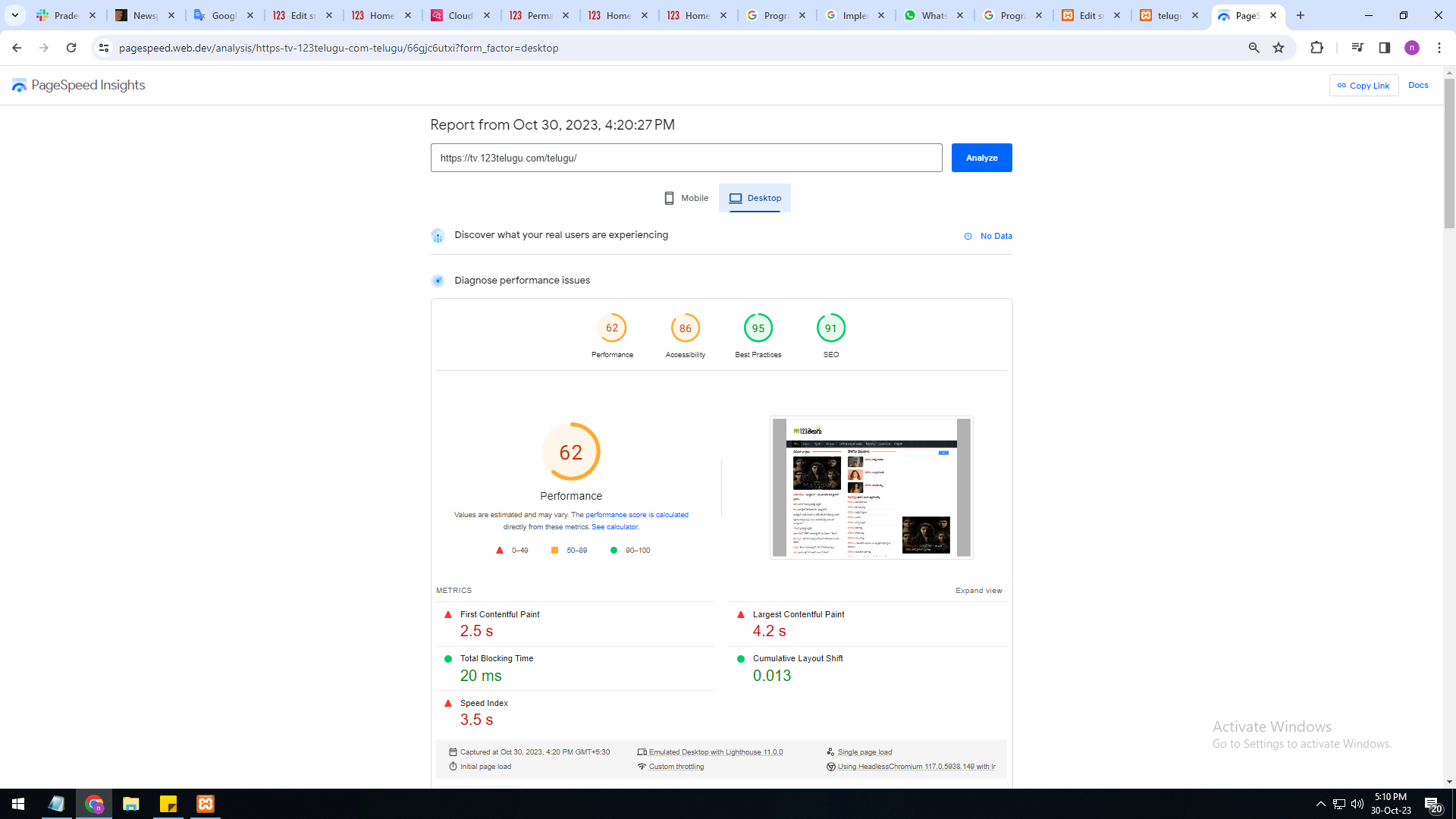
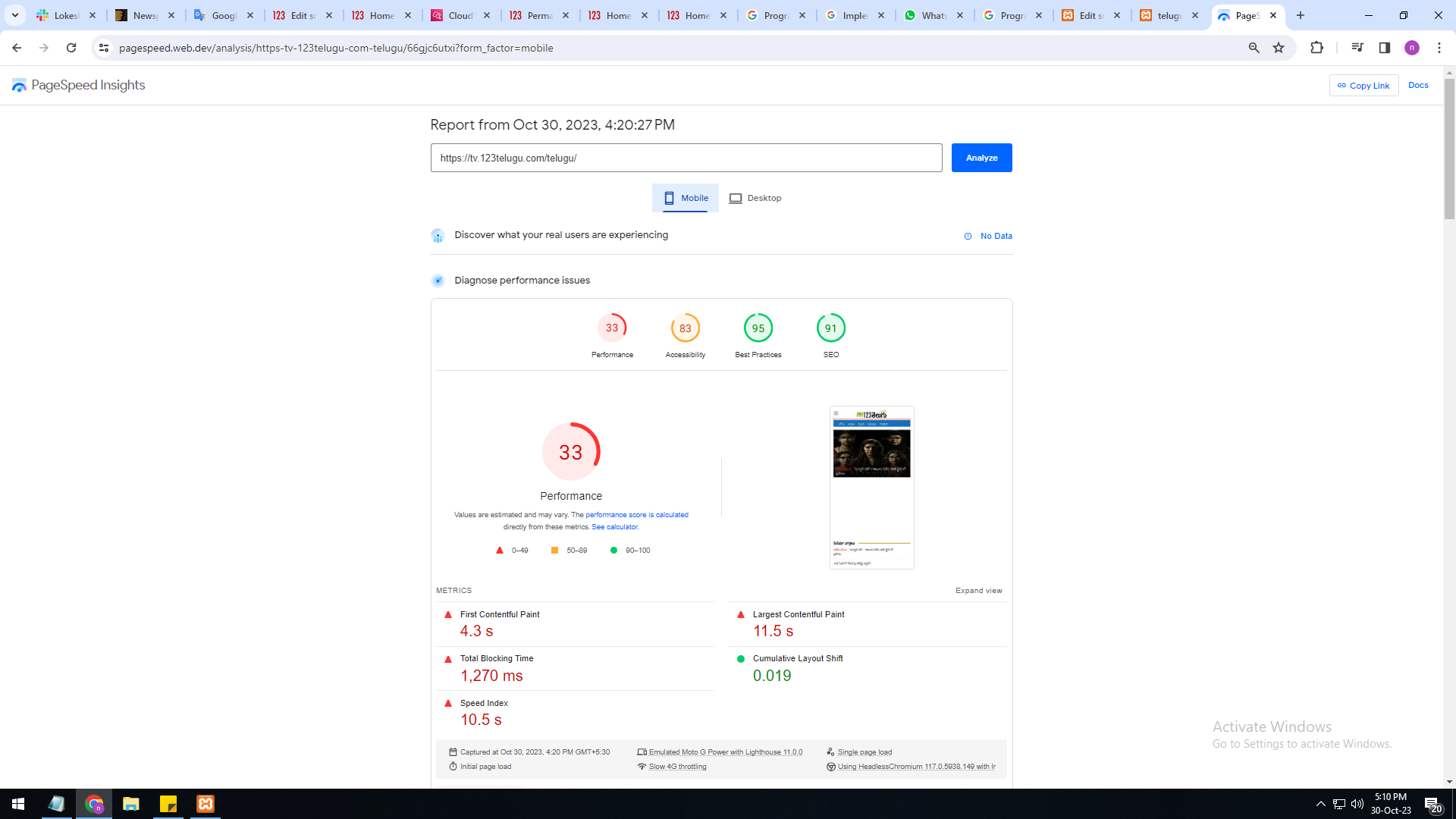
newspaper theme performance speed is very slow Please give
us some tips to increase website speed
mobile version is very slow 33%
system version is also very slow only 62%
I am sharing images URL links :
https://gallery.123telugu.com/images/theme_test/Basantham1.png
https://gallery.123telugu.com/images/theme_test/Basantham2.png
Thanking you,
Regards,
Narendra.
 Bettina
 Hello @rockman008 !
First of all, please make sure you have a backup done.
Please deactivate all the non-tested plugins with our theme before updating.
Update WordPress, PHP, the theme and plugins to the latest version: https://forum.tagdiv.com/how-to-update-the-theme-2/
Check all these requirements for the theme: https://forum.tagdiv.com/requirements-for-newspaper/
Let me know the results!
Thank you!
Bettina Hello @SeaBlueHK !
First of all, please make sure you have a backup done.
Please deactivate all the non-tested plugins with our theme before updating.
Update WordPress, PHP, the theme and plugins to the latest version: https://forum.tagdiv.com/how-to-update-the-theme-2/
Check all these requirements for the theme: https://forum.tagdiv.com/requirements-for-newspaper/
Let me know the results!
Thank you!
 Anamaria
 Hi,
Please make sure that you don’t have mixed content errors; you can check the console. You have to use an SSL plugin to fix it and then try to activate it again -> https://www.hostinger.com/tutorials/fix-mixed-content-wordpress/ -> https://wordpress.org/plugins/really-simple-ssl/
Also, if the theme can’t be activated, please check the console and see if there are message errors.
Also, make sure that all the settings are like in our requirements, please follow the guide carefully: https://forum.tagdiv.com/requirements-for-newspaper/
and please increase all requirements that are lower, and follow all steps.
Thank you!
Bettina Hello @tekedia !
Make sure that all the settings are like in our requirements, please follow the guide carefully: https://forum.tagdiv.com/requirements-for-newspaper/
and please increase all requirements that are lower, and follow all steps.
Make a test and deactivate ALL plugins except tagDiv ones, also if you are using a cache plugin, deactivate it, clear all cache and try again.
More documentation about the cloud templates is here:
– https://forum.tagdiv.com/cloud-library-templates/
– https://forum.tagdiv.com/design-post-pages-using-cloud-library-templates/
– https://forum.tagdiv.com/cloud-library-category-templates/
Thank you!
Bettina Hello @chalithar !
Make a test and deactivate ALL plugins except tagDiv ones, also if you are using a cache plugin, deactivate it, clear all cache and try again.
Please check this article: https://kinsta.com/knowledgebase/there-has-been-a-critical-error-on-your-website/
Make sure that all the settings are like in our requirements, please follow the guide carefully: https://forum.tagdiv.com/requirements-for-newspaper/
and please increase all requirements that are lower, and follow all steps.
Thank you!
Anamaria Hi,
Please let me know how you make the translations. Please check this article: https://kinsta.com/knowledgebase/there-has-been-a-critical-error-on-your-website/
Make sure that all the settings are like in our requirements, please follow the guide carefully: https://forum.tagdiv.com/requirements-for-newspaper/
and please increase all requirements that are lower, and follow all steps.
Thank you!
Anamaria Hi,
Please check if this code is missing from your .htaccess: https://www.screencast.com/t/iN0R93dD3p from our requirements https://forum.tagdiv.com/requirements-for-newspaper/ this requirement is not displayed in System Status.
You can import a page template from tagDiv Cloud Library from frontend -> https://i.imgur.com/crxdDEm.png
Please let me know if you have an error.
Thank you!
Anamaria Hi,
You need to set the code as it is described in the guide https://forum.tagdiv.com/requirements-for-newspaper/, not at the bottom of the file.
If the settings are not saved, please check the console https://i.imgur.com/0ex2unk.png and check the suggestion from here: https://forum.tagdiv.com/topic/newspaper-theme-panel-settings-are-not-being-saved/
Thank you!
Anamaria Hi,
Please make sure that you don’t have mixed content errors; you can check the console. You have to use an SSL plugin to fix it and then try to activate it again -> https://www.hostinger.com/tutorials/fix-mixed-content-wordpress/ -> https://wordpress.org/plugins/really-simple-ssl/
Also, if the theme can’t be activated, please check the console and see if there are message errors.
Also, make sure that all the settings are like in our requirements, please follow the guide carefully: https://forum.tagdiv.com/requirements-for-newspaper/
and please increase all requirements that are lower, and follow all steps.
Thank you!
Anamaria Hello,
In most cases, this problem occurs because you have the latest version of WordPress with an older version of the theme.
Please use the last version of WordPress 6.3.2 with the last theme version Newspaper 12.6.1 (if you have a theme version older, then tagDiv Composer does not work) and check to see if the problem persists.
If you need to make an update, before please make a full backup to all files and the database, in case something goes wrong. => https://forum.tagdiv.com/how-to-update-the-theme-2/
Here you can find information about the changes that have occurred in each update over time https://tagdiv.com/newspaper/
I recommend that you update the theme manually https://forum.tagdiv.com/how-to-update-the-theme-2/ via FTP/cPanel/File Manager, also if possible disable extra plugins during the theme update to avoid any problems that may arise and make sure that you have activated the tagDiv Standard pack plugin to keep the website’s look. You can try to update the theme on a staging website.
After you update the theme, you need to update the theme plugins too.
In the worst cases, the settings in the theme panel may be lost (there have been isolated cases), in these cases, after the theme plugins that were previously used are activated, you will have to use a backup for the theme panel -> https://forum.tagdiv.com/import-export-theme-settings/
Also, make sure that all the settings are like in our requirements, please follow the guide carefully: https://forum.tagdiv.com/requirements-for-newspaper/
and please increase all requirements that are lower, and follow all steps.
Also, if the problem persists please check if you do not have a plugin conflict, please deactivate ALL plugins except tagDiv plugins, also if you are using a child theme or cache plugin, deactivate them, clear all cache (also from your browser) and try again.
Let me know the results!
Thank you!
Bettina Hello @rafalucena!
Please check the requirements here: https://forum.tagdiv.com/requirements-for-newspaper/
Thank you!
 robbyyy
 Thanks for that. The cloud i’m using meets all of these requirements, yet the new version of the theme causes substantially increased CPU usage.
Any ideas what could cause this? I had to roll back due to downtime as a result of the update.
In terms of the new version of Optin Builder, any ideas as to why the login/register page would no longer work?
Bettina Hello!
Please check the requirements here: https://forum.tagdiv.com/requirements-for-newspaper/
Thank you!
robbyyyHi – I recently updated the theme to the latest version (from 12.5.1). The site slowed and eventually broke entirely. Talking to the hosts (Cloudways) they suggested that the theme was somehow using much more resources than before.
I rolled the theme back as a result… and the issue went away.
I also tried updating Optin Builder to the latest version, but the login/register page for members stopped working after updating the plugin. It didn’t entirely load). I downloaded the previous version that worked (1.4.4) and overwrote the files. It started working again.
Could you please let me know what the minimum requirements for both the theme and Optin Builder are please. I’m trying to figure out why the latest versions do not work for me.
nagiRespected Sir/Mam,
I am a developer at Mallemaala Entertainments, located in Hyderabad. We have a few requirements for our movie review website, 123telugu.com. I am hereby mentioning our requirements.
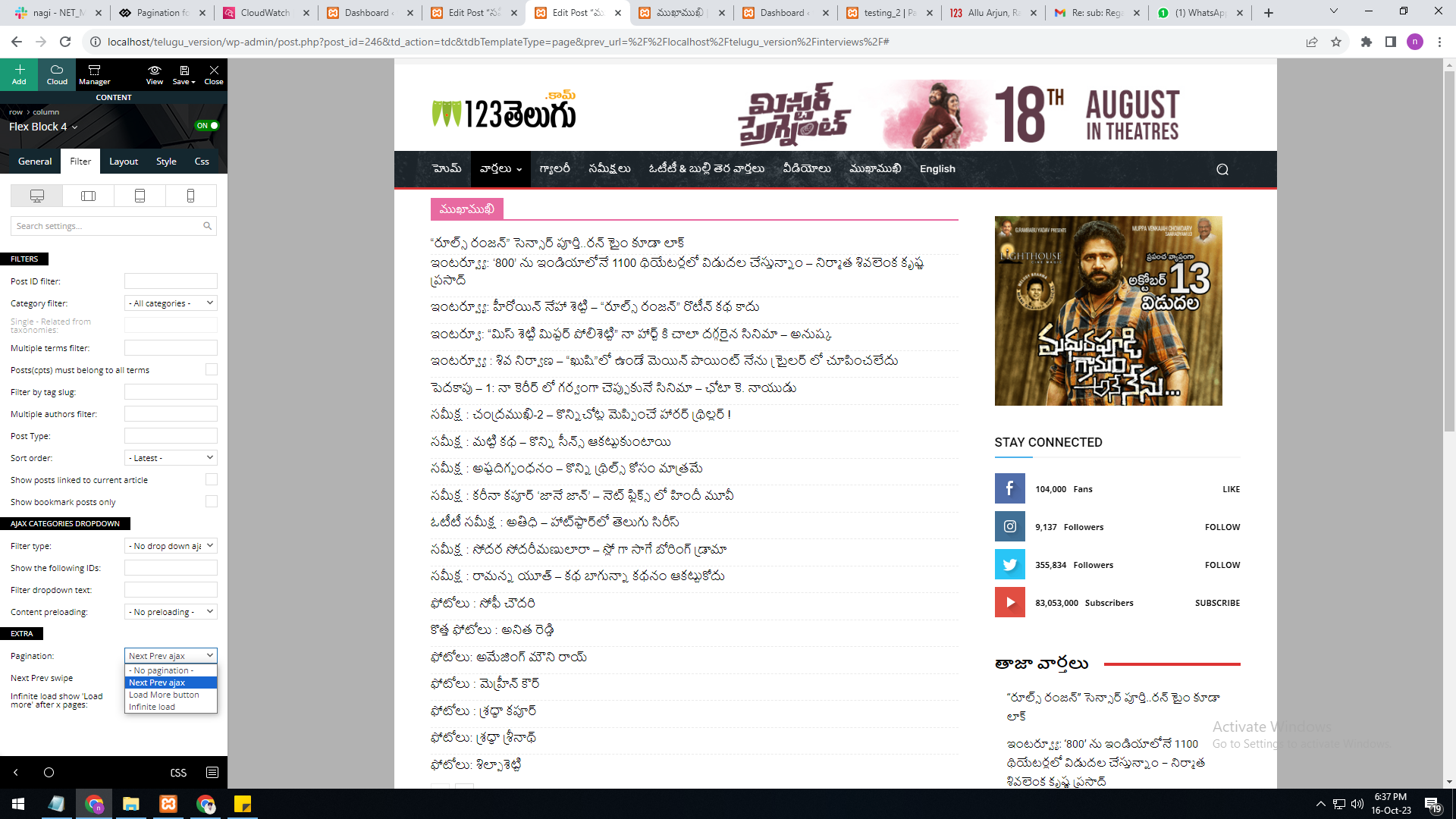
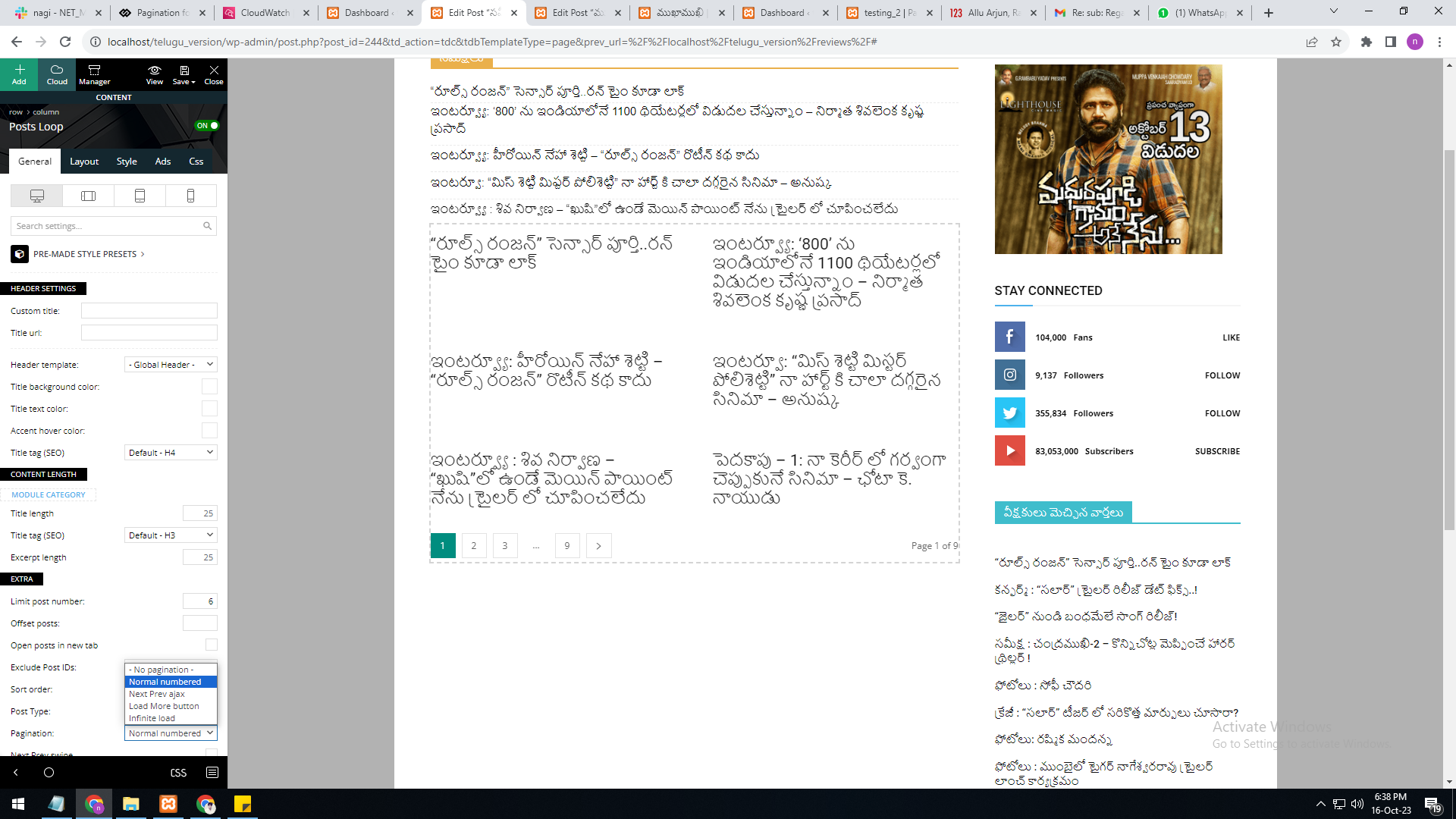
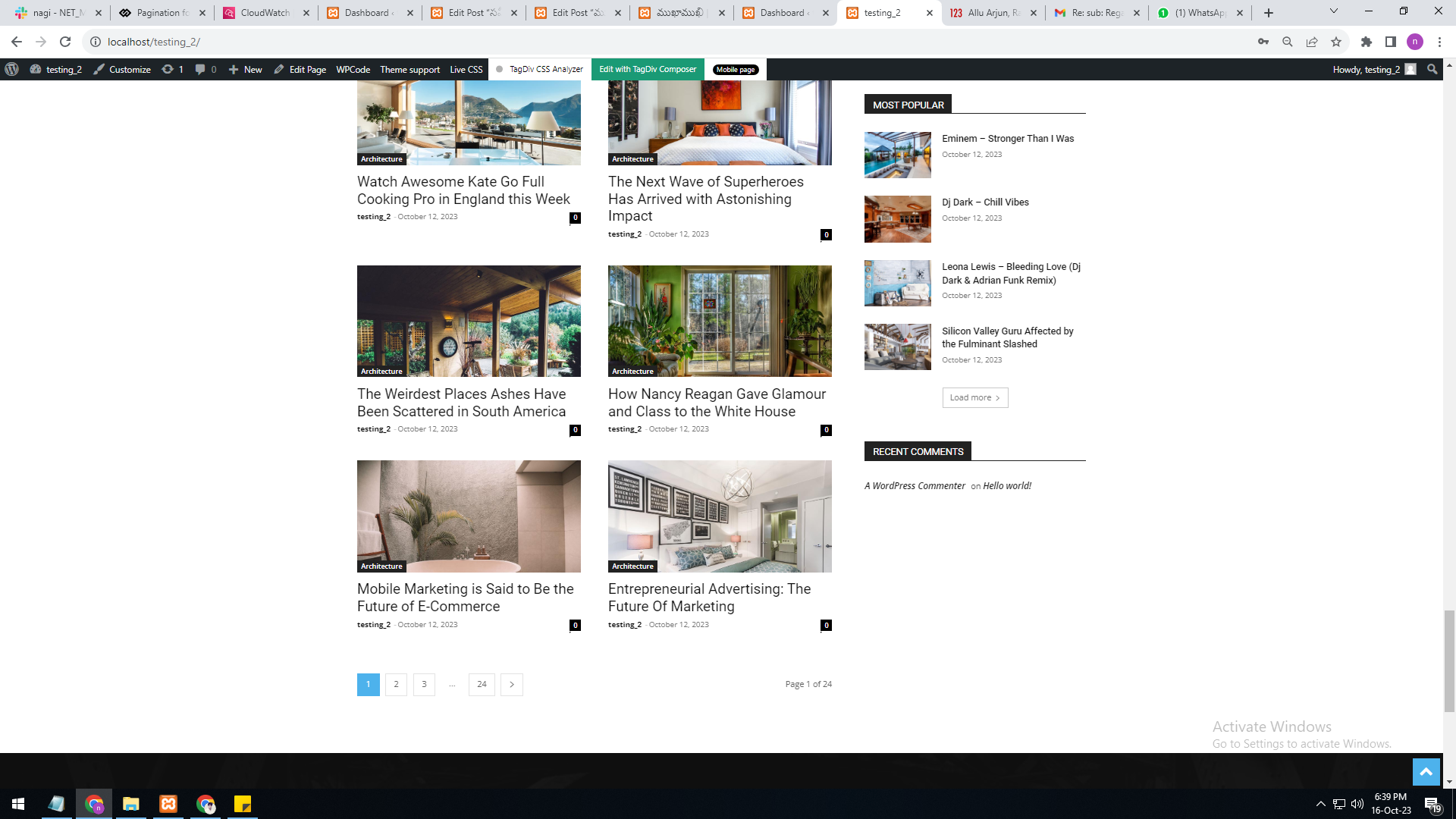
As per your reply, the numbering pagination is available in the loop concept. But we are not able to select the category option in it. The category filter option is not available in the loop concept.
In single page, flex block 4, the category filter option is available, but the pagination currently has the options “next prev,” “more,” and “infinite load. But we need numbering pagination.
present my theme options
———————
https://gallery.123telugu.com/images/theme_test/Pagination_1.png
I want like this URLS link
————————
https://gallery.123telugu.com/images/theme_test/Pagination_2.png
https://gallery.123telugu.com/images/theme_test/Pagination_3.png
Anamaria Hi,
Please make sure that you don’t have mixed content errors; you can check the console. You have to use an SSL plugin to fix it and then try to activate it again -> https://www.hostinger.com/tutorials/fix-mixed-content-wordpress/ -> https://wordpress.org/plugins/really-simple-ssl/
Also, make sure that all the settings are like in our requirements, please follow the guide carefully: https://forum.tagdiv.com/requirements-for-newspaper/
Thank you!
nagiRespected Sir/Mam,
I am a developer at Mallemaala Entertainments, located in Hyderabad. We have a few requirements for our movie review website, 123telugu.com. I am hereby mentioning those requirements.
I have implemented the pagination code through code snippets plug-in shortcode. The URL is changing, and the page is also reloading. However, the issue is that the next page is not being displayed (It is not moving to the next page even though the URL is changing).
Example:
localhost/telugu_version/news/page/2/
localhost/telugu_version/news/page/3/
 Moyne
MoyneHello, I’ve implemented most of your recommendations to optimize my site’s speed and align it with Google’s requirements, but I still can’t seem to reduce my FCP. Is there any custom CSS or other solution you could recommend to help improve the situation? Thank you. Have a great day! Url of my website : https://jurojin.net/
Anamaria Hello,
Usually, the “Invalid reply from server endpoint error” is caused by insufficient WP_Memory_limit, if you’ll set it to 256M, and is still not working, please double it and check the rest of the settings from our guide -> https://forum.tagdiv.com/requirements-for-newspaper/ also make sure that you are using SSL and you have a good bandwidth, the one from our server is 1GB/s and the one that I use at home is 500MB/s, if you have low bandwidth, then you can access parts of the cloud, this can be done from the frontend, for example, if you are on a post -> https://i.imgur.com/4G74M7F.jpg or from tagDiv Composer -> https://i.imgur.com/2F6MhfI.png or from backend -> https://www.screencast.com/t/wekHmc7kJ8J
Thank you!
Anamaria Hi,
Please make sure that you don’t have mixed content errors; you can check the console. You have to use an SSL plugin to fix it and then try to activate it again -> https://www.hostinger.com/tutorials/fix-mixed-content-wordpress/ -> https://wordpress.org/plugins/really-simple-ssl/
Also, make sure that all the settings are like in our requirements, please follow the guide carefully: https://forum.tagdiv.com/requirements-for-newspaper/
Thank you!
 nosisnews
Goodday team. Been using this template for over 6 months and so far its been the best.
I have a little request cause i want to submit my site for google news sitemap and one of the requirements of the site is, about us page containing address, what we are and list of our authors.
i use Crypto Gaming PRO prebuilt website and i would love to know if its possible to just add that one page on that particular prebuilt site please, i really love it and won’t want to change to another of the other sites.
Just somewhere at the bottom with About us Page where i can just fill in all the details, such like our vision, aim. objectives, location, team members.
Thanks Solomon
your esteemed customer
Anamaria Hello,
Please provide more details about your issue when installing the theme.
Please make sure that you don’t have mixed content errors; you can check the console. You have to use an SSL plugin to fix it and then try to activate it again -> https://www.hostinger.com/tutorials/fix-mixed-content-wordpress/ -> https://wordpress.org/plugins/really-simple-ssl/
Also, make sure that all the settings are like in our requirements, please follow the guide carefully: https://forum.tagdiv.com/requirements-for-newspaper/
and please increase all requirements that are lower, and follow all steps.
We can take a look so, please contact us via email at contact@tagdiv.com and provide the wp-admin and cPanel login and the license certificate and purchase code.
Thank you!
Anamaria Hi,
Please let me know how you make the translations. Please check this article: https://kinsta.com/knowledgebase/there-has-been-a-critical-error-on-your-website/
Make sure that all the settings are like in our requirements, please follow the guide carefully: https://forum.tagdiv.com/requirements-for-newspaper/
and please increase all requirements that are lower, and follow all steps.
Thank you!