
- NewspaperRequirements for Newspaper
- NewspaperFlex Block Settings Guide
- NewspaperBig Grid Flex Settings
- NewspaperWhen tagDiv Composer is Not Working
- NewspaperBlock settings tutorial
- NewspaperInstalling Pre-built Websites
- NewspaperHow to Update the Newspaper Theme
 Catalin
 Hi,
It seems to be a problem caused by the server. You can check the following useful topic from here -> https://www.stechies.com/editor-encountered-unexpected-error/
Also, make sure that this is not a plugin conflict, please deactivate all non-theme plugins, clear all cache and try again!
Please make sure that the theme system status is configured as mentioned in the requirements guide. Please follow the guide carefully
– https://forum.tagdiv.com/requirements-for-newspaper/
Hope this helps!
Thank you!
 Calin
Calin Hi,
Please make sure that all the settings are like in our requirements, please follow the guide carefully
– https://forum.tagdiv.com/requirements-for-newspaper/
and please increase all requirements that are lower, and follow all steps.
WP_MEMORY_LIMIT try to increase it at least to 256mb.
Also please check the php version to be 7-7.2
Please make sure that you do not have a plugin conflict, please deactivate all non theme plugins, also if you are using child theme or cache plugin, please deactivate them, clear all cache and try again.
Thank you for your understanding!
Calin Hi,
Please make sure that all the settings are like in our requirements, please follow the guide carefully
– https://forum.tagdiv.com/requirements-for-newspaper/
and please increase all requirements that are lower, and follow all steps.
WP_MEMORY_LIMIT try to increase it at least to 256mb.
Also please check the php version to be 7-7.2
Please make sure that you do not have a plugin conflict, please deactivate all non theme plugins, also if you are using child theme or cache plugin, please deactivate them, clear all cache and try again.
Thank you for your understanding!
Calin Hi,
Please make sure that you made a clean installation like in our documentation -> https://tagdiv.com/how-to-install-newspaper-theme/
Please make sure that all the settings are like in our requirements, please follow the guide carefully
– https://forum.tagdiv.com/requirements-for-newspaper/
and please increase all requirements that are lower, and follow all steps.
Please make sure that you do not have a plugin conflict, please deactivate all non theme plugins, also if you are using child theme or cache plugin, please deactivate them, clear all cache and try again.
Also if you set some code in theme panel or theme file, please remove it, clear all cache and try again.
If the problem is still there, please provide me a link to your website, in this way I will be able to make some deep investigation and provide you a better answer.
Thank you for your understanding!
 McDohl
 Hi @calin
Sorry you sound like a robot, I already do that thing, every requirements is work fine in my website, see:
https://www.screencast.com/t/ufVZK99eH6
https://www.screencast.com/t/JJ9z8sgMotpE
Please I need the font work on my custom header template. 🙁
 cype
cype There are no lower requirements, theme panel worked before the theme update.
About migrating the website, I already did it, it is not the first website I migrate from a server to another. The website worked properly on a subdomain, but on the main domain wp-admin causes too many redirects. other than that and the theme panel, all functions work well
 rjdtramirez
 I have done all the requirements see screenshot below of my status
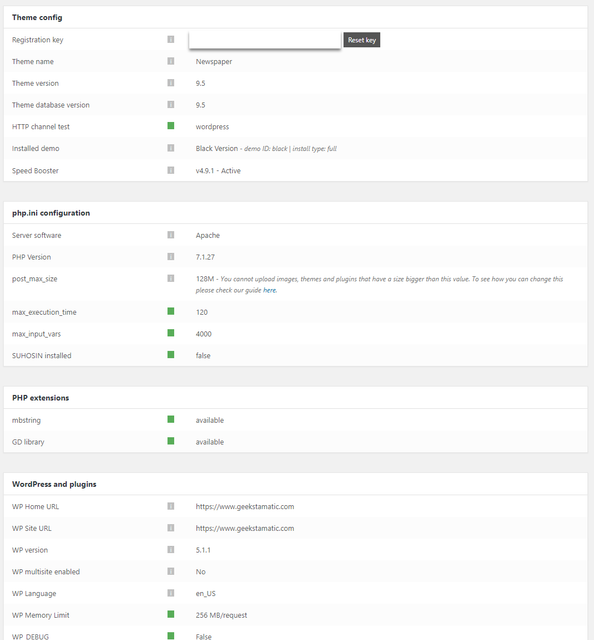
and disable my child theme
but issue still persist. i saw also this error below

Calin Hi,
Please make sure that all the settings are like in our requirements, please follow the guide carefully
– https://forum.tagdiv.com/requirements-for-newspaper/
and please increase all requirements that are lower, and follow all steps.
Please make sure that you do not have a plugin conflict, please deactivate all non theme plugins, also if you are using child theme or cache plugin, please deactivate them, clear all cache and try again.
If you want to move the website to other host/server some users recommend the duplicator plugin for migrating/moving websites, here are some guides I found about it
– http://www.wpbeginner.com/wp-tutorials/how-to-move-wordpress-from-local-server-to-live-site/
– https://www.shoutmeloud.com/migrate-wordpress-server.html
– https://pantheon.io/resources/quickstart-guide-migrating-wordpress-site
I didn’t test it but I believe it should make a perfect copy of the website, keeping all the settings, database, etc. Pages and posts, theme panel settings, ad codes in the theme panel, custom code in the theme panel are kept in the database, duplicating it will duplicate these as well.
You could give it a try, be sure to make a full backup before attempting.
Thank you!
Calin Hi,
Did you check to have the settings set like in our theme requirements guide?
Thank you!
Calin Hi,
Please make sure that all the settings are like in our requirements, please follow the guide carefully
– https://forum.tagdiv.com/requirements-for-newspaper/
and please increase all requirements that are lower, and follow all steps.
Thank you!
Calin Hi,
Please make sure that you have the last version of Newspaper theme v9.6.1
Please make sure that all the settings are like in our requirements, please follow the guide carefully
– https://forum.tagdiv.com/requirements-for-newspaper/
and please increase all requirements that are lower, and follow all steps.
Please make sure that you do not have a plugin conflict, please deactivate all non theme plugins, also if you are using child theme or cache plugin, please deactivate them, clear all cache and try again.
Thank you!
Calin Hi,
Please make sure that all the settings are like in our requirements, please follow the guide carefully
– https://forum.tagdiv.com/requirements-for-newspaper/
and please increase all requirements that are lower, and follow all steps.
WP_MEMORY_LIMIT try to increase it at least to 256mb.
Also please check the php version to be 7-7.2
When tagDiv Composer is not working -> https://forum.tagdiv.com/tagdiv-composer-not-working/
Please make sure that you do not have a plugin conflict, please deactivate all non theme plugins, also if you are using child theme or cache plugin, please deactivate them, clear all cache and try again.
Thank you!
Calin Hi,
I check this on my install and for me is working correctly.
Please make sure that all the settings are like in our requirements, please follow the guide carefully
– https://forum.tagdiv.com/requirements-for-newspaper/
and please increase all requirements that are lower, and follow all steps.
Please make sure that you do not have a plugin conflict, please deactivate all non theme plugins, also if you are using child theme please deactivate it, clear all cache and try again.
Thank you!
Calin Hi,
Please make sure that you install the theme like in our documentation -> https://tagdiv.com/how-to-install-newspaper-theme/
This is the theme requirements guide – https://tagdiv.com/newspaper-theme-requirements/
Please check the requirements guide carefully and if needed increase the parameters mentioned in it, or ask your hosting provider to do it for you if possible.
That message you are receiving could be caused by a low max upload size value, like in this similar topic
– https://wordpress.org/support/topic/the-link-you-followed-has-expired/
Thank you!
Calin Hi,
Please make sure that all the settings are like in our requirements, please follow the guide carefully
– https://forum.tagdiv.com/requirements-for-newspaper/
and please increase all requirements that are lower, and follow all steps.
WP_MEMORY_LIMIT try to increase it at least to 256mb.
Also please check the php version to be 7-7.2
Please make sure that you do not have a plugin conflict, please deactivate all non theme plugins, also if you are using child theme or cache plugin, please deactivate them, clear all cache and try again.
Thank you!
 Simion C.
 Hi,
Looks alright now from what I can see. The plugins you were using were causing the issue if now it works when they are deactivated. Not all plugins will work with all themes. Some may work with one theme while with another one they won’t.
Also be sure to have enough wp-memory – https://tagdiv.com/newspaper-theme-requirements/
We recommend a value of 256M if possible. Having insufficient memory may lead to crashes as you install more and more plugins.
Thanks
Catalin Hi,
Please notice that the speed of your website depends on how well your site is optimized.
Notice that is not a simple task and if you do not have any experience in this regard you will do not bring good results for the theme. Also, notice that we have a speed optimization tutorial but this is addressed only to advanced users. So, if you follow the steps which are presented in this tutorial here -> https://forum.tagdiv.com/how-to-make-the-site-faster/ you can increase the page speed loading and if you are not aware of the steps in this regard, please consider hiring a freelancer/developer to help you because the speed optimization services are not covered by our support policy, as you can read here -> https://forum.tagdiv.com/support-policy-2/ Check our documentation here -> https://forum.tagdiv.com/requirements-for-newspaper/ regarding on dedicated server to fit our requirements.
Unfortunately, our theme does not have such an option to minify the style.css file and we cannot recommend any plugins with this functionality because is not tested with our theme. For minifying this file, we are using CloudFlare for our demo and works fine. If you want to read other views from our users, please check this topic -> https://forum.tagdiv.com/topic/tip-how-to-easily-minify-your-css-without-breaking-your-site/
Also, check all of your Ad Spots and if you have entered any suspicious code through them, remove all of them and check the results without them.
One of our top members here on the forum wrote his own optimization tutorial here:
https://forum.tagdiv.com/topic/tutorial-chriss-custom-optimizations-for-functions-php-etc/ and here -> https://www.infophilic.com/get-almost-100-pagespeed-newspaper-theme/
Basically, these are the theme requirements
– https://forum.tagdiv.com/requirements-for-newspaper/
Another useful guide for increasing the page speed can be found here -> https://kinsta.com/blog/google-pagespeed-insights/
Lately, Google Page Speed Insight seems to change the layout and is not always reliable.
For minify CSS you can use this online tool -> https://www.minifier.org/
Thanks for your understanding!
Calin Hi,
Please make sure that you have the last version of Newspaper ( v9.6.1).
Please make sure that you do not have a plugin conflict, please deactivate all non theme plugins, also if you are using child theme or cache plugin, please deactivate them, clear all cache and try again.
Please make sure that all the settings are like in our requirements, please follow the guide carefully
– https://forum.tagdiv.com/requirements-for-newspaper/
and please increase all requirements that are lower, and follow all steps.
Thank you!
Calin Hi,
Please make sure that you do not have a plugin conflict, please deactivate all non theme plugins, also if you are using child theme or cache plugin, please deactivate them, clear all cache and try again.
Please make sure that all the settings are like in our requirements, please follow the guide carefully
– https://forum.tagdiv.com/requirements-for-newspaper/
and please increase all requirements that are lower, and follow all steps.
WP_MEMORY_LIMIT try to increase it at least to 256mb.
Also please check the php version to be 7-7.2
Thank you for your understanding!
Calin Hi,
In order to fix the error at rows: n(models): m(dom) please make sure that all the settings are like in our requirements, please follow the guide carefully
– https://forum.tagdiv.com/requirements-for-newspaper/
and please increase all requirements that are lower, and follow all steps.
WP_MEMORY_LIMIT try to increase it at least to 256mb.
Also please check the php version to be 7/7.1/7.2
Please add this code in the .htaccess , file at the end of the file:
<IfModule mod_substitute.c> SubstituteMaxLineLength 10M </IfModule>
Thank you for your understanding!
Calin Hi,
Please deactivate all plugins, use this guide -> https://www.wpbeginner.com/plugins/how-to-deactivate-all-plugins-when-not-able-to-access-wp-admin/
Also please make sure that the theme system status is configured as mentioned in the requirements guide. Please follow the guide carefully
– https://forum.tagdiv.com/requirements-for-newspaper/
and please increase all requirements that are lower, and follow all steps.
Thank you!
Calin Hi,
Please make sure that the theme system status is configured as mentioned in the requirements guide. Please follow the guide carefully
– https://forum.tagdiv.com/requirements-for-newspaper/
and please increase all requirements that are lower, and follow all steps.
Also please check for wordfence and put the firewall in learning mode (or disable any other firewall). This is the most common theme panel blockers.
Thank you!
Calin Hi,
You need to increase page loading speed, please check our guide for this -> https://tagdiv.com/how-to-increase-page-loading-speed/
Also please make sure that the theme system status is configured as mentioned in the requirements guide. Please follow the guide carefully
– https://forum.tagdiv.com/requirements-for-newspaper/
and please increase all requirements that are lower, and follow all steps.
There are many optimization guides provided by our users here in the forum, some made by us, you could check some of them
– https://forum.tagdiv.com/cache-plugin-install-and-configure/
– https://forum.tagdiv.com/how-to-make-the-site-faster/
– https://www.infophilic.com/get-almost-100-pagespeed-newspaper-theme/
– https://forum.tagdiv.com/topic/score-100100-pagespeed-with-newspaper-wordpress-theme/
– https://forum.tagdiv.com/topic/newspaper-theme-speedify-your-website/
– https://forum.tagdiv.com/topic/tutorial-chriss-custom-optimizations-for-functions-php-etc/
– https://forum.tagdiv.com/cloudflare-cdn/
– https://forum.tagdiv.com/topic/theme-causing-high-cpu-usage-2/
– https://forum.tagdiv.com/topic/sql-querys-high-cpu/
– https://forum.tagdiv.com/topic/newspaper-theme-slow-to-respond/
– https://premium.wpmudev.org/blog/optimizing-your-wordpress-database-a-complete-guide/
– https://underconstructionpage.com/optimize-wordpress-database/
– https://crunchify.com/better-optimize-wordpress-database-all-in-one-guide/
Thank you!
Calin Hi,
Please make sure that all the settings are like in our requirements, please follow the guide carefully
– https://forum.tagdiv.com/requirements-for-newspaper/
and please increase all requirements that are lower, and follow all steps.
WP_MEMORY_LIMIT try to increase it at least to 256mb.
Also please check the php version to be 7-7.2
Please make sure that you do not have a plugin conflict with untested plugins, please deactivate all non theme/tested plugins, also if you are using child theme, clear all cache and try again.
This is our list with tested plugins with our theme -> https://www.screencast.com/t/cmPkh9jba4sZ
How to increase page loading speed -> https://tagdiv.com/how-to-increase-page-loading-speed/
Thank you!
 Bogdan B.
 Hello,
There are no general known issues with nginx. In particular however, you will have to check your system status section of the theme panel and make sure all entries there are green: https://forum.tagdiv.com/requirements-for-newspaper/
Thank you!
