
- NewsmagtagDiv Composer Tutorial
- TutorialsFrom WPBakery to tagDiv Composer
- NewspapertagDiv Composer Tutorial
- NewsmagHow to use the Visual Composer plugin
- Apitd_api_block::update_key
- Apitd_api_block::update
- Apitd_api_block::add
- NewspaperCredit System
- NewspaperCreate a frontend submission form
- NewspaperHow to Use the Tabbed Content shortcode
- NewspaperCreate a form contact page
- NewspaperFilters and sorting for taxonomies
- NewspaperUser review system
- NewspaperModal Popup
- NewspaperFlex Block Settings Guide
- NewspaperSocial Sharing
- NewspaperSingle Post Shortcodes
- NewspaperInfinite Loading for Single Posts
- NewspaperThe Newspaper Mobile Theme: Introduction
- NewspaperHow to Add a Logo in Newspaper
 husky
husky And now I found another problem when I want to edit a page (without td-composer activate) :
Fatal error: Using $this when not in object context in /home/***/www/wp-content/themes/newspaper/includes/wp_booster/wp-admin/tinymce/td_wp_editor.php on line 96
If it’s too complicated to have a theme that works without bug, I prefer to be refunded and buy Multinews that I have often used without any problem. I wanted to change my appearance but I hope I do not regret it. Thank you.
husky Hi,
I have exactly the same problem. I just bought the Magazine theme. I uploaded the theme by ftp and activated it. But I have this error because of the td-composer plugin.
Parse error: syntax error, unexpected ‘[‘, expecting ‘)’ in /home/***/www/wp-content/plugins/td-composer/includes/tdc_util.php on line 623
I have disabled all other plugins, I do not know what to do.
Thank you for your reply.
 charles.kiss@gmail.com
 Simion, thank you for your response.
Sorry for the ambiguity: The tdc_main.php file containing the comments “//// Add external shortcodes….” was taken from a version 8.5 directory I had archived, …\Newspaper\includes\plugins\td-composer\includes\tdc_main.php Line 231.
I grepped the current installation of version 9.5 and those comments are not found.
The irony is that the Newspaper 8.5 version worked fine in early January 2109 (and since we purchased the product in 2017): Shortcode in the excerpt field worked before the 2019 WordPress and PHP updates – I think up to WordPress 4.95, and PHP 7.0.32.
In any case, our TablePress shortcodes are no longer rendering properly on category pages (and haven’t since January):
https://ipq.org/category/warning-letters/
These shortcodes are added to the excerpt field in the post, such as (HTML brackets are stripped for clarity):
a href=”https://ipq.org/micro-labs-limited/”><font color=”000000″>[table id=217 /]</font></a
You can see by visiting the page that the shortcode text is linked, ie. being read.
I’ve not been able to have any shortcodes render under these conditions, not even old built-in WordPress shortcodes.
The Call Stack I’m getting from the td_action undefined index error is (edited for clarity):
load_css_live (…\plugins\td-composer\css-live\css-live.php:31)
require_once (…\plugins\td-composer\css-live\css-live.php:592)
tdc_plugin_init (…\plugins\td-composer\td-composer.php:68)
WP_Hook->apply_filters (…\wp-includes\class-wp-hook.php:286)
WP_Hook->do_action (…\wp-includes\class-wp-hook.php:310)
do_action (…\wp-includes\plugin.php:465)
require_once (…\Newspaper\includes\wp_booster\td_wp_booster_functions.php:214)
include (…\Newspaper\functions.php:44)
require_once (…\wp-settings.php:479)
require_once (…\wp-config.php:105)
require_once (…wp-load.php:37)
{main} (…\wp-admin\admin-ajax.php:22)
The code we used to deliver the hooks were – and currently are – added to the Newspaper/functions.php file, LINE 12:
add_filter(‘the_excerpt’, ‘shortcode_unautop’);
add_filter(‘the_excerpt’, ‘do_shortcode’);
add_filter(‘get_the_excerpt’, ‘do_shortcode’);
Please pardon me for any errors, including errors in communication, I’ve been working on this off-and-on since January. Many attempts were made to fix this problem, including: • new installations with the old Newspaper 8.5 theme • new installations with the new theme • deactivation and deletion of plugins, including combinations thereof, and • running on PHP 7.0.32 in a development environment.
Our ipq.org site is a development site, as is ipqpubs.org, where these problems first arose.
I just began the debugging process in Visual Studio Code, a few days ago. Your assistance is greatly appreciated. I’m sure the solution is a very simple one.
Thank you!
-
This reply was modified 7 years by
charles.kiss@gmail.com.
-
This reply was modified 7 years by
-
This reply was modified 7 years by
 Catalin
 Hi,
Unfortunately, I do not exaclty understand what’s your targetted section. If you are referring to this one -> https://www.screencast.com/t/Md9TkTqoG notice that can be changed when you edit your page with TD Composer or simply, change the element from Widgets section area. If is not what you mean, provide more details about your desired section and also, provide your website URL so I can take a closer look at it.
Thank you!
Catalin Hi,
1)If you will check each of our element, using the TD Composer, you will see that exists some options regarding changing colors, like this -> https://www.screencast.com/t/x18NwtJ6img
2),3)If you want to change the position of this Scroll to Top button, you need to do it yourself through some custom CSS code. I have added to our list of improvements and we will consider our future updates.
Thanks.
 rjdtramirez
Hi,
I stumbled upon this issue at TD Composer, I wanted to edit a Column Text and add my shortcode but the editor is only loading.. See screenshot below:
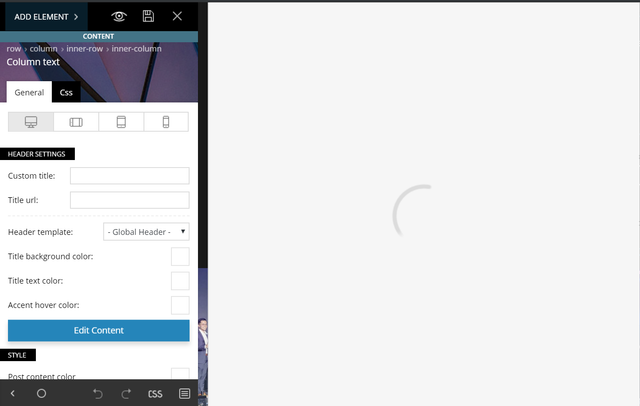
Let me know what else can be done to solve this. Thanks!
charles.kiss@gmail.com Also, please explain why all the following is commented out from the file …\Newspaper\includes\plugins\td-composer\includes\tdc_main.php:
//// Add external shortcodes
//if ( tdc_state::is_live_editor_iframe() || tdc_state::is_live_editor_ajax() ) {
// register_external_shortcodes();
//
// // Change the callbacks of the shortcodes not registered in TagDiv Composer
// // Important! Here it’s too late to map these shortcodes, the mapping should be where the ‘$tdc_admin_settings’ is set (@see ‘admin_head’ action)
// add_filter( ‘the_content’, ‘tdc_on_the_content’ );
// function tdc_on_the_content( $content ) {
//
// $mappedShortcodes = tdc_mapper::get_mapped_shortcodes();
//
// //var_dump( $mappedShortcodes ); die;
//
// global $shortcode_tags;
//
// if (empty($shortcode_tags) || !is_array($shortcode_tags))
// return $content;
//
// // Find all registered tag names in $content.
// preg_match_all( ‘@\[([^<>&/\[\]\x00-\x20=]++)@’, $content, $matches );
// $tagnames = array_intersect( array_keys( $shortcode_tags ), $matches[1] );
//
// if ( empty( $tagnames ) ) {
// return $content;
// }
//
// foreach( $tagnames as $tagname ) {
// if ( ! array_key_exists( $tagname, $mappedShortcodes ) ) {
// add_shortcode( $tagname, ‘tdc_external_shortcode’ );
// }
// }
//
// global $vc_shortcodes;
//
// foreach( $vc_shortcodes as $vc_shortcode ) {
// add_shortcode( $vc_shortcode, ‘tdc_external_shortcode’ );
// }
//
// return $content;
// }
//}
//function tdc_map_not_registered_shortcodes($postId) {
// $currentPost = get_post($postId);
//
// $mappedShortcodes = tdc_mapper::get_mapped_shortcodes();
//
// //var_dump( $mappedShortcodes ); die;
//
// global $shortcode_tags;
//
// if (empty($shortcode_tags) || !is_array($shortcode_tags))
// return;
//
// // Find all registered tag names in $content.
// preg_match_all( ‘@\[([^<>&/\[\]\x00-\x20=]++)@’, $currentPost->post_content, $matches );
// $tagnames = array_intersect( array_keys( $shortcode_tags ), $matches[1] );
//
// if ( empty( $tagnames ) ) {
// return;
// }
//
// foreach( $tagnames as $tagname ) {
// if ( ! array_key_exists( $tagname, $mappedShortcodes ) ) {
// add_shortcode( $tagname, ‘tdc_external_shortcode’ );
// }
// }
//
// global $vc_shortcodes;
//
// foreach( $vc_shortcodes as $vc_shortcode ) {
// add_shortcode( $vc_shortcode, ‘tdc_external_shortcode’ );
// }
//}
[…]
//global $vc_shortcodes;
//
//$vc_shortcodes = array(
// ‘vc_btn’,
// ‘vc_icon’,
// ‘vc_tta_tabs’,
// ‘vc_tta_section’
//);
//
//
//
//function map_not_registered_shortcodes() {
//
// global $post;
//
// if (!isset($post)) {
// return;
// }
//
// $mappedShortcodes = tdc_mapper::get_mapped_shortcodes();
//
// //var_dump( $mappedShortcodes ); die;
//
// global $shortcode_tags;
//
// //var_dump($shortcode_tags); die;
//
// if (empty($shortcode_tags) || !is_array($shortcode_tags))
// return;
//
// // Find all registered tag names in $content.
// preg_match_all( ‘@\[([^<>&/\[\]\x00-\x20=]++)@’, $post->post_content, $matches );
// $tagnames = array_intersect( array_keys( $shortcode_tags ), $matches[1] );
//
// if ( empty( $tagnames ) ) {
// return;
// }
//
// foreach( $tagnames as $tagname ) {
// if ( ! array_key_exists( $tagname, $mappedShortcodes ) ) {
//
// tdc_mapper::map_shortcode(
// array(
// ‘map_in_visual_composer’ => true,
// ‘base’ => $tagname,
// ‘name’ => $tagname,
// ‘params’ => array(
// array(
// ‘type’ => ‘textfield’,
// ‘heading’ => ‘Extra class name’,
// ‘param_name’ => ‘el_class’,
// ‘description’ => ”,
// )
// )
// )
// );
// }
// }
//
// global $vc_shortcodes;
//
// foreach ($vc_shortcodes as $vc_shortcode) {
// tdc_mapper::map_shortcode(
// array(
// ‘map_in_visual_composer’ => true,
// ‘base’ => $vc_shortcode,
// ‘name’ => $vc_shortcode,
// ‘params’ => array(
// array(
// ‘type’ => ‘textfield’,
// ‘heading’ => ‘Extra class name’,
// ‘param_name’ => ‘el_class’,
// ‘description’ => ”,
// )
// )
// )
// );
// }
//}
/**
* edit with td composer
*/
Thank you.
Perhaps there are some admin settings I need to change to get shortcodes from excerpts to work on category pages, again.
 jamiesharpe
Hello – I’m looking to replicate several blocks from the templates provided on TD composer. For example I’m looking at Block 11 – Full 2 (by TagDiv). I’d like to replicate the article meta info block that extends into the article image in the example but when I import the section, it only slightly extends into the article image. I’ve tried to change the article meta info details in TD composer but no luck. Could you let me know what to do?
charles.kiss@gmail.com Hi Simion,
I’m getting the same error:
\td-composer\css-live\css-live.php
LINE 31: $get_action = @$_GET[‘td_action’];
Exception has occurred.
Notice: Undefined index: td_action
And my TablePress shortcodes aren’t working like they used to.
-
This reply was modified 7 years by
 basmamagazine
When I try to delete anything in TD Composer, the modal doesn’t show up. I get a black overlay & that’s it.
Tried different browsers & incognito mode too. Same. So I can’t delete anything from the composer right now, which is limiting me from doing my required customizations.
 minhtiensg
I can’t remove the most popular column on the right sidebar. There is also another most popular column right above the footer (which translated to my native language). TD Composer didn’t let me change them. Please help!
 jaydayarathna
 Hi, Thank you for the reply and still the issue is there. Please see the link which shows the current issue and system status. Look forward to hearing from you
 broadstone
 Thanks for your response…
I can see why I never updated the WP Bakery because I can’t find it.
I downloaded the latest Newspaper update files, looked in the Newspaper updated folder and plugin folder and don’t see a file named js_composer.zip. Is it called something else?
PS…Your support instructions located here seem outdated.
I found plugs ins folder here: Newspaper/includes/plugins not Newspaper-tf/plugins/js_composer.zip file as shown. Still, don’t see the js_composer.zip file you talk about
Thanks
-
This reply was modified 7 years by
broadstone.
 sneakerepublica
Hi Guys, I need to install visual composer to make some new things on a page, But I was looking in the zip of the Theme and only can see the TDcomposer,, cant anyone help me please.
 tausifkhan
Fatal error: Cannot redeclare on_tdc_init_multipurpose() (previously declared in /home/topreme1/public_html/wp-content/plugins/td-composer/td-multi-purpose/td-multi-purpose.php:15) in /home/topreme1/public_html/wp-content/plugins/td-multi-purpose/td-multi-purpose.php on line 15
 dennisjpitocco
Excessive errors are reported by the AMP plugin. There is the option to “Reject” those elements. Is it safe to do so?, or… Is there some code in theme files (or settings) we need to adjust. Can send you a screenshot of the errors.
ALL of the errors begin with illegal css at rule @-moz-document and ultimately are referencing td-composer, Newspaper theme style or td cloud library.
 Adeba
AdebaFirst of all I had the same problems as someone here in the forum. Pages were almost blank.
You described the new mobile theme in such good words and wrote that this is the best way to show amp or mobile pages, so I installed mobile plugin and figured out that no category pages are now shown. They were all blank, because I used the category designer together with the td-Composer.
In general the td-composer is very cool to design a category page or a start home page but as I understood now if you use this built in feature of the theme the website is responsive but not perfectibility amp friendly.
Also Gutenberg an td-composer are are little bit ion the same direction.
So my questions are:
1.The future is amp? Seems to be.
2. How should I create categories. Using NO td-composer and just Gutenberg or just Classic?
3.How are YOU (rest of the internet) creating category pages? You don’t care about amp?
4. I really love the mobile plugin, but is there no chance to reach this goal with one designer and responsive view? It seems I have to choose between mobile plugin, responsive, Gutenberg, classic editor and td-composer.
5. Any more comments about this theme are welcome
For me it’s a huge thing because 80 % !!! of my user are Smartphone users. They see mobile view. I have many categories, specials ….
So after installing mobile plugin nobody saw my articles in mobile view.
Thanks for commenting
Any ideas are welcome
Catalin Hi,
Unfortunately, we do not recommend to change the size of your logo for Header Style 5 because you can easily break the header functionality, sorry! I recommend you to use the Header Builder template which allows you to create your own header style, using the TD Composer plugin. For more information about this plugin, please check the following documentation from here -> https://tagdiv.com/newspaper-theme-customize-the-header-manager/
Thanks for your understanding!
Catalin Hi,
You need to enjoy with the TD Composer builder and try to use the following elements from here -> https://www.screencast.com/t/ogunIbuuGHx When you are using the Text with Title, you can use some wrap text around images.
Hope this helps!
Thanks.
Catalin Hi,
Please make sure that you do not have another mobile theme activate, or plugin conflict, you will have to disable all other plugins and install the mobile theme first.
– https://www.screencast.com/t/o7c0lg6u It appears because you use the Jetpack mobile theme. Since the theme has already a mobile version, it doesn’t work with jetpack module.
-> https://jetpack.com/support/mobile-theme/
As a notice, please notice that the AMP for the pages will work only for the pages which are not created with TD Composer plugin.
Thanks.
jaydayarathnaI have installed newspaper 9.6 and wordpress 5.1.1. I cant edit any page using TD Composer. please help me.
 lkicknosway
I have a two column row with an inline single image in one column and text in the other. I can see the text and the image in TD composer but when I preview the page I can only see the text and get a broke image for the inline single image. Not sure why I can see the image within the TD composer and not on the page. I’m working in a staging environment here.
Cheers.
Catalin Hi,
If you want to use an Ad inside your header, you can use our premade header templates from here -> https://forum.tagdiv.com/header-styles/ Also, if you want a custom header style, you need to use the Header Builder which allows you to create your own header layout, using the TD Composer. -> https://tagdiv.com/newspaper-theme-customize-the-header-manager/
Thanks for your understanding!
Catalin Hi Borja,
I suppose that you want to change the Sticky header layout, right? If you want to make some changes over this section, notice that you can do it from Header Builder. Please check our documentation from here -> https://tagdiv.com/newspaper-theme-customize-the-header-manager/ -> https://www.screencast.com/t/m5Yuvoq6 Using the TD Composer, notice that you can create your own style for oyur header menu.
Please notice that if you want to have another menu on post pages, you should create another single with header template which customizes it as you wish (where you can show the Logo title in the top) and then, applies this template for your posts. -> https://www.screencast.com/t/stDbirHavj
If is not what you mean, please provide more details so I will be able to provide a more accurate response.
Hope this helps!
Thanks for your understanding!
Catalin Hi,
Please check the plugin to be activated and also, provide more details with your theme behavior, sorry! Notice that the TD Composer should work in both cases (with the demo or without demo).
Thanks for your understanding!
