
- NewspaperHow to update a plugin
- NewspaperHow to update the WPBakery Page Builder plugin
- NewspaperHow to Update the Newspaper Theme
- NewspaperSingle Post Excerpt
- NewspaperWP Rocket and Newspaper Theme: Optimization Guide
- NewspaperCredit System
- NewspaperHow to use the Bing Maps API
- NewspaperModules Builder in Newspaper Theme
- NewspaperCreate a frontend submission form
- NewspaperCustom Fields Support
- NewspaperFlex Block Settings Guide
- NewspapertagDiv Opt-In Builder
- NewspaperHow to use the YouTube API
- NewspaperDefault Category Settings
- NewspapertagDiv Composer Tutorial
- NewspaperHow to Set the Image Avatar
- NewspaperUnique Articles
- NewspaperFacebook Share
- NewspaperCache plugin – install and configure
- NewspaperFeatured Image, Video or Audio
 Catalin
 Hi,
Please notice that our new theme update comes with some core changes and that’s why this file was disappeared. Please check the official announcement from here -> https://tagdiv.com/updating-the-core-of-tagdiv-themes/ All of the theme core files were moved in the plugin’s folder and now, if you want to have the same customization you need to do it again through editing that folder which is placed in TD Composer folder.
Thank you!
 insumedical
Posts below
Newspaper V 9.6.1 After update..Request again
^^
 Simion C.
 Hi,
Chances are the modifications you made to theme files in the child theme will not be valid anymore. Many theme files were moved in the tagDiv composer and will be served from there. Now the child theme is limited to a functions file, style, and a few theme files that can still be modified in it.
Please download the theme package again and update the theme, delete the old theme and upload the new one. Update the theme plugins as well. Don’t make any modifications to theme of plugin files after the update. Also what PHP version are you using? try using PHP 7, 7.1 or 7.2 if possible.
Thanks
Catalin Hi,
I can’t seem to be able to access the website, there is a 500 error currently. Should be no problem if you follow the guide – https://tagdiv.com/updating-the-core-of-tagdiv-themes/
Also, the most reliable method to update the theme is by FTP -https://forum.tagdiv.com/newsmag-how-to-update-the-theme/
In some cases 500 errors were caused by insufficient memory, we recommend a value of 256M if possible. Try increasing it or contact the hosting provider and provide them with this guide – https://tagdiv.com/newspaper-theme-requirements/
If you already tried this, please send us an email at contact@tagdiv.com and provide FTP or cPanel as well as admin login. We will take a look. Include a link to this topic in the email. Let us know.
Thanks
Simion C. Hi,
In this case it is better to update by FTP, delete the old theme and upload the new one
– https://tagdiv.com/update-newspaper-theme/
Due to the nature of the changes made in 9.7 it would be the best method
– https://tagdiv.com/updating-the-core-of-tagdiv-themes/
Many of the theme files have been moved in the tagDiv composer after update 9.7. SO they don’t exist in the previous location, the automatic update could fail. Sorry for any inconvenience. Please let us know if you have more questions.
Thanks
Simion C. Hi,
The plugins have to be updated after each theme update, or they will not activate. Currently they cannot be updated with a patch if that is what you want to do.
If we will find a way to allow the plugin files to be modified without doing it in the main files directly, we will gladly provide it with the required documentation.
Thanks
Simion C. There were some changes made to the theme in update 9.7 – https://tagdiv.com/updating-the-core-of-tagdiv-themes/
Now the tagDiv composer has to be active at all times to maintain the same functionality. If you have updated to the latest version please activate the tagDiv composer as well.
The issue you are referring to with the single image elements when both our composer and Visual composer are active, will be fixed in the next update. In the mean time the fix is to download this file – http://cdn.tagdiv.com/wp-content/uploads/2019/04/tdc_map.zip and replace it in the tagDiv composer – http://prntscr.com/nikwre Teh single images will look and function correctly after doing this.
Sorry for this inconvenience, the fix will be included in the next theme update.
In case the page builder buttons don’t appear after you update the theme and theme plugins, we could take a look at it. Send us an email at contact@tagdiv.com and provide admin login. Please include a link to this topic in the email. Let us know.
Simion C. Hi,
This website – https://www.dringrid.ca/ seems to use 9.7.2, I browsed it for a while, works fine.
The other website uses 9.6.1, if this is planned to be launched in a short time maybe postpone the theme update for a later time.
The plugins you mention are compatible with the theme, there should be no problem using them, same as before the update.
Updating with the Envato plugin from what I know may fail sometimes. There were some users that have reported this in the past. The more reliable methods are by FTP or WordPress when it is possible to do so.
If you have sent us an email we will take a look at the problems. Due to the high level of queries in this period of time, our reply may be delayed longer than usual. Sorry for the inconvenience.
Thanks
 Calin
Calin Hi,
1. How to Update the Newspaper Theme for WordPress -> https://tagdiv.com/update-newspaper-theme/
2. The Newsmag theme do not have so many updates, last week was released an update for Newsmag.
3. If you want to change the email for login user you need to go in -> Users -> https://www.screencast.com/t/NveMQPIy7h and click on edit user https://www.screencast.com/t/p6gH0vpYyP do not forget to save the change -> https://www.screencast.com/t/zqm2crc8Bdz
Thank you for your understanding!
Simion C. Hi,
Since theme update 9.7 most of the theme files have been moved in the tagDiv composer plugin – https://tagdiv.com/updating-the-core-of-tagdiv-themes/
So customizing these files is not possible to do in a child theme anymore. One way would be to modify them in the composer plugin directly, but the changes will be lost after a theme update because the plugins will be updated as well.
The child theme is now limited to a functions and style files, and a few files that were not moved in the composer and can still be used in it.
Maybe a solution will be found to be able to modify theme files found in the plugin more safely, we will create documentation for it if that happens. If you have more questions pleas let me know.
Thanks
 Vlad S
 Hello !
Yes ! Even though your support is expired you will still have access to the latest updates. Please be advised that in order to benefit from the help of the support team you will need to renew it.
Thank you !
Calin Hi,
If you do not want to make the update to Newspaper 9.7.2 you can check the solution from this topic for wp-admin -> https://forum.tagdiv.com/topic/newspaper-backend-issue-cannot-modify-header-information-headers-already-sent/
Thank you!
Calin Hi,
Please make sure that you have TagDiv Composer activate.
The Newspaper theme update brings a change for the theme implementation.
When you’ll be updating to the Newspaper 9.7 version, you’ll need to activate the tagDiv Composer to keep the Newspaper theme functionality you’ve previously used.
Otherwise, you will have basic WordPress functionality, complying with Envato WordPress Requirements – https://help.author.envato.com/hc/en-us/articles/360000472383-WordPress-Theme-Requirements
Please read this article we wrote on the new update https://tagdiv.com/updating-the-core-of-tagdiv-themes/ to learn what it changes and what you must do in order to keep the functionality intact.
Thank you!
Simion C. Hi,
No need to activate the WPBakery plugin, bundled plugins don’t need a license. AN article about it here – https://help.market.envato.com/hc/en-us/articles/213762463-Bundled-Plugins?_ga=2.148850615.1240581804.1556603480-1715937315.1492175355
Simply install the plugin and use it, ignore the activation messages that may appear.
When there will be updates for the theme we will include the latest version of the bundled plugins at the time – https://forum.tagdiv.com/how-to-update-visual-composer-plugin/
Please let us know if you have more questions.
Thanks
Calin Hi,
Please read this article we wrote on the new update https://tagdiv.com/updating-the-core-of-tagdiv-themes/ to learn what it changes and what you must do in order to keep the functionality intact.
Thank you!
Vlad S Hello !
In order to get your latest version of theme you can simply do it by taking a look at our Documentation regarding updating the theme: https://forum.tagdiv.com/how-to-update-the-theme-2/
Thank you !
 hrawat42
while updating the theme it showing the below error please Check thehow to get ris of this problem
Fatal error: Uncaught Error: Call to undefined method td_config::get_map_filter_array() in /home/aajkautt/public_html/wp-content/plugins/td-api-plugin/td-api-plugin.php:62 Stack trace: #0 /home/aajkautt/public_html/wp-includes/class-wp-hook.php(286): td_api_plugin->hook_td…………..
 mikeC_Oakland
 This has happened to my site, too. I updated via the theme in theme panel.
 egm_ar
Good night,
I just can’t find any of the Single templates in Cloud Library.
I go to Cloud Templates, then Add New, then click on “TagDiv Composer”, “Load Template”, and the Cloud Library opens, but there are no templates on the Single category.
Has something changed on the latest update? How can I find them to apply to a new template.
Because a lot of Elements are missing when I just try to make a template from scratch.
As an example, here it is a search result for “Post” now:
When this is the result for the same search under a custom template I’ve made a couple of months ago based on a Single Cloud Library template:
Thanks for your help!
 Igor
Igor And the next update again download and delete again? and again and again …
2. The second question is also not answered.
 ben.hinc
Hello,
I’ve found a couple of posts on the forum that relate to Newspaper’s mobile theme showing up on iPad devices when using the WP Super Cache plugin — one that exists and one that gives a 404 error:
- https://forum.tagdiv.com/topic/wp-super-cache-last-update-ipad-site-now-is-mobile-them/
- https://forum.tagdiv.com/topic/mobile-theme-problems-3/
I am having this issue currently with my website located at https://www.theapex.racing/ and I’ve yet to find a solution that works. I find it odd that WP Super Cache is listed as a “fully supported plugin” but this issue continues to exist.
 KokoShanel
 Good evening, i still got the same problem. I’ve updated the theme till the last version, and the tagDiv Composer plugin is activated and updated too. But install demo “Home Decor” still inactive. What am i supposed to do to install it on my site?
 bricolage-facile
Dear all,
I set up my home page without any problems, but when I try to change just the image (Text is OK, CSS is OK…), but nothing updated, 🙁
Many thanks for your help 🙂
Cédric
 Mustafa Varol
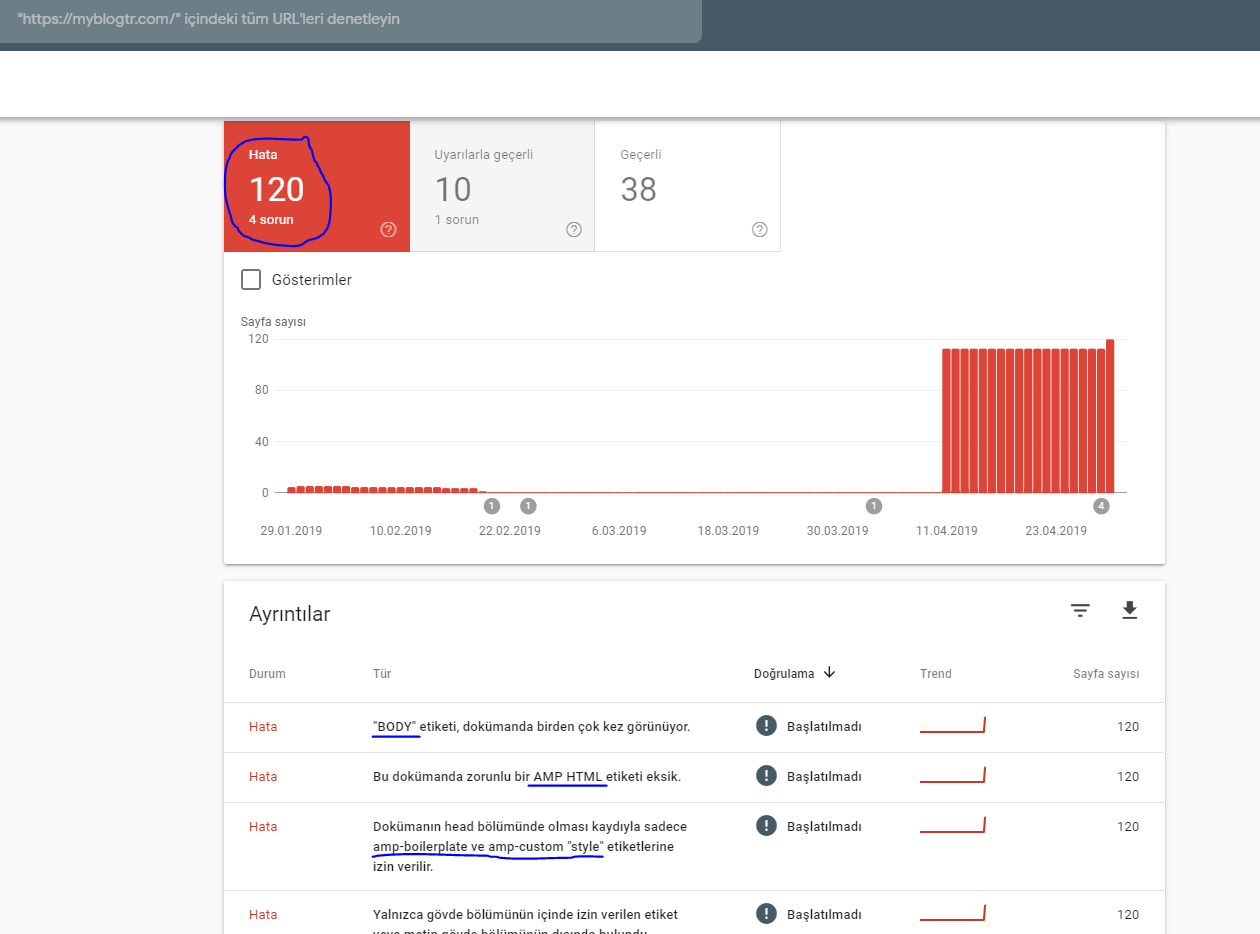
Hello;
Amp pages are working but search console finds it wrong what can be the problem?
IgorHi,
After the update, errors constantly occur in the server logs:
“POST /wp-admin/admin-ajax.php?td_theme_name=Newspaper&v=9.7.2 HTTP/1.1”, upstream: “http://127.0.0.1:8080/wp-admin/admin-ajax.php?td_theme_name=Newspaper&v=9.7.2”
