- NewspaperWP Rocket and Newspaper Theme: Optimization Guide
- TutorialsFrom WPBakery to tagDiv Composer
- NewspaperNewspaper Theme Support
- NewspaperNewspaper theme documentation
- NewspaperWeather Shortcode
- NewspaperCloudflare (CDN)
- NewspaperBest Of Forums
- TutorialsSystem status parameters guide
- NewsmagWhat’s included in Newsmag theme package
- NewsmagRequirements for Newsmag
- NewsmagNewsmag documentation
- Thumbnails vs. Featured image size
- NewspaperThumbnails – Fix strange looking images on blocks
- NewspaperRequirements for Newspaper
- NewspaperHow to Make the Site Faster
 Calin
Calin Hello,
The speed of your website depends on how well your site is optimized, if you follow the steps which are presented in this tutorial here -> https://tagdiv.com/how-to-increase-page-loading-speed/ you’ll be able to increase the speed of your website.
Also you can check this similar topic for more solutions: -> https://forum.tagdiv.com/topic/optimize-script-to-improve-site-speed/
For the second question, unfortunately without css you can use only the option from theme panel https://forum.tagdiv.com/related-articles-2/ , but this will remove the both element ( related articles and more from author )
Thank you for your understanding!
 Vlad S
 Hello !
Unfortunately yes, even tough WP bakery is a tested plugin I personally wouldn’t recommend using it. Since tagDiv Composer was created as our own page builder the developers are working on developing this plugin.
1. In the tagDiv Composer you can add ROWs. Each row has a layout setting which can be edited: https://www.screencast.com/t/0aq1TR5sPSFf And there is no limit in the amount of rows you add. Each row can have a different layout and different sizes.
2. In order for the Newspaper theme to work flawlessly we recommend meeting all of our themes system requirements which can be found here: https://tagdiv.com/newspaper-theme-requirements/. Also we do offer a tutorial for increasing the page speed and many users have reported big improvements: https://tagdiv.com/how-to-increase-page-loading-speed/ ; Also if the users choose to use plugins that get in conflict with the tagDiv Composer that is something that we can do nothing about it. Plugin conflicts can happen on many other plugin / theme setups.
3. You can stretch the row’s content to the width you want but if you are using a background color or image that will reduce your page width to a boxed layout.
As a personal note I would recommend to always make a backup before every modification and also using a test server where you will be able to test every modification / plugin you want. That will give you the ability to test all the features you want without compromising the main website.
I hope you will find this helpful and we are sorry for the inconveniences !
Thank you !
Vlad S Hello !
Please make sure that all the requirements are up to date as you can see here: https://forum.tagdiv.com/requirements-for-newspaper/
You can also follow our page speed tutorial: https://tagdiv.com/how-to-increase-page-loading-speed/
We test the websites using GTMetrix, you can do it too and see what can be improved on your website.
Let me know if this worked out for you !
Thank you !
 mimicreature
Untill 9.7 the roboto font was not getting imported from font.googleapis.com but after I updated to 9.8 I see a new HTTP connection to font.googleapis.com is being made to import roboto font.
Why it is importing. I believe it should be a part of the theme. This issue is hurting my website speed and SEO
Please tell me how to fix it.
Calin Hi,
We understand that right in this moment our theme is quiet have, but we hope that in the coming update our theme will be more light.
What you can do is to check our guide for speed optimization, maybe you can find something that will help you -> https://tagdiv.com/how-to-increase-page-loading-speed/
There are many optimization guides provided by our users here in the forum, some made by us, you could check some of them too
– https://forum.tagdiv.com/cache-plugin-install-and-configure/
– https://forum.tagdiv.com/how-to-make-the-site-faster/
– https://www.infophilic.com/get-almost-100-pagespeed-newspaper-theme/
– https://forum.tagdiv.com/topic/score-100100-pagespeed-with-newspaper-wordpress-theme/
– https://forum.tagdiv.com/topic/newspaper-theme-speedify-your-website/
– https://forum.tagdiv.com/topic/tutorial-chriss-custom-optimizations-for-functions-php-etc/
– https://forum.tagdiv.com/cloudflare-cdn/
– https://forum.tagdiv.com/topic/theme-causing-high-cpu-usage-2/
– https://forum.tagdiv.com/topic/sql-querys-high-cpu/
– https://forum.tagdiv.com/topic/newspaper-theme-slow-to-respond/
– https://premium.wpmudev.org/blog/optimizing-your-wordpress-database-a-complete-guide/
– https://underconstructionpage.com/optimize-wordpress-database/
– https://crunchify.com/better-optimize-wordpress-database-all-in-one-guide/
Thank you for your understanding!
 Sibi Paul
Sir,
I am using Newspaper Theme for My Website https://www.fastunlocker.com
My Server is Litespeed Enterprise Hosted in AWS
CDN Enabled
Optimized Using Litespeed Cashe
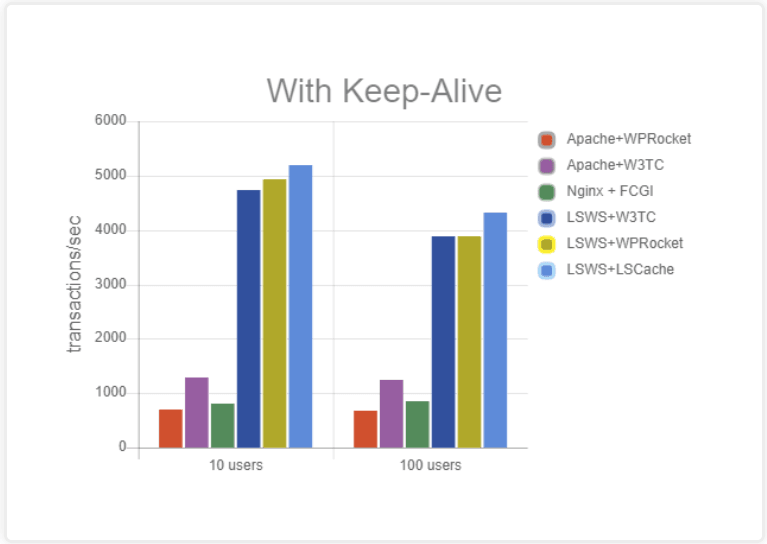
Refer this Page – https://blog.litespeedtech.com/2019/05/20/litespeed-cache-vs-wp-rocket/
Also, Check this Image – https://blog.litespeedtech.com/wp-content/uploads/2019/05/LSCWP-vs-WP-Rocket-a.png
Sir, I am almost happy with Everything in Newspaper Theme.
But,
Some Filesize is very huge in the Newspaper Theme.
When Compared to My Other Providers.
I have Subscription in Mythemeshop, GeneratePress… etc
When I Test Page speed after activating those themes,
Page size is around 60KB to 100KB
But, Newspaper Theme Page Size is 360+ KB
So, I would Like to Mention Two Test results
1 – https://gtmetrix.com/reports/www.fastunlocker.com/wa68Rx4a
2 – https://gtmetrix.com/reports/www.fastunlocker.com/PhPoslVb
The second one is the Newspaper Theme’s
I Really Appreciate its Facilities, When Compared to Other Themes… Newspaper is Fully Loaded.
I need a Small Help to Reduce the Size of Some Files.
site.com/wp-content/themes/Newspaper/images/icons/newspaper.woff?16
site.com/min/e7ce4.css
site.com/min/fe6e6.js
Kindly Help me on this…
The page is Optimized Great, But Size is High…
Vlad S Hello !
Unfortunately we still cannot acces your website. There are many websites tested with wp super cache and everything worked out fine.
Also please note that page speed is affected by multiple factors not only the theme.
Thank you !
mimicreature Though it’s not recommended by newspaper but I use WP super cache and Autoptimize plugin together and I get amazing results in GT Matrix and Google page speed . The score in both is about 97. You can see my website https://blogbyts.com to have an idea about what optimization you may need to do.
 doraemonwu
 Thank you! Nevertheless, I could not use gtMetrix to test the website for the first time, some people said that have to disable WP Super Cache when you use gtMetrix.
I tried this method. I find that my PageSpeed is B(85%) but YSlow is E(55%)
Maybe I enable the WP Super Cache can improve YSlow, but now this cannot.
I can visit my website in Hong Kong, could you mind test again?
Vlad S Hello !
Your website is not working. We do recommend testing it using gtMetrix: https://gtmetrix.com
Also please make sure that all the requirements are up to date as you can see here: https://forum.tagdiv.com/requirements-for-newspaper/
You can also follow our page speed tutorial: https://tagdiv.com/how-to-increase-page-loading-speed/
Let me know if this worked out for you !
Thank you !
doraemonwuI use Newspaper 9 recently, but I tested my website through Google Pagespeed, Its get 8 scores on mobile phone and 32 scores in computer. Could you give me some suggestion to improve the score of Google Pagespeed? Thank you!
this is my website
https://www.boyangu.com/
Should I provide what plugin I installed in the past time?
Calin Hi,
Please notice that the speed of your website depends on how well your site is optimized.
Notice that is not a simple task and if you do not have any experience in this regard you will do not bring good results for the theme. Also, notice that we have a speed optimization tutorial but this is addressed only to advanced users. So, if you follow the steps which are presented in this tutorial here -> https://tagdiv.com/how-to-increase-page-loading-speed/
There are many optimization guides provided by our users here in the forum, some made by us, you could check some of them
– https://forum.tagdiv.com/cache-plugin-install-and-configure/
– https://forum.tagdiv.com/how-to-make-the-site-faster/
– https://www.infophilic.com/get-almost-100-pagespeed-newspaper-theme/
– https://forum.tagdiv.com/topic/score-100100-pagespeed-with-newspaper-wordpress-theme/
– https://forum.tagdiv.com/topic/newspaper-theme-speedify-your-website/
– https://forum.tagdiv.com/topic/tutorial-chriss-custom-optimizations-for-functions-php-etc/
– https://forum.tagdiv.com/cloudflare-cdn/
– https://forum.tagdiv.com/topic/theme-causing-high-cpu-usage-2/
– https://forum.tagdiv.com/topic/sql-querys-high-cpu/
– https://forum.tagdiv.com/topic/newspaper-theme-slow-to-respond/
– https://premium.wpmudev.org/blog/optimizing-your-wordpress-database-a-complete-guide/
– https://underconstructionpage.com/optimize-wordpress-database/
– https://crunchify.com/better-optimize-wordpress-database-all-in-one-guide/
Thank you!
 Yahtzee_Wikilord
Ever since it was created my Cloud Template (Header Style 4) has been rendering less efficiently than the default Header Style 4. It takes a good while for the font to appear and the box will often expand before assuming its correct size. It is also highly sensitive to an optimization function called “also aggregate inline CSS”. The same function causes my Cloud Template – Big Flex Box 5 to experience font problems. Without “also aggregate inline CSS” I get poor scores on gtmetrix.com/ and developers.google.com/speed/pagespeed/insights, with it my header breaks.
My website is: https://www.medievilfaq.com/
 malikstefan
How Can i increase my website speed ?? it\’s too slow to show
Calin Hi,
From what I can see, everything looks quite normal on your website.
The mobile theme is a theme plugin that comes with the theme and provide a better speed on mobile device, you can check some more details about the mobile theme plugin here -> https://forum.tagdiv.com/the-mobile-theme/
Thank you!
 ozguncaglar
Hello there,
I have 2 questions.
1- I imported the default demo of the theme. I am trying to remove “Our Latest Posts” which inside the main page via TD Composer. But TD Composer cannot delete it. That section is unpickable. How can I solve this?
2- I installed AMP and Mobile Theme plugins which are included with the theme. I have uploaded mobile and retina mobile logos from the Theme Options section. But these plugins do not show my logos on mobile version of my website. Yes, the speed is increasing and the site is simplified but the logo does not appear. How can I solve this?
Thanks.
Vlad S Hello !
Speedbooster works perfectly with the tested plugins by the tagDiv Developers in the 9.8 version. We cannot say if it will create or not a plugin conflict with untested plugins. The best way would be for you to create a localhost, reproduce your website and see what changes does the speedbooster makes, if it creates a plugin conflict or not.
We do not recommend using alternativ plugins for deactivating functions or options of the theme. In 99% of the cases it is pure plugin conflict. We have a lot of users who are showing 95 and above page speed by following our documentation. You have to keep in mind that page speed is not affected only by the theme. It is affected by host / plugins/ content…
I hope this was helpfull !
Thank you !
Calin Hi,
Please notice that the speed of your website depends on how well your site is optimized.
Notice that is not a simple task and if you do not have any experience in this regard you will do not bring good results for the theme. Also, notice that we have a speed optimization tutorial but this is addressed only to advanced users. So, if you follow the steps which are presented in this tutorial here -> https://tagdiv.com/how-to-increase-page-loading-speed/
There are many optimization guides provided by our users here in the forum, some made by us, you could check some of them
– https://forum.tagdiv.com/cache-plugin-install-and-configure/
– https://forum.tagdiv.com/how-to-make-the-site-faster/
– https://www.infophilic.com/get-almost-100-pagespeed-newspaper-theme/
– https://forum.tagdiv.com/topic/score-100100-pagespeed-with-newspaper-wordpress-theme/
– https://forum.tagdiv.com/topic/newspaper-theme-speedify-your-website/
– https://forum.tagdiv.com/topic/tutorial-chriss-custom-optimizations-for-functions-php-etc/
– https://forum.tagdiv.com/cloudflare-cdn/
– https://forum.tagdiv.com/topic/theme-causing-high-cpu-usage-2/
– https://forum.tagdiv.com/topic/sql-querys-high-cpu/
– https://forum.tagdiv.com/topic/newspaper-theme-slow-to-respond/
– https://premium.wpmudev.org/blog/optimizing-your-wordpress-database-a-complete-guide/
– https://underconstructionpage.com/optimize-wordpress-database/
– https://crunchify.com/better-optimize-wordpress-database-all-in-one-guide/
Thank you!
 renhao
Hi there! As mentioned in title, I’ve been working with TD Composer to create a new theme for http://www.blog.qoo10.sg, testing and tweaking all on the live site for approximately the last two weeks. Last Friday, the whole website suddenly became very sluggish, at times timing out with server errors or bad request errors. We’ve increased the allocated resources on our AWS EC2 server, but our 4core CPU is still being almost maxed out by this operation.

Enabling or disabling the TagDiv Speed Booster plugin has almost no effect on this issue. However, the console log also shows TagDiv plugins generating a lot of errors, possibly adding to the overload.
`
2019/08/19 13:39:37 [error] 2339#0: *2 recv() failed (104: Connection reset by peer) while reading response header from upstream, client: 74.208.182.114, server: , request: “GET /search/1/page/8/tagDiv.com/page/page/tagDiv.com/page/tagDiv.com/page/page/10/ HTTP/1.1”, upstream: “fastcgi://127.0.0.1:9000”, host: “blog.qoo10.sg”, referrer: “-1); waitfor delay ‘0:0:3’ –”
2019/08/19 13:39:37 [error] 2336#0: *12 recv() failed (104: Connection reset by peer) while reading response header from upstream, client: 74.208.182.114, server: , request: “GET /search/1/page/8/tagDiv.com/page/page/tagDiv.com/page/tagDiv.com/page/page/ HTTP/1.1”, upstream: “fastcgi://127.0.0.1:9000”, host: “blog.qoo10.sg”, referrer: “http://blog.qoo10.sg/”
2019/08/19 13:39:37 [error] 2336#0: *11 recv() failed (104: Connection reset by peer) while reading response header from upstream, client: 74.208.182.114, server: , request: “GET /search/1/page/8/tagDiv.com/page/page/tagDiv.com/page/tagDiv.com/page/page/2/ HTTP/1.1”, upstream: “fastcgi://127.0.0.1:9000”, host: “blog.qoo10.sg”, referrer: “http://blog.qoo10.sg/”
2019/08/19 13:39:37 [error] 2336#0: *7 recv() failed (104: Connection reset by peer) while reading response header from upstream, client: 74.208.182.114, server: , request: “GET /search/1/page/8/tagDiv.com/page/page/tagDiv.com/page/tagDiv.com/page/page/2/ HTTP/1.1”, upstream: “fastcgi://127.0.0.1:9000”, host: “blog.qoo10.sg”, referrer: “http://blog.qoo10.sg/”
2019/08/19 13:39:37 [error] 2336#0: *13 recv() failed (104: Connection reset by peer) while reading response header from upstream, client: 74.208.182.114, server: , request: “GET /search/1/page/8/tagDiv.com/page/page/tagDiv.com/page/tagDiv.com/page/page/3/ HTTP/1.1”, upstream: “fastcgi://127.0.0.1:9000”, host: “blog.qoo10.sg”, referrer: “http://blog.qoo10.sg/”
`
Would greatly appreciate any advice or help you can offer on this matter.
Calin Hi,
Please notice that the speed of your website depends on how well your site is optimized.
Notice that is not a simple task and if you do not have any experience in this regard you will do not bring good results for the theme. Also, notice that we have a speed optimization tutorial but this is addressed only to advanced users. So, if you follow the steps which are presented in this tutorial here -> https://tagdiv.com/how-to-increase-page-loading-speed/
There are many optimization guides provided by our users here in the forum, some made by us, you could check some of them
– https://forum.tagdiv.com/cache-plugin-install-and-configure/
– https://forum.tagdiv.com/how-to-make-the-site-faster/
– https://www.infophilic.com/get-almost-100-pagespeed-newspaper-theme/
– https://forum.tagdiv.com/topic/score-100100-pagespeed-with-newspaper-wordpress-theme/
– https://forum.tagdiv.com/topic/newspaper-theme-speedify-your-website/
– https://forum.tagdiv.com/topic/tutorial-chriss-custom-optimizations-for-functions-php-etc/
– https://forum.tagdiv.com/cloudflare-cdn/
– https://forum.tagdiv.com/topic/theme-causing-high-cpu-usage-2/
– https://forum.tagdiv.com/topic/sql-querys-high-cpu/
– https://forum.tagdiv.com/topic/newspaper-theme-slow-to-respond/
– https://premium.wpmudev.org/blog/optimizing-your-wordpress-database-a-complete-guide/
– https://underconstructionpage.com/optimize-wordpress-database/
– https://crunchify.com/better-optimize-wordpress-database-all-in-one-guide/
Thank you!
 huma1985
sir my website speed is slow kindly tell me what i do:
Eliminate render-blocking resources and some css and javascrip files is a reason to slow speed kindly tell me recommendations.
 Simion C.
 Hi,
Loading speed depends on many factors. You could check some guides as to how it can be improved and what are the potential issues that can affect the loading speed. For example
– https://www.wpbeginner.com/wordpress-performance-speed/
For me your website is loading quite fast – https://prnt.sc/oulyvj as I am getting the cached version.
Thanks
 Jose
Jose Hola Vlad,
I don’t mean to be rude, but you haven’t answered my question. I’m not asking what is the best cache system for a website, as each person has their own preferences (mine are litespeed + litespeed cache plugin).
What I need to know is the list of user-agents in the theme. Can you tell me?
Thanks, Jose
 Prateek
 Are you using Cloudflare CDN? It can help in a lot of ways.
A CDN might not give you the best score in the test results but the actual speed of the website will be improved since it delivers the content from the server closest to you users and from where the request is made.
 TopTipBio
Hi guys,
I am really hoping you can help me.
I have contacted my server provider and they advise to contact you.
Basically, whenever I view my site, there is a delay in the page loading. There seems to be a white screen and then the page loads. This has resulted in my page load speed being rather high. I have tried everything possible to increase my speed (I have WP Super Cache and CDN on Cloudflare).
Please are you able to offer any advice? I read somewhere that having Java in the header may cause this. But I do now know how to tell?
My website is: https://toptipbio.com
Many thanks
Steven