
- NewspaperWP Rocket and Newspaper Theme: Optimization Guide
- NewspaperNewspaper Theme Support
- NewspaperNewspaper theme documentation
- NewspaperWeather Shortcode
- NewspaperCloudflare (CDN)
- NewspaperBest Of Forums
- Thumbnails vs. Featured image size
- NewspaperThumbnails – Fix strange looking images on blocks
- NewspaperRequirements for Newspaper
- NewspaperHow to Make the Site Faster
 mislek
Hi, We have two questions.
1) We use vps for our website. We can do gzip compression from cpanel. Should we also add the code you gave us in the speed documentation?
The code you gave is:
<IfModule mod_deflate.c>
<filesMatch “\.(js|css|html|php)$”>
SetOutputFilter DEFLATE
</filesMatch>
</IfModule>
2) In our cpanel we have an option of zlib.output_compression. Do we need to activate this feature from our cpanel? Is it related to the gzip compression?
Thank you!
 Calin
Calin Hi,
You can use mobile theme, this plugin was made spacial for mobiles and the speed will increase , also you can try to optimize your website
Please read this topic:
-> https://forum.tagdiv.com/topic/low-score-for-mobile-in-google-pagespeed-insights/
Thank you for your understanding.
Calin Hi,
Please try to clear all cache, and look again
Also please be notice that the counter will not show the likes in real-time ( this will slow the speed of website ), our theme make request to social media on set interval of time.
Thank you.
 Catalin
 Hello Bryanlim,
Please notice that the speed of your website depends on how well your site is optimized.
Notice that is not a simple task and if you do not have any experience in this regard you will do not bring good results for the theme. Also, notice that we have a speed optimization tutorial but this is addressed only to advanced users. So, if you follow the steps which are presented in this tutorial here -> https://forum.tagdiv.com/how-to-make-the-site-faster/ you can increase the page speed loading and if you are not aware of the steps in this regard, please consider hiring a freelancer/developer to help you because the speed optimization services are not covered by our support policy, as you can read here -> https://forum.tagdiv.com/support-policy-2/ Check our documentation here -> https://forum.tagdiv.com/requirements-for-newspaper/ regarding on dedicated server to fit our requirements.
Unfortunately, our theme does not have such an option to minify the style.css file and we cannot recommend any plugins with this functionality because is not tested with our theme. For minifying this file, we are using CloudFlare for our demo and works fine. If you want to read other views from our users, please check this topic -> https://forum.tagdiv.com/topic/tip-how-to-easily-minify-your-css-without-breaking-your-site/
Also, check all of your Ad Spots and if you have entered any suspicious code through them, remove all of them and check the results without them.
One of our top members here on the forum wrote his own optimization tutorial here:
https://forum.tagdiv.com/topic/tutorial-chriss-custom-optimizations-for-functions-php-etc/ and here -> https://www.infophilic.com/get-almost-100-pagespeed-newspaper-theme/
Basically, these are the theme requirements
– https://forum.tagdiv.com/requirements-for-newspaper/
Another useful guide for increasing the page speed can be found here -> https://kinsta.com/blog/google-pagespeed-insights/
Thanks for your understanding!
 Bryanlim
Hi, right now I’m using Newsmag theme on my blog, to be exact, the Travel Theme from Newsmag.
When I changed my blog to Newsmag from previous theme, the Pagespeed for my blog went down from previously 87/100 to 17/100.
When I see what is causing this, Google Pagespeed give me a list of things that slowed my website.
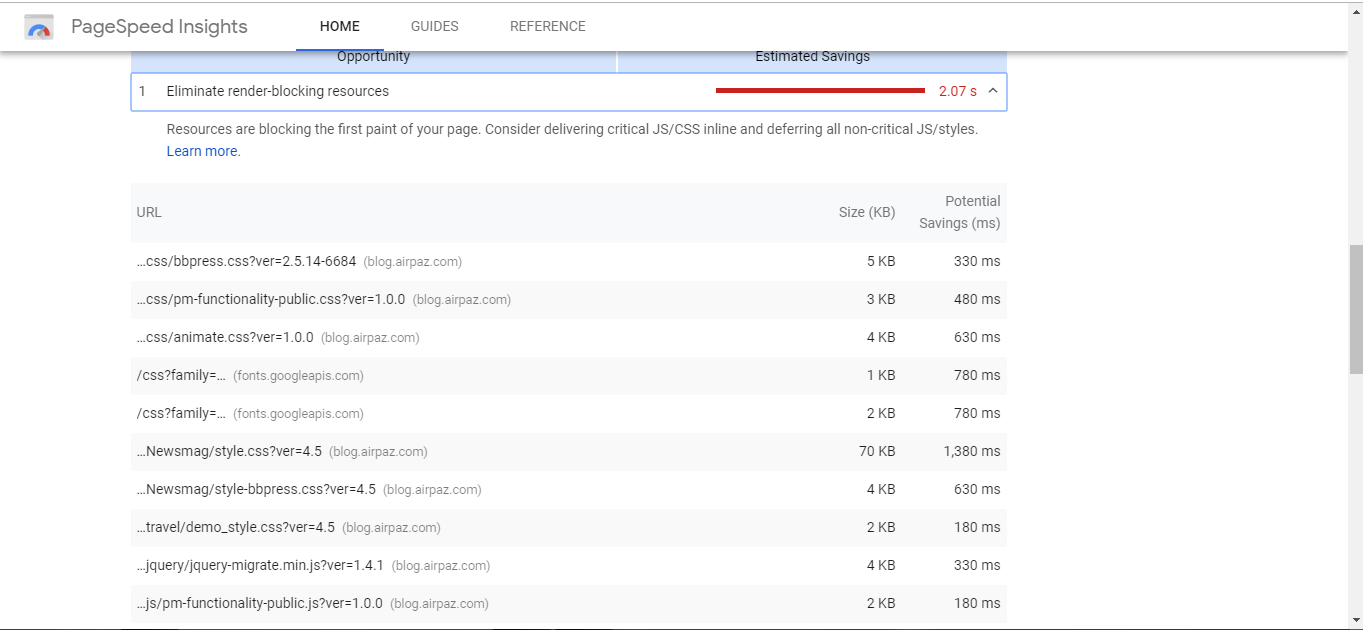
Some of the most time-consuming are from Newsmag, so I was wondering if there are any solution for this issue from you?
Thanks.
Catalin Hello itkhoj,
Please notice that the speed of your website depends on how well your site is optimized.
Notice that is not a simple task and if you do not have any experience in this regard you will do not bring good results for the theme. Also, notice that we have a speed optimization tutorial but this is addressed only to advanced users. So, if you follow the steps which are presented in this tutorial here -> https://forum.tagdiv.com/how-to-make-the-site-faster/ you can increase the page speed loading and if you are not aware of the steps in this regard, please consider hiring a freelancer/developer to help you because the speed optimization services are not covered by our support policy, as you can read here -> https://forum.tagdiv.com/support-policy-2/ Check our documentation here -> https://forum.tagdiv.com/requirements-for-newspaper/ regarding on dedicated server to fit our requirements.
Unfortunately, our theme does not have such an option to minify the style.css file and we cannot recommend any plugins with this functionality because is not tested with our theme. For minifying this file, we are using CloudFlare for our demo and works fine. If you want to read other views from our users, please check this topic -> https://forum.tagdiv.com/topic/tip-how-to-easily-minify-your-css-without-breaking-your-site/
Also, check all of your Ad Spots and if you have entered any suspicious code through them, remove all of them and check the results without them.
One of our top members here on the forum wrote his own optimization tutorial here:
https://forum.tagdiv.com/topic/tutorial-chriss-custom-optimizations-for-functions-php-etc/ and here -> https://www.infophilic.com/get-almost-100-pagespeed-newspaper-theme/
Basically, these are the theme requirements
– https://forum.tagdiv.com/requirements-for-newspaper/
Another useful guide for increasing the page speed can be found here -> https://kinsta.com/blog/google-pagespeed-insights/
Thanks for your understanding!
 Simion C.
 Be sure to regenerate first as mentioned in the guide, so the necessary thumbnails are created properly.
Once activated the mobile theme will take over. Each page, post etc will be served by it. So if you link to a page from your website, the mobile version will be served.
To achieve something like this would be like deactivating the mobile theme for specific pages, which is not possible with our plugin unfortunately.
A caching plugin would increase the loading speed significantly. We recommend the WP Super cache, this plugin works properly with the mobile theme as well
– https://forum.tagdiv.com/cache-plugin-install-and-configure/
The guide is older, some of the settings were renamed in the plugin, most are the same however
– https://www.screencast.com/t/O4bGofxq
Simion C. Hi,
You could install the mobile theme plugin and check again
– https://forum.tagdiv.com/the-mobile-theme/
This plugin is created for mobiles specifically, there should be a noticeable improvement in terms of loading speed. When active the website will not be the same as on desktop, you could make some tests. Read the guide and activate the plugin.
Using a mobile theme would be a solution to speed up the website. If not, the same content will be used across all devices.
 Jose
JoseHello,
I have detected a serious problem with td-booster on my website.
If I use an ad manager, such as “ad-inserter” or “advanced ads” plugin or “adrotate”, the ads go out of the box (container) and my overall score drops drastically.
If I deactivate the td-booster plugin, the ads look good (inside the box). The problem is, that td-booster helps me get a better score on my page, and I prefer to have it active.
Some examples, here I use the plugin td-booster + advanced ads

https://fotos.subefotos.com/21aac7829dcb815db8dc3cad65aae42ao.jpg

https://fotos.subefotos.com/a40822f8cfe5326840a4a0928688d2f3o.jpg
Now, I use the plugin td-booster and an ad from the ad manager of the newspapper theme (integrated).

https://fotos.subefotos.com/0f8380d07b33abce8194e8f1ca79d299o.jpg

https://fotos.subefotos.com/17ec00f67e08b9d564f307403691b232o.jpg
Conclusions
I’m sure my td-booster plugin is misconfigured.
This is my td-booster.php config: https://pastebin.com/wnvh8bnL
With the plugin “advanced ads” + “td-booster” activated, I performed a test modifying the “functions.php” file of the theme.(Siguiendo las instrucciones de esta guía: https://forum.tagdiv.com/how-to-make-the-site-faster/ )
These are the data provided by the theme: https://pastebin.com/MBED8Rgs
But I don’t know what else to do. I can’t locate the problem, nor do I know how to modify the td-booster file (which data I must add, remove or modify).
My programming knowledge is very limited. I’ve only gotten this far.
Can you please help me? What should I do to make the ad manager plugins as “advanced ads” work well next to “td-booster”?
Cheers, Jose
 4kfilme
Hello,
i get it why you implemented a “safety feature” into the speed boster plugin. But does that mean, i can only use 7 plugins you approved? If i use one third party plugin, i cant use it anymore and i have to live with the css and js blocking the rendering? Why not give the option to use the plugin on our own risk?
Is there a way to disable the “safety belt” for this plugin… sorry but i cant get my website to perform good on desktop and mobile, chause i’m (and i think pretty much everybody else) is using third party plugins. Especially if you run a news blog…
Best regards
Dominic
Simion C. Glad you sorted out some of the problems.
Besides installing the mobile theme plugin there would be no other solution to speed up the website on mobile.
The same page content will be loaded on mobile if the plugin is inactive, so using an average or low internet connection speed it will take more time to load everything
– https://www.screencast.com/t/3FdXZdxYPM
Also I see that there could be a problem with the thumbnails. Try to regenerate them with the plugin mentioned in this guide
– https://forum.tagdiv.com/thumbnails-fix-strange-looking-images-on-blocks/
Then edit the homepage and check what image sizes are used by the flex blocks
– https://www.screencast.com/t/eH79VV7j2
Use a lower or the lowest image size defined there. No point in loading big images for small modules. That should reduce the page size.
The analytics code for AMP has to be of this form in order for it to work properly
– https://www.screencast.com/t/vJ78X7rUL
There is a tooltip when the question mark is hovered.
 amrinder
 most of the problems are now been sorted, with your help
thank you so much
amp ads are working.
1. problem i am currently facing is mobile theme, and website loading speed on mobile and desktop
kindly help me improve that.
 designer
Good evening,
I did a test on my site with Google Audit, the extension of Google Chrome and among the possible things to do to speed up the website tells me that things attached in the image. What surprises me is the first entry “Defer offscreen images” where it marks me about 10 seconds.

If I open the voice it tells me inside: Consider lazy-loading offscreen and hidden images after all critical resources have finished loading to lower time to interactive. Learn more. “.
Should not lazy loading already be active? Why do you give me this report? Why does the site have these problems?

There are also other problematic voices, but this seems to me the most critical.
Can you tell me something?
This is the website: https://www.calabriamagnifica.it/
Thanks
Simion C. Hi,
I believe the Google test tool will simulate how the website will load on a medium tier mobile device, with an average internet connection. Having a mobile theme enabled will significantly improve this result.
Also having an AMP plugin active and serving AMP content through Google search result page will ensure quite fast loading speeds. Our mobile theme and AMP plugin can be active at the same time.
Thanks
Catalin Hello cucuteanu,
Unfortunately, please notice that we cannot provide support for speed optimization, sorry! The Speed Booster has been fully tested with the theme. We have our useful guide for website faster from here -> https://forum.tagdiv.com/how-to-make-the-site-faster/
Thanks for your understanding!
Calin Hi,
Please read The Ultimate Guide To Image Sizes for WordPress from here -> https://wphero.io/blog/ultimate-guide-wordpress-image-sizes/
For a higher website speed on mobile we do not recommend very large images, because that will take more time to full load the pages.
Thank you for your understanding.
Simion C. Hi,
So the website is loading slow? Check in the browser inspector console if there are any errors or resources that are not found (404), also test the website with online tools and see what can be improved.
There are some guides here in the forum regarding speed optimization, you could read them and try what is suggested
– https://forum.tagdiv.com/cache-plugin-install-and-configure/
– https://forum.tagdiv.com/how-to-make-the-site-faster/
– https://www.infophilic.com/get-almost-100-pagespeed-newspaper-theme/
– https://forum.tagdiv.com/topic/score-100100-pagespeed-with-newspaper-wordpress-theme/
– https://forum.tagdiv.com/topic/newspaper-theme-speedify-your-website/
– https://forum.tagdiv.com/topic/tutorial-chriss-custom-optimizations-for-functions-php-etc/
– https://forum.tagdiv.com/cloudflare-cdn/
Thanks
 unudadomain
 when i run a speedtest the favico.ico is the last file to load and there is a 1.6 second delay before it loads. I want to prevent or eliminate this from happening in order to improve my website loadtime.
Catalin Hello millennialsmentorship,
Provide your website URL so I can take a closer look at it and also, so I will be able to provide a more accurate response. Did you have some additional customizations through the code? Are you using the Speed Booster?
Thanks for your understanding!
 Vickydhumale
There is a delay while opening website menu through mobile. It’s not a speed issue. I can open other websites’ menu quickly.
Here is the link: http://herosfact.com
Please check from your end and give me resolution so that it would open in no time.
Calin Hi,
1. There is no settings in our theme for that, but you can follow some steps to do that.
Please read this-> https://www.shoutmeloud.com/how-to-remove-date-from-google-search-results.html
-> https://oscarmini.com/2014/04/how-to-remove-date-from-google-serp-snippets.html
2.Please notice that the speed of your website depends on how well your site is optimized.
Notice that is not a simple task and if you do not have any experience in this regard you will do not bring good results for the theme. Also, notice that we have a speed optimization tutorial but this is addressed only to advanced users. So, if you follow the steps which are presented in this tutorial here -> https://forum.tagdiv.com/how-to-make-the-site-faster/ you can increase the page speed loading and if you are not aware of the steps in this regard, please consider hiring a freelancer/developer to help you because the speed optimization services are not covered by our support policy, as you can read here -> https://forum.tagdiv.com/support-policy-2/ Check our documentation here -> https://forum.tagdiv.com/requirements-for-newspaper/ regarding on dedicated server to fit our requirements.
Unfortunately, our theme does not have such an option to minify the style.css file and we cannot recommend any plugins with this functionality because is not tested with our theme. For minifying this file, we are using CloudFlare for our demo and works fine. If you want to read other views from our users, please check this topic -> https://forum.tagdiv.com/topic/tip-how-to-easily-minify-your-css-without-breaking-your-site/
Also, check all of your Ad Spots and if you have entered any suspicious code through them, remove all of them and check the results without them.
One of our top members here on the forum wrote his own optimization tutorial here:
https://forum.tagdiv.com/topic/tutorial-chriss-custom-optimizations-for-functions-php-etc/ and here -> https://www.infophilic.com/get-almost-100-pagespeed-newspaper-theme/
Basically, these are the theme requirements
– https://forum.tagdiv.com/requirements-for-newspaper/
Another useful guide for increasing the page speed can be found here -> https://kinsta.com/blog/google-pagespeed-insights/
Thanks for your understanding!
 razvan162
I cant install other plugins because the homepage disable itself after a while…and become blank (the header and menu does not disapear). The newspaper theme cant work with no other plugin?
Now i have only askimet, WP Super Cache and Yoast Premium active (tagDiv plugins are active..except speed booster)….and the folowing plugins are not compatible
Compress JPEG & PNG images – disables the homepage after a while
Contact form – disables the site too
GDPR Cookie Consent – disables the homepage too
Jetpack – cant install….ERROR…and the whole website crashes
NextScripts: Social Networks Auto-Poster – disables the website homepage
WP User Avatar – disables the homepage
I must check my website every hour to see if my website is still alive. Sometimes the website disables after an hour…somethimes after a day or two!
the website is from scratch with 9.1 theme…so is not an upgrade isue.
What am i doing wrong? Why i cant install other plugins?
My website is http://www.myzone.ro and is working now BECAUSE I DISABLED ALL THE PLUGINS..a fact i don’t like!
 ashubais
 I request you or the Tagdiv community, Please make a simple step by step video tutorial for us. So, we can optimize our website and increase the speed, as the new update will provide slighter less speed than the older one.
 wilhard
Hi guys! I just bought your theme Newspaper 9 and installed your tech demo. Also I installed WP Super Cache and set it up in accordance with your instruction: https://forum.tagdiv.com/cache-plugin-install-and-configure/. Please, note that the backend interface of this plugin has changed and your instruction is not up-to-date(. Update your instruction ASAP, please.
The pingdom (London location) load speedtest of my original website: wilhard.ru is 2 seconds. The load speed of your demo on the same webhosting is 4 seconds (dev.wilhard.ru).
Also, please, check your the pagespeed of your demo website with Newspaper 9 –
https://developers.google.com/speed/pagespeed/insights/?url=https%3A%2F%2Fdemo.tagdiv.com%2Fnewspaper%2F
Even your demo (https://demo.tagdiv.com/newspaper/) is not optimized for speed and very very slow(((.
I read your article how to make the site faster (https://forum.tagdiv.com/how-to-make-the-site-faster/).
This article is written for those who doesn’t understand anything in development.
Guys, I like your theme and want to use it. Please, stop making exuses and stop telling us to hire a webdeveloper and optimize your theme for speed. It’s your job!
Optimize the empty demo theme so that it will give us 1 second load speed with a good webhosting. Please…
Please, do it ASAP. In 2-3 days. Optimize all your demo themes and show us it through Google Pagespeed (https://developers.google.com/speed/pagespeed/insights/?url=https%3A%2F%2Fdemo.tagdiv.com%2Fnewspaper%2F&tab=desktop)
Thank you in advance.
Hope for your understanding…
Catalin Hello Pawan Phayel,
Please notice that the speed of your website depends on how well your site is optimized.
Notice that is not a simple task and if you do not have any experience in this regard you will do not bring good results for the theme. Also, notice that we have a speed optimization tutorial but this is addressed only to advanced users. So, if you follow the steps which are presented in this tutorial here -> https://forum.tagdiv.com/how-to-make-the-site-faster/ you can increase the page speed loading and if you are not aware of the steps in this regard, please consider hiring a freelancer/developer to help you because the speed optimization services are not covered by our support policy, as you can read here -> https://forum.tagdiv.com/support-policy-2/ Check our documentation here -> https://forum.tagdiv.com/requirements-for-newspaper/ regarding on dedicated server to fit our requirements.
Unfortunately, our theme does not have such an option to minify the style.css file and we cannot recommend any plugins with this functionality because is not tested with our theme. For minifying this file, we are using CloudFlare for our demo and works fine. If you want to read other views from our users, please check this topic -> https://forum.tagdiv.com/topic/tip-how-to-easily-minify-your-css-without-breaking-your-site/
Also, check all of your Ad Spots and if you have entered any suspicious code through them, remove all of them and check the results without them.
One of our top members here on the forum wrote his own optimization tutorial here:
https://forum.tagdiv.com/topic/tutorial-chriss-custom-optimizations-for-functions-php-etc/ and here -> https://www.infophilic.com/get-almost-100-pagespeed-newspaper-theme/
Basically, these are the theme requirements
– https://forum.tagdiv.com/requirements-for-newspaper/
Another useful guide for increasing the page speed can be found here -> https://kinsta.com/blog/google-pagespeed-insights/
Thanks for your understanding!
