
- NewspapertagDiv AMP Plugin Tutorial
- NewspaperTrack Subscription Sources with Locker URL in Opt-In Builder
- NewspaperWP Rocket and Newspaper Theme: Optimization Guide
- NewspaperCredit System
- NewspaperIntroduction to CPT and ACF with Newspaper Theme
- NewspaperHow to edit modules for Flex Block X
- NewspaperHow to use the Posts List shortcode
- NewspaperUser review system
- NewspaperCustom Fields Support
- NewspaperHow to generate Facebook App ID
- NewspaperHow to insert a block inside the content of a post
- NewspaperModal Popup
- NewspaperPayPal Setup
- NewspaperLink Tracker
- NewspaperLockers
- NewspaperGeneral Options that May Interfere with the Newspaper Theme
- NewspaperAdd Cryptocurrency Price Ticker Widget
- NewspaperPosts Loop Element
- NewspaperThe Newspaper Mobile Theme: Introduction
- NewspaperAutoptimize Plugin – install and configuration
 brue
brue Thanks, i might be boring, but i really dunno how to explain it now. Let me try with picture.
So:
1. Multipurpose Wine theme with Style 1-Multipurpose selected
2. Topbar is turned off by default, and i don’t need it
3. Template by itself has option to turn Search and Social icons in the Main Menu
Picture:
https://i.imgur.com/Gm9PsVy.jpg
As it shows, Search is far right, and to the left is Social Icons placeholder (i have only FB)
Questions:
– How to place something in X part, left from Social Icons?
– How to do the same for mobile, again i guess in that same line i.e. Main Menu (in mobile it switch to that 3 classic horizontal lines for header menu, mobile logo and search on far right – so, i need it for example between logo and search… or is there some other visible solution)?
Mobile pic:
https://i.imgur.com/PqIut0t.jpg
 Bogdan B.
 Hello,
If the standard implementation will not work there could be special implementation required.
Maybe this will help.
https://www.ampproject.org/docs/reference/components/amp-instagram
Thanks.
 munvik
 Update: it shows following errors:
Uncaught SyntaxError: Unexpected token <
plugin.min.js?ver=4607-20180123:1 Deprecated TinyMCE API call: <target>.onNodeChange.add(..)
load-scripts.php?c=0&load[]=jquery-core,jquery-migrate,utils,moxiejs,plupload,jquery-ui-core,jquery-ui-widget,jquery-ui-mouse&ver=4.9.5:4 POST https://../wp-json/td-composer/do_job?tmp_jobId=0&tmp_blockUid=undefined&post_id=14592&uuid=2d8f434a-b1aa-2fd8-d368-b5124458f709 404 (Not Found)
send @ load-scripts.php?c=0&load[]=jquery-core,jquery-migrate,utils,moxiejs,plupload,jquery-ui-core,jquery-ui-widget,jquery-ui-mouse&ver=4.9.5:4
ajax @ load-scripts.php?c=0&load[]=jquery-core,jquery-migrate,utils,moxiejs,plupload,jquery-ui-core,jquery-ui-widget,jquery-ui-mouse&ver=4.9.5:4
addJob @ js_files_for_wrapper.min.js:21
getShortcodeRender @ js_files_for_wrapper.min.js:171
changeData @ js_files_for_wrapper.min.js:209
_moveDraggedElement @ js_files_for_wrapper.min.js:55
deactiveDraggedElement @ js_files_for_wrapper.min.js:36
(anonymous) @ js_files_for_wrapper.min.js:58
dispatch @ load-scripts.php?c=0&load[]=jquery-core,jquery-migrate,utils,moxiejs,plupload,jquery-ui-core,jquery-ui-widget,jquery-ui-mouse&ver=4.9.5:3
r.handle @ load-scripts.php?c=0&load[]=jquery-core,jquery-migrate,utils,moxiejs,plupload,jquery-ui-core,jquery-ui-widget,jquery-ui-mouse&ver=4.9.5:3
js_files_for_wp_admin.min.js:24 tdcJobManager.addJob – Error callback – textStatus: error errorThrown: Not Found
js_files_for_wp_admin.min.js:24 jobRequest {shortcode: “[vc_row][vc_column][/vc_column][/vc_row]“, columns: 1, jobId: 0, postId: “14592”, replyHtml: “”}
I have tried define ( ‘CONCATENATE_SCRIPTS’, true ); but same result. What to do
 Aline
AlineHello, I’m having trouble with the following: I would like no space between my first element and the menu, but I can’t find the right way to do it.
Right now, I found a compromise which only works by chance it seems – I take the demo called “Video News” and I am able to change the colour of the space between the menu and first element to the same background colour as the menu and the background of the element. With the other demos I tried, I always get a white space, which I can’t change.
In fact, what I really would like is no space at all, like in the demo called “Photography” for example. But when I use the Photography demo and replace the frong page by my own, there immediately comes a white space between the menu and the first element.
Could you help please?
 aditya58singh
Hi,
I am using AMP on my site. I have embedded code of Instagram and in AMP version it is not showing the images I have embedded on the site.
How to show the images of Instagram and other social media site in AMP
 bellendir
 Good afternoon. Pages with code are displayed in the search. For example, search: wd2 – pages with TG code appear.
https://cloud.mail.ru/public/CeKm/97MiYVoRq
How to hide pages from search or how to fix this error?
Добрый день. В поиске отображается страницы с кодом. Например поиск: wd2 – выходят станицы с кодом TG.
https://cloud.mail.ru/public/CeKm/97MiYVoRq
Как спрятать страницы из поиска или как по другому исправить эту ошибку?
 eduonix
Need to add url on Ajax Categories Dropdown & Want to show selected categories
 New_Door_Media
 Hi. I understand you can remove the review conditional replacing authoer and date..
though, was wondering if possible to add to conditional.
I would like the review stars to only show on Block Flex 1 and not show up on the other modules – just the name and date to appear on other modules that are not Block flex 1…I can tell you the modules I would like (or you can use another module as an example, I can take it from there)..
thanks in advance
 gabriel79
Dear,
please, why the Newsmag theme does not contain any important HTML5 tags and structural data such as for example:
<nav itemscope="itemscope" itemtype="http://schema.org/SiteNavigationElement"> main menu code </nav>
<header itemscope="itemscope" itemtype="https://schema.org/WPHeader"> code logo site </header>
<div class="td-pb-span4 td-main-sidebar" role="complementary" itemscope="itemscope" itemtype="http://schema.org/WPSideBar"> code sidebar </div>
Please, are these HTML5 tags and structural data important for SEO?
Do you advise me to include these elements in the theme? I am able to make these changes.
Thank you so much!
Gabriel
 skadmin
 i have same problem, is this down to facebooks clamp on data?
-
This reply was modified 8 years by
skadmin.
 James David
 https://ourbellalife.com/category/youtube/ as an example
the newest posts are at the bottom of the page where as my understanding is they’re normally at the top
 adrianstubbs
Hi, I recently installed your theme because of it’s supossed speed in loading. (http://ARRIBAELCAMPO.COM.MX) I have seen fast loading demos, but Upon installing and activating the theme it’self, I am net with the surprise that My site loads too slow (up to 3 minutes) or doesnt load at all.
I have deactivated all plugins to see if there are any differences, but the site still doesnt load. I am only using the pluggins recomended and no others.
¿What am I doing wrong? I realy need my site to work, and it’s why I bought this theme.
 intelweb
Hello again! I would like to add more ads inside the categories,is that possible? for example at the top of each category and inline the posts of each category. Or if there is a way to change the block posts that show at the top of each category with advertisment banners.another solution i thought , if i make its category a new page….but i dont know if it is the right way to show my post categories.
Thanks again.
 jukely
Hi,
We’re currently having an issue on our site where the first paragraph and the second paragraph of every post does not have a normal line break between them. Here’s an example: http://www.fouroverfour.jukely.com/culture/electronic-music-genres/
Is there some way we can adjust the post template so there is a regular break between those paragraphs?
Thanks!
 Simion C.
 Hi,
The AMP plugin provided in the theme package does not have a menu, this is similar to Yoast SEO website which is leading in SEO solutions
– https://yoast.com/social-media-optimization-with-yoast-seo/amp/
A menu might be introduced in the future if needed.
There were some issues with the initial AMP plugin release, but they were all fixed. SO please make sure that you are using the latest plugin version (1.1)
We could take a look at a post where this issue is present, please provide a link to it.
Thanks
Simion C. Yes it will, the file from the child theme will be used instead of the main theme file. All the modules can be customized through a child theme.
But be sure to recreate the path to the module file in the child theme, not just copy it in the child theme folder
Example – https://www.screencast.com/t/w2DwDOBfL1bn
Simion C. Hi,
Add custom links only if you need them, for example if you want a specific menu item to direct to a custom location or adress.
Categories should be added as categories
– https://www.screencast.com/t/zhEd1ao3GB3a
Thanks
 Post2Post
Hi,
We have had problems with the WooCommerce plugin for a while now. When installed, for some reason the mobile menu stops working. We have removed all plugins and narrowed it down to the WooCommerce plugin.
Also, the TagDiv composer does not load on our homepage, we were getting a spinning wheel for eternity. We this morning updated the theme to the latest version & now the Composer just leads us toa blank page.
Have posted about these previously, as you may have seen, but gotten 0 reponse.
Help would be much appreciated,
Thanks
 yuccarichard
Hi,
Anyone else has this issue? Meaning the AMP posts are missing the Menu on top, just showing a logo and the search icon
I’m getting this in console when previewing post with the /amp/ in the end:
The resource https://3p.ampproject.net/1522422854768/f.js was preloaded using link preload but not used within a few seconds from the window’s load event. Please make sure it Please make sure it has an appropriate as value and it is preloaded intentionally.
The resource https://pagead2.googlesyndication.com/pagead/js/adsbygoogle.js was preloaded using link preload but not used within a few seconds from the window’s load event. Please make sure it Please make sure it has an appropriate as value and it is preloaded intentionally.
any ideas?
 kaferacers
 Thankyou for your response,
How do I find out what module is which?
Example… screenshot attached… I want to change the weight of “This Thailand workshop is making big moves” – How do I find which module this is to change the individual weight?
Lewis
Bogdan B. Hello,
Yes, the implementation is on the way and the new update will fix the review system for amp.
Thank you!
Bogdan B. Hello,
Please contact your host and ask about blacklisted plugins. Here is an example from godaddy: https://uk.godaddy.com/help/blacklisted-plugins-8964
Thank you!
Bogdan B. Hello,
The simplest way to go about it is to make a redirect in your htaccess simply redirecting the link, not changing the code for it. The authors block get the link automatically for each author in particular. You cannot change the code for specific url’s for each of the authors. You cannot alter the function to link to a particular url as all authors will link to that url afterwards. As an alternative, you can use a different element to show your authors that allows you to add a manual link to your author url. Try for example a column content element.
Thanks.
Simion C. Hi,
From what I can see, the AMP validator detects an invalid link property
– https://www.screencast.com/t/KxMMenhItgc
This points to the sub-footer text here
– https://www.screencast.com/t/oPpfToLFpe
Please chnage the HTML you entered there with the valid link property (“_blank”)
– https://www.w3schools.com/tags/att_a_target.asp
Then there will not be invalid HTML detected by the AMP validator in all those posts.
Thanks
 oscariribe
 Hello again Bogdan, thanks for your quickly response.
I’ve did what u recommended and definitely doesn’t work.
This is an screenshot:
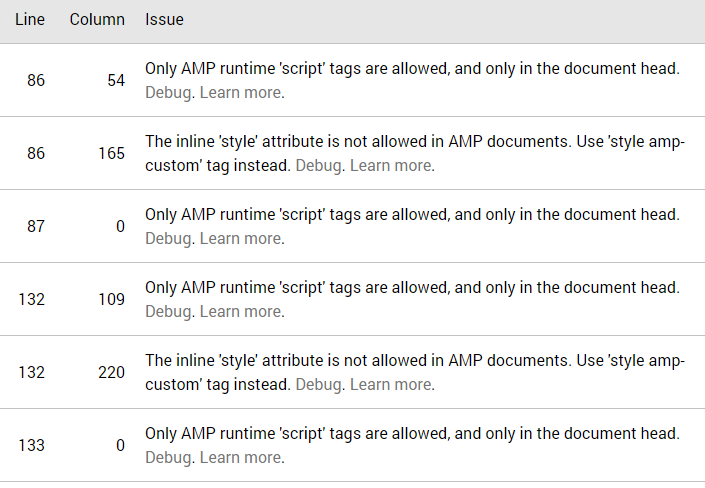
I hope it is useful for you.
-
This reply was modified 8 years by
oscariribe.


