
- NewspapertagDiv AMP Plugin Tutorial
- NewspaperTrack Subscription Sources with Locker URL in Opt-In Builder
- NewspaperWP Rocket and Newspaper Theme: Optimization Guide
- NewspaperCredit System
- NewspaperIntroduction to CPT and ACF with Newspaper Theme
- NewspaperHow to edit modules for Flex Block X
- NewspaperHow to use the Posts List shortcode
- NewspaperUser review system
- NewspaperCustom Fields Support
- NewspaperHow to generate Facebook App ID
- NewspaperHow to insert a block inside the content of a post
- NewspaperModal Popup
- NewspaperPayPal Setup
- NewspaperLink Tracker
- NewspaperLockers
- NewspaperGeneral Options that May Interfere with the Newspaper Theme
- NewspaperAdd Cryptocurrency Price Ticker Widget
- NewspaperPosts Loop Element
- NewspaperThe Newspaper Mobile Theme: Introduction
- NewspaperAutoptimize Plugin – install and configuration
 alexcampos
 I can’t use the admin panel because it has a lot of errors it seams js scripts are referencing non existing objects, no upload, no save, no buttons
Uncaught ReferenceError: tdWpAdminPanelBoxNonce is not defined

Uncaught TypeError: Cannot read property 'editor' of undefined
/wp-admin/load-scripts.php?c=0&load%5B%5D=jquery-core,jquery-migrate,jquery-ui-core,utils,moxiejs,plupload,jquery-ui-widget,jquery-ui-mouse&ver=4.9.1
 EquipaRefrigeracao
 Ohh, I’ve realized that really the problem is with the Newsmag theme, because when I try other theme, the images are showed normally (like in the attached image).
Help me, please, my clients are complaining that they can not see the images …
Thank you

EquipaRefrigeracaoHello,
I hope you’re doing good.
I’m with a great problem on my website: the images are not being displayed in the posts, and others things like submenu, search field not too. Sometimes they show up, sometimes they do not.
I think it could be a problem with CSS or JavaScript on the Newsmag theme, since I tried everything: I optimized the images, solved SSL problems, optimized the database, try it on other browsers, flushed browser cache, but so far nothing solved my problem.
This is a post example: https://www.equiparrefrigeracao.com.br/camara-fria-peixe/
Could you help me? See the image attached, please.
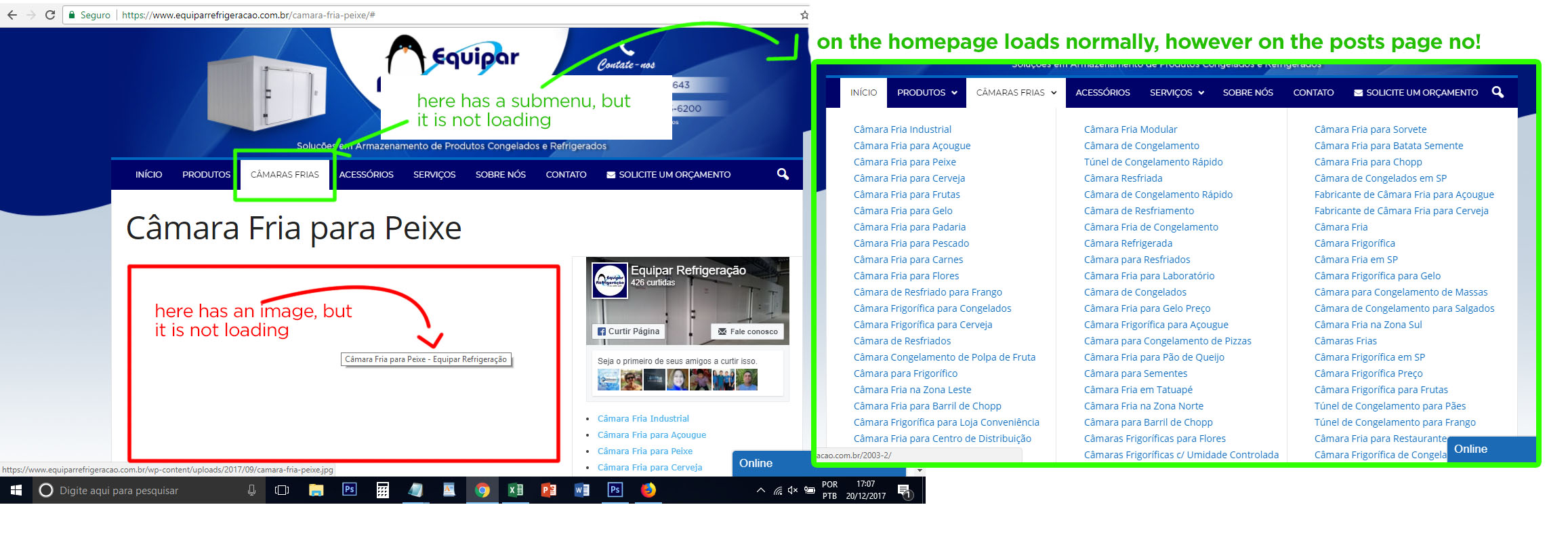
Thank you
 johnfelipe
For example this page http://www.joaconoticias.com/category/bogota/, i need put in first place last news in page 12, that is possible?
 Simion C.
 Hi,
Very rarely indeed, it has finally happened to me once in all my tests, by the search method. The image appeared after refreshing the page however. Accessing the pages through the menu always worked properly.
I really could not say what could be causing this unusual issue, since there are no errors to follow on the pages. I did not find any similar topics online either, except maybe this one but it may not be so related
– https://discussions.apple.com/thread/6563683?start=0&tstart=0
Thanks
 MrOrsh
 I have now done some more extensive testing. The issue is never presented on android browsers, only iPhone.
I have verified the issue on two other iPhones that has never been connected to either my WiFi or been to the page it self.
It does not happen all the time. Far from it even. However it seems easier to replicate when I go to the homepage (https://www.baresolutions.se) and select the menu followed by “Behandlingar & Priser” then select “Ögonbryn & Fransar”.
I also created a live test page (called “test”). This can be found if you search for “test” using the built in search function on the page.
Accessing the ögonbryn… and test-pages directly seems to produce the issue very rarely, however accessing them through either the menu or search-function makes issue appear.
It also helps to close the current tab in between each try and also switch to private/incognito-mode between each try.
Sorry about being so persistent about this, but it is annoying the crap out of me that I can’t solve it :-/
 regio-online
Hi there,
I’m struggling to find an answer to the following. I have created a banner ad for a client and placed it on the static homepage of our newssite. I used Tag Div Composer and the block Single Image to place the ad on the desired place on that page.
The problem I have is that my image is not responsive for all devices. If I want to place it as a code in the Ads section I found the code to use, but can’t find other sizes for that image in the upload folder. Besides that, how do I make sure that when someone clicks on the ad, it will link to the site of my advertiser? I don’t see an example for that in the code given on the forum in the non-Adsense ads section.
So to put it simple: I have a selfmade image/banner ad, I want to place it with tag div composer on any place I prefer on my (home)pages and I want the image to be responsive when showing on a tablet or mobile phone. Is this possible?
Thanks in advance for any help you can give!
Simion C. Hi,
The post templates can be customized through the child theme
– https://forum.tagdiv.com/the-child-theme-support-tutorial/
The difficult part would be to create this functionality for the featured image, if even possible. For example how would you set the link dynamically for each post image, I believe this would be highly difficult.
Thanks
 Bogdan B.
 The amp page has it;s own layout. It will not be the same as the theme layout. We are currently working on AMP implementation with our theme for future updates so in the near future, there will be amp support available. Until such time, the plugin is the only alternative.
Thank you!
 antoniocarvajal
Hi, I would like to know how use the shadow effect on Header ‘Big Grid 1’ in this example:
https://demo.tagdiv.com/newspaper_local_news/
Thank you in advance
 dragoerny
Hi.
Why do i get this “grey” square in the buttom of each post. Why is it there and how to remove.
Example.
http://dragoernyheder.dk/2017/11/22/jul-i-dragor-2/
Password : dragoer
Thanks.
Thomas
 pikirk
Hi,
yesterday I installed the Newspaper-theme in WordPress (4.9.1) and chose the demo “Travel Blog” and adapted it for my content today. I have some problems now, that I can not solve of myself.
1. I have switched all text colors to dark gray (#434242) under theme panel/theme color. However, some texts remain in black – for example on the homepage the headlines of the current posts.
2. Some headings of the default sidebar (for example in the widget adbox) are not left-aligned. Instead, the headings are in the middle. How can I adjust this uniformly?
3. In the footer the headlines of the widgets are slightly indented and do not start flush with the text. How can I correct this?
If necessary, I can provide screenshots. I am looking forward to a quick response.
Best regards, Alex
johnfelipe i am superuser in all my network, but i have one administrator user in one of my sites, but when he change something in menu or add new one HOME menu "<i class="icon-home"></i>" change to <i>..</i>, i need solve this becuase i have not time for change to “<i class=”icon-home”></i>” each time of my admin user change something.
For example me like superuser of all network i havent that error, only admin of each single site.
 mimmoarechi
 Done (without GD library installation because it’s too hard for me).
At this moment images in blocks seem to be perfect. Thank you.
But in header menu image I had problems: for example Demo Default Newspaper, header menu, Fashion (and featured images).
I had problems because I would use factories logoes as featured images. I resized original logoes to 5cmx4cm, obviously I lose original logoes proportions. How can I do?
 umoetteumoh01
 Does the Automattic plugin use TagDiv themes responsive design when amp activated?
 simchris
 With basic usage, using most AMP plugins including the ‘official’ one from Automattic, the video has to actually be in the post meta. Or, you need to use a plugin that attaches it properly to the footer hook in AMP template with proper AMP format for video.
Generally videos “outside” the post meta won’t show up in the AMP page.
And of course, you can check this by simply going to your amp page in browser with the /amp/ endpoint.
 Edward
 https://forum.tagdiv.com/the-child-theme-support-tutorial/
A sample child theme (with style.css and functions.php files) is available in the /code/ folder in the package that you downloaded form Themeforest:

 Catalin
 Hello,
I have inspected your Adsense and it seems that code is not delivered as expected. Please ensure that you have followed all these steps from here -> https://support.google.com/adsense/answer/7036617?hl=en&utm_source=aso&utm_medium=link&utm_campaign=ww-ww-et-asfe_
Thanks.
Simion C. Hi,
The plugin seems to support YouTube and Facebook video embeds from what I can see. You could ask on the plugin support forum if this does not work for you. Amp pages will be handled by the plugin, so it would depend on the plugin capabilities.
Thanks
Simion C. Hi,
You could do something like this for example
– https://www.screencast.com/t/hdlCMpSnB4D
.td_block_21 .td-read-more {

float: right;

}
Or maybe try something like this – https://www.screencast.com/t/9efIkEccqnV
.td_block_21 .td-read-more {

position: absolute;

top: 0;

}
Thanks
 chadsrl
Good day…
I am having bad “Google PageSpeed” test results for my site http://www.adelturk.com (Result: https://developers.google.com/speed/pagespeed/insights/?hl=eng&%3Furl=adelturk.com&url=adelturk.com )
I did disable all plugins that are not coming with original Newspaper theme to avoid possible slow time. So it is only 4 plugins active which are came with theme ( tagDiv Composer | tagDiv Multi-Purpose | WPBakery Page Builder )
Would you please take a look at the result and tell me why the results are not okay. It shows %89 rate for
https://demo.tagdiv.com/newspaper/ here >> https://developers.google.com/speed/pagespeed/insights/?hl=TR&url=https%3A%2F%2Fdemo.tagdiv.com%2Fnewspaper%2F&tab=mobile
Regards…
 Mayank Kapahi
Any help related to category page.
Suppose we have a main category Parent and its sub categories child, test and xyz.
Now when user click on main category page, it mix up with parent and child category post but i want to show it like example below
Category Page :
Main Category Heading
Sub Category1 Heading and post below
Sub Category2 and post below
Sub Category 3 Heading and posts
and so on
Simion C. Hi,
Those images are added by the multi-purpose plugin, they are default placeholders used by some elements. They should not be an inconvenience for you. For example this element uses one of those images
– https://www.screencast.com/t/5KRwmrRBB0P
Thanks
 gilean
Hi guys, i’m using template n.9 and i put the youtube url link on the right side of the post in the video texture. So doing in my amp page i cannot see video, and Search console gives me a warning. i’m using this plugin https://wordpress.org/plugins/accelerated-mobile-pages/ to show amp pages.
 PedroFumero
I really start with this theme, I try to change primary color of demo “fitness blog”, but in some place this not change, by example in home -> posts (title hover) this still having same color of demo. How can I do change all colors of demo?
