
- NewspapertagDiv AMP Plugin Tutorial
- NewspaperTrack Subscription Sources with Locker URL in Opt-In Builder
- NewspaperWP Rocket and Newspaper Theme: Optimization Guide
- NewspaperCredit System
- NewspaperIntroduction to CPT and ACF with Newspaper Theme
- NewspaperHow to edit modules for Flex Block X
- NewspaperHow to use the Posts List shortcode
- NewspaperUser review system
- NewspaperCustom Fields Support
- NewspaperHow to generate Facebook App ID
- NewspaperHow to insert a block inside the content of a post
- NewspaperModal Popup
- NewspaperPayPal Setup
- NewspaperLink Tracker
- NewspaperLockers
- NewspaperGeneral Options that May Interfere with the Newspaper Theme
- NewspaperAdd Cryptocurrency Price Ticker Widget
- NewspaperPosts Loop Element
- NewspaperThe Newspaper Mobile Theme: Introduction
- NewspaperAutoptimize Plugin – install and configuration
 rugosity
When I add my social networks in either the Theme panel or on individual users the link on the Author Panel, footer and top bar will use my website URl instead of the social media website. For example: http://www.mywebsite.com/mytwitter instead of http://www.twitter.com/mytwitter
Help.
 Hector
Please add wpml switch to the “Theme”, the default switch shown with bad with “newsmag”
Example In This theme : http://3clicks.bringthepixel.com/
Screenshot: 
This is the actual switch, it is very ugly
Screenshot: 
It would be very useful, for user with sites in different languages
thanks
 doucare1971
 Also, forgot to say that images are a factor to large loading speeds too, and people ignore the fact that keeping the images around the exact same size as the others on the website would help and keep them lower than 1080p size. Most of mine are 1024 x 576. few are tiny bit bigger, but that was before I did the 1024 x 576.
Sorry, but cloudflare is free and paid. Not all paid. I did not say to use WP Rocket either, I said I used it. That means as an example use a caching plugin. I like how my words get twisted easily. The point is saving money, but you took it as paying money instead.
Not trying to be rude, but experts do not know everything and can’t fix everything when paying them either, is another point.
-
This reply was modified 11 years by
doucare1971.
-
This reply was modified 11 years by
 simchris
 Well “page loading time” is only one element of optimization; there is also Google’s PageSpeed which can impact ranking for mobile users and how well your site will be shown in SERPS. That is one of the main reasons to “optimize” a site — “speed loading” is one aspect while “speed rating” is another. So, obviously WP Rocket and Cloudflare help by re-writing pages for clients, but not everybody wants to pay for those services.
For example my business site has a UX score of 100/100. Desktop 97/100. Mobile 96/100. Avg. page load 1.2 sec with https and no CDN or caching plugin on top. That matters. While various solutions exist, DIY, outsource, or paid service to rewrite pages dynamically — one needs to do something.
So, obviously folks need to research what fits their needs the best.
All great info in the thread as I’m sure the newbies will find it of interest. 🙂
 makeshiftwings
I’m trying to control the visibility of menu items for my Forums. For example, if people are logged in, I don’t want them shown a “Log In” link in the menu.
There are quite a few plugins that do this but every one I try doesn’t work. One of them “If Menu” (https://wordpress.org/plugins/if-menu/) actually says there is a conflict with another plugin so it is disabled.
I don’t believe I have any plugins that are affecting menu visibility. Is this something to do with the way Newspaper menus are setup?
Thanks,
 emanuelsrivero
 Look to this images too: http://pt-br.tinypic.com/view.php?pic=8xk5dv&s=8#.Vc9m9vlViko
http://pt-br.tinypic.com/r/2ihxlxt/8
simchris Don’t change compression in the functions.php file; don’t use external optimization systems like Jetpack or paid services which alter the images. The default compression for images in WP is 90%. It only changes if you use some application or other setting which might change that.
Best way to keep images sharp on retina, as we do with the Newsmag theme for our sites (I use my iPad AIR and iPhone 6 to check everything we do), is to upload images “at size” for the layout template you’re actually using. On Newsmag, for example, we do all our images as 640xXX fully optimized in Photoshop, and then those scale perfectly as if I enlarge something (rarely) it gets a little softer; they scale down perfectly for retina as they become more “dense” when seen at 1/2 size so effectively have twice the density, which works perfectly for retina.
For retina/4K desktops, that is a whole different story.
emanuelsriveroHello, i’m here again
we’r having some problems with the template! Here you can see what happen: http://pt-br.tinypic.com/view.php?pic=8xk5dv&s=8#.Vc9m9vlViko
Sometimes de issue dissapear, but hours late it came back… This are happening in homepage too! Do u know what problem is that? Sometimes all the design is working and sometimes isnt.
I need my template working very well!
Waiting for u guys.
Thanks
makeshiftwings Thanks for the reply.
Another two questions I have:
1. Will I have to recustomize the theme since, as you say, “it’s like a completely new theme.” For example, all of my settings already set in the Theme Settings section… Will those stay? Colors? Post type settings? Favicon? Etc.
2. Can I update to the latest version of WordPress (4.2.4) with the current version of Newspaper I’m running (4.6.1)? I know it’s important to keep up to date with the latest version of WordPress but that becomes difficult when you also need to go through the process of updating the theme every time.
Thanks,
 Aedin84
Hey,
So I’m in love with the video post format (Style 11) for the Newspaper theme and I want to emulate it for gallery purposes using the TagDiv Slider Gallery setting. I know how to tweak files and custom CSS, etc, but my problem is I don’t know what files to edit in order for the “theme panel” and “add/edit post” function to allow me you to change the style to one other than the default style through style 11.
To recap/be more clearer: I’ve created duplicates of style 11 and called them style 12 (single_template_12.php and loop-single-12.php), but before I begin designing/coding I want to be able to call the post format like so: 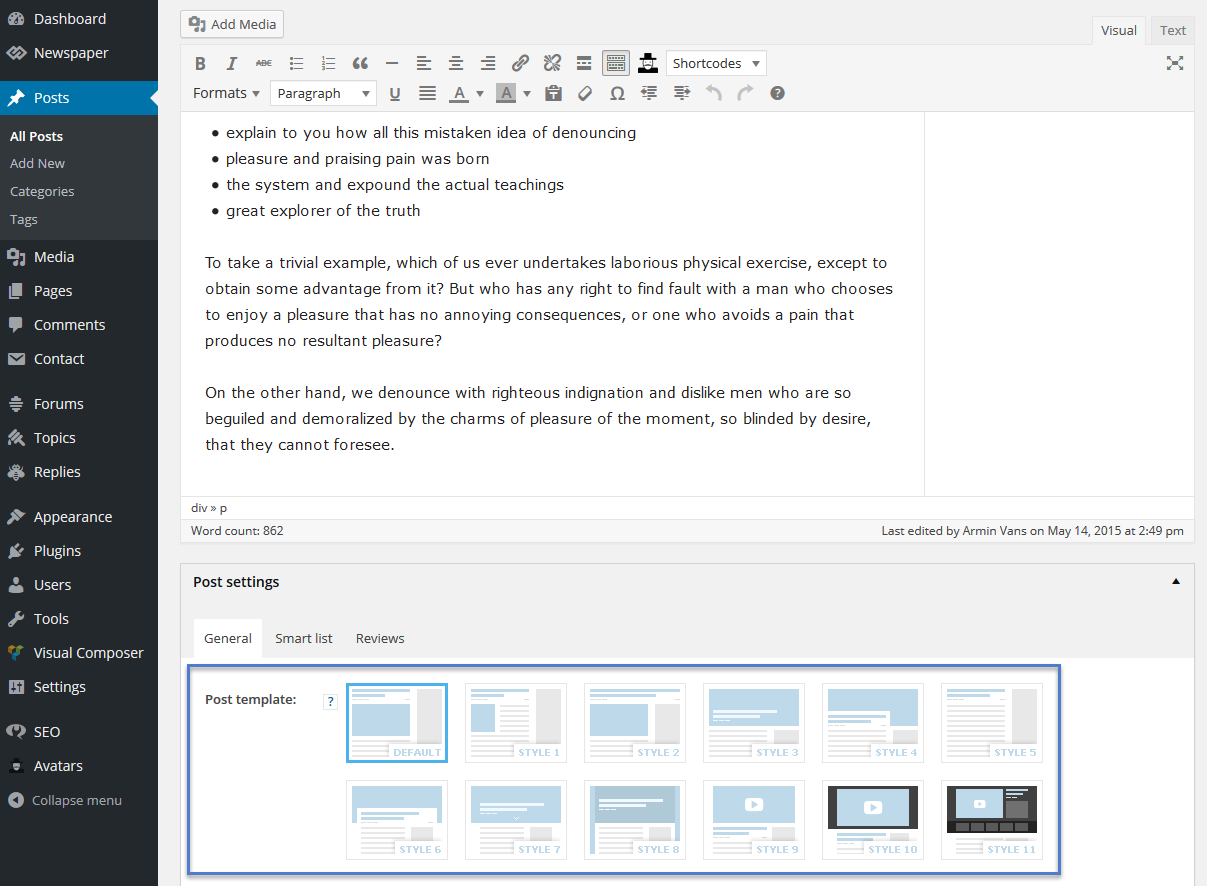
Thanks in advance for any/all help provided
 dportener
 It worked!
And even better, rather than typing in the specific URL, I simply added the &rel=0 to the code:
‘?feature=oembed&wmode=opaque&vq=hd720&rel=0’
So it now works for ALL videos.
Thanks you!
David
simchris Note that some of the stuff in my functions.php list may not apply to you, for example if not using YOAST SEO plugin, you’d not need the code there. If you’re using Visual Composer for anything other than home page, you would likely not use the visual composer stuff at bottom.
Basic issues with editing functions.php are
a) edit with a true text editor, like textpad, BBEdit, or other programmer tool, *NOT* a word processor; and make sure if using Unix, you save with unix line breaks; with Windows server, you may need to save with Windows line breaks
b) make sure you don’t break end of the file — meaning, some functions.php files have a closing ?> bracket, some don’t — obviously you should put code INSIDE the closing php bracket if there is one, but *NOT* inside another query bracket — so good to make sure you’re putting it in the right place at the end of the file, but not outside a closing bracket for the file, but not inside closing bracket for another function.
c) make sure you don’t have a “service” which is trying to do the exact same things, through a dynamic re-write — meaning, if you have some kind of aggressive service re-writing your pages to remove the version numbers on end of files, my list might conflict.
My lineup of optimizations work perfectly with mod_pagespeed (e.g., comment removal and indent removal, etc.), Apache/Linux servers, current version of WP, tagdiv booster framework, YOAST SEO, and mod_SPDY.
Like anything — always keep backup, and revert back if any change to ANYTHING you do does not work as expected.
And use common sense — if you have “allow pingbacks” turned *on* in your WP admin panel — you shouldn’t use my function to turn that off on the backend 🙂
 ondesyn
Hi There,
How can i specify where the smart side bars stop/stick? for example I would like side bar to stop so that my advert is shown for longer.
The points at which the sidebars stop/stick seems to be inconstant.
thanks
 Alin [tagDiv]
 Hi,
The entire top-bar meaning menu, social icons, sign in wigdet can be displayed on mobile device but it will not look fine. Also you have to many menu items – http://screencast.com/t/TXZeKqUbxqyY so if you want to show the menu you will have to customize it(smaller fonts, space between items) and use just few items. For example – http://screencast.com/t/dy7Fd7ZD
@media (max-width: 767px) {

.td-header-top-menu-full .td-header-sp-top-menu {

display: block !important;

}

.td-header-top-menu-full {

display: block !important;

}

.td-header-sp-top-widget {

display: none !important;

}

.top-header-menu  li  a {

font-size: 10px;

margin-right: 8px;

}

}
Hope this helps!
 drFabian
 12. Thanks! But what about the distance between the big grid and “Latest AR & VR News”? http://data-reality.com/
 dulaman
Hallo,
I have a problem in the header of all my post pages: an unwished scrollbar appears to the left next to the Twitter icon. What is this scrollbar and how can I get rid of it?
You can see a sample here: http://novafantasia.com/arquivos/12923
But it’s common to all the other pages with a Tweeter icon.
Regards
Alin [tagDiv] Hi,
I’m not sure why you have this issue, maybe you have created before another page called Pictures, usually then should appear like in your example url/pictures-2. I don’t believe that it is related to the gallery title.
Regarding the second issue, the modal feature on was not designed also for pages, sorry! It should work for gallery(on page) because it has a specific code to open image in lightbox.
Thanks!
 now4dw
Good morning Team TagDiv,
We have put a lot of time into migrating from our existing theme to Newspaper only to discover this morning that the top menu does not display on mobile – a critical issue for us:(
My site is a multi-site with six sub.sites, each addressing a particular sub-set of our audience. When displayed in any mobile device with a width of 770px or less, the top header menu is lost.
I searched the forum and found this post:
https://forum.tagdiv.com/topic/top-bar-not-showing-on-mobile/
We then tried the suggestions in that without success.
We then manually added the top header content to the functions.php file (see http://ideas2live4.com) but that is a very poor solution as it results in a menu 500 metres deep. For example, one site – http://architecture.ideas2live4.com has a top header menu to the seven sites plus 8 categories in the main header menu with 15 more categories in the drop downs. And we have still only migrated less than half our content!
Is there a more elegant solution? I truly love this theme but this is a huge hurdle.
Thanks for your assistance.
David Wilks
 TVDinner
Not sure how to fix this one and we have been trying.
We have been trying to add an installed widget to the front main page of the site.
The widget is available on the other pages of the site, but not when trying to add it to the front page.
The widget is the Feedburner Form widget. Again, it shows up with no issues on the Widget Admin screen and on ALL pages inside the site. The ONLY place it does not show up is when trying to add it to the front PAGE and editing the front page with the Visual editor like normal. It does not show as an option to add.
Here is an example showing the problem –

Help?
 alfonso
Hi Guys,
great theme, congratulations from Italy!
We have a questions: we create 1 page and 1 category with the same slug.
Example:
(page) http://www.example.com/provapage/prova
(article) http://www.example.com/provacategory/prova
So, when we visit http://www.example.com/provacategory/prova wordpress redirect (301) the url to http://www.example.com/provapage/prova.
Is a WordPress or Newspaper setting?
Is a bug?
Thanks a lot!
 szysz
szyszThe speed of my website is a tragedy in which may lie the problem ??
drFabian 12. Well, I removed the h1 on the front page, because it looks too ugly :/ Do you know how I could reduce the distance between the big grid and the menu, and the big grid and “Latest AR & VR News”? I would like it to have the same distance as “Latest AR & VR News” to the image below (looks like 10px?).
 servitium
 hi,
Thank you for your message
Unfortunately, there is still a problem.
Example http://www.test.androidtech.pl/aktualnosci/czy-tak-wyglada-galaxy-note-5/
What I did:
-I turned off all plugins except of Visual Composer
-I removed and re-installed the Visual Composer
-I removed and re-installed the theme Newspaper
-I cleaned the cache in Firefox
If you want, I will send you access to my test site?
 wmdein
Hi,
When creating an image gallery on a page called for example Pictures and giving the gallery title the same name, the gallery becomes url/pictures and the page becomes url/pictures-2. Is this what is supposed to happen or ..?
Also I have a lot of trouble with modal images on pages, I’ve turned them on but it keeps opening in a new tab.
Thanks in advance for your answer.
Alin [tagDiv] Hi,
The images used in the tagdiv gallery are not stretched or cropped like the featured images on modules. There is used the full image, it is just resized(but not enlarged) to fit into container. For example this is container size – http://screencast.com/t/nEO9LQ3tt0 and this is image size – http://screencast.com/t/hnMeyYxEMDN and a smaller image – http://screencast.com/t/CFz1ffkUpsGp You can check our demo to see this – http://demo.tagdiv.com/newspaper/td-post-aston-villa-beat-liverpool-to-join-arsenal-in-the-fa-cup-final/
Please provide more details if this is not what you mean, also provide a link!
Hope this helps!
-
This reply was modified 11 years by Alin [tagDiv].
