
- NewspapertagDiv AMP Plugin Tutorial
- NewspaperTrack Subscription Sources with Locker URL in Opt-In Builder
- NewspaperWP Rocket and Newspaper Theme: Optimization Guide
- NewspaperCredit System
- NewspaperIntroduction to CPT and ACF with Newspaper Theme
- NewspaperHow to edit modules for Flex Block X
- NewspaperHow to use the Posts List shortcode
- NewspaperUser review system
- NewspaperCustom Fields Support
- NewspaperHow to generate Facebook App ID
- NewspaperHow to insert a block inside the content of a post
- NewspaperModal Popup
- NewspaperPayPal Setup
- NewspaperLink Tracker
- NewspaperLockers
- NewspaperGeneral Options that May Interfere with the Newspaper Theme
- NewspaperAdd Cryptocurrency Price Ticker Widget
- NewspaperPosts Loop Element
- NewspaperThe Newspaper Mobile Theme: Introduction
- NewspaperAutoptimize Plugin – install and configuration
 RAJDEEP DAS
Suddenly after updating Newspaper theme with it’s plugins to 10.3.8, my all AMP pages got deindexed. The Google AMP validator and AMP Project Validator showing many issues.
Also, the AMP menu is missing from WP Dashboard when TagDiv Mobile+AMP plugin both are active.
Something wrong with AMP with this update. Kindly check.
 greenplanner
 sorry I was using the wrong amp code…
greenplanner Calin, for the AMP pages I did as you suggested but the adv isn’t showing
all was fine before applying the mobile theme
instead adv on the mobile theme (not AMP) is working fine
how can I fix it?
 doddsvalue
Hello
Images and post share element on my website is not getting displayed while the amp option remains active.
 inqusitive-stha
 Hi,
That issue seems to be fixed, but now it shows two new errors on the google search console. Here is the link to that https://search.google.com/search-console/amp/drilldown?resource_id=https%3A%2F%2Fwww.noobietech.com%2F&item_key=GgQIGRAD&utm_source=wnc_10030322&utm_medium=gamma&utm_campaign=wnc_10030322&utm_content=msg_100058679&hl=en&sharing_key=_ugkguk1qGlVsiOb-q-KaA
 r1kay
r1kayHi,
My ad network requires me to insert scripts to the header, but the header scripts are different for each post template. We can’t load both scripts from the theme panel, because that will conflict with their ad servers. We use 2 tagdiv composer post templates and I noticed they both have some kind of template id in the body class, for example: tdb_template_17454. Is it possible to get the template id with the function get_page_template()? If this would work, the next question would be to what header.php file I should add the function? As mentioned we use the tagdiv composer so the header.php file in the theme folder doens’t work.
Thanks in advance!
 Rizla4i
 For example Category page – there is no any settings in theme panel for stretching category page and i cant stretch row in builder for that page as well.
 vitaincamper
Hi, i’ve a custom post type “eventi” with a custom taxonomy “categoria-eventi”;
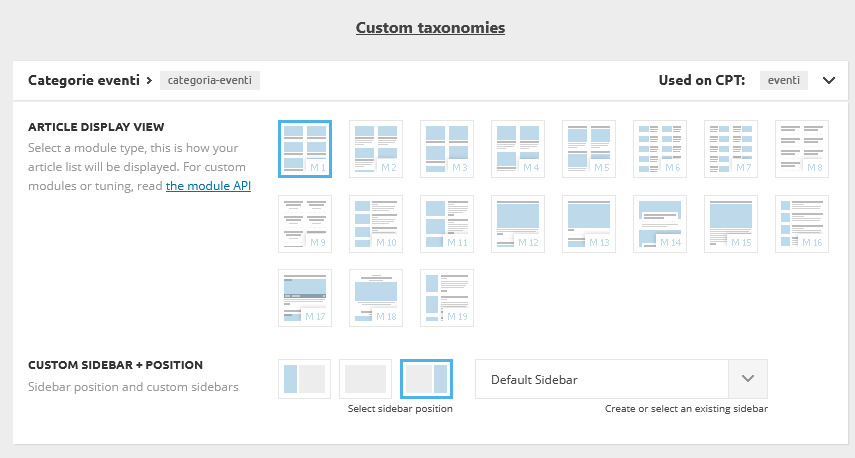
Whatever is the setup in this section, nothing change on the frontend: why?
Can i use a category template into a custom taxonomy (i’d like to obtain this)?
Thank you in advance
 Calin
Calin Hi,
Those are coming from theme panel > header > logo & favicon -> https://i.imgur.com/ZvPP6gU.png -> https://forum.tagdiv.com/logo-favicon/
Hope this will help you!
 Vlad S
 Hello !
This seems to be a common issue. This is AMP dev response: ” We checked your issue. This is not an issue from our plugin. This is an issue from google PageSpeed tools authors. This issue is globally present on every site. ”
Thank you !
 Kritica Economica
Hi! How can I change the default quote settings? The quote is too big relative to the text and I want it to be aligned on the left. This is an example of an article with quotes on my website.
 tamosukas
Hello where can be problem, that adsense on mobile theme do not show normally ads. my website is kanarai.eu and on mobile and even on pc versions there ads not showing, I contacted adsense they sayed the some problems from website, but Icant figured out where are problems, maybe because of amp version something setup ed wrong? Where usually are mistakes that not possible to show ads on a page
 The Cyber Flame
I am using the NewsPaper X since few months. I have lots of questions. Here are two of them.
1. The Social Counter widget is not working properly. Links are working, but it does not show the count of Instagram & Youtube. How to fix that?
2. I designed a HomePage. ( I think this is the hardest Theme to customize. Everything is too much advanced. 🙂 ) Then in the footer section, it shows ” © Newspaper WordPress Theme by TagDiv ” instead of showing my own details. I can’t find how to edit that. In the Theme Panel, there is no any option to edit that. It can edit if I select ‘No Template’ under Footer tab in theme panel. Then the footer changes. It is so complicated. I tried in Theme Editor to replace that phrase. But it didn’t work. Please help me to solve this.
Thank You!
The Cyber FlameI am using the NewsPaper X since few months. I have lots of questions. Here are two of them.
Calin Hi,
The error happens due to a lot of possible reasons. Check the useful guide from here -> https://www.hostinger.com/tutorials/fix-sorry-you-are-not-allowed-to-access-this-page-wordpress#gref
Theme activation -> https://tagdiv.com/how-to-activate-the-newspaper-theme/
You can manually activate the Newspaper theme from here: https://www.screencast.com/t/EL4k48Lq
If this is still not working go in Newspaper> System status and replace the url from: -> https://i.imgur.com/WlRnszw.png
admin.php?page=td_system_status
in
admin.php?page=td_system_status&reset_registration=1
And try after that to activate the theme.
Let me know the results!
Calin Hi,
As I can se the problem with mobile ads is coming from those errors -> https://i.imgur.com/hDfERpy.png your ads code is not loading in theme.
For amp code, you need to set only the second code that is with the personal code, the first one is already set in our theme, therefore is no longer need to set it
Thank you!
 mydesignjobs
Hello Sirs,
There is a Fatal ERROR to my website : https://glamour.business
Fatal error: Uncaught Error: Class ‘AMP_Theme_Support’ not found in /home/digitals/public_html/glamour.business/wp-content/plugins/td-mobile-plugin/td_mobile_theme.php:108 Stack trace: #0 /home/digitals/public_html/glamour.business/wp-content/plugins/td-mobile-plugin/td-mobile-plugin.php(291): td_mobile_theme::is_amp_request() #1 /home/digitals/public_html/glamour.business/wp-includes/class-wp-hook.php(287): td_mobile_get_the_content_for_vc(”) #2 /home/digitals/public_html/glamour.business/wp-includes/plugin.php(206): WP_Hook->apply_filters(”, Array) #3 /home/digitals/public_html/glamour.business/wp-includes/formatting.php(3819): apply_filters(‘the_content’, ”) #4 /home/digitals/public_html/glamour.business/wp-includes/class-wp-hook.php(287): wp_trim_excerpt(”, Object(WP_Post)) #5 /home/digitals/public_html/glamour.business/wp-includes/plugin.php(206): WP_Hook->apply_filters(”, Array) #6 /home/digitals/public_html/glamour.business/wp-includes/post-template.php(429): apply_filters(‘get_the_excerpt’, ”, Object(WP_Post in /home/digitals/public_html/glamour.business/wp-content/plugins/td-mobile-plugin/td_mobile_theme.php on line 108
There has been a critical error on your website.
Learn more about debugging in WordPress.
I didn`t make any recent changes to my website. Please Help.
Trilochan Bhattacharya
Vlad S Hello !
That is how the template looks but you can create your sidebar using tagdiv composer as you can see in our video guide here: https://www.youtube.com/watch?v=fa7GenCHcBU&t=8s
Thank you !
 Topfgartenwelt
 I know that the page is AMP valid, but when I test the AMP page in Page Speed Insights I get the information to remove the duplicate modules in JS Bundles:
Greetings Kathrin
 codexxx
 Hi Calin & Tech Support,
I’ve created a blog page using tagDiv composer, the fonts reflected when it logged in to the WP-admin but it will not be reflected if it logout from the WP-admin. See the screenshots below:
Login session: https://prnt.sc/vme861
Logout: https://prnt.sc/vme8zs
Why it goes like that? I thought using tagDiv composer will result in WYSWYG.
Hoping for your input and suggestion to fix this issue.
Thanks!
 Hispanic L.A.
 Thank you, Vlad. But that is exactly what I am using in the front page https://hispanicla.com, the Search Box you pointed to.
The problem is again that only few entries are shown for the author when we imput the name in that box. For example, author “Gabriel Lerner” has 355 posts under his name, yet only 84 appear. Author “Nestor Fantini” has 92 authored yet just 49 appear. And so on. Thanks!
 Tinystepsbabyclub
Hi Guys
I am using the mobile theme (no amp) and all is well apart from I’ve noticed that the logo in the footer appears as a white box which means you can see the surrounding colour – it looks weird. The logo in the header is great (perfect size and padding etc).
I am sure I have a PNG transparent logo in the footer but i am not sure where I need to go to change the logo for the mobile theme specifically? Here is the logo in the footer on mobile as a screenshot example (the difference in colour is a lot more noticeable on the mobile than it is in this screenshot) https://imgur.com/a/3DaUlAj
Could you let me know where I need to go to make sure I have a png transparent logo set up in the footer on the mobile theme, please?
Cheers guys!
TS
 Silvia_76
Good evening.
Some time ago I bought the “newspaper” template on themeforest. Yesterday I realized that the theme is no longer activated for some strange reason, and in fact the demos template is no longer loaded .. When I try to activate it worpress goes into error saying “You are not allowed to access this page.” (https://www.enjoyitalygo.com/wp-admin/admin.php?page=td_cake_panel&_wpnonce=a635e7ac73) can you please help me.
(Today I received the email and downloaded the update but I still have the same result)
Best regards
 Jolie
JolieHello, we recently updated to Newspaper 10.3.7, and Tag Div Composer would pause while loading, returning a blank page. When we inspect the page, there are three errors. Any help is much appreciated, thank you!
Uncaught TypeError: Cannot read property ‘registerPlugin’ of undefined
at o.registerPlugin (post-edit-1530.js:1)
at new o (post-edit-1530.js:1)
at t.default (post-edit-1530.js:1)
at HTMLDocument.<anonymous> (post-edit-1530.js:1)
post-edit-1530.js:1
Uncaught SyntaxError: Unexpected token ‘<‘
?page_id=82705&td_action=tdc_edit&post_id=82705&tdbTemplateType=page:185
Uncaught TypeError: Cannot read property ‘outerWidth’ of undefined
at td_wp_admin.min.js?ver=10.3.7:135
(anonymous) @ td_wp_admin.min.js?ver=10.3.7:135
Vlad S Hello !
As you can see here: https://www.screencast.com/t/m7avAvlhEm Your page is AMP Valid and there are no other issues. Can you let us know what you are using to test ?
Thank you !



