
- NewspapertagDiv AMP Plugin Tutorial
- NewspaperTrack Subscription Sources with Locker URL in Opt-In Builder
- NewspaperWP Rocket and Newspaper Theme: Optimization Guide
- NewspaperCredit System
- NewspaperIntroduction to CPT and ACF with Newspaper Theme
- NewspaperHow to edit modules for Flex Block X
- NewspaperHow to use the Posts List shortcode
- NewspaperUser review system
- NewspaperCustom Fields Support
- NewspaperHow to generate Facebook App ID
- NewspaperHow to insert a block inside the content of a post
- NewspaperModal Popup
- NewspaperPayPal Setup
- NewspaperLink Tracker
- NewspaperLockers
- NewspaperGeneral Options that May Interfere with the Newspaper Theme
- NewspaperAdd Cryptocurrency Price Ticker Widget
- NewspaperPosts Loop Element
- NewspaperThe Newspaper Mobile Theme: Introduction
- NewspaperAutoptimize Plugin – install and configuration
 Calin
Calin Hi,
On amp you can display only auto amp ads, simple google auto (Anchor and vignette) ads will not work.
If you get the auto amp ads from google adsence and there is still a problem, you can send us an email at contact@tagdiv.com and provide admin login, as well as cPanel. We will take a look. Include a link to this topic in the email.
Thank you!
 RAKESHVARMA8
Hello Sir,
When I Install newspaper mobile theme & Activate then Some Features like; mobile menus, search button, footer pages doesn’t open & many mores. So Plese help me…
Calin Hi,
That is because you are using the mobile theme plugin, if you want to have that option on images, you need to use the responsive version (you need to set the mobile theme only for amp -> https://i.imgur.com/lieSNf2.png or disable it).
Thank you!
Calin Hi,
1. The date format can be set from here -> https://i.imgur.com/uyQtFIK.png -> https://wordpress.org/support/article/formatting-date-and-time/
If you are using a cloud header from tagDiv Cloud Library you can edit it with tagDiv Composer -> https://i.imgur.com/lkwNbdV.png
2. For cloud header the file path is -> wp-content/plugins/td-cloud-library/shortcodes/header/tdb_header_date.php -> https://i.imgur.com/8xPrqmb.png (you need toadjust you code to set it in buffy) and for standard templates is D:\xampp\htdocs\Newspaper\wp-content\plugins\td-standard-pack\Newspaper\parts\header\top-menu.php -> https://i.imgur.com/qbEF0d6.png
3.Unfortunately the newsletter plugin can not be use in widgets, this is available only in tagDiv Composer, but you can set the mail chimp code in a text widget in in your sidebar -> https://i.imgur.com/fnZc5fQ.png
Thank you!
Calin Hi,
As I can see in your screenshot, you have only the mobile theme plugin activate, the amp plugin is not installed and activate, that is way you can not choose a different option.
If you are using the mobile theme plugin, you’ll gain a better speed then responsive version of theme, but in order to achieve that speed you’ll need to create a new content for pages because in the most of cases those were made with builders ( tagDiv Composer, WPBakery ) and you need to use only the mobile editor ( you need to set the content for pages in mobile editor and this content will be display on mobile theme)
-> https://i.imgur.com/9d0UWLT.png
Also you can show the responsive version on mobile theme -> https://i.imgur.com/m0bVB5T.png you can check more details about mobile theme in our documentation -> https://forum.tagdiv.com/the-mobile-theme/ or if you want to have the responsive version only, you can use the amp option from mobile theme -> https://i.imgur.com/oofST3D.png (to use the mobile theme template on amp) or you can disable the plugin.
Thank you!
 xavilv
Hi,
I don’t have the AMP enabled because Google notified me a lot of problems with the post and pages, so I decided not to use it. Consequently, the mobile version of my website is too slow.
Could you please tell me any plugin to speed up the mobile version or any other alternative solution?
Thanks
Calin Hi,
I just checked your website and now you are no longer using the mobile theme plugin.
If you still want to use the mobile theme plugin make sure that you have enabled the mobile theme thumbs -> https://i.imgur.com/xvwyMQx.png also make sure that you do not have a plugin conflict.
The logo and mobile menu can be set from here -> https://i.imgur.com/xkSQysk.png also the about us section can be set from here -> https://i.imgur.com/e2hkXRO.png or remove with custom css.
If you are using the mobile theme plugin, you’ll gain a better speed then responsive version of theme, but in order to achieve that speed you’ll need to create a new content for pages because in the most of cases those were made with builders ( tagDiv Composer, WPBakery ) and you need to use only the mobile editor ( you need to set the content for pages in mobile editor and this content will be display on mobile theme)
-> https://i.imgur.com/9d0UWLT.png
Also you can show the responsive version on mobile theme -> https://i.imgur.com/m0bVB5T.png you can check more details about mobile theme in our documentation -> https://forum.tagdiv.com/the-mobile-theme/ or if you want to have the responsive version only, you can use the amp option from mobile theme -> https://i.imgur.com/oofST3D.png (to use the mobile theme template on amp) or you can disable the plugin.
Thank you!
Calin Hi investmentguide,
If you are using the mobile theme plugin, you’ll gain a better speed then responsive version of theme, but in order to achieve that speed you’ll need to create a new content for pages because in the most of cases those were made with builders ( tagDiv Composer, WPBakery ) and you need to use only the mobile editor ( you need to set the content for pages in mobile editor and this content will be display on mobile theme)
-> https://i.imgur.com/9d0UWLT.png
Also you can show the responsive version on mobile theme -> https://i.imgur.com/m0bVB5T.png you can check more details about mobile theme in our documentation -> https://forum.tagdiv.com/the-mobile-theme/ or if you want to have the responsive version only, you can use the amp option from mobile theme -> https://i.imgur.com/oofST3D.png (to use the mobile theme template on amp) or you can disable the plugin.
Hope this will help you!
Thank you!
Calin Hi,
The website fro your example is not responsive on small devices, the users will not be able to check the information you have on your website.
Also our theme is full responsive and have even a dedicate plugin for mobile -> https://forum.tagdiv.com/the-mobile-theme/
Why is Responsive Design So Important? -> https://www.webfx.com/web-design/why-responsive-design-important.html
Thank you for your understanding!
Calin Hi,
That validator finds errors in everything it seems, I believe you should not worry about that test, it is to strict. It finds errors anywhere, for example
– https://blog.codinghorror.com/html-validation-does-it-matter/
It would be next to impossible to fix each of the issues it detects.
Thanks
Calin Hi,
So you are referring to the an anchor link -> – https://www.screencast.com/t/dzsIlRQFx
– https://www.screencast.com/t/7yBu0LhdYDrO
I just checked this and in above screenshots and for me is working, if you implement this in another way, let me know, also you can try the example.
If the problem persists, please provide me access to your website to check the problem.
Thank you!
 upvartanews
 Hi ,
I have done all thing, whatever you tell me for doing, but still google auto (Anchor and vignette) ads is not working in amp page . and also my colleauge facing same issue with this theme.
 elvisfrog
I have a pickle, after search forums and trying the recommended suggestion I am still stuck. Using Single Post Template – Default Pro, I have google adsense code, when I use the default template, not single post, it will show inline ad after specific paragraphs, but when I choose “Single Post Template” no ads and error in the inspector “Only one ‘enable_page_level_ads’ allowed per page.” this error only shows when I put google adsense code in the single page template and no ads are shown, now I should say no ads are showing on desktop, but if I view AMP page on the desktop it displays the ads, but what is weird is on the actual mobile device the amp page shows no ads except for seemingly at the very bottom, not inline, now that might be some other issue, so far just trying to figure out how to get ads listed in this single post template. Thoughts, suggestions? I have run out of things to try. NOTE: if I enter shortcode for my internal ad system it does show ads, though they are tiny, not sure what that is about.
 surya357
 No iam not saying that section for that one i will share the screenshot with you. while first time loading the site https://www.screencast.com/t/S6v5aZRyifE please have a look on it. after loading if i click any menu under this section images are not showing up for example: select the other categories in same section like ALL, marketing, finance like that if you click those categories its shows the content but not the image. please rectify it asap. please see the screenshot after selecting the other menu https://www.screencast.com/t/oJqQl1al5HyM
 demcrumblies
Hi there, I have a strange problem with the Newspaper Theme. I bought it on April 26th and and it worked pretty quickly for the first two days.
However, when I try to edit any page using the default WordPress editor, it takes many minutes to load (sometimes over 5 minutes, and sometimes just a blank screen appears). However, if I click to edit the page using the Edit with TD Composer, it works right away. I still need to use the default editor sometimes to make other edits such as adding tags, dates, etc., but the theme loading speed makes it unusable now. Here is what I mean when I say when I click the edit link or the Edit with TD Composer: 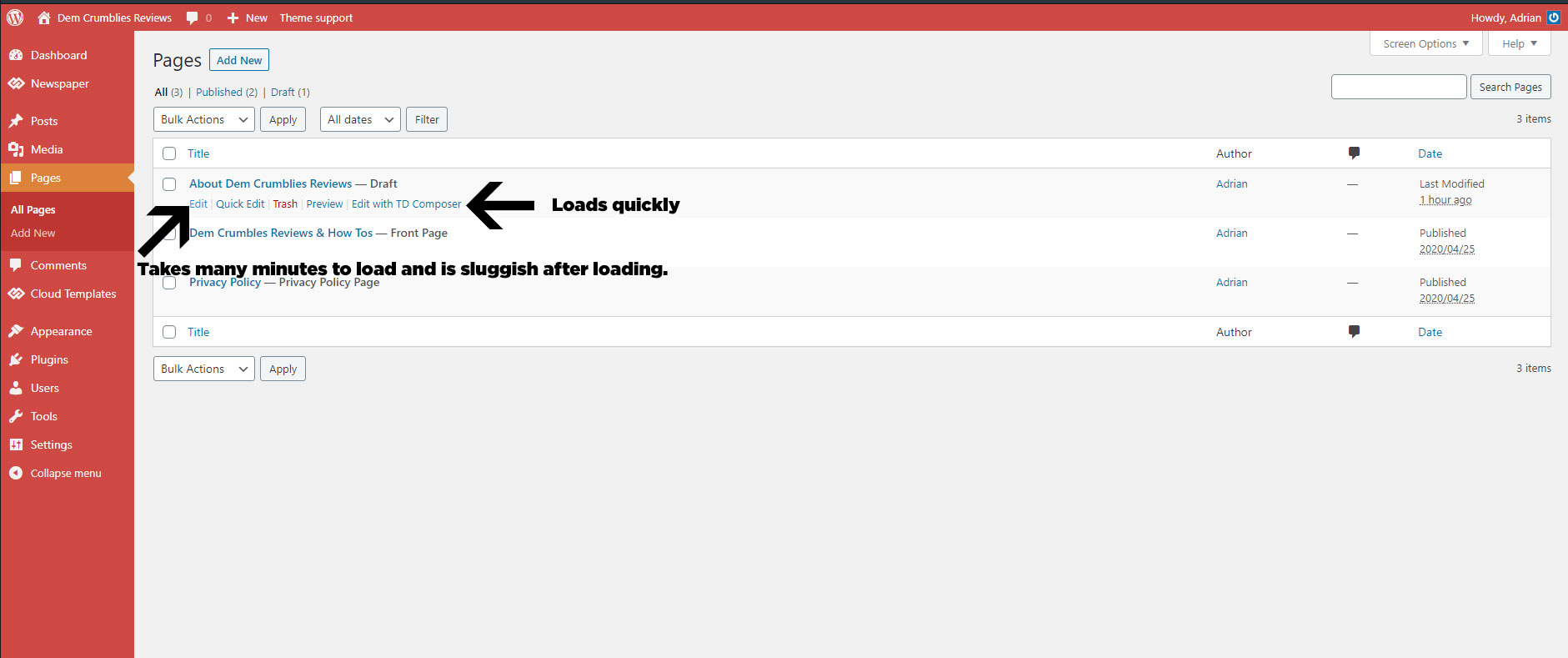
I have met all the server requirements or exceeded them, proof here: 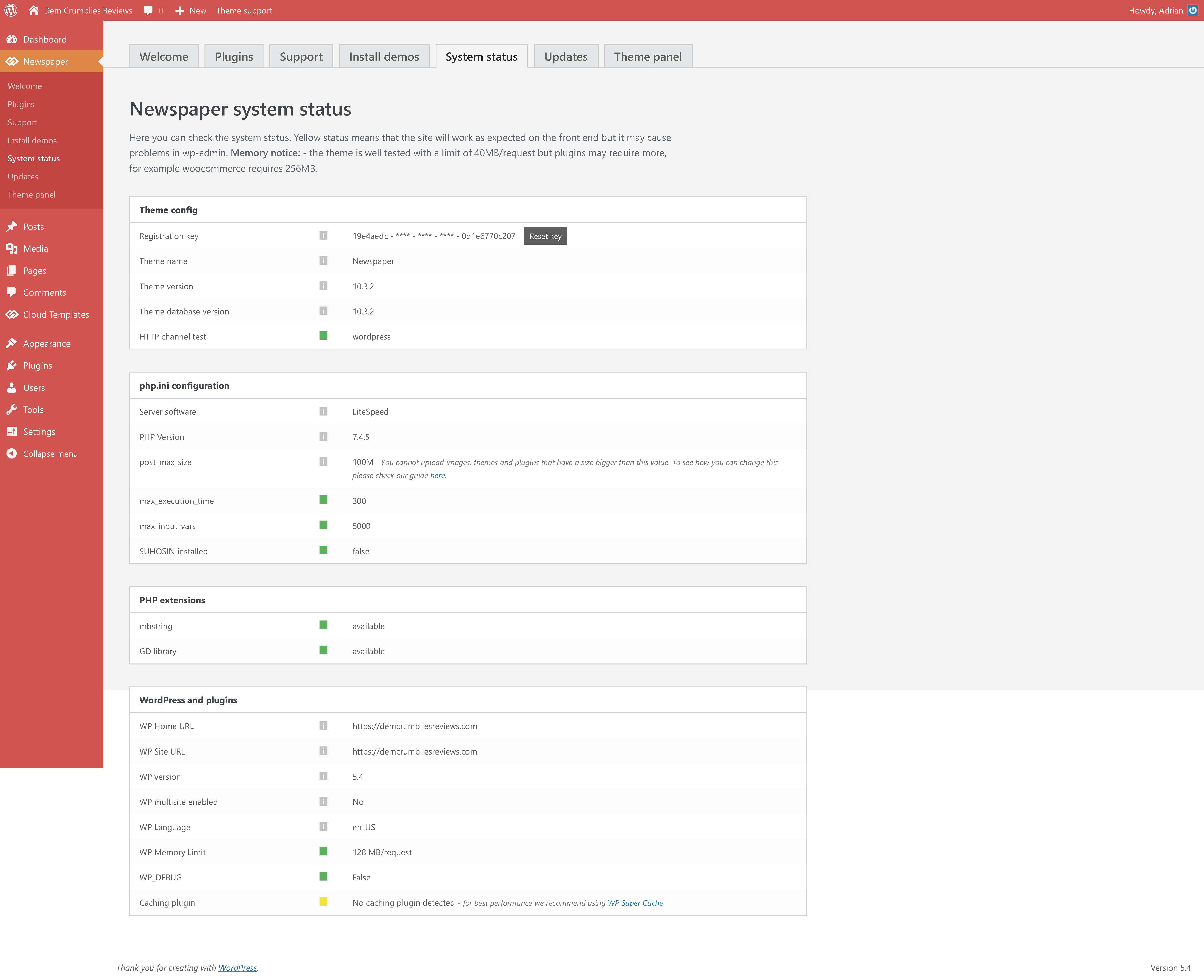
I had set my PHP version to 7.2 as recommended, but changed it to 7.4.5 today after everything loaded slowly, but it still did not help.
Viewing the website is not slow. Accessing the plugins screen, theme settings, tool settings, menu settings is fast. The ONLY issue is when I choose to click “Edit” using the default WordPress editor shown in the image above.
I have disabled all plugins, so that only the the tagDIV ones are active, but still no help. Proof here: 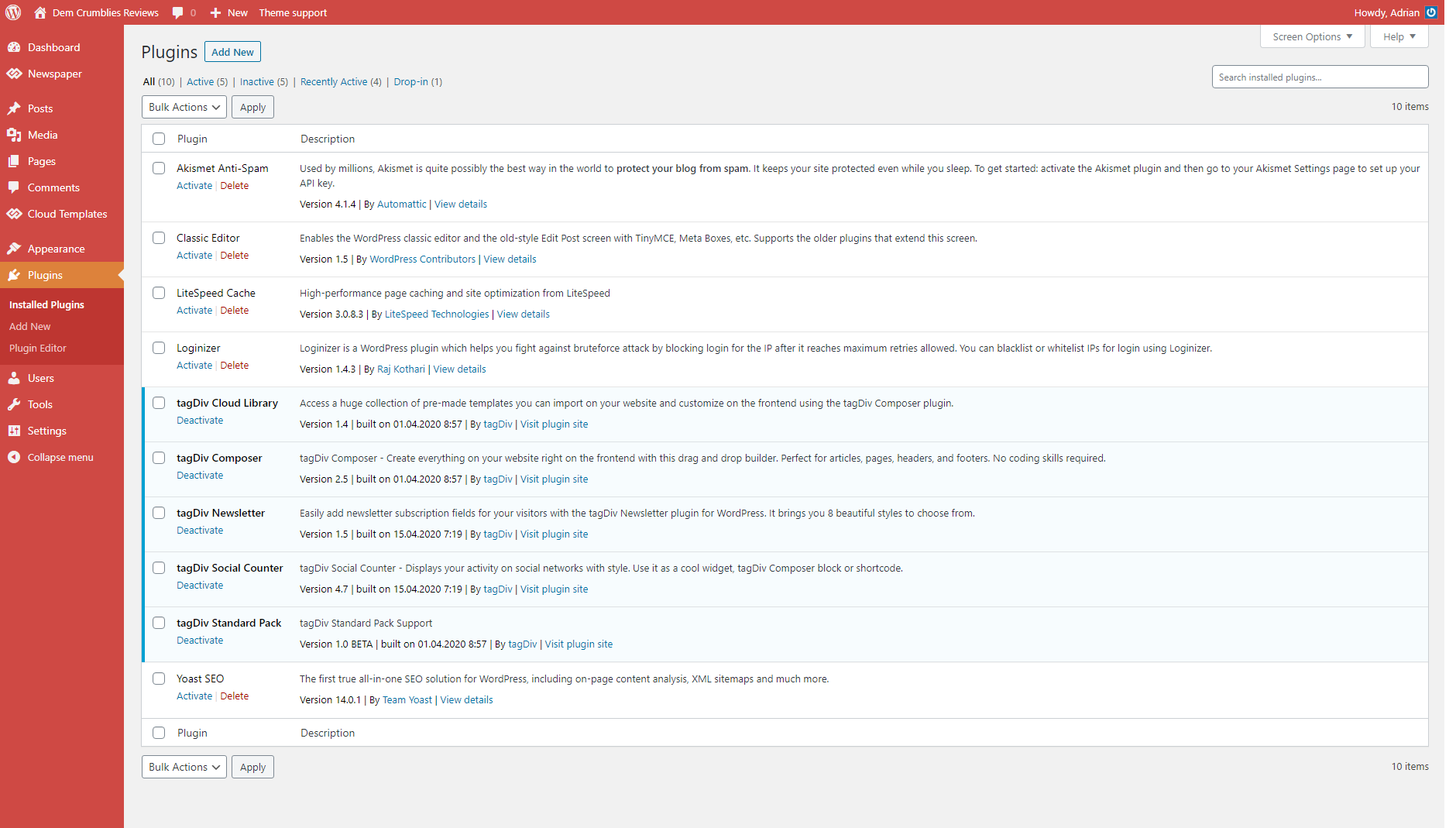
I have recorded a clip to show what I mean. (fast when using TD Composer and very very very slow and sluggish when clicking to edit using the default editor).
 EveryIrene
Hi – pushed a few articles yet there seem to be an issue with how the japanese font is displayed.
For example, a random letter in a word is bolded or is a completely different font style.
Another example is where the period should be (lower left), it is in the smack in the middle.
Is there a solution?
Thanks so much
 czuprkam1
Hey. Maybe I have something wrong configured. Please help.
It works on a desktop computer. It doesn’t work on mobile devices. I mean displaying photos from a given article.
For example, this article: https://suvalkai.pl/stai-kaip-atrodo-suvalku-turgus-ziurekite-i-nuotraukas/
When you click on a photo on mobile devices, it opens as an attachment page, not as a media file.
Please help.
 kibiribi
Hello dear support team!
1) Could you advise, how to enlarge image for checkout page?
screen – https://www.screencast.com/t/JY8oeKeR3
test link – http://wp.webdoroga.com?add-to-cart=290
2) I’ve got category page for wooCom – http://wp.webdoroga.com/shop/
I tried to hide right side bar
2.1 Changed default template of page – screen https://www.screencast.com/t/KyntSp6F
it didn’t help
2.2 After that I added CSS code from Google search 🙂
it works for me – https://www.screencast.com/t/KyntSp6F
Please confirm – is it ok ?
3) Couldn’t find where can I change product page design?
example – http://wp.webdoroga.com/product/shop-200/
screen – https://www.screencast.com/t/wvQtXRUBMq
 sscom
sscom Hi,
unfortunately, that doesn’t help for me. I have a lot of editors for my website and I want them to use only Gutenberg editor, not TagDiv Composer.
If they create a new page, its content is inserted in the “Global template”, which is not as I want (for example, I use another header). Also, the site gives me just random code instead of the actual template, as you can see here: https://imgur.com/a/cCq9fcg
Is there any possibility, to set a specific webdesign as global template, to create new pages only with Gutenberg editor (and it’s content is automatically inserted in the selected global template)?
I hope, you can understand, what I mean. It’s quite hard to explain in words…
-
This reply was modified 6 years by
sscom.
Calin Hi,
If you are revering to the amp activation, this is only a design issue, actually the plugin will be activate but the status in not change in Newspaper plugins, this will be fix soon.
-> https://i.imgur.com/0VPlMh9.png -> https://i.imgur.com/Ui8GW9Z.png
Thank you!
 Jennifer Hollister
 Thanks for the answer. Now the problem is also, that once installing the AMP plugin, all images (desktop and mobile) disappear. Also, on mobile front-page, even without the AMP, all images are not displayed. Please check funrumor.com
Calin Hi,
When the mobile version or amp is displaying on desktop is a cache problem, we recommend to use WP Super Cache with the settings from our guide -> https://forum.tagdiv.com/cache-plugin-install-and-configure/ also if you are using other cache plugins please deactivate theme and make a test.
If you are using the mobile theme plugin, you’ll gain a better speed then responsive version of theme, but in order to achieve that speed you’ll need to create a new content for pages because in the most of cases those were made with builders ( tagDiv Composer, WPBakery ) and you need to use only the mobile editor ( you need to set the content for pages in mobile editor and this content will be display on mobile theme)
-> https://i.imgur.com/9d0UWLT.png
Also you can show the responsive version on mobile theme -> https://i.imgur.com/m0bVB5T.png you can check more details about mobile theme in our documentation -> https://forum.tagdiv.com/the-mobile-theme/ or if you want to have the responsive version only, you can use the amp option from mobile theme -> https://i.imgur.com/oofST3D.png (to use the mobile theme template on amp) or you can disable the plugin.
Hope this will help you!
Thank you!
Calin Hi,
I’m trying to explain you, but as much I try, you do not provide an example how should look the page.
Maybe you want it to be like this -> https://demo.tagdiv.com/newspaper/homepage-one-top-post/ if yes, you can achieve this by editing the page with tagDiv Composer and add the homepage post element -> https://i.imgur.com/UR2luhp.png -> https://i.imgur.com/30KSU1A.png -> https://i.imgur.com/J7JtcAV.png
If this is still not what you want or you do not understand, please provide some example about what you want to achieve withe the image.
Hope this will help you!
 Akaueb
Hello, we noticed there is a strange issue with AMP version of websites.
After debugging a few we found this path: plugins/td-composer/mobile/header-amp.php
The thing is that the search bar echoes this snippet of code:
<amp-img src=”{{post_thumb_url}}”
And then replaces the {{post_thumb_url}} at runtime. Unfortunately this confuses search engine crawlers that interpretes this as an URL so we found a lot of 404 like this:
https://www.mywebsite.com/path/to/article/{{post_thumb_url}}
https://www.mywebsite.com/path/to/article/{{post_cat_link}}
…
We did a fast research on google and found that other people have the same issue:
https://mbaretimes.com/search/%7B%7Bpost_cat_link%7D%7D/
So, this is unlikely because of two factors:
1) CPU overload with huge amount of 404 (3-4 for each blog post, that is dramatic for a newspaper)
2) Waste of crawling budget for search engine => less SEO friendly website.
Please, can you investigate this bug and provide to fix in next Theme releases?
Thank you,
Silvio (Akaueb Srls)
 viktorgorgiev
Hello,
I have question and I want you to tell me wide how can I make my page to look the same on mobile, not mobile responsibility
I have an example of that from this site, it’s Macedonian – http://www.infomax.mk
You can check it on desktop and on mobile and i want my site (transparent.mk) to look like that.



