- NewspapertagDiv AMP Plugin Tutorial
- ApiPractical example – How to add a new Block and Module
- NewspaperTrack Subscription Sources with Locker URL in Opt-In Builder
- NewspaperWP Rocket and Newspaper Theme: Optimization Guide
- NewspaperCredit System
- NewspaperIntroduction to CPT and ACF with Newspaper Theme
- NewspaperHow to edit modules for Flex Block X
- NewspaperHow to use the Posts List shortcode
- NewspaperUser review system
- NewspaperCustom Fields Support
- NewspaperHow to generate Facebook App ID
- NewspaperHow to insert a block inside the content of a post
- NewspaperModal Popup
- NewspaperPayPal Setup
- NewspaperLink Tracker
- NewspaperLockers
- NewspaperGeneral Options that May Interfere with the Newspaper Theme
- NewspaperAdd Cryptocurrency Price Ticker Widget
- NewspaperPosts Loop Element
- NewspaperThe Newspaper Mobile Theme: Introduction
 docktera
 Thanks for your response. I’m already aware of the Font Awesome plugin due to reading the forum and documentation at first.
As long as pages are built with TD Composer, the theme included awesome font style sheet is already loaded, and therefor i don’t need (and i don’t want) this extra Font Awesome plugin.
With blog posts for example, single post pages are not built with TD composer, so the theme included awesome font style sheet is -not- loaded unfortunately.
I was hoping to initiate a feature request to use the theme included awesome font style sheet at all times without extra plugins.
 Calin
Calin Hi,
1. So if you want to have a post/article that will have set a featured image just let the post how it is, but if you want to set a featured video on your post, then you need to specific this -> https://i.imgur.com/3x55EVm.png insede the post you can set images and video without problems.
Here is an example how it will look you posts on block if these has set a featured video -> https://i.imgur.com/XOCXAzf.jpg
2. If you want to set some youtube videos on your homepage or any page, you can use tagDiv Composer, edit the page add a column text and paste the link -> -> http://prntscr.com/pndcqw -> http://prntscr.com/pnddar
If you want to display all the videos that have set a feature video, then you can set on these a category and set a flex block and filter it after that category -> https://i.imgur.com/slHpHSq.png -> https://i.imgur.com/ay4C45g.jpg
Hope this will help you!
Thank you!
 barbitania
Hi!
I have issues with the images of the blocks. The images don’t cover the block area, rather it seems like the image is placed at the block area as is (even if it is too big) and then the excess is being cut off. Or if the image is vertical, then there is an ugly empty space left at the side edges.
What i want to achieve is a kind of “background-size:cover, background-position:center” look. But it seems like the images are not applied as background, but as simple images so these rules cannot be applied.
Example: http://desarrollo.rondasomontano.com/revista/category/economia/
Here You see on the upper big blocks how little of the images can be seen, most of them are cut off. Also the below smaller block images have the problem that they don’t have an even shape (the vertical image is just being there small and thin!)
What is the solution for this?
Thank you in advance for your answer,
Bests,
Anna Balizs
Calin Hi,
Unfortunately we didn’t tested any plugins for pagination with our theme, therefore we can not recommend one.
If you want you can check this similar topic -> https://forum.tagdiv.com/topic/post-loop-pagination-link-to-list-of-all-articles/
As I can see in our example you have some pages that look the same as posts.
Thank you!
Calin Hi,
If you are using the mobile theme plugin that provide you a better speed then responsive version of theme, but in order to achieve that speed you’ll need to create a new content for pages because in the most of cases those were made with builders ( tagDiv Composer, WPBakery ) and you need to use only the mobile editor ( you need to set the content for pages in mobile editor and this content will be display on mobile theme)
-> https://www.screencast.com/t/ebUIzt4se
Since Newspaper v9.7.4 you can show the responsive version on mobile theme -> http://prntscr.com/oh6r2s you can check more details about mobile theme in our documentation -> https://forum.tagdiv.com/the-mobile-theme/ or if you want to have the responsive version only, you can use the amp option from mobile theme -> https://i.imgur.com/n7fEXCy.png (to use the mobile theme template on amp) or you can disable the plugin.
If this is not what you mean, please provide me some more details.
Thank you!
Calin Hi,
What dimension have your background image? did you set it on full size as in my example?
Thank you!
 David
DavidHi,
As stated above, I would like to have the Tagdiv Composer Elements display on AMP.
Thanks!
Calin Hi,
1. Thank you for your kind words.
2. If you want to embed a link from youtube you can simply copy and paste the youtube url in a cloud text in text area -> https://i.imgur.com/CSPcls9.png
In order to fix the problem wit youtobe playlist, you need to deactivate the tagDiv Composer, delete it and install it from Newspaper> Plugins -> https://i.imgur.com/qsouHOR.png after that check our documentation from here -> https://forum.tagdiv.com/youtube-api-key/
4. Our mobile theme plugin have 3 options:
Mobile – this will be apply only on mobile device
Mobile + Amp – this will apply the mobile theme template and functions on both, mobile and amp
Amp – this option will set the mobile template only on amp and on mobile will be display the responsive version of Newspaper theme.
You can check more in our documentation from here -> https://forum.tagdiv.com/the-mobile-theme/ -> https://forum.tagdiv.com/tagdiv-amp-plugin-tutorial/
5. If you want you can check our documentation and articles for tagDiv Cloud Library from here https://tagdiv.com/category/documentation/cloud_library/ this will help you to use the clouds.
6. Newspaper X is base on frontend editor, to can edit the whole website from the frontend using tagDiv Composer, the widgets were use for the backend builders, now when you can use the right click to save the elements and copy the style the widgets are no more necessary.
7. Some social media re set using tagDiv Composer -> https://i.imgur.com/tR84FOD.png , and not the settings from theme panel, so there is no need to use any custom html code.
9. Indeed is not recommend to edit the pages/templates with other builders, in case you’ve done this you can use a revision of you page -> https://prnt.sc/oadfq4
10. In most cases there should be no problems is you change the pages/templates name.
If you have some questions related to our theme, just let us know!
Have a nice day!
 bxp331
I’m running Newspaper 9.7.2 and use the theme panel’s Ads > Header ad panel to call a shortcode for displaying ads in the site’s header. Recently, the shortcode is getting stripped out on some pages, but not on others. Of course, the result is that any time the shortcode is stripped out, we don’t display an ad.
What would account for this? What’s the fix?
Here are links to two pages:
Ads DO NOT display in header (bad!):
https://foodtradenews.com/
Ads DO display in header (good!):
https://foodtradenews.com/2020/01/13/wallace-rabenold-among-15-redners-executives-promoted/
Here are 3 things to reference:
1. Theme panel settings (ADS > HEADER AD > YOUR HEADER AD):
https://ibb.co/M12NywY
2. Source code of bad header:
<!--HOME TOP AD-->
<div class="ftn-ad-universal-top">
<div class="ftn-header-ad-wrapper">
<div class="ftn-header-ad-center">
<div class="adsanity-shortcode"></div>
3. Source code of good header:
<!--HOME TOP AD-->
<div class="ftn-ad-universal-top">
<div class="ftn-header-ad-wrapper">
<div class="ftn-header-ad-center">
<div class="adsanity-shortcode"><div class="ad-alignnone"><div class="ad-row">
<div id="ad-10387" class="ad-970x90 adsanity-970x90"><div class="adsanity-inner">

	<a rel="nofollow" href="https://foodtradenews.com/ads/iddba-billboard-ad-february-2020/" target="_blank"><img width="2560" height="238" src="https://i1.wp.com/foodtradenews.com/wp-content/uploads/2020/02/IDDBA_0220-scaled.gif?fit=2560%2C238&ssl=1&cache-bust=1582562205" alt="" /></a>
</div></div>

</div></div>
Thanks for your help!
 haykdigital
 Thanks Vlad. Please send us an update when they fix the AMP plugin and post an update.
 miwiley
 Insert Raw HTML in a block on page. — Adjust accordingly to your social network. I used https://simplesharebuttons.com to generate images – but there are others. That addresses one of your problems – you listed a few. The Youtube thing is getting fixed (known issue). covid19data.com – you can see how I used Social & Video
 miwiley
(1) Great theme – I left another for this one [old: coronavirusdata.org] – 301’s coming
(2) Challenges with Youtube:Video – I opted to embed raw HTML (saw that this will get fixed)
(3) CSS options – are outstanding!
(4) Mobile (AMP+) hit and miss, settings confusion for the most part
(5) Templates @Cloud – not really utilized, but might play around later
(6) I feel like there should be more widget/options
(7) Social media – IMO = messy – I opted to again embed HTML [footer]
(8) No conflicts with plugins yet – i stayed pretty light
(9) Don’t ever try to edit pages with anything other than TDComposer – Holy Sh…!!, i had start over, good thing i did not get very far
(10) Don’t ever try to rename a template(d) page – Yikes, that caused a mess as well.
— so pretty much take the templates/demos and TDCompose them – I was trying to fixup how the code looked @dev
Overall 4-5 stars on this theme.
If you have any comments about the theme implementation – i would enjoy hearing them
— http://www.covid19data.com
 INVESTOR
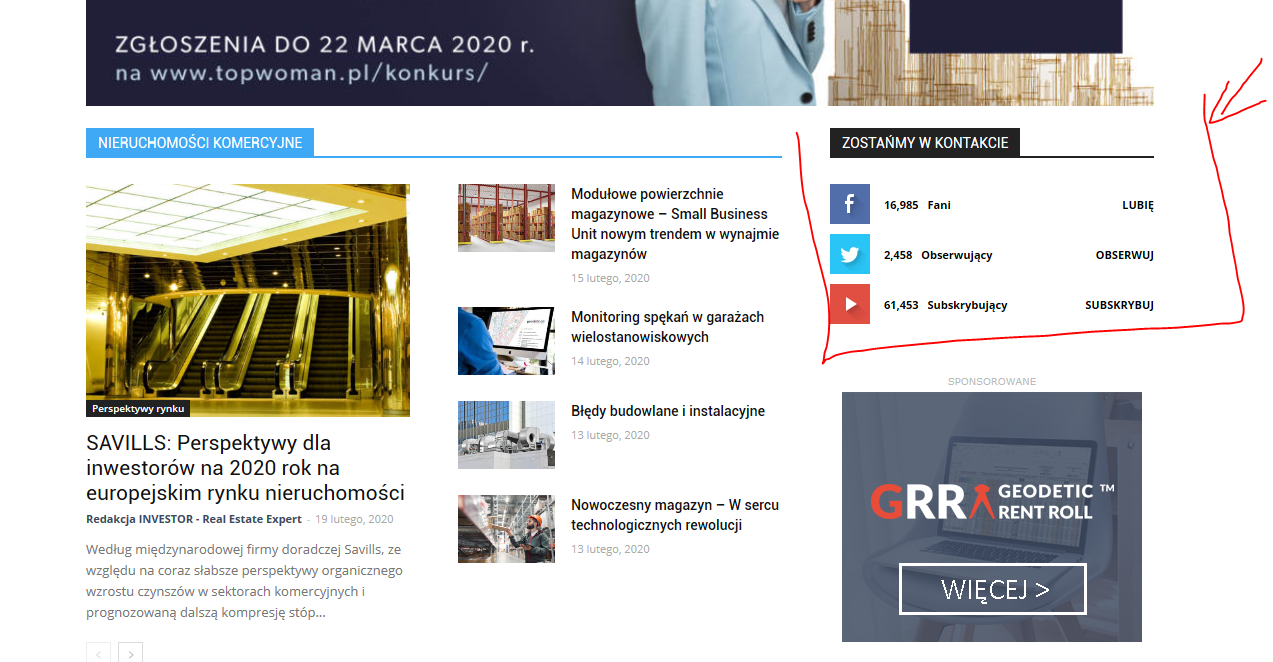
Hi, I have the Newspaper theme on my site, I want to update my social networks on the home page but after changing all links that I need in the theme panel – nothing changes. I still can see icons that I don’t want to be active (for example I don’t want Twitter, but want LinkedIn instead) and links which are visible don’t work properly, for example YouTube doesn’l link to my chanel .
How can I edit this block anyway? I can’t even change the area where this is placed on my homepage. Can’t find the way to edit this part.
My site homepage is: https://investorrealestateexpert.co/
What I’m talking about is:
https://investorrealestateexpert.co/wp-content/uploads/2020/02/investor-wycinek.png
thanks in advance for your help
Calin Hi,
The auto ads for amp need to be set in mobile theme in in amp ads -> http://prntscr.com/pt3bmw
Only one code is need to be set in theme panel, the other one is a standard code and is already add in our theme -> http://prntscr.com/pkwtzh also the code need to be set only in AMP ads -> http://prntscr.com/pkwum2
Thank you!
Calin Hi,
If you are using the mobile theme plugin that provide you a better speed then responsive version of theme, but in order to achieve that speed you’ll need to create a new content for pages because in the most of cases those were made with builders ( tagDiv Composer, WPBakery ) and you need to use only the mobile editor ( you need to set the content for pages in mobile editor and this content will be display on mobile theme)
-> https://www.screencast.com/t/ebUIzt4se
Since Newspaper v9.7.4 you can show the responsive version on mobile theme -> http://prntscr.com/oh6r2s you can check more details about mobile theme in our documentation -> https://forum.tagdiv.com/the-mobile-theme/ or if you want to have the responsive version only, you can use the amp option from mobile theme -> https://i.imgur.com/n7fEXCy.png (to use the mobile theme template on amp) or you can disable the plugin.
Thank you!
Calin Hi,
Please note that this issue is not caused by the mobile theme, or the theme, there are other users with the same issue after the latest AMP update – https://support.google.com/webmasters/thread/29367056 The AMP plugin developers provided a fix for it here – https://wordpress.org/support/topic/the-script-tag-contains-invalid-json-that-cannot-be-parsed-6/ – https://wordpress.org/support/topic/the-script-tag-contains-invalid-json-that-cannot-be-parsed-3/ but they say it’s not needed anymore. Maybe mark the warnings as fixed in the console, and they should not appear anymore according to those topics.
What you can do is to install the previous version of amp.
Thank you!
 TomaszM
 There is also one more strange issue… I installed recommended amp plugin but it looks like something is wrong, because tehere is info in plugin panel that suggest like wrong amp plugin is istalled. See:
http://tinyurl.com/qvhamem
-
This reply was modified 6 years by
TomaszM.
Calin Hi,
Please note that this issue is not caused by the mobile theme, or the theme, there are other users with the same issue after the latest AMP update – https://support.google.com/webmasters/thread/29367056 The AMP plugin developers provided a fix for it here – https://wordpress.org/support/topic/the-script-tag-contains-invalid-json-that-cannot-be-parsed-6/ – https://wordpress.org/support/topic/the-script-tag-contains-invalid-json-that-cannot-be-parsed-3/ but they say it’s not needed anymore. Maybe mark the warnings as fixed in the console, and they should not appear anymore according to those topics.
Thank you!
TomaszMHello
I need your help. I migrated last week my promodels.pl portal to your Newspaper theme. Before migration I used different AMP plugin and everything was ok. Now I installed recommended AMP plugin for your theme. I also installed tagDiv Mobile Theme. I have set in mobile settings / mobile theme to USE MOBILE THEME FOR: mobile + amp. I made redirections and i was looking ok, but … Google Search Console starded to raport problems with AMP version ! It looks like there are several issues on EVERY amp page… the issues are about improper javascript, wrong use of style tags :/
I dont know what to do, but I am sure if do nothing my google ranks will down. Please let me know what to do now.
Do I need?
1. Reconfigue (how) ?
2. Delete mobile theme and suggested AMP plugin and use old plugin?
3. Other ideas?
page: https://promodels.pl
amp ver: https://promodels.pl/?amp
Regards
Tomasz
Calin Hi,
If you want to edit the footer, or the header, then you’ll need to edit it from a page, for example, you can edit the homepage, click on edit with tagDiv Composer -> https://i.imgur.com/uweNRrc.jpg after that go down to the footer end edit it how you want (now you can customize the the whole web-page from fronted).
Also the pages that are build with tagDiv Composer will display only shortcodes in backend.
Thank you!
 Vlad S
 Hello !
This has been reported as an AMP plugin bug. Please update your AMP plugin.
Thank you !
 fatih-2
 Hi @Calin
Yes, Using mobile plugin-active. Theme panel is amp+mobile..All the mobile theme versions are enabled for posts also, AMP settings are enabled for posts and pages.
I don’t think there’s a plugin conflict because we are using same plugins same themes on 2 websites 1 is ok and 1 is not. Do I have to enable specific thums or else for images?
Please see attached. https://prnt.sc/r6s023
Calin Hi fatih-2,
Are you using the mobile theme plugin ? the mobile theme plugin provide a better speed then responsive version of theme, but in order to achieve that speed you’ll need to create a new content for pages because in the most of cases those were made with builders ( tagDiv Composer, WPBakery ) and you need to use only the mobile editor ( you need to set the content for pages in mobile editor and this content will be display on mobile theme)
-> https://www.screencast.com/t/ebUIzt4se
Since Newspaper v9.7.4 you can show the responsive version on mobile theme -> http://prntscr.com/oh6r2s you can check more details about mobile theme in our documentation -> https://forum.tagdiv.com/the-mobile-theme/ or if you want to have the responsive version only you can use the amp option from mobile theme (to use the mobile theme template on amp) or you can disable the plugin.
Also please make sure that you do not have a plugin conflict with untested plugins, please deactivate all non theme/tested plugins, also if you are using child theme, clear all cache and try again.
Thank you!
Vlad S Hello !
Please make sure that you have followed all the steps for AMP implementation as you can see here: https://forum.tagdiv.com/tagdiv-amp-plugin-tutorial/
Thank you !
 charlestcr
 Your view is correct.i am not using child theme.I cleared Cache. but same issue is there in Google chrome & Mozilla Firefox
(Google chrome) i tried in guest mode also
https://www.screencast.com/users/web8027/folders/Default/media/65a8bd3d-e18a-4080-ae18-06dcf69fe7f4
https://www.screencast.com/users/web8027/folders/Default/media/186382f6-fde6-4da2-90dc-1290963c7825
(Mozilla Firefox)://content.screencast.com/users/web8027/folders/Default/media/f7c1f03a-dff9-41bd-9509-fcf5fc6014c9/12.png
in uc browser showing properly
https://www.screencast.com/users/web8027/folders/Default/media/d402cb9e-76e4-4dbb-802d-d9c247a4b9f9
what I have to do? Please help