
- NewspapertagDiv AMP Plugin Tutorial
- NewspaperTrack Subscription Sources with Locker URL in Opt-In Builder
- NewspaperWP Rocket and Newspaper Theme: Optimization Guide
- NewspaperCredit System
- NewspaperIntroduction to CPT and ACF with Newspaper Theme
- NewspaperHow to edit modules for Flex Block X
- NewspaperHow to use the Posts List shortcode
- NewspaperUser review system
- NewspaperCustom Fields Support
- NewspaperHow to generate Facebook App ID
- NewspaperHow to insert a block inside the content of a post
- NewspaperModal Popup
- NewspaperPayPal Setup
- NewspaperLink Tracker
- NewspaperLockers
- NewspaperGeneral Options that May Interfere with the Newspaper Theme
- NewspaperAdd Cryptocurrency Price Ticker Widget
- NewspaperPosts Loop Element
- NewspaperThe Newspaper Mobile Theme: Introduction
- NewspaperAutoptimize Plugin – install and configuration
 Thorstenmuc
Hi,
how can I assign categories? For example “id: 83”
Thank you, greeting Thorsten
 skortimai
 Dear Calin,
whenever I install the AMP plugin and configure it …the mobile view can appear on the desktop..kindly see the screenshot on the mobile view on desktop https://prnt.sc/qnc1ud … I only want this view to be on the mobile not the desktop
 renatols
 I installed the Autoptimize plugin and things got better, but theres a notice that this plugin may could be not compatible with AMP.
 slivertorp
 Thanks Vlad,
For some reason I can’t get the full width image to be above of the boxed layout (green background color) https://imgur.com/a/poKusj6
I would like the green background color to be under the full width image.
Custom CSS
https://imgur.com/a/Zb8RIdw
If I “clear” the background color from : Theme colors > General Theme Colors > Background Color.
The full width image is back to its normal size
https://imgur.com/a/LPlxWmm
Basically I would, like to keep the center of my website with all my posts white + a background color to have a different color on each side of the website.
Ideally with the possibility to have full width image above the background color.
Here a great example of what I need :
https://imgur.com/a/2ZMiArb
– Center : White color
– Background : Cream color
– A full width image above the background Cream Color
Sorry for the confusion if my original post wasn’t that clear.
Thank you in advance.
Have a nice day
-
This reply was modified 6 years by
slivertorp.
-
This reply was modified 6 years by
-
This reply was modified 6 years by
 Sumit
Sumit Hi,
Thanks for your response.
I want to know how can I solve this all in one plugin error.(https://prnt.sc/qn2tv2)
These links that I mentioned in the January 13th image appear in the google webmaster bug list. Even though i’m testing this /?amp format i’m getting error(https://drive.google.com/file/d/1-TRSrIqJwBpECyI4UMVp3uySLY52O_EO/view?usp=sharing)
I am not adding image separately to amp. I am using normally 800×530 image site for all my posts.
waiting for your response.
Thank you.
 Vlad S
 Hello !
Your errors seem to come from all in one plugin: https://prnt.sc/qn2tv2 Also please make sure that you test amp pages because those you tested are not amp pages.
All amp pages must be tested with http://www.example.com/?amp ;
Also you will have to increase the size of your images because the images are too small and that is the reason why you you will see : https://searchengineland.com/google-now-wants-larger-images-amp-articles-291493
I hope this was helpful !
Thank you !
 gumball44
 Hi Calin,
Microsoft edge problem seems to be fixed, Thank you for your help.
However Footer size logo AMP is still here for me, even if I clear cache. Logo size doesn’t change, furthermore your code breaks header alignment. I use Samsung A32017 mobile.
-
This reply was modified 6 years by
gumball44.
 etinos
 Before, I had 3 versions, normal, for mobile (it’s like a regular one but much simpler) and the AMP, that was different from the 2 previous ones.
This is confusing, let’s make it simple, I want to have the AMP version displayed on mobiles, what do I select? Because the current mobile version it’s slow.
Mobile version: https://ibb.co/cghzhJK
AMP version: https://ibb.co/Lt88Tyn
It’s a different website, but you get the idea.
 SimplyCom
 Hi,
Thanks for the 2 solutions abouve but unfortunatly niether are working for me, I have tried with the greater sign and with the greater sign and exclamation mark and neither options are working, the only option I am getting in the post settings section are “Naver” here is the code: –
“function td_add_new_social_network() {
$social_drag_and_drop = td_options::get_array(‘td_social_drag_and_drop’);
if ($social_drag_and_drop != ” && array_key_exists(‘naver’, $social_drag_and_drop) != true) {
$social_drag_and_drop += array(‘naver’ => ”);
}
td_options::update_array(‘td_social_drag_and_drop’, $social_drag_and_drop);
}
td_add_new_social_network();
function td_theme_migration() {
$td_db_version = td_util::get_option(‘td_version’);
// update TO version 8.6 – add social networks
// @since 14.12.2017
if (version_compare($td_db_version, ‘8.6’, ‘>’) || TD_DEPLOY_MODE == ‘dev’) {
$social_drag_and_drop = td_options::get(‘td_social_drag_and_drop’);
if ($social_drag_and_drop == ”) {
td_options::update_array(‘td_social_drag_and_drop’, array (
‘facebook’ => true,
‘twitter’ => true,
‘pinterest’ => true,
‘whatsapp’ => true,
‘linkedin’ => ”,
‘reddit’ => ”,
‘mail’ => ”,
‘print’ => ”,
‘tumblr’ => ”,
‘telegram’ => ”,
‘stumbleupon’ => ”,
‘vk’ => ”,
‘digg’ => ”,
‘line’ => ”,
‘viber’ => ”,
‘naver’ => ”
));
}
}”
Any help would be appreciated, the client needs to have the other sharing options! Many thanks
Vlad S Hello !
1. We have tested your pages and the fonts work: https://www.screencast.com/t/SzA9RvmIhdg
2. Please make sure that you’ve configured AMP properly. Follow our tutorial in order to understand how AMP works: https://forum.tagdiv.com/tagdiv-amp-plugin-tutorial/
3. That is because your website is cached. Please try a cache plugin. We recommend using the WP Super Cache: https://forum.tagdiv.com/cache-plugin-install-and-configure/
Thank you !
 challengerbanking
Hi,
I created a rectangle shape on slider revolution. I inserted an icon and some text, however I cannot seem to adjust the size of the icon and text separately and text-align both to center. For example, I want the icon to be 50px and the text to be 20px.
Can you please help me on how to do this?
Thanks!
 cricexec
Hi —
I cannot turn off the number of views and shares of a post.
The settings in the theme builder are correctly turned off.
Theme builder –> Post Settings –> Post and Custom Post Types: I have disabled SHOW POST VIEWS and SHOW COMMENT COUNTS
However I’m still seeing post view/share counts on posts.
Here is an example:
https://www.cricexec.com/2020/01/10/adelaide-strikers-strikers-to-support-bushfire-relief-efforts/
What can I do here?
 ratedhistory
Hi. I’m having an issue with not being able to change the excerpt length when using flex boxes. For example I’m using flex box 3 but when I change the number in the excerpt box it doesn’t do anything. I can turn excerpt on and off but cant change the length. Incidentally the title length works absolutely fine! I’ve tried using different internet browsers and clearing cash etc but no change.
 jamiesharpe
 Hi Vlad – I’ve done that per these screenshots: https://www.screencast.com/t/r0f3FoVsuY and https://www.screencast.com/t/w2M6h6lYbp5r. However the ads are not showing up on mobile, here’s an example post that I’m looking at on mobile: https://www.pinkluggageabroad.com/maldives-luxury/
could you let me know what I’m doing wrong? Thank you.
 Allraps.com
 Is there any tutorial on how to make my homepage flex to have the subcategories right next to the Name of the flex block? Example name: MUSIC, sub:SINGLE, ALBUM? I can’t make it look like the live preview on the template that I chose.
 vv2005
 Hello maaikewind,
I tried it on my site, /404 doesn’t change into https://www.example.com/tdb_templates/404-template-8/ , it stays as https://www.example.com/404 . This, I think has to do with permalinks I guess.
So, maybe you could take a backup and try the permalinks settings of my site.
My .htaccess also contains this
# BEGIN WordPress
# The directives (lines) between BEGIN WordPress and END WordPress are
# dynamically generated, and should only be modified via WordPress filters.
# Any changes to the directives between these markers will be overwritten.
<IfModule mod_rewrite.c>
RewriteEngine On
RewriteBase /
RewriteRule ^index\.php$ – [L]
RewriteCond %{REQUEST_FILENAME} !-f
RewriteCond %{REQUEST_FILENAME} !-d
RewriteRule . /index.php [L]
</IfModule>
# END WordPress
And at last my permalinks settings(Settings->Permalinks->) are as below
Custom Structure https://www.example.com /%category%/%postname%/
Please do take a full backup before trying it out.
Regards
skortimaiHello team,
Kindly assist me in configuring my website mobile view, whenever I activate the AMP plugin my website desktop view can change to the mobile view I have spent over two days trying to properly configure AMP plugin so my site mobile view. I will highly appreciate your urgent response
 Chetan10001
Hey Sir,
I am Customizing my Website and when i am doing the setting of mobile and after save this When i open website in my laptop there shows nothing change i am doing both, “Newspaper Theme Panel” & “Edit with TD Composer” but Whenever i open my website in mobile there showing there Change. Kindly Help me
 Mukizo-Learning
Hi, could you tell me how I could implement AMP AdSense advertising?
When I generate the AMP ad in AdSense, it generates two codes, one that goes in the BODY and another that goes in the HEAD, which are the following:

But these do not know very well where they go from the Newspaper issue since in the ADS AMP section there is no option to include the HEAD part
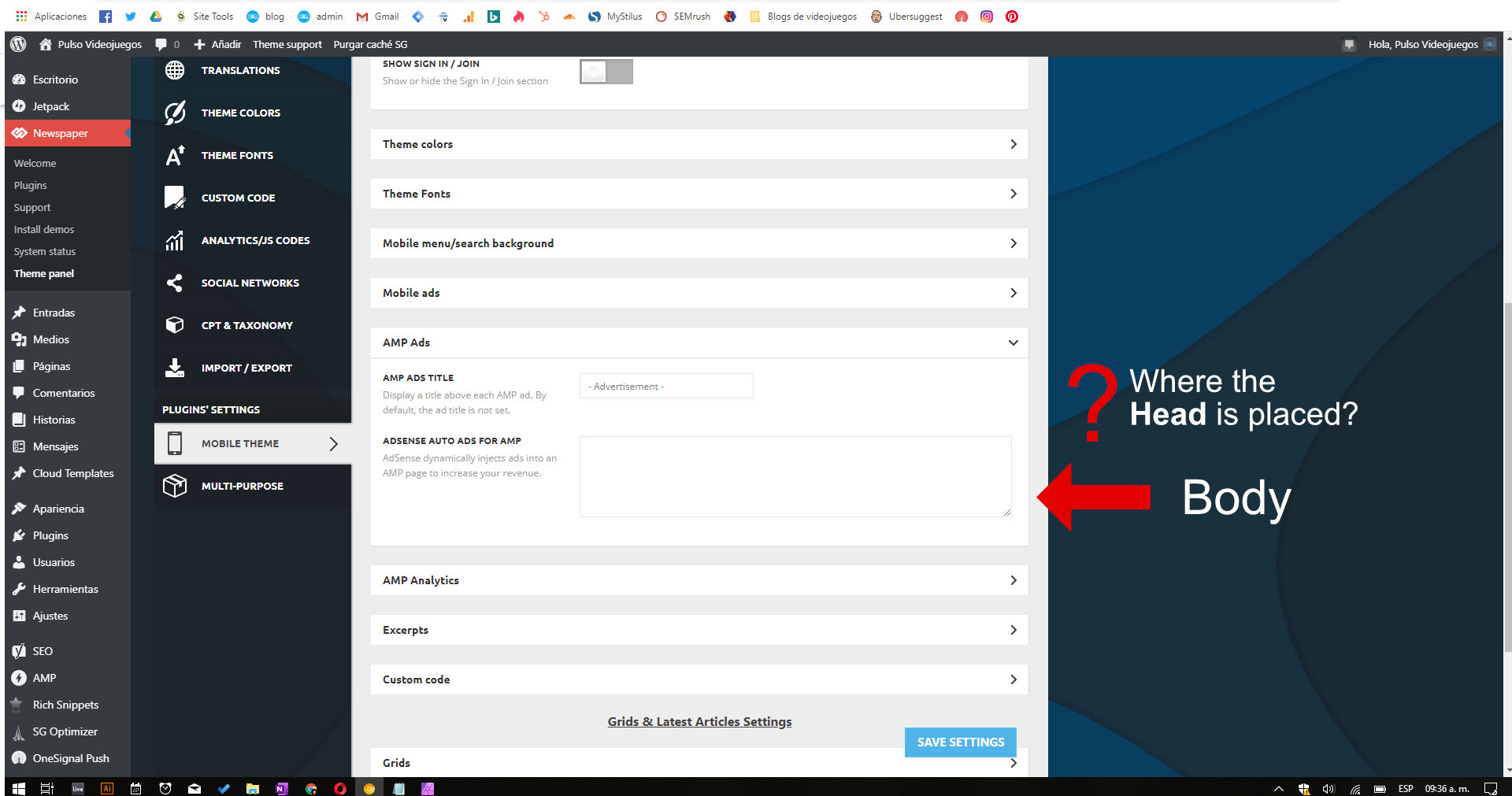
Could you tell me how this configuration is done?
Or should I use the normal HTML code provided by AdSense to include it in the ADS AMP section of Newspapaer?
 imdarshanpetkar
Hi, how do i create a banner image like in the craft ideas example (the yellow banner with woman at the top).
My logo(Banner)is showing small than Crafe ideas.
 zajawkarz
Hello. I have created a new “Single Post Template”. Unfortunately, with WP Rocket with the “load JS files by defer method” option enabled – only on pages with content the main menu and the “search” button do not work properly.
In addition, I have one more problem. I can’t correctly register the image size for “search live mobile”. It works on computers, for mobile – 80x80px is still missing.
I have one more question and attention. Why don’t you prepare much better documentation for the template? Your documentation is not detailed enough – it could be much better! You also combine all these styles into three or four “CSS” files instead – separate them into each module, block, etc. Here it is extremely difficult to remove unnecessary “CSS” code!
Example: My website
Newspaper: 10.2
 maaikewind
Hi!
Suddenly today I can’t see the preview for the blog post I’m working on. I get an error message.
The error log of my WordPress site mentions this ->
FastCGI: server “/var/run/php72-cgi/php-cgi” stderr: thrown in /www/wp-content/plugins/td-cloud-library/state/single/tdb_state_single.php on line 1667, referer: https://www.fuckdiestudieschuld.nl/wp-admin/post.php?post=5238&action=edit
Any thoughts?
(If I open an old post that’s already been published, the preview works just fine. The problem only appears with new posts.)
Any help is very welcome!
Thanks,
Maaike
 connect5thgen
I am not able to update template
I am not able to update sample txt
I am not able to load ( filter ) any categories
Please advise
Chrome Browser
https://screencast-o-matic.com/watch/cYVX2mvAer
Opera Browser
https://screencast-o-matic.com/watch/cYVX2MvAeC
 Demir
DemirHello,
We use the “Single Post Template 48 – Animals Pro” template that I downloaded from the Cloud library. By default, the captions are in italics, left-handed, and in gray color. Even if we change the settings in the “Style> Image Caption Text” section of the template, there are no changes. We have cleaned up all the cashes on the server and browser side, the result does not change.
Is this a bug, or are we missing something?
Thanks in advance for your interest and help.
Regards.
maaikewind 