
- NewspapertagDiv AMP Plugin Tutorial
- NewspaperTrack Subscription Sources with Locker URL in Opt-In Builder
- NewspaperWP Rocket and Newspaper Theme: Optimization Guide
- NewspaperCredit System
- NewspaperIntroduction to CPT and ACF with Newspaper Theme
- NewspaperHow to edit modules for Flex Block X
- NewspaperHow to use the Posts List shortcode
- NewspaperUser review system
- NewspaperCustom Fields Support
- NewspaperHow to generate Facebook App ID
- NewspaperHow to insert a block inside the content of a post
- NewspaperModal Popup
- NewspaperPayPal Setup
- NewspaperLink Tracker
- NewspaperLockers
- NewspaperGeneral Options that May Interfere with the Newspaper Theme
- NewspaperAdd Cryptocurrency Price Ticker Widget
- NewspaperPosts Loop Element
- NewspaperThe Newspaper Mobile Theme: Introduction
- NewspaperAutoptimize Plugin – install and configuration
 wmcoettc
 Muchas gracias.
We have a few widget entries created by a person who is no longer with the company.
I would like to know how they are created?
And most importantly, how are they placed in an area of the website?
For example, we want to put the logos of 5 sponsors of our website and we would like them to appear in some news or websites.
Do you think it is a good system to do it with widgets? Or is it better to do it another way?
Thanks
 gmodonesi
 Hello, thank you for the answer.
Actually my question was to find out if the counter is incremented only when an article is actually opened (“sinlge post template”) or also when the preview of the article (image and title only) appears on the homepage or in some side bar for example.
Thanks
-
This reply was modified 1 year by
gmodonesi.
 Bart Leonard
Hello Tagdiv Team,
I hope you’re doing well. I’m reaching out to share some detailed feedback on the PCForge template in your Newspaper Theme. I think you’ve created something truly unique with PCForge, and I really appreciate your initiative in developing a WordPress-compatible PC builder tool—a feature no other theme provider has dared to approach. It has immense potential, and I’m very interested in using it for a project I’m working on.
The overall design is visually striking and the builder concept is incredibly useful, but I’ve encountered some structural and functionality issues that I believe could be improved. These adjustments would make PCForge even more valuable and practical, particularly for projects involving comprehensive component databases.
Structural Setup with Taxonomies vs. Custom Post Types (CPTs)
1. Current Approach Using Taxonomies:
- Currently, in PCForge, the PC components—such as Cases, Cooling, CPUs, Graphics, Memory, Motherboards, PSUs, and Storage—are organized as terms within taxonomies, rather than as Custom Post Types (CPTs). For example, in the CPUs taxonomy, we see terms like “AMD” acting as a parent term, with specific CPUs like Ryzen 5 5600X, Ryzen 7 5800X, and Ryzen 9 5900X listed as child terms.
- Each CPU term includes custom fields (e.g., Socket, Cores) using ACF fields of the “Text” type.
PCForge CPU Details (Field Group)
OC Forge Taxonomies
This structure raises several questions:
- Brand Representation: AMD, Intel, and other brands are currently set as parent terms within component taxonomies. However, brands are not strictly categories—they represent manufacturers. Designating AMD or Intel as parent terms within CPUs, rather than as brands, can be misleading and complicate organizational clarity. Typically, users expect brands to be a separate taxonomy or field to indicate manufacturers, not as hierarchical parents in a component category.
- Limited Scalability and Flexibility: The taxonomy structure for component categories appears limiting, especially when considering the need for specifications and compatibility filters. A CPT-based structure for each product category (such as CPUs, Motherboards, GPUs, etc.) would make data more manageable, with component-specific taxonomies and custom fields unique to each CPT. This change could enable better filtering and compatibility management, as each component could then be indexed, related, and filtered in more practical ways.
PCForge Graphics Taxonomy Terms
PCForge Motherboard Taxonomy Terms
PCForge Edit Motherboard Taxonomy Terms. MSI
PCForge Edit Motherboard Taxonomy Terms. B550 Tomahawk
2. Alternative Structure Using Custom Post Types (CPTs):
- Adopting CPTs for each product category would allow for a more intuitive structure and better scalability. By creating CPTs for categories like Cases, Cooling, CPUs, Graphics, etc., each could have dedicated taxonomies and custom fields, making it possible to implement unique filters and specifications relevant to each product type.
- With this setup, brands like AMD and Intel could be a separate taxonomy or a custom field within each CPT, offering greater flexibility in managing manufacturers. This structure could also simplify compatibility management, allowing for rules and filters that would prevent users from selecting incompatible components.
Compatibility and Builder Functionality
- 3. Compatibility Issue:
- At the moment, the PC builder isn’t working correctly when it comes to enforcing component compatibility. For instance, in the builder, I first selected the CPU field and chose “AMD.” This opened another field where I selected the specific CPU model, “Ryzen 5 5600X.” I then moved to the Motherboard field, where I selected “Asus,” which opened a field to choose the specific Asus motherboard. From there, I chose “Asus ROG Strix Z590-E Gaming WiFi.” These components are clearly incompatible, as the Z590 chipset only supports Intel CPUs, but the builder currently allows this incompatible pairing, which can mislead users and compromise the builder’s usability.
- Structuring component compatibility filters is crucial for a builder feature to deliver real value. Right now, without compatibility filters, there’s a risk of user error, which diminishes the reliability of the builder.
4. Challenges with Drop-Down Menus and Scalability:
- The drop-down menus in the current builder structure are manageable with a small selection of components (e.g., a few CPUs, motherboards, GPUs). However, in a real-world scenario where a comprehensive PC builder might handle thousands of components, these menus would become unwieldy. PCForge Builder
- A CPT-based structure, combined with compatibility filters, could better support a large-scale component database, and allow for more effective navigation, filtering, and component selection.
5. Seeking Clarification on Design Choices:
I acknowledge that I may be misunderstanding certain aspects of the builder’s structure, and I could be overlooking reasons for these specific design decisions. I would appreciate it if you could clarify the thinking behind this setup, particularly around the choice to organize components as terms in taxonomies instead of using Custom Post Types. Understanding the rationale behind this approach would be really helpful, as I’m keen to make the best use of the PCForge template for my project.
Offering Assistance
I genuinely love the PCForge concept, and I’d like to offer any support that could help improve it. I run a PC hardware store, so I’d be more than happy to provide compatible component data or any other details your team might need to refine the compatibility functionality or the component structure. I’m sure Tagdiv has the expertise to tackle compatibility logic, and I would be excited to see PCForge become a go-to WordPress solution for PC building.
Market Potential and Future Opportunities
I believe PCForge has the potential to be an industry leader if optimized to handle compatibility and larger datasets. Many users across forums frequently ask how to implement a WordPress-based PC builder similar to PCPartPicker, and no one has offered a concrete solution. Instead, recommendations typically include using CPTs. I know a good number of people purchase the Newspaper theme specifically for PCForge, and with further refinement, it could become the standard solution in WordPress for this need.
Thank you for considering this feedback, and please don’t hesitate to reach out if I can assist with any data or further insights. I look forward to seeing how PCForge evolves and to potentially using it as a core part of my project.
Best regards,
 Anamaria
 Hello,
Have you tried to import the category cloud template-> https://forum.tagdiv.com/cloud-library-category-templates/? If yes, and this is not imported, then please check the console -> click the Network tab, select the error, and select Preview -> https://i.imgur.com/iiBOHwP.png and you will see the error.
For each category, on the flex block there is a special filter for the current category, which dynamically displays the posts from that category within each category -> https://forum.tagdiv.com/flex-block-settings-guide/
The Posts Loop automatically filters the posts depending on the cloud template you set (for example, on the category page, there will be posted posts from that category) https://forum.tagdiv.com/posts-loop/
Did you edit with tagdiv Composer, and the changes that you made are not saving?
Thank you!
 Bettina
 Hello!
Can you please provide an example of the issue you have?
A solution for sending a screenshot/video is this:
Download, capture, and send: https://www.techsmith.com/jing-tool.html
After making the screenshot, you will have a link; paste it here.
Thank you!
Anamaria Hello,
Please check the block with “No posts” and delete it the offset number; leave it empty with no space or value: https://app.screencast.com/Gh9jDf6t0XtLS
For each tag, on the flex block there is a special filter for the current tag, which dynamically displays the posts from that tag within each tag https://i.imgur.com/twZS0DH.png
The Posts Loop automatically filters the posts depending on the cloud template you set (for example, on the tag page, there will be posted posts from that tag) https://forum.tagdiv.com/posts-loop/
Thank you!
 Luigi23
 ciao Bettina
I deactivated the AMP plug-in, but nothing changed.
ciao Luigi
Bettina Hello!
Make sure you do not have the mobile theme and AMP plugins active.
Thank you!
Anamaria Hello,
Please check the block with “No posts” and delete it the offset number; leave it empty with no space or value: https://app.screencast.com/Gh9jDf6t0XtLS
For each category, on the flex block there is a special filter for the current category, which dynamically displays the posts from that category within each category.
The Posts Loop automatically filters the posts depending on the cloud template you set (for example, on the category page, there will be posted posts from that category) https://forum.tagdiv.com/posts-loop/
Thank you!
 IdentidadyFuturo
A couple of weeks ago, I started having an issue with the display of posts in the categories menu of the site fiestascostumbristas.cl.
For example, the post https://www.fiestascostumbristas.cl/2024/11/04/fiesta-del-agro-ancud-2024/ is in the “Los Lagos” category. It appears on the homepage but not in the corresponding menu: https://www.fiestascostumbristas.cl/region-de-los-lagos/
The same happens in the ‘Los Rios’ category, where it only displays 1 post, even though the category has 6
The same happens with all the latest posts. I have reviewed the theme settings and the cache, and Rank Math.
Do you have any idea what the issue could be?
 Claudiu
I have used your theme in the past and was nothing but satisfied. I just bought 2x Newspaper and 1x Newsmag.
You made some changes and I would like to understand the reasoning and if it is still for me. For me = a theme is meant to make it easier for me to build and modify a site based on demos.
1. Is there any demo that doesn’t require the hassle of your header builder? Exactly like it was before, from Theme Settings. Any demo I tried, I wasted about 2-3 hours to get a decent header, without too much customization. When everything it’s done, their is a Mobile setup from scratch.
1.2 Why is there still the option to upload logos in theme settings if it doesn’t work? On which demos does it work, if there is one?
1.3 On living pro even if I upload my logo image from editor, the theme’s logo it’s still there.
1.4 What is a Modal Header, how is it different & is this useful for me? Where can I find an answer?
2. Why is Elementor a featured plugin on ThemeForest if it doesn’t even come in the package?
2.1 Can I build pages with tagdivcomposer, custom pages, like I could with elementor, service pages, etc. If so, where can I find some tutorials, text or video, that will explain it to me simply and quickly?
2.2 Can I build on category pages? To add pieces of content, blocks, icons, beyond the article feeds.
3. Global Colors. Before, they were easy to modify from the theme settings. Now I go there, it doesn’t happen, or I don’t see what these settings do. Everything that is green (main color) should now be blue or red. I go back into tagdivcomposer – manager – global colors. I set them, I don’t know what they are for, if they work, if they have a logic. They probably do, but I don’t know what it is and it doesn’t help me.
4. Rows, Columns and Elements. How do I know when and what to edit? I don’t see a breadcrumbs style list of the elements anywhere. How many columns are there in a row, which I edit?
5. I haven’t reached the footer yet and I’ve lost about a day’s work. I understand that you can do anything with the div composer tag, but are there tutorials or do I have to waste months? How long will it take me to build an entire page?
6. Where do I set the font size for headings on articles? In the theme settings I only have options for pages and other variants, but not posts.
7. The icons in front of the menus, I see that they are yours after the forms. Where do I find them? I search on Google, I find that you recommend Font Awesome, but where are these from demos? <i class=”tdc-font-tdmp tdc-font-tdmp-home”></i>
I couldn’t find a quick answer to any of these questions by searching on Google for tagdiv resources, on the forum, on YouTube, or anything like that.
Thank you for your time to answer all these headaches.
 xelibris
Environment
Theme: Newspaper 12.6.8
Template: Category Template – Week PRO
Site URL: https://sideration.net
Issue Description
Some category pages are not displaying their associated posts without any apparent reason. For example:
The “Société” category has 2 published posts

When clicking “See” to view the category page, no posts are displayed
The category URL is correct
New posts assigned to this category don’t appear either
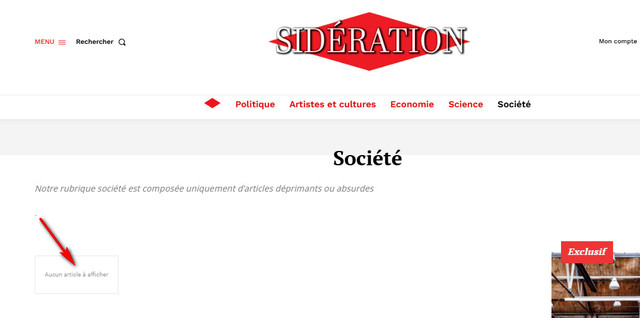
Troubleshooting Steps Taken
Verified the category URL is correct
Tried creating new posts and assigning them to the category
Cleared cache
Verified posts are properly published and categorized
Expected Behavior
Category page should display all posts assigned to that category
Actual Behavior
Category page appears empty, showing no posts
Question
Could you please help me identify why these posts are not appearing on their category page and how to resolve this issue?
Additional information or logs can be provided if needed.
Thank you for your assistance.
 trungthao
Please help to check this web: yamyfood.com.
When I add 2-3 products to the cart and move to another product page or blog page, the cart button shows the wrong number.
Example: I add 1 product, and move to another product to add more. After that, I move on blog page, Cart button will show 1 product instead of 2 products.
This situation is serious when using safari/chrome on iPhone.
Could you help me with this problem?
Thank you!
This problem is
 diegocoru
Hi
I have a last 5 article section on top on my homepage and then down i have a number of sections. The problem is that sometimes the articles appear twice or even three times at the home: for example in the las 5 articles, in the category section and in the most read articles.
Is there a way to filter so if they appear in the last 5 articles top section won’t be displayed anywhere else in the page?
You can have a look at my page: https://elmejorblogdeviajes.com/
 ipro-wpadmin
 I know this is a weird case. In this case we are detecting on our end when we want to trigger the login pop up. We want to trigger the login popup with our code using JS. Is there a JS function we can call to trigger the login pop up?
Second option could be to create a new modal pop up using TagDiv. Is there a easy way to trigger the modal pop up in this case with custom JS, using a built in TagDiv function?
example for certain users we want to trigger the pop up ourselves.
window.onload = TagDivPopupTrigger;
Thanks-
Stan
 brue
brueDear Sirs,
i have already had similar problem few months ago, but since i don’t control server side at all, i couldn’t proceed with further tries and mitigation of problem.
So, i have now installed completely new WP installation, with only Newspaper theme on it. When i try to install
tagDiv Composer and tagDiv Cloud Library it gives Ajax Error.
But, in Firefox mozzila it stops before downloading any of those two plugins. In Chrome and Edge it downloads it, but cannot Activate.
Now i have those two plugins in plugin section, but still cannot activate them (nor from Newspaper plugins page, nor from WP plugins page).
I ve tried to use Copilot in the Edge to see what kind of error Activate Composer generates, and it says:
plugins.php?error=tr…nonce=62de97f7a2:67 Uncaught SecurityError: Failed to execute ‘replaceState’ on ‘History’: A history state object with URL ‘http://***.**/wp-admin/plugins.php?plugin=td-composer/td-composer.php’ cannot be created in a document with origin ‘https://***.**’ and URL ‘https://***.**/wp-admin/plugins.php?error=true&plugin=td-composer/td-composer.php&_error_nonce=62de97f7a2’.
at plugins.php?error=tr…ce=62de97f7a2:67:19
Here is the explanation of the error message from DevTools console:
SecurityError: This error occurs when a script attempts to perform an action that violates the browser’s security policies.
replaceState: The replaceState method is used to modify the current history entry. In this case, it failed due to a security restriction.
Origin Mismatch: The error indicates a mismatch between the origin of the document (https://***.**) and the URL being set (http://***.**). The protocol difference (http vs https) causes this issue.
Solution: Ensure that both the document and the URL being set have the same protocol (https). This will resolve the origin mismatch and prevent the error.
I have tried to talk with provider, but they cannot find solution to it. Can you help, please?
Best regards,
Bojan
 fm360
fm360 Not exactly
For example, a row that has multiple blocks, images… and that row appears on multiple pages. If i edit something in that template, it will update on all the pages that are loading the template.
 peyanski
 Thank you for the answer. Then we have to ask can we have multiple cloud templates active and visible at site at same time for pages and for posts? As example we want to have different cloud template to be active for video posts and for articles with text and other type at same time to be active for audio posts. Is this possible? And same regarding the pages?
-
This reply was modified 1 year by
peyanski.
 mimikoss
How can I create a custom sticky header in Newspaper theme similar to the Echo Verse demo site from tagDiv Cloud?
I currently have a main header with:
Large logo
Main menu with mega menu functionality
I’d like to achieve the same effect as Echo Verse demo where:
Initial header shows full size logo and main mega menu
When scrolling, it transforms into a compact sticky header
The sticky header maintains mega menu functionality but with a slimmer design
Both states keep full navigation capabilities
Is this possible using the header template system? I noticed Echo Verse achieves this effect smoothly – what’s the best way to replicate it?
For reference, I’m looking at the Echo Verse demo header behavior where the large header smoothly transitions to a compact version while maintaining all menu functionality.
Any guidance or examples would be much appreciated.
 WTS
WTS Hi, this issue can be fixed by checking the value of the $currentWidgetInstanceSettings argument (which could be empty) in the on_widget_display_callback(); e.g. replacing the line 2929:
if( isset($widgetArgs['widget_id']) && strpos($widgetArgs['widget_id'], 'td_block') !== 0 ) {
with
if( $currentWidgetInstanceSettings && isset($widgetArgs['widget_id']) && strpos($widgetArgs['widget_id'], 'td_block') !== 0 ) {
 sparky263
I found that I could make one or the other sticky but not both.
I saw this post from:
‘Bettina, Jul 15, 2024 at 1:08 pm, Unfortunately, you can’t have 2 sticky rows there. A workaround there could be to use inner rows in that row and drag & drop the elements from the second row into an inner row. You can add multiple inner rows to the row.”
I tried to create an inner row but I couldn’t make it work. Can I make it work somehow or am I out of luck?
 duck1970
Hello, I would like help, after what happened in Spain due to the DANA, I need to put a black ribbon, for example in the MENU. Can you tell me how to insert a black ribbon? I imagine the ribbon would be an image?
I am attaching a screenshot with an example of what I want.
https://www.radiomarcabarcelona.com/goodnews-design/black_bow.png
Thanks
Anamaria Hello,
Please follow the steps from this guide https://www.hostinger.com/tutorials/how-to-fix-wordpress-missed-schedule?utm_campaign=Generic-Tutorials-DSA|NT:Se|LO:Other-EU&utm_medium=ppc&gad_source=1&gclid=CjwKCAjw-JG5BhBZEiwAt7JR655EXGkgxvM6CexvR9P35fzz4woyRa8mey4Kfs8v90YQudAOIeVWThoCnFYQAvD_BwE
Thank you!
 anastasios
Hello, I would like to ask if there is a way to choose the category that appears in the front page for each article.
For example if you look at the uploaded image – if we have multiple categories on one article (see 2 of img), can we choose which one will appear when displayed at the front page (see 1 of img)? Thank you!
Kind regards,
 alexieb
Hello,
I’m using in my header template the mega menu.
For example in my menu you have “Health”, “wellness”, and “family”
And when going on “Health” the mega menu display:
– subcategories of “Health”
– 4 articles for each subcategory
BUT
We have 2 levels of subcategories
Health
– Cancer
— Breast Cancer
And at the moment both Cancer and Breast Cancer are displayed.
How can I do to only have Cancer or only Breast Cancer subcategory level displayed?
Thanks!
A



