- NewspapertagDiv AMP Plugin Tutorial
- NewspaperTrack Subscription Sources with Locker URL in Opt-In Builder
- NewspaperWP Rocket and Newspaper Theme: Optimization Guide
- NewspaperCredit System
- NewspaperIntroduction to CPT and ACF with Newspaper Theme
- NewspaperHow to edit modules for Flex Block X
- NewspaperHow to use the Posts List shortcode
- NewspaperUser review system
- NewspaperCustom Fields Support
- NewspaperHow to generate Facebook App ID
- NewspaperHow to insert a block inside the content of a post
- NewspaperModal Popup
- NewspaperPayPal Setup
- NewspaperLink Tracker
- NewspaperLockers
- NewspaperGeneral Options that May Interfere with the Newspaper Theme
- NewspaperAdd Cryptocurrency Price Ticker Widget
- NewspaperPosts Loop Element
- NewspaperThe Newspaper Mobile Theme: Introduction
- NewspaperAutoptimize Plugin – install and configuration
 jlgraber
 Hi Catalin,
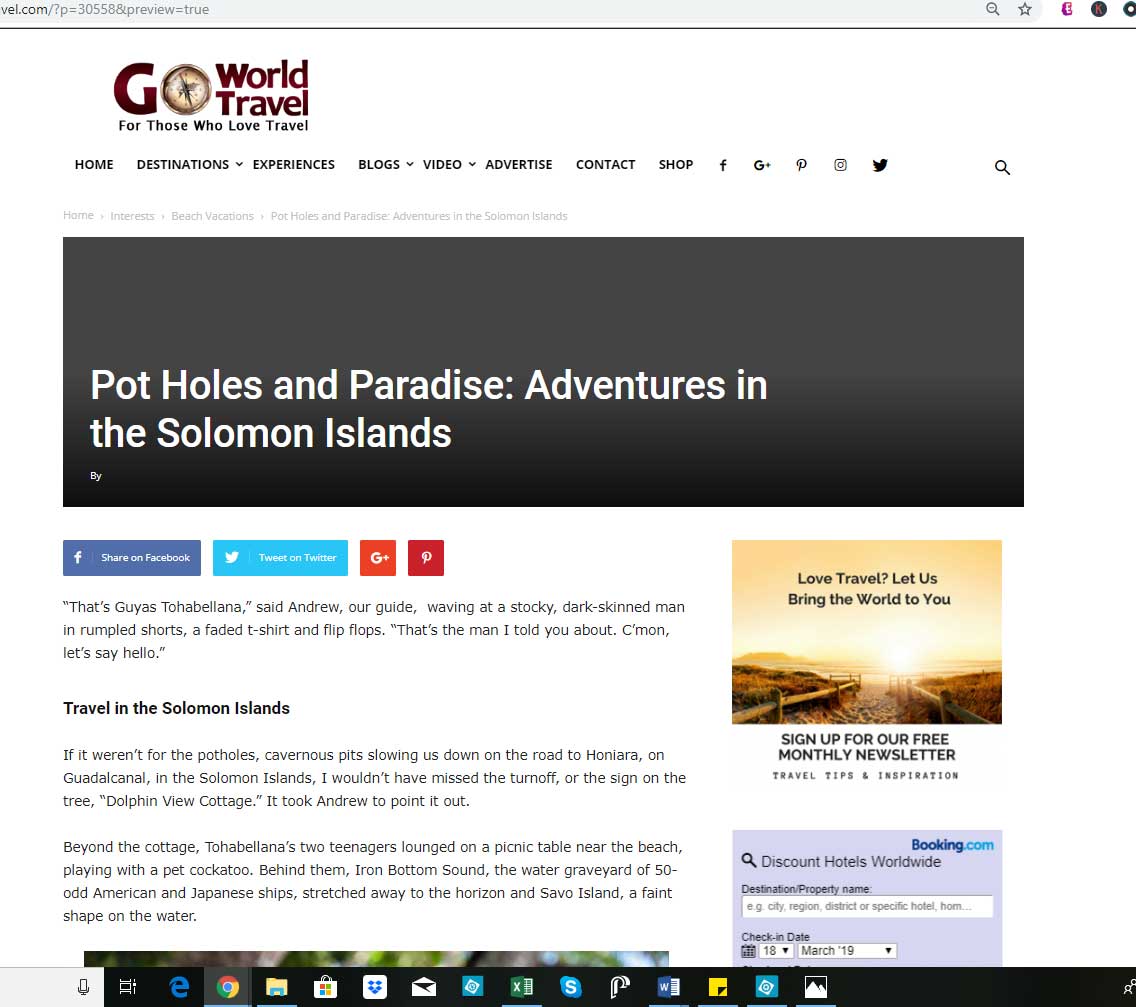
Thanks for your email. We definitely have the featured image set. Here’s an example of what we’re talking about. In this recent post, we have the post template set to Style 7 and it looks great! https://www.goworldtravel.com/travel-solomon-islands/ (Style 6 also looks fine)
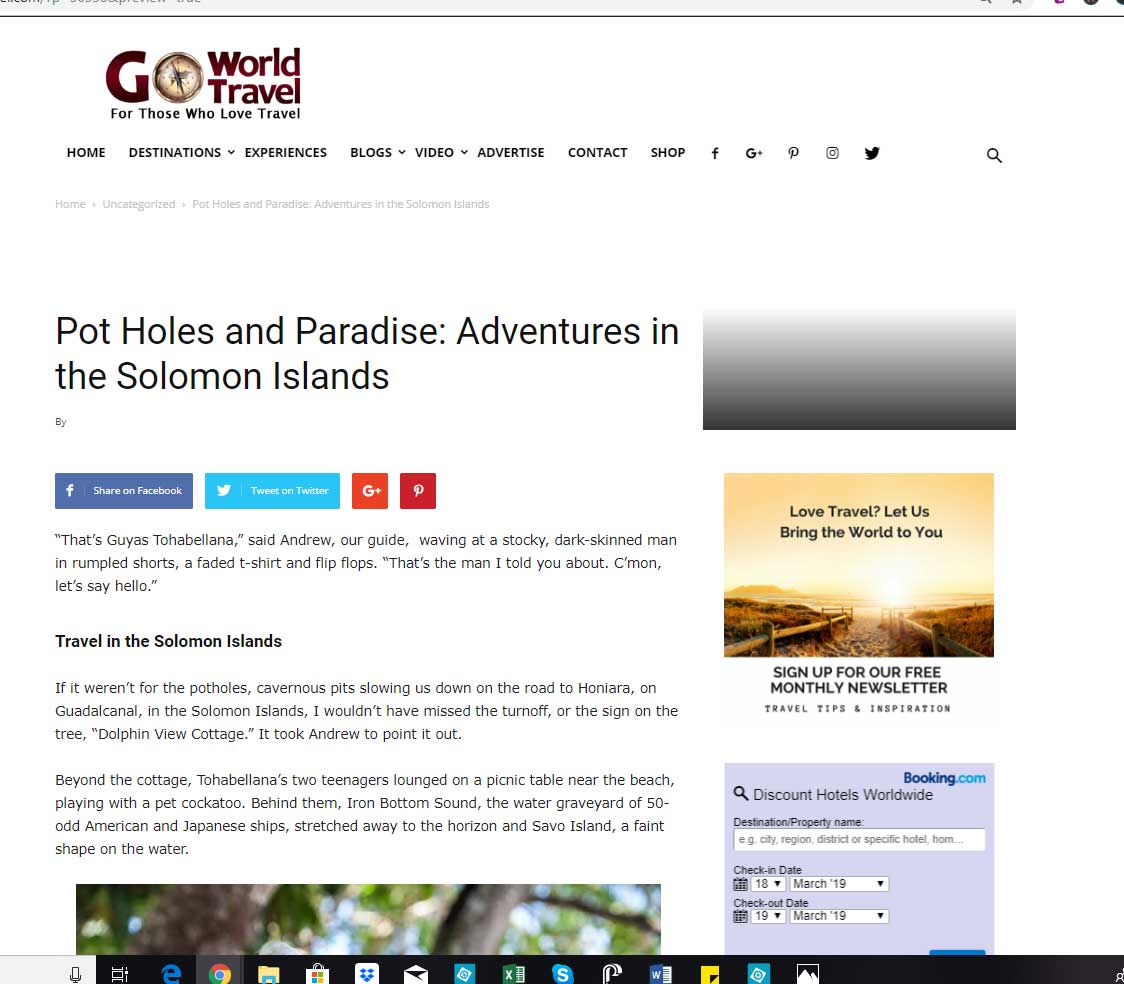
But if we set the post template to style 3 or style 4 for same post, this is what happens:
https://www.goworldtravel.com/wp-content/uploads/2019/03/newspaper-theme-error-style-3.jpg
https://www.goworldtravel.com/wp-content/uploads/2019/03/newspaper-theme-error-style-4.jpg
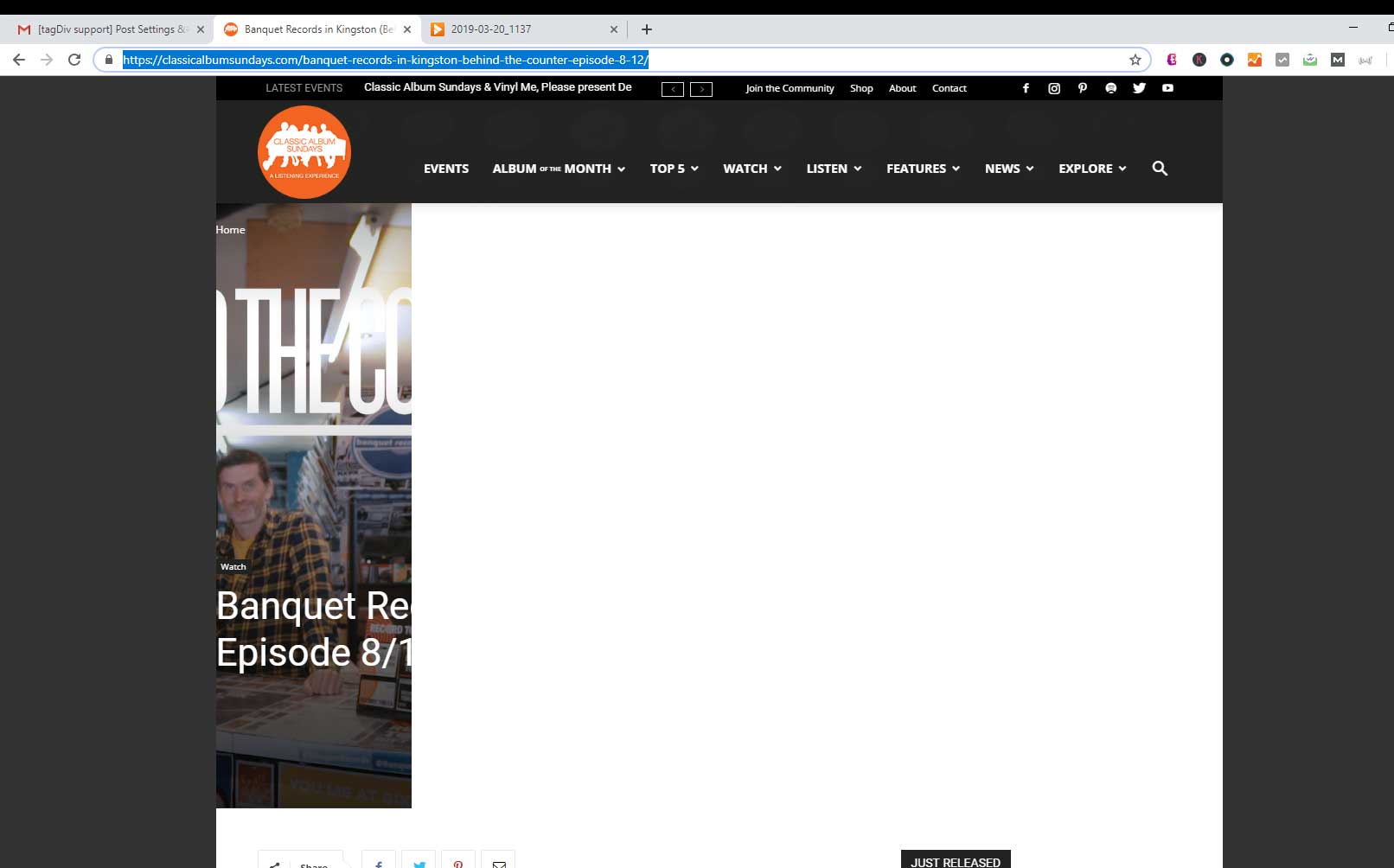
Also, FYI, this is what I see on the link you sent from classicalalbumsunday.com
https://www.goworldtravel.com/wp-content/uploads/2019/03/screenshot-classical-album-sundays.jpg Checked it from several different PCs on chrome
Any ideas on what may be causing Post template 3 and 4 to have these problems?
Thank you!
 sbabones
 Thanks. With your help, I was able to find the author-template.php file and make the edits. Now my code looks exactly like your example. But the second author still doesn’t appear on the finished post. I can add a second author when I compose the post, and the post shows up on both authors’ author pages, but the second author’s name doesn’t appear on the post itself. Help? Salvatore
 aditya58singh
 Just deactivate the plugin and install them again first install the mobile theme and then AMP.
Deactivate all other plugin and then check… might be some other plugin is conflicting @kiran
 Kiran
Kiran I did everything as you said and even deactivated the cache plugin, but the amp pages still won’t load the style sheet.
-
This reply was modified 7 years by
Kiran.
 monoazulweb
Hello,
Would you like to know how you could automatically redirect mobile users to another URL, for example to a Play Store App?
I would like all the traffic that comes by Android go directly to my app, instead of loading the page from the browser of the cell phone since we need for all the phones to load if or if the site in HORIZONTAL and this is only achieved by middle of a webView in the android app. Or maybe there is something in thema that allows me to do it?
 Jumich
 Just to avoid duplicate topic… I’m pretty sure that GA code doesn’t work properly when “AMP + mobile” was chosen. I pasted my code directly to AMP plugin (not in Mobile Theme panel). It works great on “AMP” but not on “AMP + mobile. My site: https://radioklinika.pl (now set on “AMP+mobile”)
My code is:
{
“vars”: {
“account”: “UA-2415269-29”
},
“triggers”: {
“trackPageview”: {
“on”: “visible”,
“request”: “pageview”
},
“scrollPings”: {
“on”: “scroll”,
“request”: “event”,
“scrollSpec”: {
“verticalBoundaries”: [
50
]
},
“vars”: {
“eventCategory”: “AMP Scroll Depth”,
“eventAction”: “Scrolled”,
“eventLabel”: “${verticalScrollBoundary}%”
}
},
“pageTimer”: {
“on”: “timer”,
“timerSpec”: {
“interval”: 90,
“maxTimerLength”: 90,
“immediate”: false
},
“request”: “event”,
“vars”: {
“eventCategory”: “AMP Engagement”,
“eventAction”: “more than 90s”
}
}
}
}
-
This reply was modified 7 years by
Jumich.
Jumich ok, i got it. Tell me please if there is any way to exclude from “Mobile + AMP” particular pages. As far as I see, even if I uncheck “Pages” from AMP option, there is a blank page shown on this URL. Looks like I must use “mobile editor” and duplicate my content. I thought that exluding particular pages gives me freedom, which means: all my posts is super fast serving from google serwer, but my pages can still using short codes, beacose its based on non AMP. I’m not sure if I made my self clear..
 jensgrabble
 Hi Simon
I get more than 30 issues (before 2) with the new theme update:
The mandatory attribute ‘⚡’ is missing in tag ‘html’. MANDATORY_AMP_TAG_MISSING_OR_INCORRECT
line 1, column 151
The attribute ‘onload’ may not appear in tag ‘link rel=preload’. DISALLOWED_HTML
line 1, column 407
The attribute ‘href’ in tag ‘link rel=stylesheet for fonts’ is set to the invalid value ‘https://www.ikwilgoedkoopreizen.be/wp-includes/css/dist/block-library/style.min.css’. AUTHOR_STYLESHEET_PROBLEM
line 1, column 3267
The attribute ‘href’ in tag ‘link rel=stylesheet for fonts’ is set to the invalid value ‘https://www.ikwilgoedkoopreizen.be/wp-content/plugins/contact-form-7/includes/css/contact-form-7.min.css’. AUTHOR_STYLESHEET_PROBLEM
line 1, column 3437
The attribute ‘href’ in tag ‘link rel=stylesheet for fonts’ is set to the invalid value ‘https://www.ikwilgoedkoopreizen.be/wp-content/plugins/official-mailerlite-sign-up-forms/assets/css/mailerlite_forms.css.min.css’. AUTHOR_STYLESHEET_PROBLEM
line 1, column 3626
The attribute ‘href’ in tag ‘link rel=stylesheet for fonts’ is set to the invalid value ‘https://www.ikwilgoedkoopreizen.be/wp-content/plugins/revslider/public/assets/css/rs-plugin-settings.min.css’. AUTHOR_STYLESHEET_PROBLEM
line 1, column 3844
The mandatory attribute ‘amp-custom’ is missing in tag ‘style amp-custom’. DISALLOWED_HTML
line 1, column 4041
The attribute ‘href’ in tag ‘link rel=stylesheet for fonts’ is set to the invalid value ‘https://www.ikwilgoedkoopreizen.be/wp-content/plugins/wp-coupons-and-deals-premium/assets/css/wpcd-style.min.css’. AUTHOR_STYLESHEET_PROBLEM
line 1, column 4121
The mandatory attribute ‘amp-custom’ is missing in tag ‘style amp-custom’. DISALLOWED_HTML
line 1, column 4314
The attribute ‘href’ in tag ‘link rel=stylesheet for fonts’ is set to the invalid value ‘https://www.ikwilgoedkoopreizen.be/wp-content/plugins/js_composer/assets/css/js_composer.min.css’. AUTHOR_STYLESHEET_PROBLEM
line 1, column 4497
The attribute ‘href’ in tag ‘link rel=stylesheet for fonts’ is set to the invalid value ‘https://www.ikwilgoedkoopreizen.be/wp-content/plugins/wp-gdpr-compliance/assets/css/wpgdprc.css.min.css’. AUTHOR_STYLESHEET_PROBLEM
line 1, column 4681
The mandatory attribute ‘amp-custom’ is missing in tag ‘style amp-custom’. DISALLOWED_HTML
line 1, column 4866
The attribute ‘href’ in tag ‘link rel=stylesheet for fonts’ is set to the invalid value ‘https://www.ikwilgoedkoopreizen.be/wp-content/themes/Newspaper1/td-theme.min.css’. AUTHOR_STYLESHEET_PROBLEM
line 2, column 94
The attribute ‘href’ in tag ‘link rel=stylesheet for fonts’ is set to the invalid value ‘https://www.ikwilgoedkoopreizen.be/wp-content/themes/Newspaper1/includes/demos/lifestyle/td-theme-demo-style.min.css’. AUTHOR_STYLESHEET_PROBLEM
line 2, column 253
Custom JavaScript is not allowed. CUSTOM_JAVASCRIPT_DISALLOWED
line 2, column 460
Custom JavaScript is not allowed. CUSTOM_JAVASCRIPT_DISALLOWED
line 2, column 574
Custom JavaScript is not allowed. CUSTOM_JAVASCRIPT_DISALLOWED
line 2, column 1483
Custom JavaScript is not allowed. CUSTOM_JAVASCRIPT_DISALLOWED
line 21, column 674
The mandatory attribute ‘amp-custom’ is missing in tag ‘style amp-custom’. DISALLOWED_HTML
line 143, column 47
Custom JavaScript is not allowed. CUSTOM_JAVASCRIPT_DISALLOWED
line 814, column 11
Custom JavaScript is not allowed. CUSTOM_JAVASCRIPT_DISALLOWED
line 814, column 99
Custom JavaScript is not allowed. CUSTOM_JAVASCRIPT_DISALLOWED
line 818, column 43
The mandatory attribute ‘amp-custom’ is missing in tag ‘style amp-custom’. DISALLOWED_HTML
line 822, column 17
The parent tag of tag ‘style amp-custom’ is ‘noscript’, but it can only be ‘head’. DISALLOWED_HTML
line 822, column 152
The mandatory attribute ‘target’ is missing in tag ‘FORM [method=GET]’. DISALLOWED_HTML
line 822, column 4116
The tag ‘FORM [method=GET]’ requires including the ‘amp-form’ extension JavaScript. MANDATORY_AMP_TAG_MISSING_OR_INCORRECT
line 822, column 4116
The parent tag of tag ‘style amp-custom’ is ‘body’, but it can only be ‘head’. DISALLOWED_HTML
line 822, column 4495
The tag ‘img’ may only appear as a descendant of tag ‘noscript’. Did you mean ‘amp-img’? DISALLOWED_HTML_WITH_AMP_EQUIVALENT
line 831, column 287
The tag ‘img’ may only appear as a descendant of tag ‘noscript’. Did you mean ‘amp-img’? DISALLOWED_HTML_WITH_AMP_EQUIVALENT
line 831, column 1115
The tag ‘img’ may only appear as a descendant of tag ‘noscript’. Did you mean ‘amp-img’? DISALLOWED_HTML_WITH_AMP_EQUIVALENT
line 831, column 1339
The mandatory attribute ‘target’ is missing in tag ‘FORM [method=GET]’. DISALLOWED_HTML
line 831, column 3051
The tag ‘FORM [method=GET]’ requires including the ‘amp-form’ extension JavaScript. MANDATORY_AMP_TAG_MISSING_OR_INCORRECT
line 831, column 3051
The tag ‘img’ may only appear as a descendant of tag ‘noscript’. Did you mean ‘amp-img’? DISALLOWED_HTML_WITH_AMP_EQUIVALENT
line 831, column 4951
The tag ‘img’ may only appear as a descendant of tag ‘noscript’. Did you mean ‘amp-img’? DISALLOWED_HTML_WITH_AMP_EQUIVALENT
line 831, column 6841
The tag ‘img’ may only appear as a descendant of tag ‘noscript’. Did you mean ‘amp-img’? DISALLOWED_HTML_WITH_AMP_EQUIVALENT
line 831, column 8740
The tag ‘img’ may only appear as a descendant of tag ‘noscript’. Did you mean ‘amp-img’? DISALLOWED_HTML_WITH_AMP_EQUIVALENT
line 831, column 10665
The tag ‘img’ may only appear as a descendant of tag ‘noscript’. Did you mean ‘amp-img’? DISALLOWED_HTML_WITH_AMP_EQUIVALENT
line 831, column 12593
Custom JavaScript is not allowed. CUSTOM_JAVASCRIPT_DISALLOWED
line 831, column 13863
Custom JavaScript is not allowed. CUSTOM_JAVASCRIPT_DISALLOWED
line 838, column 109
Custom JavaScript is not allowed. CUSTOM_JAVASCRIPT_DISALLOWED
line 845, column 15
Custom JavaScript is not allowed. CUSTOM_JAVASCRIPT_DISALLOWED
line 944, column 46
The attribute ‘style’ in tag ‘span’ is set to the invalid value ‘color:#0096ed !important’. DISALLOWED_HTML
line 953, column 849
The attribute ‘style’ in tag ‘span’ is set to the invalid value ‘color:#0096ed !important’. DISALLOWED_HTML
line 953, column 1496
The attribute ‘style’ in tag ‘span’ is set to the invalid value ‘color:#0096ed !important’. DISALLOWED_HTML
line 953, column 2151
The tag ‘img’ may only appear as a descendant of tag ‘noscript’. Did you mean ‘amp-img’? DISALLOWED_HTML_WITH_AMP_EQUIVALENT
line 953, column 2867
Custom JavaScript is not allowed. CUSTOM_JAVASCRIPT_DISALLOWED
line 953, column 3687
The tag ‘img’ may only appear as a descendant of tag ‘noscript’. Did you mean ‘amp-img’? DISALLOWED_HTML_WITH_AMP_EQUIVALENT
line 963, column 717
The tag ‘img’ may only appear as a descendant of tag ‘noscript’. Did you mean ‘amp-img’? DISALLOWED_HTML_WITH_AMP_EQUIVALENT
line 963, column 1832
The tag ‘img’ may only appear as a descendant of tag ‘noscript’. Did you mean ‘amp-img’? DISALLOWED_HTML_WITH_AMP_EQUIVALENT
line 963, column 2971
The tag ‘img’ may only appear as a descendant of tag ‘noscript’. Did you mean ‘amp-img’? DISALLOWED_HTML_WITH_AMP_EQUIVALENT
line 963, column 4144
The tag ‘img’ may only appear as a descendant of tag ‘noscript’. Did you mean ‘amp-img’? DISALLOWED_HTML_WITH_AMP_EQUIVALENT
line 963, column 5291
The tag ‘img’ may only appear as a descendant of tag ‘noscript’. Did you mean ‘amp-img’? DISALLOWED_HTML_WITH_AMP_EQUIVALENT
line 963, column 6385
Custom JavaScript is not allowed. CUSTOM_JAVASCRIPT_DISALLOWED
line 963, column 7626
The tag ‘img’ may only appear as a descendant of tag ‘noscript’. Did you mean ‘amp-img’? DISALLOWED_HTML_WITH_AMP_EQUIVALENT
line 973, column 534
The tag ‘img’ may only appear as a descendant of tag ‘noscript’. Did you mean ‘amp-img’? DISALLOWED_HTML_WITH_AMP_EQUIVALENT
line 973, column 2050
The tag ‘img’ may only appear as a descendant of tag ‘noscript’. Did you mean ‘amp-img’? DISALLOWED_HTML_WITH_AMP_EQUIVALENT
line 975, column 342
The tag ‘img’ may only appear as a descendant of tag ‘noscript’. Did you mean ‘amp-img’? DISALLOWED_HTML_WITH_AMP_EQUIVALENT
line 975, column 1892
The tag ‘img’ may only appear as a descendant of tag ‘noscript’. Did you mean ‘amp-img’? DISALLOWED_HTML_WITH_AMP_EQUIVALENT
line 975, column 3450
Custom JavaScript is not allowed. CUSTOM_JAVASCRIPT_DISALLOWED
line 975, column 5082
Custom JavaScript is not allowed. CUSTOM_JAVASCRIPT_DISALLOWED
line 975, column 6372
The tag ‘img’ may only appear as a descendant of tag ‘noscript’. Did you mean ‘amp-img’? DISALLOWED_HTML_WITH_AMP_EQUIVALENT
line 985, column 585
The tag ‘img’ may only appear as a descendant of tag ‘noscript’. Did you mean ‘amp-img’? DISALLOWED_HTML_WITH_AMP_EQUIVALENT
line 985, column 1580
The tag ‘img’ may only appear as a descendant of tag ‘noscript’. Did you mean ‘amp-img’? DISALLOWED_HTML_WITH_AMP_EQUIVALENT
line 985, column 2686
The tag ‘img’ may only appear as a descendant of tag ‘noscript’. Did you mean ‘amp-img’? DISALLOWED_HTML_WITH_AMP_EQUIVALENT
line 985, column 3786
The tag ‘img’ may only appear as a descendant of tag ‘noscript’. Did you mean ‘amp-img’? DISALLOWED_HTML_WITH_AMP_EQUIVALENT
line 985, column 4944
The tag ‘img’ may only appear as a descendant of tag ‘noscript’. Did you mean ‘amp-img’? DISALLOWED_HTML_WITH_AMP_EQUIVALENT
line 985, column 5983
Custom JavaScript is not allowed. CUSTOM_JAVASCRIPT_DISALLOWED
line 985, column 6930
The parent tag of tag ‘style amp-custom’ is ‘body’, but it can only be ‘head’. DISALLOWED_HTML
line 985, column 8080
Custom JavaScript is not allowed. CUSTOM_JAVASCRIPT_DISALLOWED
line 997, column 10
The parent tag of tag ‘link rel=stylesheet for fonts’ is ‘body’, but it can only be ‘head’. DISALLOWED_HTML
line 1004, column 15
Custom JavaScript is not allowed. CUSTOM_JAVASCRIPT_DISALLOWED
line 1004, column 219
Custom JavaScript is not allowed. CUSTOM_JAVASCRIPT_DISALLOWED
line 1004, column 398
Custom JavaScript is not allowed. CUSTOM_JAVASCRIPT_DISALLOWED
line 1005, column 363
Custom JavaScript is not allowed. CUSTOM_JAVASCRIPT_DISALLOWED
line 1005, column 609
Custom JavaScript is not allowed. CUSTOM_JAVASCRIPT_DISALLOWED
line 1044, column 17
Custom JavaScript is not allowed. CUSTOM_JAVASCRIPT_DISALLOWED
line 1044, column 184
The mandatory tag ‘head > style[amp-boilerplate]’ is missing or incorrect. MANDATORY_AMP_TAG_MISSING_OR_INCORRECT
line 1044, column 1297
The mandatory tag ‘noscript > style[amp-boilerplate]’ is missing or incorrect. MANDATORY_AMP_TAG_MISSING_OR_INCORRECT
line 1044, column 1297
The mandatory tag ‘amphtml engine v0.js script’ is missing or incorrect. MANDATORY_AMP_TAG_MISSING_OR_INCORRECT
line 1044, column 1297
Can you help me?
Thanks
 Adeba
Adeba Maybe one reason???
https://ampbyexample.com/advanced/using_the_google_amp_cache/
If I enter my URL : https://magazin.adeba.de/?amp
it will change to that URL:
https://magazin-adeba-de.cdn.ampproject.org/c/s/magazin.adeba.de/?amp
which looks exactly like google stored in the cache
 Pradeep Augustine
 Hello Simion. Thank you for your reply. I do find the fatal error. I have rolled back to the older version of the theme and the error is gone now. I’m using the AMP plugin with some advanced features (https://wordpress.org/plugins/accelerated-mobile-pages/) This is the second most used AMP plugin on WordPress. This uses the official plugin with some advanced options. I tried the AMP plugin as suggested in your blog. It shows error with the plugins I’m using. It is not showing my Custom Comments. So, I’m not using the Official Amp plugin. Check the site now for amp pages. Everything works great with the Advanced AMP plugin with the older version of Theme. Please leave the Mobile Plugin independent as it was before. Even if you are merging it with the AMP plugin gives the option to use only the mobile theme. I don’t need the official AMP plugin for my site as it lacks features like menu, etc.
-
This reply was modified 7 years by
Pradeep Augustine.
-
This reply was modified 7 years by
-
This reply was modified 7 years by
Adeba so I found out:
https://magazin-adeba-de.cdn.ampproject.org/c/s/magazin.adeba.de
this looks normal
https://www.google.com/amp/s/magazin.adeba.de/%3famp
This looks bad on a mobile phone
If you google for adeba
Google shows you this as the AMP Version:
https://www.google.com/amp/s/magazin.adeba.de/%3famp
 axehorde
 ok.
I’m trying to set up the event plugin here https://labussolanews.com/eventi/ but inside the single event page there is a problem.
The content does not remain inside the box but is like floating on the page (you can see when scrolling down). https://labussolanews.com/events/european-taekwondo-championship/.
The support tells me it’s not a plugin’s fault but is the theme.
” You need to us this CSS code “http://w3schools.com/css/default.asp” with Inspect Element. These issues are not from MEC and you need to contact your web designer in order to fix the issue with your theme. Your theme’s container width is not properly set”
 bobbymc
 “But I see you do not use AMP currently”.
Not sure what you mean. I have the plugin activated.
 Simion C.
 Hi,
That looks like an AMP error message
– https://www.ampproject.org/docs/troubleshooting/validation_errors#custom-javascript-is-not-allowed
But I see you do not use AMP currently. So I believe there would be no actual issue in this case with those errors, as far as I know.
Thanks
Simion C. The website will be faster on mobile if you use the mobile theme + AMP option. The mobile theme will apply to the whole website for mobile visitors and also AMP pages.
The only AMP option will apply the mobile theme only on AMP (visitors that access the website from the Google search results page on mobile ). Other mobile visitors will be served the default responsive version of the website.
 Calin
Calin Hi,
Please make sure that you have mobile theme and amp activate -> https://www.screencast.com/t/0HdK6yDmo
-> https://www.screencast.com/t/WGJ8XPIQcqzD
Now you have more possibility’s, you can use only mobile, mobile + amp like in v9.6 and amp very you have possibility to set on which posts to set the amp.
How to Make an AMP Ready Website with Newspaper Theme -> https://tagdiv.com/amp-newspaper-theme/
Thank you!
Simion C. What exactly did you edit in the WPBakery plugin? If possible please let me know.
Seems the menu is working in the AMP version http://prntscr.com/n0ipno
But not working in the simple mobile version. We have seen this issue before, but in the AMP version and mobile theme. Also it happened only in pages. Do you use any optimization plugins or methods? Try if possible to test without them.
 yvrmark
Hello, I am getting this error when updating to the latest version. I have updated both the theme and included mobile plugin. Any ideas? Thanks.
Fatal error: Uncaught Error: Class ‘AMP_Theme_Support’ not found in /home/xxx/public_html/xxx.com/wp-content/plugins/td-mobile-plugin/td_mobile_theme.php:91 Stack trace: #0 /home/xx/public_html/xxx.com/wp-content/plugins/td-mobile-plugin/td-mobile-plugin.php(233): td_mobile_theme::is_amp_request() #1 /home/xxx/public_html/xxx.com/wp-includes/class-wp-hook.php(286): td_mobile_get_the_content_for_vc(”) #2 /home/xxx/public_html/xx.com/wp-includes/plugin.php(208): WP_Hook->apply_filters(”, Array) #3 /home/xxx/public_html/xxx.com/wp-includes/formatting.php(3694): apply_filters(‘the_content’, ”) #4 /home/xxx/public_html/xxx.com/wp-includes/class-wp-hook.php(288): wp_trim_excerpt(”) #5 /home/xxx/public_html/xxx.com/wp-includes/plugin.php(208): WP_Hook->apply_filters(”, Array) #6 /home/xxx/public_html/xxx.com/wp-content/plugins/jetpack/_inc/lib/class.media-summary.php(335): apply_filters(‘get_the_excerpt’ in /home/xxx/public_html/xxx.com/wp-content/plugins/td-mobile-plugin/td_mobile_theme.php on line 91
 csc0203
Hi,
I have placed some Adsense ad units and set them at a different size for mobile phone (320 x 100 in the header for example). However, the theme is still automatically resizing them. Is there any way to fix this?
The size is set accordingly in the ad section of the theme panel too. So this is not the issue.
Simion C. Hi,
Please check their documentation, I found this guide for example
– https://www.litespeedtech.com/support/wiki/doku.php/litespeed_wiki:config:gzip-compression
Thanks
 hakankenandemir
 We did that too, yet there is still no ads.
Here in page source, you can see that codes are implemented: 
Still no idea why they don’t show. We’ve waited whole day.
bobbymcAccording to Google I have over 3,600 pages with the following error: “Custom JavaScript is not allowed”
This is new – I am still using 9.5 because of problems stated in another thread.
Google also said “First detected: 3/8/19” – what happened?
Please advise.
Jumich What about page speed? Befor an update was much faster. One more thing. what is the difference between:
1) Mobile+Amp – Displays content using the Mobile Theme on both mobiles and AMP
2) AMP – Uses the responsive version of the theme on small screen devices and Mobile Theme only on AMP.
I’ve got to admit I’m a little bit confused.
bobbymc Had to change the URL and reinstall old theme again.
That link will not work at all now.
Please refer to the original question in the thread as to why the Amp pages lost all previous formatting.
BTW Mobile theme is not activated.
 vitamin_ka
 You need to properly configure robots.txt and disable indexing these directories, you will get rid of the error and unnecessary traffic from the robots
exemple:
User-agent: *
Disallow: /cgi-bin
Disallow: /?
Disallow: /wp-
Disallow: *?filter_by
Disallow: *?s=
Disallow: *&s=
Disallow: /search
Disallow: /author/
Disallow: *?attachment_id=
Disallow: */trackback
Disallow: */feed
Disallow: */embed
Disallow: */page/
Allow: */uploads
Allow: /*/*.js
Allow: /*/*.css
Allow: /wp-*.png
Allow: /wp-*.jpg
Allow: /wp-*.jpeg
Allow: /wp-*.gif
Allow: /wp-*.ttf
Allow: /wp-*.woff
Allow: /wp-*.svg
Also, if you downloaded the theme via ftp and not through the wordpress installer, you need to specify permissions for 755 folders and 644 theme files so that you don’t feel any inconvenience in using the theme in the future.
-
This reply was modified 7 years by
vitamin_ka.
-
This reply was modified 7 years by